



You can have a migration plan with neat timelines, tidy item counts, and a smug green status row. That still doesn't mean you have a risk assessment framework. Most of the bad plans I've seen fail for the same reason, they treat migration like a delivery exercise instead of a controlled collision with throttling, broken inheritance, stale permissions, GUID conflicts, and governance drift.
If your team is reviewing a proposal right now and it feels too clean, trust that instinct. The missing detail usually isn't cosmetic. It's the difference between a controlled cutover and a mess that lands in your compliance mailbox, your service desk, and your post-incident review all at once.
Your Migration Plan Is a Gamble Not a Strategy
I've sat through enough migration reviews to spot the pattern in the first five minutes. The deck looks professional, the dates are bold, and someone has proudly counted files as if file count were a control. Then you ask the obvious questions, what happens when the source library is huge, what happens when permissions are inherited badly, what happens when Microsoft starts throttling, and the room goes quiet.
That silence is the problem. A project plan tells you what someone hopes will happen. A real risk assessment framework tells you what will break first, what breaks next, and what evidence you need before you let the cutover happen.
A decent framework starts with actual exposure, not optimism. The Ollo Microsoft 365 migration guide is useful because it reflects the ugly reality most plans skip, the work isn't moving data, it's controlling failure modes. If your plan doesn't force people to name those failure modes in advance, you don't have a plan, you have a bet.
Practical rule: If the plan can't tell you where the migration will hit technical limits, it isn't ready for regulated data.
That's where skeptical IT Directors are right to push back. Your team doesn't need another glossy status update. Your team needs a framework that turns fear into evidence, and evidence into decisions.
The Textbook Framework and Where It First Breaks
The basic cycle is easy enough to say out loud. Identify the risks, analyse them, evaluate them, treat them, and monitor them. That's the baseline, and it's the minimum you should accept from any serious team.
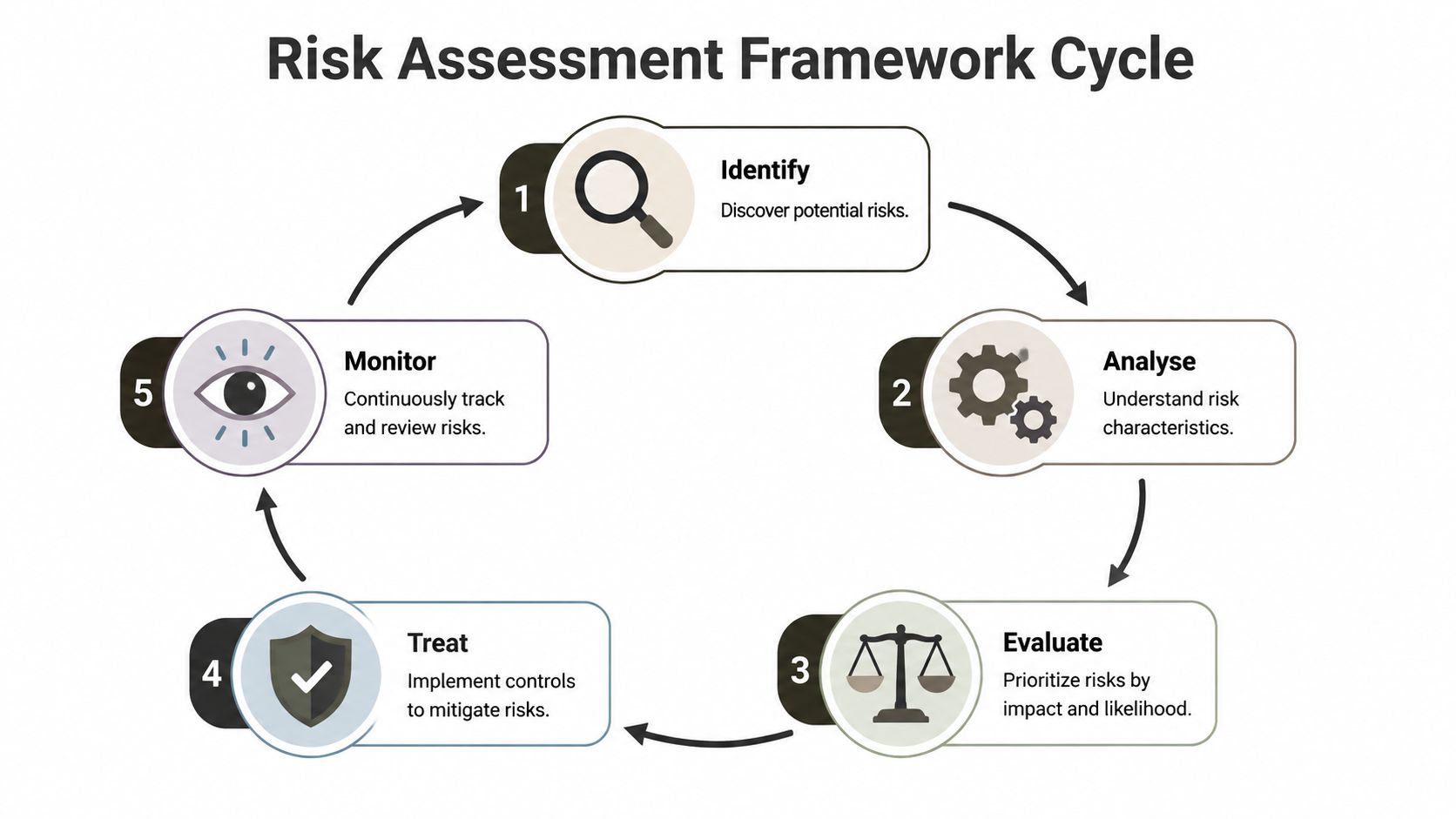
The problem lies in stopping at the vocabulary rather than building the necessary machinery. NIST's Risk Management Framework is explicit that this is a continuous control cycle, not a one-time checklist, and it links system categorisation to control selection. If your asset inventory is weak, your controls are scoped wrong before the migration starts, and the residual-risk profile is already poisoned NIST Risk Management Framework.
Start with the shared language
Use the five stages because they force discipline. Identification names the hazards. Analysis assigns characteristics. Evaluation decides what matters first. Treatment chooses the control response. Monitoring checks whether your assumptions still hold.
That sequence is fine on paper. In a regulated Microsoft 365 move, it breaks the first time someone discovers that the “simple” source estate includes sprawl, hidden dependencies, and years of neglected access control. Then the framework either catches up, or it becomes another document no one trusts.
For a broader view of how organisations think about risk, IT Cloud Global's guide on IT risks is a useful background reference. Read it as context, not comfort, because the ultimate test is whether your framework survives contact with migration reality.
The cycle only works if the evidence keeps changing with the environment.
That's the part teams often ignore. They write one assessment, file it away, and then act surprised when the project mutates under them.
Risk Identification Beyond Terabytes and File Counts
A migration risk register that says “large data volume” tells me almost nothing. It's the kind of note a team writes when they want to look serious without doing the hard work. Real identification means naming the technical breaking points before they bite you in production.

Microsoft documents the limits you're supposed to respect. SharePoint Online's list view threshold is 5,000 items, and Microsoft says operations that exceed it are blocked to preserve performance Microsoft SharePoint list view threshold. Microsoft also says migration throttling cannot be disabled or suspended, and opening a support ticket doesn't remove the throttle Microsoft migration speed guidance. Power Automate's Get items action can also hit the same threshold and may return no records if you don't paginate correctly Microsoft Power Automate guidance.
The traps you need to name up front
If your team misses these, you don't have a risk register, you have a retrospective.
- Throttling: Your migration jobs slow down or stall because Microsoft enforces it, not because your team is unlucky.
- 5,000-item threshold: Big lists and libraries stop behaving like ordinary data containers, so scripted workflows and views can fail.
- Pagination gaps: Automations that don't page correctly give you false confidence, then fail without clear indication.
- Permissions sprawl: Broken inheritance and nested security groups turn remediation into a labour sink.
- Path and metadata edge cases: Long paths, conflicting IDs, and messy metadata don't show up as clean rows in a spreadsheet, but they still stop work.
The Ollo data classification guide matters here because you can't classify what you haven't identified properly. If you don't know which data is sensitive, which data is operationally critical, and which data has legacy access baggage, then your assessment is already too shallow.
EU disaster-risk guidance makes the same structural point in a different context. A good assessment has to evaluate hazard, vulnerability, and exposure. That maps cleanly to Microsoft 365 work, where the hazard might be throttling, the vulnerability might be permission drift, and the exposure is the data estate that will fail if you guess wrong EU disaster-risk guidance.
Why Your Migration Tool Is Blind to Critical Risk
The migration starts, files move, and the team calls it progress. Then throttling kicks in, permissions break, and nobody can explain why the cutover got ugly. That failure pattern is predictable, because migration tools move content. They do not judge whether the underlying risk posture is under control.
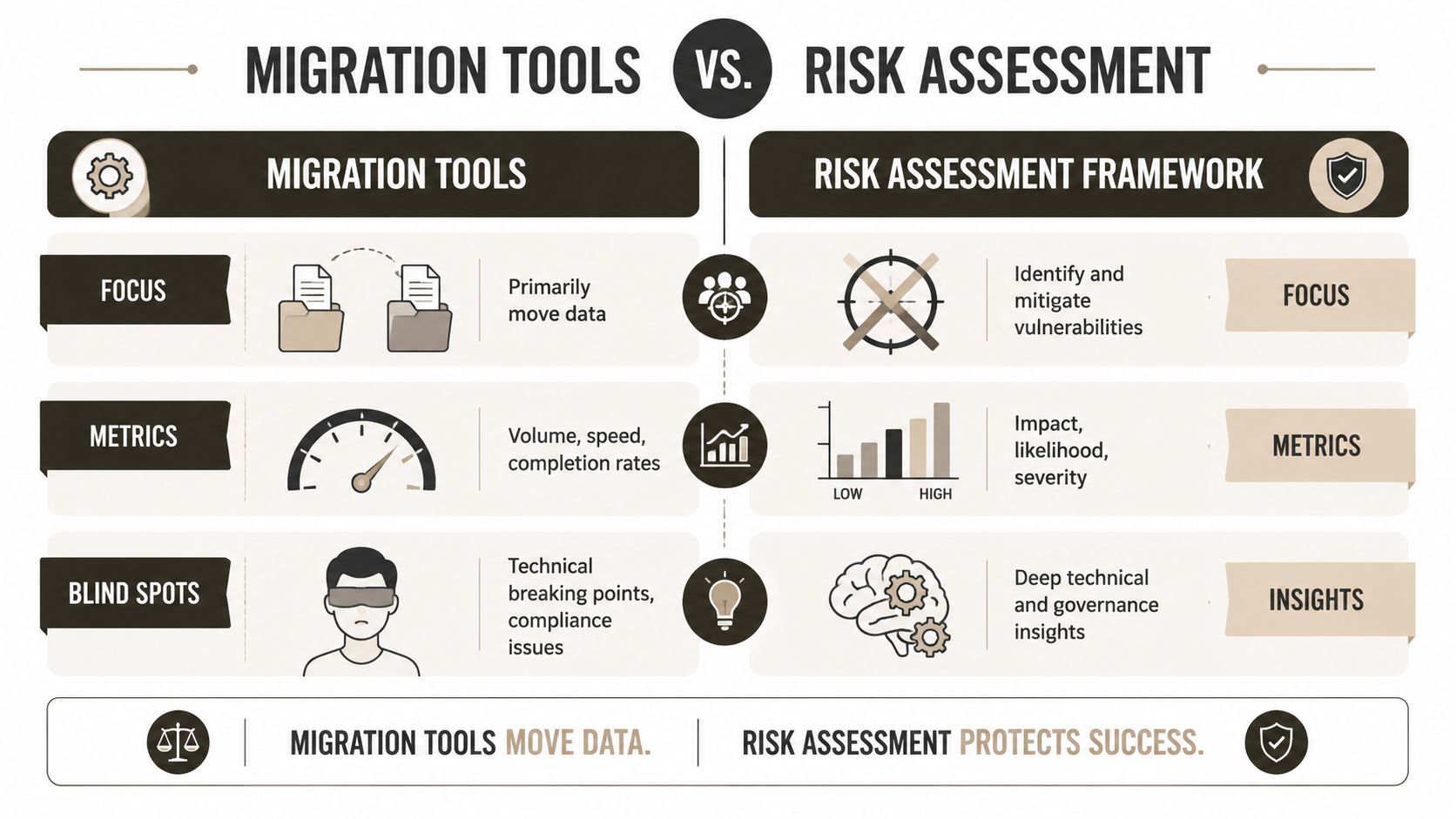
The SharePoint Migration Tool handles simple moves well enough when the source is clean and the structure is boring. It does not rescue you from throttling, weak remediation design, or access chaos. ShareGate is stronger in difficult estates, but it still will not resolve tenant-to-tenant GUID conflicts or untangle a mess of nested groups for you. Those failures come from planning gaps, not from the tool lacking a feature.
Compare the tool with the framework
The Open Group's risk taxonomy, echoed in NIST SP 800-30, breaks assessment into threat event frequency, threat capability, control strength, vulnerability, and probable loss magnitude The Open Group risk taxonomy. That is the level of discipline most DIY teams skip. They count items and measure speed, then act surprised when throttling or permission drift raises the chance of control failure during the migration window.
A migration tool never equals a risk assessment framework.
- SPMT fits a single, simple site with limited baggage.
- ShareGate fits a lift-and-shift move when permissions are clean and the estate is disciplined.
- Custom PowerShell and pre-flight analysis are what you use when the environment is regulated, messy, or politically sensitive.
I'd state the Ollo Verdict plainly. Use SPMT for a small, uncomplicated move. Use ShareGate when the estate is clean and the operational risk is low. For anything regulated, fragmented, or likely to trigger compliance exposure, use custom scripting and pre-flight remediation, because the tool will not surface your worst problems for you.
Direct rule: If you cannot show how the tool output maps to control evidence, your migration is not defensible.
The Ollo SharePoint migration tool guide makes the same point from the tool side. A product can move content, but it cannot replace the assessment work that tells you what will fail, what must be remediated, and what evidence auditors will expect.
The video below is worth watching if your team keeps pretending speed solves design problems.
Microsoft documents the operational choke points that DIY plans keep ignoring. Bad batch strategy, uncontrolled request volume, and lazy automation can turn a manageable migration into a bottleneck. The same applies to GUID conflicts and stale metadata. The tool does exactly what it was built to do, then stops. That is why myhalo's data destruction guidance belongs in the wider control conversation, because disposal and migration both fail when teams treat process as an afterthought.
Risk Treatment with Zero Trust and Data Governance
Identifying the mess is only half the job. Treatment is where careless projects either become defensible or become a permanent compliance headache. You don't fix migration risk by shuffling files faster, you fix it by changing how access, classification, and retention work before the data lands.
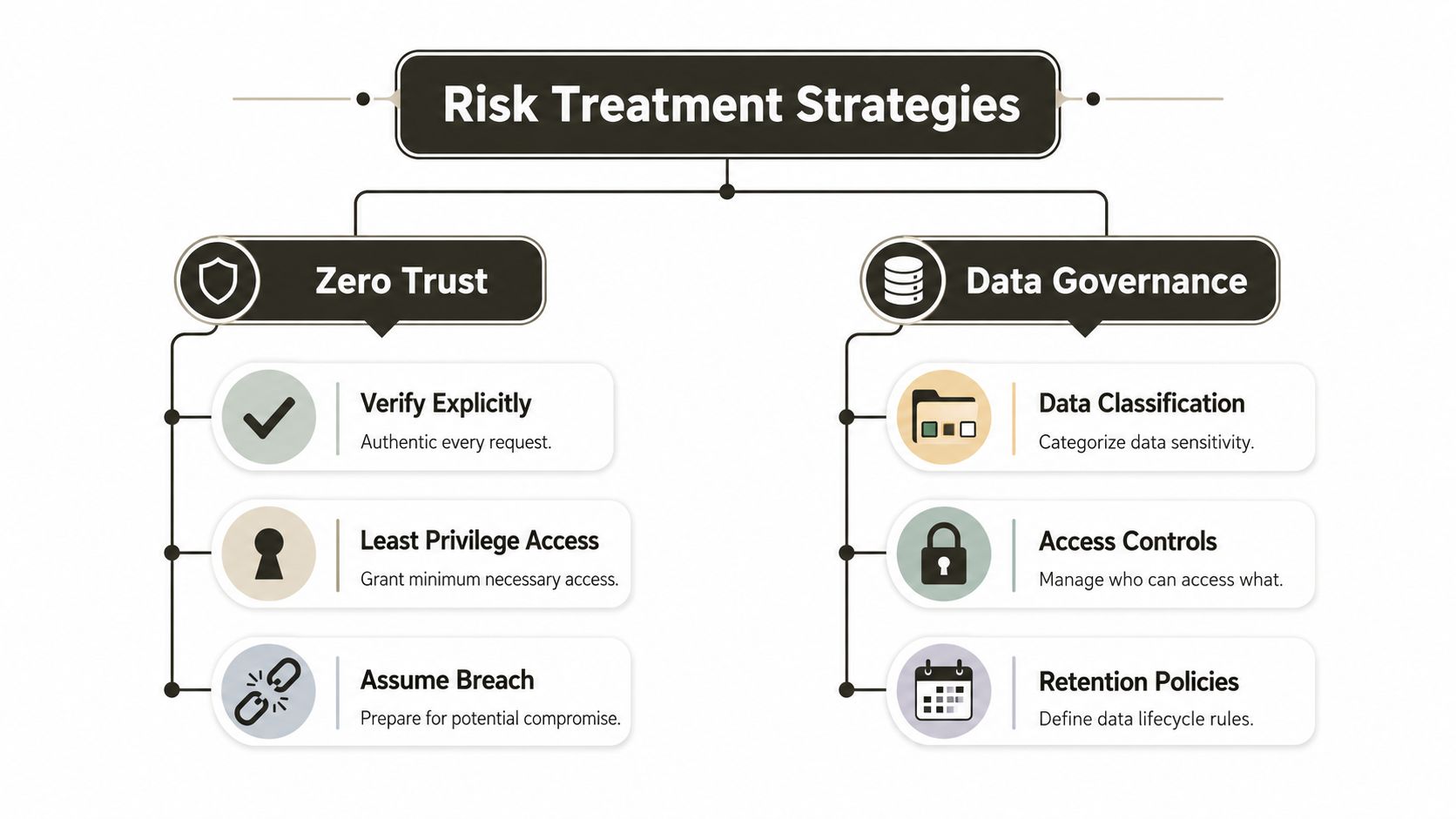
The treatment controls worth caring about sit in two buckets. Zero Trust covers explicit verification, least privilege, and assuming breach. Data governance covers classification, access controls, and retention policies. That's not decorative language, it's the difference between a controlled environment and a newly migrated mess with the same old liabilities.
Treat the cause, not the symptom
The Ollo Zero Trust requirements guide is relevant because access redesign can't happen after the cutover if you want a clean control story. If you move weak permissions into a new tenant and tell yourself you'll clean them later, you've just exported the risk. That's how data spillage and overexposure happen in real programmes.
The UN ESCAP Disaster-related Statistics Framework makes the same point in measurement terms. It defines risk through exposure, vulnerability, and coping capacity, and it says useful assessment depends on real inputs like population density, land use, household income, hazard exposure, and infrastructure exposure UN ESCAP framework. In Microsoft 365, your equivalents are classification labels, permission maps, retention rules, and the ability to prove who can touch what.
This is also where data destruction and retention discipline matter. If you need practical background on removing data safely when retention windows close, myhalo's data destruction guidance is a sensible reference point. Don't confuse destruction policy with deletion theatre, though. If retention and labels aren't defined before migration, you'll just move ambiguity into a new tenant.
What good treatment looks like
- Conditional Access and PIM: Force explicit verification and privileged control, don't leave high-value access open by habit.
- Sensitivity and retention labels: Apply them before or during migration design, not after everyone has already copied the mess.
- Classification rules: Make them operational, not decorative. If nobody uses them, they're wallpaper.
- Access remediation: Strip inherited junk and rebuild permissions where the source estate has gone feral.
- Governance ownership: Give someone named responsibility for the control model, not just the project timeline.
This is the part where regulated organisations either get serious or keep paying for the same mistakes twice.
Monitoring for Risk The Drift That Sinks Projects
A risk assessment framework that doesn't change is dead on arrival. The most dangerous assumption in any migration is that the original analysis will still be true when cutover arrives. It won't be.
Frameworks break when people freeze assumptions around data volume, permissions, and cutover windows. Recent methods research is blunt about this, the failure mode is not the first risk score, it's the untracked drift that makes the score obsolete before the job ends assumption drift research.
Watch for the things that invalidate the plan
Monitoring is not watching a progress bar. It's active re-assessment when reality changes. A company acquires another business mid-project, a regulatory constraint shifts, source content grows faster than expected, or a business owner becomes less tolerant of downtime. Your assessment has to catch those changes early, or the cutover decision becomes guesswork.
That's why I tell teams to treat monitoring as a discipline, not a status ritual.
- Re-check assumptions: If the source estate changes, score the risks again.
- Review dependencies: Permissions, cutover windows, and business tolerance all move.
- Trigger off-cycle review: Don't wait for the next steering meeting if the environment has already changed.
- Tie monitoring to evidence: New facts should force a new decision, not just a new slide.
For teams that want a practical control layer around this drift, Ollo's security information and event management guide is a relevant read because visibility without action is just noise. Monitoring only matters when it triggers a re-assessment and a decision.
Hard truth: A successful cutover can still become a failed migration if the assumptions behind it are stale.
That's the bit most executives miss. They celebrate completion before they know whether the new environment is governable.
The Final Calculation Your Risk vs Our Expertise
Let's be direct. If you try to run a complex, regulated Microsoft 365 migration without a serious risk assessment framework, you're not saving money, you're manufacturing liability. The cost isn't just delay. It's data loss, compliance exposure, broken access control, and the kind of operational embarrassment that sticks to the people who signed off on it.
Your team probably knows how to run the business. That's not the same as knowing how to survive migration failure modes. We often see clients fail when they treat a migration as a tooling decision instead of a governance and evidence problem. The documentation says one thing, but actual implementation gives you throttling, thresholds, hidden dependencies, and assumptions that rot while the project is still live.
The smarter move is to treat specialist support as insurance against expensive mistakes. Ollo's value sits in the stuff DIY teams usually discover too late, pre-flight risk analysis, permissions remediation, zero-trust redesign, and migration planning that adheres to Microsoft's documented limits. That doesn't make the work cheap. It makes the failure less likely.
Your finance team already understands this logic. You don't buy insurance because you expect a fire. You buy it because the downside is too large to absorb casually. Migration risk works the same way, except the fire can come from throttling, GUID conflicts, broken inheritance, or a compliance review that finds your controls were never real.
Choose the team that's used to rescuing failed projects, not the one that promises a smooth one.
If your migration looks simple on paper but dangerous in practice, bring it to Ollo. We'll help you map the underlying risks, challenge the assumptions, and build a migration plan that can survive regulated Microsoft 365 complexity without relying on luck.

















