



Most advice on security information and event management is childish. It tells you to buy a platform, connect a few log sources, turn on some rules, and congratulate yourself on having a security operation.
That's how teams get blindsided.
If you run Microsoft 365 in a regulated environment, your SIEM isn't a dashboard project. It's an architectural risk concentration point. Done properly, it gives your team usable detection, audit evidence, and incident visibility. Done badly, it floods analysts with rubbish, misses identity abuse, and leaves you defending a failed control in front of auditors.
Sceptical IT Directors are usually right to be sceptical. You've seen “enterprise-ready” tooling fold the moment it hits API throttling, ugly SharePoint estates, or Entra ID design that was never fit for zero trust in the first place.
Your SIEM Is Not a Security Blanket It Is a Loaded Weapon
Buying a SIEM doesn't give you a security strategy. It gives you a very expensive way to misunderstand your own environment.
The market keeps growing because the pressure is real. The global SIEM market was valued at USD 7.0 billion in 2025 and is projected to reach USD 15.7 billion by 2034, according to IMARC's SIEM market analysis. That growth comes from rising cyber threats and mandatory compliance. Fine. None of that means your implementation will work.
The documentation says a SIEM ingests logs, correlates events, and alerts your team. In reality, your team can build a noisy, partial, brittle mess that looks active while missing the one chain of events that matters. We often see clients fail when they treat the vendor logo as the architecture.
If you want a sane baseline explainer, CloudCops' comprehensive guide to SIEM is worth reading. Then stop there. Generic guidance won't save your tenant when your ingestion pipelines choke and your audit trail develops gaps you only discover during an incident review.
A SIEM is a force multiplier only if the underlying estate is organised enough to support one. If your Microsoft 365 controls are inconsistent, your permissions are chaotic, and your log coverage is patchy, the SIEM amplifies confusion.
Your team doesn't need more alerts. Your team needs fewer blind spots.
That's why security teams need to think about architecture first. Log coverage, identity design, retention, permissions model, and operational ownership all matter before you start tuning correlation. If those foundations are weak, your SIEM becomes theatre. Tighten the underlying controls first with a proper Microsoft 365 security baseline, then decide what your SIEM should do.
Understanding SIEM Architecture Through Its Failure Points
A SIEM design makes sense on a whiteboard. Production ruins the fantasy.
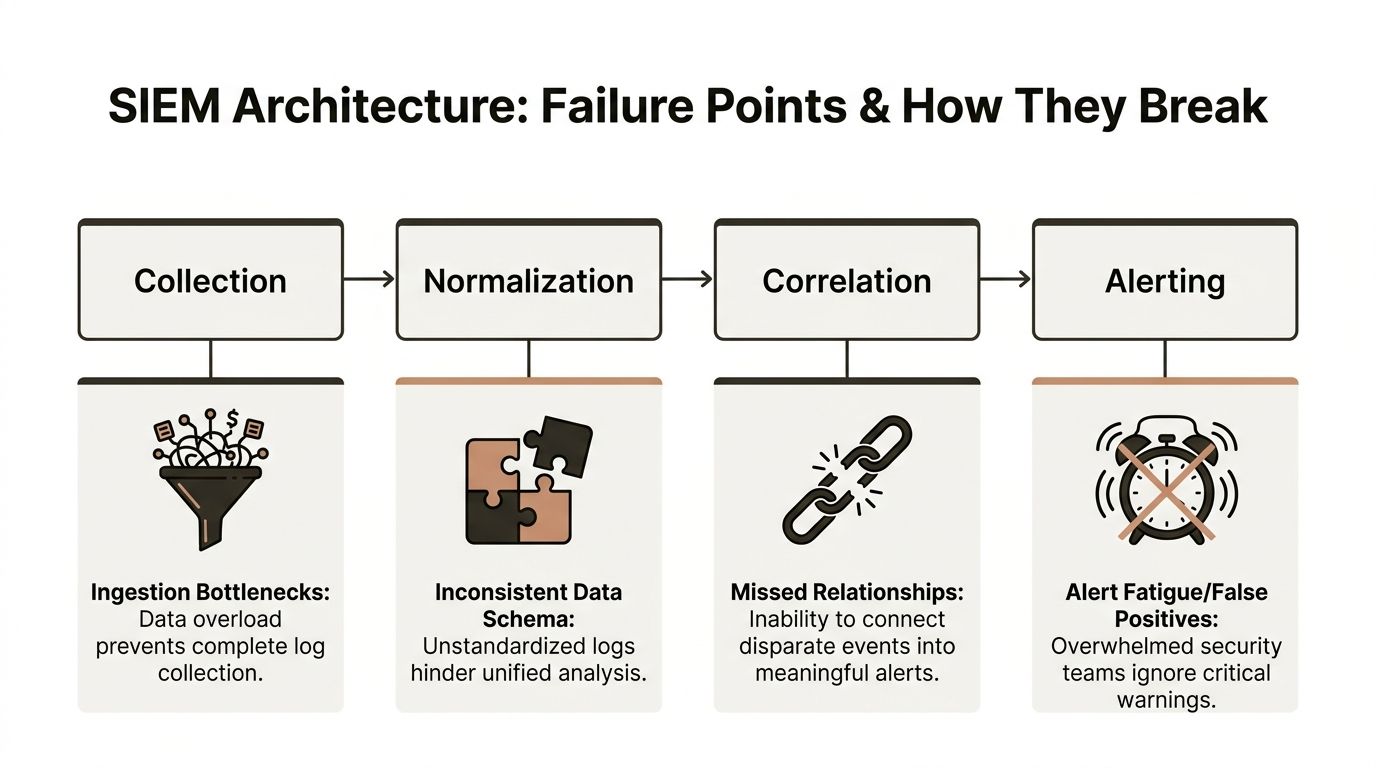
Collection, aggregation, analysis, detection, and alerting are the standard stages in a SIEM workflow, as outlined in Wallarm's explanation of SIEM workflow. However, the practical implementation often presents a harsher reality. In Microsoft 365 estates, each stage fails in ways that look minor until you need the evidence, the timeline, or the alert that never fired.
The quiet failure of collection
Collection breaks first, and it often breaks without causing enough pain to trigger action. The connector stays authenticated. The dashboard stays green. Your team assumes coverage is intact.
Meanwhile, Microsoft 365 starts doing what Microsoft 365 does. APIs throttle. Endpoints return incomplete payloads. Connectors hit pagination limits and stop short. Teams pulling data from Entra ID and audit feeds often discover the ugly edge cases far too late, especially if nobody on the project understands how Microsoft Entra ID fits into the wider identity control plane.
The classic DIY mistake is treating "connected" as proof of collection quality. It proves nothing. If your ingestion path cannot detect lag, partial retrieval, schema drift, and gaps caused by Microsoft 365 API constraints, you do not have telemetry. You have hope dressed up as architecture.
Normalisation fails in the middle, where nobody is looking
Normalisation is where weak projects start lying to their operators. The logs arrive, but the meaning gets damaged on the way in.
A user action lands under different field names across workloads. IP data disappears during parsing. Device context never maps cleanly. Role information drops out. Then correlation rules compare bad inputs and produce garbage with confidence.
Out-of-the-box parsers are part of the problem. Vendors sell the fiction that standard connectors understand messy tenants. They do not. Old hybrid remnants, renamed fields, custom workflows, inherited admin models, and inconsistent Microsoft 365 configurations break parser logic all the time. If nobody validates the transformed data against the original source, your analysts investigate a sanitised version of reality.
Correlation breaks under Microsoft 365 pressure
Correlation rules fail for two reasons. They are written for demos, and they are fed bad data.
Microsoft 365 attacks rarely stay inside one workload. Identity abuse starts in Entra ID, moves through Exchange or SharePoint, and finishes in a place your rule writer never modelled. Add API throttling, retention mismatches, delayed audit events, and hard collection limits, and your "single incident view" becomes a stitched-together guess.
That is why DIY SIEM work keeps collapsing at the same point. The team builds rules before it proves data quality, source coverage, and timing consistency. Then alert volume rises, trust drops, and the analysts start muting what they should be investigating.
If your team cannot prove that the event chain is complete, your SIEM is producing theatre, not detection.
Use this test before you trust any design:
| SIEM stage | What the vendor promises | What breaks in real Microsoft 365 deployments |
|---|---|---|
| Collection | Broad log ingestion | Throttled APIs, partial pulls, lagging connectors, hard source limits |
| Aggregation | Unified visibility | Inconsistent timestamps, duplicate records, missing workload context |
| Analysis | Smart detections | Rules built on incomplete fields and badly parsed events |
| Breach detection | Fast threat identification | Cross-workload attack paths missed because the chain never joins up |
| Alerting | Rapid response | Noise, mute-happy analysts, and false confidence during incidents |
My recommendation is blunt. Do not judge SIEM architecture by whether it can ingest data in a lab. Judge it by whether it survives Microsoft 365 failure conditions, ugly tenant history, and operational load without dropping evidence. If your team cannot test that properly, hire people who can. That is cheaper than discovering the gaps during an incident review.
The Microsoft 365 Blind Spots Your SIEM Will Miss
Most SIEM content still talks like the datacentre is the centre of gravity. It isn't. Your exposure now sits in Microsoft 365, Entra ID, SharePoint Online, Exchange Online, Teams, and the ugly edges between them.
That's where DIY SIEM work gets dangerous. Teams connect “Microsoft 365” and think the job is done. It isn't even close.
The log sources people assume are simple
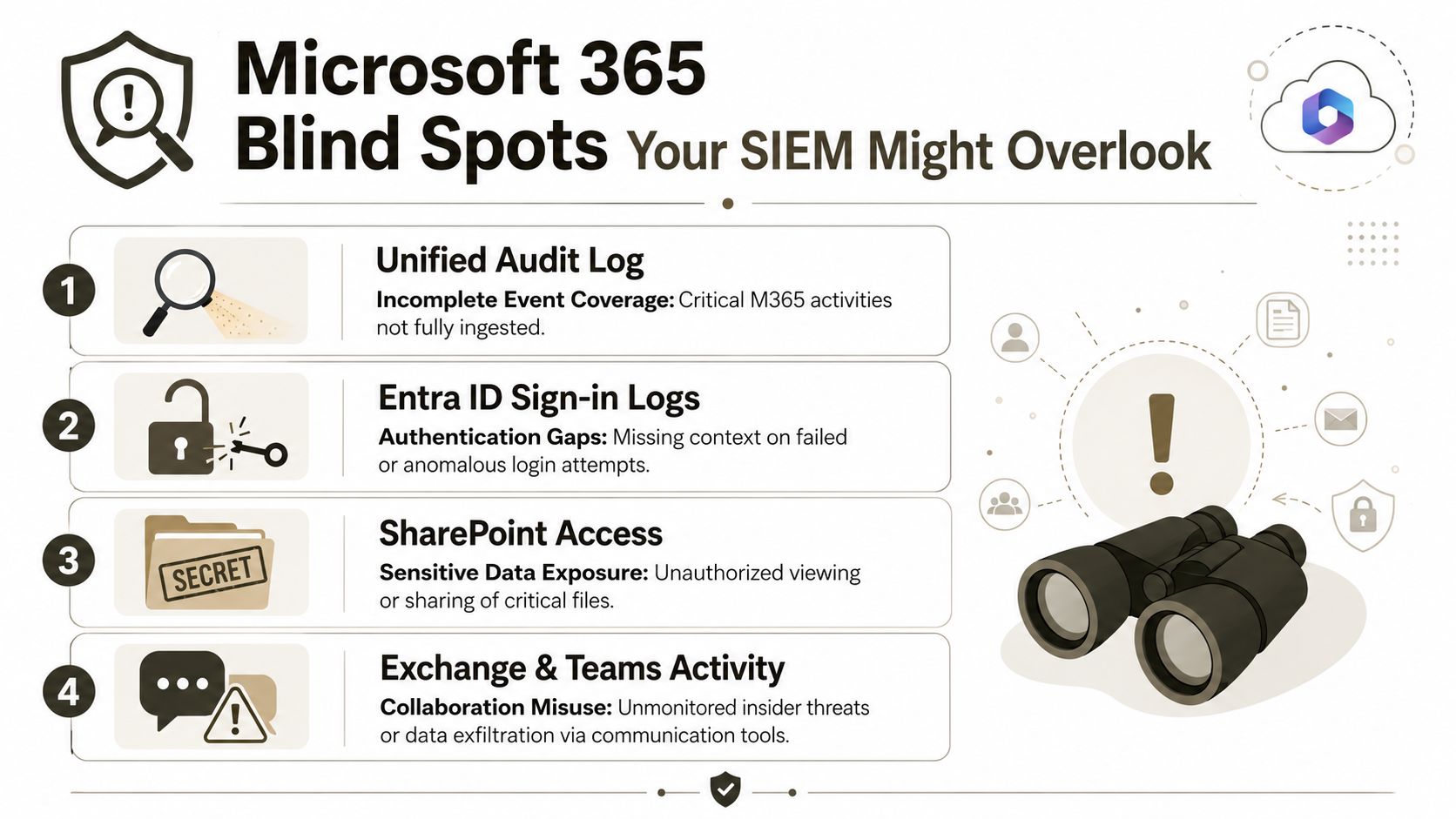
Your SIEM needs visibility into the Unified Audit Log, Entra ID sign-in activity, SharePoint access patterns, and collaboration activity across Exchange and Teams. Each source matters for a different reason, and each one arrives with its own quirks.
What usually goes wrong:
- Unified Audit Log: Coverage looks broad, but teams often overestimate how complete and immediate it is for investigations.
- Entra ID sign-ins: Authentication data exists, but the context needed for a meaningful detection path often gets handled badly.
- SharePoint access activity: Sensitive data exposure and poor permissions hygiene become visible here, if your collection and parsing are good enough.
- Exchange and Teams events: Insider risk and exfiltration patterns can hide in plain sight when collaboration telemetry isn't mapped properly.
For identity-heavy estates, your architecture has to treat cloud identity as a first-class security layer, not a side feed. If that's not already your operating model, start with a tighter Entra ID security design approach.
SharePoint breaks more SIEM assumptions than people realise
The documentation says SharePoint Online is just another workload to monitor. In reality, it has operational limits that can break audits, scans, migrations, and evidence gathering at exactly the wrong moment.
In SharePoint Online, the List View Threshold is hard-coded at 5,000 items per view and cannot be raised, as confirmed in ShareGate's explanation of the SharePoint threshold. During a migration or audit, any process querying a view that returns more than 5,000 items fails immediately, which breaks user access and compliance workflows.
That matters for SIEM because your security operation depends on reliable access to evidence. If the underlying content architecture can't support broad queries, your monitoring and investigative process become fragile.
A broken audit path in SharePoint isn't a nuisance. It's a control failure.
The Microsoft 365 blind spot isn't just “missing logs”. It's assuming the platform behaves like a tidy source system when it often behaves like a patchwork of separate services with separate constraints. Your SIEM has to account for those constraints, or it will give your team false confidence.
Common Deployment Disasters and How to Sidestep Them
Most failed SIEM deployments don't collapse because the platform is bad. They collapse because teams underestimate how hostile enterprise Microsoft 365 can be under load, during change, and in regulated estates with years of accumulated junk.
We often see clients fail when they treat ingestion, migration, and security telemetry as separate projects. They aren't. They share the same APIs, the same identity dependencies, and the same failure domains.
API throttling turns “real-time” into fiction
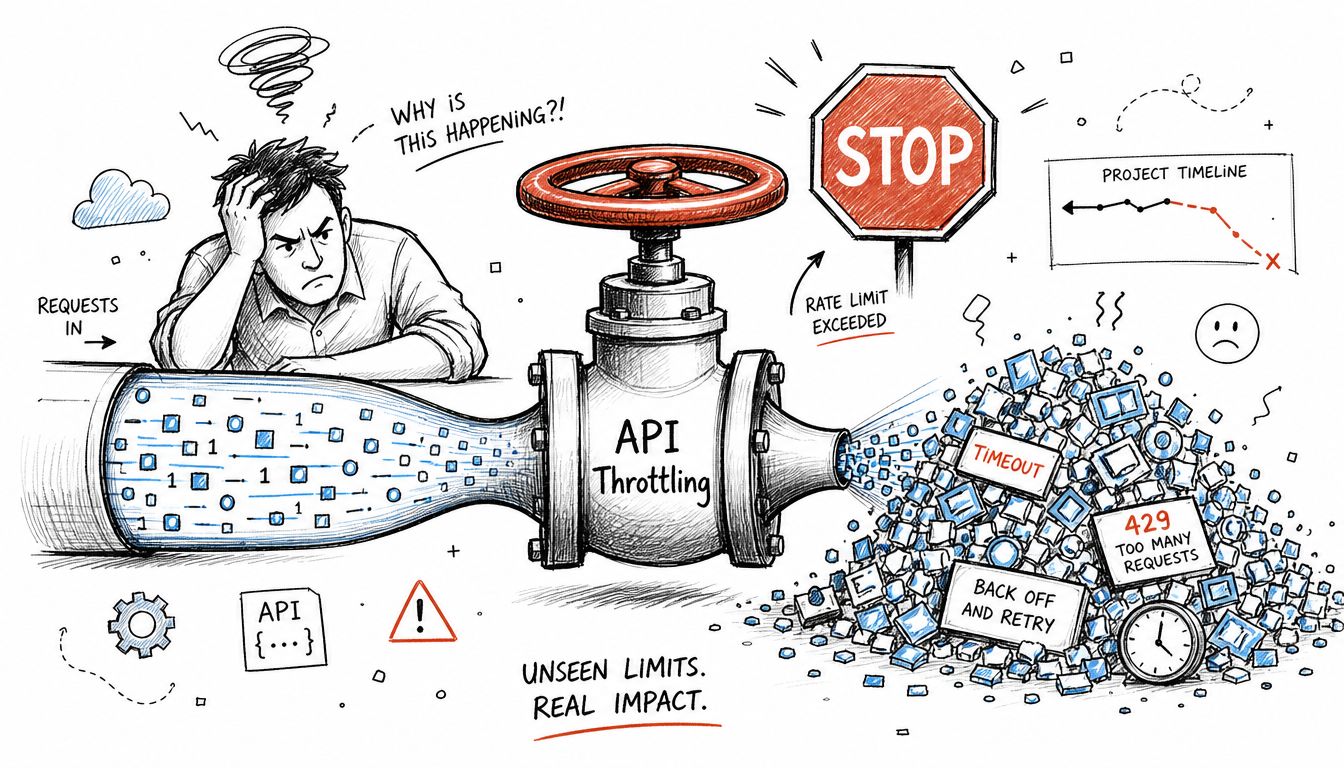
The documentation claims SIEM correlation rules trigger instantly, but reality is rougher. 30 to 50% of rules fail in Healthcare and Finance sectors due to Microsoft 365 API throttling and 5k item log limits, and 62% of IE-region SIEMs in regulated sectors fail during peak log surges, based on the verified data provided for this article.
Out-of-the-box confidence vanishes. SPMT and standard connectors can be useful in small, tidy jobs. In enterprise conditions, API throttling punishes naïve collection patterns. Your SOC ends up looking at delayed, partial, or missing events while management still believes the SIEM is watching everything.
The Ollo verdict. Use SPMT for very small, low-risk work. For enterprise SIEM-adjacent Microsoft 365 projects, you need custom scripting, throttling mitigation, and someone who understands how Microsoft services behave under pressure.
Broken inheritance exposes data you thought was protected
Migration teams love inherited permissions until inheritance breaks in the wrong place. Then sensitive data lands in a structure that no longer matches the intended access model.
That failure often starts outside the SIEM, but it lands squarely inside it. Suddenly your alerts show unusual access activity against content that was never meant to be broadly visible. The SIEM didn't cause the exposure. It just arrived too late to prevent it.
A useful companion read on the operational side is this piece on preventing M365 data loss. Backup matters. But backup doesn't fix bad permissions, broken inheritance, or weak logging architecture.
GUID conflicts corrupt trust in the result
GUID conflicts are one of those issues lazy project plans barely mention. Then the cutover happens, references break, workflows misbehave, and teams start questioning whether the migrated or ingested data is authoritative.
That's poison for security operations. If your analysts can't trust object lineage and content relationships, investigations slow down. If legal or compliance teams can't trust the evidence chain, your reporting loses credibility.
The Ollo verdict. ShareGate is a strong tool in capable hands, but basic use isn't enough. Enterprise work needs pre-migration analysis, identity mapping, and scripted controls that preserve integrity under change.
Here's the operational reality many teams discover too late:
The hidden failures nobody budgets for
Three ugly examples show up repeatedly:
- List threshold collisions: Queries that look reasonable fail because SharePoint won't tolerate broad views over large lists.
- Recycle bin surprises: Deleted items still count against back-end thresholds, which can push libraries over operational limits during migration and audit work.
- Path and structure chaos: Deep folder sprawl, inconsistent naming, and old permission models make both migration and monitoring less reliable.
Security teams often call us after these problems become visible through suspicious activity reviews or failed evidence pulls. At that point, you're not improving a platform. You're paying to recover trust.
If you want to know whether your estate is already exposing these conditions, pair SIEM planning with a proper penetration testing review of your Microsoft 365 attack surface.
Mapping SIEM to Compliance You Cannot Afford to Fail
Compliance teams don't care that your connector was “mostly working”. Auditors won't excuse a gap because Microsoft 365 throttled your ingestion during a busy period. Regulators care about evidence, traceability, and whether your controls operated when they were supposed to.
That's why a weak SIEM isn't an IT inconvenience. It's a liability.
Finance, Healthcare, and Energy all punish gaps differently
In Finance, your logging and access monitoring need to stand up to scrutiny around privileged activity, anomalous access, and evidence retention. In Healthcare, missing context around user actions can undermine investigations into inappropriate access to sensitive records. In Energy, security monitoring has to survive operational complexity and cross-system dependencies.
The details vary by framework, but the failure pattern is consistent. A partial audit trail gives you partial defensibility. That's another way of saying no defensibility.
If your SIEM misses events during peak load, your compliance posture is weaker than your policy documents suggest.
A lot of teams still separate “security monitoring” from “compliance reporting”. That split is a mistake. The same pipeline that supports detection often supports audit evidence. If one side is brittle, the other side is brittle too.
Microsoft 365 failure modes turn into audit findings
Consider what happens when your tenant has poor identity hygiene, incomplete workload coverage, or weak access governance in SharePoint and Teams. Your SIEM may still generate alerts, but the evidence behind them becomes questionable.
A few examples of what that looks like in practice:
- Identity events without enough context: Investigators can't prove what the user did after authentication.
- SharePoint evidence blocked by platform limits: Compliance reviews fail to inspect content structures properly.
- Collaboration activity with weak mapping: Teams can't reconstruct how data moved across Exchange, Teams, and SharePoint.
That's why I tell IT Directors to stop asking whether the SIEM “ticks the compliance box”. Ask whether the estate would survive a hostile audit after an actual incident.
For organisations facing European regulatory pressure, your monitoring design has to align with operational resilience and reporting duties, not just control checklists. A strong starting point is reviewing how NIS 2 affects Microsoft 365 governance and security architecture.
The Ollo verdict
Use your SIEM as an evidence system, not just an alert engine. If your architecture can't produce reliable audit trails from Microsoft 365 under stress, you haven't implemented a compliant control. You've implemented a fragile story.
Measuring Real SIEM Success Beyond Alert Volume
A SIEM that produces more alerts each quarter is doing one thing well. Burning analyst time.
Security leaders who celebrate alert volume usually have weak detection engineering, weak triage, or both. Microsoft 365 makes this worse because the native connectors create the illusion of coverage while dropping context, delaying telemetry, or hitting platform limits that nobody noticed during the pilot.
Measure whether the system helps your team reach a defensible answer fast. Everything else is reporting theatre.
What mature teams measure instead
Use metrics that expose whether your SIEM can support an investigation under pressure:
- Time to detect real attacker activity: Measure from the first meaningful event to analyst awareness, not from when the alert finally appeared in the queue.
- Time to contain: Measure how long it takes to disable access, isolate the account, revoke sessions, or trigger the right escalation.
- False positive load: Count how much analyst capacity gets wasted on rules that fire often and prove nothing.
- Investigation completeness: Check whether analysts can trace the incident across Entra ID, Exchange, Teams, SharePoint, and admin activity without manual stitching.
- Telemetry reliability: Track ingestion delays, connector failures, API throttling, and schema inconsistencies. If the feed is unstable, every downstream metric is fiction.
Those are uncomfortable metrics. Good. They expose the projects that were sold as quick wins and built as dashboards.
The Microsoft 365 reality most SIEM reports hide
The ugliest failures show up in cloud identity and cross-workload investigations. A DIY team sees Entra ID events arriving and assumes the problem is solved. It is not solved.
Microsoft 365 punishes shallow SIEM designs. API throttling introduces gaps. SharePoint and Graph constraints distort coverage. The 5,000 item threshold turns simple evidence collection into a mess if the data model and collection method were not designed properly from the start. By the time the SOC notices, the incident clock is already running and the audit trail is incomplete.
That is why alert volume tells you almost nothing. A tenant can produce plenty of alerts and still leave analysts unable to answer basic questions about token misuse, privilege changes, mailbox access, document exposure, or lateral movement across M365 services.
A healthy dashboard can sit on top of a broken investigation pipeline.
What success looks like in practice
A mature SIEM programme gives analysts fast, usable answers. They can identify the account, confirm the access path, correlate the identity event to workload activity, and prove what changed without exporting logs into a spreadsheet at 2 a.m.
If your team still relies on manual reconstruction to understand a Microsoft 365 incident, you do not have mature monitoring. You have an expensive evidence gap.
If you want a blunt view of whether your current design will survive a real incident, get a Microsoft 365 SIEM risk audit before the next connector issue or threshold limit turns into a board-level problem.
The Ollo verdict
Judge your security information and event management programme by investigative certainty and response speed. If your analysts cannot answer who did what, in which workload, under which identity context, and on what timeline, the platform is not protecting the business. It is decorating the security stack.
The Ollo Verdict A Risk Checklist for Your SIEM Project
At this point, the choice is simple. You can run a SIEM project as a procurement exercise, or you can run it as a risk-reduction exercise.
One of those paths usually ends in rework.
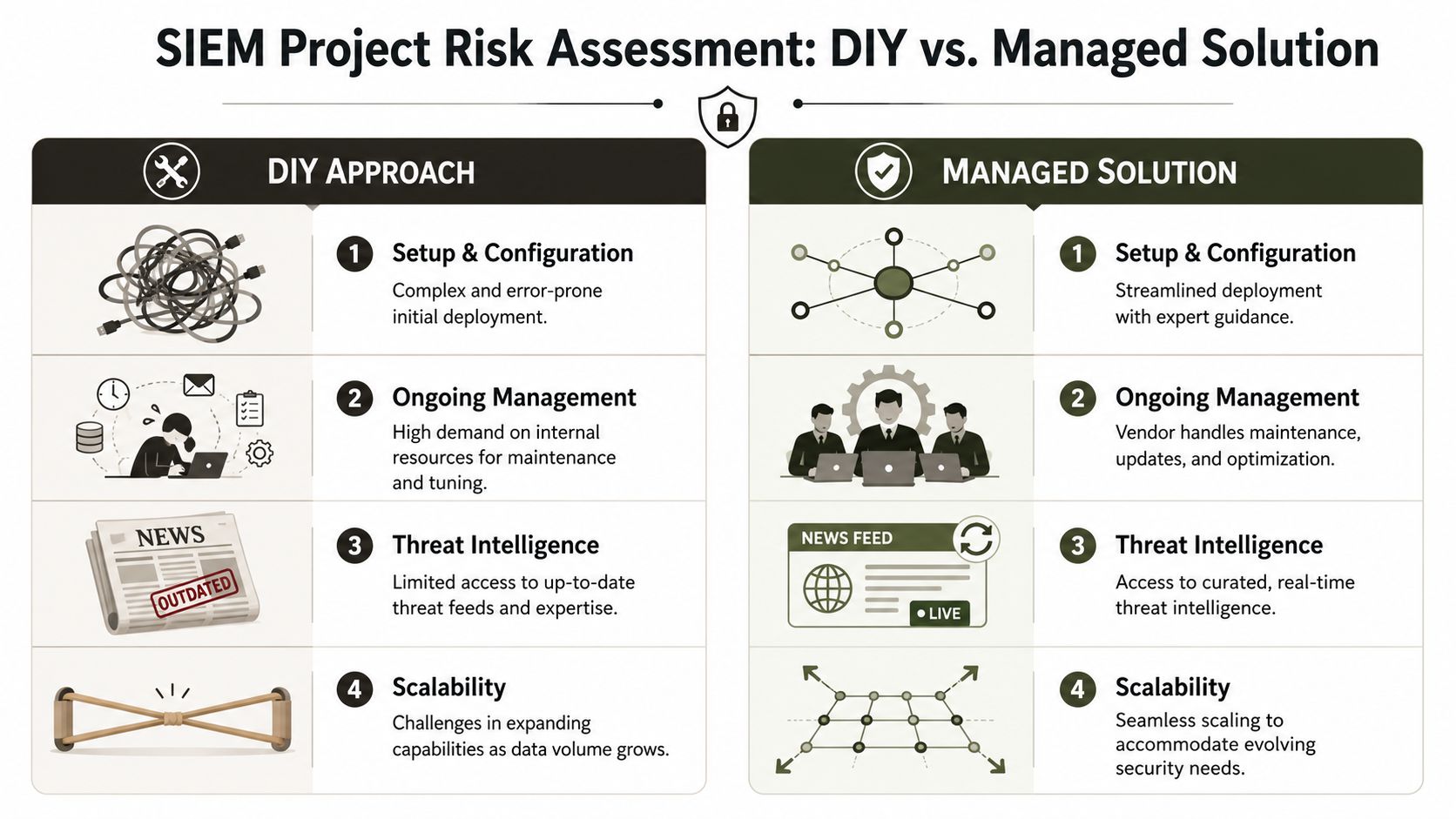
The risk checklist sceptical IT leaders should actually use
Don't ask whether your chosen platform has the right features. Ask whether your project can survive the ugly conditions that kill real deployments.
| Risk area | DIY or standard vendor path | Expert-led path |
|---|---|---|
| Microsoft 365 ingestion | Assumes connectors are enough | Tests for throttling, latency, and coverage gaps |
| SharePoint complexity | Ignores structural limits until late | Designs around threshold and audit constraints |
| Identity monitoring | Treats Entra ID as one more feed | Builds cloud identity visibility into the core model |
| Permissions and inheritance | Discovers exposure after migration | Reviews structure and access logic before cutover |
| Data integrity | Risks GUID confusion and poor mapping | Preserves lineage with controlled orchestration |
| Compliance evidence | Produces dashboards, not proof | Designs for audit defensibility |
Questions your team should answer before signing off
If your internal team or vendor can't answer these clearly, the project isn't ready:
- What happens when Microsoft 365 APIs throttle at the worst possible time?
- How do you validate that SharePoint activity and access evidence remain usable under threshold constraints?
- How do you detect identity-centric attacks that don't fit old perimeter logic?
- How do you prevent broken inheritance and object conflicts from poisoning your evidence trail?
- How do you prove to compliance that the control operated during load, not just during testing?
Those aren't edge cases. Those are normal enterprise conditions.
The final verdict
Standard tools have their place. SPMT has a place. ShareGate has a place. SIEM vendor templates have a place. That place is not “blindly trusted in a high-stakes Microsoft 365 estate”.
If your environment is small, clean, and lightly regulated, you can take more risk. If your tenant carries sensitive data, ugly legacy design, or real audit pressure, gambling on DIY is a career-limiting decision.
Run a proper risk review before you commit. If you need an outside benchmark, start with Ollo's free audit. Your team doesn't need another hopeful project plan. Your team needs a hard answer on where this will break.
If your Microsoft 365 estate carries real compliance pressure, identity complexity, or migration baggage, Ollo is the safe pair of hands. We handle the ugly parts most providers avoid: throttling, broken inheritance, GUID conflicts, Entra ID redesign, and rescue work when a “working” SIEM or migration turns out to be fiction.

















