



Most advice on NIS2 and Microsoft 365 is dangerously soft. It treats compliance like a licensing decision. Buy E5. Turn on a template. Run a report. Tell the board you're covered.
That's how organisations walk into an audit with a false sense of control and a tenant full of blind spots.
For NIS2 Microsoft 365 work, the core issue isn't whether Microsoft has relevant tools. It does. The issue is whether your team can prove that your controls effectively work across identity, data, logging, incident handling, recovery, and supplier access when the environment is messy, inherited, or mid-migration. In regulated environments, that gap between “available” and “implemented” is where projects fail.
The Dangerous Myth of Out-of-the-Box NIS2 Compliance
Microsoft 365 is not NIS2 compliant out of the box. Your licences don't save you. Your default tenant configuration doesn't save you. Purview dashboards don't save you.
NIS2 has applied since 17 October 2024, and non-compliance penalties can reach €10 million or 2% of global annual turnover for essential entities, as set out in Microsoft's summary of the directive on the Microsoft Trust Centre NIS2 compliance page. That isn't a theoretical risk. That's the commercial backdrop your CFO already understands.
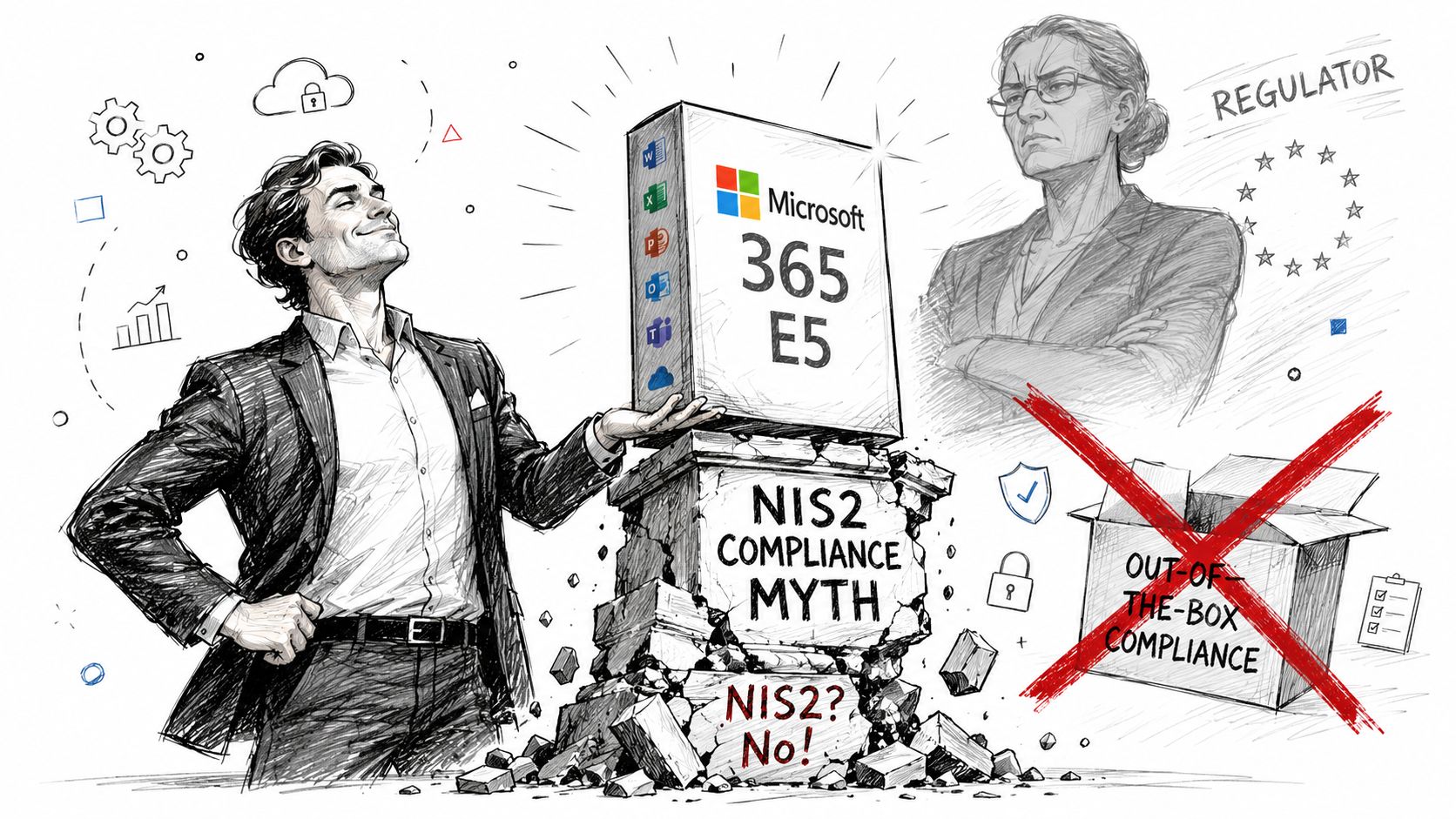
Tools don't equal controls
The most common mistake I see is simple. Teams confuse the presence of a Microsoft feature with the existence of a defensible control.
Purview Compliance Manager can track activity. Entra ID can enforce access policy. Defender can detect threats. None of that means your tenant is configured in a way that would stand up under scrutiny. If your logs aren't retained properly, your access model is inherited chaos, and your recovery process hasn't been tested, you don't have compliance. You have software.
A lot of internal teams start with generic Microsoft 365 security best practices. That's sensible as a baseline. It's not enough for NIS2 in a live enterprise tenant with technical debt, supplier access, and years of inconsistent admin decisions.
Your regulator won't care that the feature existed. They'll care whether your team implemented it, governed it, and can prove it.
Default posture is usually the problem
The documentation presents capability. Reality exposes configuration debt.
We often see clients fail when they assume Microsoft's baseline settings reflect regulated-sector expectations. They don't. Out-of-the-box setups often leave weak evidence trails, incomplete governance, and recovery plans that look fine on paper but collapse when a real incident touches SharePoint, Exchange, Teams, and identity at the same time.
If your current strategy is “we're on Microsoft 365, so we're largely covered”, you're already late.
NIS2 Is a Business Problem Not a Microsoft Feature
NIS2 doesn't ask whether you own security tooling. It asks whether your organisation can manage risk, handle incidents, control access, protect suppliers, and recover operations. That's a business accountability problem with technical dependencies, not a product feature matrix.
Evidence matters more than dashboards
An IT Director doesn't get judged on how many portals the team can open. You get judged on whether your organisation can produce evidence, quickly and cleanly, when someone asks hard questions after an incident.
That means your team needs more than settings. It needs operating discipline.
- Risk management: You need a current view of where sensitive data lives, who can access it, and what changed.
- Incident handling: You need a repeatable process that shows detection, containment, investigation, and recovery.
- Access control: You need clear identity governance, not a pile of legacy exceptions.
- Logging: You need enough coverage and retention to reconstruct what happened.
- Business continuity: You need recovery that works under pressure, not a backup policy nobody has tested.
A lot of organisations discover too late that their technical controls and their operational procedures don't line up. If your service desk, security team, infrastructure team, and compliance lead all handle incidents differently, you don't have resilience. You have confusion. That's why disciplined operational playbooks matter, and practical resources on SOPs for operations managers can help teams tighten the process side instead of pretending the portal will do it for them.
Governance failure becomes legal exposure
Often, many Microsoft 365 projects drift into executive risk. The tenant gets built by one team, secured by another, and audited by people who didn't configure any of it. Nobody owns the end-to-end control chain.
Practical rule: If your team can't show who approved a control, who monitors it, and how it's tested, then it isn't mature enough for NIS2.
That's why governance matters more than licensing. A tenant with strong ownership, review cycles, and clear accountability is safer than a badly governed tenant with every premium feature switched on. If your governance model is still informal, start by reviewing the Microsoft 365 governance audit checks every CTO should review.
What this means for your team
Your Microsoft 365 admins can manage workloads. That doesn't automatically make them incident evidence engineers, identity architects, or compliance operators.
You need people who can connect legal obligations to technical implementation. That means translating “incident handling” into alerting, telemetry, chain of custody, documented decision points, and tested recovery. Without that translation layer, your organisation ends up compliant in PowerPoint and exposed in production.
Mapping NIS2 Requirements to Microsoft 365 Capabilities
Microsoft's platform can support a serious NIS2 programme. That part is true. Microsoft's security guidance highlights multifactor authentication, incident response, supply-chain security, and business recovery plans as core requirements in its NIS2 guidance for Microsoft Security solutions. On paper, the stack maps neatly.
The problem starts when buyers assume the map is the territory.
NIS2 Article mapping to Microsoft 365 tools
| NIS2 Requirement (Article 21) | Microsoft 365 Tool (The Official Story) | The Ollo Reality Check (The Gap) |
|---|---|---|
| Access control | Entra ID, Conditional Access, MFA | Strong capability, but inherited exclusions, guest sprawl, and weak role design undermine it fast |
| Incident handling | Microsoft Defender, Sentinel, audit logs | Detection is useless if telemetry isn't tuned, retained, and reviewed across workloads |
| Data protection and encryption | Purview Information Protection, DLP, encryption features | Labels and policies don't classify decades of messy content by themselves |
| Supply-chain security | Entra ID controls for external access, app governance | Third-party apps and B2B access often sit outside normal review cycles |
| Business recovery | Backup strategy, retention, recovery processes | Retention isn't the same as rapid operational recovery |
| Risk management and evidence | Purview Compliance Manager, eDiscovery, audit records | Tracking status is not the same as implementing and validating controls |
The official story is only the starting point
Microsoft gives you components. It doesn't give you a finished control environment.
Take access control. Entra ID and Conditional Access can absolutely enforce a strong posture. But if your tenant carries years of exceptions for legacy apps, partner accounts, emergency access shortcuts, and stale admin roles, the control looks far better in architecture slides than it does in production.
The same applies to data controls. Purview can classify, label, and protect. In real tenants, content sits in old SharePoint sites, ungoverned Teams, user-created groups, synced folders, and migration leftovers. If nobody has rationalised that estate, the control boundary is fiction.
Teams evaluating adjacent compliance workflows often run into the same issue in business systems outside core security. For example, work around GDPR compliant HR software shows why data governance only works when Purview gets tied to actual operational processes rather than treated as a separate compliance layer.
The tenant decides whether the control is real
Microsoft 365 can map to NIS2. Your tenant configuration decides whether that mapping survives contact with reality.
That's the key point. Buyers searching for NIS2 Microsoft 365 usually want a yes or no answer. The honest answer is harsher. Microsoft 365 gives you a workable foundation, but only if someone engineers identity, telemetry, retention, data governance, and recovery into a coherent operating model.
If your team still treats Purview as a reporting tool rather than a control implementation layer, start with a tougher look at Microsoft Purview versus manual compliance approaches.
Where the Microsoft Compliance Story Breaks Down
The Microsoft compliance story breaks at the exact point where real engineering work begins.
Microsoft states that Purview Compliance Manager includes a dedicated NIS2 assessment template, but Microsoft's own compliance material also reflects the limitation that independent coverage calls it “somewhat limited” and weighted towards non-technical controls, with a recommendation to add ISO 27001 and GDPR assessments for a fuller picture on the Microsoft Trust Centre NIS2 compliance page.
That's the polite version. The blunt version is this. A template tracks status. It does not build your controls.
Purview can measure. It can't rescue bad architecture.
We often see clients score well inside Compliance Manager while the underlying tenant still has weak access design, patchy labelling, poor audit coverage, and no reliable incident reconstruction path.
That happens because checklists reward declared activity. Regulators and incident responders care about actual evidence. If an attacker moved through a guest account, touched Teams files, exfiltrated SharePoint data, and triggered identity alerts, your team must correlate those events across systems. A green dashboard won't do that for you.
The dangerous gap between recorded and real
The documentation says Microsoft 365 can support NIS2 mapping. In reality, controls fail in three ugly ways.
- Configuration drift: Security settings change over time, often during urgent exceptions or project cutovers.
- Weak evidence coverage: Teams enable logging but don't verify breadth, retention, or cross-workload correlation.
- Governance theatre: Reviews happen as meetings, not as enforceable technical controls.
If your compliance posture depends on people remembering to behave correctly under pressure, it isn't a control. It's hope.
Identity architecture assumes a central role. A badly structured Entra ID environment insidiously undermines every downstream control, from admin segregation to supplier access to Conditional Access enforcement. If your tenant still carries historical role sprawl or inconsistent policy design, review your Microsoft Entra ID architecture and control model before you tell anyone you're NIS2-ready.
The Ollo verdict
Treating NIS2 as a licensing issue is negligent. Treating the Purview NIS2 template as the answer is worse, because it gives leadership a false sense of closure while the technical debt remains active.
Use the template as an evidence tracker if you want. Fine. Just don't mistake it for control engineering.
The Migration Minefield How Consolidations Create NIS2 Gaps
Migrations are where fake compliance gets exposed.
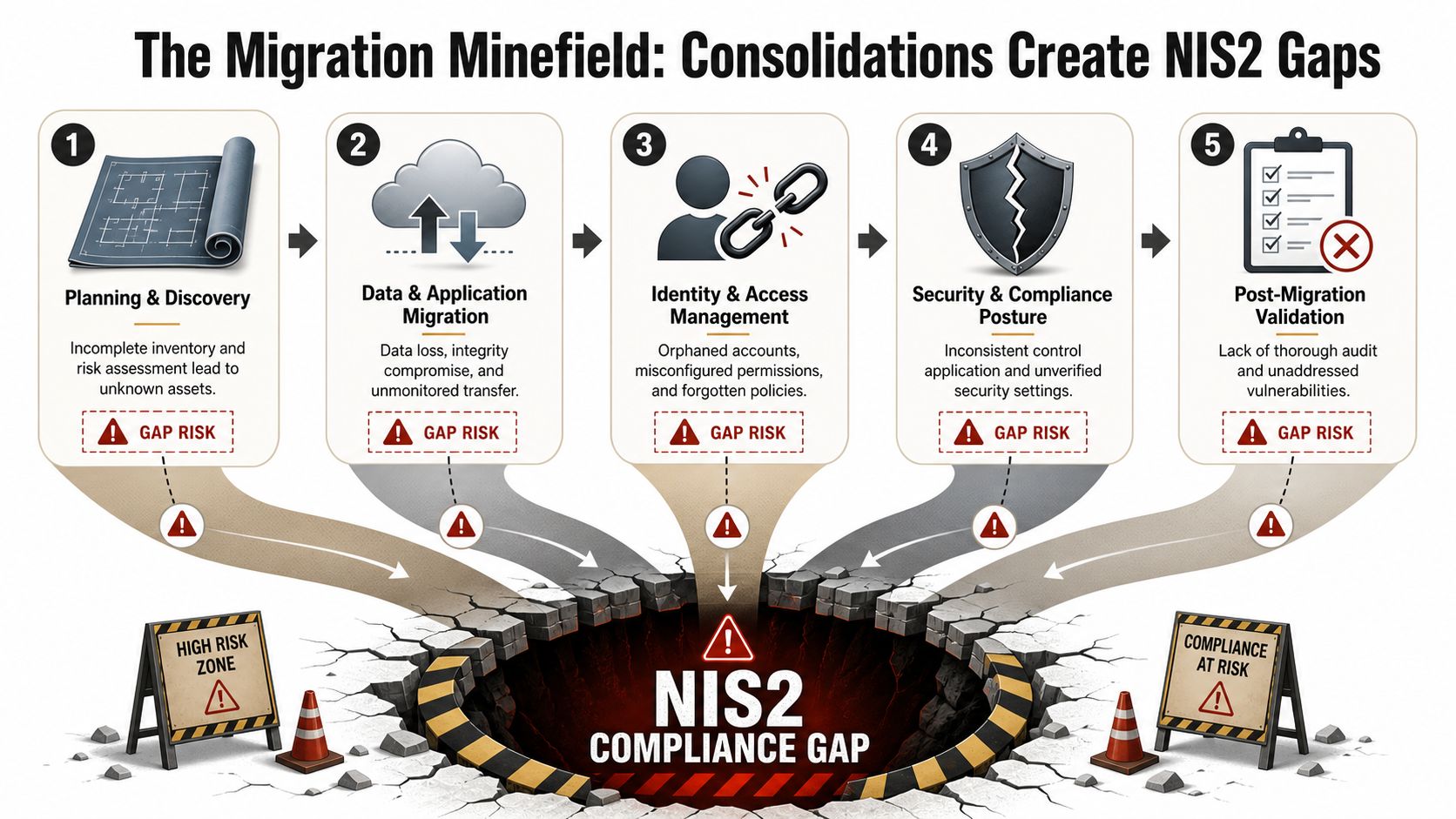
A tenant can look tidy in workshops, slide decks, and policy libraries. Then the consolidation starts, and the organisation discovers it has no reliable inventory, no defensible ownership model, and no clean way to prove who had access to what during the move. Under NIS2, that is not a project nuisance. It is an operational and legal risk with real financial consequences.
Microsoft's migration story falls apart under pressure
Microsoft documents real technical risks in large SharePoint Online moves, including API throttling and blocking, in its guidance on avoiding throttling or blocking in SharePoint Online. Those issues do not stay technical for long. They delay cutovers, break validation windows, and leave regulated data in limbo between old and new estates.
That is the part Microsoft's standard story glosses over. Its tooling is built to move workloads. NIS2 asks you to preserve control, traceability, accountability, and incident readiness while you do it. Those are different jobs.
SPMT is the usual example. It can handle straightforward transfers. It is a poor choice for regulated consolidations that involve identity redesign, permission remediation, retention conflicts, legal holds, and business-critical audit evidence. Teams use it anyway because it is there, it is cheap, and leadership wants the project signed off. That is how migrations turn into uninsured losses.
The NIS2 gaps appear during the move, not after it
The destination tenant is only part of the problem. The migration window itself creates exposure that many internal teams fail to model properly.
Discovery breaks before engineering starts
If you do not know which sites, Teams, mailboxes, apps, and service accounts exist, you cannot scope risk properly. Unknown content gets skipped, copied without review, or dumped into the new tenant with inherited problems intact.Permissions mutate in transit
Consolidations routinely expose broken inheritance, abandoned groups, direct grants, and access paths that nobody intended to keep. The result is predictable. Sensitive material ends up overexposed, or critical users lose access during cutover. One creates reportable security risk. The other creates business interruption.Identity is copied instead of redesigned
NIS2 cares about accountability and control. Many migration projects recreate legacy Entra ID structures, stale admin patterns, and supplier access mistakes in the target tenant. That preserves the old risk and makes the new environment harder to govern from day one.Evidence chains get corrupted
Ownership changes, metadata shifts, and object remapping make it harder to prove provenance and custody. If your response to an incident depends on showing where a document came from, who touched it, and what policy applied at the time, weak migration design destroys that confidence.Control validation gets sacrificed to the cutover date
Project teams obsess over whether the content arrived. They spend far less time proving that retention, audit coverage, DLP, access review, and alerting still behave correctly after the move. For NIS2, that is the test that matters.
One bad migration can leave you with a tenant that looks operational but cannot stand up to regulatory scrutiny.
The risk Microsoft does not solve for you
Out-of-the-box migration tooling does not resolve policy conflicts between source and target tenants. It does not clean up role sprawl. It does not rebuild governance around newly merged business units. It does not tell you whether third-party apps, guest accounts, and exception-based access still make sense in the target design.
Worse, many of the nastiest failures are quiet. A library migrates, but retention no longer applies as expected. A Team is recreated, but its membership logic changes. A mailbox lands in the right place, but delegated access is broader than before. Nobody notices until an incident, an audit request, or a legal dispute forces the question.
By then, the project team is gone and the evidence is gone with it.
Basic migration tools copy content. Regulated consolidations require control mapping, scripted remediation, evidence preservation, and post-move testing that internal teams rarely resource properly.
The Ollo verdict
Treat any merger, carve-out, divestment, or multi-tenant consolidation as a control-engineering exercise first and a content move second. Use SPMT for low-risk jobs if you want. For regulated estates, you need migration architecture, selective use of specialist tooling such as ShareGate, and custom PowerShell or PnP scripting where Microsoft stops short.
If your programme includes tenant consolidation under NIS2 pressure, review a detailed Microsoft 365 tenant migration plan for regulated environments before your project team creates a compliance gap you cannot explain, insure, or reverse.
A Prioritised Remediation Plan to Avoid Disaster
You don't need another bloated checklist. You need an order of attack.
Phase 1 Assess and contain
Start with visibility. If your team can't answer basic questions about access, changes, and sensitive content exposure, don't touch advanced compliance language yet.
Your first actions should be practical:
- Turn evidence into a managed asset: Verify audit coverage across core workloads and confirm who reviews it.
- Review privileged access: Strip out stale admin roles, inherited exceptions, and undocumented elevation paths.
- Find supplier and guest exposure: Map external access and third-party app access before you talk about supply-chain security.
- Identify critical data locations: Don't classify everything at once. Focus on the systems that would hurt most if breached.
The point here isn't perfection. It's containment. You need to stop operating blind.
Ollo verdict: Internal teams can usually handle first-pass discovery and role review if someone senior owns it. They should not self-certify the outcome without external challenge in a regulated environment.
Phase 2 Harden and engineer
Once you understand the estate, lock down the control plane.
Use Conditional Access properly. Enforce MFA consistently. Clean up role design in Entra ID. Start applying Purview labelling and DLP where the business risk is highest. Tie controls to actual user behaviour, not just policy objects sitting untested in a portal.
This is also where zero-trust work separates mature teams from improvisers. Access decisions need context. Admin boundaries need discipline. Exceptions need expiry and review. If your policies still reflect one-off decisions made during old projects, your environment isn't hardened.
Operational warning: Every undocumented exception becomes an attack path during an incident.
Ollo verdict: Strong internal engineers can implement parts of this. They struggle when the tenant has history, multiple business units, merger baggage, or competing admin models. That's where redesign work becomes specialist territory.
Phase 3 Operationalise and test
A control that hasn't been exercised under pressure is unfinished.
Run incident simulations. Test recovery steps for core Microsoft 365 workloads. Validate who does what, in what order, with what evidence. Review supplier access and external collaboration routes as living controls, not annual paperwork.
Use short cycles:
- Run tabletop exercises: Force teams to walk through a realistic Microsoft 365 incident.
- Test evidence retrieval: Confirm you can reconstruct actions across identity, mail, files, and collaboration.
- Check policy enforcement: Prove that controls still apply after change activity, migration work, or licensing shifts.
- Review recovery assumptions: Make sure business leaders understand the difference between retention, restore, and operational recovery.
Ollo verdict: Your internal team should own day-to-day operation once the model is engineered properly. They should not design their own test around assumptions they haven't challenged.
A practical middle ground exists. Internal teams manage the platform. Specialists handle architecture, redesign, high-risk remediation, and independent validation. That's the safest operating model I've seen.
The Engagement Model When to Call Ollo
Internal IT should own Microsoft 365 operations. That part is obvious. They understand the business, the politics, the exceptions, and the shortcuts people take when controls get in the way.
The problem starts when leadership mistakes platform familiarity for risk competence.
A team can run Exchange, Teams, SharePoint, and Entra ID every day and still be badly exposed under NIS2. I see that failure pattern constantly. Admin teams inherit broken identity models, inconsistent retention, old guest access decisions, and migration debris, then treat them as background noise. They are not background noise. They are legal exposure, weak incident evidence, and recovery failure waiting for the wrong day.
When internal management is enough
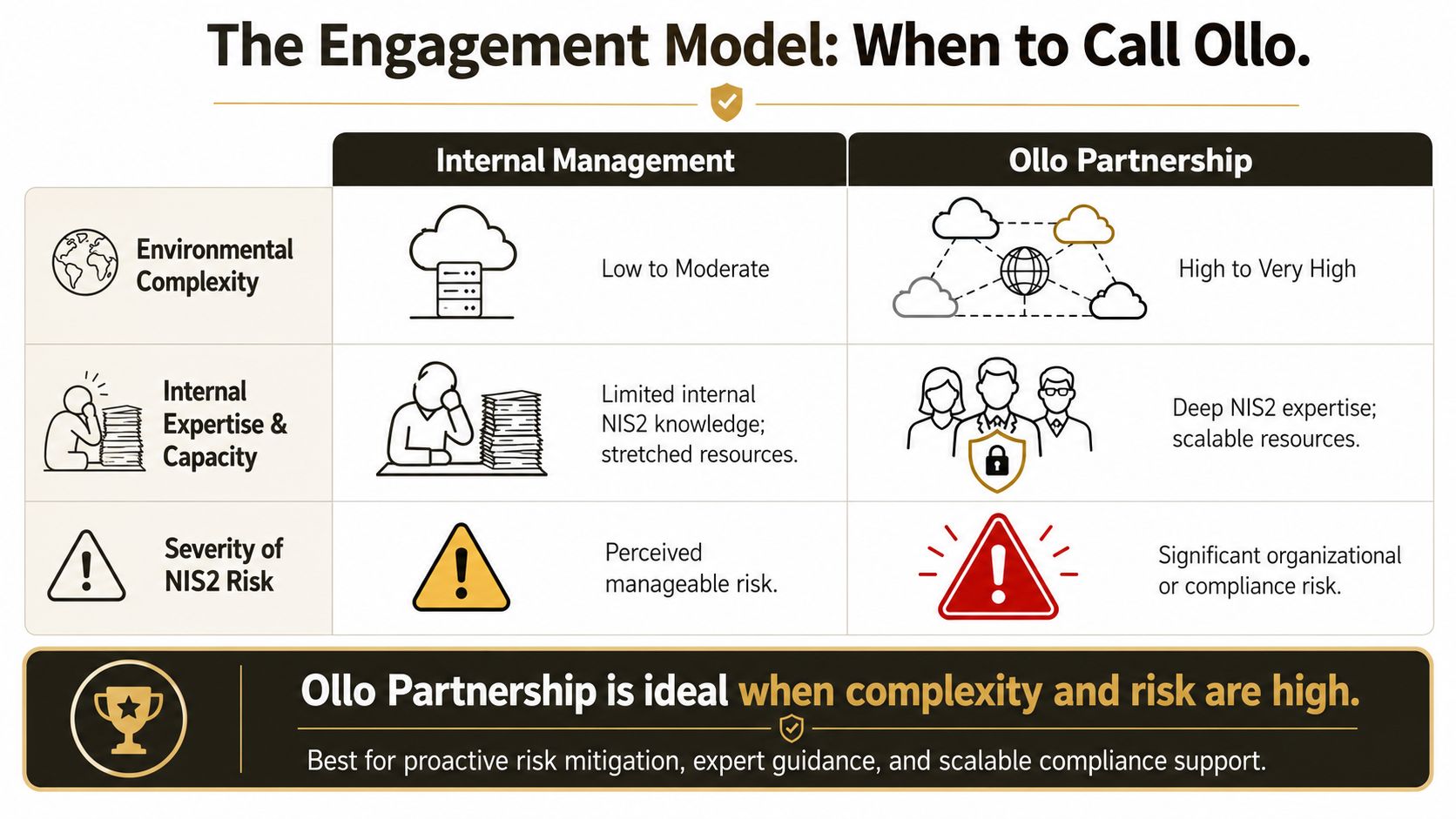
Keep the work in-house when the environment is controlled and the consequences of error are limited.
- Stable tenancy: One tenant, low merger history, few exceptions, limited third-party sprawl
- Controls already proven: Policies are enforced, tested, and evidenced under change, not just configured in the portal
- Operational workload: Joiner, mover, leaver processes, recurring access reviews, routine reporting, standard remediation tasks
That is operations. It is not redesign.
When specialist help is required
Call a specialist when the work can change your compliance position, your audit defensibility, or your ability to investigate an incident. That includes tenant migration, tenant consolidation, Entra ID redesign, remediation after a security event, inherited compliance debt, or any programme where different business units have conflicting control models.
Microsoft's own tooling does not close those gaps for you. It gives you features. It does not resolve cross-tenant permission drift, broken evidence chains, policy conflicts after consolidation, or the ugly reality of regulated data spread across legacy workloads. Treating those problems as normal IT delivery is how organisations create risks insurers do not want to touch.
Use a specialist migration and Microsoft 365 governance consultancy such as Ollo when the project includes regulated data, complex consolidation, ShareGate orchestration, or custom PowerShell PnP scripting rather than basic tool-led moves.
Use a simple test. If the project fails and the result is a missed deadline, your internal team can probably handle it. If the project fails and the result is weak access control, missing audit evidence, broken retention logic, or executives giving poor answers to regulators, bring in Ollo.
If your organisation needs a hard-nosed review of its Microsoft 365 risk posture, or you're planning a migration that cannot tolerate compliance drift, talk to Ollo. We help IT leaders reduce risk around tenant consolidations, governance debt, and zero-trust redesign before those issues become audit findings or incident headlines.

















