



Most advice on a low code automation platform starts with speed, capability, and drag-and-drop convenience. That advice leaves out the part that matters to IT Directors who carry the risk when things go wrong. Low code can accelerate delivery. It can also hide the exact technical failure points that break migrations, corrupt permissions, and create compliance exposure.
I've seen too many teams buy the story that automation becomes safe because the interface looks simple. It doesn't. The documentation says low code is faster. In reality, the hidden runtime behaviour still hits the same Microsoft 365 service limits, the same SharePoint thresholds, and the same identity and permission complexity that break traditional projects.
The Promise Versus the Painful Reality of Low Code
The market is moving hard in this direction. Gartner forecasts that 75% of new enterprise applications will be built on low-code platforms by 2026, and some surveys report development is 40 to 60% faster than traditional methods, as noted in this low-code growth analysis. That sounds compelling until your team points one of these platforms at a live Microsoft 365 estate with real libraries, real permissions, and real compliance obligations.
That's where the popular advice falls apart.
Speed is not the same as control
A visual builder reduces friction at the front end. It doesn't remove complexity from the back end. Your tenant still has to process connector calls, permission evaluations, retries, metadata writes, and identity checks. If your workflow triggers too aggressively or your migration logic depends on assumptions the platform can't preserve, you don't get a small inconvenience. You get throttling, broken inheritance, and audit headaches.
We often see clients fail when they treat low code as a substitute for architecture. It isn't. It's a faster route to deployment, not a waiver from technical limits.
Low code doesn't remove engineering. It hides engineering until production exposes it.
The regulated-sector problem nobody likes to mention
If you work in energy, finance, or healthcare, the cost of failure isn't cosmetic. Missing a permission boundary or corrupting lineage in a document estate doesn't just delay a project. It can break internal controls and complicate legal review. Your risk doesn't shrink because a citizen developer built the workflow instead of a developer.
This is why the usual “Power Apps vs custom dev” debate often misses the only question that matters. Which option fails more predictably under pressure? That's the lens I'd use when reading any Power Apps versus custom development guide for cloud architects.
The first lesson from the trenches
Use low code for what it is. A productivity layer. A delivery accelerator. Sometimes a very good one. Don't treat it as an enterprise risk strategy on its own, because it isn't one.
Understanding the Core Low Code Automation Components
A low code automation platform looks simple because it packages complexity into three visible layers. If you don't understand those layers, you won't spot where your tenant starts taking damage.
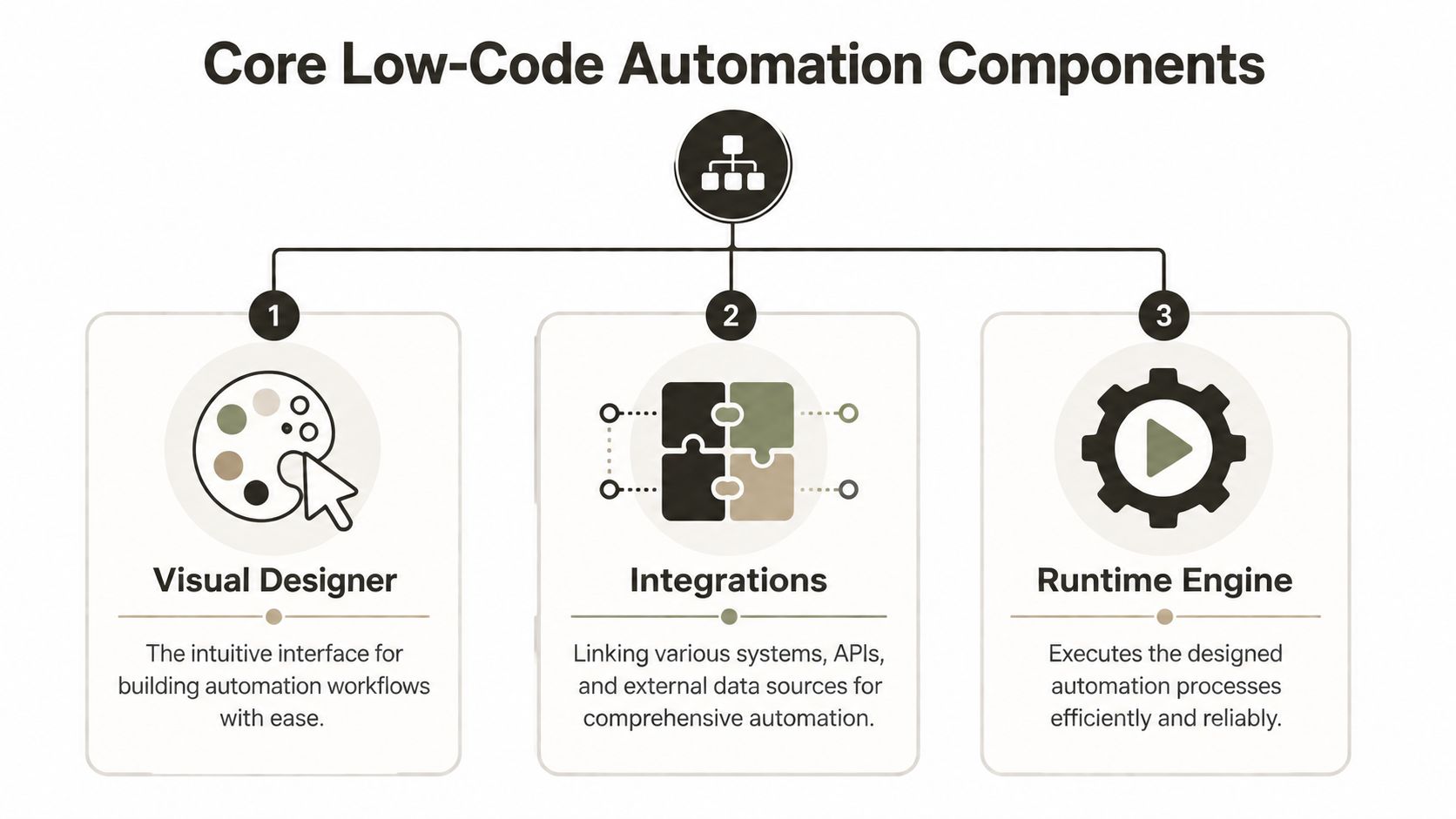
Visual Designer
This is the part vendors love to show. Drag a trigger. Drop an action. Connect a branch. Save. It feels safe because the interface is tidy.
It isn't safe by default. The visual designer is only a modelling surface. It doesn't tell you how many calls the finished workflow will generate, how retries behave under service pressure, or what happens when a connector encounters malformed metadata.
Integrations
Connectors are where most hidden risk enters the room. They package access to systems like SharePoint, Exchange, Teams, SQL, Salesforce, and third-party APIs. They also abstract the call patterns, which means your team often can't see the actual operational footprint until the platform starts failing in production.
If you want a better conceptual model for end-to-end process control, read this guide to workflow orchestration. It helps separate simple task chaining from actual operational coordination, which is where many low-code designs go off the rails.
Practical rule: If your team can't explain what each connector does to authentication, throughput, retries, and error handling, they aren't ready to deploy it into production.
Runtime Engine
The runtime engine executes what the designer produced. That's the part most business users never think about. It schedules actions, runs logic, handles retries, and pushes requests into Microsoft 365 or other systems. In other words, it's the layer that turns a neat flowchart into real operational load.
That matters because by 2026, developers outside formal IT are projected to comprise at least 80% of low-code users, and while this promises a 90% reduction in development time, failed implementations still run into API Throttling and GUID Conflicts that standard tools can't resolve, according to these low-code trends and statistics.
Think of it like this
A low code automation platform is a car with tinted windows over the engine bay. The steering wheel feels easy. The dashboard looks friendly. But if the oil pressure drops, the engine still seizes.
That's why teams building external forms, portals, or lightweight business apps on Microsoft Power Pages still need architectural oversight. The front end might be low friction. The backend consequences aren't.
The Enterprise Breaking Points Microsoft Docs Confirm
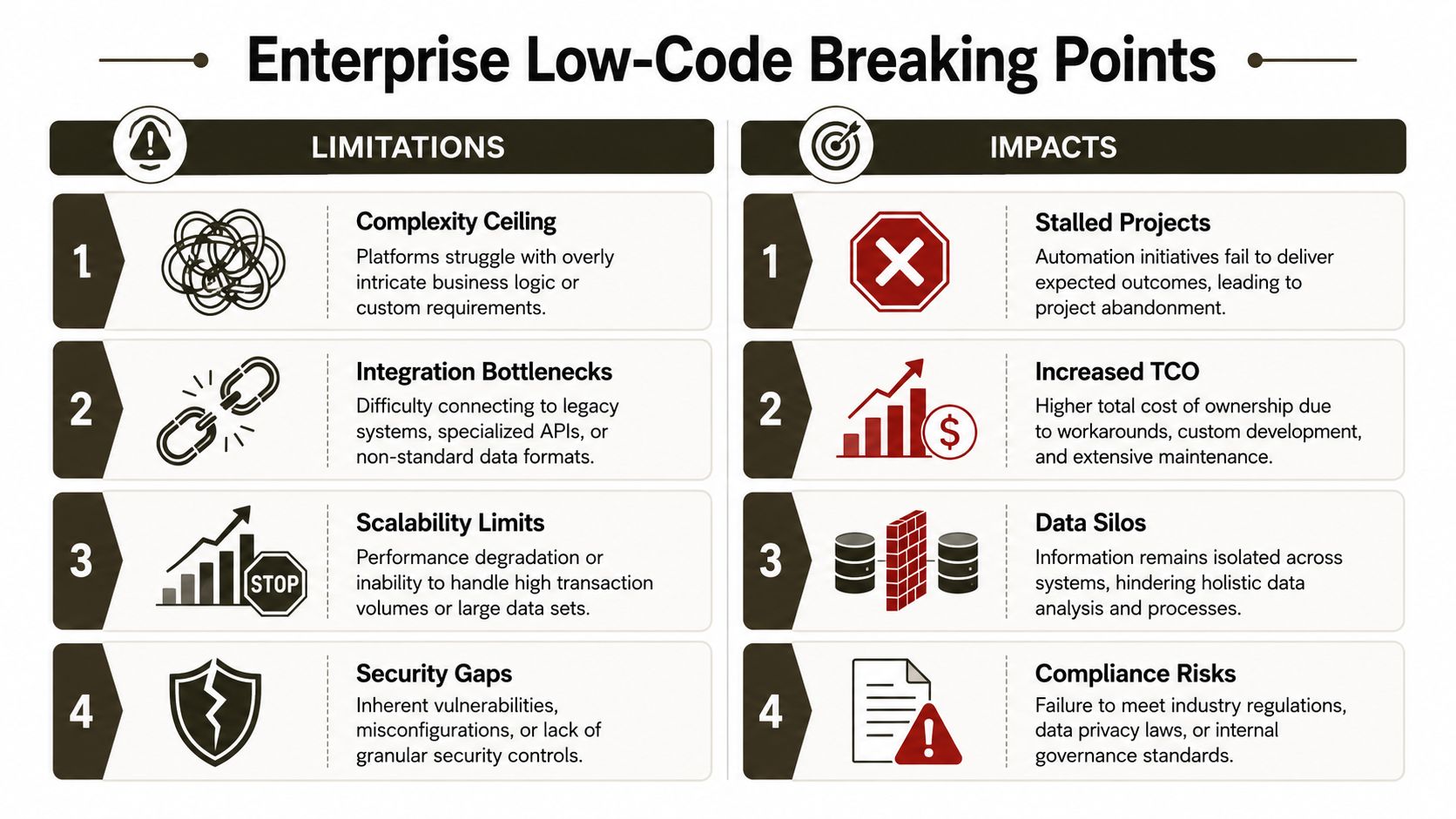
Generic low-code content becomes useless. Enterprise projects don't fail because the screen was hard to use. They fail because Microsoft 365 enforces limits, and those limits don't care how friendly your builder looked on demo day.
API throttling is not a bug
Microsoft 365 enforces API throttling. When background processes exceed service tolerance, the platform returns HTTP 429 Too Many Requests and can also return 503 Service Unavailable responses. Microsoft's own guidance explains that clients must respect retry behaviour rather than hammer the service again through blind restarts. It also notes a threshold of 10 delegated user requests per second per user, which is exactly the kind of detail teams ignore until jobs stall in production. You can verify that in Microsoft's guidance on avoiding throttling or getting blocked in SharePoint Online.
The documentation says retries make the process resilient. In reality, retries can stretch a migration window, jam background operations, and cause cascading delays if you built the workload with no backoff strategy.
The 5,000-item threshold still destroys naive designs
SharePoint Online enforces a List View Threshold of 5,000 items. Once a library crosses that line, standard migration APIs can become unreadable or unreliable unless the source gets reorganised into smaller, indexed libraries first. That isn't folklore. It's a documented operational problem in real migrations, covered in this analysis of SharePoint version history migration and the 5,000-item threshold.
If your low-code process assumes it can enumerate, read, or process large libraries the same way a small team site works, you're building on fantasy. The platform doesn't care that the workflow looked elegant in test.
Concurrency hits another wall
Microsoft also enforces a queue limit of 5,000 simultaneous migration jobs. Push beyond that, and the service throttles immediately. Teams then have to reduce parallelism and shift work into off-peak windows. That detail appears in Microsoft's published discussion of SharePoint Online throttling and migration queue limits.
A lot of DIY teams make the same mistake. They see slow progress, so they increase threads. That often makes the service less cooperative, not more.
Broken inheritance and GUID conflicts don't fix themselves
The ugliest failures don't announce themselves with a clean error message. They show up later as access anomalies, orphaned permissions, missing references, and objects that no longer behave like the source environment. Low-code tools cannot resolve Broken Inheritance and GUID Conflicts, and one verified data point states these issues plague 40% of DIY migrations in regulated sectors, tied to the same Microsoft 365 constraint profile already discussed earlier.
If your project includes tenant-to-tenant consolidation, don't assume a connector can preserve intent just because it can move files.
The cost of getting this wrong
In a regulated environment, missing these checks doesn't just fail the migration. It breaks legal hold assumptions, weakens access control confidence, and leaves your team explaining why the target estate no longer reflects the source design.
Power Platform for Tasks Versus Scripts for Migrations
Power Platform is useful. That's the honest starting point. It works well when the scope is narrow, the logic is simple, and the blast radius is limited. It becomes a liability when teams stretch it into migration work it was never meant to control.
Where low code earns its keep
For departmental automation, a low code automation platform can be the right call. Approval flows, notification routing, simple forms, light-touch data capture, and team-level process automation fit the model. If a business unit wants a controlled approval process, a focused pattern like this Power Automate approval workflow approach makes sense.
That's not the same as saying it belongs in a high-stakes migration.
Where it starts to break
Platform vendors themselves make the distinction. Nintex and IBM describe Low-Code Application Platforms as outsider-friendly for departmental tasks, but unsuitable for complex enterprise applications that need deep integration, specific data governance, and fault recovery, as outlined in Nintex's explanation of low-code automation.
That aligns with what experienced migration teams already know. Migrations need deterministic behaviour. They need logging you can trust, exception handling you can control, and preservation logic that doesn't collapse when the source estate contains old customisations, non-standard permissions, or damaged metadata.
Tool Selection Matrix
| Scenario | Recommended Tool | Reason (Risk Mitigation) |
|---|---|---|
| Team approvals and notifications | Power Automate | Good fit for bounded workflows with clear owners and low blast radius |
| Internal form with standard Microsoft 365 data | Power Apps plus Power Automate | Useful when data structures are straightforward and governance exists |
| Large SharePoint library restructuring | Custom scripting | Needed to inspect source structure, manage batching, and avoid threshold failures |
| Tenant-to-tenant SharePoint migration with custom permissions | ShareGate plus PowerShell PnP scripts | Better control over inheritance repair, object mapping, and exception handling |
| Consolidation across regulated business units | Scripted migration approach with governance controls | Supports auditability, staged execution, and targeted remediation |
The Ollo Verdict
Use Power Platform for departmental tasks. Don't use it as your migration engine.
Use SPMT for very small, low-risk moves if the estate is clean and simple. For anything beyond that, especially tenant-to-tenant consolidation, high-volume libraries, custom permissions, or regulated content, you need ShareGate plus custom PowerShell PnP scripts. That's the only approach I trust when the cost of failure lands on your team.
Governance and Zero Trust A Non-Negotiable Layer
The biggest mistake organisations make with low code isn't technical. It's political. They hand out licences before they define control. That creates shadow IT with an official logo on it.
Citizen development without guardrails is a governance failure
A low code automation platform lets process owners build quickly. That's the attraction. It also lets them create connectors, service principals, and data paths that central IT doesn't fully review unless governance exists first.
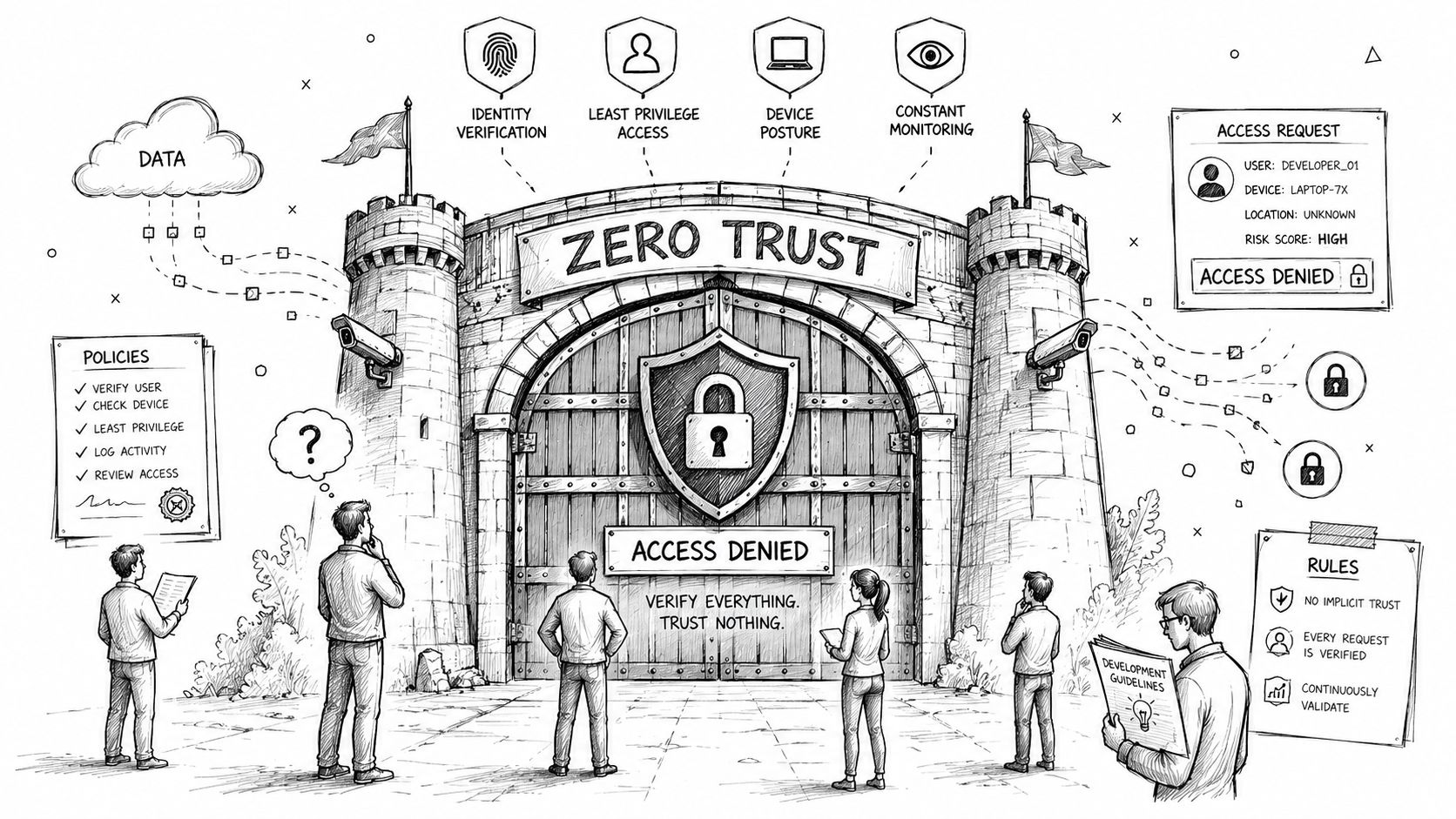
In regulated sectors, that's reckless. Your team can't claim control over data handling if unaudited workflows move records between systems on loosely governed credentials. Least privilege must exist before the first automation goes live, not after the first incident review.
Zero Trust has to sit underneath the platform
If your Entra ID model still relies on broad access assumptions, low code accelerates the wrong thing. It multiplies access paths before you've tightened them. That's why governance and identity design belong at the front of the programme, not in a clean-up phase.
Use environment strategy, connector controls, data loss prevention policies, service principal review, and ownership models from day one. If your organisation hasn't defined who can create what, where they can connect, and how those automations inherit identity permissions, you haven't built an automation capability. You've built an exposure surface.
A practical reference point for this work is a structured Power Platform governance model. The key isn't policy theatre. The key is enforceable control.
Your automation is only as trustworthy as the identity model and governance controls behind it.
What mature control looks like
You don't need endless bureaucracy. You need hard boundaries.
- Environment separation: Keep experimental work away from production data and production identities.
- Connector review: Approve high-risk connectors deliberately. Don't let every business unit discover them by accident.
- Service account discipline: Know which identities each automation uses and why.
- Ownership rules: Every flow, app, and integration needs a named owner and a recovery owner.
- Auditability: If an automation modifies records, your team must be able to explain what changed and under which identity.
This short explainer is worth watching if your leadership team still treats Zero Trust as a security slogan instead of an operating model.
The operational truth
Governance slows down the wrong projects and protects the right ones. If a proposed automation can't survive access review, data classification review, and ownership review, it never belonged in production.
Your Operational Checklist Before You Automate Anything
Teams frequently ask how to build. The better question is whether your organisation is truly ready to automate this safely.
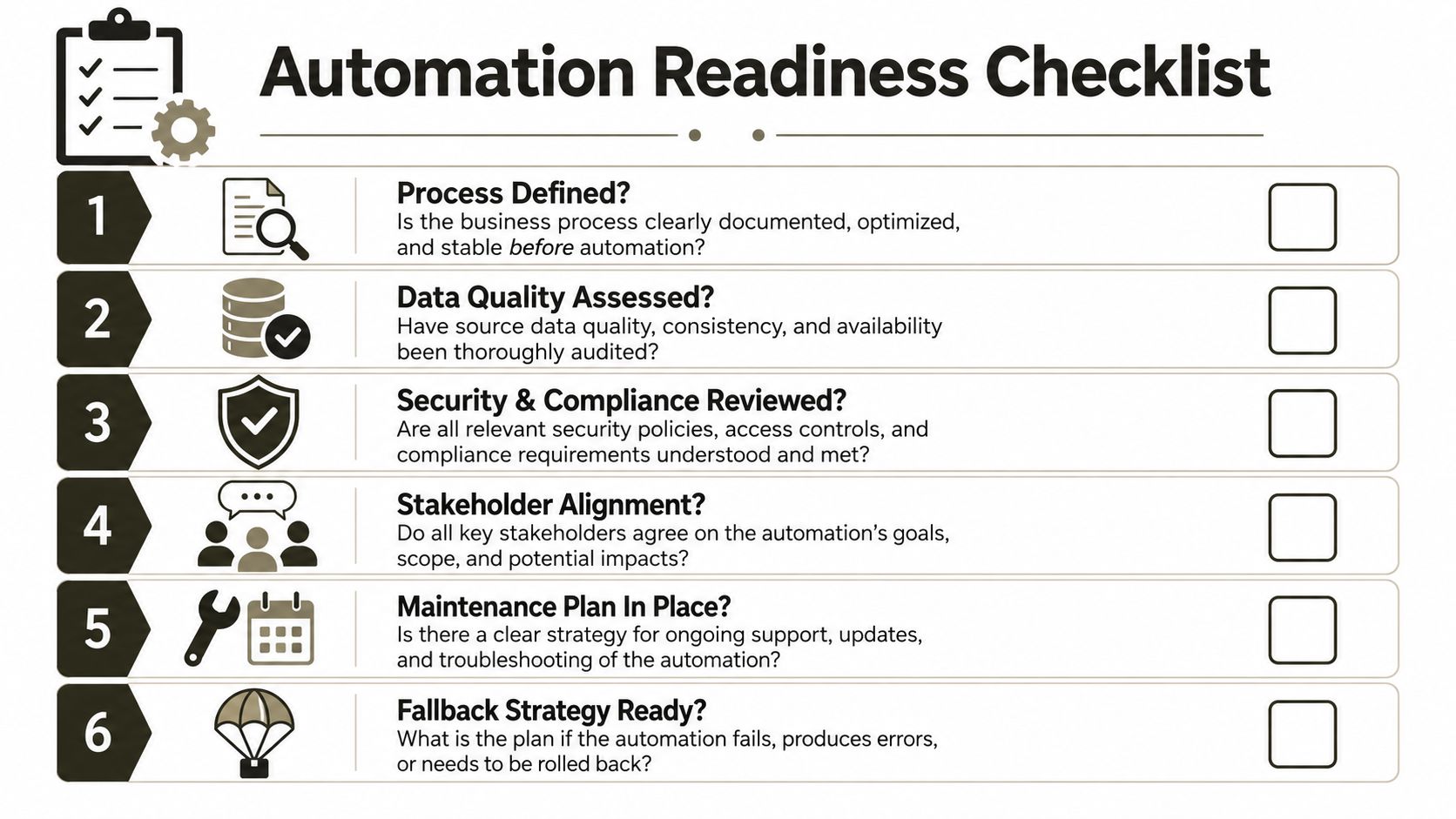
Readiness questions that expose weak plans
Ask these before your team builds a single production workflow.
Have you audited source libraries properly? Don't ask whether SharePoint contains “a lot of files.” Ask which libraries exceed the 5,000-item threshold, which ones rely on legacy structures, and which ones require restructuring before automation or migration begins.
What is your throttling response plan? If Microsoft 365 starts returning HTTP 429 or 503, who reduces concurrency, who monitors retries, and who decides whether to pause or re-sequence workloads?
Where will permissions break first? If the estate contains unique permissions, broken inheritance patterns, or complex site-level exceptions, has anyone mapped them before your platform starts copying content?
Who owns the failure? When a citizen-developed flow writes bad metadata, duplicates records, or moves sensitive files to the wrong location, which named person is accountable for remediation?
Governance checks most teams skip
These questions matter just as much as technical design.
- Is Entra ID configured for least privilege? Your automations should run on tightly scoped identities, not broad convenience access.
- Do you have environment boundaries? Development, test, and production must stay separate.
- Can you roll back safely? If the workflow damages data or misroutes content, your team needs a practical fallback path.
- Have compliance owners signed off? If they haven't reviewed data handling, your project isn't ready.
A low-code project becomes dangerous when the business can launch it faster than IT can govern it.
The hard recommendation
If your team can't answer every question above with evidence, not confidence, stop the rollout. Fix readiness first. The cost of caution is small. The cost of production remediation is not.
The Only Safe Path for High-Stakes Automation
Low code isn't the enemy. Blind confidence is.
A low code automation platform can deliver real value in the right scope. But Microsoft 365 still enforces throttling. SharePoint still breaks naive designs at threshold boundaries. Enterprise migrations still run into broken inheritance, permission anomalies, and object-level conflicts that visual builders do not resolve. Those are documented constraints, not edge cases.
Your decision shouldn't centre on which platform looks most efficient in a demo. It should centre on how your team will avoid predictable failure points when the estate is messy, the permissions are non-standard, and the compliance burden is real. That is why high-stakes work needs architecture, sequencing, scripting, governance, and identity design that can survive production conditions.
If you're modernising legacy forms and process-heavy SharePoint estates, the safest route often starts with rethinking the underlying application path, not forcing old complexity through a low-code wrapper. That's especially true for teams planning an InfoPath migration to Power Apps, where the primary risk lives in data structure, permissions, and runtime behaviour rather than the form designer itself.
The safest path is boring in the best sense. Audit first. Govern first. Redesign identity first. Use low code where it fits. Use scripted migration tooling where failure would hurt. That's how you protect your data, your timeline, and your own credibility.
If your Microsoft 365 or SharePoint programme involves tenant-to-tenant consolidation, regulated data, broken permissions, or rescue work after a failed DIY attempt, speak to Ollo. We handle the ugly scenarios most firms discover too late, with the migration discipline, PowerShell PnP scripting, ShareGate execution, and Zero Trust redesign work that high-risk projects require.

















