



Your SharePoint knowledge management project probably didn't start in crisis. It started with a sensible brief. Consolidate content. Clean up old file shares. Move into Microsoft 365. Improve search. Support Copilot later. Then the first migration test ran into throttling, permissions didn't map cleanly, owners discovered years of junk content, and suddenly your “content tidy-up” became a business risk programme with no one willing to name it.
This is the main problem. Most enterprise knowledge management projects fail long before cutover. They fail in planning, in classification, in permission modelling, and in the fantasy that Microsoft's happy-path documentation describes what happens in a regulated tenant full of legacy debt.
I've seen the same pattern repeatedly. Internal teams treat knowledge management as a file move. It isn't. It's an architectural redesign under live fire.
Your Knowledge Management Project Is Already Behind Schedule
If your team has already discovered duplicate libraries, mystery site owners, folder trees nobody understands, and permission exceptions that date back to a departed administrator, you're not unlucky. You're in the normal state of an enterprise migration.
We often see clients fail when they think delay starts after a missed milestone. It starts earlier. It starts when the programme assumes content is cleaner than it is, permissions are simpler than they are, and SharePoint Online will tolerate the same chaos your file shares tolerated for years.
The distress signals are obvious
The warning signs don't hide:
- Search returns noise: Users can technically find documents, but they can't trust what they find.
- Site owners contradict each other: One team wants lift-and-shift, another wants a redesign, and compliance wants retention controls bolted on late.
- Migration tests stall: Throughput looks acceptable in a lab, then collapses against live tenant constraints.
- Security reviews uncover drift: Direct user permissions and broken inheritance surface in places nobody expected.
That's when the project gets rebranded as “phased”. In practice, that usually means the team has lost control of scope.
This isn't a documentation exercise
The commercial stakes are bigger than most sponsors admit. The global knowledge management market is projected to reach $2.1 trillion by 2030, and strong knowledge management systems can reduce time lost to information search by up to 35% while boosting organisational productivity by 20–25%. Tangible returns also include 39% improved business execution and 35% better customer support according to knowledge management statistics cited by Document360.
Those numbers matter because they expose the lie behind underfunded migrations. This isn't a nice-to-have intranet tidy-up. Your knowledge estate affects execution speed, support quality, and decision-making.
Practical rule: If your migration plan measures success by “files moved”, your programme is already aimed at the wrong target.
The documentation says knowledge management is about organising content. In reality, it's about whether your people can trust the platform when decisions carry legal, operational, or customer impact.
What failure actually looks like
Failure rarely arrives as one dramatic outage. It shows up as slower approvals, duplicate work, bad search results, untraceable records, and teams reverting to email attachments because the new platform feels unsafe.
That's why sceptical IT Directors are right to be sceptical. A troubled knowledge management migration doesn't just waste budget. It degrades the way your organisation operates.
Defining the Real Goal Getting M365 Knowledge Management Right
The goal isn't to “get everything into SharePoint”. That thinking creates bloated libraries, weak metadata, and permission sprawl. Instead, the goal is a single source of truth that your users can find, your security team can govern, and your auditors can defend.
That means discoverability, control, and traceability. If one of those fails, the whole knowledge management model fails.
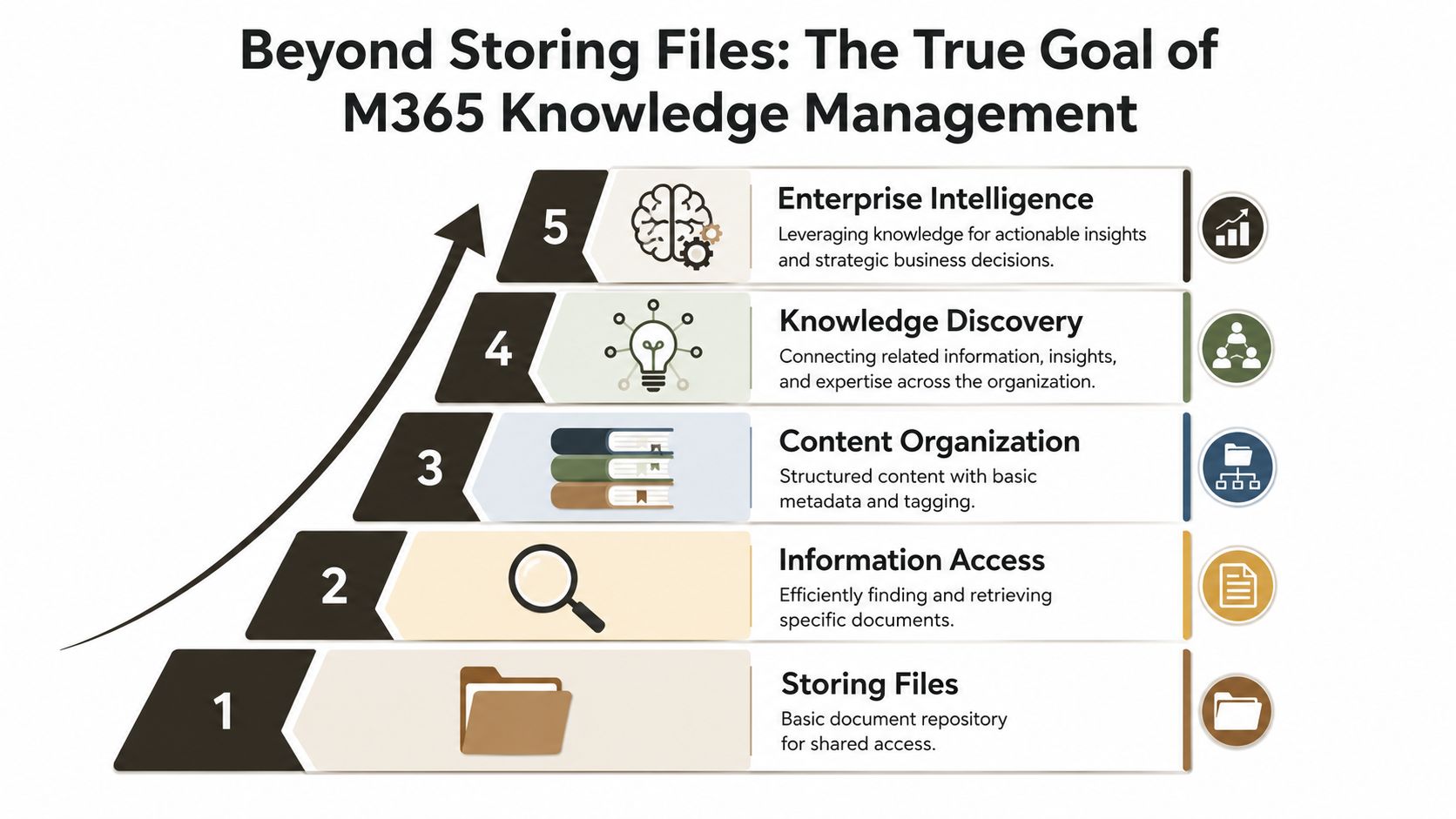
File storage is the lowest rung
A document repository is not a knowledge system. It's just a container. Plenty of tenants have enormous volumes of content and almost no usable knowledge because nobody designed the structure, ownership model, metadata, or search experience properly.
The maturity jump happens when you stop asking where to store files and start asking:
- Who owns the truth: Which team decides what content is authoritative?
- Who can see what: Which access rules apply by business function, not historical accident?
- How will users find it: Search, metadata, navigation, and content types have to work together.
- How will you prove compliance: Retention, sensitivity, access history, and content lineage need to stand up under scrutiny.
Poor knowledge management creates active risk
In regulated sectors, messy content isn't merely untidy. It's dangerous. Legacy file shares often contain years of broken inheritance and direct user access exceptions. When teams migrate that mess without fixing it first, they carry old security flaws into the new environment.
That risk is spelled out in this review of SharePoint migration mistakes, which notes that migration of legacy file shares without pre-cleanup of broken permissions inheritance and direct user access exceptions results in a security and compliance nightmare where sensitive folders retain old access rights in SharePoint Online.
Missing this step doesn't just fail the migration. It breaks legal compliance.
The official messaging often implies that Microsoft 365 will somehow impose order by virtue of being modern. It won't. It will faithfully host your disorder unless you redesign it.
Treat unstructured data as liability
Your unstructured data estate includes unmanaged records, stale versions, personal copies, confidential material in the wrong place, and permissions nobody has reviewed in years. That isn't technical clutter. It's unmanaged business liability.
A serious Microsoft 365 programme starts by aligning the migration to adoption, governance, and business operating model. If your team hasn't done that work, a Microsoft 365 adoption strategy needs to sit beside the migration plan, not behind it.
A good architecture protects the business first. Better search and AI readiness come after that.
Designing Your Taxonomy The Blueprint Before the Build
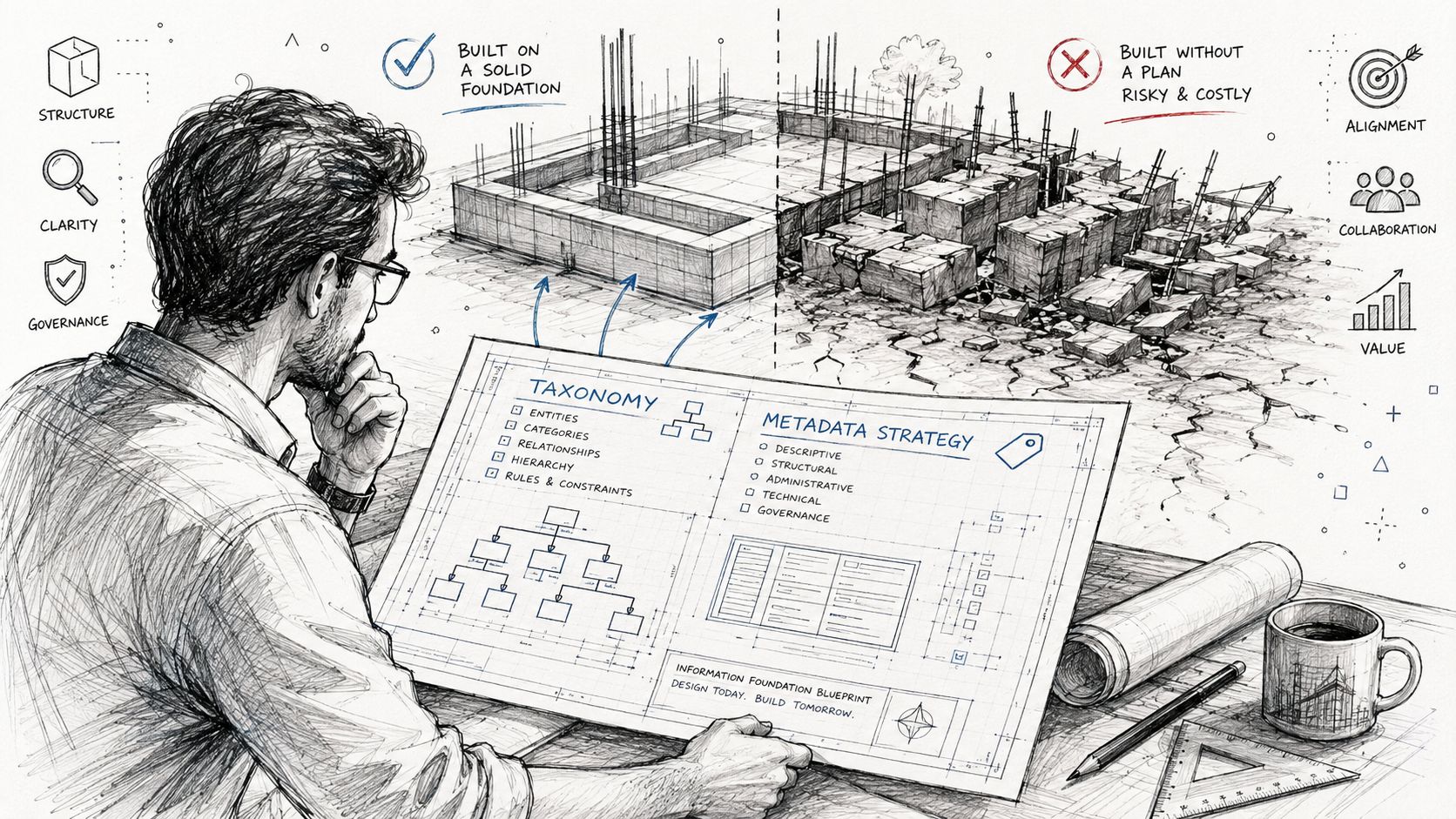
Most failed knowledge management programmes share one flaw. They started moving content before designing the information architecture. That's the same as pouring concrete before the blueprint exists.
Your taxonomy decides whether SharePoint becomes an organised knowledge layer or a more expensive file share.
Folders alone won't carry enterprise knowledge
Folders feel familiar, so teams overuse them. That works for small workgroups. It fails at scale because folders don't express business meaning well enough for search, governance, automation, or records control.
A durable SharePoint model uses:
- Content types for consistent document classes
- Managed metadata for shared terms across sites
- Term sets for controlled vocabulary
- Site columns for reusable classification
- Search refiners built on metadata users understand
If your users can create whatever columns, terms, and library structures they like, entropy wins quickly.
The blueprint has to answer hard questions
Before migration, lock down the decisions that shape the estate:
Define knowledge domains
Don't organise around old network drives. Organise around business functions, regulated processes, and ownership boundaries.Separate operational content from records
Teams often jam everything into one place. That destroys retention logic and makes defensible disposal harder.Standardise mandatory metadata
Keep it tight. If you demand too much, users bypass it. If you demand too little, search degrades and governance becomes theatre.Design for future automation
Content classification should support approval flows, retention labels, and AI retrieval later. Retrofits cost more and fail more often.
The documentation says “user-friendly”. In reality, user-defined structures create years of remediation work.
Central design beats local improvisation
I'm opinionated here because the evidence from the field is brutal. When every department invents its own conventions, no central search model survives, no compliance team gets consistent reporting, and no migration batch behaves predictably.
A better approach is to establish a governed model, then allow limited local flexibility inside it. That means shared term stores, approved content types, controlled naming standards, and clear ownership for each knowledge domain.
A practical design review should cover the following:
| Area | What to decide before migration |
|---|---|
| Classification | Which metadata fields are mandatory and who owns them |
| Structure | Which sites, libraries, and hubs support business processes |
| Security | Where inheritance should remain intact and where exceptions are justified |
| Search | Which refiners, result sources, and naming rules help users retrieve content |
| Lifecycle | What gets retained, archived, reviewed, or disposed |
If your organisation plans to use AI across Microsoft 365, taxonomy quality matters even more. This guide to classification, metadata, and tagging for Copilot success gets to the heart of that dependency.
The cost of skipping taxonomy
When teams skip this phase, they usually pay later in three ways. Search quality collapses. Permission models become harder to rationalise. Remediation turns into a second project nobody budgeted for.
That's not bad luck. That's what happens when structure gets designed after content lands.
Why Standard Migration Tools Fail at Enterprise Scale
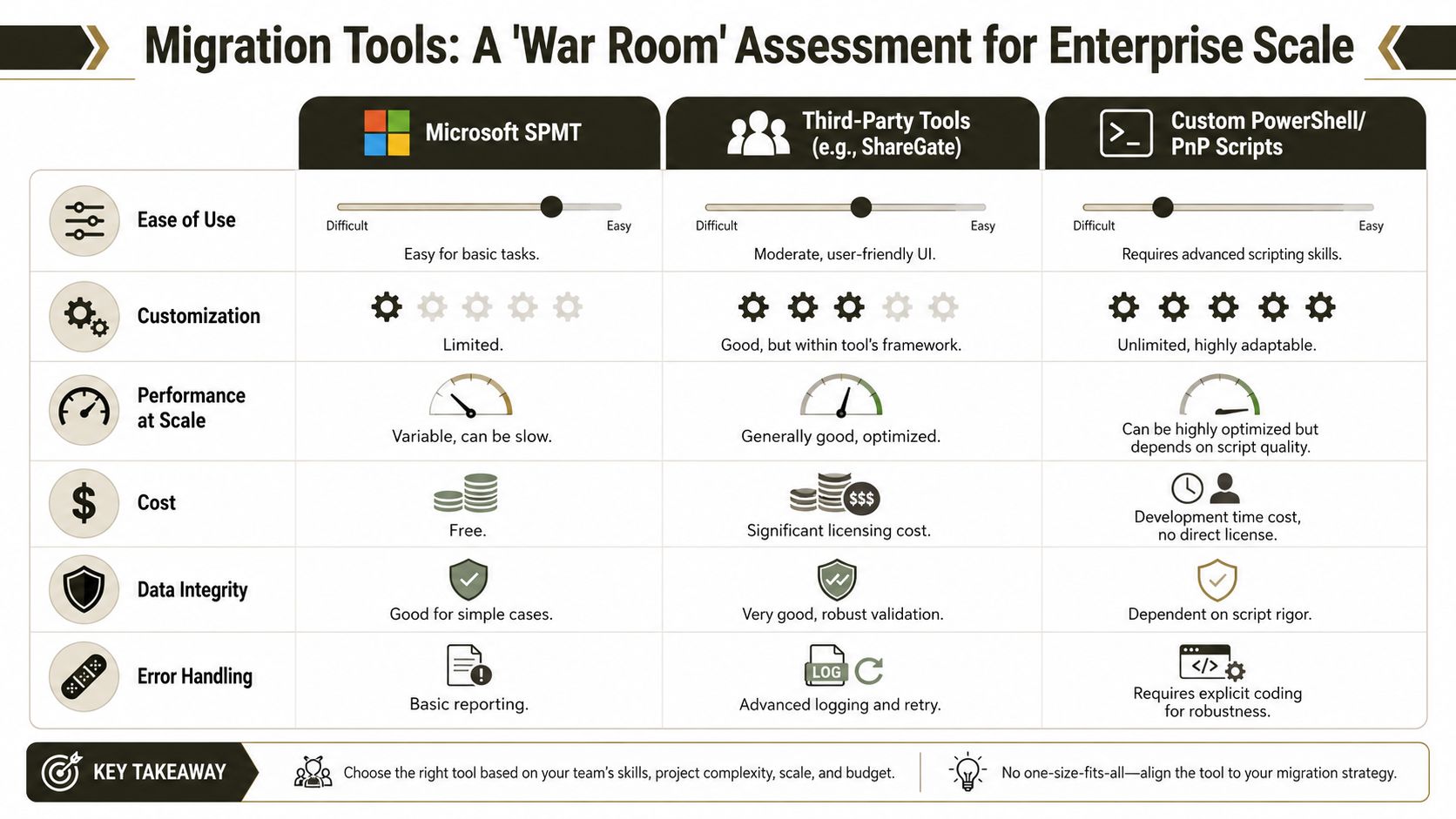
Tools matter, but the bigger issue is how teams misunderstand their limits. Microsoft's SharePoint Migration Tool, ShareGate, and custom PowerShell PnP scripts each have a place. They are not interchangeable.
The mistake is assuming a tool choice can compensate for weak architecture, dirty permissions, and unmanaged tenant constraints.
SPMT works until the estate gets real
SPMT has one clear advantage. It's easy to start with. For simple moves, that matters.
However, practical limits emerge. DIY migration attempts using Microsoft's native SPMT tool can suffer a 70% reduction in migration throughput due to API throttling, especially when migrating enterprise-scale data beyond 50GB, according to this analysis of enterprise SharePoint migration constraints.
That isn't a bug. It's a platform protection mechanism. Microsoft is protecting the service, not your project timeline.
ShareGate is powerful, but it doesn't remove complexity
ShareGate is a serious tool. It handles many scenarios better than native tooling, and its reporting, mapping, and validation capabilities are useful. But teams often buy it and assume the licence includes judgement. It doesn't.
We often see clients fail when they throw ShareGate at complex environments with:
- Deep permission exceptions
- Broken inheritance at scale
- Content restructuring during migration
- Multiple source systems with inconsistent metadata
- Tenant-to-tenant consolidations that need identity redesign
In those cases, ShareGate still needs expert configuration, staged execution, and exception handling. Without that, the tool migrates a bad design faster.
Here's the practical comparison:
| Tool | Where it helps | Where it breaks |
|---|---|---|
| SPMT | Small, simple, low-risk moves | Throughput collapse, weak control, poor fit for enterprise exceptions |
| ShareGate | Better validation, mapping, and admin visibility | Still dependent on architecture quality and operator skill |
| PowerShell PnP scripts | Precision, control, exception handling, velocity tuning | Requires deep engineering discipline |
A lot of IT leaders don't want to hear this because they've already bought the tool. Tool ownership doesn't equal migration capability.
A short walkthrough helps make the difference clear.
Custom scripting is how you control the project
Enterprise migration success depends on control over batch sizing, retries, metadata mapping, permission resets, logging, and exception handling. That's where custom PowerShell PnP scripting earns its keep.
A script can do what a wizard often can't:
- Throttle intelligently: Adjust batch behaviour when the tenant pushes back
- Reset broken inheritance: Standardise libraries before the mess spreads
- Handle exceptions deliberately: Skip, quarantine, or transform problematic items with intent
- Produce auditable logs: Give security and compliance teams evidence, not anecdotes
Use SPMT for under 50GB and only when the structure is simple. For anything larger or more complex, you need custom scripting.
That isn't purism. It's risk control. If you want a more direct view of why tool-led plans keep failing, this breakdown of why SharePoint migration tools fail and code is mandatory is worth your time.
The Ollo Verdict
Use native tools for trivial moves. Use ShareGate with experienced hands for structured, well-understood scenarios. For enterprise knowledge management with complex permissions, tenant constraints, and business-critical content, custom scripting isn't optional. It's the only way to stay in control.
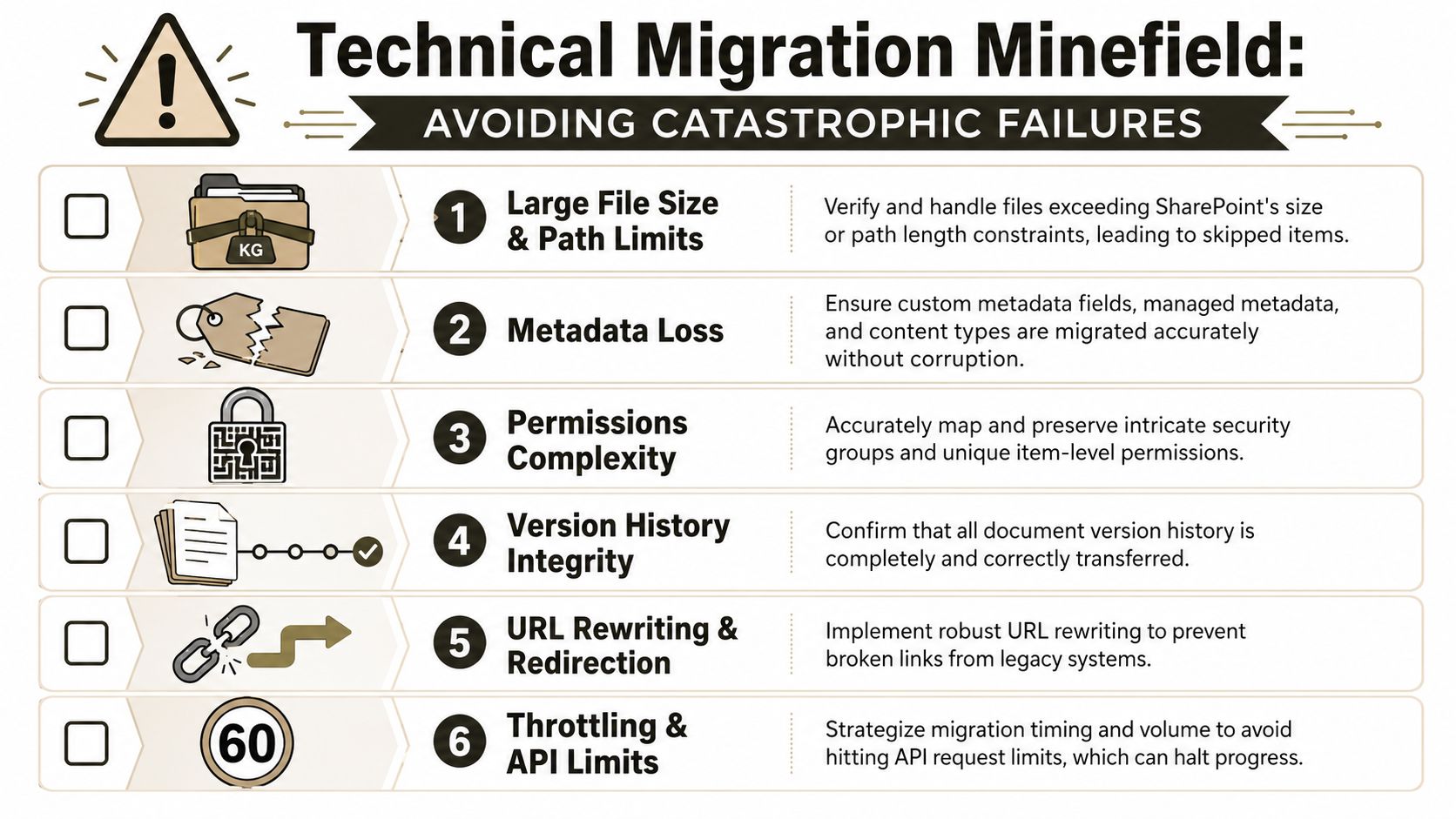
Navigating the Technical Migration Minefield
Enterprise knowledge management migrations don't usually die because the team forgot to create a project plan. They die because technical edge cases were dismissed as admin details. They aren't admin details. They are project killers.
The documentation says SharePoint Online is flexible. In reality, several hard platform limits shape everything you can and can't do.
The 5,000-item threshold is not a footnote
The 5,000-item list view threshold is a hard technical limit confirmed in official Microsoft Learn documentation. In enterprise SharePoint knowledge management, it causes API throttling and broken inheritance when unmanaged metadata hierarchies trigger excessive queries, as discussed in this analysis of SharePoint knowledge management limits.
Internal teams often treat this as a user interface nuisance. It isn't. It affects migration behaviour, indexing, queries, and administrative operations.
If your design allows libraries to grow without indexing strategy, partitioning, and metadata discipline, you're building a future outage into the platform.
Path lengths, GUID conflicts, and silent damage
The nastiest failures aren't always loud. Some become visible months later.
Three examples show up repeatedly in distressed estates:
Long path problems
Legacy folders often carry absurd nesting. During migration, those paths can fail, skip, or require truncation and rewrite logic.GUID conflicts
When content structures, workflows, or linked artefacts move badly, references can break in ways users won't spot immediately.Orphaned permission states
Broken inheritance plus inconsistent security mapping can leave items accessible to the wrong people or to no one at all.
These are the kinds of failures Microsoft documentation mentions abstractly while understating their operational impact in live enterprise tenants.
Your technical due diligence checklist
Before your team moves another batch, challenge the design against real constraints:
Library scale
Will any target library breach practical thresholds because the business wants one giant “knowledge hub”?Metadata query load
Have you indexed the fields users and scripts will hit most often?Permission inheritance
Which sites and libraries must retain inheritance, and where are exceptions justified?Path rationalisation
Have you shortened source structures before migration, not after?Reference integrity
Which links, IDs, and embedded references need validation after each batch?
For larger estates, this guide to large-scale SharePoint migration is the kind of planning reference teams should read before they discover these problems the hard way.
The real lesson from the trenches
DIY approaches struggle here because these constraints interact. A library with poor taxonomy hits threshold pressure. Threshold pressure triggers query issues. Query issues complicate permission handling. Permission handling then breaks validation and rework.
That cascade is why “just migrate it and tidy up later” keeps failing.
Implementing Governance and Zero Trust Controls
Security teams often get brought in late, after the migration plan is already committed. That's backwards. Governance and Zero Trust controls aren't polish. They determine whether the destination is safer than the source.
If your migration copies legacy permission chaos into Microsoft 365, you haven't modernised anything. You've just changed the logo on the risk.
Post-migration cleanup is a myth
This is one of the most expensive delusions in enterprise SharePoint work. Leaders assume they can move first, then fix permissions, ownership, and governance later.
That assumption breaks down fast. Post-migration remediation projects have a failure rate exceeding 90%, primarily because Microsoft Graph and legacy permission structures cannot be reliably corrected after content is moved, according to this analysis of post-migration remediation failure.
That means pre-migration cleanup isn't best practice. It's the only viable risk-reduction strategy.
What a defensible control model looks like
A serious governance plan maps access and lifecycle controls before migration starts. Your team should define:
- Access by role, not by historical convenience
- Group-based permissions instead of direct user exceptions
- Sensitivity and retention alignment for key knowledge domains
- Ownership for every site, library, and business-critical content set
- Review processes for privileged access and external sharing
If your Entra ID groups, SharePoint permission model, and content governance policies don't line up, users will route around the platform and the audit trail gets weaker.
Zero Trust has to shape the migration itself
Zero Trust in this context means explicit verification, least privilege, and continuous control. It doesn't mean spraying conditional access policies over a badly structured content estate and hoping that counts as governance.
A proper design strips out unnecessary exceptions before migration, reduces unique permissions, and rebuilds access around approved security groups and business roles. Teams that skip this step usually end up defending inherited mess under a modern compliance badge.
For a practical governance lens, this content governance guidance is closer to what enterprise teams need than another generic migration checklist.
Governance is the project. The migration is just the transport layer.
Conclusion The Only Metric Is Reduced Project Risk
You don't need another article telling you knowledge management matters. You already know that. The critical question is simpler and harsher. What does failure cost your organisation?
If your answer includes data exposure, audit pain, bad search, project overruns, stalled AI plans, or users losing trust in the platform, then this decision isn't about convenience. It's about risk.
The failure pattern is predictable. Teams underestimate taxonomy. They overestimate native tools. They ignore hard limits until throttling, threshold issues, broken inheritance, and reference failures start compounding. Then they discover that post-migration cleanup can't reliably rescue the estate.
That's why smart IT leaders should judge a knowledge management programme by one metric above all others. Did it reduce operational, security, and compliance risk while making trusted knowledge easier to find and use?
A mature operating model helps here. If your leadership team wants a repeatable way to review AI and information risks after migration, Obsidian AI risk reviews offer a useful governance rhythm for ongoing oversight.
The final call is blunt. You can let your team gamble on a DIY approach built on generic documentation and tool wizards, or you can treat the migration as what it is: a high-stakes architecture and risk-management programme. For enterprise knowledge management, the responsible choice is the one that gives your organisation fewer surprises, fewer exceptions, and fewer recovery projects.
If your Microsoft 365 migration carries real business risk, Ollo is the team to bring in before the damage gets expensive. They specialise in high-stakes SharePoint and tenant-to-tenant migration work, including zero-trust redesigns, complex permission remediation, and rescue projects in regulated environments where data loss and compliance failure aren't acceptable outcomes.

















