



Most advice on Microsoft 365 adoption strategy is unserious. It talks about champions, lunch-and-learns, posters, and “driving engagement” as if your real problem is user enthusiasm.
It isn't.
Your real problem is that Microsoft 365 multiplies whatever disorder already exists in your estate. Weak identity turns into cloud-wide exposure. Bad permissions turn into faster data leakage. Unowned content turns into audit failure. If you migrate first and govern later, you haven't modernised anything. You've just moved your mess into a more complicated control plane.
That's why a credible Microsoft 365 adoption strategy starts with engineering discipline, not internal marketing. The success test isn't whether users send messages in Teams. The test is whether your environment stays secure, searchable, governed, and defensible after cutover.
Your Current Microsoft 365 Adoption Strategy Is Wrong
Most Microsoft 365 adoption strategy content starts from the wrong premise. It assumes adoption is mostly behavioural. Train people better. Recruit champions. increase awareness. Push usage.
That advice collapses the moment your tenant meets real enterprise complexity.
Microsoft's own guidance includes a secure your environment phase, yet most rollout plans still treat governance as a later clean-up task. That's backwards. In regulated estates, adoption isn't about getting people into the tools. It's about proving the tools don't break retention, access control, and auditability once people start using them at scale. If you want a blunt version of why these programmes derail, read the real reason enterprise Microsoft 365 projects fail.
Training doesn't fix structural failure
We often see clients fail when they try to solve technical debt with communication plans. The documentation says users need guidance. True enough. But guidance won't fix broken inheritance in legacy SharePoint. It won't clean up duplicate repositories. It won't stop over-permissioned Teams sites. It won't tell you which records need retention controls before migration.
If your source estate is chaotic, “adoption” accelerates the spread of that chaos.
Your tenant doesn't become safe because users attended a webinar. It becomes safe because identity, permissions, retention, and ownership were designed properly before rollout.
Usage is not the same as success
A lot of IT leaders get trapped by vanity signals. More chat activity. More cloud file storage. More SharePoint sites. None of that proves the programme worked.
What matters is harder and less glamorous:
- Can you trace access to regulated content without guesswork?
- Can you prove retention rules apply to the right records?
- Can you explain ownership for every major workspace?
- Can you detect drift before it becomes a legal problem?
That's the standard that matters in finance, healthcare, and energy. Everything else is theatre.
A serious Microsoft 365 adoption strategy treats the platform as an enterprise operating environment with failure modes. It assumes permissions will drift, users will route around controls, and business units will create sprawl unless you stop them. That mindset sounds cynical. It's also the only one that survives contact with reality.
Conduct a Brutally Honest Pre-Migration Audit
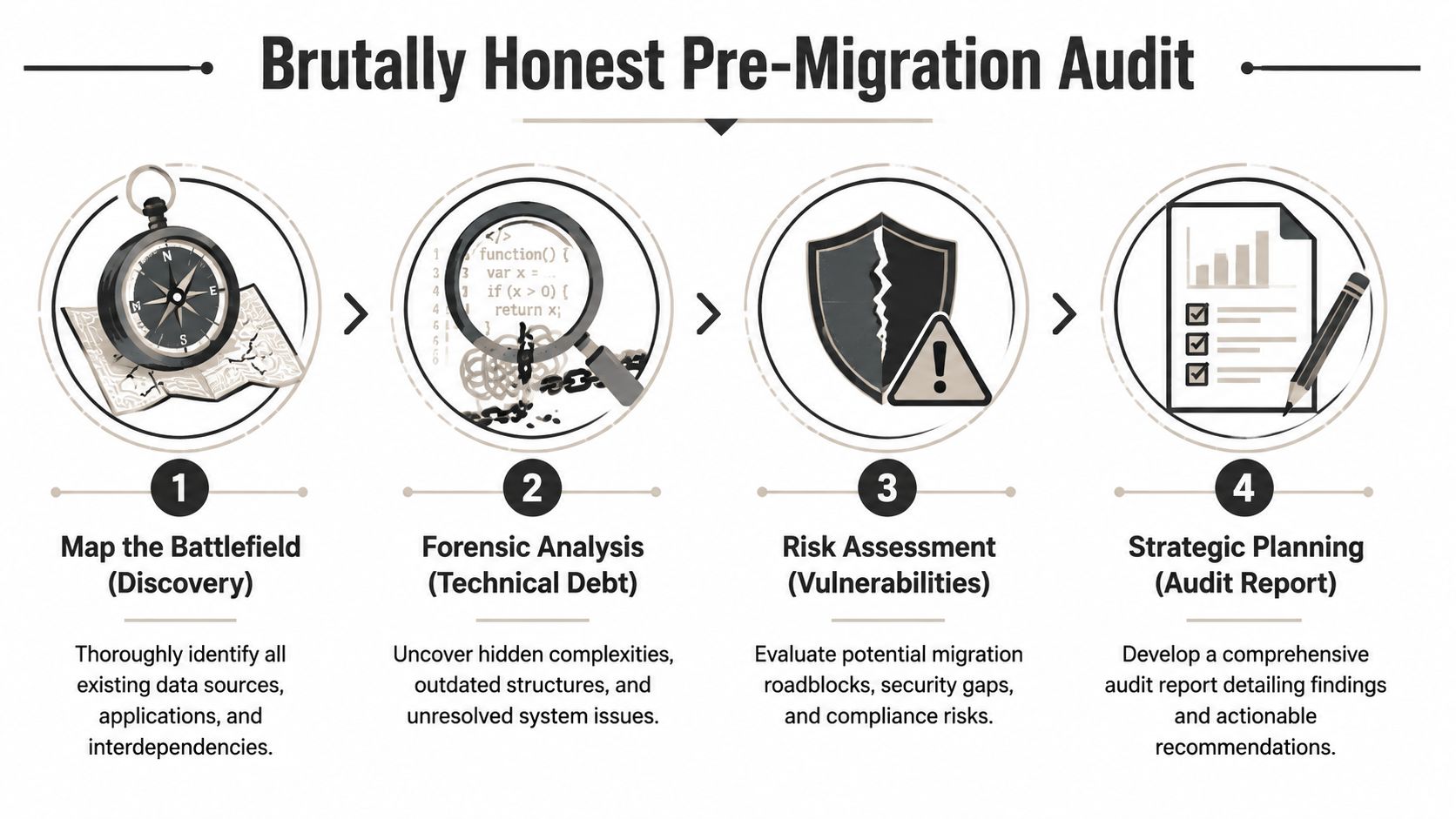
A pre-migration audit isn't a spreadsheet exercise. It's forensic work. You're not counting files. You're identifying which parts of your estate will break when they hit Microsoft 365.
A brutally honest governance audit checklist is a better starting point than any vendor readiness template because it forces you to look at identity sources, ownership gaps, permission models, and compliance exposure before anyone starts copying data.
Calibrate the audit to your actual estate
A one-size-fits-all approach is fantasy. Irish enterprise cloud readiness already shows that split. In 2023, 84% of large Irish enterprises with 250+ employees used cloud services, compared with a national average of 55% according to CSO data cited here. That gap matters. A large enterprise with established IAM, compliance oversight, and central IT can support a broader Microsoft 365 rollout. Smaller firms often can't. They need tighter sequencing and fewer moving parts.
So audit the estate you have, not the one you wish you had.
What you need to expose before migration
We often see clients fail when they assume legacy permissions will “come across fine”. They won't. The source environment usually contains years of unmanaged exceptions, nested groups nobody understands, orphaned content, and duplicate data with no authoritative version.
Your audit should surface at least these fault lines:
- Identity sprawl. Multiple directories, stale accounts, legacy groups, and inconsistent naming.
- Content ambiguity. Data split across file shares, SharePoint farms, personal drives, email attachments, and line-of-business exports.
- Permission chaos. Unique permissions everywhere, broken inheritance, and access granted to groups that no longer map cleanly to business roles.
- Compliance exposure. Records with regulatory retention obligations mixed in with general collaboration content.
- Operational dependencies. Excel-based processes, embedded links, custom forms, and workflows that break after migration.
Practical rule: if you can't map ownership, classification, and access before migration, you're not ready to migrate. You're ready to create cloud-based confusion.
Treat audit output as a risk register
The audit report must drive design decisions. It should tell you what to remediate before migration, what to transform during migration, and what to quarantine entirely. If your organisation is also preparing for your SOC 2 audit, that discipline becomes even more useful because it forces you to tie collaboration controls to evidence, ownership, and review cycles.
That's the core purpose of the audit. It stops you importing unmanaged risk into a platform that exposes it faster.
Build Your Zero Trust Perimeter Before Day One
If your Microsoft 365 adoption strategy starts with moving files, it's already defective. Identity comes first. Always.
Microsoft's own adoption and governance guidance explicitly ties uptake to a secured environment with MFA, Conditional Access, and retention policies in place from the start, as explained in this Microsoft 365 adoption and governance guidance. That isn't a nice-to-have. It's the baseline for trustworthy use.
Start with identity, not collaboration
Your users don't need immediate access to every workload. They need an environment that won't expose the business the moment they sign in. Build your perimeter in Entra ID before broad rollout. That means your access model should already reflect device trust, location, and role sensitivity.
We often see projects collapse because teams prioritised mailbox migration, Teams rollout, or SharePoint publishing while identity controls were still half-configured. That creates a dangerous overlap where newly migrated content is live, but access policy is inconsistent.
The damage doesn't stay contained. Once users create workspaces and share links inside a weak identity model, you spend months cleaning up what should never have been allowed.
What must exist before rollout
A workable foundation usually includes:
- MFA enforcement for every user. Exceptions become attack paths.
- Conditional Access policies based on device state, location, and access context.
- Role separation for administrators, content owners, and standard users.
- Retention and classification planning aligned to legal and operational obligations.
- External sharing guardrails set before users start improvising with guest access.
The documentation says secure the environment as part of the journey. In reality, if you leave these controls until after rollout, users build habits around the wrong behaviour. Then every correction feels like a service reduction.
Zero Trust is part of adoption, not a blocker to it
Some internal teams still talk about security as if it slows adoption down. That's lazy thinking. In Microsoft 365, weak identity doesn't speed adoption. It turns the rollout into a security regression.
If you need a practical reference point, this Zero Trust implementation guide for non-security teams lays out the work in operational terms rather than security jargon.
Secure identity first. Otherwise your rollout teaches users to trust an environment that hasn't earned it.
That's why experienced migration architects treat Zero Trust as the opening move. Not the tidy-up phase.
Select Migration Tooling for Reality Not Demos
Migration tools look competent in demos because demos don't include your nastiest sites, your oldest file shares, or your most political departments.
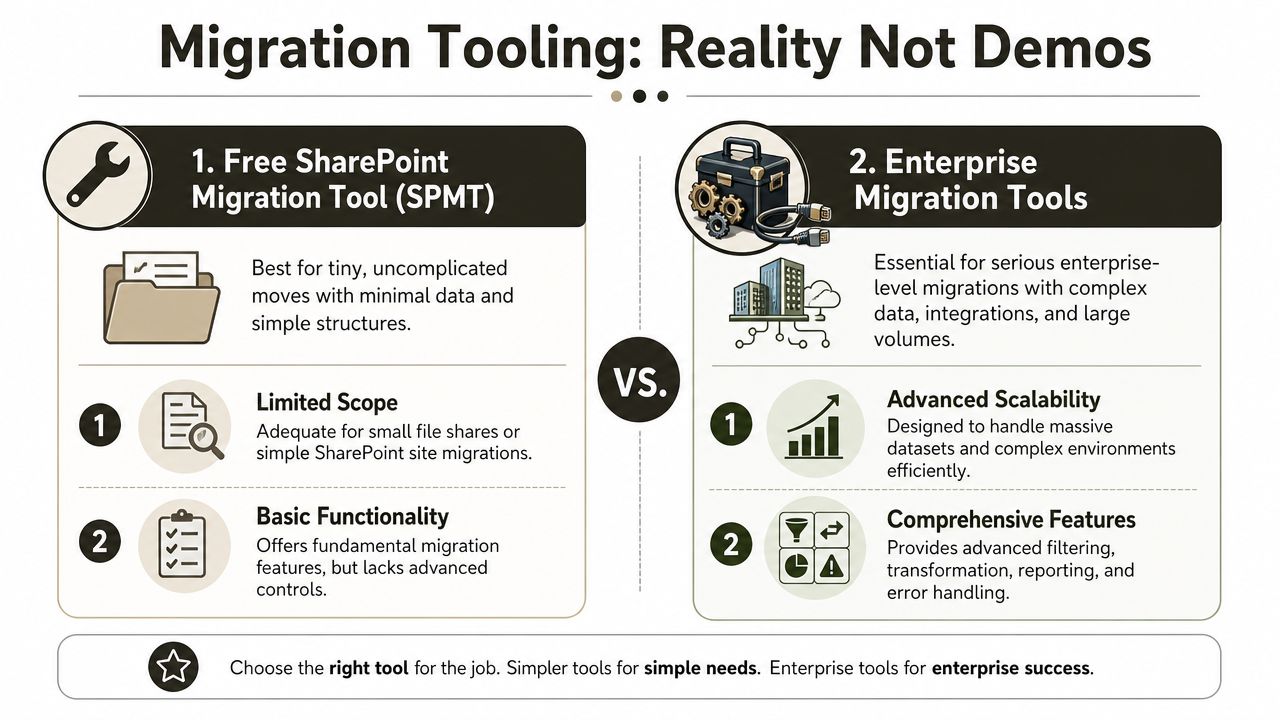
In production, tooling choices expose whether your Microsoft 365 adoption strategy is grounded in reality or wishful thinking. Microsoft's free tools have their place. That place is small, simple, and tightly scoped. Once you introduce scale, permissions, transformations, or compliance pressure, the cracks show quickly.
For the basics of the free route, this SharePoint Migration Tool guide is worth reviewing. Then decide if your estate is simple enough to justify it. Most enterprise estates aren't.
What breaks in the real world
The documentation says migration tools support common scenarios. Reality is uglier. Enterprise migrations run into API throttling, 5,000-item list view thresholds, long path limits, malformed metadata, and source structures nobody has touched in years. Microsoft Learn confirms these limitations exist, and basic tools handle them poorly once you move beyond tidy greenfield examples.
If your team needs a clean explanation of why APIs become a bottleneck during migrations, OMOPHub's API terminology resource is a useful primer. It won't solve throttling, but it will help non-specialists understand why throughput collapses when too many operations hit service limits.
Tool comparison without the nonsense
| Tooling option | Where it works | Where it starts failing |
|---|---|---|
| SPMT | Small file shares, simple SharePoint moves, proofs of concept | Limited control, weak handling of enterprise edge cases, painful troubleshooting under complexity |
| ShareGate | Standard SharePoint and file share migrations, better reporting, more controlled mappings | Still hits limits in tenant consolidations, large-scale transformations, and complex remediation work |
| PowerShell PnP and bespoke scripting | Edge cases, remapping, clean-up, governance enforcement, targeted fixes | Requires experienced engineering, testing discipline, and operational oversight |
We often see clients fail when they assume a commercial tool means the migration can run on autopilot. It can't. ShareGate is a strong baseline, but it won't think for you. It won't redesign your information architecture. It won't resolve every broken permission model. It won't magically understand what to do with malformed source content.
The Ollo verdict
Use SPMT for tightly bounded proofs of concept under 50GB. Use ShareGate for standard file share and SharePoint migrations. For tenant-to-tenant consolidations, regulated data moves, or any migration where permission fidelity matters, use a hybrid approach with ShareGate and bespoke PowerShell PnP scripting. Anything less is a gamble.
That's also where a specialist service becomes rational rather than optional. Ollo handles those hybrid migration patterns because enterprise estates always contain the awkward exceptions that canned tooling can't resolve safely.
Confront the Unspoken Horrors of Data Governance
Migration isn't where most programmes die. Governance is.
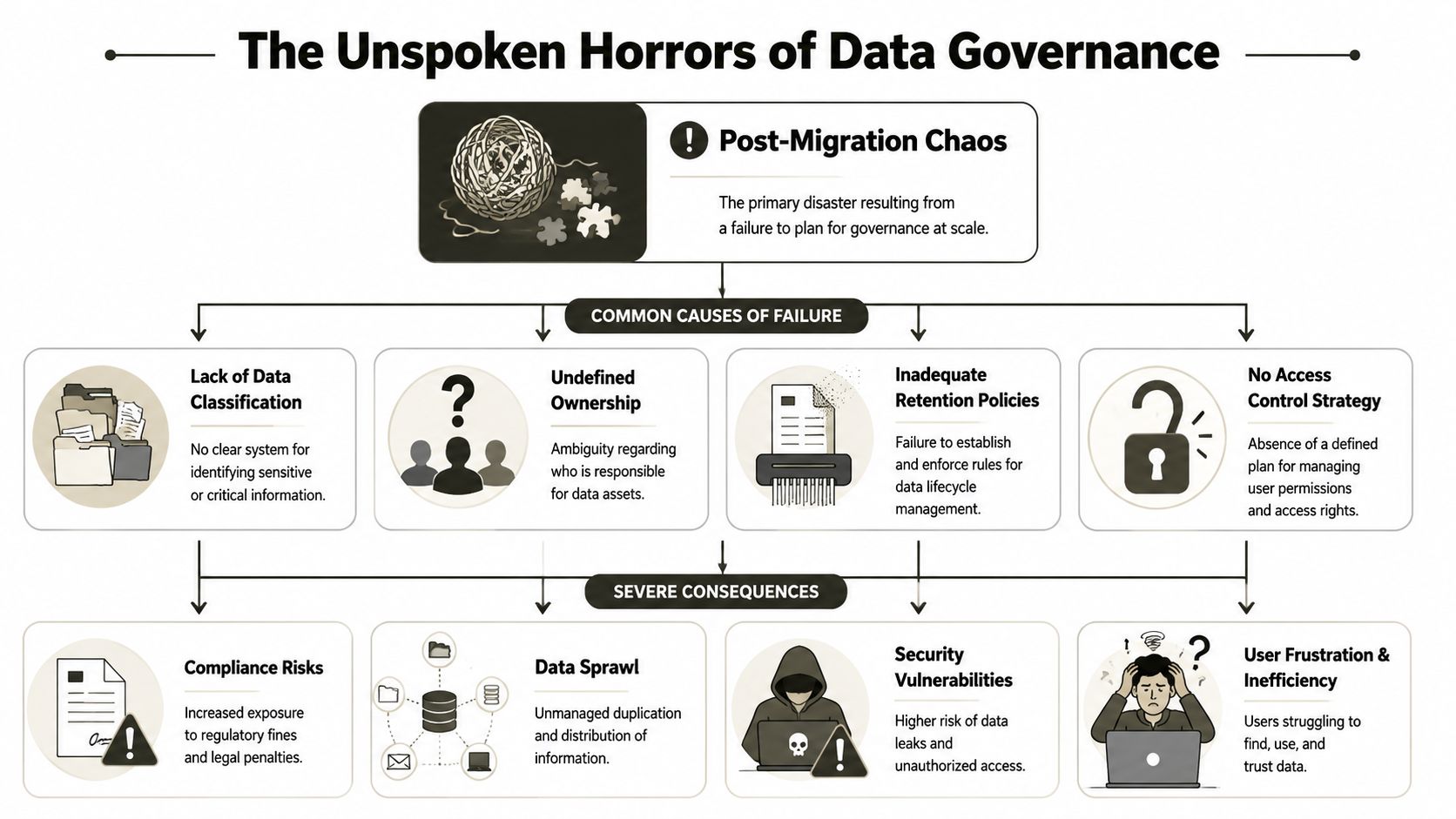
The visible cutover often succeeds. Mail moves. Files appear. Teams gets rolled out. Executives announce success. Then the damage starts in earnest. Nobody knows who owns what. Sites proliferate. Permissions drift. Sensitive content lands in the wrong container. Search turns noisy. Audit questions start arriving.
The war story nobody puts in the slide deck
We often see clients fail when they treat tenant migration as a transport exercise. It isn't. In tenant-to-tenant moves, users, groups, and sites don't arrive with the same identifiers. GUIDs change. If your mapping logic is sloppy, file-level permissions stop making sense. Some users lose access completely. Others inherit access they should never have had.
The documentation talks in broad terms about adoption and security. Fine. But in regulated sectors, the operational question is much harsher. Can you adopt Microsoft 365 without blowing up your compliance model? Microsoft's own high-level adoption guidance leaves that gap largely unresolved, especially around broken inheritance and complex consolidations, as described in Microsoft's adoption guidance for Microsoft 365.
Governance failures don't look dramatic on day one. They look routine. Then legal asks for records, security asks for evidence, and nobody can produce a clean answer.
Later in the same rescue engagements, we usually find three predictable causes:
- Uncontrolled workspace creation that floods the tenant with duplicate Teams and sites.
- No ownership model so abandoned content persists indefinitely.
- Retention applied late after sensitive material has already spread into the wrong places.
Here's a short explainer that captures the shape of the problem:
The consequences are operational, not theoretical
Once broken inheritance and sprawl take hold, you don't just get untidy collaboration. You get:
- Audit exposure because access and retention states are inconsistent
- Security blind spots because stale permissions survive unnoticed
- User distrust because nobody knows where the authoritative version lives
- Support drag because IT becomes the cleanup crew for every bad provisioning decision
That's why “adoption success” is the wrong phrase. The actual target is controlled operation under load.
Governance needs enforcement, not policy PDFs
A policy document won't stop sprawl. You need provisioning rules, ownership requirements, lifecycle controls, and periodic access review. If business units can create containers indefinitely with no review logic, they will. If nobody owns records, nobody will classify them. If retention is optional, it won't happen consistently.
The documentation says one thing. Reality says uncontrolled freedom produces unmanaged estates. Reality wins every time.
Enforce Compliance Controls for Regulated Industries
If you work in finance, healthcare, or energy, your Microsoft 365 adoption strategy is a compliance design exercise first and a collaboration programme second.
That changes the order of work. You don't start with “where should teams store files?” You start with “what must be retained, restricted, reviewed, and defensibly deleted?” If your rollout doesn't answer that early, your project plan is cosmetic.
Design controls into the tenant
Microsoft 365 gives you the building blocks. Sensitivity labels help classify and protect data. Retention policies help enforce lifecycle obligations. Those controls matter only if you apply them deliberately to the right content types and business processes.
We often see clients fail when they enable broad collaboration before they define the records boundary. The result is predictable. Regulated content gets mixed into casual workspaces, access expands through convenience sharing, and later remediation becomes expensive because you're untangling live business operations.
Why Ireland-specific governance now matters more
Microsoft's Ireland market commitment changed the conversation. Microsoft announced a €2.5 billion data-centre investment for Ireland in 2024, with a projection of 6,000 jobs during construction and hundreds of permanent roles once operational, according to this summary of Microsoft's adoption and market context. For Irish IT leaders, that means local cloud capacity and data residency expectations are no longer edge concerns. They sit at board level.
So tenant design and sovereignty decisions can't stay buried in implementation notes. They affect legal review, regulator confidence, and procurement scrutiny.
What regulated organisations should demand
A credible design should define:
- Classification rules for sensitive operational, financial, and patient data
- Retention logic tied to record categories rather than user preference
- Access boundaries for internal users, privileged roles, and guests
- Evidence paths so your team can prove the controls are working
- Regional governance assumptions for where data lives and how it's handled
If your sector carries external audit pressure, this guide to regulated industry SharePoint migration is the sort of planning lens you need before rollout, not after an incident.
The failure cost here isn't abstract. Missing this step doesn't just create admin overhead. It undermines legal defensibility.
Measure What Matters and Plan for Remediation
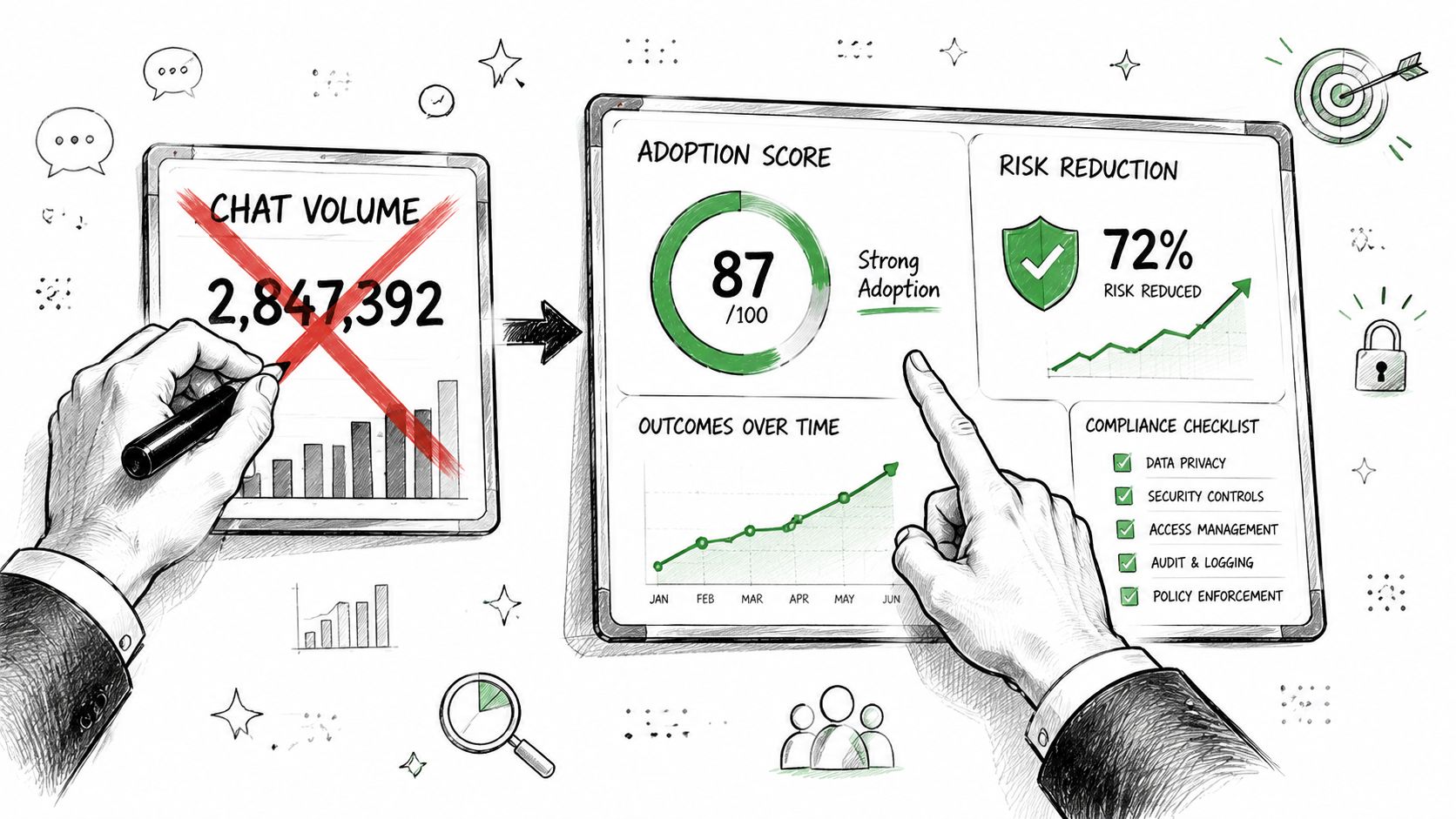
Stop reporting chat volume as if it means anything.
Microsoft treats usage telemetry as the control point for adoption. Adoption Score and Microsoft 365 usage reports exist to show where collaboration, communication, and endpoint behaviours are weak so you can intervene selectively, as explained in Microsoft Adoption Score guidance. That's the useful interpretation. The useless one is turning telemetry into a celebratory dashboard.
Read telemetry like an engineer
Your team should use reports to hunt for deviations from your intended operating model.
Examples that matter:
- Unexpected external sharing may indicate exposure, not healthy collaboration.
- Weak authentication patterns in a business unit may indicate policy gaps or bad exception handling.
- Low usage in governed repositories may mean users are still storing content elsewhere.
- Rapid workspace growth may indicate provisioning controls aren't working.
Telemetry without remediation is just a prettier way to discover failure late.
Build correction into the operating model
Every Microsoft 365 environment drifts. Users create shortcuts. Owners leave. Permissions accumulate. Shared links outlive the project that created them. Your strategy should assume this and include predefined correction patterns.
A practical baseline includes:
- Quarterly access reviews for high-risk sites and groups.
- Scheduled stale-site clean-up with owner confirmation and archive rules.
- Sharing remediation workflows for overexposed links and guest access exceptions.
- Targeted intervention based on real usage and control signals, not generic retraining.
If you aren't planning remediation, you don't have a Microsoft 365 adoption strategy. You have a launch plan. Those are not the same thing.
If your team is staring at a tenant consolidation, a regulated migration, or a rescue job after a failed rollout, Ollo can help you assess the estate, define the control model, and execute the migration with the governance work done in the right order. That's the difference between a cloud rollout and a recoverable operating environment.

















