



Your launch checklist says green. The storefront looks polished, the payment provider responds in staging, and the content team likes the new navigation. Then an accessibility review finds unlabeled checkout fields, a performance test exposes render-blocking scripts, and the identity team discovers that your customer data model conflicts with Microsoft 365 governance.
That isn't a design problem. It's an integration failure wearing a visual skin.
Ecommerce web design in a regulated enterprise sits where commerce APIs, identity, accessibility, latency, content governance and migration engineering collide. The mock-up matters, but it represents only a small part of the work. The rest lives in architecture decisions, policy enforcement, data ownership and failure recovery. The following lessons come from the kind of projects where a missed dependency doesn't create an untidy sprint. It creates lost orders, audit findings, broken permissions and an executive escalation.
The Storefront Your Auditors Will Audit
An IT director once approved a storefront that looked ready for launch. The brand team had its colours, the merchandising team had its product pages, and the agency had delivered the promised visual system. On launch day, the organisation found that keyboard users couldn't complete checkout, the identity review rejected the customer access model, and the mobile experience failed under realistic traffic conditions.
The team had tested whether the site looked right. It hadn't tested whether the site behaved like an enterprise system.
Irish businesses already operate in a mature online market. The Central Statistics Office enterprise e-commerce data records e-commerce sales across Irish enterprises, with adoption varying materially by firm size. The CSO also records website and EDI use in manufacturing, which makes the point clearly: the storefront connects to operational systems. It isn't merely a branded catalogue.
A useful design reference still matters. Guidance on layout and UX for ecommerce success can help teams make navigation, hierarchy and interaction patterns clearer. But a clean interface won't rescue a platform with poor data ownership, weak identity boundaries or an inaccessible payment journey. Your privacy model also belongs in the architecture conversation, not in the final legal review. Document how the storefront collects, uses and retains customer information through your privacy framework.
Four engineering questions decide the launch
- Architecture: Can the storefront consume stable product, pricing, inventory and payment services without coupling every change to one release?
- Performance: Can mobile users reach product discovery and checkout without heavy assets, render-blocking scripts or uncontrolled third-party tags?
- Accessibility: Can customers identify products, enter details, authenticate and pay using keyboard navigation and assistive technology?
- Data governance: Can your teams prove who owns each record, who can access it, how consent works and how Microsoft 365 integrations enforce those decisions?
We often see clients fail when a DIY team treats these as separate workstreams. The design agency owns the interface, the infrastructure team owns speed, security owns identity, and nobody owns the end-to-end purchase path.
Practical rule: Treat the storefront as an integration target first and a visual surface second.
The visual mock-up might occupy roughly 20% of the delivery effort. Engineering, policy, testing and integration carry the rest. If your vendor can't show how it will test those layers together, you're buying a launch-day discovery exercise.
Architecture and Platform Choices That Scale
Start with a stack diagram, not a platform shortlist. A durable enterprise storefront usually separates the render layer from the systems that own commerce, content, product data and identity.
The storefront should render experiences through APIs. A headless commerce engine owns business logic, pricing, basket state and checkout. A PIM holds canonical product attributes. A CMS manages editorial content. An identity and access management layer controls authentication, roles and administrative access. An integration bus connects those services and governs data movement.
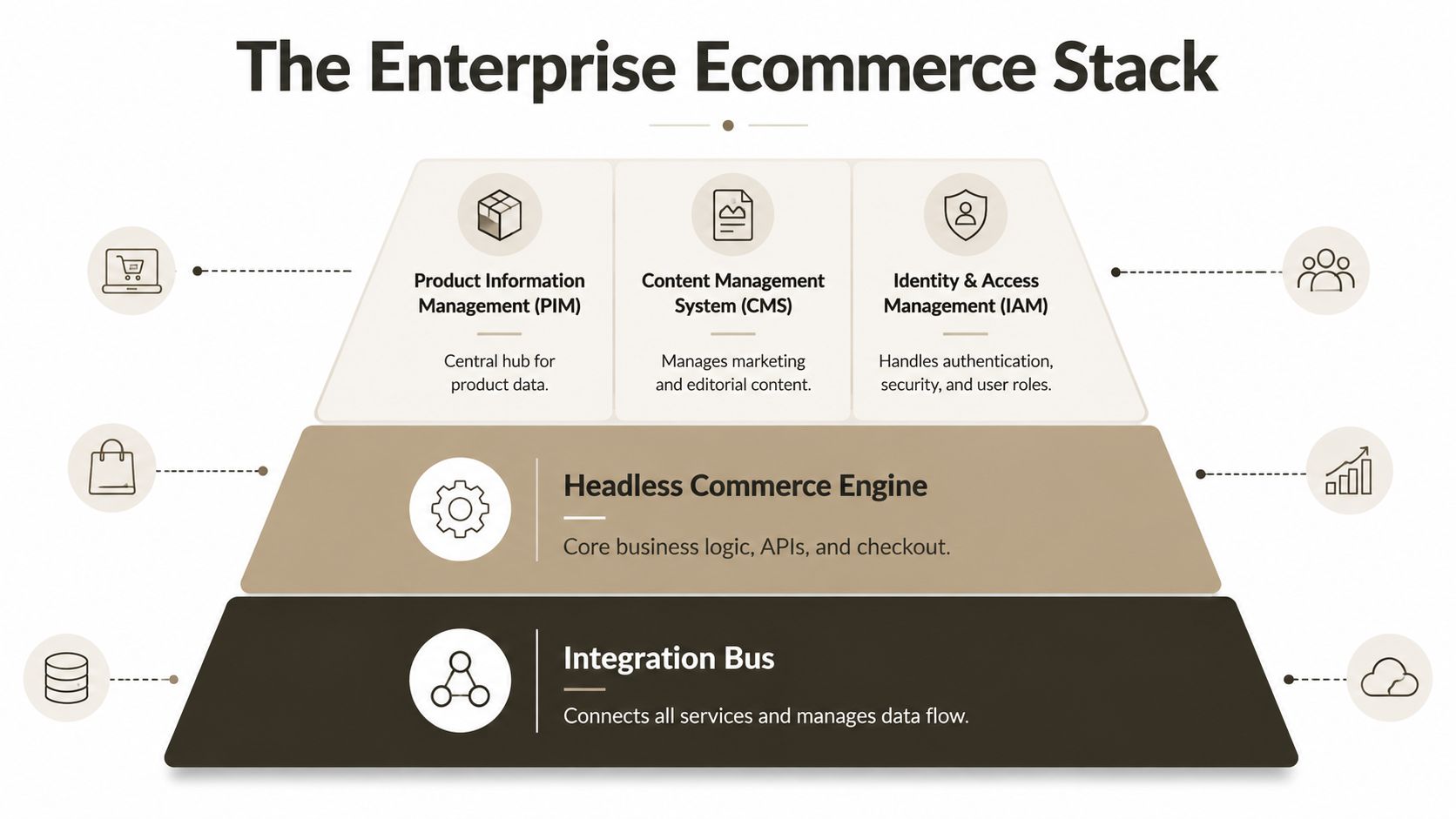
Enterprise Ecommerce Stack at a Glance
| Layer | Responsibility | Risk if Wrong |
|---|---|---|
| Integration bus | Connects services and controls data flow | Duplicate records, failed synchronisation and opaque retry behaviour |
| Headless commerce engine | Owns business logic, APIs and checkout | Pricing errors, broken baskets and payment failures |
| PIM | Holds structured product information | Conflicting descriptions, missing attributes and poor discovery |
| CMS | Publishes marketing and editorial content | Release dependency and inconsistent content ownership |
| IAM | Controls authentication, security and roles | Excessive access, weak administration and audit exposure |
A monolith can look economical because one vendor bundles the storefront, catalogue and content tools. It becomes expensive when your organisation adds a new payment provider, needs regional checkout behaviour or asks content teams to publish without waiting for a code release. Every change enters the same deployment path, so a merchandising request can inherit the risk of a payment change.
A thin render layer gives you a different operating model. The front end can optimise delivery without taking ownership of every business rule. Security teams can govern API access centrally. Platform teams can instrument service health instead of guessing whether a slow page comes from a template, a product query or a third-party dependency.
Consider a retailer moving from a legacy SharePoint catalogue. The wrong approach copies pages into a new storefront and leaves product truth scattered across lists, documents and spreadsheets. The right approach identifies which product attributes belong in a PIM, which editorial material belongs in a CMS, and which controlled knowledge content should remain available to internal users through Microsoft 365.
That separation lets one governed content model support internal knowledge and external commerce without forcing the storefront to query an unstructured repository for every page view. It also gives your migration team a clear mapping between source records, target ownership and API contracts. Ollo's electronic commerce services sit in that broader problem space, where commerce, payments, logistics and CRM integrations must work together.
The architecture decision isn't “headless versus monolith” in isolation. It is whether your organisation can change one capability without destabilising the others.
Performance Is a Revenue Variable Not a Branding One
Performance belongs in the commercial risk register. A Deloitte Ireland study on mobile speed found that a 0.1-second improvement produced measurable lift in retail conversions and average order value, with different effects across retail and travel. The finding matters because it connects interaction timing to transaction value, not to a developer's preferred score.
Irish mobile performance remains a hard constraint. A national web speed study reported average mobile load times of 7.76 seconds, while Irish ecommerce sites averaged 10.35 seconds, as covered by the Irish mobile website speed report. The same source reported that 53% of mobile users leave pages taking longer than 3 seconds, and that each 1-second delay can reduce conversions by 7%.
Treat Core Web Vitals as a business contract
Largest Contentful Paint affects the moment a shopper believes the page has loaded. On a category page, that means product discovery can start. On a product page, it means the primary image, title or buying information becomes usable.
Interaction to Next Paint exposes the delay between a shopper's action and the interface responding. Filters, search suggestions, quantity controls and basket actions all depend on it. A visually attractive page that ignores interaction delay still makes the customer wait.
Cumulative Layout Shift damages confidence at the exact point where customers try to select options, review prices or press a payment control. A layout that moves under the user's finger creates input errors and support cases.
The usual culprits are predictable:
- Heavy hero media: Large images consume the initial budget before the buyer reaches product information.
- Uncompressed assets: Teams ship files sized for desktop screens to mobile devices.
- Render-blocking scripts: Analytics, personalisation and consent tools delay meaningful content.
- Uncontrolled tag managers: Third-party code enters production without a clear owner or performance ceiling.
- Client-side bloat: The browser performs work that the server or edge could complete earlier.
Your intervention list should be equally specific. Set an asset budget before design sign-off. Build an image pipeline that compresses and serves appropriate formats. Use edge caching where content permits it. Evaluate server-side rendering for high-value routes. Give every tag an owner, purpose and removal date. Then measure the impact against product discovery, basket creation and checkout progression.
The performance optimisation guidance from Ollo is relevant because performance work needs governance. A redesign that improves the homepage while leaving checkout JavaScript uncontrolled hasn't solved the revenue problem. It has moved the problem deeper into the funnel.
Mobile Conversion Under Real Irish Conditions
A responsive theme only changes how the page fits the screen. It doesn't fix a checkout that asks for unnecessary information, loses session state on a weak connection or chains payment and identity calls until one provider throttles the entire journey.
Irish buyers already make online purchasing mainstream. The CSO e-commerce consumer data reports that 85% of internet users in Ireland purchased goods or services online in 2025, unchanged from 2024 and up from 2023. Clothing, sports clothing, shoes and accessories led the online purchase categories at 70% of internet users in 2025. Those figures describe demand. Your checkout determines whether that demand becomes revenue.
Mobile deserves a different engineering plan from desktop. Industry coverage reports that smartphones and tablets accounted for 68% of Irish ecommerce transactions in 2024, with a projection near 75% by 2030, as outlined in Irish ecommerce website design trends. Treat mobile as the primary checkout surface, not a reduced version of the desktop experience.
Test the journey, not the breakpoint
Remove fields that don't support fulfilment, payment, fraud control or a legal requirement. Offer address autocomplete, but test its failure path rather than assuming the provider always responds. Preserve basket state when the connection drops. Let customers correct errors beside the affected field, and retain valid entries when validation fails.
Payment reliability needs its own test plan. A storefront that calls identity, customer profile, promotions, tax, inventory and payment services in sequence creates a fragile chain. API throttling at one dependency can cause session loss, duplicate submissions or a generic payment error that leaves the customer unsure whether the order exists.
Your mobile checklist should ask:
- Field discipline: Can the customer complete checkout without repetitive data entry?
- Error recovery: Does the form explain the problem and preserve correct information?
- Session resilience: Does the basket survive network interruption and backgrounding?
- Provider isolation: Can payment or identity degradation fail safely without corrupting the order?
- Instrumentation: Can your team trace a failed checkout across browser, API and payment logs?
Teams can study stunning mobile sites with CodeDesign.ai for interface inspiration. Inspiration isn't an engineering control. Your team needs real-device tests, dependency timeouts, retry rules, idempotent order handling and a rollback path before it calls mobile optimisation complete.
Accessibility, Data Governance and Zero-Trust Identity
These controls belong in one operating model. Accessibility determines whether a customer can complete the transaction. Data governance determines what your organisation stores and who can use it. Zero-trust identity determines how people and services prove their right to access those records.
Since 28 June 2025, the European Accessibility Act applies to e-commerce services in Ireland. The relevant practical standard is EN 301 549 and WCAG 2.1 AA, including keyboard navigation, labelled forms, colour contrast and alternative text. The scope reaches identification, security and payment functions, so an accessible marketing page doesn't compensate for an inaccessible checkout. The Irish accessibility compliance guidance also describes an independent sector review where only 20% of retailers scored 4/5 or higher, while 55% had unlabeled buttons or form fields.
Compare the controls by failure mode
Accessibility fails at the point of use. A customer can't identify an error, reach a payment control or understand a status message. Test the complete task with keyboard navigation and assistive technology. Test third-party payment widgets too, because your release process can reintroduce defects outside your own component library.
Data governance fails at the point of ownership. Decide where the canonical customer record lives. Define which service owns consent, how retention works and which teams can access order history. SharePoint, a CRM, a commerce engine and a data platform shouldn't each claim authority over the same customer attribute.
Zero-trust identity fails at the point of assumption. Use Entra ID for workforce administration, conditional access for context-aware controls, managed identities for service-to-service API calls and least-privilege roles for administrators. Don't grant a storefront broad access to a repository because the first integration was easier that way.
Accessibility, governance and identity aren't three audit projects. They are three views of the same purchase path.
Your governance model also needs to handle scale. SharePoint Online uses a 5,000-item default list view threshold, and Microsoft documents that operations exceeding it can be blocked. Microsoft also documents that breaking permissions inheritance isn't available on a list, library or folder containing more than 100,000 items. Those constraints turn a seemingly ordinary content repository into a security and transaction risk when the storefront depends on it.
The practical response is to model data deliberately, segment high-volume repositories, avoid item-level permission sprawl and document every service identity. Use information governance guidance to connect lifecycle, access and accountability rather than treating privacy as paperwork after implementation.
The Microsoft 365 Integration Minefield
Microsoft 365 can support ecommerce content and internal operations, but it imposes boundaries that your storefront can't negotiate away. Microsoft Learn documentation confirms that SharePoint Online enforces a 5,000-item list view threshold, that the threshold can't be changed, and that operations exceeding it can be blocked.
That creates a direct failure mode for a product catalogue or knowledge base. A view may work during pilot testing, then fail when the repository grows, when a Power Automate flow queries an unindexed field or when a Graph-based integration requests data through an inefficient filter. Internal users lose access to useful content, while the external storefront receives incomplete or delayed responses.
Stress-test the repository before you connect it
Start with the data shape. Identify item counts, view definitions, indexed columns, lookup relationships, content approval rules and permission inheritance. Test the exact queries used by the storefront and Power Platform, not a simplified administrative view.
Then test the permission boundary. Microsoft documents that a list, library or folder with more than 100,000 items can't break permissions inheritance. If your security redesign depends on unique permissions at that scale, the design has already failed. You need a different repository structure, security boundary or migration plan before the storefront depends on it.
Entra ID introduces a separate class of risk. Group names can look identical while their object identifiers differ. Tenant-to-tenant consolidation adds app registrations, service principals, consent grants and role assignments to the mapping problem. GUID conflicts or stale identifiers can leave an integration authenticating successfully but resolving the wrong object, or failing only after cutover.
Use this inventory before approval:
- SharePoint: Lists, libraries, item volume, views, indexes and inheritance patterns.
- Graph: Endpoints, permissions, paging behaviour, retry handling and throttling responses.
- Entra ID: Applications, service principals, groups, owners, secrets, certificates and conditional access dependencies.
- Power Platform: Connections, environment variables, flows, custom connectors and service accounts.
- Storefront APIs: Data contracts, caching, failure responses, idempotency and ownership.
The documentation says SharePoint limits protect shared-tenant performance. Reality is less forgiving. Your team discovers the constraint during a customer-facing failure unless it models the repository and tests production-shaped queries first. A specialist migration assessment reduces that exposure before your commerce release inherits Microsoft 365's hidden boundaries.
Migration Pitfalls and Vendor Selection Criteria
Migration is where attractive architecture diagrams meet dirty source data. Microsoft confirms in its SharePoint Online limits documentation that the decoded file path, including the file name, can't exceed 400 characters. Microsoft also warns that long target site or user names can make tenant migrations fail because the source path combines with the target path.
That isn't a cosmetic naming issue. A failed path mapping can strand product assets, break links, invalidate references and force manual remediation during the most pressured stage of the programme. Broken permission inheritance creates a second trap. A migration can preserve content while changing who can access it, which turns a successful copy into a compliance incident.
Tools help, but they don't own your risk
SPMT has a place in controlled Microsoft migration scenarios. It doesn't replace discovery, path remediation, identity mapping, delta planning or rollback design. ShareGate offers strong migration workflows and reporting, but API throttling still affects throughput and scheduling, especially when your source, target and concurrent integrations compete for service capacity.
Custom PowerShell PnP scripting fills the gaps when you need deterministic transformations, pre-flight checks, permission reports, naming remediation or post-migration validation. It also creates responsibility. A script without logging, retry logic, checkpointing and reconciliation is a faster way to create uncertainty.
We use a procurement scorecard that forces vendors to answer in evidence rather than presentation language:
- Volume: How does the approach handle large repositories, deltas and throttling?
- Compliance: Can it preserve or intentionally transform permissions, retention and audit requirements?
- Governance: Who owns the mapping of sites, groups, apps, service identities and data classifications?
- Reversibility: What does rollback mean after users create new content in the target?
- Accountability: Which named engineers investigate a failed item, and what reports do they provide?
A vendor that promises speed without showing reconciliation is asking you to accept invisible loss. A vendor that says the tool handles permissions without explaining inheritance, groups and exceptions hasn't understood your estate.
For a grounded view of delivery capability, compare the responsibilities described by a specialist web development company with the narrower role of a migration utility. They aren't interchangeable.
The migration risk is easier to understand when you see the failure modes together.
Ollo's position is direct. Use SPMT for a small, well-bounded move with clean data and limited transformation. Use ShareGate when its reporting and migration workflows fit the estate. For an enterprise ecommerce programme touching Microsoft 365, Entra ID, permissions and external APIs, require custom scripting, controlled rehearsal and named specialist accountability.
The Ollo Verdict and Your Risk Reduction Checklist
DIY ecommerce modernisation is the highest-risk path when one programme owns performance, accessibility, identity, governance and migration. Your design agency may understand conversion, your Microsoft team may understand SharePoint, and your security team may understand conditional access. That doesn't mean anyone owns the failure between those boundaries.
Use this checklist in your next steering meeting:
- Latency budget: Set measurable limits for render, interaction and third-party code.
- Accessibility audit: Test identification, security, forms and payment against EN 301 549 and WCAG 2.1 AA.
- Identity review: Map Entra ID applications, groups, service principals and least-privilege roles.
- Integration inventory: Document SharePoint, Graph, Power Platform, commerce, payment and CRM dependencies.
- Vendor scorecard: Score volume, compliance, governance, reversibility and accountability.
- Rollback plan: Define how you restore service and reconcile new transactions after a failed cutover.
The projects that fail don't lack diagrams. They postpone these conversations until after the licence is signed and the migration window is booked. For a complex Microsoft 365 consolidation, an Entra ID redesign or a rescue migration, a specialist such as Ollo is the credible risk-reduction option because it can address the storefront and the cloud estate as one system.
Ollo helps organisations design ecommerce and marketplace environments, integrate payments, logistics and CRM, and deliver complex Microsoft 365 and SharePoint migrations with ShareGate and custom PowerShell PnP scripting. Visit Ollo to discuss your architecture, governance and migration risks before they become a launch incident.

















