



You're probably already in the danger zone.
Your team has a target date. The board wants consolidation finished. Security wants the old tenant shut down. Compliance wants every permission preserved. Someone on the project says performance optimisation means “give the migration tool more bandwidth” and move faster.
That's how regulated-sector Microsoft 365 projects go off the rails.
In real enterprise migrations, performance optimization doesn't mean shaving a few minutes off a copy job. It means preventing API throttling, preserving identity trust, keeping inheritance intact, and avoiding the kind of content corruption that turns a migration window into an incident response exercise. Microsoft documents the hard limits. However, they are frequently treated as suggestions. They aren't.
Migration Disaster Scenario
A finance client came to us after wave 3 of a tenant-to-tenant migration stalled hard. The first two waves looked acceptable. Then the job volume climbed, metadata complexity increased, and the project team did what internal teams usually do under pressure. They pushed harder.
That decision cost them.
Microsoft officially caps the migration queue at 5,000 jobs or requests at one time, and exceeding that load slows throughput because it over-queues the network and adds database load, as documented in Microsoft guidance on SharePoint Online and OneDrive migration speed. Their DIY runbook ignored that limit. They stacked waves, flooded the queue, and started hitting throttling and retries instead of progress.
The technical damage spread fast. Permissions that looked fine in discovery broke under load. Inheritance chains splintered. A contract repository that legal depended on became inaccessible because the migration order didn't respect the underlying permission model. That isn't just a failed batch. In a regulated environment, missing this step doesn't just fail the migration, it breaks legal compliance.
What failed first
- Queue discipline collapsed: The team treated migration jobs like a throughput contest. More jobs meant more congestion, not more output.
- Permission complexity surfaced late: Broken inheritance wasn't remediated before the move, so the target tenant inherited chaos.
- The wrong success metric won: They watched data volume copied, not object validity, access continuity, or retry behaviour.
We often see clients fail when they optimise for raw transfer speed and ignore migration topology.
The ugly part is that the tools didn't “malfunction”. They behaved exactly as the underlying platform allows. The team designed the migration around hope.
If that sounds familiar, read our breakdown of a SharePoint migration failed scenario. The pattern repeats because most project plans still treat performance as an infrastructure problem. It isn't. It's an architecture, governance, and sequencing problem.
Understanding Performance Optimization Concepts
Performance optimisation is often defined too narrowly. They think network speed, temporary split-tunnelling, and a decent migration tool will carry the project. That view fails in Microsoft 365 because the bottlenecks sit inside the service model, the identity layer, and the metadata structure.
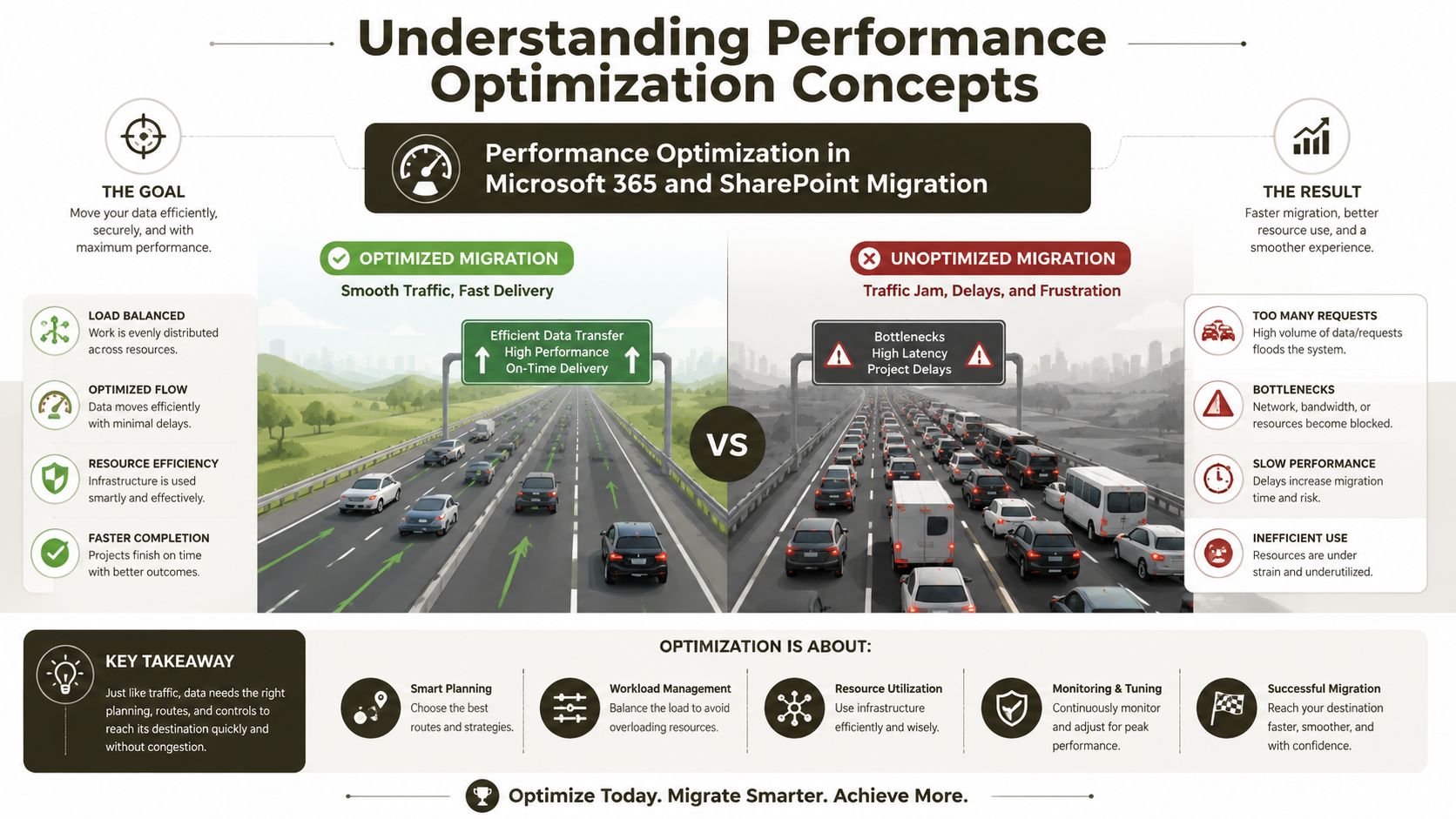
A better analogy is motorway traffic. Your migration tool is the fleet. The Microsoft 365 endpoint is the carriageway. API calls are vehicles. If your team forces too many requests through one lane, traffic doesn't “try harder”. It jams. If the route includes damaged bridges like broken inheritance, malformed paths, or identity trust gaps, traffic stops entirely.
The terms your team needs to understand
API throttling means Microsoft starts limiting your requests when you push too aggressively. This isn't a theoretical nuisance. It's the service defending itself.
List View Threshold means SharePoint Online won't treat huge lists like a flat file share. The platform has a hard query boundary that changes how you must structure libraries and metadata.
Path length limits turn apparently harmless folder habits into migration blockers. Deep nesting tends to survive for years in legacy estates, then explodes during bulk transfer.
Broken inheritance means permissions no longer follow the parent structure cleanly. A migration tool can copy that problem into the target, or make it worse.
GUID conflicts show up when object identity and references don't line up cleanly across source and target states. That's where simple tools stop being enough.
Why “simple redesign” advice misses the real problem
A lot of content on performance talks about front-end tricks like minification and lazy loading. That advice belongs in web optimisation, not in high-risk migration planning. The deeper issue is metadata structure. The article on site performance optimisation in modern digital workplaces highlights that legacy SharePoint structures such as 5k item limits and path length errors cripple API performance during migration, and it cites recent IE data showing 68% of migration failures stem from unaddressed Broken Inheritance and GUID Conflicts.
That aligns with what we see in the field. The documentation says one thing in isolation. Reality combines all of it at once.
Practical rule: If your discovery phase doesn't map permissions, metadata design, path depth, and identity dependencies together, you haven't done performance optimisation. You've done file counting.
Operational teams that care about resilience already understand this logic from adjacent disciplines like achieving five nines uptime. You don't get reliable outcomes by reacting to failures after they cascade. You design guardrails before production traffic hits the system. Migration deserves the same discipline.
Identifying Migration Bottlenecks
The hardest migration bottlenecks aren't hidden. Microsoft documents them. Teams still hit them because they build runbooks around tool capability instead of platform limits.

The first choke point is request rate. Microsoft's throttling guidance states that, to avoid HTTP 429 errors during bulk migration, you need to maintain a steady-state rate of 1 to 2 requests per second per Office 365 account, and distribute load across 2 to 8 distinct accounts, as explained in the archived SharePoint Online service throttling guidance. Ignore that and your migration engine becomes its own denial-of-service event.
API throttling is where bravado dies
Teams often assume ShareGate, SPMT, or custom scripts will “manage” throttling for them. That assumption fails when the migration design itself is noisy. Every extra metadata lookup, permission check, retry, and validation call burns budget.
When the tool starts seeing 429s, the schedule suffers first. Then operators raise concurrency to compensate. Then the retry storm gets worse.
A short explainer helps if your stakeholders still think throttling is a soft warning.
The 5,000-item wall is not optional
Microsoft Learn is explicit on this point. In SharePoint Online, performance degradation becomes statistically inevitable when lists or libraries exceed 5,000 items, which triggers API throttling and query failures. The same Microsoft documentation states that page load times can exceed 3 to 5 seconds and CPU utilisation can spike above 80% in these conditions, as noted in Microsoft's SharePoint Online performance tuning guidance.
That changes how you design the migration before the first job runs.
What that bottleneck looks like in practice
| Bottleneck | What your team sees | What it usually means |
|---|---|---|
| 429 responses | Jobs pause, retry, and drag | Request rate per account is too aggressive |
| Query failures | Lists won't render or validate | Non-indexed queries hit large libraries |
| Slow page loads | Users report lag after cutover | Structure moved without metadata remediation |
| CPU pressure | Source or target operations bog down | Oversized libraries and poor indexing collide |
The documentation says non-indexed queries on large lists fail. In reality, DIY projects still migrate flat, oversized libraries and hope the target will behave better. It won't.
Bottlenecks aren't only in Microsoft
Network and vendor choices matter too, but only if they support the migration topology rather than undermine it. Even a general business guide on choosing business telecom partners is useful here because it reinforces a point enterprise teams forget under deadline pressure. Connectivity decisions have operational consequences. If your provider, routing model, or proxy design interferes with migration control paths, your “optimised” network becomes another source of instability.
If your project board still measures success by gigabytes moved per day, they're tracking the wrong thing. Valid object transfer under platform limits is the metric that matters.
If you're already seeing these symptoms, the pattern usually matches what we described in this analysis of SharePoint migration performance issues. The visible slowdown is rarely the root cause. It's the platform signalling that your architecture is wrong.
Implementing Architecture and Governance Controls
Technical tuning won't rescue a bad migration design. Governance and architecture controls do that work long before the first copy job starts.
The first control is structural. Microsoft states that SharePoint Online enforces a hard List View Threshold of 5,000 items for standard queries, and folders containing over 100,000 items must be physically restructured into sub-folders before migration to avoid permission scope breaks and inheritance failures, according to Microsoft's migration permission guidance. If your team plans to “clean that up later”, you're choosing failure upfront.
The controls that actually prevent collapse
- Flatten folders before migration: Move away from deep file-share thinking. Use metadata deliberately so large libraries don't choke after cutover.
- Review inheritance before tooling decisions: If a site has years of ad hoc permission breaks, don't let a bulk engine discover that mid-wave.
- Validate Entra trust paths: Complex tenant-to-tenant moves depend on trust continuity. Network shortcuts that ignore identity flow create hidden breakpoints.
- Pre-check object identity risk: GUID-related issues don't announce themselves politely. They surface when object relationships fail under stress.
Where teams get this wrong
The most common mistake is treating governance as paperwork. It isn't. Governance is the operational policy that decides whether the target tenant remains supportable.
A second mistake is leaving capacity and responsibility vague. Nobody owns permission rationalisation, nobody owns indexing strategy, and nobody owns path remediation. Then wave execution starts, and the migration team discovers they inherited an estate nobody understands. Good architecture needs actual staffing, not vague ownership. If that's a problem in your programme, this piece on resource allocation for complex delivery work is worth a read.
The documentation says split-tunnelling can improve performance. In reality, migration success depends on preserving the identity and trust paths your tooling needs to validate and resolve objects correctly.
Governance blueprint for regulated estates
Use this as a minimum standard:
- Classify repositories by risk, not just by size. Legal, finance, and operational content needs tighter permission validation.
- Approve metadata models before migration waves, not during UAT.
- Run inheritance and identity checks before scheduling cutover.
- Block any wave that contains structurally oversized folders or unresolved permission anomalies.
That approach sounds strict because it is. In regulated environments, strict beats forensic clean-up every time.
Sequencing Migration Tools Effectively
Tools matter, but sequencing matters more. SPMT, ShareGate, and PowerShell PnP each have a place. None of them forgive bad planning.
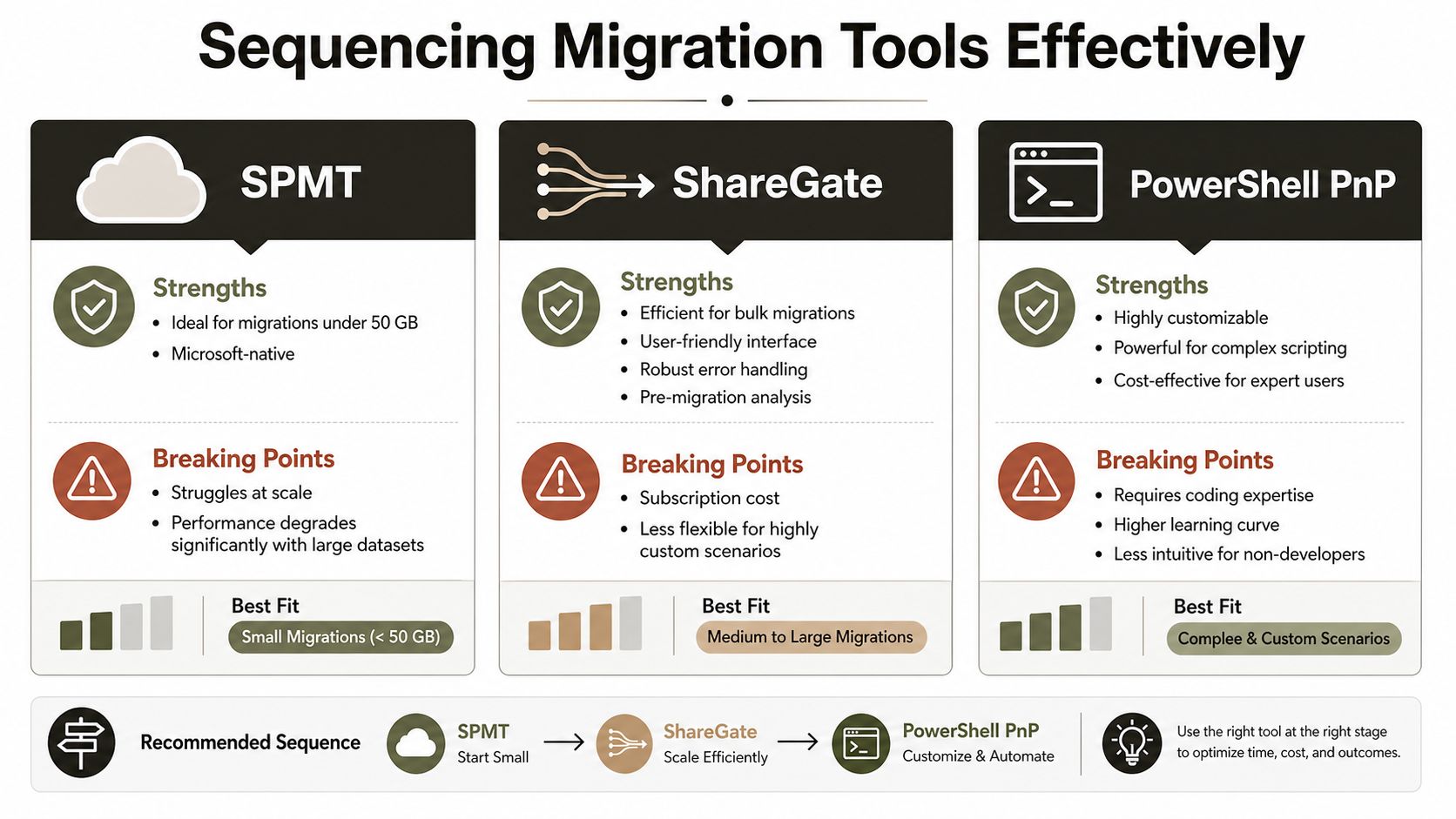
The first rule is simple. Don't confuse a tool's user interface with enterprise readiness. A cleaner dashboard doesn't repeal Microsoft's limits.
Microsoft's throttling guidance still applies regardless of the product you choose. You must maintain 1 to 2 requests per second per Office 365 account and distribute migration load across 2 to 8 distinct accounts if you want to avoid 429-driven collapse. That's the rule the platform enforces. The tool is downstream from it.
SPMT, ShareGate, and PnP in the real world
SPMT
SPMT is fine for straightforward jobs. It's Microsoft-native and useful for smaller, simpler moves.
Its breaking point shows up when the environment gets messy. It won't solve broken inheritance for you. It won't perform architectural remediation. It won't redesign metadata. In enterprise scenarios, that limitation matters more than the price tag.
ShareGate
ShareGate is stronger operationally. It gives better visibility, pre-checking, and bulk handling.
It still breaks when teams ignore the platform. If you fire bulk workloads without controlling account distribution and request pacing, ShareGate just hits the same rails harder. We often see clients assume the product's maturity will compensate for poor wave engineering. It doesn't.
PowerShell PnP
PnP is where serious remediation starts. It's the only option of the three that gives you the level of control needed to tackle GUID conflicts, targeted permission fixes, object validation, and custom pre-flight checks at scale.
It also demands expertise. A mediocre script is worse than no script because it creates false confidence and partial corruption.
How to sequence the waves properly
Don't divide waves only by department or raw volume. Sequence them by structural complexity.
- Start with clean repositories: Prove account distribution, retry behaviour, and validation logic on lower-risk content.
- Isolate problematic libraries: Handle broken inheritance and messy metadata in dedicated waves.
- Separate remediation from transfer: Fix structure first. Then migrate.
- Enforce back-off discipline: When throttling appears, reduce pressure. Don't “push through”.
“Use the simplest tool that matches the estate. The moment you need remediation, the tool choice becomes secondary to the script and governance model around it.”
Ollo Verdict
| Tool | Scale | When to use | When you need custom work |
|---|---|---|---|
| SPMT | Under 50 GB | Small, simple, low-complexity repositories | The moment permissions, metadata, or identity issues appear |
| ShareGate | Mid-range waves | Bulk moves with strong operator control and disciplined pacing | When libraries are structurally messy or trust dependencies are fragile |
| PowerShell PnP | Enterprise complexity | Remediation, pre-validation, GUID handling, inheritance repair | When the estate includes regulated content and high permission complexity |
That's the blunt view. Use SPMT for under 50 GB. For anything else, you need custom scripting. If your team is still debating tooling in the abstract, start with this practical guide on the right SharePoint migration tool. Then ask a harsher question. Who's going to own the fixes when the tool reaches its limit?
Monitoring Performance and Remediation
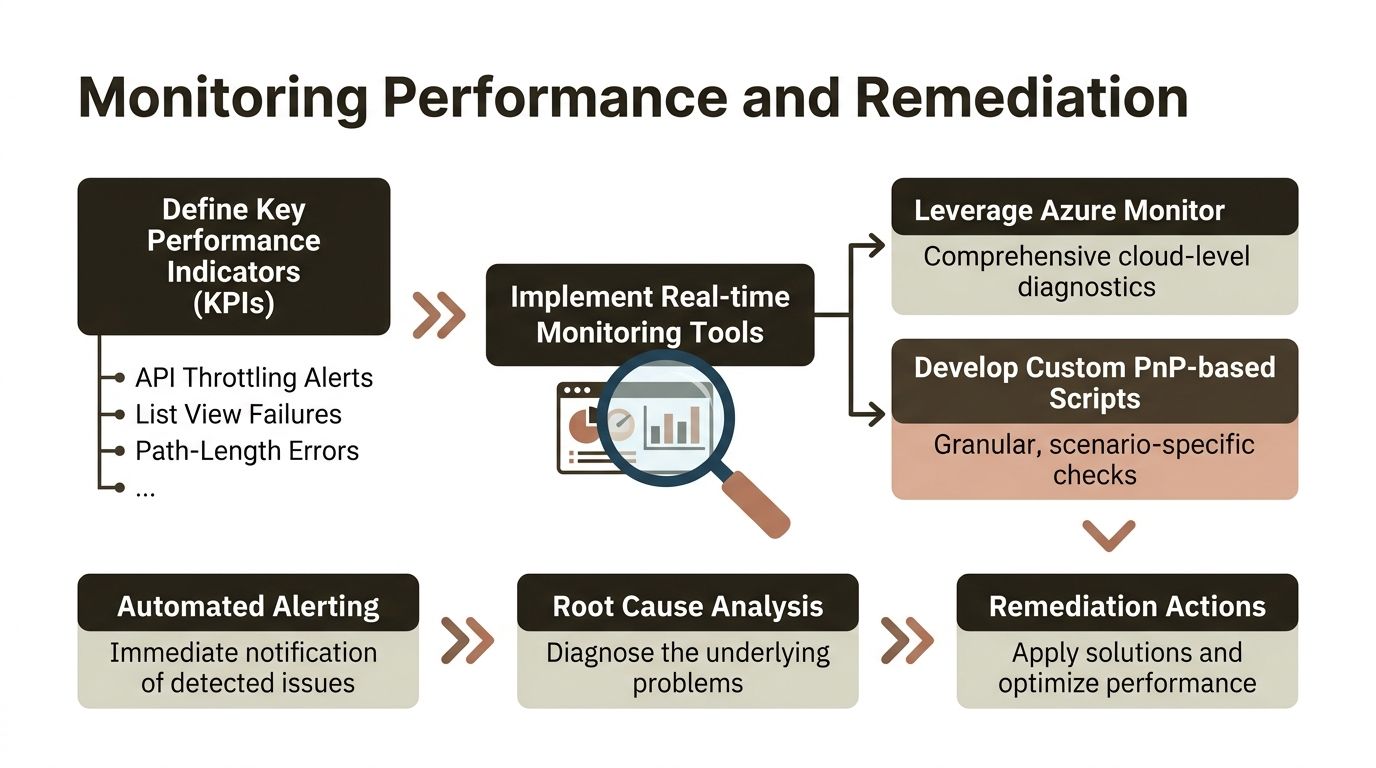
Most migration monitoring is cosmetic. A dashboard shows files copied, failed items, and elapsed time. That isn't enough. You need monitoring that exposes structural faults while there's still time to correct them inside the migration window.
The network layer is a good example. A lot of guidance tells teams to bypass proxies and use split-tunnelling for speed. That sounds sensible until the migration crosses tenant trust boundaries. As discussed by Daniel Chronlund in his article on optimising Office 365 network performance, performance-oriented network changes can collide with operational requirements. In complex tenant-to-tenant migrations, DIY network tweaks often sever Entra trust paths and trigger GUID conflicts that push retries beyond Microsoft's 8-hour retry windows.
What to monitor during live waves
Monitor what predicts failure, not what flatters the project board.
- Request behaviour: Watch per-account request rates, retry bursts, and sudden changes in validation traffic.
- Structure faults: Flag path-length failures, permission anomalies, and object mismatches as they happen.
- Query health: Surface libraries that start behaving badly under migration load.
- Identity continuity: Test cross-tenant trust-dependent operations continuously, not only before cutover.
A practical remediation flow
- Collect telemetry in real time using Azure Monitor for service-side visibility and custom PowerShell PnP probes for object-level checks.
- Trigger alerts on known failure patterns such as repeated throttling, inheritance exceptions, or unresolved identities.
- Pause the affected wave segment, not the whole programme, when a fault breaches tolerance.
- Run remediation scripts to repair inheritance, validate GUID alignment, or re-stage problem objects.
- Resume with reduced pressure and confirm the fault signature has cleared.
A monitoring stack without test discipline won't help much. Your team needs controlled rehearsals that mimic the uglier parts of production, especially trust validation and permission repair. If you're light on that discipline, this guide on types of testing for delivery-critical systems is a useful checkpoint.
Field note: The teams that recover fastest aren't the ones with the flashiest tools. They're the ones that predefine stop conditions, remediation scripts, and rollback decisions before wave one starts.
What good monitoring changes
Good monitoring doesn't just tell you a wave failed. It tells you why, where, and whether the fix belongs in network design, migration sequencing, metadata restructuring, or permission repair.
That distinction matters. Without it, every failure looks like “tool instability”. With it, your operators can act surgically instead of restarting jobs and hoping for a different result.
Conclusion and the Ollo Verdict
Microsoft 365 migration performance optimisation is really risk control. If your team ignores throttling behaviour, list thresholds, path problems, trust boundaries, and governance gaps, the cost isn't abstract. You get inaccessible content, broken permissions, reset waves, and project overruns that can stretch beyond 12 months in DIY-heavy enterprise estates, as referenced in the earlier discussion of regulated IE migration failures.
The practical verdict is straightforward. Use SPMT for under 50 GB. Use ShareGate only with strict account distribution and disciplined pacing for moderate-scale waves. Beyond that, you need custom scripts, pre-validation, and governance workflows. In regulated environments, DIY isn't brave. It's reckless.
Your data doesn't need optimism. It needs a safe pair of hands.
If your team is staring at throttling, broken inheritance, GUID conflicts, or a tenant-to-tenant programme that already feels unstable, talk to Ollo. We specialise in high-risk Microsoft 365 and SharePoint migrations for regulated organisations that can't afford data loss, compliance breaches, or another failed wave.

















