



The most dangerous advice in Microsoft 365 migration is also the most popular. “Plan it well, pick a tool, and execute a transition.” That line sells software. It doesn't protect your data, your audit trail, or your regulatory exposure.
But in reality, migrations fail in uglier ways. API throttling stalls jobs halfway through. List view thresholds turn apparently successful libraries into unusable messes. Broken inheritance drags old permission mistakes into a new tenant, then hides them behind tidy dashboards. The documentation says one thing. Reality says your team finds the damage when users lose access, workflows stop, and compliance starts asking questions.
We often see clients fail when they treat an application for investment as a budget request for licences and labour instead of what it really is. A risk submission. If you're asking the board to fund a migration, you're not asking them to approve a project plan. You're asking them to accept operational, legal, and governance risk. That changes the standard completely.
Why Your M365 Migration Plan Is Already Flawed
Most migration plans start with the wrong assumption. They assume the platform is the challenge. It isn't. The source estate is the problem, and the migration tooling only exposes it.
Your team probably has a spreadsheet with site counts, storage estimates, and a target date. That looks organised. It tells you almost nothing about whether SharePoint Online will reject your structure, throttle your jobs, or flatten permission logic that nobody documented properly.
The myth of the smooth cutover
SPMT gets pitched as if the hard part is copying files from A to B. That's beginner thinking. Enterprise migrations break on structure, identity, and fidelity. They break when old libraries carry ugly permission inheritance, when metadata doesn't map cleanly, and when the target environment punishes lazy execution with hard technical limits.
Practical rule: If your plan uses phrases like “lift and shift”, “minimal disruption”, or “tool-led migration”, you haven't written a risk plan. You've written a procurement memo.
Even firms that publish sensible advice on broader Microsoft 365 moves, such as F1Group's migration services, still need to be read with an architect's eye. The high-level guidance helps. It doesn't save you from the low-level traps that wreck regulated migrations.
If your current planning document doesn't explicitly account for throttling, list design, permission remediation, and post-migration validation, it's already weak. The board won't notice that at approval stage. Your helpdesk will notice on Monday morning after go-live.
What your plan should challenge first
A credible plan for an application for investment has to answer harder questions than “which tool?” It needs to force uncomfortable decisions early.
- What will break under pressure: Libraries, flows, lookups, permissions, and user mappings need scrutiny before any move starts.
- What can't be copied blindly: Legacy clutter, obsolete versions, abandoned team sites, and over-permissioned folders should not get a free ride into the new estate.
- What the business can't afford to lose: Not just files. Auditability, legal hold integrity, and access controls.
- What your team can operate: Running a pilot and rescuing a failed enterprise wave are very different skills.
A proper pressure test starts with a forensic view of the environment, not a migration wizard. That's why serious teams review a deeper Microsoft 365 migration risk checklist before they put numbers into the application for investment.
Deconstructing Pre-Migration Analysis Failures
Most pre-migration analysis is cosmetic. It counts files, measures storage, and congratulates itself for producing a colourful dashboard. None of that tells you whether the target environment will remain usable after the move.
A real assessment behaves more like digital forensics. You inspect metadata integrity, permission inheritance, content sprawl, workflow dependencies, and the ugly edge cases that standard discovery reports tend to skip. We often see clients fail when their audit says “all green” while hidden liabilities sit in nested folders, custom columns, and stale groups nobody owns.
Here's the pattern. The business approves the application for investment based on volume and timelines. Then the migration team discovers that what looked like one content set is a tangle of broken inheritance, duplicate identities, and libraries built in ways SharePoint Online tolerates badly. That isn't bad luck. That's a bad assessment.
Inventory isn't analysis
You need to separate what exists from what is fit to migrate. Those are not the same question.
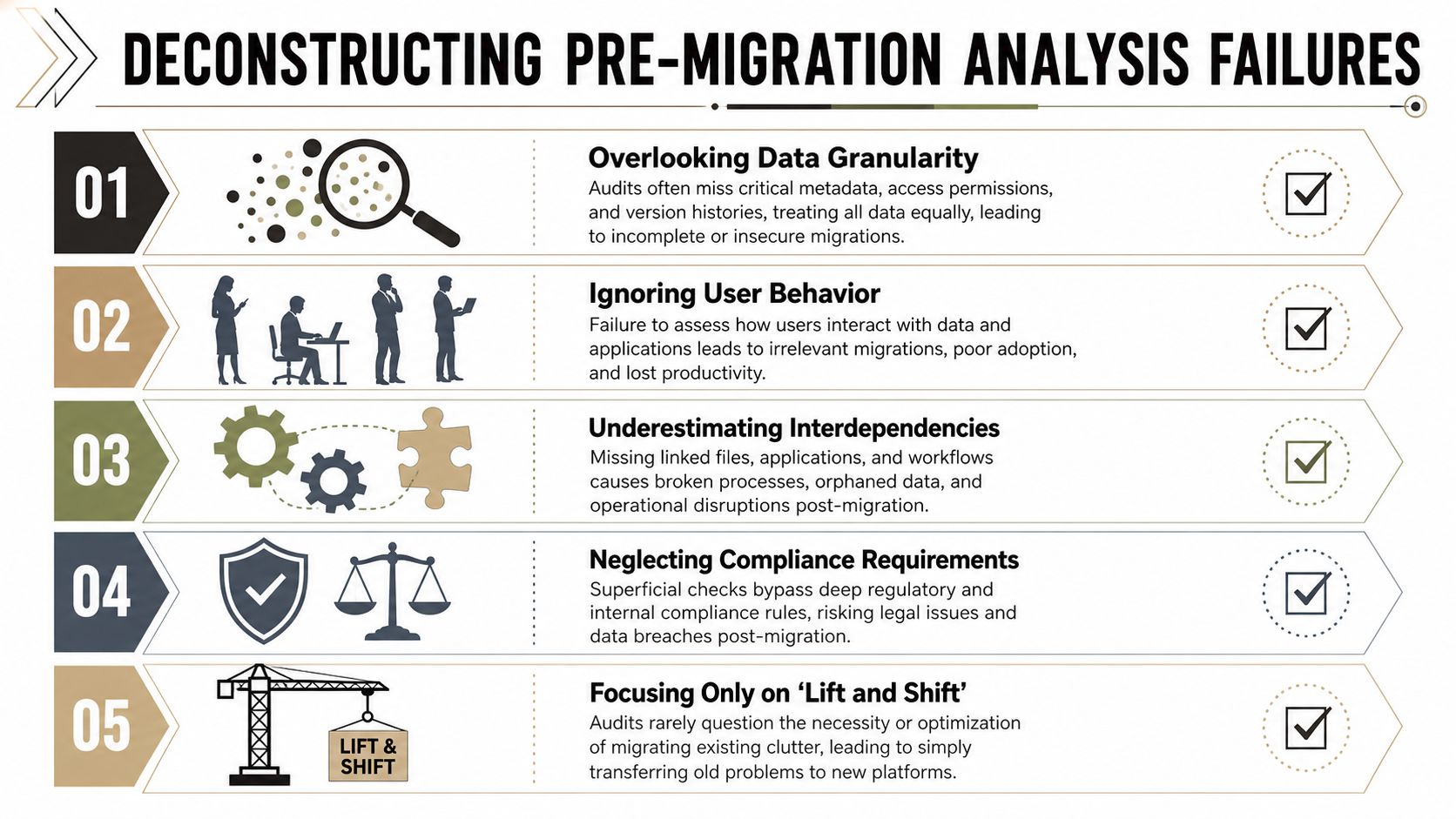
- Granularity gets ignored: Teams count folders and documents but skip field-level metadata, version history relevance, and access model complexity.
- User behaviour gets guessed: Nobody checks whether the libraries being moved still support live business processes or whether they're just historical landfill.
- Dependencies stay hidden: Power Automate, linked Excel files, embedded references, and app integrations get noticed after cutover, not before.
- Compliance gets treated as a label: If your assessment only tags content “sensitive” without testing residency, access, and policy interactions, it isn't serious.
- Clutter gets promoted: “Lift and shift” sounds efficient until you realise you've funded the migration of years of unmanaged rubbish.
We often see clients fail when the initial audit answers storage questions but avoids governance questions. That's how messy source systems become expensive target systems.
Pilot work is where the lies get exposed
The cleanest way to expose hidden failure points is a structured pilot. In the IE region, enterprise SharePoint migrations that include a structured pilot program achieve 25–40% faster project timelines due to earlier exposure of issues such as broken permission inheritance and metadata loss, according to this SharePoint migration tool comparison. That matters because pilot failure is cheaper than production failure.
The documentation says a pilot validates connectivity and mappings. In reality, a good pilot uncovers the things your initial discovery missed. Old site templates. Strange field behaviour. Identity mismatches. Libraries that look fine until users try to sort, filter, or search them.
What a forensic assessment must include
A defensible assessment for an application for investment should cover at least these areas:
| Area | What to inspect | Why it matters |
|---|---|---|
| Permissions | Broken inheritance, stale groups, direct grants | Bad access models become security incidents |
| Metadata | Required fields, managed terms, content types | Mapping failures corrupt findability and records logic |
| Structure | Deep nesting, oversized libraries, poor IA | Weak architecture creates unusable SharePoint sites |
| Automation | Flows, alerts, forms, linked processes | Business processes fail silently after cutover |
| Compliance | Residency, retention, legal controls | Missing this step can trigger governance breaches |
If your current review doesn't go that deep, it isn't an assessment. It's an estimate. A proper SharePoint migration assessment should challenge the source data hard enough to make stakeholders uncomfortable. That discomfort is useful. It's cheaper than rework.
SPMT vs ShareGate A Reality Check for the Enterprise
Let's kill the polite fiction. Tool choice matters, but not in the way software vendors suggest. You're not choosing between “good” and “better”. You're choosing between basic transport and controlled execution.
The market loves simplistic comparisons because they help justify a tidy application for investment. Free tool versus paid tool. Native versus specialist. That framing misses the actual question. Which option fails less badly when the environment gets hostile?
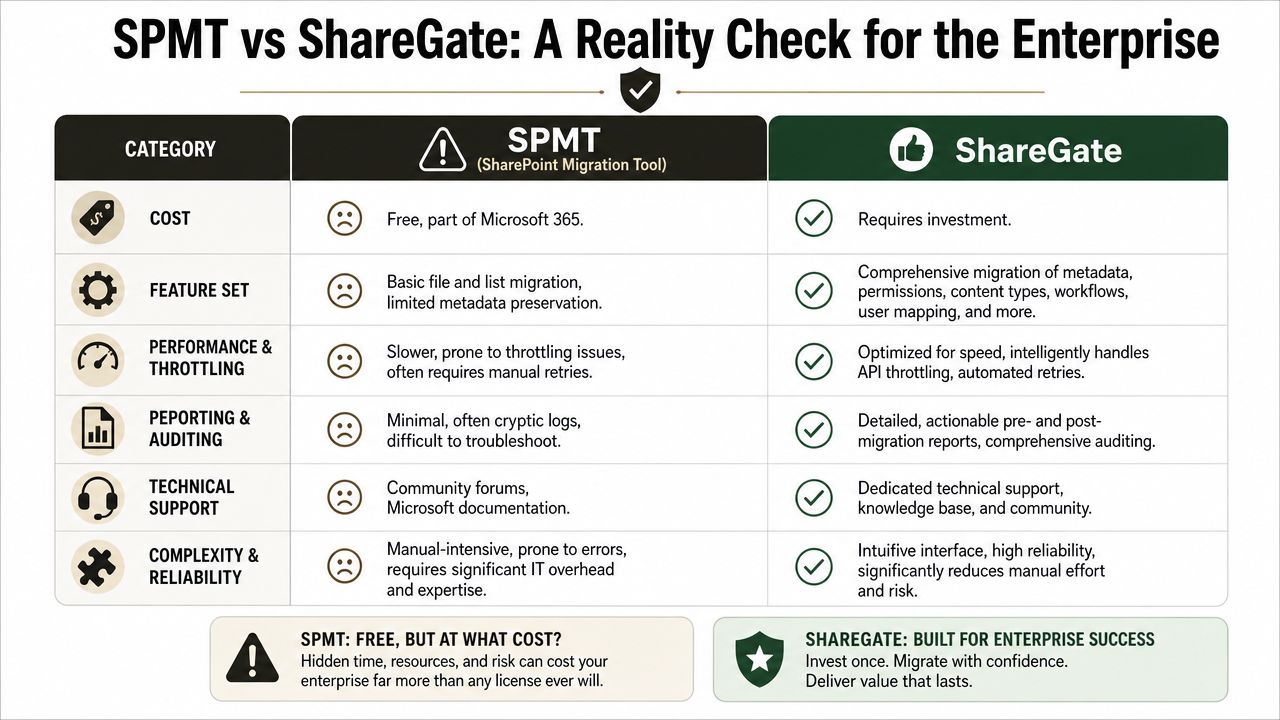
A visual summary helps, but only if you read it cynically.
SPMT is free for a reason
Microsoft's SharePoint Migration Tool has a place. It's useful for smaller, cleaner workloads. It gives teams a zero-licence-cost path into SharePoint Online. That's the good news.
In practice, Microsoft Learn states that submitting more than 5,000 migration jobs simultaneously triggers API throttling and degrades throughput, especially in user mode rather than app-based authentication, as documented in Microsoft's migration speed guidance. That's not a theoretical warning. In enterprise work, throttling creates stalls, retries, and ugly uncertainty around what completed.
The documentation says “manage your throughput.” In reality, teams using SPMT at scale often end up babysitting jobs, rerunning partial waves, and trying to explain why a migration appears healthy in one dashboard while users report missing content in another.
Here's the uncomfortable summary:
- Free doesn't mean resilient: SPMT lowers licence spend. It does not lower operational risk.
- Logs aren't enough: When jobs stall or fail awkwardly, the reporting often leaves your engineers doing detective work.
- Enterprise edge cases punish it: Complex metadata, awkward permissions, and large migration sets push it out of its comfort zone.
SPMT works when the environment is simple. Enterprise environments are rarely simple.
Ollo Verdict: Use SPMT for a single team site or a very small, tightly controlled content set. For enterprise critical data, it's malpractice.
If you want a more grounded view of where Microsoft's native tooling fits, read this SharePoint Migration Tool analysis with your engineering team, not just your procurement lead.
The execution discussion is easier to follow when you can see the mechanics in action.
ShareGate is powerful, not forgiving
ShareGate is the professional's choice for a reason. It handles more complexity, gives stronger reporting, and supports broader remediation and mapping work. We use it because it's capable.
That still doesn't make it safe in inexperienced hands.
ShareGate is a scalpel, not a Swiss Army knife. If your team treats it like an easy button, they can still mis-map users, flatten permissions, mishandle metadata, and move garbage at speed. The software can accelerate good architecture. It can also accelerate bad decisions.
Use this rule of thumb:
| Tool | Best case use | Breaking point |
|---|---|---|
| SPMT | Small, simple, low-risk content moves | Scale, throttling, weak forensic control |
| ShareGate | Complex migrations with proper planning | Operator error, weak governance decisions |
What experienced teams do differently
Skilled migration teams don't ask whether ShareGate can move the content. They ask whether the move should happen in that shape at all.
- They redesign before they migrate: Libraries, permissions, and information architecture get cleaned before bulk movement starts.
- They script around limitations: PowerShell PnP and controlled batch logic handle edge cases the interface alone won't solve.
- They validate relentlessly: Every wave gets checked for fidelity, access, and business usability, not just transport completion.
Ollo Verdict: Use ShareGate when the estate is messy and the risk is real. But if you don't pair it with custom scripting and experienced operators, you've bought a better weapon without training the person holding it.
Navigating Throttling Compliance and Data Fidelity
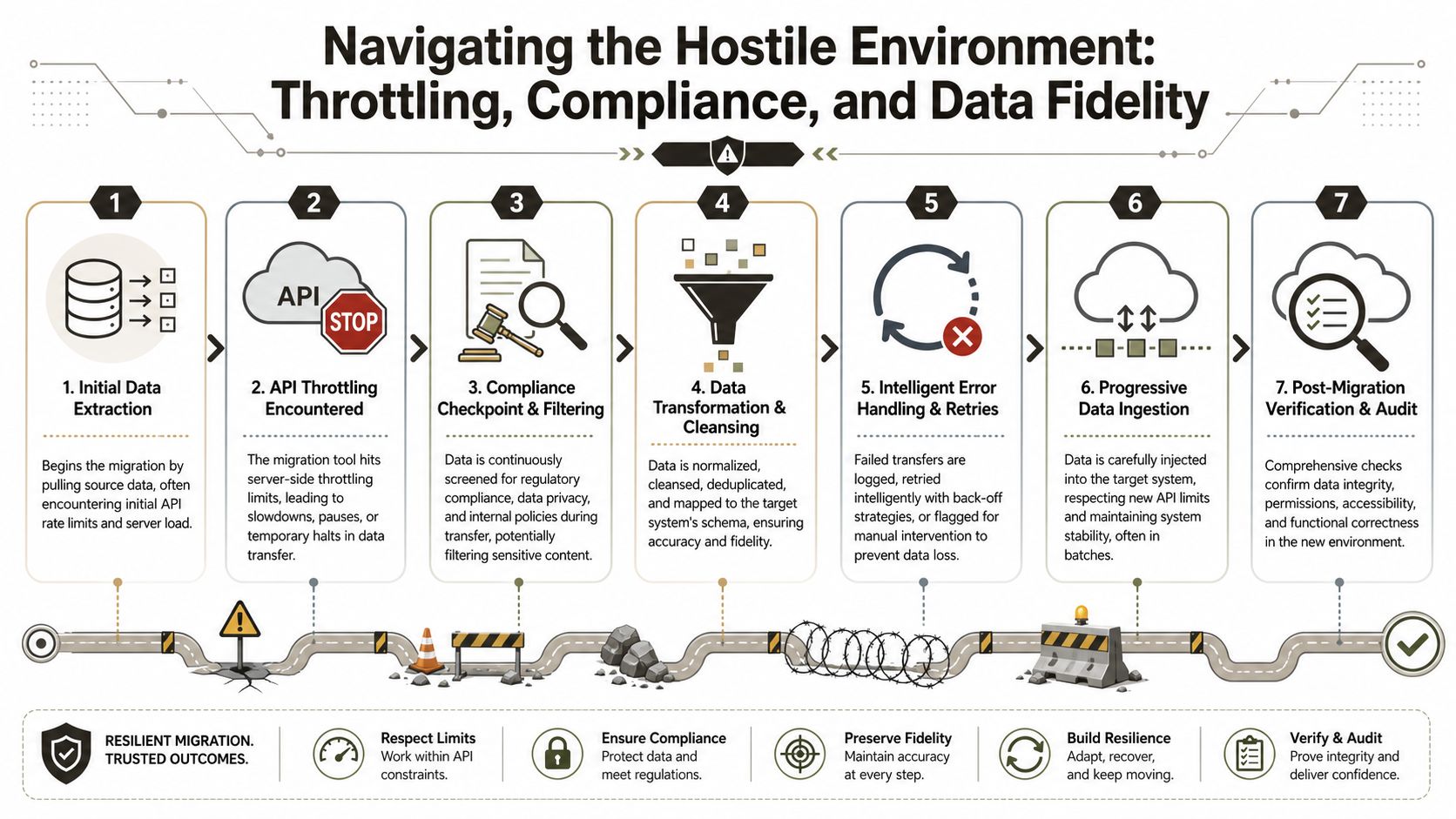
Migration execution is not a neutral transport event. It's a hostile environment. Microsoft protects the service, not your project plan. If your process doesn't account for that, the platform will punish you.
The industry talks about throttling as if it's just a slowdown. That's too soft. It's an enforcement mechanism. The service decides your workload is too aggressive, and then your throughput drops, your timings drift, and your confidence in data completeness starts collapsing.
Throttling isn't a nuisance
The teams that survive throttling design for it. They use app-based authentication where appropriate, stagger workloads, schedule heavy waves carefully, and build retry logic that respects the platform instead of fighting it.
The teams that don't do this usually discover the problem too late. Their jobs look active. Their dashboard keeps moving. Then they realise key batches never completed cleanly, retries masked inconsistencies, and users have already started working in the target.
For anyone writing an application for investment, this matters because validation isn't an optional “nice to have” line item. It's part of execution control. If you want a wider engineering perspective on that discipline, this guide for data engineers on migration validation is worth your time.
Field note: If your migration plan treats validation as a post-go-live tidy-up task, your plan is technically unserious.
The 5,000 item trap that ruins otherwise successful migrations
In SharePoint Online, the default List View Threshold is hard-coded at 5,000 items per view, and exceeding it blocks database operations such as queries. Microsoft confirms this in its official guidance on the list view threshold. You can't switch it off in the cloud.
That limit catches teams because the library may hold far more content overall, yet users only discover the failure after migration when views, filters, and basic operations stop behaving properly. Exceeding the threshold is like trying to drive a lorry through a pedestrian underpass. The system doesn't negotiate. It rejects the premise.
What competent execution looks like
A serious execution plan handles data fidelity before import, not after complaints arrive.
- Pre-index the right columns: If your design depends on filtered views, build the structure before content lands.
- Break up oversized libraries: Don't dump a legacy file share into one neat-looking document library and hope for the best.
- Control batch behaviour: Smaller, sequenced waves reduce the chance that one failure poisons a larger run.
- Validate permissions and metadata immediately: Don't wait for user tickets to tell you what went wrong.
- Treat compliance as in-flight work: Retention, sensitivity, and access rules must travel with the content, not chase behind it.
A mature data loss prevention approach isn't separate from migration engineering. It is migration engineering.
Cleaning Up The Post-Migration Governance Debt
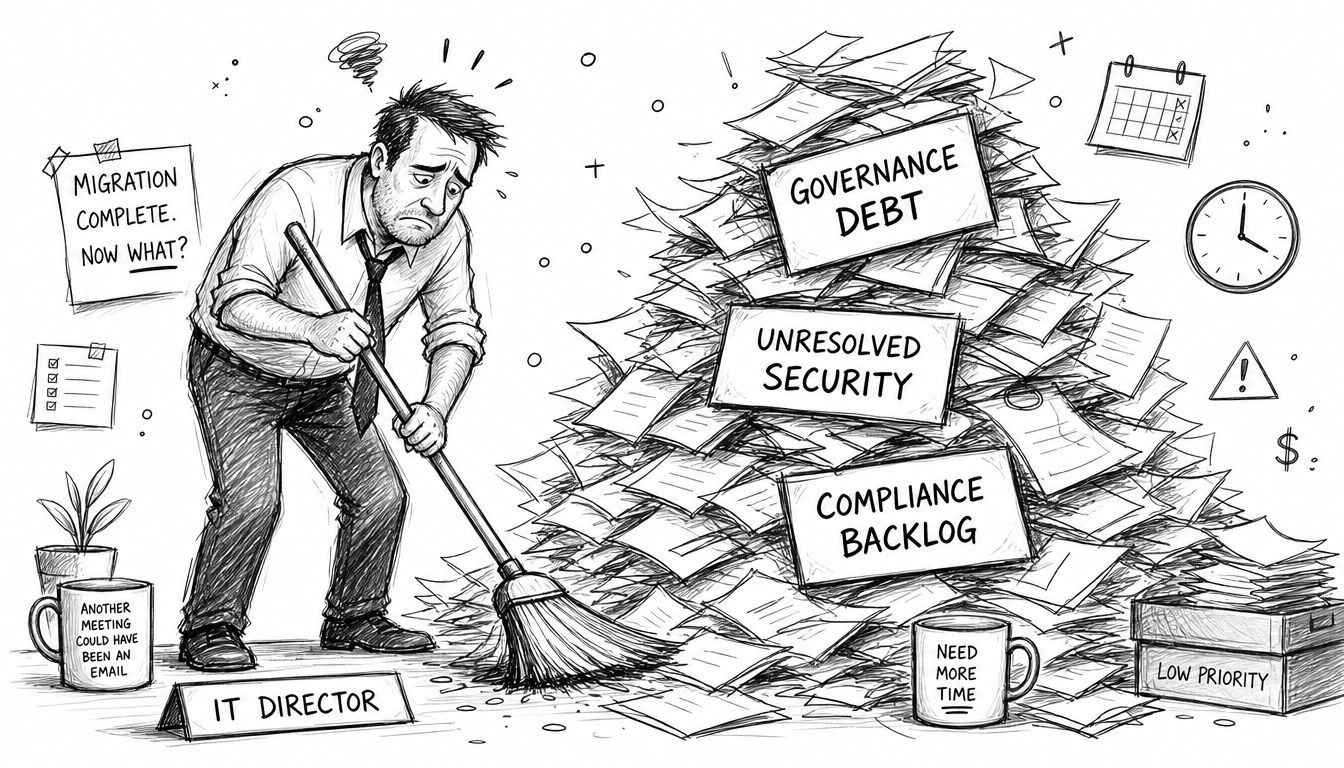
Bad migrations don't end at cutover. They create debt. Governance debt is what your organisation pays when the project team declares success and leaves operations to untangle the damage.
That debt appears fast. Power Automate flows stop because connections didn't survive the move. Sensitive libraries inherit the wrong permissions because nobody fixed access design before migration. Links break. Search quality drops. Users stop trusting the platform. Your helpdesk becomes the shock absorber for architectural negligence.
Governance debt is operational debt
IT Directors often frame the application for investment around project delivery. That's too narrow. The larger cost sits after migration, when the estate needs support, correction, and audit defence.
The worst part is that many of these issues don't announce themselves loudly. A broken flow may fail unnoticed. A permissions error may grant access too broadly without triggering a visible outage. A damaged metadata model may leave records technically present but practically undiscoverable.
Here's what that usually looks like in live environments:
- Helpdesk drag: Users raise access and missing-content tickets for weeks because the migration “completed” without proper verification.
- Security confusion: Legacy folder exceptions and broken inheritance create overexposure in the target tenant.
- Business disruption: Finance, HR, and operations teams waste time hunting for documents that technically migrated but no longer behave correctly.
- Audit pressure: Governance teams ask who approved the move, what controls were tested, and where the evidence sits.
A failed migration doesn't just create a messy SharePoint site. It leaves your leadership team defending preventable control failures.
Regulated Irish organisations carry sharper risk
In Ireland, inward FDI stocks reached €1.87 trillion in 2023, with over 60% concentrated in the Dublin region, according to the CSO's regional FDI release. For regulated organisations operating in that environment, governance failures aren't abstract. Data residency expectations, access controls, and regional compliance requirements carry board-level consequences.
If your migration approach ignores those constraints, the problem isn't just technical quality. It becomes legal exposure. For a financial services firm in Dublin, a sloppy move can create a direct breach of data sovereignty obligations where 100% local data residency is a strict requirement.
Clean-up is always more expensive than control
The sensible response is to stop treating governance as a post-project tidy-up. It belongs inside planning, execution, and validation. Teams building stronger control environments often benefit from broader thinking around building an ethical GRC framework, because migration governance isn't only about technology. It's about decision quality.
Your board doesn't fund an application for investment so your team can relocate old chaos into a newer interface. They fund it to reduce operational and compliance risk. If your migration creates governance debt, the investment case collapses.
The Only Defensible Migration Strategy for Regulated Data
If you work in energy, finance, or healthcare, the conclusion is blunt. Internal teams using generic plans and off-the-shelf tooling don't usually take a calculated risk. They repeat a predictable mistake.
The pattern is consistent. Weak discovery hides ugly source data. The wrong tool gets selected because it looks efficient on paper. Execution hits throttling, threshold, and fidelity problems. Then the organisation spends months paying governance debt that should never have existed. That's not transformation. That's expensive denial.
A credible application for investment must fund four things properly:
- Forensic pre-migration analysis
- Pilot-led validation
- Scripted execution for edge cases and scale
- Post-migration control verification
Anything less is optimistic theatre.
Your board doesn't need another migration promise. It needs evidence that the plan can survive contact with reality.
If your data sits in a regulated environment, you also need controls that stand up under scrutiny. Identity, access, retention, residency, and auditability must be engineered into the move. They can't be patched in later. That's why migration strategy should sit alongside computer system validation disciplines, not outside them.
The only defensible strategy is specialist-led, technically sceptical, and validation-heavy. If that sounds stricter than what your current partner proposed, that's the point.
Before you present your application for investment to the board, speak with Ollo. We'll pressure-test the migration plan, expose the failure points your team hasn't modelled, and tell you plainly whether your approach can survive a regulated enterprise rollout.

















