



Most advice on SharePoint migration is dangerously incomplete. It treats migration as transport. Copy the files. Map the users. Test a few sites. Job done.
That thinking creates the exact security mess Zero Trust was designed to stop. Legacy permissions, stale identities, over-shared libraries, service accounts nobody owns, and broken inheritance don't become harmless because you moved them into Microsoft 365. They become cloud-native liabilities.
I've spent enough time in rescue work to say this plainly. Your migration isn't a content move. It's an identity, access, and governance event. If your team still talks about it as “moving files from A to B”, you're already behind.
Your Migration Is Already a Security Incident Waiting to Happen
Most failed SharePoint migrations start with the same bad assumption. Someone in leadership decides the job is operational, not security-critical. Then the team focuses on schedules, storage, and cutover windows while ignoring identity validation, permission cleanup, and access drift.
That's how you create a breach path on purpose.
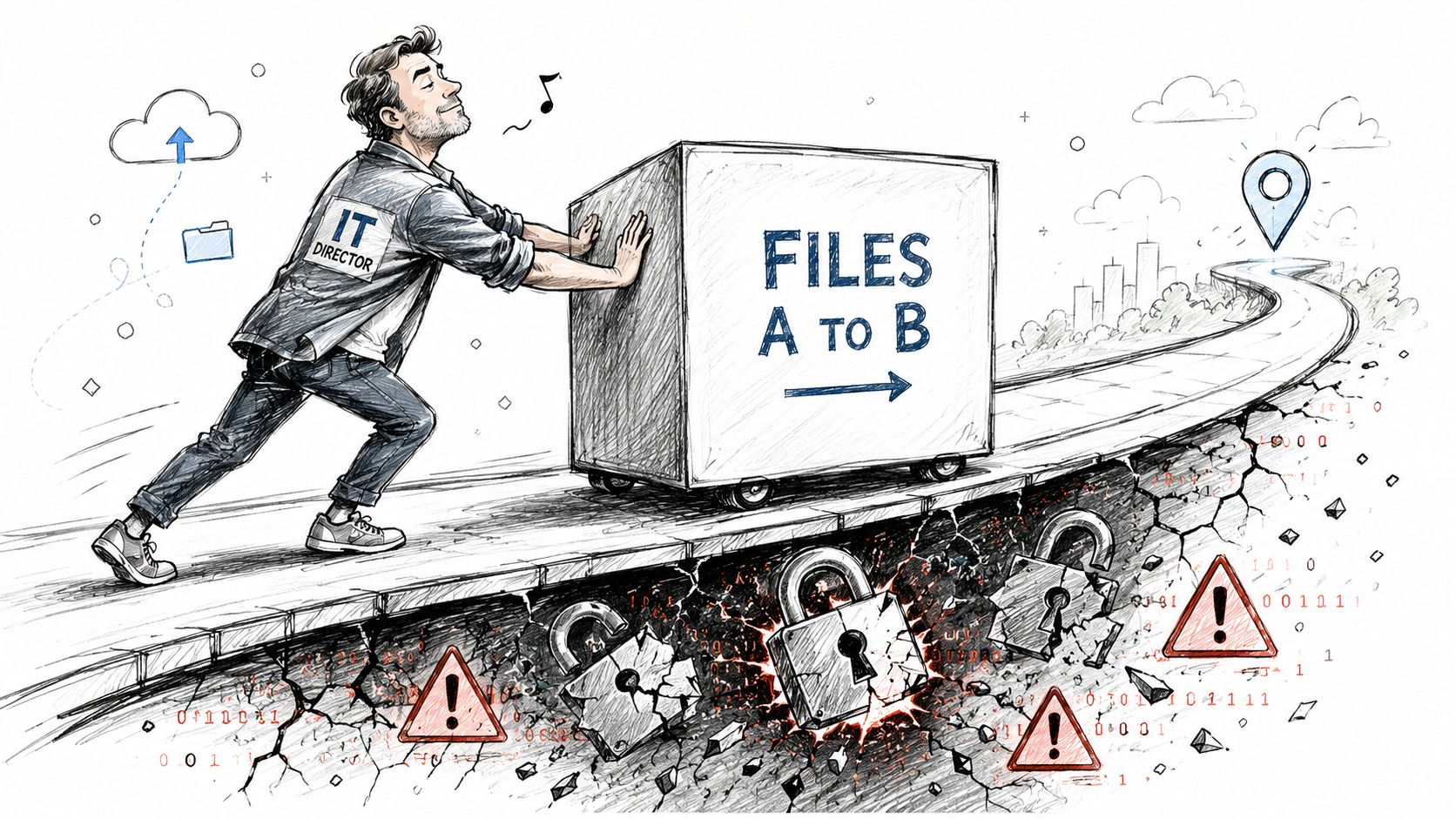
By 2026, 72% of global enterprises are actively implementing Zero Trust frameworks, and organisations with mature Zero Trust implementations see a 62% reduction in ransomware incidents, according to CrowdStrike's overview of Zero Trust security. Treat that as a projection with an obvious implication. Serious enterprises no longer separate migration planning from security architecture.
Where migration thinking usually breaks
We often see clients fail when they inherit old assumptions from on-prem days:
- “Internal means trusted.” It doesn't. Old SharePoint estates are full of permissive groups, stale memberships, and forgotten sharing paths.
- “Permissions can be cleaned up later.” They won't be. Once bad access lands in the target tenant, your team spends months arguing over ownership while risk sits there.
- “The tool will preserve everything.” It may preserve the wrong things perfectly.
Your migration wave can expose more sensitive data in one weekend than a careless admin can in a year.
If you want a useful parallel from the broader security world, review how OSINT and dark web investigations uncover exposed credentials and forgotten digital footprints. Migration work creates the same kind of visibility problem inside your own estate. You can't secure what you haven't enumerated.
The real issue is trust inheritance
Legacy SharePoint environments carry historical mistakes. Nested groups nobody can explain. Libraries with unique permissions on thousands of items. External users who should have been removed years ago. Sites owned by people who left. Service principals with more access than any human should have.
When your team migrates that mess without redesigning trust, you're not modernising. You're replatforming insecurity.
That's why a proper SharePoint migration security review belongs before any production move. If your partner starts by asking how many terabytes you have instead of who has access to what and why, they're solving the wrong problem.
Zero Trust Is Not a Project It Is a Prerequisite
Too many IT leaders treat Zero Trust like a phase-two programme. First migrate. Then harden. Then tidy identities. Then review permissions. That sequence is backwards.
Zero trust requirements belong in the design before a single document moves. If you postpone them, your migration becomes the mechanism that spreads bad identity and access patterns into the new tenant.
Why the sequencing matters
A migration freezes decisions into a new environment. Site architecture, permission models, external sharing rules, group design, service account scope, retention handling. Once those choices land at enterprise scale, reversing them gets expensive and politically painful.
That's why the ROI argument matters more than the ideology. A Forrester Total Economic Impact summary discussed by IBM states that organisations implementing Zero Trust architecture achieved an average 246% ROI over three years, with payback in under six months. The same source says mature implementations report up to a 50% lower likelihood of data breaches. Those aren't abstract security talking points. They're a direct argument against “migrate first, fix later”.
What prerequisite really means
Zero Trust as a prerequisite means your team must answer these questions before cutover:
| Decision area | What your team must define before migration | What happens if you don't |
|---|---|---|
| Identity | Which users, guests, apps, and service accounts actually need access | Stale access lands in the target tenant |
| Access policy | What least-privilege looks like by role, site, and workload | Over-broad permissions become normalised |
| Device and session trust | Which controls gate access based on risk and context | Weak sessions get the same trust as healthy ones |
| Governance | Which content classes need DLP, labels, and retention treatment | Sensitive data moves without control boundaries |
Practical rule: If Zero Trust appears on your roadmap after migration, it isn't governing the migration. It's cleaning up after it.
For teams that need a non-hype overview, EnvManager's Zero Trust guide is a useful primer. The mistake is stopping at the primer and assuming implementation is mostly policy language. It isn't. In Microsoft 365, it becomes architecture, scripting, exception handling, and governance enforcement.
A sensible Microsoft 365 Zero Trust implementation guide for non-security teams should therefore start with migration design, not finish with it. The data move is the moment when bad trust either dies or gets copied forward. There is no neutral option.
Mapping Zero Trust Principles to Entra ID and SharePoint
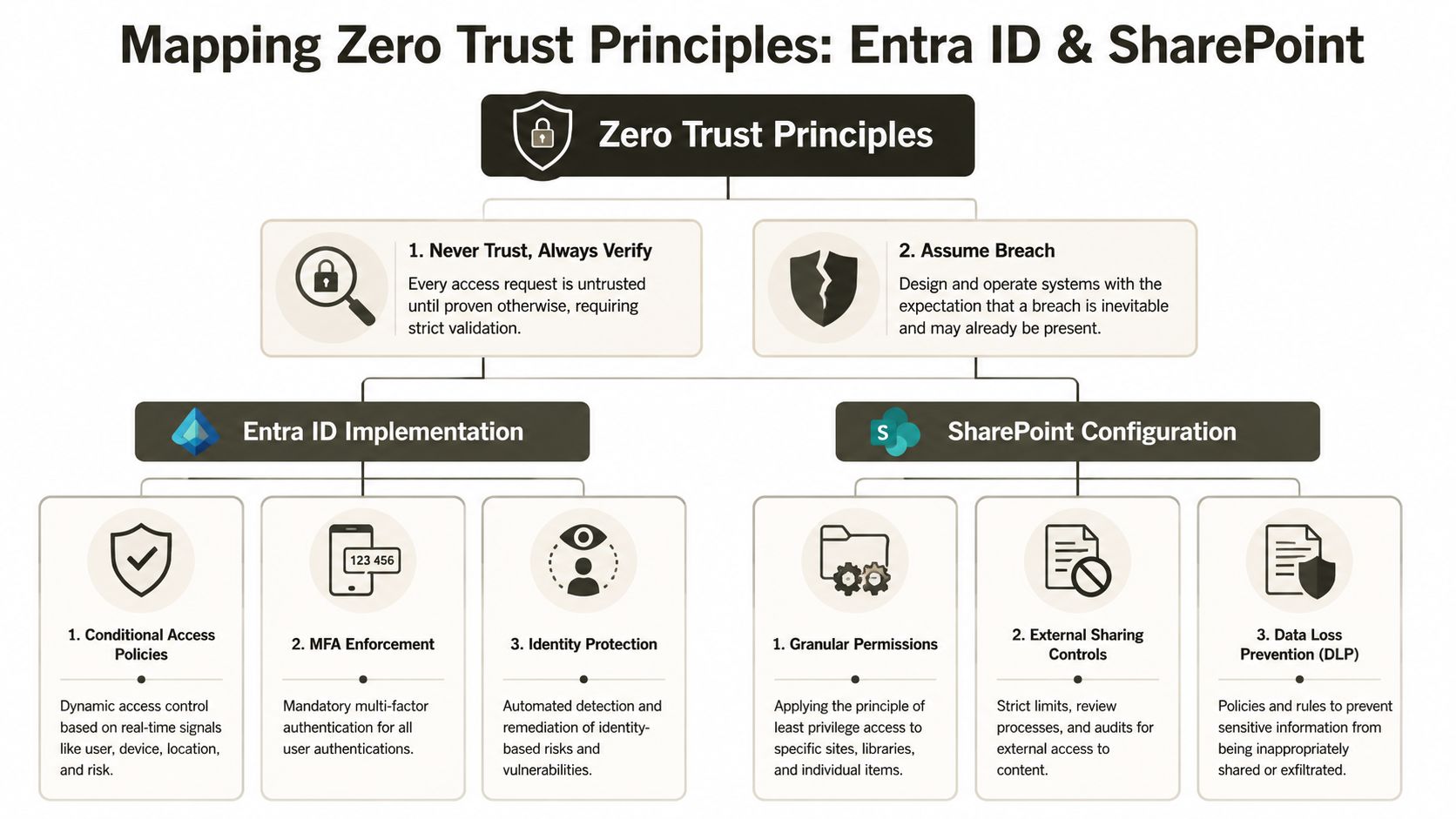
NIST SP 800-207 defines Zero Trust around explicit verification and eliminating implicit trust. That sounds tidy in a framework document. In a Microsoft tenant, it turns into hard configuration choices in Entra ID and ugly clean-up work in SharePoint.
If your team can't translate zero trust requirements into actual identity and content controls, then “Never Trust, Always Verify” is just wallpaper.
Start with Entra ID, not SharePoint
Your SharePoint security posture depends on identity quality. If Entra ID carries stale users, weak group design, unmanaged guests, and broad admin assignments, SharePoint will reflect those flaws at content level.
The minimum translation looks like this:
- Conditional Access first: Access decisions should evaluate user context, device state, and location instead of assuming any authenticated session deserves broad access.
- MFA everywhere: Not as a checkbox. As a baseline control that stops weak sign-in patterns becoming migration-time shortcuts.
- Identity Protection in practice: Risky identities and suspect sign-ins must trigger action, not just reporting.
- Lifecycle discipline: Joiners, movers, leavers, guests, and service identities need ownership. If nobody owns them, nobody can trust them.
A good external reference for the identity side is identity management services. Read it as context, not as a substitute for tenant-specific engineering.
For Microsoft-specific design, your team should already understand the core Microsoft Entra ID architecture considerations before migration tooling enters the conversation.
Then fix SharePoint where trust actually breaks
The documentation says Zero Trust requires explicit and continuous verification. In reality, migration teams often ignore the content layer where bad trust hides.
That means:
- Granular permissions instead of lazy inheritance sprawl
- Controlled external sharing instead of legacy convenience
- DLP tied to sensitive content classes
- Hub and site design that limits blast radius
- Permission reviews before, during, and after cutover
Here's a problem often overlooked. Microsoft Learn documentation confirms that without continuous validation of device health, identity, and location, automated scripts hit API throttling limits, and static queries fail 40% more often than dynamic, context-aware queries in high-volume SharePoint environments, leading to data loss. That matters because migration scripts aren't just moving content. They're making access decisions under load.
The principle-to-control map
| Zero Trust principle | Entra ID control | SharePoint control | Migration consequence if ignored |
|---|---|---|---|
| Never trust, always verify | Conditional Access and MFA | Permission review at site, library, and item level | Legacy access gets copied into the target |
| Assume breach | Identity risk monitoring | Restricted sharing and segmented site design | One compromised account can reach too much content |
| Least privilege | Role scoping and group hygiene | Granular permissions and cleaned inheritance | Excess access survives migration |
| Continuous validation | Context-aware access checks | Ongoing governance checks during waves | Scripts throttle, fail, or migrate risky access states |
Later in the programme, this explainer is worth watching because it puts the Microsoft side in a format non-specialists can absorb without flattening the complexity:
Continuous verification sounds like security theory until your static migration job starts failing under throttling and leaves content behind.
That's the operational truth. Zero trust requirements don't sit beside migration. They control whether migration behaves safely at all.
Data Governance That Survives Migration
Your biggest Zero Trust problem probably isn't an attacker. It's your own estate.
Legacy SharePoint environments hide sensitive data in ordinary libraries, preserve obsolete access decisions for years, and bury unique permissions where nobody expects them. When teams migrate without governance reconstruction, they don't just move data. They reactivate exposure.
Implicit trust lives in old content structures
NIST SP 800-207 mandates that Zero Trust Architecture must eliminate implicit trust, yet 70% of healthcare IT leaders still trust devices by default once they pass the perimeter. That flaw matters because old SharePoint models often behave the same way. If access existed once, it stays. If a group had rights years ago, nobody questions it. If external sharing helped one project, it lingers.
That mindset collides head-on with zero trust requirements.
We often see clients fail when they assume governance can be layered on after content lands. It can't, not reliably. Labels, DLP rules, and retention logic all depend on understanding the content, the business process, and the permission model before migration starts.
Governance controls that need pre-migration decisions
A serious governance pass should include:
- Classification planning: Decide where sensitive data belongs and how it should be labelled before migration scripts touch it.
- DLP alignment: Make sure target policies reflect actual regulated content, not generic templates.
- Retention review: Confirm legal and operational retention requirements so libraries don't lose meaning in transit.
- External sharing audit: Strip back old guest access and re-approve what remains.
- Permission inheritance audit: Identify where unique permissions serve a business need and where they merely reflect years of neglect.
Legacy data doesn't become governed because it reached the cloud. Someone still has to classify it, scope it, and defend it.
A proper SharePoint data governance approach has to treat migration as a filter, not a conveyor belt. If your partner proudly says they can “bring everything across exactly as-is”, that should worry you.
Microsegmentation in SharePoint is not optional
People hear microsegmentation and think network controls. In SharePoint, the practical version is stricter information boundaries. Departmental hubs. Site-level separation. Smaller permission domains. Controlled sharing routes. Minimal owner sprawl.
That design does two things. It limits lateral exposure after compromise, and it reduces the chance that one bad migration decision contaminates your whole tenant.
Here's a simple view:
| Governance area | Bad legacy pattern | Zero Trust-aligned response |
|---|---|---|
| Site design | One giant collaboration sprawl | Segment by business boundary and sensitivity |
| Permissions | Years of unique inheritance exceptions | Rebuild least-privilege access deliberately |
| Sharing | Historic guest links with no review | Re-authorise external access case by case |
| Sensitive content | Mixed with ordinary files | Apply labels, DLP, and retention before migration wave execution |
The documentation says “assume breach”. In SharePoint, that means designing so one compromised identity can't roam across finance, HR, legal, and operations because your team wanted fewer sites to manage. Convenience is how exposure spreads.
Why Standard Migration Tools Fail at Enterprise Scale
Vendors love demo scenarios. Small site. Clean permissions. Shallow folder structures. Friendly metadata. No tenant consolidation. No legal hold complication. No identity baggage.
Enterprise migrations don't look like that.
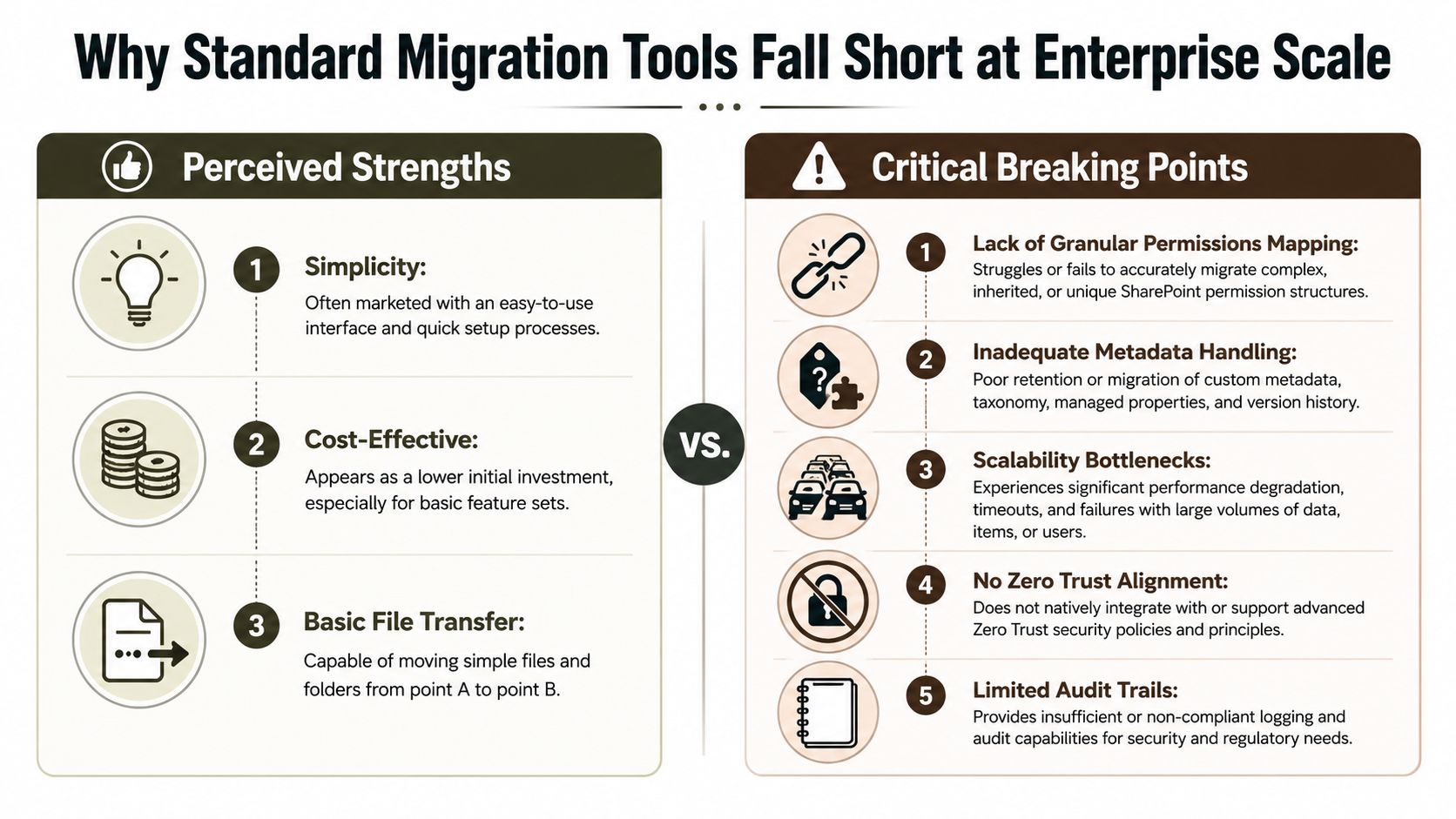
SPMT has a place. It's just a small one.
The official Microsoft SPMT documentation explicitly warns that the tool is not designed for migrations exceeding 50GB or 100,000 files, and Microsoft guidance cited in the verified material notes severe API throttling and long-running process failures beyond those limits, with a 30-40% increase in migration time when that threshold is ignored. That is enough to settle the argument.
Use SPMT for a small, uncomplicated workload. Don't use it as your enterprise strategy.
ShareGate is stronger, not magical
ShareGate is a professional tool. We use tools in that class for a reason. They help with packaging, orchestration, reporting, and repeatable execution. But out of the box, they still hit real-world enterprise constraints.
The usual breaking points are predictable:
- Complex permissions: Tools can copy chaos very efficiently.
- Metadata edge cases: Managed properties, taxonomy quirks, and version expectations still need validation.
- Deep paths: Long folder structures don't fix themselves.
- Tenant merges: Identity mapping and security translation require engineering, not optimism.
- Zero Trust alignment: A migration tool moves artefacts. It doesn't design your trust model.
The tool comparison IT directors actually need
| Tool choice | Where it works | Where it breaks | Ollo verdict |
|---|---|---|---|
| SPMT | Small, simple migrations | Enterprise-scale volumes, throttling, limited complexity handling | Use SPMT for under 50GB. For anything else, you need custom scripting. |
| ShareGate | Structured enterprise projects with experienced operators | Permission remediation, path exceptions, identity conflict edge cases | Use ShareGate with engineering discipline, not as autopilot. |
| Basic DIY scripting | Narrow automation tasks | Exception handling, governance mapping, repeatable auditability | Fine for labs. Dangerous in production. |
The SharePoint migration software landscape only makes sense when you stop asking which tool is “best” and start asking where each one fails.
Tools don't rescue bad design. They accelerate it.
That's the war story nobody puts on comparison pages. The tool matters. The engineering around the tool matters more.
Your Pre-Migration Failure Checklist
Rescue work teaches one useful habit. Build the pre-mortem before the project turns into a post-mortem.
If your migration plan can't answer the failure points below with technical precision, stop the programme and fix the design. These aren't theoretical edge cases. They're hard failure modes confirmed in Microsoft documentation and repeatedly visible in enterprise estates.
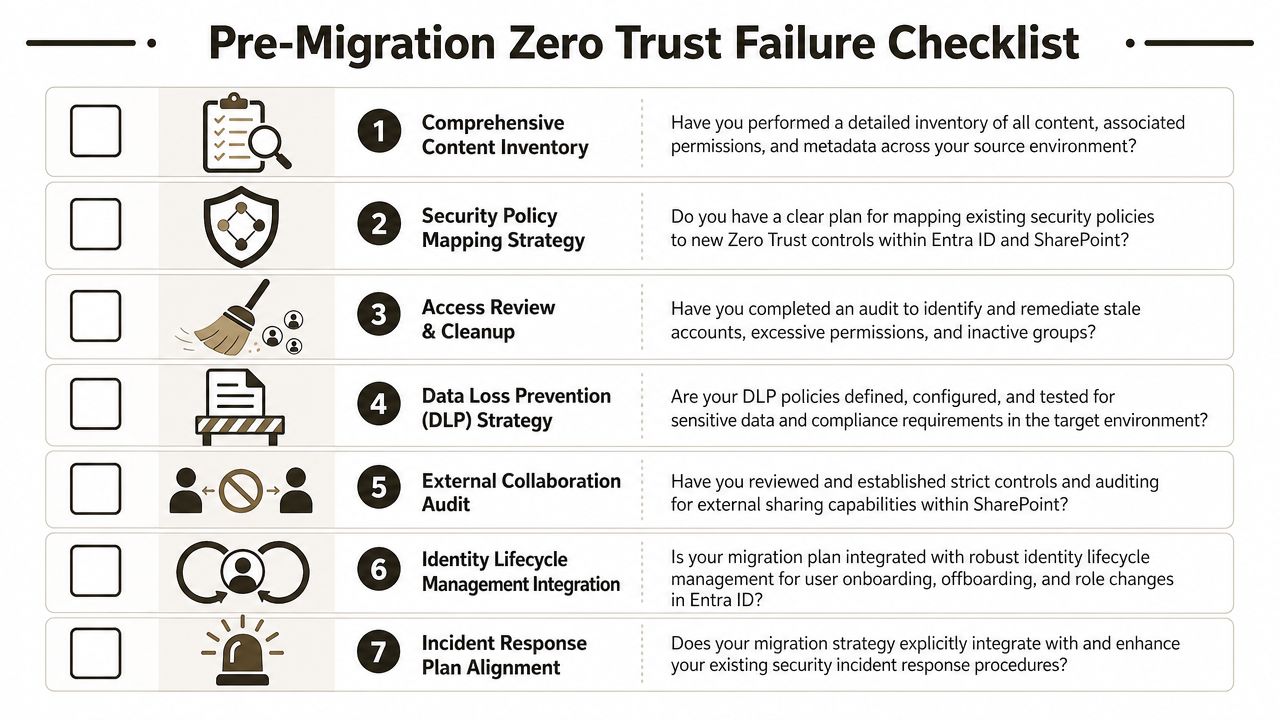
The five checks that kill weak plans
- API throttling
The documentation says automation helps. In reality, poorly designed jobs hammer services, trigger throttling, and stall under load. That's not just a performance problem. It interrupts validation, leaves partial results, and creates uncertainty over what moved.
The 5,000 item threshold
The official Microsoft Learn documentation for SharePoint Online archival limits hard-caps the List View Threshold at 5,000 items, and any query exceeding that without specific indexing fails immediately, as noted in this published reference discussing SharePoint Online archival limits. Missing this doesn't just fail a batch. It threatens legal and compliance datasets with silent omission.
Path length
SharePoint Online enforces a 400-character path length limit. Deep legacy folder structures don't care. They will break, rename, or fail unless you remediate paths before execution.
Broken inheritance
Old environments often contain years of unique permission exceptions. When those structures migrate unchecked, they violate least-privilege and create access states nobody intended.
GUID conflicts
Tenant consolidation introduces identity collision risk. Duplicate object identifiers can break authentication and security group resolution. That isn't a neat admin issue. It blocks users from their own content.
- How are they inventorying content, permissions, and metadata before wave planning?
- How are they handling large libraries that cross the 5,000-item threshold?
- What is their remediation method for path length failures?
- How are they detecting and rebuilding broken inheritance instead of blindly copying it?
- What is their plan for tenant consolidation identity mapping and GUID conflict resolution?
What each failure means in Zero Trust terms
| Failure point | Technical effect | Zero Trust principle violated | Business impact |
|---|---|---|---|
| API throttling | Jobs stall or return incomplete results | Continuous verification | Uncertain migration state and potential data loss |
| 5,000 item threshold | Queries fail on large lists and libraries | Explicit validation | Compliance content may be skipped |
| 400-character path limit | Files fail or are altered during migration | Least privilege and integrity controls | Records lose structure or fail to land correctly |
| Broken inheritance | Legacy access exceptions persist | Eliminate implicit trust | Over-permissioned content in target tenant |
| GUID conflicts | Identity mapping fails | Never trust, always verify | Users lose access, groups break, continuity suffers |
The questions your partner must answer
Hand this checklist to your migration partner. If they answer with product features instead of remediation methods, they aren't ready.
The documentation says thresholds and limits are manageable. Reality is harsher. They're manageable only when someone designs around them deliberately.
The Real Cost of a DIY Migration Failure
The wrong question is “What does specialist help cost?” The right question is “What does failure cost when the target environment becomes less secure than the source?”
DIY failure doesn't stop at project delay. It creates inaccessible records, broken security groups, policy violations, audit gaps, and an M365 estate your team no longer trusts. Then the internal politics begin. Security blames infrastructure. Infrastructure blames collaboration. Compliance asks for evidence nobody captured.
The risk matrix most teams avoid
The official Microsoft Entra ID guidance confirms that when merging tenants, duplicate Object IDs cause authentication failures and broken security groups, and it warns that manual resolution of GUID conflicts is complex and prone to error, as reflected in this discussion of federal Zero Trust mandate guidance and tenant identity issues. That single problem is enough to derail business continuity during consolidation.
Here's the plain-language version:
| Sector | High-Impact DIY Risk | Business Consequence | Ollo Mitigation Strategy |
|---|---|---|---|
| Finance | Legacy permissions and identity conflicts survive consolidation | Exposure of regulated content, failed audits, user lockouts | Pre-migration permission audit, identity remapping, guided cutover validation |
| Healthcare | Implicit trust in devices and content access persists into M365 | Sensitive records become reachable through old access paths | Governance-led migration design, least-privilege rebuild, controlled sharing model |
| Energy | Large, operationally critical document sets hit thresholds and throttling | Missing engineering records, stalled operations, compliance risk | Wave engineering, indexed migration logic, custom scripting for scale and exception handling |
Why generalists keep getting this wrong
Generalist partners focus on migration throughput. Enterprise rescue work focuses on trust reconstruction.
That difference matters. A generalist asks how fast they can move the data. A serious architect asks which access states must die before migration, which identities must be revalidated, and which libraries must be restructured so legal and operational records remain trustworthy after cutover.
The documentation often describes the platform limits cleanly. The field reality is uglier. Teams hit throttling, list thresholds, path limits, and identity collisions at the same time. That combination breaks more than the migration plan. It breaks confidence in the new environment.
The expensive part of a failed migration isn't the rerun. It's the insecure tenant you inherit afterwards.
That's why DIY is usually fake economy in regulated sectors. Your team doesn't save money by avoiding specialist engineering. It instead moves the bill to incident response, audit remediation, operational disruption, and emergency rework.
The final verdict is simple. Zero trust requirements make legacy SharePoint migration harder because they expose everything lazy in the old environment. That is exactly why they matter. If your migration partner treats Zero Trust as a security side quest, they are building your next failure.
If your team is planning a Microsoft 365 migration, tenant consolidation, or rescue project and you already know the environment is messy, get specialist eyes on it before you move anything. Ollo handles high-stakes SharePoint and Microsoft 365 migrations for organisations that can't afford data loss, broken permissions, or Zero Trust failures disguised as project delivery.

















