



Your Microsoft 365 migration is probably already behind schedule, and the worst part is that your board won't see the core problem until the cutover window starts slipping. We often see teams treat the migration tool as the centre of gravity, then discover too late that the schedule lied to them from day one. The tool didn't fail first. The dependency model did.
I've watched tenant consolidations go into go-live week with everyone staring at a Gantt chart that looked tidy, while the actual blockers sat in plain sight, hidden behind legal hold, permission rehydration, path limits, and approval queues. That's the point of critical path analysis, it forces the schedule to tell the truth. If you're running Microsoft 365 or SharePoint work without it, you're basically hoping the Friday night incident bridge never happens. If you want a practical migration timeline reference, start with this SharePoint migration timeline guide.
Why Your Microsoft 365 Migration Is Probably Already Late
A tenant-to-tenant consolidation can drift into legal-hold trouble long before anyone notices the schedule is broken. The plan keeps saying “on track” because the copy work is the only thing the team bothered to model. Meanwhile, the blockers sit outside that neat little box, platform limits, permission rehydration, approval queues, and the cleanup work that always shows up late. That is how these projects fail, through ignored dependencies that finally land on the IT Director's desk at 8am Monday.
The history of critical path analysis matters because the method was built for tightly coupled work like this. James E. Kelley Jr. and Morgan R. Walker developed it in the late 1950s, and their first paper appeared in 1959. NASA's historical account says DuPont's early plant-shutdown trials showed it could save 25% on shutdowns, which is why the method became a practical control tool for large work where one task governs the finish date. Microsoft 365 migrations need that same mindset. The schedule must show which dependency controls the cutover window, not which task just looks busy. NASA's historical account of critical path scheduling
Practical rule: If your schedule does not show which dependency can kill the cutover window, it is not a migration plan. It is a reassurance document.
The most common mistake is blaming ShareGate, SPMT, or PowerShell when the problem sits in the dependency map. Critical path analysis gives the project finish date its arithmetic. A strong control model treats the path as the thing to manage, not the task list. Float, dependency handoffs, and zero-slack work keep a migration from drifting into a compliance event. For a clear view of how resource control affects people once work starts competing for the same team, see resource allocation in migration projects.
The Four Mechanics of Critical Path Analysis
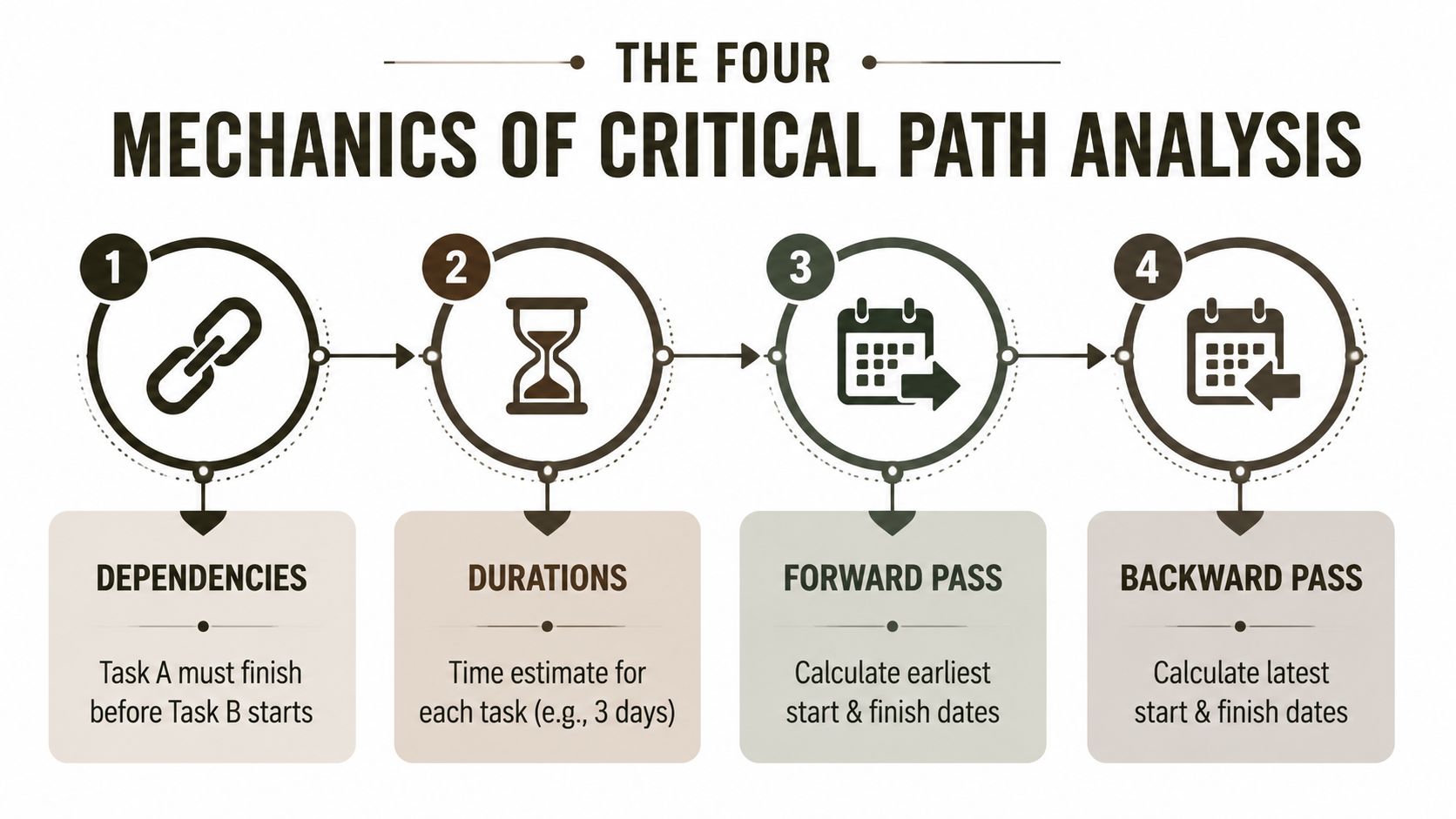
A network diagram only works when you build it in the right order. Start with dependencies, then assign durations, then run the forward pass, then the backward pass. Reverse that sequence and you get a polished-looking schedule that will not hold up when the migration starts to slip. DIY schedules frequently fail when teams optimize copy speed instead of dependency order.
Dependency mapping comes first
Take a simple SharePoint migration flow, discovery, content move, permission rehydration, validation. Discovery must finish before the move starts. The move must finish before permission rehydration can be trusted. Validation must wait for permissions to settle, because a green copy job means nothing if users still can't open the site.
That dependency chain is what controls the finish date. If you miss a handoff, the rest of the plan turns into guesswork.
Duration estimates only matter after the network is right
The duration on each task is just a number until it sits inside the dependency model. If discovery takes three days, the copy takes two, permission rehydration takes four, and validation takes one, the longest chain is not always the raw data movement. It is the sequence that cannot slip without moving the finish date. That is the critical path.
This is also where resource allocation discipline matters. If the same people are stretched across discovery, fix work, and validation, the schedule will lie even when the task durations look reasonable on paper. Keep the workstream order clear, then assign people to the path that controls go-live.
Forward pass, backward pass, then float
The forward pass calculates the earliest start and earliest finish for each activity. The backward pass calculates the latest start and latest finish without delaying delivery. Float is the gap between them. Any activity with zero total float is critical, which means even a small delay on that task pushes the whole migration date.
Practical rule: Busy work drains attention. If a task can slip without moving the finish date, stop treating it like a fire.
The basic mistake in DIY schedules is simple. Teams spend time optimizing low-value copy steps while the permission and validation chain controls go-live. Keep the dependencies visible, keep the float honest, and keep the people assigned to the right work. That is how the schedule stays truthful under pressure.
Building a Critical Path for a Tenant-to-Tenant Migration
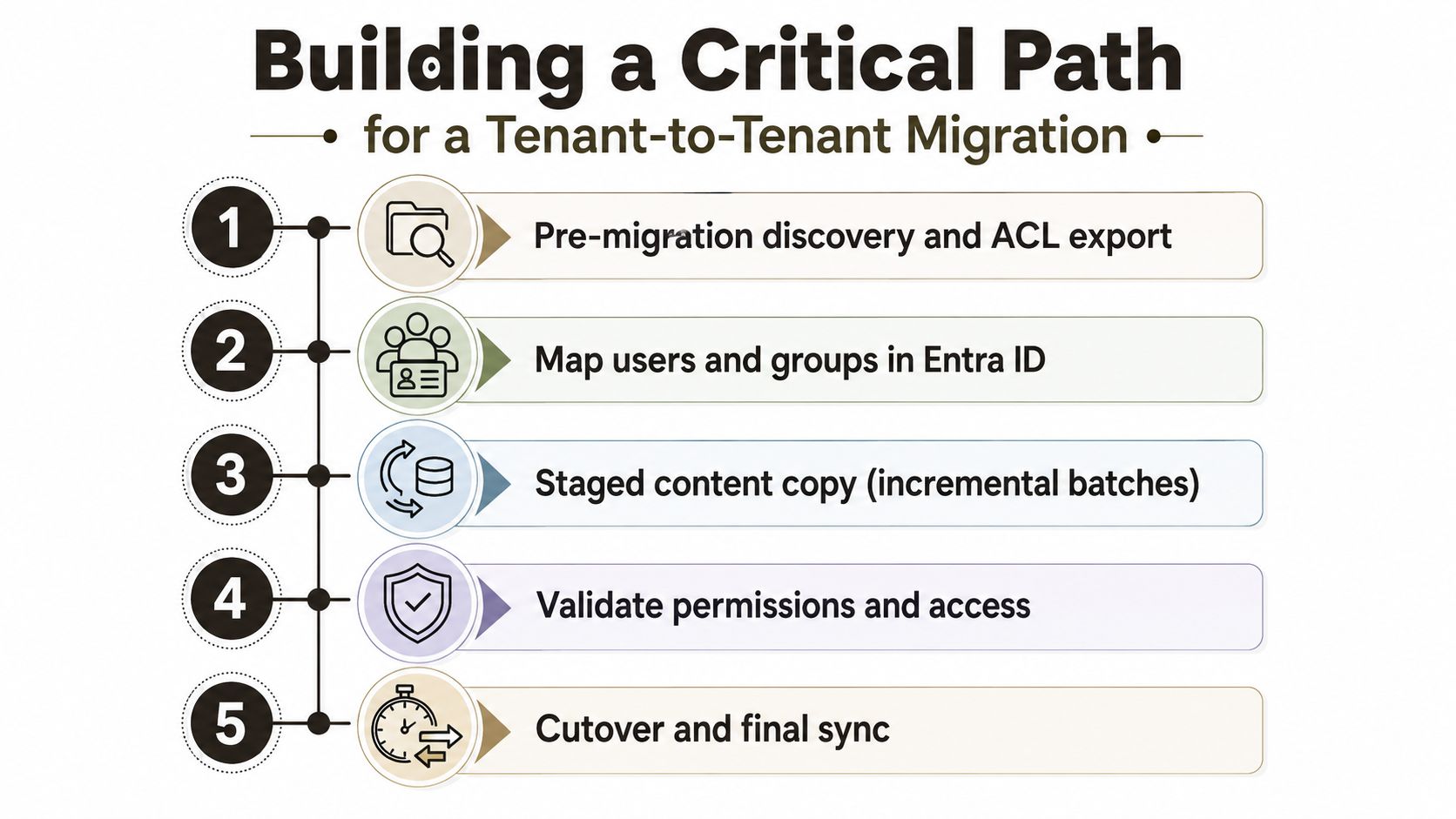
A tenant-to-tenant consolidation looks straightforward until the dependency chain gets real. We often see clients assume the copy is the long pole, then discover that the primary delay sits in identity mapping, permission repair, and final validation. That's where the finish date lives or dies, not in the bulk transfer itself.
Step 1 pre-migration discovery and ACL export
Start by inventorying the sites, libraries, permissions, and business owners, then export the ACLs before you touch content. Give this three days if the tenant has mixed ownership or inherited permissions that need untangling. This task sits near the start of the chain, but it still matters because every later step depends on knowing what must be rebuilt.
Step 2 map users and groups in Entra ID
Map the source identities to target users and groups in Entra ID, and do it before any staged copy starts. Put two days aside for a clean environment, longer if the tenant has stale groups or naming collisions. This work can overlap with some discovery clean-up, so it usually carries a little float, but only if the mapping rules are already agreed.
Step 3 staged content copy with PowerShell PnP scripts
Run the staged copy in batches using PowerShell PnP scripts, because enterprise migrations need control, not blind bulk transfer. A realistic starting point is four days for the initial wave, but that number means nothing unless you have the dependency chain already stable. This task often gets too much attention in steering decks, even though it rarely sits on the longest chain.
Step 4 permission rehydration in dependency order
The migration often bites back at this stage. Permission rehydration must follow the identity map, the ACL export, and the staged copy, which means it can't start early just because the copy looks finished. Give it three days if the structure is clean, more if you need to repair broken inheritance or resolve group conflicts.
Step 5 final validation and sign-off
Validation should not be a quick smoke test. It needs time for access checks, owner sign-off, and business confirmation that the migrated sites behave correctly for real users. Assign one to two days for this, and don't steal from it. If validation shrinks to half a day, your schedule has already started lying.
Here's the important part, the critical chain almost always sits in permission rehydration plus validation, not the raw copy. Discovery and mapping may have float. The copy may have float. The final access checks usually don't.
Practical rule: If validation has no protected time, the cutover is fake. You have a copy, not a migration.
The reason this matters in a steering committee deck is simple. If the director sees the longest chain sitting in the permission and validation workstream, they can fund the right specialists early instead of burning the weekend later. That's the discipline missing in most tenant migration plans, and it's why tenant-to-tenant migration planning needs an architecture view, not just a tool view.
The Hidden Risk Most Critical Paths Ignore
A critical path without a risk model is fiction in Microsoft 365 work. The documentation gives you durations, dependencies, and a clean calculation model, but reality adds resource scarcity, throttling, approvals, and rework. That is the gap. The schedule says the path is valid. Your migration night says otherwise.
The standard critical path analysis workflow assumes fixed durations and ignores resource constraints. That matters because a task can look mathematically sound and still collapse when a small pool of engineers, SharePoint admins, or security reviewers becomes the bottleneck. The plan says a task is ready when the predecessor finishes, but the person who must approve or repair it may be on another project, another queue, or another timezone. That is how enterprise schedules drift without warning.
Why float is not spare budget
Float should not become an excuse for optimism. If you spend it on wishful sequencing, you remove the only cushion you had for remediation. Reserve it for the tasks that break in migration work, reindexing, permission cleanup, path normalisation, and retry windows. That is the difference between a schedule that survives a bad batch and one that collapses on contact.
For Microsoft 365 work, the risk model must include the platform itself. Microsoft Learn documents the limits and operational behaviours that cause real migration friction, especially in SharePoint migration overview and constraints, so your plan needs to account for those constraints before the first cutover window opens. If tenant migration plans omit identity repair as a first-class dependency, the “critical” path is just a guess.
The hard lesson is this, critical path analysis is only as good as the dependency model feeding it. If you leave out resource contention, platform limits, or governance gates, you do not have a schedule. You have an optimistic diagram with arrows on it. The same discipline applies to performance optimisation, because migration speed only matters when the dependencies underneath it are real.
Five Microsoft Platform Limits That Rewrite Your Critical Path
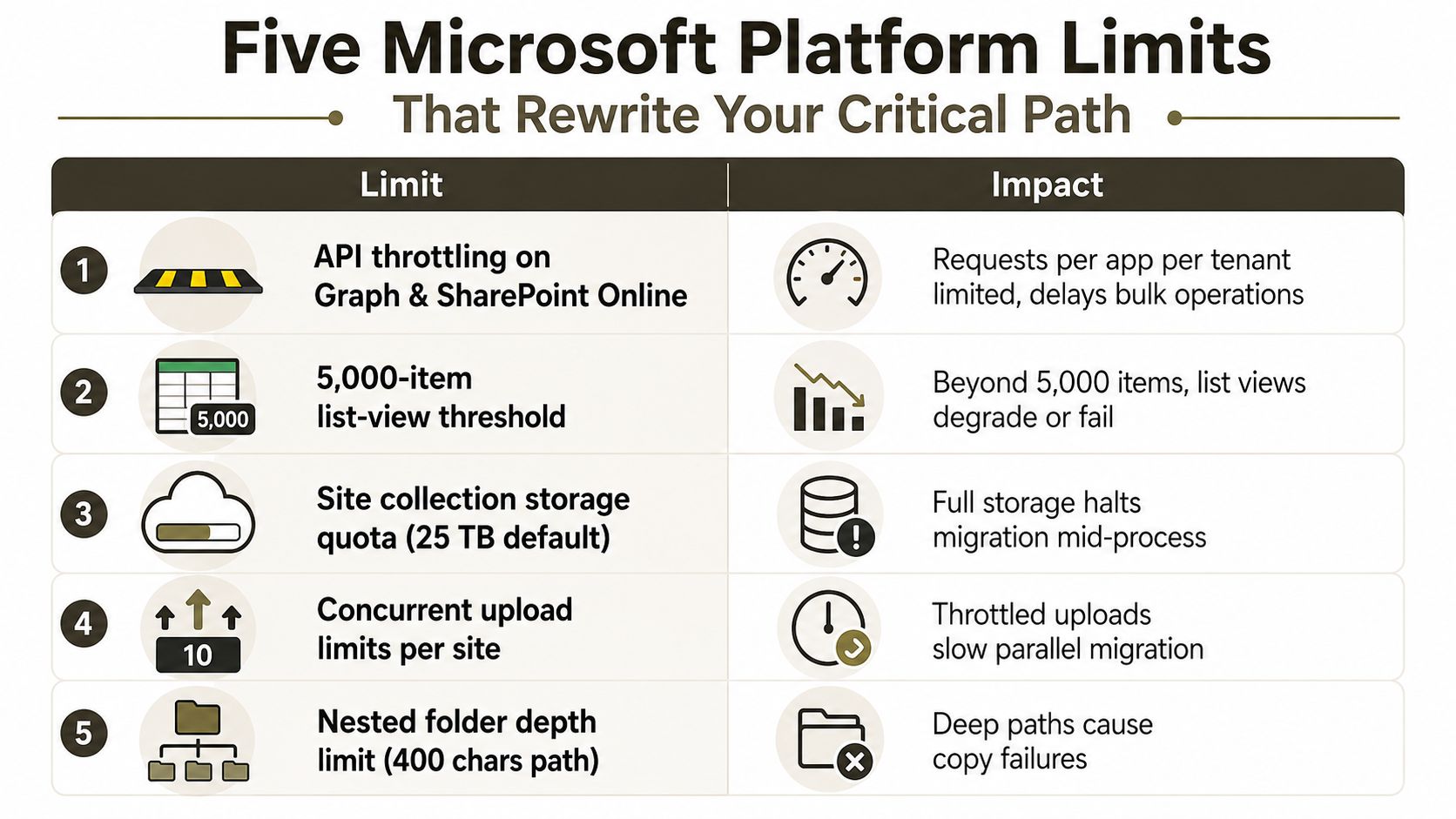
Platform limits are the silent schedule-killers in Microsoft 365 migrations. These five are the ones that turn a tidy plan into a weekend recovery exercise. If your critical path ignores them, the schedule is fiction.
API throttling on Graph and SharePoint Online
Microsoft Learn confirms that throttling exists in Microsoft 365 services, and that matters because bulk operations slow down when the service pushes back. In practice, the batch that looks fine in testing can stall once tenant traffic, retries, and concurrent jobs start competing for the same service limits. Teams that assume parallelism will keep the pipeline moving usually learn otherwise when the platform starts rate-limiting the work.
The 5,000-item list-view threshold
Microsoft Learn also confirms the 5,000-item list-view threshold, and large libraries stop behaving like tidy test cases. Once you cross that threshold, list views can degrade or fail, which means validation and content-access steps can stall even if the copy itself finished cleanly. Put that limit into the dependency model, because it changes when downstream work can begin.
URL and path-length limits
Long paths still break migrations. Microsoft Learn documents path and length constraints, and the pain shows up fastest in file-heavy SharePoint estates with nested folders, legacy naming, and years of user-generated mess. The failure mode is ugly. The batch lands partially, then the team burns the evening on path normalisation and reruns. Build remediation time into the plan at the start, or the critical path will absorb it later.
GUID conflicts during user or group rehydration
GUID conflicts show up when identity objects do not map cleanly across tenants. That is not a cosmetic issue. It blocks permission rehydration and forces manual repair before validation can proceed. In real projects, the schedule stops being about transfer and starts being about identity surgery. If the GUID mapping is wrong, the finish date moves.
Broken permission inheritance during staged copy
Staged copy can expose broken inheritance, which means the target site no longer behaves like the source did. Microsoft Learn-backed migration guidance warns about permission and structure issues that need attention during transfer. Once inheritance breaks, validation stops being a quick check and becomes an investigation, because users can land in content they should not see, or fail to reach content they should.
Practical rule: Do not treat platform limits as exceptions. Treat them as scheduling inputs, or they will become incident tickets.
These are not abstract risks. They are the reasons a plan that looked sensible on Monday still needs emergency changes by Friday. If you care about cost control and delivery speed, the same plan has to cover both critical path analysis and performance optimisation. Otherwise, the schedule is just a neat diagram with the hard parts missing.
Two Tenant-to-Tenant Case Studies Where the Critical Path Moved
A regulated financial-services consolidation came in with an 8-week plan, and the team thought the copy phase would define the finish date. It didn't. Week three exposed GUID conflicts during permission rehydration, the critical path shifted, and the client had to extend the change freeze while compliance teams reviewed the exposure. The near-miss was not the copy job, it was the repair work that nobody had protected in the schedule.
A healthcare tenant merger went wrong in a different way. The staged copy started as a 4-day job and turned into a 14-day problem once throttling kicked in and batch retries stacked up. Validation slipped past the regulatory cutover window, which forced a board-level escalation and raised obvious legal and operational exposure. That wasn't a tool failure. It was a planning failure.
Both projects prove the same point. The longest chain often becomes remediation, not migration. Once that happens, every hour of lost float turns into business pain, missed deadlines, extra governance meetings, and executives asking why the schedule looked so confident on paper.
You should read those two examples as a warning, not a retrospective. If your team hasn't modelled identity repair, throttling retries, and validation gates as first-class dependencies, you're underestimating the actual delivery date. The plan may still look neat. The work won't.
The Ollo Verdict on DIY Migrations Versus Hiring a Specialist
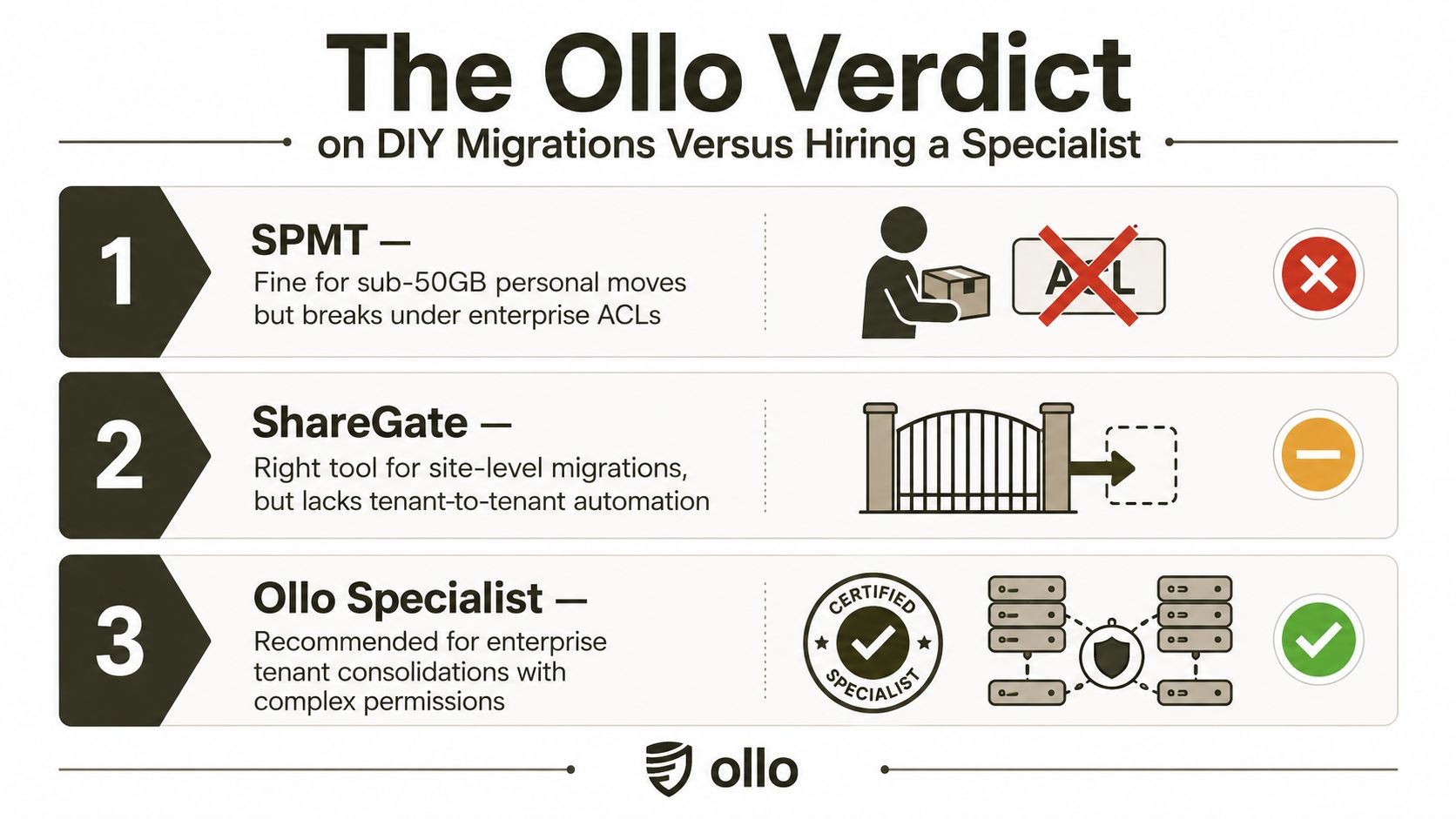
SPMT works for small personal moves. In enterprise Microsoft 365 work, it falls apart once ACL complexity, tenant-wide permissions, and cleanup logic enter the picture. ShareGate is the better mid-market tool, but it still leaves throttling, GUID repair, and dependency mapping to your team. For complex tenant consolidations, use a PowerShell PnP and ShareGate stack run by people who have already cleaned up the mess, not by people learning on production data.
DIY migration looks cheap until the hidden work shows up. Miss the critical path and you do not just lose time, you can break legal compliance, miss the cutover window, and leave executives remembering the failure long after the technical work is finished. That is the cost of optimism in a Microsoft 365 migration, and it is why the schedule has to include repair work, validation, and permission rehydration from the start.
If you want the sharper split between internal teams and outside specialists, read our comparison of admin versus consultant approaches. It maps the tradeoff clearly for Microsoft 365 work that starts simple and turns ugly once governance, permissions, and tenant boundaries get involved.
Monday morning checklist
- If you cannot show the zero-float chain, escalate.
- If you have not modelled throttling, path limits, and permission repair, escalate.
- If the team is still arguing about the tool instead of the dependency model, escalate.
For enterprise consolidation work, the Ollo verdict is direct, do not DIY the critical path. Use specialist delivery when the migration touches regulated data, complex permissions, or brittle governance, because that is where schedules stop being estimates and start becoming liabilities. If the plan depends on someone noticing the problem after it breaks, the plan is bad.
If your Microsoft 365 migration has already started slipping, bring in Ollo before the cutover window turns into another incident bridge. We handle tenant-to-tenant consolidations, rescue migrations, and the ugly dependency chains that make DIY plans fall apart. If you want a schedule that tells the truth, not a diagram that flatters the room, talk to us.

















