



Most advice about automated invoice processing software starts with OCR, approval routing, and a promise of fewer manual tasks. That advice is incomplete, and in regulated organisations it can be dangerous. OCR can read a document, but it can't prove that the invoice satisfies structured e-invoicing requirements, validate Irish VAT logic reliably, preserve an auditable approval chain, or keep a SharePoint repository usable after migration.
We often see clients fail when they treat invoice automation as an accounts payable efficiency project. They digitise paper, add a Power Automate approval, and discover later that their system can't process structured XML, distinguish a compliant eInvoice from a PDF, or protect supplier and invoice records across a complex Microsoft 365 estate. The result isn't merely an inefficient workflow. It can create compliance exposure, blocked production operations, broken permissions, and emergency rework.
The practical starting point is therefore governance. Your invoice platform must capture the right data, enforce the right controls, exchange structured records, and survive the limits of the systems around it. The principles overlap with wider business process automation tools, but invoice processing carries a particularly unforgiving combination of financial, tax, security, and records-management obligations.
Why Most Invoice Automation Projects Fail Before They Start
Invoice automation projects usually fail before a workflow is configured. The common plan is familiar: centralise invoices, apply OCR, route approvals, and connect the output to an ERP. Those steps address the visible process, not the control system underneath it. A PDF can look digital to a person while remaining unstructured to software. An extracted field can look plausible while containing the wrong VAT treatment or supplier identity.
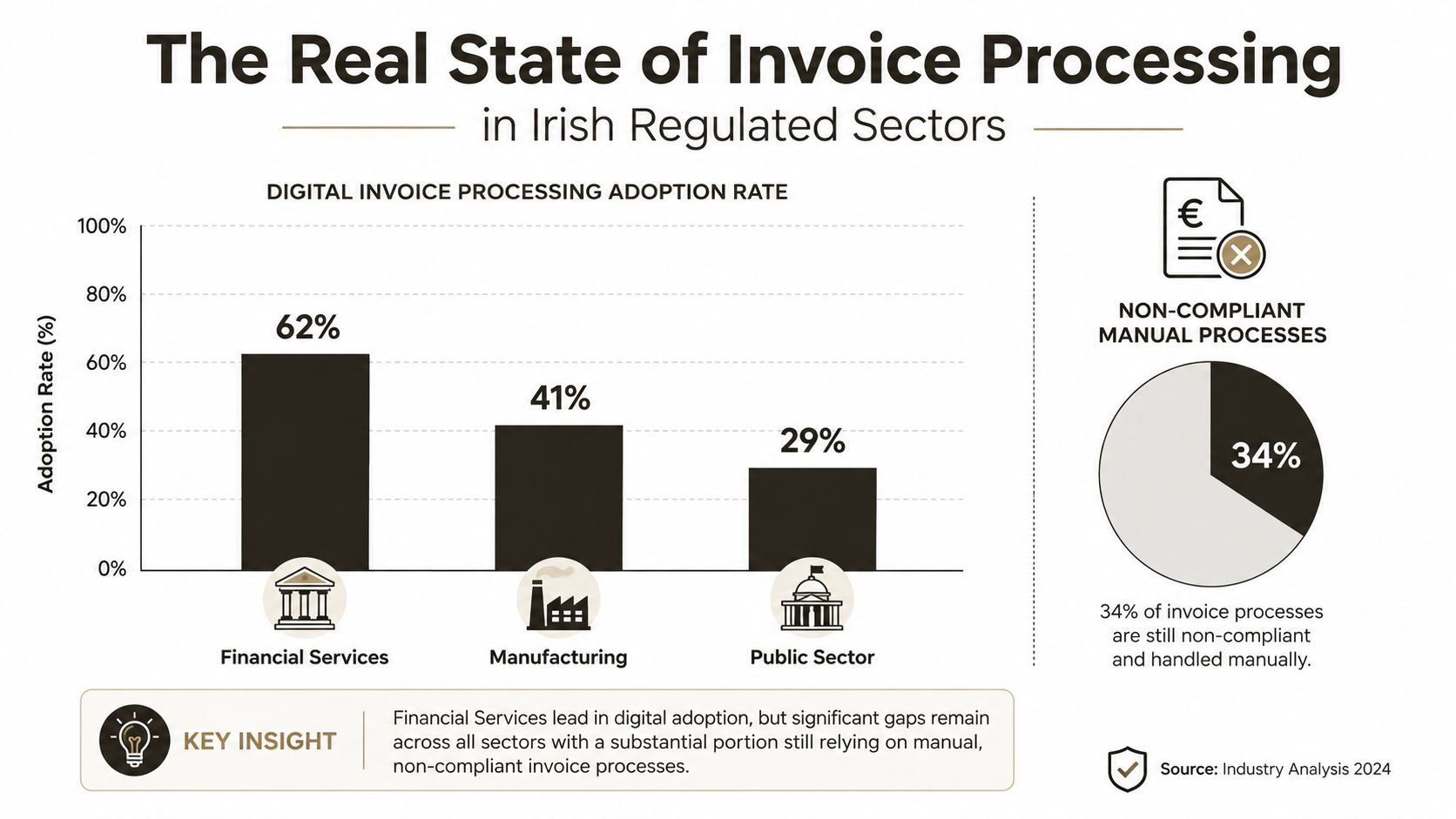
Ireland's official enterprise data shows the gap. In 2023, 29% of enterprises used electronic invoices suitable for automated processing, while 60% used electronic invoices that weren't suitable for automated processing and 44% still used paper invoices, according to the Central Statistics Office invoicing release. The categories overlap, so they should not be treated as a single total. The supplied CSO interpretation describes 71% of firms as still outside structured, automatically processable invoicing when non-structured and paper users are considered together.
OCR solves capture, not control
OCR has a useful role. It reads invoice numbers, dates, supplier names, totals, and line items from PDFs or scans, then passes those fields into a workflow. It does not turn an image into a compliant structured exchange. Confidence thresholds, validation rules, and human exception handling remain necessary.
Irish AP guidance identifies the fields that create production problems, including the supplier VAT number, invoice date, net and VAT amounts, and line items. A reliable system must distinguish Irish VAT rates such as 23%, 13.5%, 9%, and 0%. The Irish accounts payable automation guidance explains why noisy scans, supplier variation, and multi-rate invoices make low-confidence extraction risky.
Practical rule: Never allow a low-confidence extraction to post because the invoice passed through OCR.
The shortcut creates a future rewrite
A PDF-first design looks inexpensive until the input format changes. Revenue has confirmed that PDF invoices and scanned paper invoices will not satisfy ViDA requirements. Your platform therefore needs to handle structured XML and validate mandatory fields, VAT logic, and audit evidence, rather than relying on visual capture alone. The Revenue e-invoicing context explained by Xero Ireland sets out why structured exchange matters.
The same governance issue appears in Microsoft 365 implementations. SharePoint list thresholds around 5k items, API throttling, long file paths, permission inheritance, and poorly designed metadata can turn a working proof of concept into a migration problem. Treat business process automation tools as components within a controlled architecture, not as a substitute for one.
Remove human review only after adding supplier verification, duplicate detection, approval segregation, and exception queues. Otherwise, automation increases the speed at which a fraudulent, duplicated, or misclassified invoice can move through the organisation. The result goes beyond inefficiency. It creates compliance exposure, blocked production operations, broken permissions, and emergency rework. In regulated sectors, specialist migration services reduce that risk by testing the repository, interfaces, controls, and exception paths before production.
Current State of Invoice Processing in Regulated Sectors
Irish enterprises are entering structured invoice processing from different starting points. Manufacturing led the CSO sample in 2023, with 36% using eInvoices suitable for automated processing, compared with 30% in construction and 27% in selected services, according to the CSO enterprise invoicing statistics. Those figures measure structured-readiness rather than general digital adoption, a distinction many software comparisons collapse.
Public-sector requirements provide a clearer operating reference. Since 12 June 2019, Irish public-sector entities have been required to receive and process structured eInvoices compliant with EN 16931, under Statutory Instrument 258/2019, which transposed Directive 2014/55/EU. The European Commission's Ireland eInvoicing country information confirms the B2G requirement, while no general B2B mandate applies across the private sector yet.
Digitisation and structured automation are different controls
A scanned paper invoice can enter a document library, and a PDF attached to email can enter an OCR queue. Neither format automatically supplies the structured data needed for machine validation and exchange. Structured e-invoicing requires invoice data to follow a machine-readable model, rather than just presenting information that a person can read.
That distinction changes supplier onboarding. Identify which suppliers can send structured invoices, define accepted channels, validate each payload, and route malformed or incomplete records into an exception process. An inbox-monitoring capture tool cannot provide those controls by itself.
Public-sector volume exposes the operating model
An Irish government presentation cited by Quadient says the public sector processes more than 4 million invoices each year, while one health-service rollout previously handled 275,000 invoices annually through paper and email. The same material recorded 20,000 eInvoices received during the first 22.5 months of one rollout, representing about 5% of total invoices at that point, as reported in Quadient's overview of Ireland's e-invoicing landscape.
A mandate does not create adoption automatically. Supplier communication, format validation, exception ownership, integration monitoring, and records retention still require defined owners and tested procedures. Regulated organisations should treat these capabilities as governance controls, because invoice automation determines whether evidence remains complete, traceable, and usable during review.
Technical Architecture and Microsoft 365 Integration Patterns
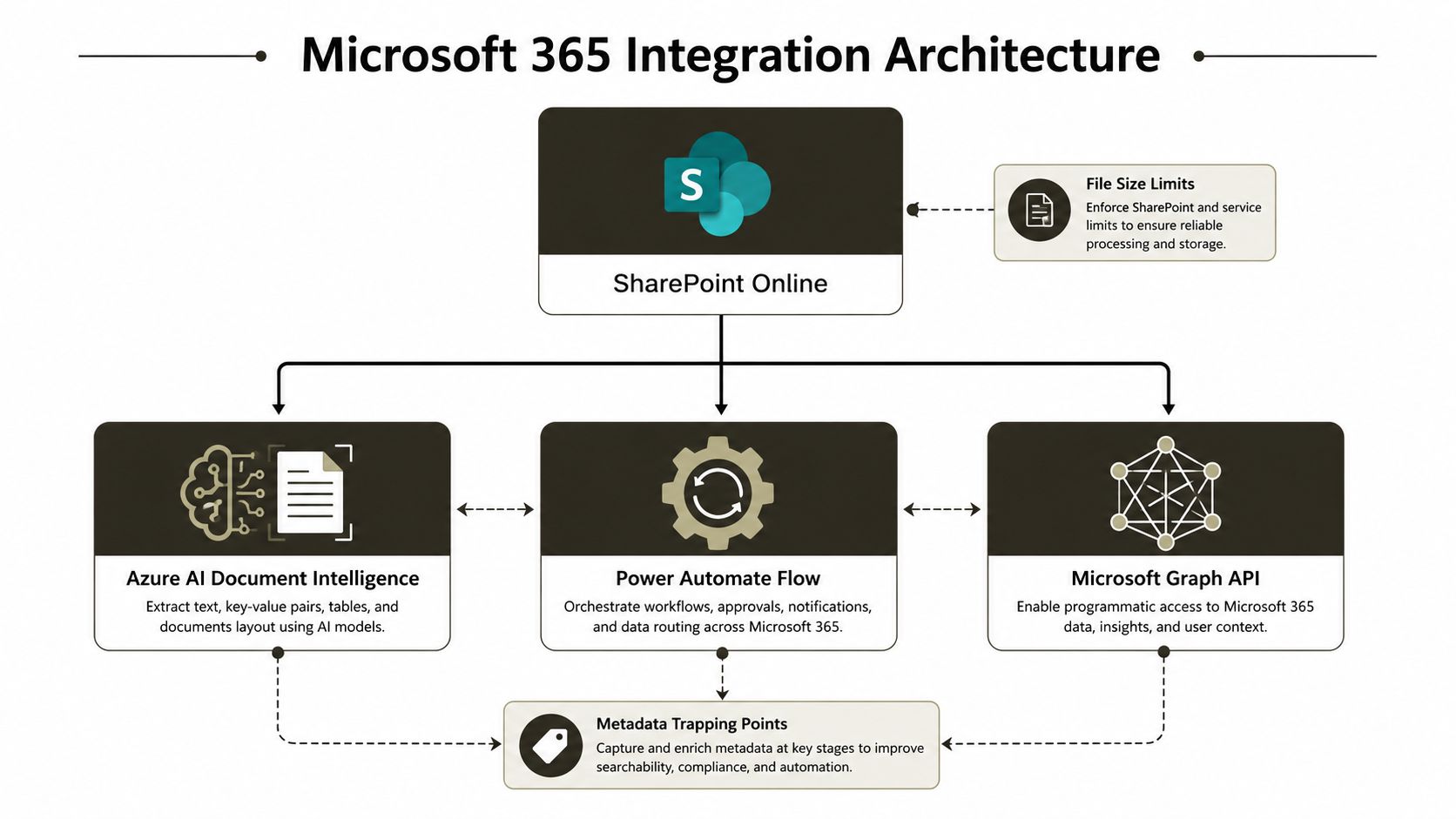
A dependable architecture separates four concerns: capture, extraction, workflow, and records management. SharePoint Online can store the invoice document and metadata. AI Builder or Azure AI Document Intelligence can extract fields. Power Automate can manage approvals and exceptions. Microsoft Graph or approved connectors can move data between Microsoft 365 and finance systems. Each component has limits, and your design must account for them before production data arrives.
Keep documents, metadata, and decisions distinct
Store the source invoice as an immutable or tightly controlled record, then store extracted fields in a deliberate metadata model. Don't force Power Automate to rediscover invoice values from a file every time an approver opens it. Capture the extraction result, confidence, validation status, supplier key, invoice key, approval state, and posting result as separate fields with controlled transitions.
Use indexed columns and filtered views for operational queues. Microsoft confirms that SharePoint Online has a hard 5,000-item List View Threshold, and Microsoft 365 tenants can't raise it. The Microsoft Learn guidance on the List View Threshold explains that broad or unindexed queries can become blocked rather than merely slow.
Design for path and permission boundaries
A library can contain a large volume of content, but that doesn't mean every structure will remain manageable. Microsoft documents a 400-character maximum for the decoded file path, including the filename, in SharePoint in Microsoft 365. It also documents a capacity of 30 million items in a list or library, while warning that once a list, library, or folder exceeds 100,000 items, you can't break or reinherit permissions at that level. Those constraints appear in the SharePoint Online limits documentation.
Your migration plan should therefore flatten unnecessary folder depth, generate controlled filenames, and use metadata instead of reproducing every legacy directory. It should also map access by business role and record sensitivity, rather than copying years of accidental inheritance into a new tenant.
A Power Automate flow that works against a small test library can fail when it queries a broad production view, encounters a missing metadata value, or receives a throttling response from a connected service. The SharePoint and Azure integration patterns used by Ollo are useful as a reference point, but your team still needs a tenant-specific architecture, test data, and rollback plan.
Compliance Deadlines That Make DIY Implementations Dangerous
The compliance timetable changes the buying question. You aren't choosing between an OCR product and a manual process. You're deciding whether your invoice architecture can support structured exchange, tax reporting, supplier readiness, and defensible audit evidence before the applicable deadlines arrive.
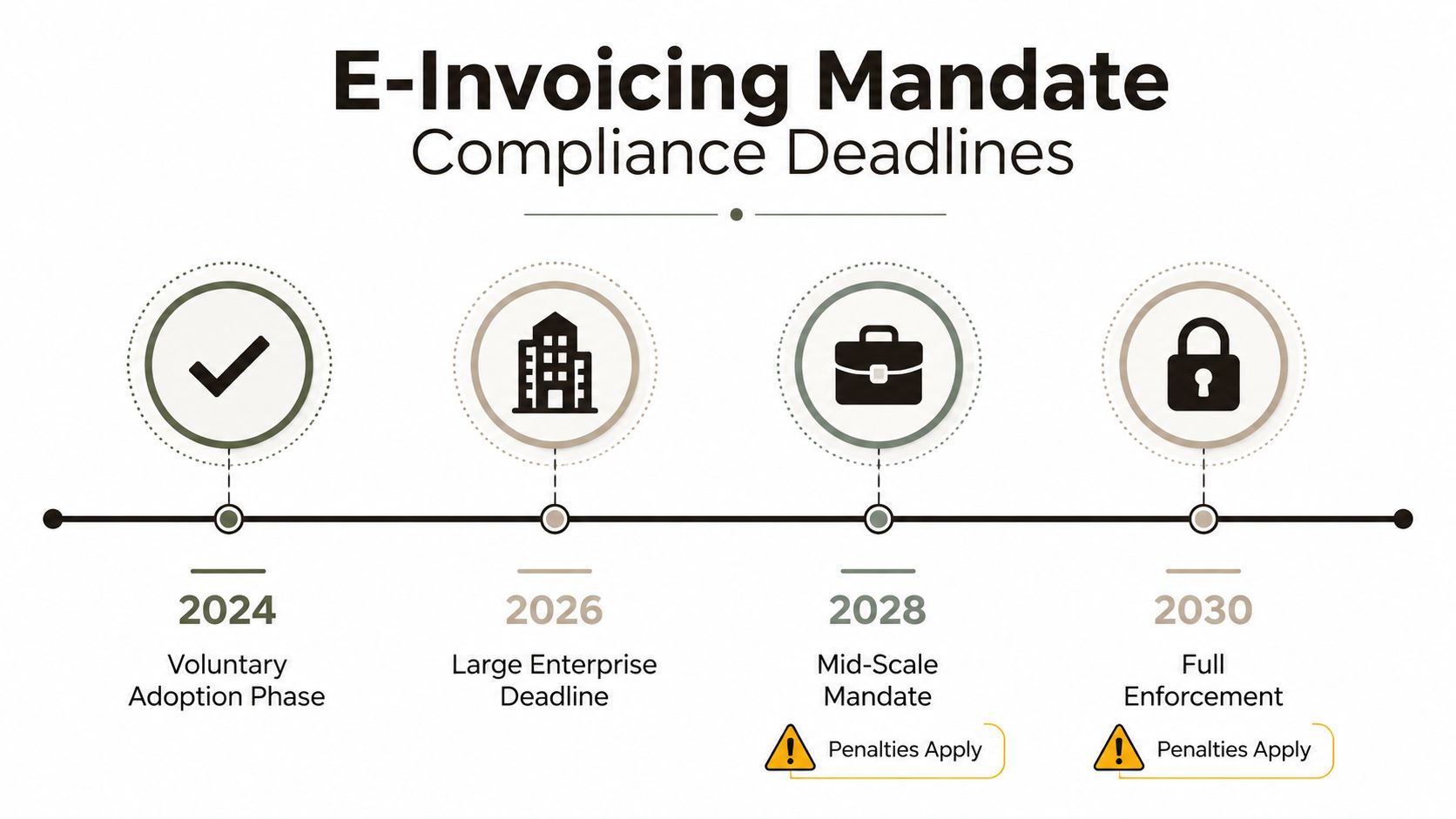
Revenue's phased VAT modernisation rollout requires large corporates to issue structured eInvoices and report domestic B2B transactions from November 2028. All businesses must be able to receive structured eInvoices from that date, with broader obligations extending through 2029 and 2030, according to the Irish e-invoicing mandate timeline. These are future requirements, but the architecture decisions that determine readiness happen before the deadline.
PDF-first workflows won't age well
A PDF-first workflow can remain useful as an interim capture channel, but it can't become your compliance strategy. Revenue's position means that scanned paper and PDF documents won't satisfy ViDA requirements. Your software must ingest structured XML, validate EN 16931 fields, support Peppol-based exchange where required, and retain evidence of what the system received, changed, approved, and posted.
For a practical overview of the underlying framework, TaxID's EU e invoice standards explained gives useful context on structured standards and compliance concepts. Use that background to challenge vendor demonstrations. Ask the vendor to show malformed XML handling, missing VAT fields, duplicate invoice detection, supplier identity changes, and a human review path.
The deadline won't repair a weak data model. It will expose one.
Compliance also depends on people and controls
Supplier onboarding needs ownership. Someone must verify supplier identifiers, approve changes to bank and tax details, and investigate exceptions. Approval routing needs segregation of duties, resilient delegation, and an audit trail that doesn't disappear when a user leaves or a group changes.
Your security team should also review the invoice workflow as part of the wider Microsoft 365 control environment. The NIS2 and Microsoft 365 guidance is relevant where invoice data sits inside broader operational and security governance. Missing these controls doesn't just delay a project. It can undermine legal compliance, create audit exposure, and force a rushed redesign while your AP team continues processing invoices through email and paper.
Technical Failure Points That Collapse Enterprise Implementations
Enterprise invoice automation usually fails in its control surface, not its file connector. Teams copy an unsuitable security model, assume identifiers will remain stable, or treat throttling as a temporary inconvenience. Those decisions can turn an accounts payable project into a compliance incident.
Microsoft's official migration permission guidance states that a list or library cannot contain more than 50,000 unique security scopes. Unique scopes beyond the List View Threshold can add SQL round trips and reduce performance. Permission-modifying actions can also trigger HTTP 429 throttling. Repeated retries will not remove a structural limit. The security topology must change, and the Power Automate approval workflow approach must account for permissions and identity, not only flow steps.
Security inheritance becomes a production dependency
A list or library containing more than 100,000 items cannot break permission inheritance at the list itself, according to Microsoft's migration guidance. Where a structure contains more than 100,000 children, Microsoft says the security import must be split across multiple phases to avoid hard limits.
That constraint matters when a legacy invoice repository contains years of department-specific access decisions. A lift-and-shift can preserve documents while failing to reproduce who may read, approve, export, or administer them. Users lose access, administrators create emergency exceptions, and auditors receive a security model nobody can explain.
Identity conflicts break workflow logic
Supplier records often join OCR output, the ERP, the invoice archive, and approval routing. If a migration creates duplicate supplier records or changes the identifier expected by a flow, an invoice can route to the wrong cost centre, fail to match a purchase order, or stop at an approval step without a valid owner.
GUID conflicts create similar failures across SharePoint sites, lists, document libraries, and migrated metadata. A name may look correct while its underlying identifier differs. Scripts and connectors need an explicit mapping layer, preflight validation, and post-cutover reconciliation.
API throttling creates another breaking point. Finance platforms, SharePoint, Graph, and Power Automate can impose request limits or return transient errors during large synchronisation runs. Treating every 429 as retryable can turn a backlog into a loop. Use batching, backoff, checkpoints, idempotent writes, and monitoring that separates a temporary service response from a hard limit. The harder question goes beyond extraction accuracy. Your organisation must prove who supplied, validated, approved, changed, and posted each total under the required governance model.
The Risk-Reward Calculation for DIY Versus Specialist Migration
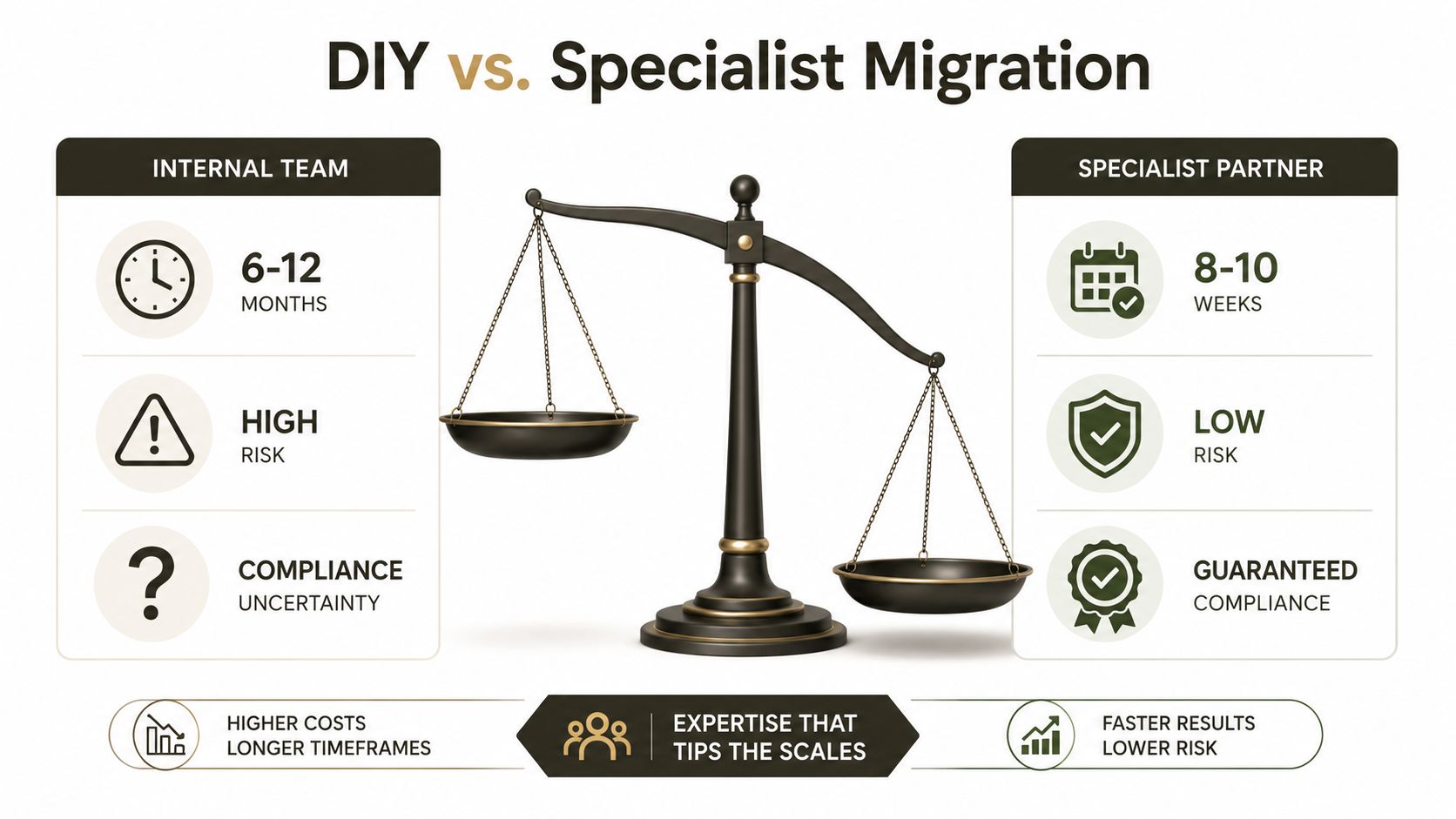
DIY looks attractive when the scope appears to be “scan invoices, create a library, and add approvals”. That description hides the work. Your team must assess legacy data, map identities, redesign permissions, control file paths, validate extraction, test ERP integration, monitor API behaviour, and prove that the resulting records support audit requirements.
Microsoft's SharePoint Migration Tool has a legitimate place in straightforward work, but it isn't an enterprise rescue strategy. Use SPMT for sub-50GB migrations. For anything else, you need custom scripting and a controlled migration design. ShareGate and custom PowerShell PnP scripts can address more complex tenant-to-tenant consolidation patterns, but tools still require an architect to decide what should move, what should be transformed, and what should be rejected.
The real cost sits outside the project plan
A failed migration doesn't merely consume more consultant hours. It can strand users without access to critical invoice records, break delegated administration, expose documents to the wrong audience, or stop an approval process that finance depends on. In regulated sectors, missing permission inheritance design can break the security model that supports governance and legal compliance.
A DIY team often discovers these problems during cutover because test data doesn't contain the legacy exceptions that production does. Specialist work moves that discovery earlier through inventory, sampling, dry runs, reconciliation, and explicit acceptance criteria.
Tools don't replace judgement
ShareGate can help with complex transfers and reporting. PowerShell PnP can handle transformations that a graphical tool can't express. Neither tool decides whether an invoice library should use folders, metadata, separate sites, retention labels, or a redesigned approval boundary.
Ollo works in this specialist space as a Microsoft 365 and SharePoint migration consultancy, using ShareGate and custom PowerShell PnP scripts for complex tenant-to-tenant consolidations, Entra ID redesigns, and rescue migrations. The Microsoft 365 administrator versus consultant comparison helps frame the capability question: maintaining a tenant isn't the same as recovering a migration whose data, identities, and permissions no longer align.
Risk decision: If the implementation touches regulated records, cross-tenant identity, inherited permissions, or structured e-invoicing compliance, internal effort alone isn't risk reduction. It transfers risk to the people least equipped to test the failure modes.
Decision Framework for IT Leaders Evaluating Invoice Automation
Evaluate automated invoice processing software against the system you must operate, not the demo you can watch. Ask whether the platform accepts structured XML as well as PDFs, validates Irish VAT fields, routes low-confidence records to people, preserves an audit trail, and integrates with your ERP without creating duplicate supplier identities.
Then inspect the Microsoft 365 design. Your team should be able to explain how it will avoid the 5,000-item List View Threshold, control the 400-character path limit, manage large permission structures, and respond to API throttling without losing or duplicating invoices. If the vendor can't show those controls with representative data, treat the gap as a delivery risk rather than a product detail.
Use a specialist guide on automation for law firms for broader workflow context, but apply a stricter test to finance and regulated records. The right question isn't whether automation can extract a total. It's whether your organisation can prove who supplied, validated, approved, changed, and posted that total under the required governance model.
Choose controlled implementation when your estate includes legacy SharePoint, tenant consolidation, complex inheritance, or compliance deadlines. More internal effort won't fix a flawed information architecture, an unmapped identity model, or a workflow that depends on unindexed production queries.
Ollo assesses invoice automation architectures, SharePoint estates, tenant-to-tenant migrations, Entra ID controls, and Power Automate workflows before those weaknesses reach cutover. Visit Ollo to discuss a controlled migration and compliance-ready design for your Microsoft 365 environment.

















