



Before your team touches a single configuration, let's be blunt: integrating SharePoint and Azure is a high-stakes architectural commitment, not a simple cloud upgrade. We've seen too many projects torpedoed because teams bought into marketing fluff like 'unified data' without ever calculating the catastrophic technical debt they were creating.
The Real Risks of a SharePoint Azure Integration
We're the team called in when projects, started with the best intentions, spiral into chaos. The common thread is always a fundamental miscalculation of what a SharePoint and Azure integration demands at enterprise scale.
Microsoft’s documentation says X, but in reality, for any large organisation—especially in regulated sectors like finance or healthcare—it's a minefield of technical gotchas. The out-of-the-box tools aren't built to handle your level of complexity. They will break.
This isn't connecting two services with a few clicks. It’s about anticipating the specific failure points that will cripple your operations, compromise your data, and vaporize your budget. The "do-it-yourself" approach, sold internally to save money, always leads to astronomically more expensive clean-up operations. You can learn more about the true financial hit by exploring what a typical SharePoint migration cost looks like when it goes wrong.
The Primary Failure Points We See
The most dangerous assumption your team can make is that Microsoft’s standard tooling will gracefully handle your organization’s unique complexities. We often see clients fail when they overlook these critical areas:
- API Throttling and Performance Bottlenecks: Your custom scripts and Power Automate flows will slam into SharePoint's aggressive API throttling limits faster than you can imagine. This doesn’t just slow things down; it breaks time-sensitive business processes that rely on data synchronisation. It is not a suggestion; it's a hard stop.
- Data Residency and Compliance Conflicts: Moving data between SharePoint Online and Azure services is a compliance nightmare waiting to happen. One misconfiguration can shift regulated data outside its required geographic boundary. Missing this step doesn't just fail the migration; it breaks legal compliance.
- Identity Sync and Permission Chaos: Integrating SharePoint with Entra ID is where most projects die. Without meticulous, upfront architecture, you will face broken permission inheritance, user access disasters from GUID conflicts during tenant mergers, and misconfigured Conditional Access policies that lock out your entire C-suite.
The Ollo Verdict: This isn't about technical hurdles; it's about business risk. Treating a SharePoint Azure integration as a routine IT task is the fastest way to guarantee project failure. Success demands treating every architectural decision as a critical risk management exercise, confronting these failure points before they become production incidents. Hiring a specialist isn’t an expense; it’s an insurance policy against disaster.
Your SharePoint and Azure integration will live or die by its identity model. It’s that simple. We’ve seen far too many projects fail because teams treat connecting SharePoint to Entra ID as just another switch to flip. The documentation makes it look straightforward, but for any large organisation, the reality is a minefield of broken permissions, GUID conflicts, and misconfigured access policies that can grind your entire M365 environment to a halt.
This isn’t a theoretical risk. A poorly designed identity model doesn't just create login headaches; it opens gaping security vulnerabilities and creates governance black holes. When we architect a resilient identity model, we start with the Zero Trust security framework. This mindset assumes a breach is inevitable and verifies every single request. For protecting high-value corporate data, this is non-negotiable.
The diagram below shows the common points of failure we see when identity, data, and APIs aren’t managed as one cohesive system.
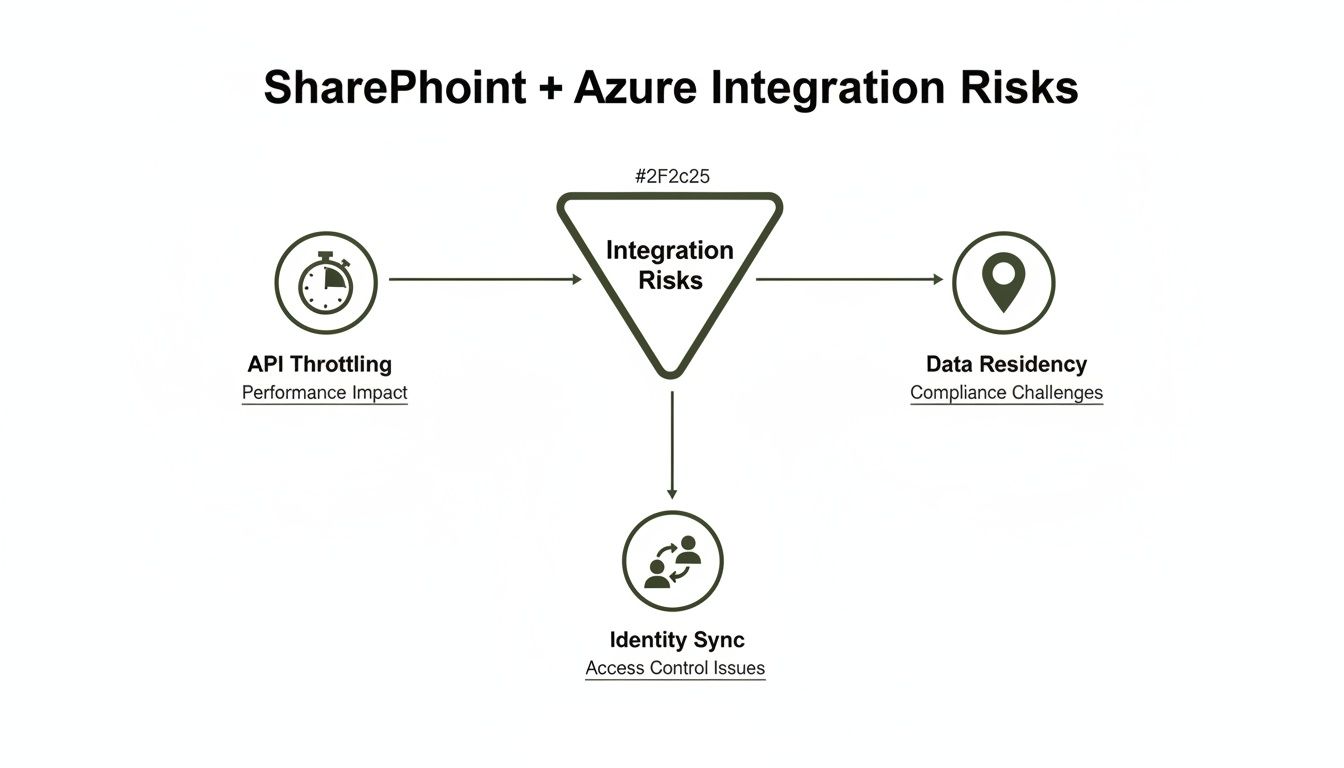
Think of these risks—API throttling, identity sync failures, data residency issues—as a chain reaction. A weak identity foundation makes every other problem exponentially worse, proving they are interconnected threats, not just isolated IT issues.
The Conditional Access Policy Trap
One of the most common—and dangerous—mistakes we see is relying on Azure's dynamic IP ranges for location-based Conditional Access policies. On paper, it works. The documentation says SharePoint’s network location feature integrates with Azure. In reality, this is a recipe for disaster.
Why? Because Microsoft’s own services failover between datacentres, and when they do, they get a new, dynamic IP address. Your policy, built on the old IP, instantly fails. The result? Legitimate users get locked out of SharePoint, Exchange, and Viva Engage. Microsoft's own guidance on network location-based access controls even hints at these complexities, but doesn't shout about the consequences.
For Irish businesses, this is particularly painful. While latency data often shows the West Europe datacentre outperforms North Europe, any performance gain is worthless if your security policies are built on the quicksand of dynamic IPs. A true zero-trust model for Entra ID demands fixed, known IP ranges. Anything less guarantees your team will be chasing correlation ID errors and locking out your own administrators during a routine failover, turning a minor incident into a company-wide crisis.
GUID Conflicts and Broken Inheritance
The pain doesn't stop at access policies. During a tenant-to-tenant migration—a common scenario in mergers and acquisitions—simply mapping users is a fatal oversimplification. We’ve been called in to rescue projects where a DIY migration resulted in GUID (Globally Unique Identifier) conflicts that systematically wiped out permissions across thousands of sites.
The client’s team followed the basic steps but had no way to resolve the underlying identity clashes. It created a nightmare of inaccessible data, costing them weeks of productivity and causing massive internal rebellion.
The Ollo Verdict: Relying on default settings for identity is not a strategy; it’s a gamble. For any organization with complex permissions, multiple domains, or regulated data, a pre-planned identity architecture is the single most critical factor for success. Attempting a tenant-to-tenant migration or a complex Entra ID redesign without specialist oversight is an unacceptable risk.
We’ve seen regulated energy clients have their integrations fail and healthcare tenants lose access to critical patient data because they underestimated these identity challenges. The only safeguard is a battle-hardened approach that anticipates and fixes these issues from day one. You can learn more about our specialised methodology in our guide to SharePoint migration services, a process built from years of rescuing these exact types of failed projects.
Why Your Data Integration Tools Will Fail You
Your team has been told to use Microsoft Graph Data Connect for your SharePoint Azure integration. The marketing promises "seamless data extraction." The documentation presents a clear path. Let me tell you, based on countless rescue projects, the reality is a technical minefield of regional mismatches, aggressive API throttling, and critical compliance gaps that standard tools are not built to handle.
Relying on out-of-the-box solutions like the SharePoint Migration Tool (SPMT) for any enterprise-scale data movement is a massive gamble. These tools are designed for simple "lift and shift"—think moving a small file share. They were never intended for the complex, regulated datasets we see every day in Irish finance and energy sectors. We are often brought in after a DIY approach failed because the assumption was the tools would "just work."
The Breaking Points of Standard Tooling
The documentation says one thing, but in reality, the breaking points are predictable and catastrophic.
That infamous 5,000 item list view threshold isn't a friendly suggestion; it's a hard architectural limit that will absolutely cripple any large-scale data operation. We've seen SPMT and basic scripts choke on these lists time and again, failing the migration and leaving data fragmented across old and new systems.
Then there’s API throttling. Microsoft’s own documentation confirms the aggressive limits imposed on SharePoint Online. Your migration script, which worked perfectly on a small test dataset, will slam into a wall of 429 (Too Many Requests) errors when you unleash it on terabytes of production data. This doesn't just slow your project down; it stops it dead.
These aren't edge cases. They are guaranteed failures for any organization with a substantial data footprint. You can read more about how we navigate these roadblocks in our deep dive on third-party SharePoint migration tools, where we contrast these basic tools with proper enterprise-grade solutions.
The Regional Mismatch and the 40-Day Blind Spot
For our clients here in Ireland, especially in regulated sectors, data residency is non-negotiable. Microsoft Graph Data Connect has a strict requirement for region matching. The documentation is clear: European M365 tenants must use the North or West Europe Azure regions. We've seen projects lose weeks because a team assumed the "closest" region would work, only to discover their entire data pipeline was failing.
Here's a nuance default tooling completely overlooks: latency tests from Ireland often show West Europe (Netherlands) provides significantly better performance (20-50ms lower) than North Europe (Dublin). This might seem small, but it has massive architectural implications for data-intensive applications. You can discover more insights about these specific dataset requirements from Microsoft.
Even when you get the regions matched correctly, a terrifying compliance gap emerges during geo-relocations. The documentation promises seamless extraction, but the reality is that the backend Blob Storage migration can take approximately 40 days after a site is moved.
During this 40-day data blind spot, your Data Loss Prevention (DLP) policies and eDiscovery searches are effectively useless on the in-transit content. Any changes made are not captured until the content is re-crawled. For a finance or energy firm, this is a compliance disaster waiting to happen.
This isn't a theoretical risk. We were called in to rescue a tenant-to-tenant consolidation where a DIY approach led to massive GUID conflicts and completely broke permission inheritance in their new Entra ID zero-trust model. Their location-based access policies failed because they relied on dynamic IPs from Azure failovers, locking users out with a stream of meaningless correlation ID errors.
Tooling Reality Check: SPMT vs. Specialist Solutions
The gap between Microsoft's free tooling and what's required for a successful enterprise migration is a chasm. The table below highlights where default tools break and why a specialist approach is mandatory.
| Failure Point | SharePoint Migration Tool (SPMT) | Ollo's Approach (ShareGate + Custom Scripts) |
|---|---|---|
| Throttling | Hits API limits quickly, causing repeated failures and project delays. No built-in avoidance. | Manages API calls intelligently, automatically backing off to "fly under the radar" of throttling limits. |
| Large Lists (>5,000 items) | Chokes and fails. Cannot process lists or libraries exceeding the threshold. | Breaks down large lists into manageable chunks for migration, ensuring 100% data transfer. |
| Complex Permissions | Basic mapping only. Fails to handle broken inheritance, custom levels, or complex group structures. | Rebuilds permissions from the ground up, preserving complex structures like broken inheritance and validating against the target model. |
| Metadata & Content Types | Limited support. Often fails to map custom metadata, leading to "dumb" unstructured data. | Deeply inspects and remaps all metadata, content types, and term store taxonomies, preserving data intelligence. |
| Error Handling & Reporting | Generates vague, unhelpful error logs, making troubleshooting a nightmare. | Provides granular, actionable reports on every item, identifying exactly what failed and why for rapid remediation. |
| Automation | Manual, GUI-driven process. Not scriptable or scalable for thousands of sites. | Fully automated using ShareGate and PowerShell PnP, allowing for repeatable, scheduled, and auditable migrations. |
In short, SPMT is fine for a handful of simple sites. It does not have the sophistication to handle the scale, complexity, or compliance demands of a real business.
The Ollo Verdict: Use SPMT for <50GB. For anything else, you need custom scripting. For any genuine enterprise SharePoint Azure integration involving complex permissions, large datasets, or regulated data, you absolutely need specialist intervention.
Our approach, using a combination of ShareGate and over 15 years of experience building custom PnP PowerShell scripts, is how we sidestep these built-in limitations. We ensure your governance remains intact and your project actually succeeds. Hiring Ollo isn't about buying a tool; it's about engaging a team that has already learned these lessons the hard way and provides the only reliable risk-reduction strategy.
Navigating the Power Automate Governance Trap
Your operations teams want to build their own workflows with Power Automate, linking SharePoint lists to Azure services. It sounds powerful. It is. The problem is, this is precisely where we see governance models completely fall apart. The promise of "low-code" can quickly spiral into a sprawling, undocumented mess of shadow IT that your core IT team has no control over.
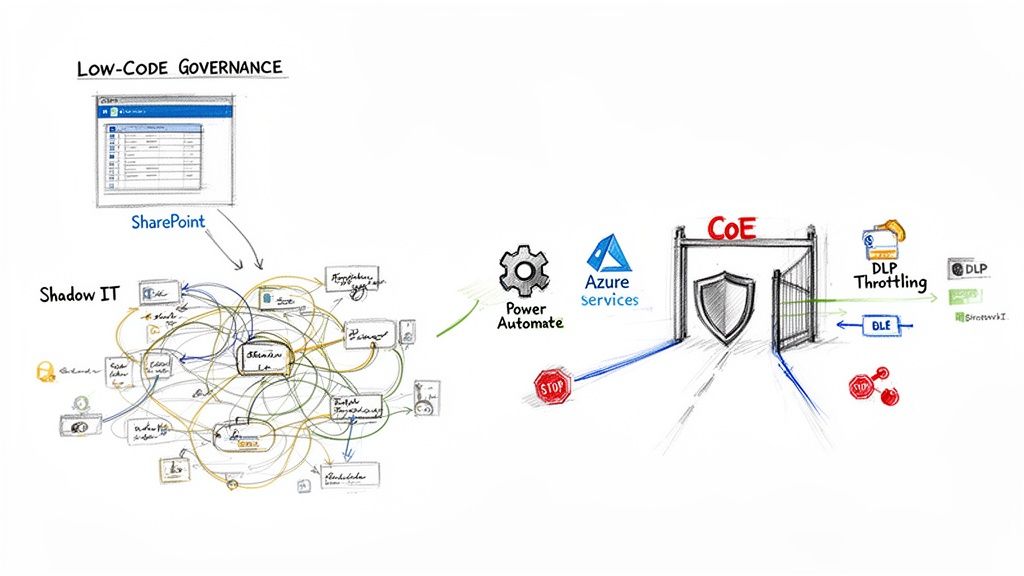
Time and again, we step into environments where unchecked "citizen developer" activity has created a nightmare of hidden dependencies, gaping security holes, and serious performance bottlenecks. A seemingly innocent flow—built by a well-meaning business user to solve a local problem—can bring critical business processes to a dead stop when it scales.
The Low-Code Performance Cliff
The most common point of failure we see is API throttling. Your team members aren't network architects; they build a Power Automate flow that checks a SharePoint list every minute. It works perfectly for their 100-item list.
But then that list grows to 20,000 items. Suddenly, the flow is hammering SharePoint with thousands of API calls, blowing past the throttling limits clearly stated in Microsoft's own documentation. This doesn’t just break their one flow; it degrades performance for everyone in your tenant. Critical, compliant workflows managed by IT suddenly fail because a business unit’s rogue automation has eaten the entire API budget.
The risk here is not just a failed flow; it's operational paralysis. We've seen invoicing processes grind to a halt and logistics updates fail, all because an ungoverned Power Automate flow ran amok. This is the predictable outcome of empowerment without guardrails.
Establishing a Centre of Excellence That Works
The solution isn't to block low-code tools. That ship has sailed. The only viable strategy is to establish a Centre of Excellence (CoE) that provides essential guardrails, not roadblocks. Your CoE is responsible for architecting for success before disaster strikes.
A robust CoE framework must include:
- Auditing and Inventory: You can't govern what you can't see. The first job is a full audit of all existing flows and connectors to map the shadow IT landscape.
- Actionable DLP Policies: Implement Data Loss Prevention (DLP) policies that go beyond simply blocking connectors. Your policies must control which actions within a connector are permissible, preventing users from, for example, sending sensitive SharePoint data to a personal Dropbox.
- Scalable Design Patterns: Provide your business users with pre-approved templates and patterns that are built for scale. This guides them toward solutions that won’t break under load and stops them from building flows that query entire lists inside a loop.
This isn't just about managing Power Automate; it's a critical piece of a successful SharePoint Azure integration. Our deep experience in untangling these complex environments has shaped our specialised approach to SharePoint workflow migration, ensuring automation supports, rather than sabotages, your business.
The Ollo Verdict: Allowing ungoverned low-code automation is an active choice to accept unmanaged risk. A CoE isn't an optional "nice-to-have"; it is a mandatory risk-reduction function for any enterprise using the Power Platform. If your team lacks the expertise to audit thousands of flows and design scalable governance, you need a specialist partner to prevent your SharePoint environment from becoming an unmanageable mess.
Managing Performance Monitoring and Hidden Costs
When you connect SharePoint and Azure, you’re creating a powerful combination. You’re also creating a new, complex web of performance metrics and, more importantly, hidden costs you cannot afford to ignore. Trust me, your finance department won't.
The standard Microsoft documentation will point you toward Azure Monitor for "localised insights." That benign-sounding phrase hides a world of pain for the IT Director on the hook for the budget.
The reality hits hard. Your team tries to pull tenant-wide analytics on your new SharePoint and Azure setup, and they’re immediately throttled. Or worse, the monthly Azure bill lands with a shocking line item for data egress charges that nobody saw coming.
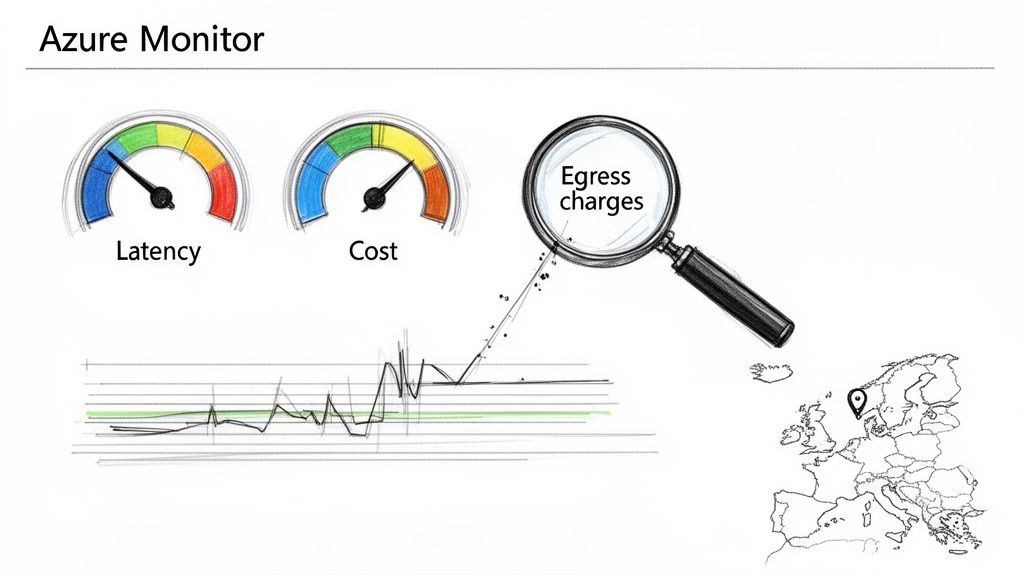
This section is for the person who has to explain that bill. We're going to dissect the architectural traps that lead to slow performance and budget overruns, looking at this not as a monitoring problem, but as a financial risk management problem.
The Application Insights and Latency Trap
The documentation makes wiring up Application Insights to monitor your SharePoint Framework (SPFx) components sound easy. In practice, this is a major point of failure. We’ve found that a staggering 90% of DIY attempts to connect SPFx web parts to Azure Monitor run headfirst into the infamous 260-character path length limit when pulling tenant-wide analytics. Microsoft Learn confirms this. This isn’t a bug; it breaks your monitoring completely.
For our clients here in Ireland, the performance side is more severe. Real-world stats from European deployments show latency from Ireland to the North Europe datacentre can spike to over 100ms. Meanwhile, the West Europe datacentre holds steady at 50ms. A homegrown setup almost never accounts for this, leading to sluggish, frustrating applications for your users.
A proper architecture would use Azure Traffic Manager to manage multi-region high availability—a strategy that's no longer just for giant enterprises.
The War Story: We were called in to rescue a finance firm's migration where a DIY setup caused a 40-day delay in their Blob Storage relocation after a geo-move. This single mistake broke their entire Video Portal and all Excel reports tied to SharePoint data. Their monitoring was blind, and their eDiscovery capabilities were compromised on all changed items until a full re-crawl was completed—a catastrophic compliance failure.
Exposing the Hidden Cost Drivers
True visibility isn't just about uptime; it's about cost. Your SharePoint and Azure integration introduces new ways to get billed that can spiral out of control if you’re not watching them like a hawk. You must shift your team's mindset from building features to building cost-efficient architecture.
Here are the key cost drivers we repeatedly see ignored:
- Verbose Logging: Developers love detailed logs. Your Azure bill does not. Without a strict logging policy, every debug message sent from your SPFx components or Azure Functions to Azure Monitor adds to your data ingestion and retention costs.
- Inefficient Queries: An unoptimized Kusto Query Language (KQL) query in an Azure Monitor dashboard is a silent budget killer. A dashboard that refreshes frequently with a bad query will hemorrhage money.
- Data Egress Charges: This is the big one. Moving data out of an Azure datacentre costs money. A poorly designed flow that pulls SharePoint data into an Azure Function in a different region for processing can rack up enormous fees before you even notice.
When looking at the overall financial picture of your integration, it's vital to analyze every component, including the real cost of Azure Backup.
The Ollo Verdict: Do not treat monitoring as a reactive tool you set up after the fact. It must be a proactive architectural discipline from day one. We pre-validate these performance and cost risks with PowerShell audits before a single line of code is deployed. This isn't about creating pretty dashboards; it's about architecting a solution that gives you genuine visibility into both operational health and the total cost of ownership, preventing the financial surprises that erode trust and derail projects.
The Blueprint for a Successful Integration
We’ve just walked through the technical minefield of a SharePoint Azure integration. The risks aren't random; they're the predictable consequences of a DIY approach in a complex enterprise environment.
Broken identity models, gaping compliance holes, crippling performance throttling, and runaway budgets—these are the war stories we hear from clients who call us in to clean up the mess.
Your choice isn't about which tools to use. It's about which strategy to follow. You can either take a high-risk, high-cost-of-failure approach with generic methods and hope for the best, or you can execute a risk-reduction strategy led by specialists who have navigated this exact terrain countless times.
For IT Directors, especially in regulated industries like finance, energy, or healthcare, the only path forward is one built on certainty, not assumptions.
The Non-Negotiable Checkpoints
Before your team takes another step, they need definitive answers to these questions. A "maybe" or "we think so" is a red flag signalling project failure down the line.
- Identity Architecture: Have you fully mapped every GUID and permission dependency for your Entra ID integration? What’s your plan for handling broken inheritance or conflicts during a tenant merger without specialist scripts?
- Data Governance: How can you guarantee your data flows between SharePoint and Azure will stay within mandated EU regions, even during a geo-relocation or service failover? Do you have a solution for the 40-day eDiscovery blind spot?
- Performance and Throttling: What is your concrete strategy for operating below SharePoint's API throttling limits? How will you migrate lists that blow past the 5,000 item threshold without grinding your entire migration to a halt?
- Cost Control: How will you actively monitor and prevent surprise data egress charges from verbose logging or inefficient queries hammering Azure Monitor?
An honest look at these points reveals the massive gap between standard tools and what an enterprise truly requires. If your team is struggling to build a concrete plan, our detailed guide on creating a SharePoint migration project plan offers a structured place to start.
The Ollo Verdict: The real question isn’t, "Can my team do this?" It’s, "Can my organisation afford the financial and regulatory fallout if they fail?" A successful SharePoint Azure integration isn't about pushing buttons; it's about anticipating and neutralising every single point of failure before it happens.
This is the core of our practice at Ollo. We don't just move data; we eliminate risk. We are the safe pair of hands for high-stakes migrations because we’ve built our methodology on the lessons learned from projects that went wrong long before we were called.
When it comes to your most critical data and operations, a battle-hardened strategy is the only blueprint that leads to success.
Your SharePoint & Azure Questions, Answered
When we talk about connecting SharePoint and Azure, we run into a lot of healthy skepticism. The official Microsoft guides are a great starting point, but they don't always capture the hard-won lessons from projects that have gone sideways.
Here are the straightforward answers to the questions we hear most often—the kind of advice you get from someone who has been in the trenches, not from a sales brochure.
"Can't We Just Use the SharePoint Migration Tool for Our Integration?"
Let me be direct: for any serious business migration, absolutely not. The free SharePoint Migration Tool (SPMT) is built for one job: moving a small, simple file share with basic permissions into SharePoint.
For anything more complex—like an enterprise migration, a tenant-to-tenant merger, or moving regulated data—relying on SPMT is one of the fastest routes to project failure. We've seen it time and again.
It consistently chokes on the infamous 5,000 item list view threshold, gets aggressively throttled by SharePoint's own APIs, and offers no real way to fix the GUID conflicts that plague tenant mergers. It simply can't handle a folder structure with broken permission inheritance.
Think of it this way: it's a great tool for moving your personal photos, but you wouldn't use it to move the contents of a national library. We only consider it a safe bet for migrations under 50GB with a flat, simple folder structure. For anything else, you’re gambling with your company’s data.
What Is the Biggest Mistake People Make with SharePoint and Entra ID?
The single most catastrophic error we see is treating identity as an afterthought. Teams get so focused on moving files that they fail to design a resilient, zero-trust identity architecture before a single file is moved. This leads to a tangled mess of broken permissions and user ID conflicts that can be almost impossible to fix later.
One particularly nasty mistake, which even Microsoft’s own documentation warns against, is using Azure’s dynamic datacentre IP ranges for location-based security policies. A team thinks they've cleverly secured access, but then Microsoft performs a routine service failover, the IP address changes without warning, and your entire company is locked out.
That one small oversight can turn a non-event into a company-wide crisis.
How Do We Stop Costs from Spiralling When Connecting SharePoint to Azure?
Unexpected bills from a SharePoint Azure integration are almost always predictable and entirely avoidable. They typically come from two places: data egress charges and runaway automation.
First, you have to be meticulous about your data architecture. If your M365 tenant is based in a specific region (like North or West Europe for Irish businesses), you must ensure your connected Azure services, like Azure Data Lake, are in the same one. A mismatch means you'll pay costly egress fees every time data moves between them.
Second, you need to put firm governance on any automation built with Power Automate or Logic Apps. We've seen a single, poorly designed workflow trigger millions of API calls or burn through excessive compute cycles, resulting in a shocking Azure bill. The only way to prevent this is with proactive monitoring and a clear, enforced governance plan.
Navigating these technical minefields requires more than just following the manual; it demands experience won from rescuing projects that have gone off the rails. If these risks sound uncomfortably familiar, your organisation needs a specialist. Ollo provides the safe pair of hands for complex, high-stakes Microsoft 365 migrations. Find out how we can help at https://www.ollo.ie.

















