



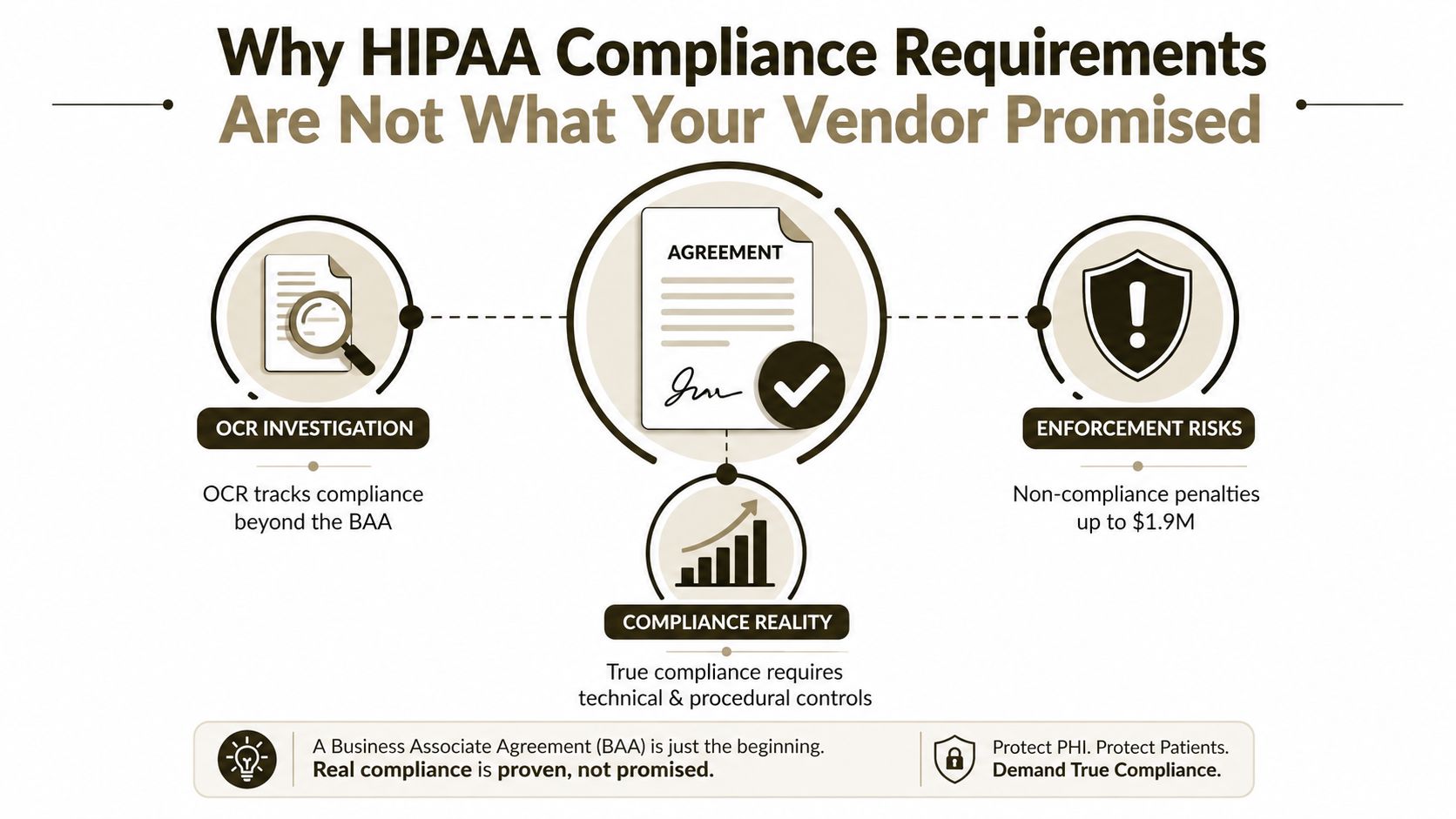
Most vendors will tell you HIPAA compliance requirements start and end with a signed BAA. That advice is lazy, and it gets IT Directors into trouble. OCR does not care that a contract exists if your Microsoft 365 tenant still leaks access, logs, or retention gaps, because the enforcement record shows the agency has received over 374,321 HIPAA complaints and initiated over 1,193 compliance reviews, then resolved 99% of those cases as of October 31, 2024, with 152 settlement or civil money penalty cases totalling $144,878,972 HHS enforcement highlights.
If you run healthcare workloads in Microsoft 365, the migration itself becomes part of the compliance surface. Broken inheritance, stale sharing links, and missing audit continuity are not IT nuisances, they are the kind of weak controls OCR can use against you when it asks whether your safeguards worked in production. The right question is not whether your vendor can move data. The right question is whether they can move ePHI without breaking the controls HIPAA expects you to prove.
If you want a practical reminder that security hygiene is broader than any single contract, cyber protection advice from Networking2000 is worth reading, because the same discipline applies when you're moving regulated data between tenants. And if your team is still writing migration procurement around assumptions instead of evidence, start with a hard technical review and align it to a proper request for proposal.
Why HIPAA Compliance Requirements Are Not What Your Vendor Promised
The biggest mistake in regulated Microsoft 365 projects is assuming the paperwork equals compliance. It does not. A BAA defines the contractual boundary, but OCR looks for operational proof, and the 2023 reporting data shows the agency is still closing complaints and compliance reviews at scale OCR 2023 Annual Report to Congress.
The contract does not protect the tenant
A vendor can sign every form in the stack and still leave you exposed if Entra ID roles drift, SharePoint permissions inherit incorrectly, or audit logs do not survive the cutover. That is where migration projects fail. The documentation says a BAA is required, but a BAA without working access controls and logging is just a promise with no enforcement inside the tenant.
Practical rule: Treat the BAA as the entry ticket, not the control environment. If the tenant cannot prove who had access, when they had it, and why they had it, you do not have compliance, you have paperwork.
OCR's enforcement data matters because it shows how the agency works in practice. It tracks complaints, reviews, closures, and settlements, then uses those records to find patterns of weak governance. Your migration vendor's reassurance is worthless unless they can show how the source tenant, destination tenant, and every intermediary tool preserved HIPAA's technical safeguards.
For teams building a regulated migration plan, I would cross-check your internal process against Microsoft 365 healthcare compliance guidance, then force every assumption into evidence. That matters more than anyone's sales deck.
If you are writing procurement around assumptions instead of evidence, start with a hard technical review and align it to a proper request for proposal.
The HIPAA Security Rule Technical Safeguards You Must Verify in Microsoft 365
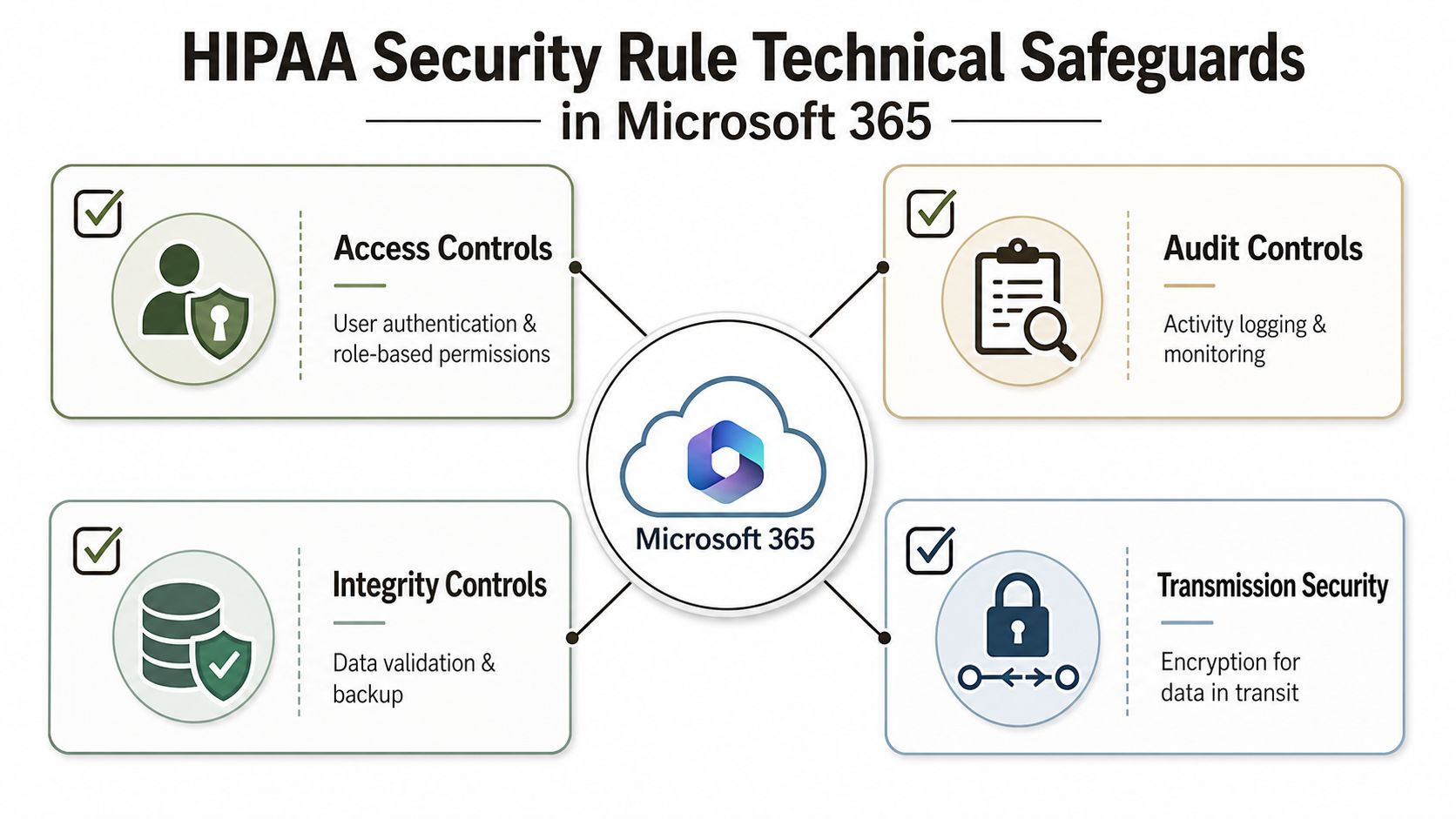
HIPAA's Security Rule requires reasonable and appropriate technical safeguards for ePHI, including access controls, audit controls, integrity protections, and transmission security HHS Security Rule guidance. In Microsoft 365, that translates into settings you can verify, document, and defend. If you can't show the control, you don't have the control.
Start with identity, not storage
Entra ID is where regulated access either holds or collapses. Your team needs strong role design, Conditional Access that blocks weak sign-in paths, and MFA policies that don't exempt privileged accounts. If a migration leaves global admins over-permissioned in the destination tenant, the problem isn't cosmetic. It's a direct failure of access control under HIPAA.
Verify logging before you trust the cutover
Audit logging has to follow the data. Unified audit logs, SharePoint activity, Exchange access traces, and DLP alerts all need to remain queryable after the move, or your forensic trail breaks. That's the difference between “the files arrived” and “the files arrived with evidence intact”.
Protect integrity and transit
Sensitivity labels, DLP, and encryption policies need to stay aligned with actual storage locations. If a file lands in a site collection with broken inheritance or broad group membership, integrity and confidentiality both suffer. In regulated work, “reasonable” means you can prove the controls still work after the migration tool finishes.
Do this first: audit Conditional Access, service account scope, labels, DLP, and audit log availability in both tenants before you move a single mailbox or site.
I'd also point your security team to Conditional Access policies for Microsoft 365, because migrations routinely weaken identity controls at the exact moment they should get stricter. And if you're still relying on default collaboration settings for PHI, that's the wrong design.
How Microsoft 365 Migrations Break HIPAA Controls Without Anyone Noticing
We often see clients fail when they treat tenant-to-tenant migration like a file copy. The files land. The permissions look close enough. Then a month later, someone discovers broken inheritance in SharePoint, stale sharing links, or a metadata structure that no longer maps cleanly to the source. That is not a glitch. It's a compliance problem with a delayed fuse.
The failure modes are predictable
SPMT and out-of-the-box ShareGate jobs can move content, but enterprise regulated content stresses them in ways casual projects never notice. GUID conflicts in term stores and managed metadata can leave dangling references, and long path errors can strand content in the source tenant or force manual exceptions. Microsoft Learn documents the list view threshold at 5,000 items, so if your libraries are badly structured, you can hit practical limits that turn a successful-looking migration into an incomplete one.
List-heavy sites are especially dangerous. A migration can finish while a subset of lists or views still behaves incorrectly, and nobody notices until users complain or an auditor asks for consistency evidence. That's why a file move is not the same thing as a compliant move. If the destination tenant can't preserve structure, inheritance, and traceability, OCR has a ready-made control failure.
Audit evidence gets damaged during rescue work
The worst projects are the ones that look fine in demos and then need rescue. Teams patch permissions by hand, rebuild sites, and re-share content under pressure. Every one of those fixes can create orphaned links, broken chain-of-custody, or logging gaps that an auditor can later interpret as weak governance.
Rule of thumb: if you need ad hoc fixes after cutover, assume your compliance posture already took damage.
That's why we treat tenant moves as compliance engineering, not data transport. Your migration plan has to preserve structure, logging, and access history, or you've turned a routine project into a forensic exercise. For teams doing this properly, Microsoft 365 migration guidance should sit beside the runbook, not after the fact.
Business Associate Agreements, Vendor Governance, and the Risk Analysis Regulated Teams Skip
A signed BAA does one thing. It places a vendor inside the HIPAA perimeter. It does not prove the vendor's configuration, subcontractors, migration methods, or cloud operations can protect ePHI after your Microsoft 365 tenant changes shape.
The Security Rule also expects a documented risk analysis and an ongoing risk management process. A one-time questionnaire does not satisfy that requirement. In Microsoft 365, the vendor footprint changes as soon as you add migration tooling, third-party authentication workflows, and post-cutover admin support. If your risk review does not cover those moving parts, it is incomplete.
Vendor governance has to follow the migration path
Every tool in the pipeline becomes part of the compliance story. ShareGate, PowerShell automation, identity connectors, eDiscovery tooling, and temporary admin accounts all sit inside the governance model. If they touch PHI, they need controls, logging, and a named owner.
| HIPAA Requirement | Migration Deliverable | Evidence Format |
|---|---|---|
| BAA in place | Signed agreement for every vendor touching PHI | Stored contract with effective date |
| Risk analysis documented | Migration-specific risk review | Approved assessment and remediation log |
| Access limited | Named admin accounts and least-privilege scope | Role assignment export |
| Auditability maintained | Logged migration activity | Unified audit log and change record |
For teams comparing vendor due diligence practices, HIPAA vendor checks for PI lawyers shows the level of scrutiny you need when regulated data is involved. That is the standard healthcare migration work should meet. If you want a cloud-specific reference point, Microsoft 365 healthcare compliance is useful as a companion read, but it does not replace your own tenant-level risk review.
Ireland and Europe complicate the picture
If your healthcare group uses Irish-based or EU-resident cloud operations, HIPAA is only one lens. The Privacy Rule allows certain uses and disclosures, but it does not answer separate questions about local data handling, vendor governance, or transfer controls. Teams get complacent here. They assume the BAA covers everything, then discover their documentation, access logging, and retention decisions need to satisfy more than one framework.
Microsoft 365 migrations make that gap visible fast. A vendor can be contractually covered and still leave you with broken inheritance, unclear admin access, or audit evidence that does not line up with the post-cutover tenant. OCR will not care that the vendor promised compliance. It will look at your controls, your records, and whether you checked the environment before and after the move.
Breach Response, Audit Logging, and the 60-Day Clock
The HIPAA Breach Notification Rule sets a hard deadline. Individuals must be notified without unreasonable delay and no later than 60 days after discovery of a breach of unsecured PHI, and breaches affecting 500 or more individuals must also go to HHS and prominent media outlets HIPAA breach notification overview. That clock starts when you discover the breach, not when you finish arguing about whether the logs look suspicious.
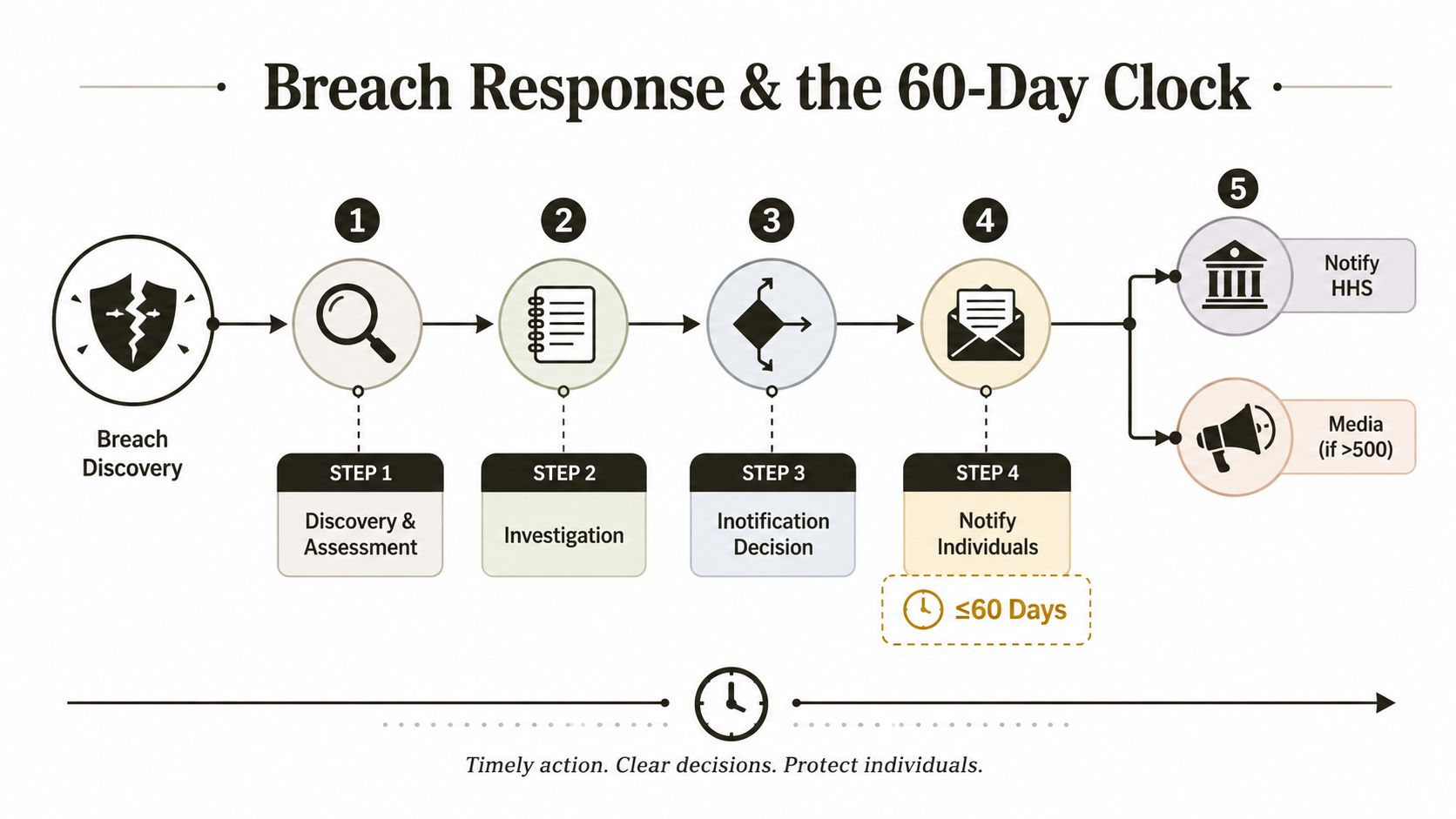
Preserve evidence before cutover
If audit logs vanish during the migration window, you've created an investigation problem even if no breach happened. OCR will ask what happened to access records, who touched the PHI, and whether the data ever left the secure perimeter. If you can't prove it, you will spend weeks reconstructing events from fragments.
Retention is not optional housekeeping
HIPAA documentation retention runs for six years from the date created or last in effect HIPAA compliance checklist guidance. That includes required policies, notices, complaint dispositions, sanctions, and related records. In practice, that means your migration evidence, risk sign-off, and remediation records need a retention strategy before the project starts, not after a problem lands.
Build the forensic package up front
Your incident packet should already include source and destination audit exports, access change logs, eDiscovery hold details, and proof that relevant records were preserved. If you wait until a breach review begins, your team will lose time and credibility. That delay can make a bad day worse.
I'd use SIEM integration guidance for regulated operations as a design reference, because the log chain has to survive both the migration and the audit. If your logging architecture can't support that, it isn't ready for PHI.
The Pre-Migration HIPAA Compliance Checklist for Regulated Tenants
Before you move ePHI, force the project through a checklist, not a hope-and-pray plan. Your vendors should be able to answer every one of these points in writing, and your security team should sign off before the first workload moves.
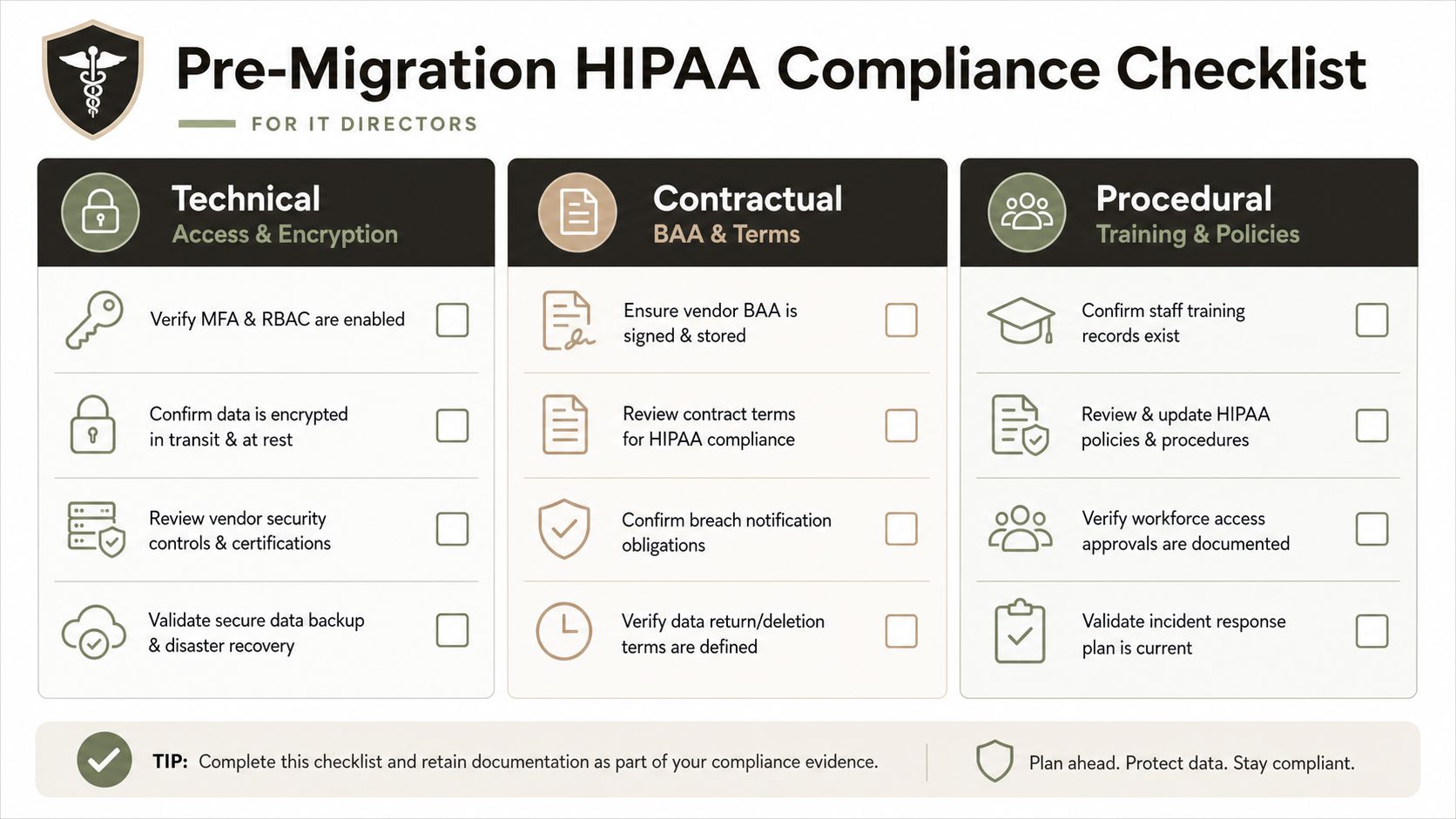
Technical controls
- Verify identity protections. Confirm MFA, Conditional Access, and role scope in both tenants.
- Check logging continuity. Make sure audit data will remain available across the migration window.
- Review labels and DLP. Validate that sensitivity and protection settings still bind to the destination sites and mailboxes.
Contractual controls
- Store the BAA. Keep the signed agreement in the project record, not just in procurement.
- Map vendor responsibility. Identify every tool and service that touches PHI during the move.
- Document subcontractor oversight. Don't let secondary vendors sit outside your control model.
Procedural controls
- Confirm policies exist. Written procedures must already be in force.
- Prove the risk analysis is current. The migration should trigger a review if the environment changes.
- Keep training evidence. Annual staff training and attestation should already be documented.
That's the minimum. If any box is blank, the project is not ready. For regulated teams, privacy law risks for market access is a helpful reminder that legal exposure doesn't stay inside one framework or one geography.
When DIY Migration Becomes the HIPAA Risk
The documentation says HIPAA is about privacy, security, and breach notification. Microsoft 365 migration work makes those rules concrete. The tenant move becomes the control surface, and once your team misses how identity, logging, metadata, or access inheritance change during cutover, the project stops behaving like a routine migration and starts acting like a compliance event.
Specialist involvement matters because the hard parts are not the file transfers. The hard parts are Entra ID redesign at cutover, custom PowerShell PnP scripting when ShareGate or SPMT hit their limits, and preserving audit continuity when the source and destination tenants do not behave the same way. In rescue work, the previous vendor often leaves partial permissions, malformed metadata, and a compliance posture that needs reconstruction before anyone can trust the target environment.
Use SPMT for small, simple moves where the control surface is narrow. For anything regulated, large, or messy, you need a migration approach that treats HIPAA as a design constraint, not a checkbox. That means custom handling for broken inheritance, GUID conflicts, long paths, and log continuity, plus a team that knows how to document every decision for OCR. Ollo does that kind of work in Microsoft 365 and SharePoint migrations, and it does it as a compliance problem, not a copy problem.
If your project includes ePHI, tools alone are not enough. The vendor choice becomes part of your audit defence, and the wrong choice can break legal compliance and give OCR a clean narrative about weak controls.
If the migration team cannot explain where identity changes, how audit records survive the move, and which permissions are supposed to be preserved, stop the project. A migration without that discipline creates exposure fast, because the failure shows up after cutover, when users are already working in the destination tenant and the evidence trail is already damaged.
If you're planning a Microsoft 365 tenant move that touches ePHI, don't gamble on generic migration help. Talk to Ollo about regulated tenant-to-tenant work, rescue migrations, and compliance-first cutovers that keep HIPAA controls intact while your environment changes.

















