



The most dangerous advice in Microsoft 365 healthcare compliance is also the most common. Buy the right licence, turn on a few security features, sign the paperwork, and you're covered.
You're not.
Microsoft sells a capable platform. It does not sell you a finished compliance posture. Your team still has to configure identity, access, retention, auditing, sharing, and governance in a way that stands up when someone asks hard questions about patient data. That's where projects go off the rails. Not at procurement. At configuration, migration, and operational drift.
We often see clients fail when they treat healthcare compliance as a licensing exercise instead of an engineering discipline. The paperwork says the platform supports regulated workloads. Reality is uglier. One careless guest sharing rule, one broken inheritance chain in SharePoint, one lazy retention policy, and your tenant stops being a compliance asset and starts being evidence.
Your Microsoft 365 Licence Is Not a Compliance Shield
Buying the right Microsoft 365 licence is the easy part. It is also the part executives overvalue, because a licence invoice looks tidy in a board pack and a control matrix does not. In healthcare, that mistake shows up later, during migration, access reviews, retention disputes, and audit responses.
A tenant can be licensed for regulated workloads and still be configured badly enough to create exposure. That is the core issue. The platform gives you features. Your team still has to set them up in a way that keeps patient data contained, discoverable, retained correctly, and provable under scrutiny.
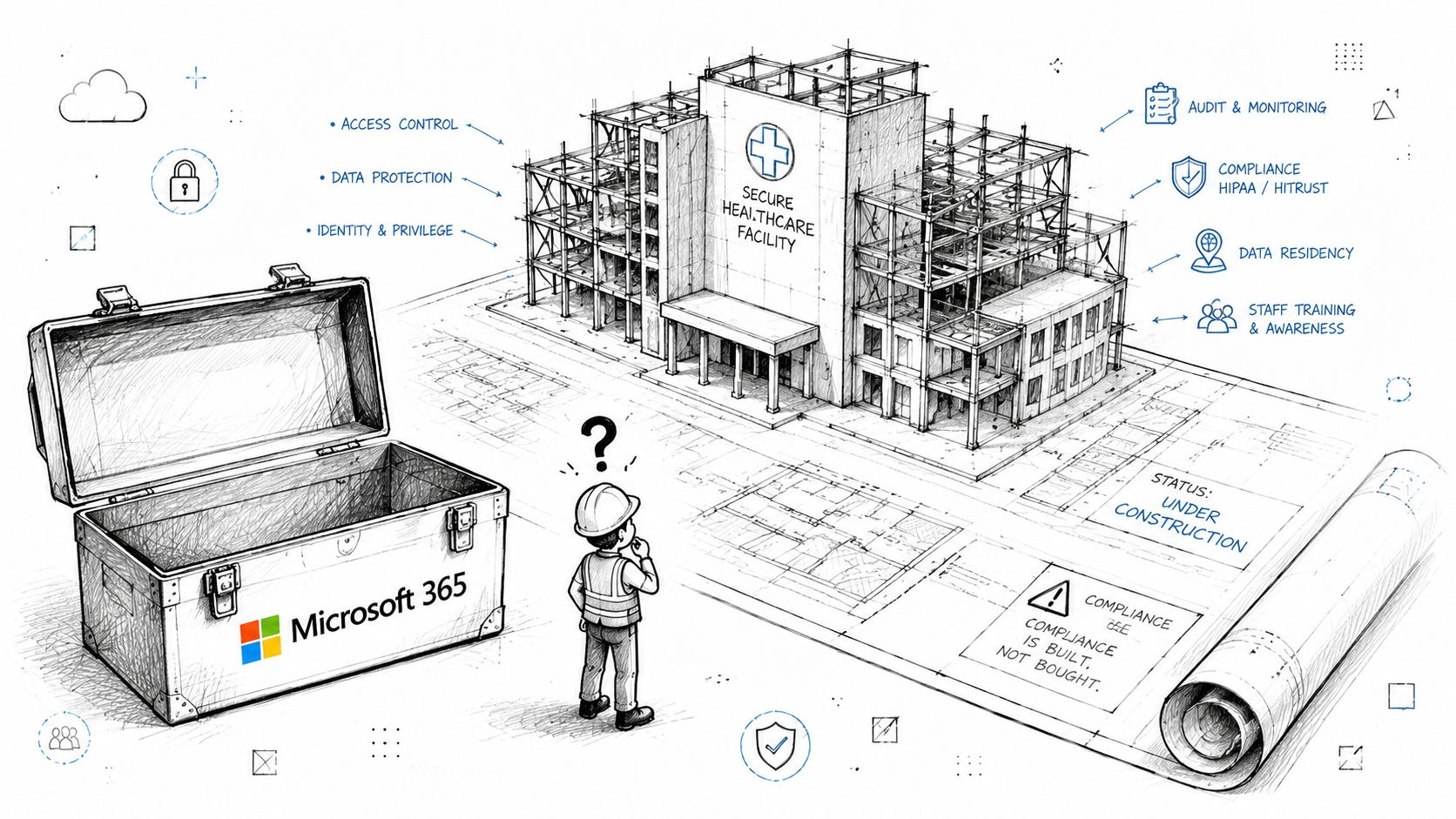
The dangerous projects are the ones that treat licensing as evidence of readiness. They usually skip the ugly engineering work. SharePoint permission inheritance is left messy. External sharing stays wider than anyone intended. Purview labels exist on paper but never get enforced in the places staff work. Audit settings are turned on late, which means the evidence you need after an incident may never have been captured.
Then migration starts, and the tools expose every weak assumption. Large libraries hit the 5,000 item view threshold. Bulk moves trigger throttling. Metadata maps break. Old folder structures drag bad permissions into the new tenant. Teams call it a technical snag. An auditor sees a chain of custody problem, poor retention control, or uncontrolled access to PHI.
What this means in practice
A licence review matters because poor licensing choices usually point to a deeper failure in control design. The organisation bought features without mapping them to actual obligations, actual data flows, and actual operational ownership.
Watch for these warning signs:
- Access is still based on convenience, not least privilege, especially across Entra ID groups, Teams, and SharePoint sites
- Retention is broad or inconsistent, which makes legal hold, subject access, and audit defence harder than it should be
- Migration planning ignores platform limits, such as list thresholds, version history bloat, API throttling, and broken permission inheritance
- No one owns exceptions, so temporary workarounds become permanent compliance debt
If your internal team cannot explain who can access PHI, how that access is reviewed, what happens to records during migration, and how audit evidence is preserved, you do not have a compliance posture. You have a licence stack.
That is why a proper Microsoft 365 licence audit for healthcare environments is worth doing early. It exposes the gap between what you bought and what you can defend. In our experience, that gap is exactly where DIY programmes fail and where specialist intervention from Ollo starts paying for itself.
Understanding Microsofts Promises vs Your Reality
Microsoft says the platform can support healthcare compliance. That statement is true, and it misleads internal teams every week.
The trap is simple. Buyers read product scope, security attestations, and feature matrices, then assume the hard part is finished. It is not. In a healthcare tenant, the primary failure point is the gap between available controls and configured controls. Auditors do not care that Microsoft built the feature. They care whether your organisation set it correctly, monitored it, and can prove it held under pressure during migration, access changes, and day-to-day operations.
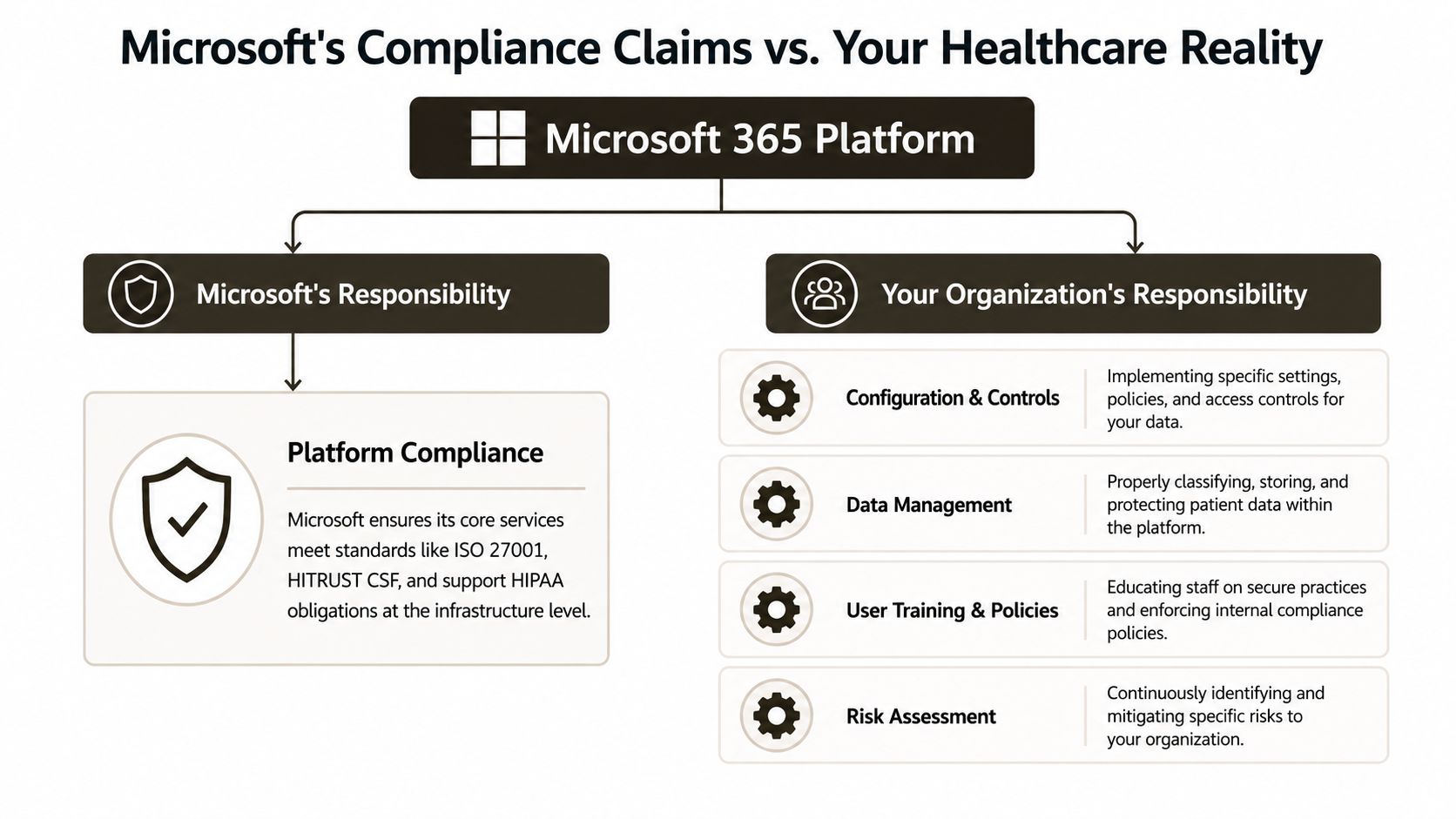
Microsoft provides the service boundary. Your team owns what happens inside it.
That means your organisation still has to set identity rules, access boundaries, data classification, retention behaviour, audit logging, sharing restrictions, and exception handling. Miss any one of those, and the rest of the stack does not rescue you. A tenant full of expensive features can still fail an audit because PHI sits in the wrong site, inherits the wrong permissions, or moves during migration without defensible records management.
The ugly part is that healthcare teams usually discover this during change, not during steady state. A migration starts. Legacy permissions get copied into SharePoint Online. Teams sprawl hides sensitive files behind friendly channel names. Retention is inconsistent across mailboxes, OneDrive, and sites. Then throttling slows validation, the 5,000 item limit exposes bad information architecture, and staff start making exceptions to hit deadlines. That is how a technical project turns into a compliance problem.
The audit issue is rarely a missing Microsoft feature. It is a badly configured control, a broken inheritance chain, or a migration shortcut nobody documented.
Internal IT teams often treat this as an admin task with some policy paperwork around it. That is naive. Entra ID, Teams, SharePoint, Exchange, and Purview are tightly connected. One lazy decision in access design or migration sequencing can undermine legal hold, audit evidence, and least-privilege enforcement at the same time. If you want the short version, this comparison of Microsoft Purview versus manual compliance explains why manual control collapses as soon as scale and audit pressure show up.
Email creates the same false confidence. Teams assume Microsoft 365 mail protection is enough, then leave spoofing gaps and weak domain controls in place. That is avoidable. Start with this guide for stopping email attacks, then decide whether your internal team can implement and monitor those controls without creating more exceptions.
Here is the business case. If your healthcare migration includes PHI, shared workspaces, legacy file structures, or mixed retention obligations, expert intervention is cheaper than explaining control failure to legal, compliance, and the board. Ollo gets pulled in after organisations learn that lesson the expensive way.
Technical Landmines That In-House Teams Always Miss
Failed migrations rarely die from one dramatic error. They die from accumulations of technical neglect. A little throttling here. A little broken inheritance there. A list threshold nobody tested. A path issue nobody cleaned up. Then the project goes live, users complain, security starts asking questions, and compliance becomes incident response.
We often see clients fail when they assume migration tooling will somehow normalise bad source environments. It won't. Tools move problems. Sometimes they preserve them beautifully.
API throttling turns schedules into fiction
Microsoft 365 APIs protect the service. That's sensible. It also means your migration throughput is not yours to command. In-house teams usually discover this too late. They estimate based on file volume, not on service behaviour under load.
When throttling hits, jobs stall, retries stack up, and cutover plans become fantasy documents. In healthcare, delay isn't just inconvenient. It extends dual-running, widens the window of record inconsistency, and encourages admins to make rushed exceptions.
The 5,000 item threshold still punishes lazy design
Microsoft Learn confirms the SharePoint list view threshold at 5,000 items. That isn't trivia. It's one of the oldest and most consistently ignored design traps in SharePoint projects. Healthcare teams migrate a “document repository” that looked fine on a file share, then discover after go-live that critical views, filters, or permissions behave badly because nobody remodelled the library properly.
The disaster pattern is predictable:
- Legacy folders become giant libraries, with no indexing discipline
- Clinical or operational teams rely on filtered views, which fail under load
- Permission exceptions pile up, creating both performance and security pain
Missing this step doesn't just create user frustration. It can push staff into unsafe workarounds like local copies, email attachments, and shadow storage.
For identity-driven controls that reduce the blast radius when things go wrong, your team should understand Conditional Access policy design in Microsoft 365.
Broken inheritance exposes data quietly
This one causes real damage because it hides in plain sight. SharePoint permissions inherit by default until someone breaks inheritance at a site, library, folder, or item level. Over time, organisations accumulate exceptions nobody tracks. During migration, those exceptions often copy badly, map badly, or survive without business justification.
The result is ugly. Staff keep access they shouldn't have. External users retain access longer than intended. Sensitive folders sit under permissive parents. The compliance failure doesn't announce itself. It waits.
If you haven't mapped broken inheritance before migration, you're not migrating data. You're migrating undocumented access decisions.
Long paths and bad filenames create silent loss
File servers tolerate years of abuse. Nested folders, ugly naming conventions, duplicate structures, and ancient departmental habits all pile up. Cloud platforms are less forgiving. During migration, long paths and invalid characters produce skipped items, renamed objects, or failed batches.
That's not a cosmetic issue. If the migration report says files were skipped, your legal, clinical, and records teams need to know exactly what that means. Most DIY teams never build that level of reconciliation.
This is also where email becomes part of the problem. Teams often focus on SharePoint and ignore the fact that exposed mailboxes and weak message controls can leak the same patient data through a different channel. If your security posture around mail is still immature, this guide for stopping email attacks is worth a read because attackers won't respect your project boundaries.
A useful technical walkthrough sits here:
DIY teams miss the audit layer
The migration may “finish” and still leave you exposed if you didn't preserve traceability. Healthcare compliance depends on proving access control, record handling, and governance. If your project moved data but left audit gaps, unmanaged sharing, or unreviewed exceptions, you didn't modernise anything. You changed the address of the risk.
A Brutally Honest Review of SPMT ShareGate and DIY Scripts
Tool selection decides whether your migration is controlled engineering or expensive improvisation. Many organizations choose tools based on licensing cost or vendor demos. That's backwards. You should choose based on failure modes.
Migration Tool Reality Check
| Tool | Advertised Use | Reality & Breaking Point | Ollo Verdict |
|---|---|---|---|
| SPMT | Free Microsoft migration into SharePoint and OneDrive | Fine for basic, low-risk moves with simple structures. It breaks down when you hit complex permissions, remediation-heavy sources, audit-sensitive content, or when you need tight control over mapping and exception handling. | Use SPMT for very small, non-critical migrations. For regulated healthcare content, it's the wrong instrument. |
| ShareGate | Broad migration and management across Microsoft 365 and SharePoint | Strong toolset. Still won't redesign information architecture, fix governance, or save you from throttling, poor source hygiene, and bad permission models. In the wrong hands, it accelerates mistakes. | Use ShareGate when an experienced operator has already assessed the estate and planned remediation. |
| DIY PowerShell scripts | Full customisation and automation | Useful for targeted tasks, pre-migration clean-up, and edge-case handling. Dangerous as a primary migration strategy if your team hasn't already solved retries, deltas, authentication handling, reconciliation, and reporting. | Use scripts as surgical instruments, not as your only migration platform. |
SPMT is free for a reason
I'm not saying SPMT has no place. It does. If you're moving a modest volume of clean content with basic structure and low compliance impact, it can work.
That is not most healthcare estates.
The minute you need to preserve intent around permissions, handle awkward source structures, sequence departments carefully, or validate exceptions properly, SPMT stops being “lean” and starts being negligent. Free tools attract teams who underestimate complexity. This is the main danger.
If you want a grounded baseline on where the tool fits, read this SPMT overview for SharePoint migration planning. Then ignore any temptation to stretch it beyond its design comfort zone.
ShareGate is powerful, not magical
ShareGate belongs in serious projects. We use it. That doesn't make it self-driving.
Its value is speed, visibility, and control in capable hands. Its weakness is that it can't correct bad architecture for you. It won't decide which legacy folder structures should become separate sites. It won't rationalise broken inheritance. It won't explain to your compliance lead why guest access survived because someone mapped a team badly.
Healthcare organisations often buy ShareGate and assume the problem is solved because the interface looks manageable. That's like buying theatre equipment and assuming you can now perform surgery.
ShareGate is a strong engine. If your migration design is wrong, it just crashes faster.
DIY scripting flatters internal teams
This is the trap for technically strong organisations. Your engineers can script. They know PowerShell. They've built automation before. So they decide to build a migration framework.
Then reality arrives. Transient failures need retry logic. Authentication needs hardening. Delta runs need consistent logic. Reconciliation needs evidence. Reporting needs to satisfy both IT and compliance stakeholders. The script estate grows into a one-off application nobody wants to support after cutover.
There is one pragmatic middle ground. Use specialist tooling for migration execution and custom scripting for remediation, validation, and edge cases. That's also where a service such as Ollo fits. It uses ShareGate and custom PowerShell PnP scripting for complex Microsoft 365 and SharePoint migration work, rather than relying on basic tooling for enterprise jobs.
The Ollo verdict
- SPMT for small, simple, low-risk content only.
- ShareGate for serious migration work, but only with an operator who understands SharePoint architecture, throttling, permissions, and compliance impact.
- DIY scripts for targeted remediation and augmentation, not as the backbone of a regulated migration.
If your healthcare migration includes sensitive records, mixed permissions, legacy sprawl, or audit pressure, a tool purchase is not your risk strategy. Specialist execution is.
Practical Configuration for Real-World Compliance
Buying Microsoft 365 licences does not configure a healthcare control model. It gives you a pile of features, competing admin centres, and enough toggles to fail an audit in several different ways.
That is the part internal teams underestimate. They focus on whether the feature exists. Auditors care whether it was configured consistently, whether it stayed that way through migration and cutover, and whether you can prove it. In healthcare, bad configuration is not a technical nuisance. It is evidence that your governance stops where the marketing brochure starts.
Microsoft is still expanding regulated coverage across parts of its cloud estate. A concrete example is Microsoft's announcement on March 5, 2025, that Dynamics 365 Contact Center would become HIPAA compliant, after earlier compliance milestones for PCI DSS, ISO, and SOC 2, as outlined in Microsoft's Dynamics 365 Contact Center compliance announcement. The practical lesson is simple. Your compliance boundary changes as you add workloads, and your configuration standard has to keep up.
Controls that actually survive audit scrutiny
Healthcare organisations should treat these controls as baseline engineering, not optional hardening:
- Entra ID Conditional Access. Set access rules around device trust, sign-in risk, location, session control, and phishing-resistant authentication where possible.
- Purview sensitivity labels. Use labels that trigger encryption, external sharing restrictions, and downstream handling. Classification alone is cosmetic.
- Retention and records configuration. Map retention to operational use, legal hold requirements, and actual records behaviour across Exchange, Teams, and SharePoint.
- Unified audit and evidence retention. If you cannot reconstruct who accessed what, changed what, and shared what, your compliance story falls apart fast.
The ugly part is the interaction between those controls.
A migration can preserve content while breaking the policy model wrapped around it. Teams-connected sites inherit broad membership. Legacy folders with unique permissions come across with no rational owner. Libraries exceed practical management thresholds, then admins start creating exceptions to keep staff working. Throttling slows remediation runs. The 5,000-item list view threshold turns simple validation into a mess. None of that shows up in a licensing chart, and all of it shows up later when someone asks for evidence.
Where healthcare teams actually fail
They configure each control tower in isolation and assume the result adds up.
Identity owns MFA. The SharePoint team owns site structure. Records people own retention. Security owns alerts. Nobody owns the failure path where a migrated patient document lands in a Teams-backed library with inherited permissions, an overly broad group, a label that was published but never applied, and an audit trail nobody tested before go-live.
That is how DIY migrations pass a smoke test and fail a compliance review.
Your baseline should answer four questions without guesswork:
- Exactly which users and groups can access patient-related content, and who approved that model?
- What blocks unmanaged devices, risky sign-ins, and oversharing across Teams, SharePoint, and Exchange?
- How do labels, retention, and external sharing rules behave after migration, not just before it?
- What evidence can you produce quickly when legal, compliance, or an auditor asks for proof?
If your team cannot answer those cleanly, the tenant is not ready.
Use a benchmark such as these Microsoft 365 security best practices for SharePoint and Microsoft 365 to expose gaps. Then get someone who has already fought through list thresholds, throttling, broken inheritance, and post-migration validation at scale. That is where Ollo adds value. Not by selling magic, but by stopping a healthcare migration from becoming an expensive compliance incident.
Beyond Downtime Quantifying the Financial and Legal Risk
A failed healthcare migration doesn't stop at IT inconvenience. It becomes a finance problem, a legal problem, and a leadership problem.
The direct cost nobody budgets for
When projects stall, your organisation pays twice. You keep legacy systems alive longer than planned. Internal staff lose weeks to manual clean-up, exception handling, and user fallout. Then someone brings in rescue specialists after the original budget has already been burned.
That pattern is common because teams underprice complexity and overprice optimism.
Compliance failure changes the conversation
Downtime irritates people. Compliance failure alarms executives.
If your migration introduces weak access control, loses governance evidence, or exposes patient data through bad sharing or inherited permissions, your problem isn't “project delay”. It's whether your organisation can defend its handling of regulated information. “We were migrating” won't protect your team in an audit review or breach investigation.
User trust also has a cost
Healthcare staff won't wait for IT to recover gracefully from a broken rollout. If search fails, permissions look random, document access slows down, or records appear incomplete, users route around the platform. They email files, save local copies, and create shadow processes.
That behaviour creates the next compliance issue.
Missing one permission inheritance during migration can expose data silently. The user may never report it. The auditor eventually will.
The board-level version of the risk
If you need to explain this upward, keep it plain:
- Operational risk means disrupted clinical, administrative, or records workflows.
- Security risk means sensitive information may reach the wrong audience.
- Compliance risk means you can't prove proper control or retention.
- Financial risk means you pay for delay, duplication, remediation, and external intervention.
Cheap migration decisions often look efficient during procurement. They become expensive during recovery.
The Ollo Approach From Assessment to Secure Operations
The only sane way to handle Microsoft 365 healthcare compliance is to treat migration and governance as one programme. Not two. Not sequential workstreams. One disciplined piece of engineering.
What a risk-managed approach looks like
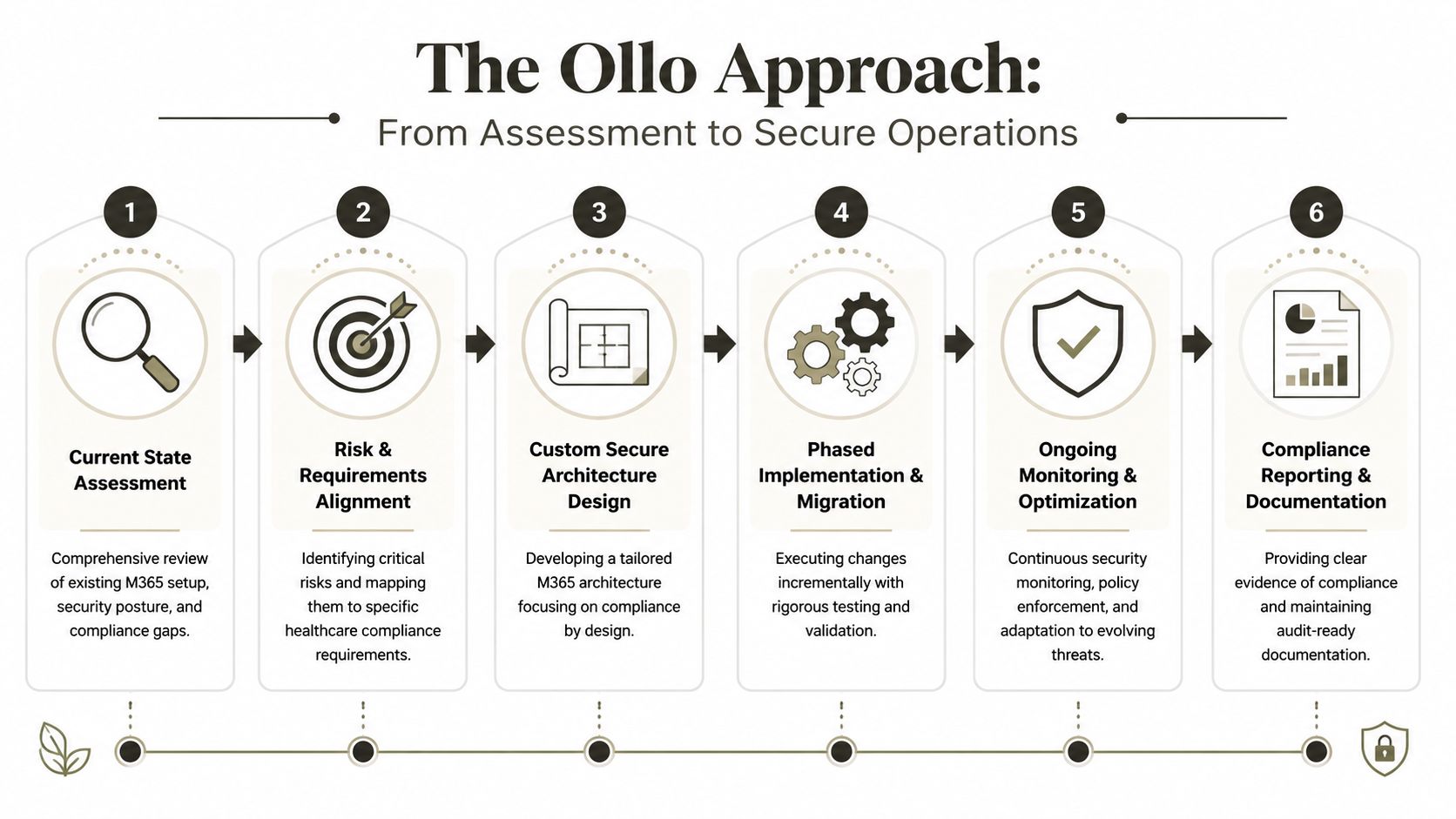
First, assess the source properly. That means finding oversized libraries, broken inheritance, ugly paths, overexposed sharing, and any structure that will collapse under cloud rules.
Then align the target with actual compliance requirements. Don't replicate old mess into a new tenant. Redesign where needed. Rationalise access. Decide what deserves separate sites, tighter controls, stronger labels, and better retention handling.
After that, execute in phases with evidence. Migrate, validate, reconcile, and document. Don't call it done because the files arrived. Call it done when the permissions, retention, access model, and audit posture all match design.
Why operations matter after cutover
The handover is where weaker providers disappear and your risk starts mutating. Policies drift. New teams appear. Sharing exceptions creep in. New Microsoft services expand the surface area.
That's why governance has to become operational. If you want a broader leadership lens on that discipline, this piece on how CIOs operationalise governance is useful because it connects control frameworks to executive accountability rather than just admin settings.
The documentation says the cloud supports compliance. Reality is that only continuous control keeps it that way.
If your team is planning a healthcare migration, inheriting a messy tenant, or cleaning up after a project that already went sideways, talk to Ollo. You don't need another generic Microsoft 365 deployment. You need a hard assessment of where the compliance chain will break, and a migration plan that fixes those points before patient data, audit evidence, or executive trust takes the hit.

















