



Most advice on software solutions for manufacturers starts in the wrong place. It starts with features, demo screens, and vendor promises, when the core failure usually lands later, in the migration, the permissions model, and the collaboration layer nobody budgeted to fix.
In Irish manufacturing, that mistake is expensive because the spend is already concentrated in core systems. CSO data show manufacturing accounts for about 35% of total Irish business expenditure on software, databases, and data processing, and roughly one-fifth of all enterprise ICT spend. That tells you the truth most buyers avoid, the software itself matters, but the surrounding Microsoft 365 and SharePoint estate often decides whether the whole programme survives cutover or detonates under load, as the Irish manufacturing market keeps pulling vendors toward MES, ERP, PLM, and industrial cloud stacks at scale (Irish industrial software market landscape).
If your team is shopping for a new MES or ERP and nobody has mapped the migration path, you're already behind. The contract is the easy part. The hard part is preventing broken inheritance, GUID conflicts, API throttling, and permission chaos from turning a modernisation project into an audit problem. For a blunt assessment of why enterprise Microsoft 365 programmes fail for reasons that have nothing to do with the platform itself, see the real reason enterprise Microsoft 365 projects fail.
Why the Software Choice Is the Easy Part
The wrong instinct is to treat vendor selection as the main decision. In manufacturing, the software purchase is usually the least dangerous part of the programme, because the actual damage starts when your team has to move content, integrate systems, preserve permissions, and keep production evidence intact under pressure.
The spend sits where the plant runs
Irish manufacturing doesn't buy software as a novelty. The CSO data show the sector absorbs a huge share of software, database, and data-processing spend, which means the core operational stack carries real business risk, not just licence cost. That matters because under-investment shows up fast in downtime, manual reconciliation, and weak audit trails, especially when production records, quality evidence, and engineering content live across Microsoft 365, file shares, and line-of-business systems.
Practical rule: if a manufacturing project does not have a migration and governance workstream on day one, it isn't a software project, it's a future incident.
The real buyer question
The right question isn't “Which MES should we buy?” It's “How do we stop the surrounding Microsoft 365 and SharePoint layer from collapsing when modernisation starts?” A plant can survive imperfect dashboards for a while. It can't survive missing SOPs, broken access control, or a document estate that nobody can trust after cutover.
That's why the market keeps rewarding vendors who understand operational software as an ecosystem, not a product box. Irish manufacturers are buying coordination layers, identity controls, and compliance-bearing document systems as much as they're buying shop-floor tools. If the architecture team ignores that, the rollout will still happen, just badly.
For a related view on how business automation needs to connect to real process control rather than slideware, browse Enasys tracking tools from Material Handling USA and compare how inventory visibility changes once movement data is tied to execution, not just reporting. The same logic applies to manufacturing software choices, visibility without control is theatre.
And if your team is trying to automate the surrounding workflow instead of just buying another point tool, the most useful companion reading is business process automation tools. The point is simple, software selection is the front door, migration discipline is the building.
The Five Categories of Manufacturing Software
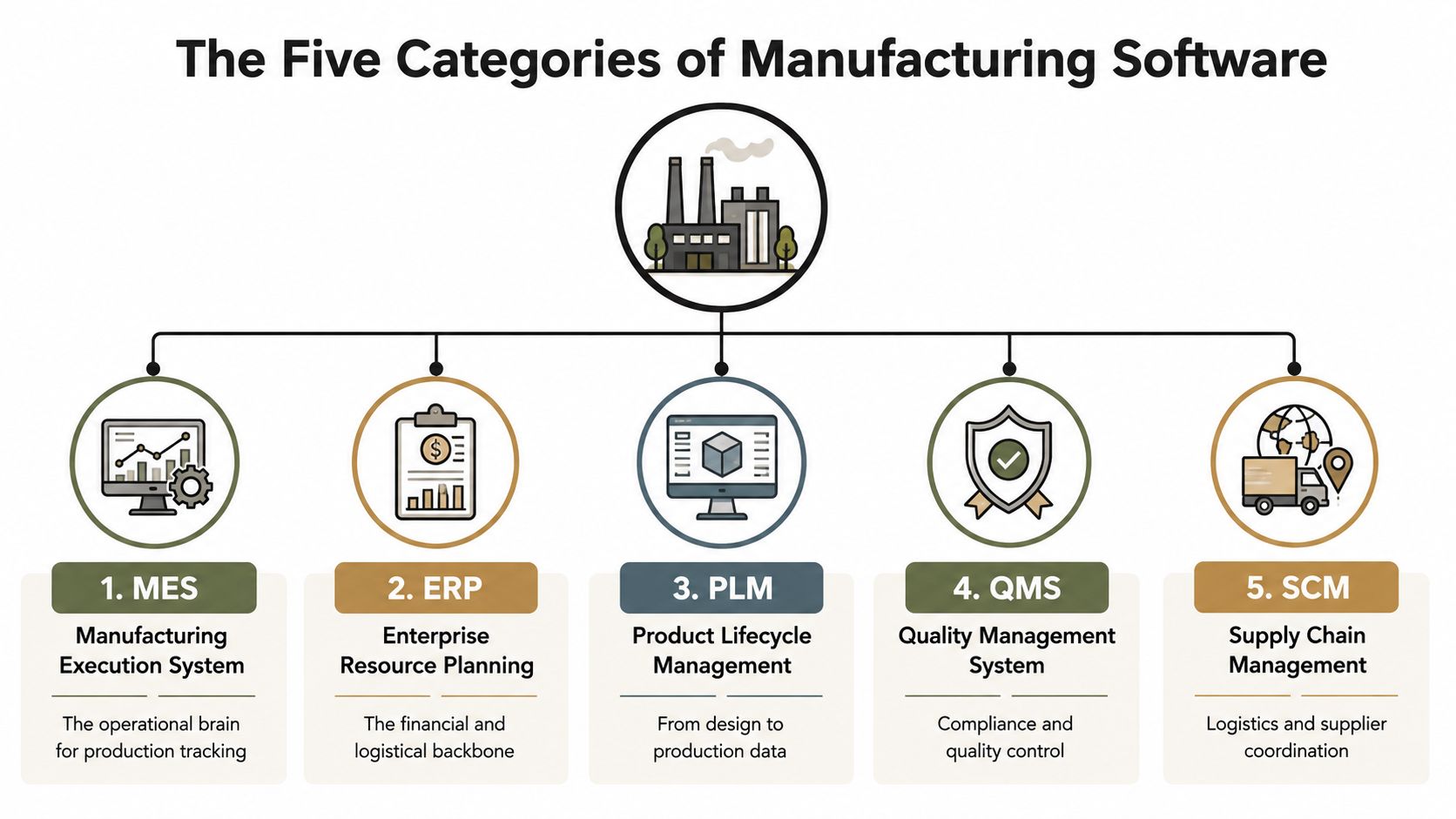
A serious buyer needs a clean map before any shortlist makes sense. Most manufacturing environments end up with five layers that overlap but do not do the same job, and trouble starts when leaders pretend they are interchangeable.
The question buyers should actually be asking
MES runs production execution. It captures what happened on the floor, what got made, and where the exceptions landed. ERP coordinates finance, purchasing, stock, and supply chain logic. If you confuse them, you force the plant to use finance software as an operational system, and that always ends in manual workarounds.
PLM and QMS carry the controlled record
PLM handles engineering and product lifecycle data, while QMS handles regulated quality workflows, controlled documents, and evidence. In a mature manufacturer, these two are not optional add-ons. They decide whether the business can prove what it built, what changed, and who approved the change.
The forgotten layer is the one that breaks first
The fifth layer is the Microsoft 365 and SharePoint collaboration estate, and this area is where the hardest failures usually sit. SOPs, drawings, audit evidence, and working documents often live there even when nobody says it plainly in the steering committee. When MES or ERP projects land, this estate is the first thing that cracks if nobody has mapped inheritance, metadata, retention, and access.
That is why the collaboration layer deserves the same discipline as the production systems. A clean software stack on paper means nothing if your actual records live in a SharePoint farm nobody has governed properly. For a closer look at how automation should connect to business process design rather than isolated tools, see computer system validation and use the same control mindset on document-heavy manufacturing estates. For the surrounding workflow layer, business process automation tools are useful only when they support control, not just speed.
The plant does not care how elegant the logo is. It cares whether operators, quality teams, and auditors can find the right record at the right time.
For a related view on how business automation needs to connect to real process control rather than slideware, browse Enasys tracking tools from Material Handling USA and compare how inventory visibility changes once movement data is tied to execution, not just reporting. The same logic applies to manufacturing software choices, visibility without control is theatre.
Selection Criteria That Actually Matter in Regulated Manufacturing
Vendor demos obsess over dashboards. Your risk register should not. It should care about identity boundaries, retention, auditability, integration depth, and whether the API survives cutover night without turning your team into firefighters.
Security and identity come first
If the software cannot fit inside your zero-trust and Entra ID model, reject it. Manufacturing environments need controlled access, traceable sign-in behaviour, and a design that does not push users into shadow accounts or brittle exception handling. If a vendor cannot explain how its product fits your identity model, they are asking you to accept unmanaged risk.
Compliance is not a checkbox
Regulated manufacturing lives or dies on retention, audit trails, and controlled evidence. That means the question is not whether the UI looks modern, it is whether the system preserves the record structure your auditors will later ask for. If the software cannot support that discipline, it has no place on the shortlist.
The Safety Space compliance ROI guide is useful because it frames compliance as operational control, not paperwork. That mindset matters when you are selecting software that will carry SOPs, inspections, and quality records.
M365 and SharePoint integration must be native
Bolted-on connectors fail at the worst time. You want native behaviour, sane identity handling, and predictable document movement between Microsoft 365, SharePoint, and whatever production system you are layering on top. If the vendor treats SharePoint as an afterthought, expect a mess when document libraries, approvals, and controlled content need to move in step with the plant.
Hard rule: “best of breed” often means “weakest integration story”. If a vendor cannot describe the seam, it is a liability.
API limits are part of the product
A serious manufacturing platform needs documented limits, throttling behaviour, and realistic guidance for integration volume. The documentation may say the connector works, but enterprise estates hit the edge cases first, especially when users assume the API will absorb migration-scale load without batching or retry logic. If the vendor will not engineer around those limits, your team will become the integration layer.
That is why I tell IT Directors to score vendors on disqualifiers, not wish lists. If security, retention, M365 integration, or API behaviour looks shaky, the product is not a fit for a regulated manufacturing estate, no matter how polished the demo looks. For a related control mindset, the validation discipline behind computer system validation is worth reading before you approve anything that will carry regulated records.
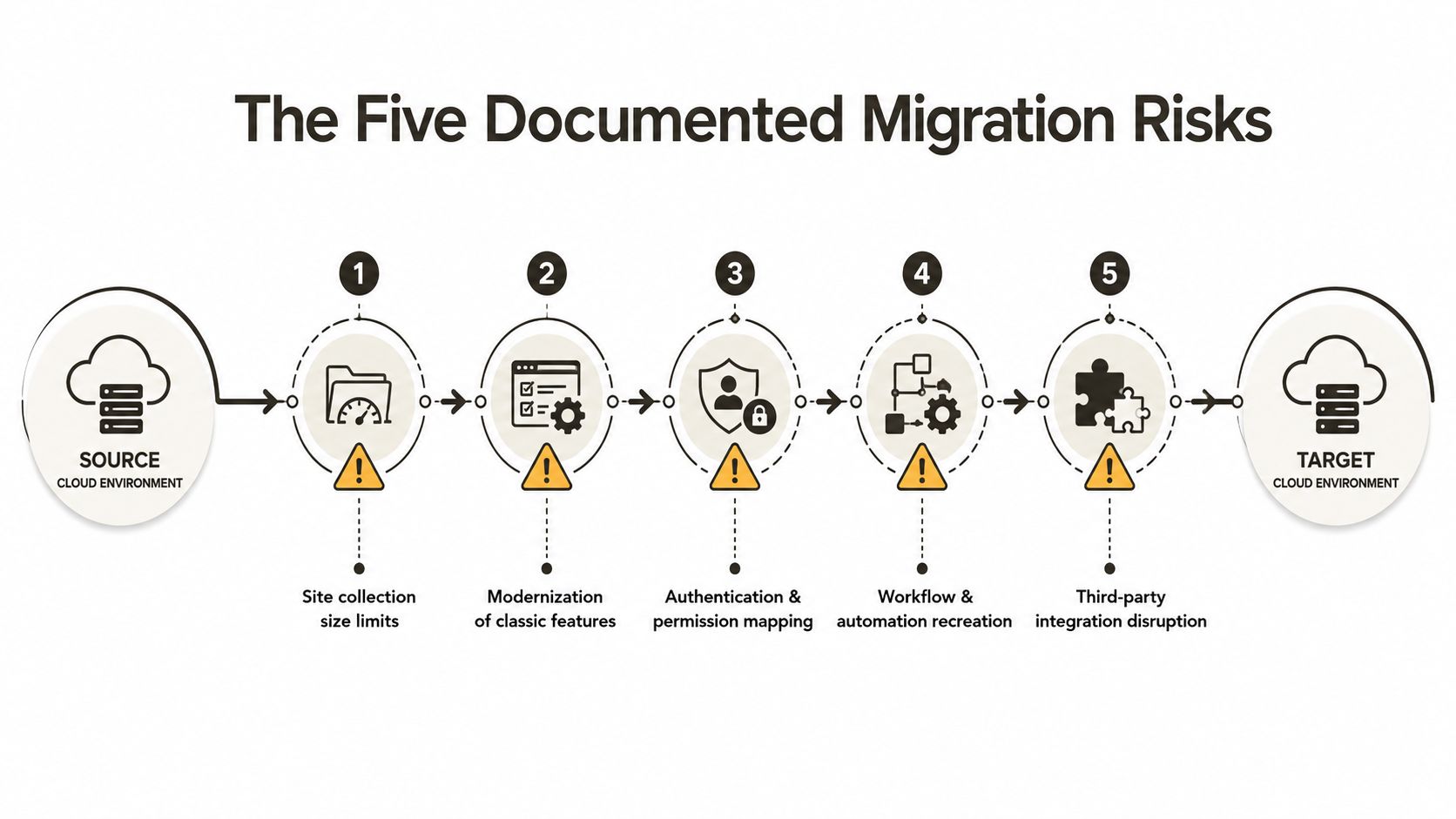
The Five Migration Risks Microsoft Learn Already Documents
SharePoint and Microsoft 365 migration gets sold as a tooling problem. That story is lazy. The platform has hard limits, and manufacturing estates run into them fast because they are full of brittle permissions, messy libraries, and old content structures that nobody wants to touch until cutover day.
Site size and list design break naïve migrations
Microsoft Learn documents the 5,000-item list view threshold, and that is a platform constraint, not a guideline. If your team lifts flat lists into SharePoint without redesigning the information architecture, views start failing, access slows down, and production users begin opening tickets before the dust has settled. That is how a migration becomes a support backlog.
The fix is not more optimism. It is redesigning the content model before the move, so list structure, views, and permissions fit how the plant works.
Path length and content structure bite harder than people expect
Long path limits look harmless in a workshop and ugly in production. Manufacturing libraries often carry nested drawings, quality records, and legacy folder trees, and once the migration job reaches those paths, failures show up that never made it into the steering deck. The tool is not the problem. The content shape is.
You need to trim and reshape the structure before cutover. If you wait until the transfer job starts breaking, you are already behind.
Throttling is what kills your timetable
API throttling is the quiet killer in large Microsoft 365 projects. Your migration runs well until the service pushes back, then the timetable slips because someone assumed the tool would just keep hammering through the night. Microsoft's documentation is clear on the point, throttling has to be engineered around, especially when permissions, metadata, and document volume all rise at once.
That is why a proper migration plan uses batching, retries, and controlled throughput. Anything else is wishful thinking dressed up as a project schedule.
GUID conflicts and broken inheritance are not cleanup tasks
Tenant-to-tenant consolidation can surface GUID conflicts, and permission remapping can break inheritance in ways that leave documents open to the wrong people, or closed to the right ones. In a regulated manufacturing estate, that is not a cosmetic issue. It becomes a compliance incident, and it can become a data-loss event if the wrong objects get overwritten or hidden during remediation.
If you need a practical reference point for the mechanics, SPMT and SharePoint migration tooling should be on the reading list before anyone decides the built-in utility is enough. It is not enough on its own.
The operational consequence is always the same
If the platform constraints are not built into the plan, the cutover fails under real load. Your plant loses time, your support team gets buried, and your auditors start asking questions you cannot answer cleanly. That is why a scripted, batch-controlled, validation-heavy approach beats hope every time.
Comparing SPMT, ShareGate, and Custom PowerShell PnP
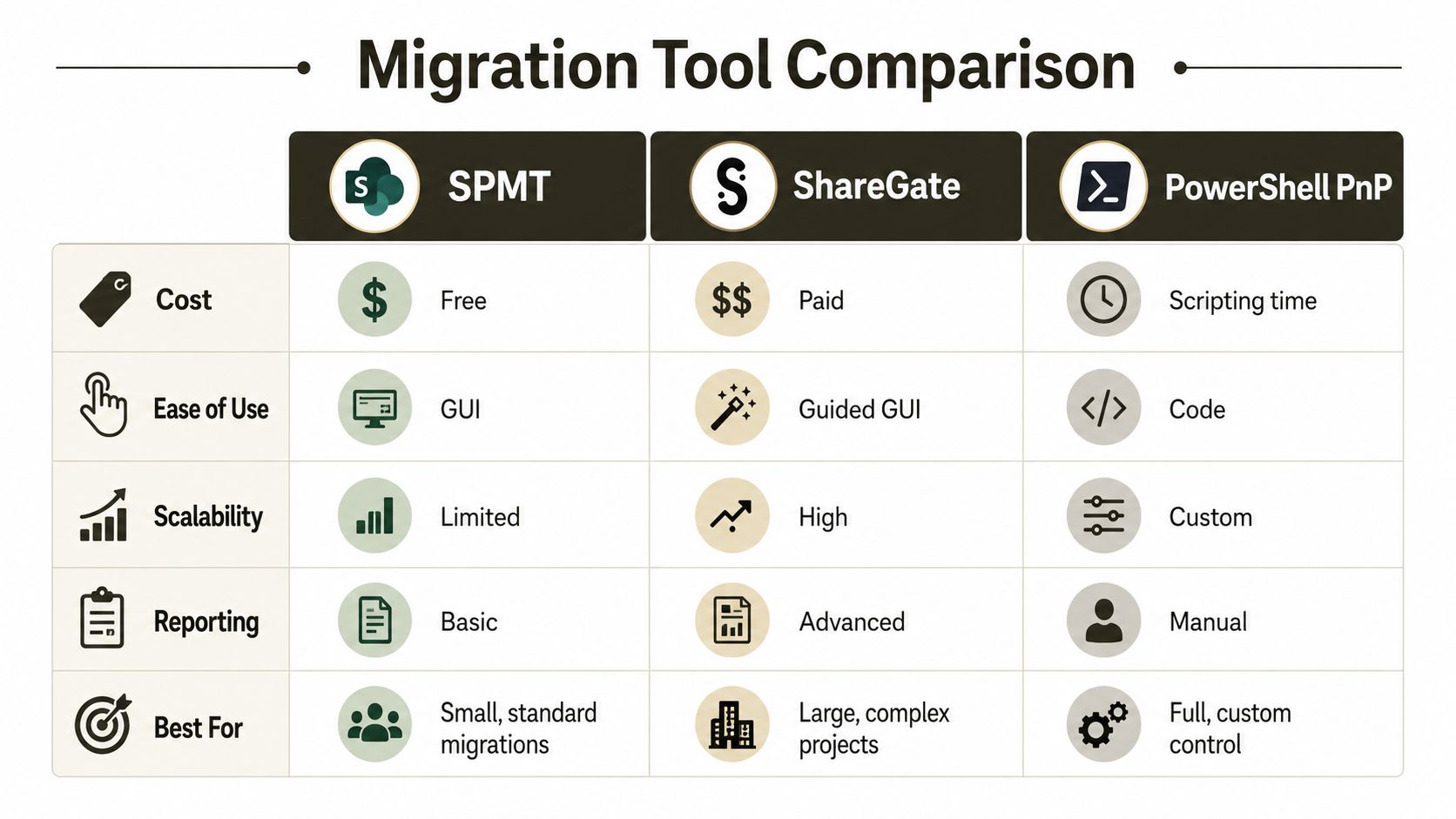
The three tools most IT Directors consider are Microsoft's SharePoint Migration Tool, ShareGate, and custom PowerShell PnP scripting. Each has a place. Each also has a hard limit that vendor brochures glide past.
SPMT is fine until scale and complexity show up
SPMT is useful for straightforward moves and smaller content sets. The moment you bring in awkward metadata, complex permissions, or throttling pressure, it starts showing its seams. Microsoft tools have limits, and enterprise manufacturing environments hit them at scale, especially where file shares and SharePoint estates were left to sprawl for years.
Ollo verdict: use SPMT only for simple, bounded migrations. For serious manufacturing estates, it's not enough.
ShareGate is stronger, but it still isn't magic
ShareGate gives you better usability, better visibility, and a more serious migration workflow. It handles complex estates better than basic tooling, which is why teams like it. But it still runs into hard edges when permission remapping, content restructuring, and large regulated libraries all collide in the same cutover.
If your project needs deep governance work, ShareGate helps, but it doesn't remove the need for senior architecture. For a specialist-led programme, that's where the tool becomes an asset instead of a false comfort blanket.
Ollo verdict: ShareGate is the right starting point for complex migrations, but only when an experienced team controls the design and validation.
Custom PowerShell PnP is the only defensible control layer at scale
Custom PnP scripting gives you the control basic tools can't. You can shape content, control batches, validate permissions, and deal with the weird edge cases that show up in regulated manufacturing estates. But don't kid yourself, script-driven migrations punish sloppy engineering. Without senior oversight, testing, and rollback discipline, your own scripts become the failure mode.
The video below is worth watching if your team still thinks migration tooling alone solves the problem.
Ollo verdict: custom PowerShell PnP is the right answer when the estate is messy, regulated, or large enough to break basic tooling. Anything else is wishful thinking.
The Pre-Cutover Implementation Checklist
A proper pre-cutover checklist should read like a war room document, not a sales brochure. If your project manager can't use it on Monday morning, it isn't a checklist.
Inventory what will break first
- List the high-risk libraries: Identify every list or library that may hit the 5,000-item list view threshold or create view issues after the move.
- Audit path length now: Find the deepest folder structures, then decide what gets flattened before migration.
- Map broken inheritance risk: Document where permission inheritance already diverges, because migration will only make the problem louder.
Validate the control plane
- Build the permission map: Record who needs access before you touch the source estate, then compare it to the target model.
- Test API throttling behaviour: Simulate volume, because live traffic will not be kind during cutover.
- Scan for GUID conflicts: Look for identity collisions in tenant-to-tenant moves, especially where old content and reused structures overlap.
Prove the records survive
- Check retention and audit trails: Verify that quality records, SOPs, and controlled documents still meet your governance standard after the transfer.
- Confirm content shape: Don't move a flat mess into a new tenant and call it modernisation.
- Stage rollback gates: Set explicit points where the cutover can stop, reverse, or pause without improvisation.
For a practical template that aligns well with this discipline, the SharePoint migration checklist is a useful internal reference if you want the conversation to stay anchored in execution, not theory.
Operational advice: if the project team cannot show you a tested rollback path, you don't have a migration plan, you have a gamble.
Why DIY Migration Is the Expensive Choice
DIY looks cheap until it isn't. A missed permission remap becomes an audit finding, a GUID conflict can corrupt engineering records, and throttling can blow the cutover window that the plant depended on for a regulated go-live. At that point, the cost isn't the consultant fee you tried to avoid, it's the delay, the remediation work, and the trust you lost with the business.
The Irish manufacturing environment makes that risk worse, not better. With spend concentrated in core operational software and pressure rising on compliance-heavy estates, a bad move in Microsoft 365 or SharePoint doesn't stay in IT. It hits production control, document governance, and business continuity together.
That's why a specialist consultancy is the risk-reduction strategy, not a luxury. A mature team brings ShareGate where it helps, custom PnP scripting where basic tools fail, and the judgement to know which content needs shaping, validation, and controlled batching before anyone presses cutover. That mix exists because enterprise manufacturing estates are not normal IT estates.
Ollo verdict: if the move is small and boring, basic tooling can handle it. If the move touches regulated records, tenant consolidation, Entra ID redesign, or rescue work, you need a specialist pair of hands.
If you're planning a Microsoft 365 or SharePoint migration in a manufacturing estate, talk to Ollo before your team touches the source tenant. We handle the hard stuff, tenant-to-tenant consolidation, zero-trust redesigns, and rescue migrations, because that's where DIY projects usually fail.

















