



Your migration weekend is booked. Change freezes are in place. Leadership expects Monday to be quiet.
It won't be quiet if you've treated this as a technical project instead of a business continuity event.
I've seen the same failure pattern too many times. The tool run finishes, but permissions don't line up. Lists open for some users and fail for others. Search looks empty. Automation breaks because a dependency nobody documented lived inside an old SharePoint list or a buried Excel file. Your team starts saying the migration “mostly succeeded”. The business hears one thing: critical work stopped.
That's why business continuity planning matters here. Not the binder on the shelf. Not the policy document audit likes. The operational plan that assumes Microsoft 365 migrations fail in partial, messy, platform-specific ways, then forces your team to rehearse recovery before production gets hurt.
The Migration Just Failed Who Takes the Blame
It's 3 AM on Monday. Your phone lights up. The weekend cutover has collapsed. Finance can't find document libraries. Department sites load, but inherited permissions broke during the move. A workflow tied to a legacy list stalls approvals. The CIO wants one answer, fast. Who signed off on this?

This isn't a freak event. It's what happens when an M365 migration gets treated like routine infrastructure work. Your generic continuity plan might cover fire, flood, and power loss. It won't save you from API throttling during a tenant consolidation, broken inheritance across site collections, or long-path failures buried in a file share that nobody cleaned up before go-live.
According to a 2024 global analysis, 44% of businesses lack a disaster recovery plan, and the cost of continuity breaks ranges from $137 to $16,000 per minute (Market.us global continuity analysis). In regulated IE environments, that gap gets worse because documentation may claim compliance while the actual estate has never gone through a tested Business Impact Analysis.
Paper compliance won't answer the 3 AM call
A paper BCP often gives leadership false comfort. It says who to notify, where backups live, and which executive owns the incident. Fine. None of that tells your team what to do when half the content migrated, version history looks inconsistent, and Microsoft 365 is throttling your batch jobs.
Practical rule: If your continuity plan doesn't include migration-specific rollback criteria, it isn't protecting the business. It's protecting the audit trail.
If you need a plain-language refresher on the essentials of business continuity, it's worth reviewing before you approve another high-risk cutover. Then apply those basics to cloud migration reality, not old server-room thinking.
The blame lands on the team that assumed “good enough”
We often see clients fail when they assume a tenant-to-tenant migration is just a larger file copy. It isn't. It changes identity, permissions, structure, and operational behaviour all at once. That's why the gap between an internal admin and a specialist matters. If you're weighing that difference, this breakdown on Microsoft 365 admin vs consultant is the right lens.
The documentation says the platform is manageable. In reality, your migration becomes a live resilience test the minute business users depend on the target environment.
Why Your BCP Is Useless for an M365 Migration
Most business continuity plans were written for clean failures. The server is down. The building is inaccessible. The network is offline. Those scenarios are serious, but they're simple compared with a SharePoint migration that fails in fragments.
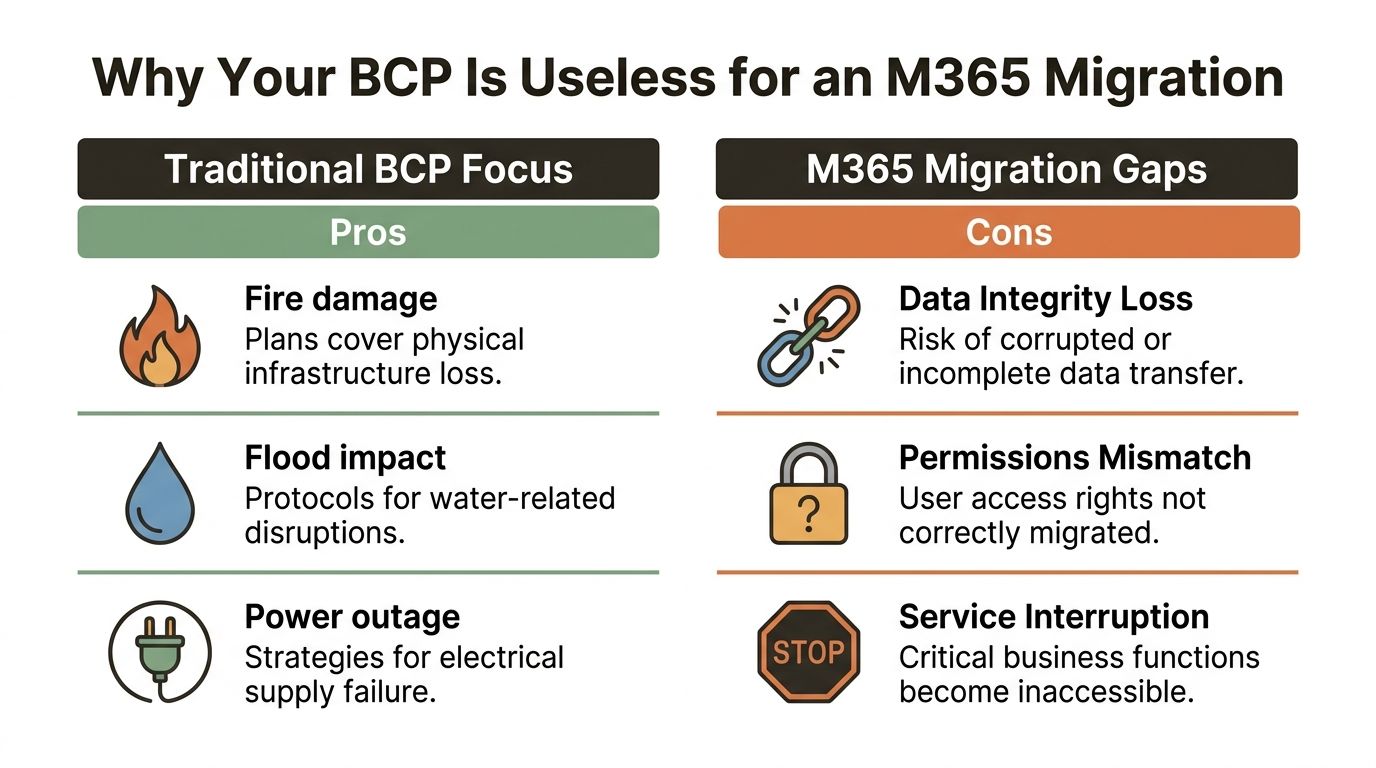
An M365 migration rarely fails all at once. It fails selectively. A site opens, but metadata is wrong. A library appears, but permissions drift. A list exists, but critical views break. Traditional BCPs don't model that kind of damage, so your Recovery Time Objective becomes fiction the moment the platform starts behaving as it typically does.
Critical Ireland-focused continuity data makes the point sharply. 75% of businesses without a properly aligned plan fail within three years, while 61% of global businesses have a plan and 20% of those plans are incomplete (CalNet on business continuity planning importance). That's the problem. A plan existing on paper doesn't mean it can survive a cloud migration incident.
Traditional continuity logic breaks in the cloud
Here's where older plans fall apart:
- Binary outage thinking: Your BCP assumes systems are either available or unavailable. Migrations create partial failure, which is worse because users keep working inside damaged structures.
- Business-first timelines without platform reality: Your team may demand a short RTO. Microsoft 365 doesn't care what your spreadsheet says if the service throttles your migration batches.
- Infrastructure bias: The document talks about buildings, hardware, and backups. Your actual risk sits in list design, permissions inheritance, identity mapping, and undocumented dependencies.
You should also expect non-technical stakeholders to misunderstand what “live” means. If a document library loads, they assume the migration succeeded. Your architects know better. They need evidence, validation, and rollback authority.
The visual summary helps, but only if your team acts on it instead of admiring it:
Replace generic planning with migration-specific controls
If your organisation still thinks continuity planning is mostly a template exercise, even a basic guide for SMB disaster preparedness is a useful reminder that plans need roles, recovery logic, and maintenance. For regulated M365 estates, that baseline still isn't enough. You need migration-specific controls layered on top.
A practical way to think about it is this:
| Traditional BCP assumption | M365 migration reality |
|---|---|
| Outage is obvious | Failure is often partial and hidden |
| Recovery is infrastructure-led | Recovery is dependency-led |
| Permissions are stable | Permissions can break during remapping |
| RTO is a business decision | RTO is constrained by platform behaviour |
The documentation says your continuity plan is complete because it names owners and escalation paths. In reality, it's useless if it doesn't account for how SharePoint, Entra ID, and migration tooling actually fail.
If you work in a regulated environment, that gap isn't only technical. It creates validation, audit, and evidence problems. That's why system assurance has to sit beside continuity planning, not behind it. It is at this point that computer system validation stops being a compliance checkbox and becomes operational protection.
Your First Defence The Unflinching Business Impact Analysis
A bad Business Impact Analysis asks each department what matters, collects a list of systems, then calls it done. That process misses the thing that destroys migrations. Hidden dependencies.
A real BIA is an interrogation of how work gets done when nobody's trying to impress audit or tidy up architecture diagrams. You sit with finance and find the macro-heavy workbook that drives payroll. You trace approvals back to a SharePoint list built ten years ago by somebody who left. You identify the service account nobody documented because “it's always just worked”.
The risk is not theoretical. 90% of businesses fail within a year if they can't resume operations within 5 days after a disaster. DIY continuity work often skips the interviews where 70% of hidden system vulnerabilities are uncovered, and actual recovery times exceed expected RTOs in 60% of untested financial firms (Risk and Resilience Hub continuity statistics).
What a serious BIA looks like
Start with process, not technology.
Follow the business transaction
Don't ask, “Which site matters?” Ask, “How does an invoice get approved, and what breaks if this step disappears?” That question exposes lists, permissions, flows, mailboxes, and user workarounds.Trace identity and access dependencies
A migration doesn't move data alone. It moves who can see what, who can approve what, and who inherits rights from where. Broken assumptions here create silent failures.Force proof, not opinion
Department heads often rank everything as critical. Push back. Ask for operational evidence, timing impact, legal impact, and fallback method.
The interview mistakes that cause the damage
We often see clients fail when they run the BIA as a survey. Surveys create optimism. Interviews expose risk.
Watch for these patterns:
- “This folder is important.” Fine. Which team owns it, which process depends on it, and what metadata drives retrieval?
- “We can tolerate a short outage.” Short based on what. Customer impact, payroll timing, month-end close, or guesswork?
- “Permissions can be fixed after go-live.” No. Missing this step doesn't just break access. In regulated firms, it can break legal compliance.
Ask users to show you the work, not describe the work. The gap between those two things is where most migration failures live.
Turn the BIA into cutover intelligence
A useful BIA produces decisions, not just documentation. It tells you:
- which workloads move first and which must wait
- which processes need rollback scripts before cutover approval
- which site collections need custom handling because standard tools will mishandle structure or scale
- which stakeholders need real-time validation during migration weekend
That's the point. Business continuity planning for M365 starts with ruthless discovery. If your BIA doesn't make people uncomfortable, it probably isn't honest enough.
The Technical Minefield That Standard Tools Ignore
Polite planning dies.
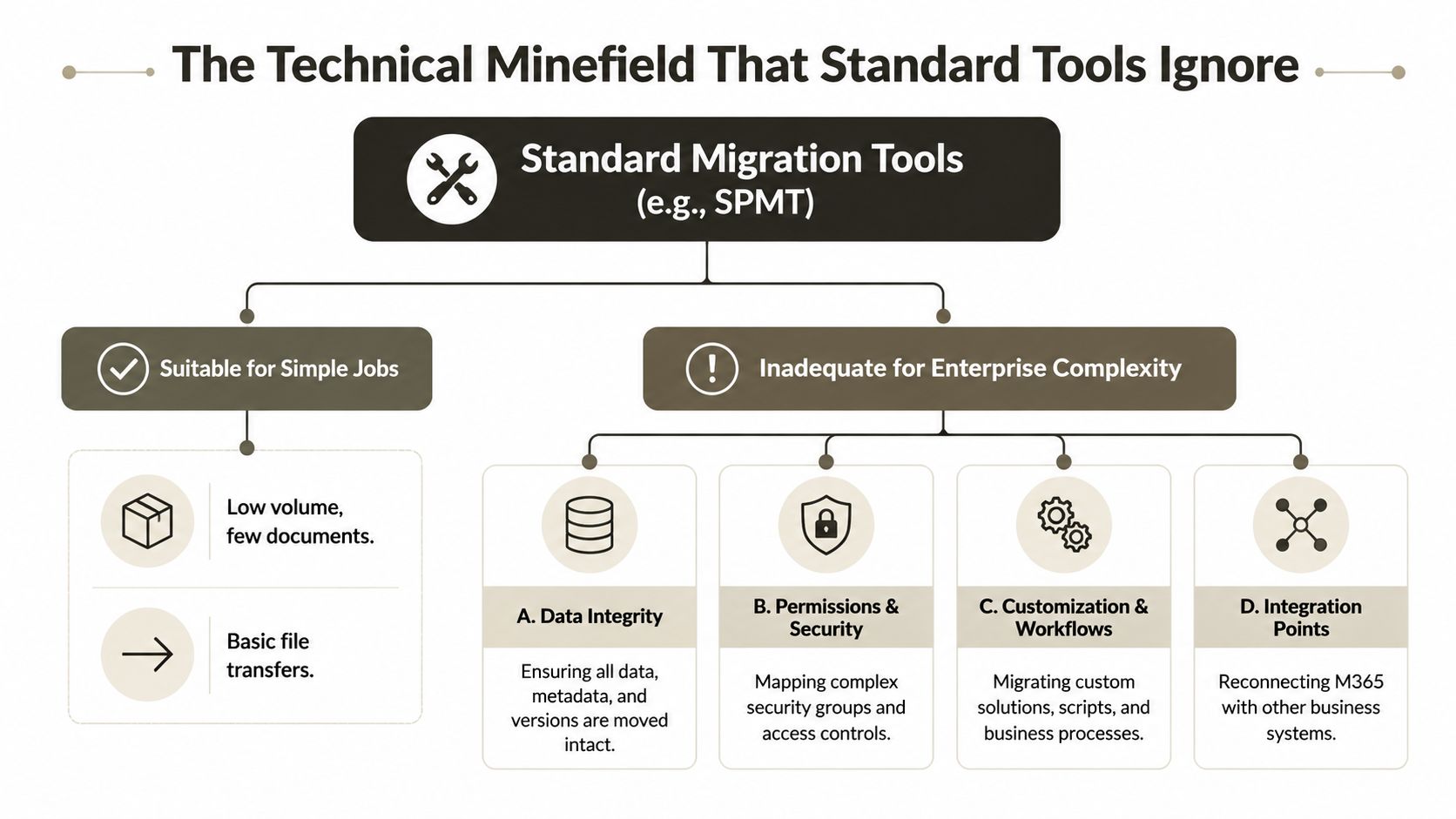
SPMT has a place. ShareGate has a place. Both are useful. Both also break in predictable ways when the estate gets large, messy, regulated, or customised. If your team pretends otherwise, they're gambling with production data.
The 5,000-item limit is not a suggestion
In SharePoint Online, the 5,000-item List View Threshold is a hard SQL throttling limit. Any migration query trying to process more than 5,000 items in a single view will fail, and Microsoft explicitly states it won't help resolve problems caused by exceeding that limit (ShareGate on the SharePoint list threshold). Microsoft Learn guidance also confirms this behaviour in practice. Your team cannot wish this away with admin rights, optimism, or a weekend outage window.
That matters because enterprise migrations don't fail on clean boundaries. A library might look manageable at the top level while specific views, filters, or substructures trigger threshold failures underneath.
Ollo Verdict: Use SPMT for small, simple, low-risk jobs. Once your estate contains large lists, heavy metadata use, or dependency-rich sites, you need custom scripting and controlled batching.
API throttling wrecks your timeline quietly
The documentation says you can estimate a migration window. In reality, API throttling rewrites your weekend without asking permission. Throughput drops. Retry logic piles up. Your validation team starts waiting on jobs that looked safe in pre-cutover planning.
This is why generic runbooks fail. They assume time behaves linearly. It doesn't when the platform starts protecting itself.
A sensible architect plans for:
- batch control
- staged execution
- pause and retry logic
- validation checkpoints before downstream waves start
Permissions drift, broken inheritance, and GUID conflicts
Data integrity isn't just “file arrived in destination”. You also need structure, lineage, and access to survive the move.
We often see clients fail when they discover too late that:
- Broken inheritance left unique permissions scattered across libraries and folders.
- GUID conflicts surfaced during tenant consolidation and confused downstream references.
- Long path structures from old file servers caused selective failures that standard tool logs buried in noise.
- Version and metadata assumptions didn't hold under enterprise load.
Here's the practical comparison:
| Problem | Basic tool behaviour | What a specialist approach changes |
|---|---|---|
| Threshold-heavy lists | Fails or stalls on large views | Batches, filters, restructures, validates |
| Complex permissions | Maps inconsistently at scale | Audits inheritance and remaps deliberately |
| Tenant consolidation | Risks identity and GUID issues | Plans object mapping before cutover |
| Long file paths | Drops or skips edge cases | Pre-cleans and scripts around constraints |
Standard migration tools move content. Enterprise migration work has to preserve business function.
Constructive cynicism about the tooling
SPMT is free, accessible, and fine for straightforward migrations. ShareGate is stronger, especially for structured SharePoint work. But neither tool absolves your team of architecture.
The documentation says tools support migration. In reality, tools expose the quality of your preparation.
If your project includes regulated data, complex site hierarchies, tenant-to-tenant consolidation, or zero-trust redesign work, you need more than a wizard and a dashboard. You need a technical plan that accepts Microsoft 365's hard limits, then routes around them with scripting, sequencing, and evidence-led validation. If your team is still considering the default path, read this analysis of SPMT and where it breaks in the real world.
Ollo Verdict: Use ShareGate when you need stronger control over SharePoint structure. Use custom PowerShell PnP scripting when thresholds, identity complexity, or edge-case remediation make dashboards too blunt. Use SPMT for underpowered jobs only.
Building and War-Gaming Your Migration Runbook
A runbook is not a checklist. It's a battle plan written for people who will be tired, under pressure, and one bad decision away from extending the outage.
That distinction matters because only 40% of business continuity plans survive testing without major shortfalls, 65% of failures come from unclear communication templates and undefined employee roles, success rates rise to 85% when organisations use structured tabletop exercises followed by functional crisis simulations, and 55% of mid-size firms still fail to track key metrics (Regions on testing business continuity strategy).
What belongs in the runbook
Your migration runbook should answer the ugly questions before cutover starts.
- Who can stop the migration: Name the person with authority to call no-go. Not a committee. A person.
- What triggers rollback: Define the exact validation failures that force reversal. Permissions mismatch, failed critical list access, broken line-of-business workflow, incomplete identity mapping.
- How the business gets updated: Pre-write user, leadership, and regulator-facing communications where relevant.
- Which evidence must exist before wave progression: Don't advance because the timer says so. Advance because the target environment passed checks.
A shared operational board helps during rehearsal and cutover, provided it supports disciplined ownership. If your team needs a simple way to share Kanban boards with your team, use it to track runbook actions, blockers, and rollback tasks in real time.
Tabletop talk is not enough
A whiteboard exercise won't expose script timing, authentication edge cases, or validation bottlenecks. Your team needs functional rehearsal. Run the scripts. Simulate failure. Time the rollback. Check whether fallback role-holders can log in and execute their tasks.
Rehearsal isn't there to prove the plan works. It's there to show you where the plan lies.
The minimum test standard
If you want a practical benchmark, your test cycle should include:
- Tabletop review with named roles and pre-written incident messages.
- Functional simulation that runs the actual migration and validation steps in a controlled setting.
- Rollback drill with timing evidence, not assumptions.
- After-action review that updates the runbook immediately.
If your organisation still treats testing as a sign-off form, it's behind. This is exactly why disciplined types of testing matter in migration work. Without them, your runbook becomes theatre.
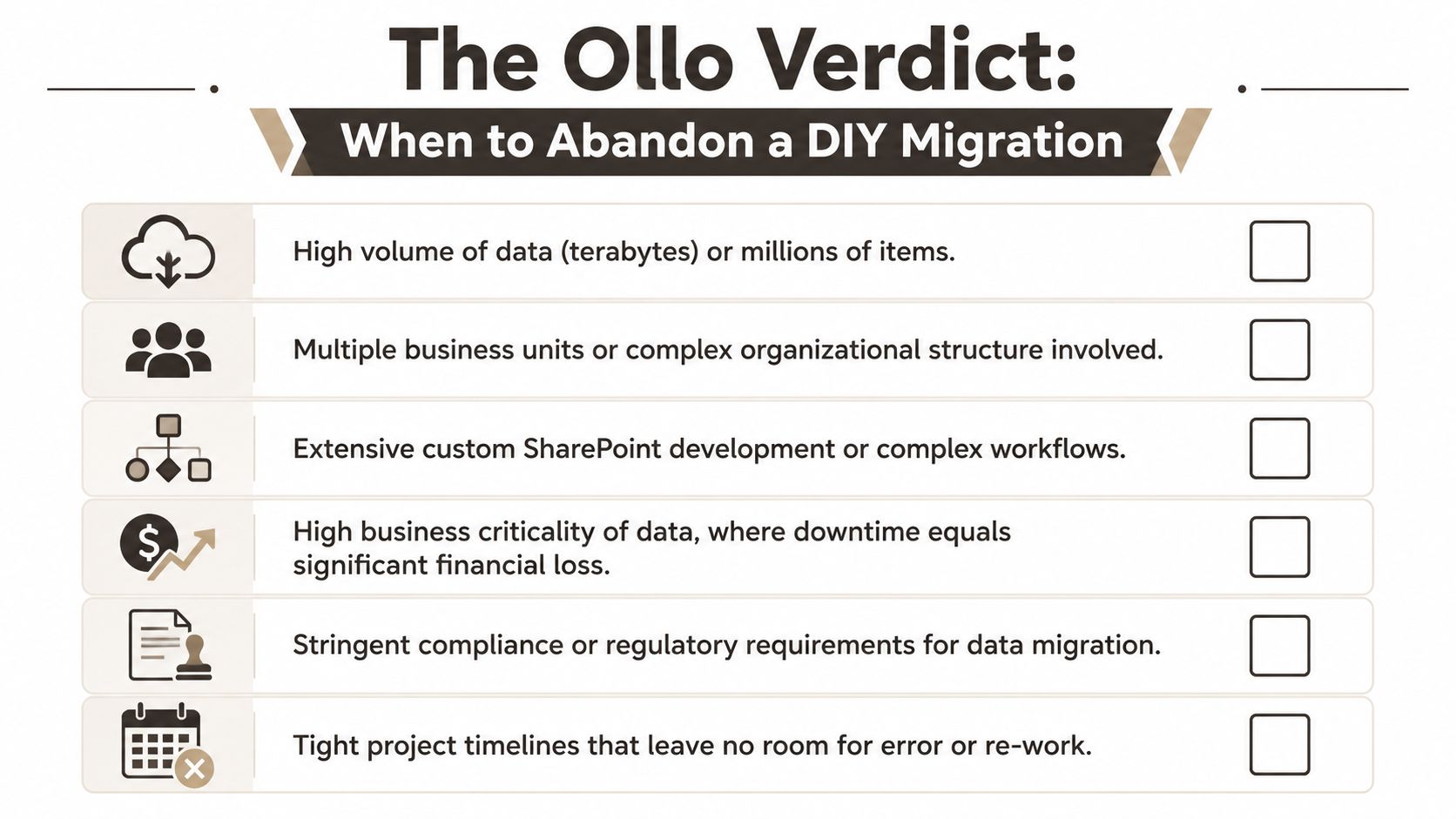
The Ollo Verdict When to Abandon a DIY Migration
You're right to be sceptical of consultancy noise. Most migration content talks as if complexity can be managed with enough enthusiasm and a good project board. It can't.
The risk decision is simpler than people make it. If your migration carries operational, compliance, or architectural complexity, DIY stops being prudent and starts becoming reckless.
The most neglected issue is human performance under pressure. 68% of firms fail to account for decision fatigue during multi-day crisis scenarios, and IT Directors report 40% longer recovery times when untrained fallback role-holders step in (DRJ on hybrid business continuity blind spots). That single point should change how you view migration weekends. Your plan isn't executed by ideal operators. It's executed by tired people in a degraded situation.
Use this decision test
Abandon the DIY path if any of these are true:
- Your estate is regulated. Finance, energy, and healthcare teams can't shrug off access drift, validation gaps, or evidence failures.
- You're consolidating tenants. Identity remapping, permissions translation, and object conflicts raise the stakes fast.
- Your SharePoint design is messy. Large lists, unique permissions, buried workflows, and old customisation create failure chains.
- Your timeline is tight. Compression removes room for remediation and tempts people to wave through bad outcomes.
- Your rollback path is weak. If the business can't reverse safely, the migration isn't ready.
- Your continuity planning is generic. If the BCP wasn't built around platform constraints, it won't protect you.
Final judgement
If your project is small, isolated, and structurally clean, internal teams can handle it.
If it isn't, stop pretending a DIY migration saves money. It usually just delays the invoice until after the incident. For organisations dealing with tenant moves, regulated data, SharePoint complexity, or zero-trust redesign, specialist intervention is the primary risk-reduction strategy. If that's your situation, review what SharePoint migration services should include before you let another weekend cutover proceed.
If your team is staring at a high-stakes Microsoft 365 migration and knows the default playbook won't survive contact with reality, talk to Ollo. We handle the complex work regulated firms can't afford to get wrong, especially rescue migrations, tenant consolidations, and SharePoint estates full of the exact failure points other teams often discover too late.

















