



You pay Microsoft for uptime. Fine. But when your legal team asks for a clean restore after a bad delete, a ransomware event, or a migration cutover that mangled permissions, uptime won't save you. Neither will blind faith in retention labels, recycle bins, or version history.
That's the gap most Microsoft 365 backup discussions avoid. They talk about features. They don't talk about failure modes. In regulated environments, that omission is dangerous. Your problem isn't “Can Microsoft keep the service running?” Your problem is “Can your team restore data and prove the tenant came back in a controlled state?”
Your Data Is Your Responsibility Not Microsofts
The most expensive assumption in Microsoft 365 is this one: “It's in the cloud, so it's already backed up.”
No. Microsoft protects the service. You protect the data, access, recovery process, and evidence that restoration happened properly. Those are different jobs.
What Microsoft owns and what your team owns
Microsoft runs the platform. That means datacentres, service availability, and the plumbing underneath Exchange Online, SharePoint Online, OneDrive, and Teams.
Your team owns the ugly part. User actions. Admin mistakes. Malicious deletes. Broken permission models. Botched migration mapping. Ransomware fallout. Governance drift. Recovery testing.
That distinction sounds obvious until a project fails. Then everyone discovers they bought a cloud service, not an operational recovery strategy.
If your stakeholders still blur the line between retention and backup, give them a plain-language refresher on what are backups. It helps cut through the usual confusion between “data still exists somewhere” and “we can restore it safely.”
Practical rule: If your recovery plan depends on users remembering where something was deleted, or on admins rebuilding permissions by hand, you don't have backup. You have hope.
Shared responsibility gets nastier during migration
This gets worse in tenant consolidations and rescue migrations. During a migration, your team changes content, structure, metadata, security groups, site ownership, and often governance settings all at once. Microsoft won't step in and reconstruct the original state because your mapping logic was wrong or your tool flattened broken inheritance.
We often see clients fail when they treat backup as a storage problem instead of a control problem. The content may still exist. The controlled state may not.
That's why governance has to sit beside backup, not behind it. If you haven't audited the tenant properly, start with this Microsoft 365 governance audit checklist. Backup without governance just gives you more places to restore chaos from.
The real line in the sand
Ask your team one question: if an administrator wipes the wrong SharePoint site, or a migration script rewrites permissions across a business-critical library, can you restore both the data and the intended security state without improvising?
If the answer is “mostly”, “probably”, or “we'd use retention”, you already have a gap.
The Dangerous Gaps in Native M365 Protection
Native Microsoft 365 protection looks reassuring right up until you need it under pressure. Then the cracks show.
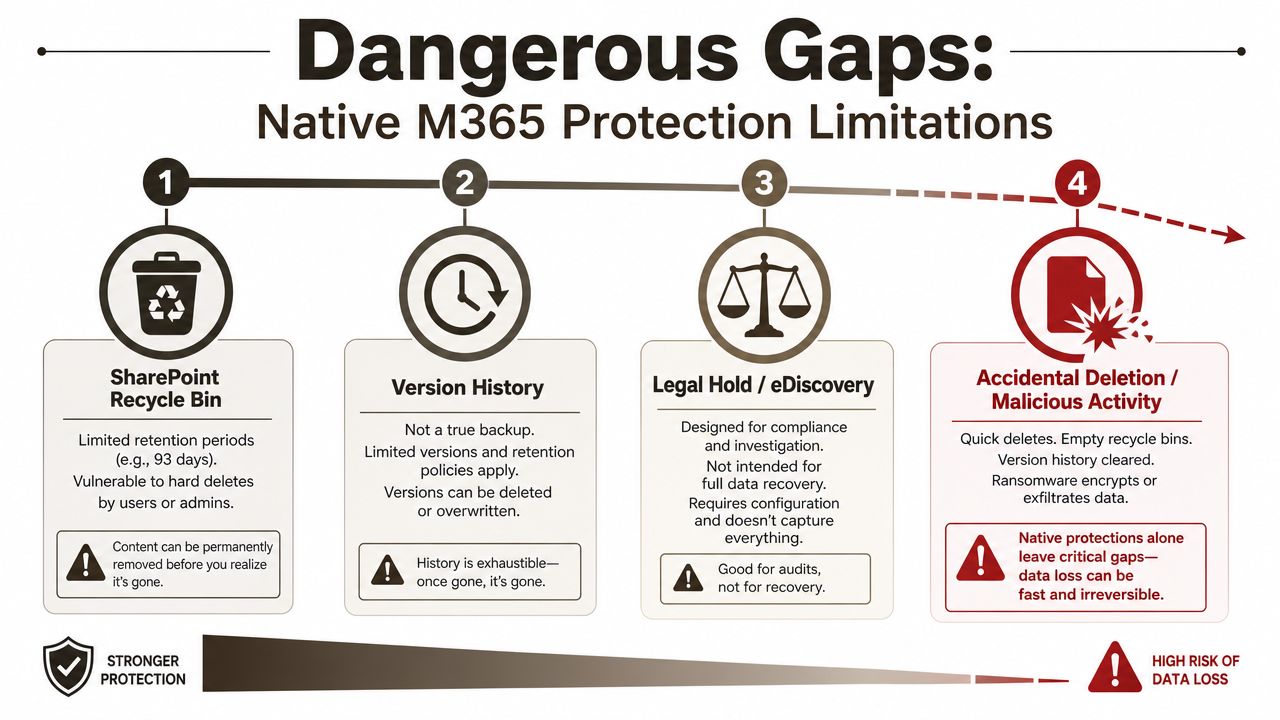
One independent summary of Microsoft's historical behaviour says Office 365 data is backed up every 12 hours and retained for only 14 days, while SharePoint and OneDrive restores can be available for up to 93 days. Email recovery defaults are shorter. That's the baseline many organisations in Ireland have been leaning on, and it's too thin for regulated recovery requirements (Wasabi summary of Microsoft 365 protection behaviour).
Recycle Bin is not a recovery strategy
The SharePoint and OneDrive recycle path gives people false confidence because it's visible and easy to understand. That doesn't make it robust.
A 93-day maximum window sounds decent until you discover the corruption started months earlier, or a destructive change sat unnoticed until an audit. At that point, native retention windows stop being “helpful” and start being irrelevant.
The documentation says deleted content may be recoverable for a period. In reality, regulated organisations need recovery control that survives delayed discovery, legal review, and operational mess.
Version history helps collaboration, not disaster recovery
Version history is useful. It lets users roll back document changes. It is not a tenant recovery mechanism. It does not protect you from site deletion, broad permission damage, structural mistakes, or a migration job that lands content in the wrong place.
It also doesn't answer the governance question. You may restore a document version and still leave the wrong users with access to it.
Retention and legal hold solve a different problem
Retention policies and holds exist for compliance, eDiscovery, and records obligations. They do not exist to give operations teams a fast, clean, business-ready restore path.
That difference matters when the business wants a mailbox, a site, or a controlled dataset back now, not after a legal-grade extraction exercise. We often see clients fail when they discover that preservation isn't the same as operational recovery.
For security teams, native protection also sits beside, not inside, the broader response stack. If you're reviewing attack paths in email and collaboration workloads, Microsoft Defender for Office 365 belongs in the conversation, but it still won't replace backup.
Native Microsoft 365 features can preserve pieces of data. They do not give you a complete, repeatable recovery system for a damaged tenant.
The hard truth for regulated teams
If your plan relies only on built-in retention, you're betting your incident will happen in exactly the way Microsoft's service limits expect. Real incidents don't behave that neatly.
Ransomware, malicious insiders, failed migrations, and admin error don't care about product boundaries. They cross SharePoint, Exchange, Teams, and identity controls in one hit. Native protection does not restore that estate as a coherent, controlled whole.
Where DIY Recovery Plans Actually Break
DIY looks sensible in a pilot. A few PowerShell scripts. A test restore. A migration utility everyone recognises. Then the live estate reminds you that enterprise Microsoft 365 is not a lab.
Microsoft Learn documentation confirms several of the limits that break these projects in practice. Throttling is real. SharePoint list and library behaviour has hard constraints. Path handling gets ugly. Permission inheritance becomes brittle. None of that is surprising. What's surprising is how many teams still build recovery plans as if those constraints won't apply during an actual incident.
War story one, throttling turns urgency into outage
A restore starts after a destructive change. The team expects a few hours of disruption. Then Microsoft throttles API-heavy activity because the tenant is pushing hard at exactly the moment everyone is desperate.
Now the restore window stretches. Business users keep working in half-restored areas. New changes collide with old content. Audit evidence gets messy. The incident commander starts asking for certainty nobody can provide.
That's not bad luck. That's what happens when the plan ignored service behaviour Microsoft already documents.
War story two, SharePoint structure breaks before content does
The next failure mode usually sits in SharePoint. Large libraries, broken inheritance, odd legacy folder design, and ugly metadata combinations create a restore path that falls apart under load.
Microsoft's own documentation confirms the 5,000-item list view threshold. Teams that only tested small libraries learn this too late. The files may still exist, but enumeration, validation, and permission reapplication become slow, error-prone, or both.
Then you hit the second problem. Security state. Restoring content into a site with broken or flattened inheritance can expose data to the wrong users or lock out the right ones.
Field note: Restoring files is often the easy part. Restoring the exact permission model without creating a compliance incident is where projects bleed.
War story three, identity and metadata collisions
Tenant-to-tenant recovery and rescue migration work introduces another class of pain. GUID conflicts, path length issues, naming collisions, and malformed historic structures create mismatches that generic tools don't handle gracefully.
SPMT has a place. ShareGate has a place. Neither changes the underlying reality that large, messy estates need custom logic, pre-flight analysis, and exception handling. If your tenant has legacy site sprawl, oversized libraries, or permission complexity, basic tooling won't save you.
Here's the blunt comparison.
| Capability | Native Retention (Recycle Bin) | Microsoft 365 Backup Add-on | Third-Party Backup |
|---|---|---|---|
| Primary purpose | Short-window recovery of deleted content | Fast Microsoft-native backup and restore for supported workloads | Broader backup and recovery control |
| Retention model | Limited by native service behaviour | Fixed by backup policy at one year | Varies by vendor and design |
| Configuration restore | Weak | Limited | Often stronger, but you must verify scope |
| Best use case | Minor, recent user mistakes | Recent operational recovery inside Microsoft 365 | Regulated recovery, longer control, estate-wide planning |
| Main risk | You discover the issue too late | You mistake it for full compliance backup | Poor design still fails if testing is weak |
If you want an example of how badly SharePoint recovery and migration plans can unravel, start with this SharePoint disaster recovery migration analysis.
The Ollo Verdict
Use native retention for small, recent mistakes. Use Microsoft 365 Backup for quicker recovery of supported content. For complex estates, regulated workloads, or tenant-to-tenant rescue scenarios, DIY is reckless. You need custom scripting, validation logic, and a team that already knows where the bodies are buried.
Is the New Microsoft 365 Backup Add-On Enough
Microsoft finally admitted the obvious. Native protection wasn't enough. So now there's a real Microsoft 365 Backup product.
On paper, it fixes part of the problem. Microsoft says the service is a standalone pay-as-you-go product with no extra licence requirement beyond the source SharePoint Online or Exchange Online licence, and as of 31 July 2024 the price is $0.15 per GB per month for backup storage (Microsoft 365 Backup pricing and product details).
That matters. It means Microsoft now sells backup as a separate control because the built-in story never covered the operational reality.
What Microsoft got right
Microsoft also states that backup copies stay inside the Microsoft 365 data trust boundary and inherit the tenant's geographic residency, while only limited metadata goes to Azure for billing. The service stores backups on append-only Azure blobs, making them immutable unless an admin explicitly deletes them during offboarding (Microsoft Learn backup overview).
That's good architecture. Immutability reduces overwrite risk. Geographic residency matters. Keeping backup inside the Microsoft 365 trust boundary simplifies some governance and legal conversations.
If your main concern is recovering supported content quickly after a recent destructive event, this add-on is a credible option.
Where it still falls short
Now for the part marketing doesn't stress hard enough. Microsoft 365 Backup retention is fixed at one year under the backup policy, according to Microsoft's own product information. That may be fine for operational recovery. It isn't enough for long-term, compliance-grade archiving in many regulated environments (Microsoft 365 Backup product page).
The bigger problem is conceptual. This service improves data recovery. It does not solve whole-tenant reconstruction. If your post-incident state includes policy drift, broken access controls, or missing configuration, restored content alone won't make the tenant safe or compliant.
The trap buyers fall into
We often see clients fail when they hear “immutable” and assume “complete”. Those are not the same thing.
Immutable backup storage helps against ransomware overwrite. It does not magically restore conditional access logic, SharePoint governance decisions, Teams configuration, or the original permission intent across a mixed estate. If your environment is simple, maybe that gap is tolerable. If you're in finance, healthcare, or energy, it usually isn't.
Microsoft 365 Backup is a useful layer. It is not the whole strategy.
The Ollo Verdict
Use the Microsoft 365 Backup add-on when you need fast recovery of recent Microsoft 365 data and you want backup copies to remain inside Microsoft's trust boundary. Don't mistake it for a full resilience design. If your recovery obligations extend beyond one year, or beyond content alone, it isn't enough.
Architecting a Bulletproof M365 Backup Strategy
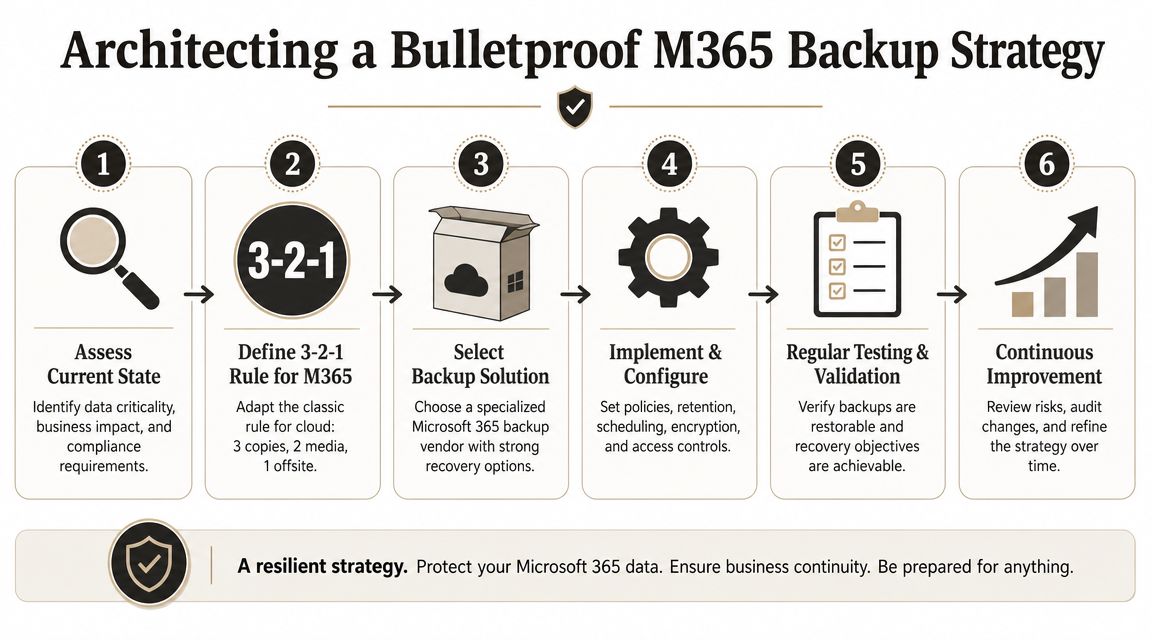
A serious Microsoft 365 backup strategy starts with a grim assumption. Your first restore attempt will happen on a bad day, under pressure, with incomplete information. Design for that reality, not for a vendor demo.
Start with copies, not promises
Use the 3-2-1 mindset in cloud terms. Keep your production copy. Keep a proper backup copy outside day-to-day production risk. Keep another protected copy that gives you resilience when the obvious platform path is compromised.
That doesn't mean buying random tools until the diagram looks impressive. It means deciding, in advance, which copy answers which failure mode.
- Production copy: Your live Microsoft 365 tenant. Useful for business. Useless as a safety net.
- Operational backup copy: Fast recovery for recent incidents, especially content loss and destructive changes.
- Protected fallback copy: An isolated or immutable copy that survives the nastier scenarios, including attacker interference and admin mistakes.
Configuration is where recovery usually dies
Industry analysis keeps circling the same blind spot. Configuration restore remains poorly covered. Microsoft 365 backup conversations focus on files, mailboxes, and OneDrive content, while tenant settings, roles, policies, and governance state remain the harder recovery problem. One analysis also noted that nearly half of organisations wrongly assume Microsoft backs up tenant configurations, while only 18% take extra steps to preserve configurations or restoration documentation (CoreView analysis on Microsoft 365 tenant backup gaps).
That's the real audit question. Not “Can we restore a file?” but “Can we prove the tenant came back in the same controlled state?”
Your strategy must include:
- Tenant configuration capture. Document and script critical settings, not just content selection.
- Permission model validation. Especially in SharePoint where inheritance breaks without notice.
- Identity dependency mapping. Entra ID, access rules, and group logic affect whether restored data is usable.
- Restore evidence. You need records of what was restored, how, and whether security state matched expectation.
If you're refining operational visibility around this, some of the ideas in these cloud monitoring insights for DevOps teams are useful because backup that isn't monitored becomes backup theatre.
Here's a useful walkthrough before testing your own controls:
Test the ugly scenarios
Many organizations test happy-path recovery. Restore a file. Restore a mailbox. Tick the box. That proves almost nothing.
Test the failures that hurt:
- Bad migration rollback: Can you restore content and original permissions after a failed cutover?
- Malicious delete: Can you recover without overwriting evidence you still need?
- Governance drift: Can you verify sites, teams, and policies returned in a controlled state?
- Cross-workload recovery: Can SharePoint, Exchange, Teams, and identity controls be reconciled after restoration?
For organisations planning major change, this SharePoint backup before migration guide is worth reviewing before you touch production data.
The Ollo Verdict
A bulletproof Microsoft 365 backup strategy is never just a backup purchase. It's content protection, configuration capture, restore evidence, and repeated testing. Skip any one of those and your “recovery” can still fail the business.
The Ollo Approach to Mitigating Backup and Migration Risk
Most providers sell tools and optimism. That's not enough for high-stakes Microsoft 365 recovery and migration work.
The safer approach starts before any data moves. You inspect the estate for the things that usually break projects. Large libraries that will trigger throttling. SharePoint structures sitting near the 5,000-item threshold documented by Microsoft. Broken inheritance. Long path issues. Naming collisions. Legacy permissions nobody wants to admit exist. If you don't find those up front, they find you later.
Why specialist handling reduces risk
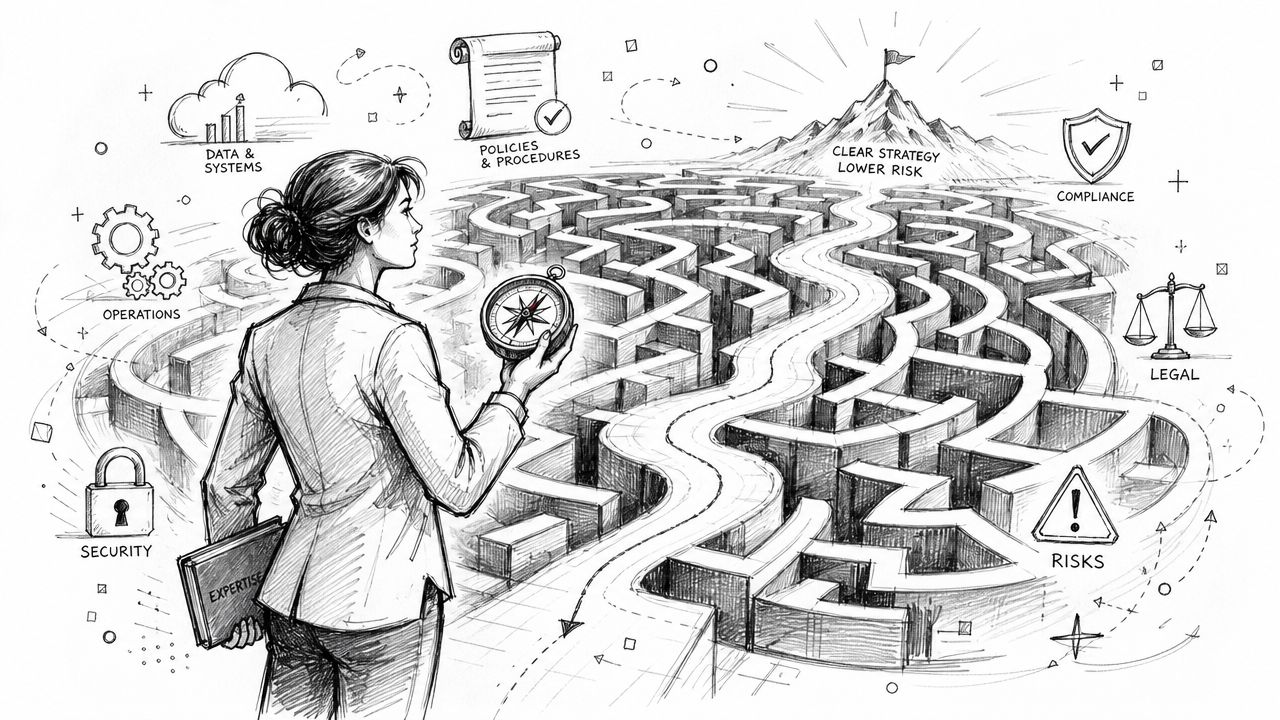
Enterprise recovery fails in the gaps between products. ShareGate can move a lot. PowerShell can fix a lot. Microsoft-native tooling can help in the right scope. None of them removes the need for architecture, scripting discipline, rollback design, and permission reconstruction.
That's why serious teams build around failure handling, not feature lists.
- Pre-flight analysis: Surface structural problems before cutover.
- Custom scripting: Use PnP PowerShell and validation logic where packaged tools stop short.
- Permission reconstruction: Rebuild access intentionally, not by guesswork.
- Controlled rollback: Preserve a path back when migration logic or source data quality turns toxic.
If you want an external perspective on why complex moves need method, not bravado, this piece on flawless enterprise data transfer is a useful read.
The practical difference
The documentation says one thing, but reality is harsher. You can restore data and still fail the outcome. You can complete a migration and still break compliance. You can preserve content and still lose operational control.
That's why high-risk tenants need specialist migration engineering, not generic administration. If your estate spans SharePoint, Exchange, Teams, and Entra ID with compliance pressure on top, the job is no longer “move content”. The job is “avoid an incident while changing everything that matters”.
For organisations planning a major tenant move, consolidation, or rescue project, Microsoft 365 migration services are where that risk reduction has to become real.
If your team can't prove how it would restore Microsoft 365 data, permissions, and tenant control state after a bad delete, ransomware event, or failed migration, you don't have a recovery plan. You have exposure. Ollo helps regulated organisations reduce that risk with specialist Microsoft 365 migration, backup, and recovery architecture built for the failure modes most providers ignore.

















