



The worst help desk failure I've seen in a Microsoft 365 migration didn't start with a broken tool. It started with a team that believed the documentation and trusted a manual queue to hold the line. By the time permission errors, broken inheritance, and identity complaints hit the desk in waves, the support team had stopped triaging and started panicking, and compliance had already become part of the incident.
That's the part most leaders miss. The migration didn't fail because users asked too many questions. It failed because the help desk became the bottleneck, then the evidence trail started to rot. If your desk can't absorb the defect volume, your project isn't “a bit behind”, it's drifting into audit risk, cutover delay, and business disruption. That's why the key question isn't whether you can migrate. It's whether your support model can survive the blast radius. If you want the cleaner version of that story, read the companion case study on moving from manual to automated cloud migration.
Understanding IT Help Desk Services
A serious IT help desk service is not a phone line with a ticket number attached. It's the control layer that decides what gets handled, what gets escalated, what gets documented, and what becomes a governance problem. In regulated organisations, that matters far more than the polite language in vendor brochures. The help desk is where access issues, service failures, and incident narratives either get shaped into an audit-ready record or get lost in noise.
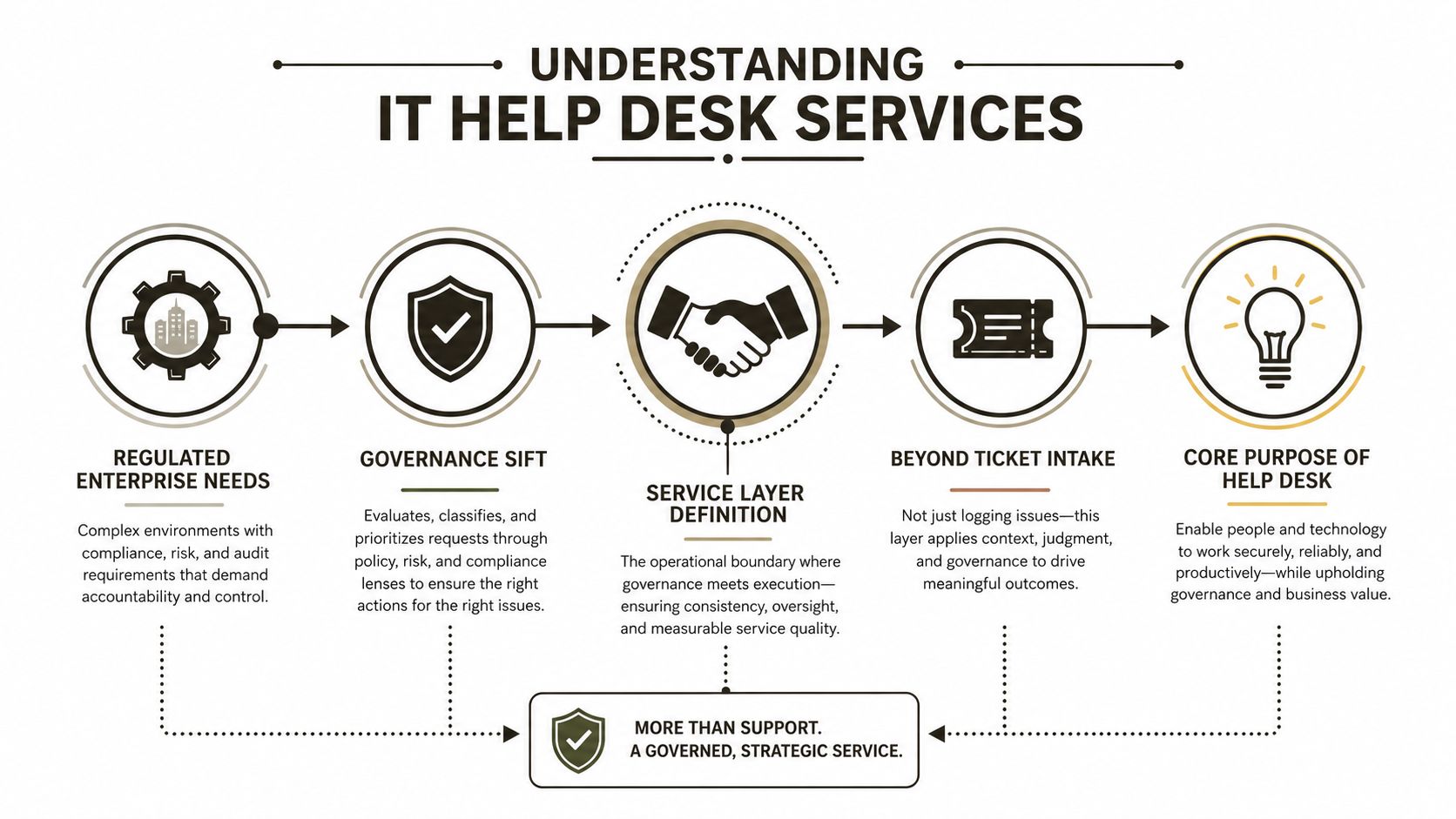
Why regulated teams treat the desk as a control function
Microsoft's own support flow for Microsoft 365 in Ireland is ticket-driven and admin-gated. An admin has to use the Help & support path in the admin centre, and if search doesn't solve the issue, they escalate through Contact Support with contact details and an issue description. Microsoft also states that technical support is available 24/7 in English on the Irish support page, which tells you exactly how operationally real this layer is for after-hours incidents. See the official Microsoft 365 support path for Irish businesses in Microsoft's support options for Microsoft 365.
That workflow proves the point. A help desk in finance, healthcare, or energy isn't just answering users, it's handling the first governed step in a support chain that needs admin details, license context, and an incident narrative before a vendor will even talk seriously. Microsoft's guidance for admins also starts with the Service health dashboard before case creation, which shows the desk has to be ready to interpret current and past incidents instead of guessing in the dark.
Practical rule: if your team can't explain the issue clearly enough to open a vendor case fast, your help desk is under-designed.
The market data backs up the operational shift. Business Research Insights estimates the IT Service Desk Market at USD 3.69 billion in 2025, rising to USD 4.32 billion in 2026 and reaching USD 18.04 billion by 2035, implying a 17.2% CAGR over the forecast period (source). That doesn't mean every desk needs more bodies. It means the service layer has become a dependency, and procurement teams should stop treating it like a back-office commodity.
If you still think of the desk as “just support”, you'll underfund escalation, underwrite risk, and overestimate what a small team can absorb during change. That mistake shows up first in audit gaps, then in stalled projects, then in executive escalations.
Service Models and Technical Components
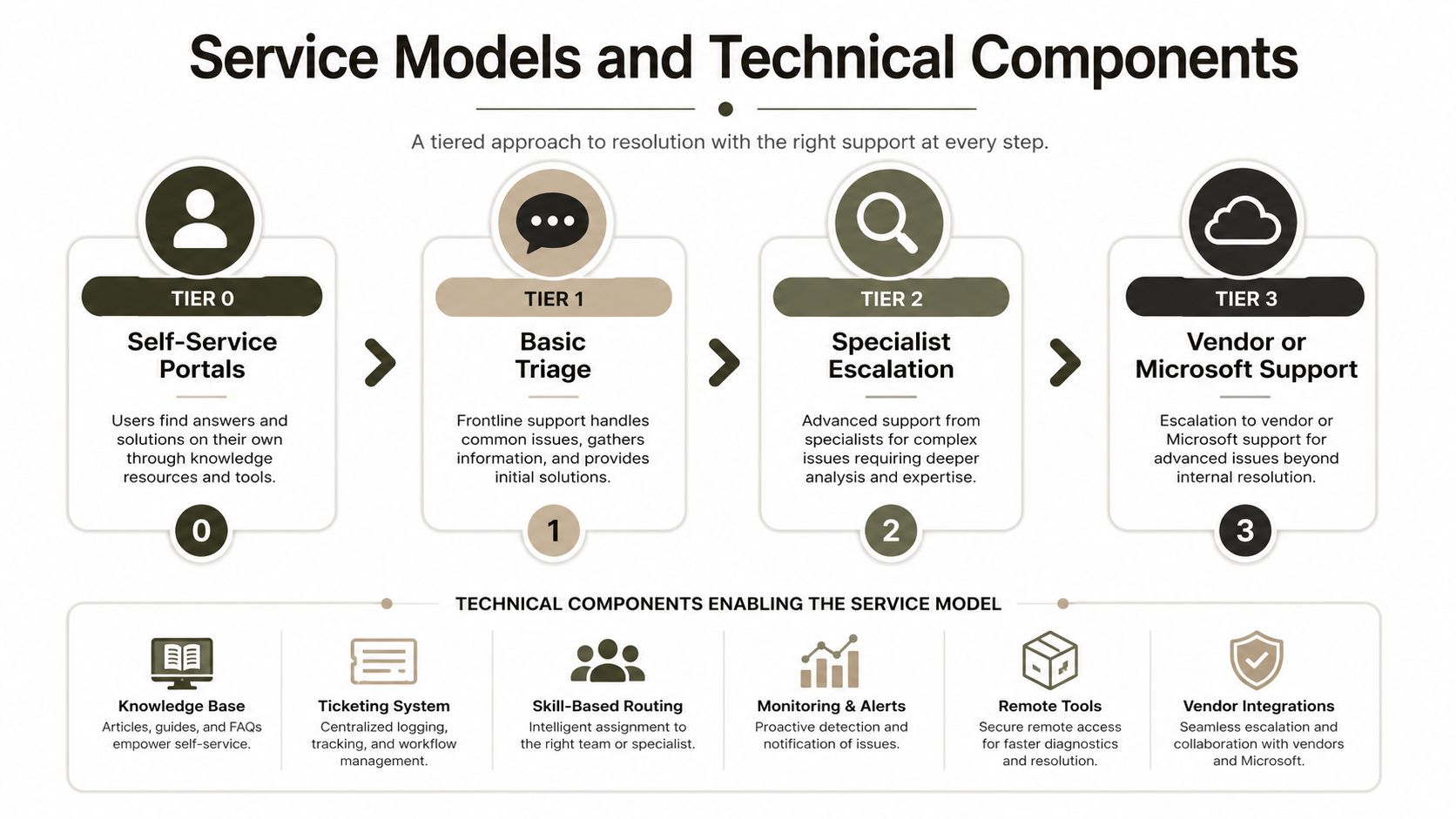
The useful way to think about help desk design is by service model, not by headcount. Tier 0 should deflect routine requests. Tier 1 should triage. Tier 2 should diagnose. Tier 3 should push vendor or Microsoft cases with complete evidence. Anything else turns into a queue with no memory.
What each tier must actually do
Tier 0 needs a self-service portal that solves the obvious stuff before a human touches it. That means password resets, status checks, and known-issue guidance. Tier 1 should not be doing archaeology on every ticket. It should capture enough context to sort signal from noise, then route fast.
Tier 2 needs people who can read logs, understand change timing, and recognise whether a user issue is really a migration defect, an access design flaw, or a Microsoft service issue. Tier 3 is where the desk stops pretending it owns the fix and starts driving a vendor case with the right metadata. Microsoft explicitly tells admins to start with the Service health dashboard and then use Contact Support with detailed issue descriptions and license details, which is exactly why bad intake slows everything down. Read Microsoft's support process in Get help and support in Microsoft 365 admin.
A decent ticketing platform matters, but ticketing alone won't save you. It has to validate users against your identity system, preserve the full incident history, and route based on category, priority, and ownership. If your escalation matrix isn't enforced inside the tool, people will improvise. That's how SLA breaches start.
Knowledge management is where desks usually fail
Runbooks and wikis stop repeated pain. They also expose where the desk is weak. If the documentation only helps after the first three tickets, it isn't operational knowledge, it's cleanup work.
The fastest help desks aren't the ones with the most agents. They're the ones with the cleanest decision paths.
That's also why the support model must stay tied to governance. The desk has to know who can approve access, who can validate scope, and who owns the incident narrative. When a support queue is built properly, it becomes the front end of controlled change. When it isn't, it becomes a churn machine.
For teams formalising the wider Microsoft 365 operating model, the service desk has to fit into the broader platform strategy, not sit beside it. That's the gap the Microsoft 365 and Azure services overview should sit next to in any internal planning pack.
Compliance and Migration Risks Validated by Microsoft
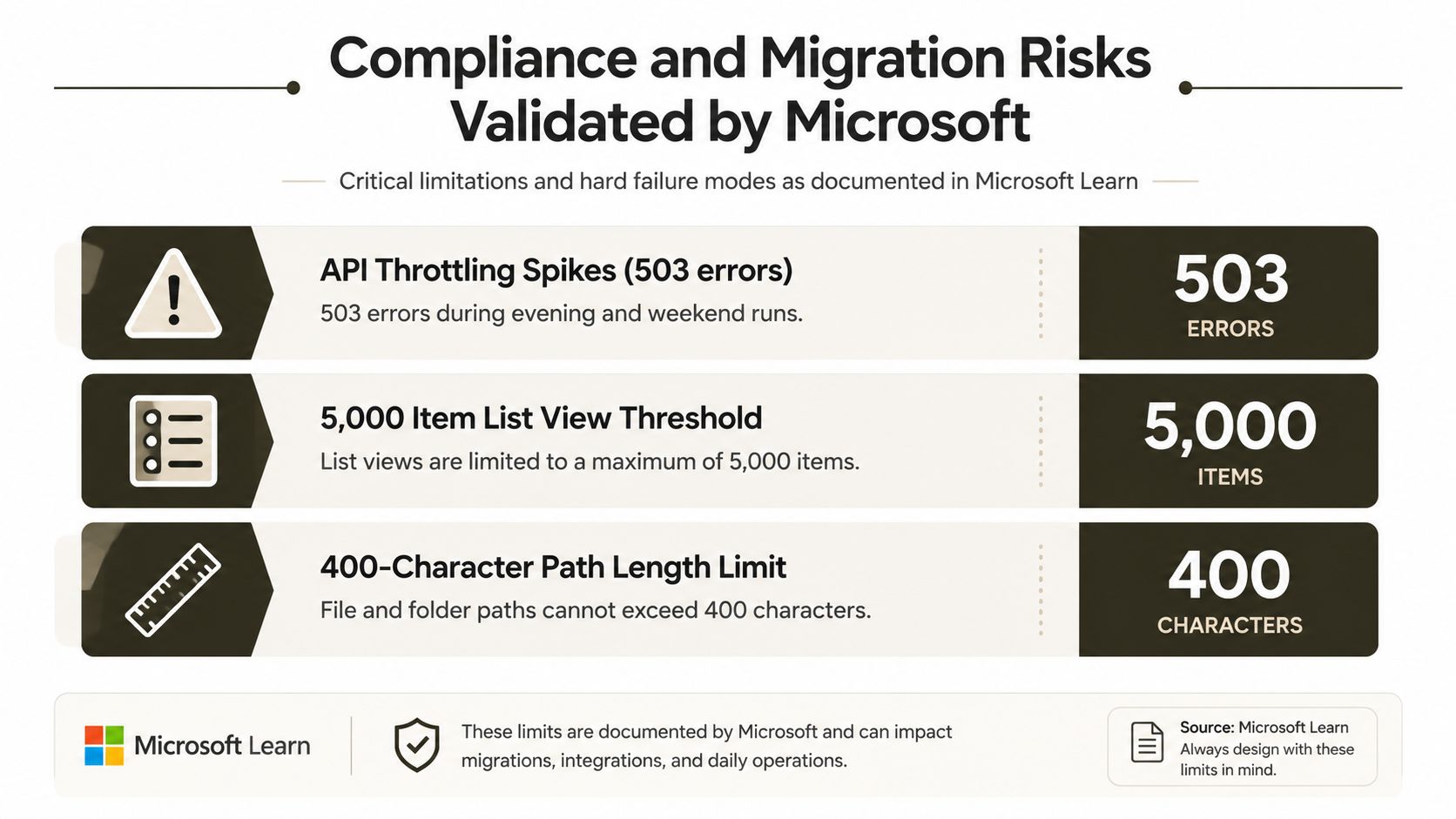
Microsoft Learn is unusually blunt about migration failure modes, and you should be too. If you ignore those limits, the help desk doesn't just get busy, it gets buried under defects that look like user problems but behave like governance failures. The main risks are throttling, list constraints, and path length constraints, and Microsoft documents all of them in plain language.
Throttling is not a nuisance, it's a cutover killer
Microsoft's SharePoint migration guidance says migrations run in the background and should use app-based authentication. If you run them in user mode, Microsoft warns that it can trigger larger-than-normal throttling, and it explicitly documents 503 throttling during evening and weekend hours as a support case condition. That means your “quiet window” can become the exact time the platform pushes back hardest. See the official guidance in SharePoint Online and OneDrive migration speed.
If your plan assumes a weekend cutover will just work, you're already gambling. The documentation says the workflow is simple, but reality is that authentication mode and schedule determine whether the migration moves or stalls. That's why support desks need migration-aware runbooks, not generic ticket templates.
The list and path limits are not abstract
A Microsoft Learn-based Ollo guide calls out the 5,000-item list view threshold and the 400-character path length limit explicitly warned about in Microsoft documentation. Missing those blockers during cutover forces rescue mode, and rescue mode burns time that your help desk will never recover. Read the practical guidance in Ollo's SharePoint migration note on legal environments.
Microsoft also states that SharePoint and file-share migration supports files up to 250 GB in the SharePoint Server-to-Microsoft 365 and file-share-to-Microsoft 365 scenarios, but that limit doesn't erase source-system performance issues or throttling pressure. A large file can still fail operationally if the rest of the migration design is sloppy. See Microsoft's file size limitations.
Why compliance teams should care before cutover
The overlooked problem is support volume. During tenant-to-tenant work, every broken permission, failed sync, and access complaint becomes a ticket. Most generic help desk content ignores that surge, but unmanaged defect spikes quickly overwhelm manual triage processes, as noted in the help desk analysis from InvGate's service request management guide.
If you want a useful adjacent resource on governance discipline, the AI governance compliance guide is worth keeping beside your migration checklist. It won't fix your SharePoint topology, but it will sharpen the way your organisation thinks about control, traceability, and exception handling.
The operational conclusion is simple. If the help desk can't classify migration defects quickly, it won't just miss SLAs. It will slow cutover, weaken auditability, and create the very backlog that makes compliance teams panic.
How DIY Desks Fail Migrations
A DIY desk usually fails in the same predictable way. The team assumes the migration tool will carry the load, the queue will absorb the noise, and the support staff can improvise the rest. Then the defects arrive in volume, and human-only triage becomes a bottleneck instead of a control point.
The admin versus consultant debate in Microsoft 365 work matters here because in-house teams often own the tool, the permissions, and the fallout, but none of the migration edge cases.
Where the assumption breaks
SPMT and ShareGate both have their place, but neither changes the fact that migration defects can flood the desk faster than people can classify them. When a migration throws permission anomalies, GUID conflicts, or access drift, a generic queue has no context and no playbook. That's when the desk starts reassigning tickets instead of resolving them.
If your support team doesn't know the difference between a content issue and an identity issue, your migration plan is already leaking time.
The nasty part is volume. Once users discover they can't open a library, see the wrong inheritance, or locate a broken folder path, they don't file one ticket. They file a pattern. If the runbook doesn't explain who owns that pattern, the desk becomes the dumping ground.
DIY teams also underestimate the after-hours effect. Migration errors don't wait for office hours, and Microsoft's support flow doesn't either. That's a problem when the queue has no overnight escalation discipline and no clean handoff to vendor support.
The Ollo verdict
Use SPMT for trivial sub-50 GB moves. For anything that touches regulated content, identity redesign, or large-scale SharePoint rework, you need specialist scripting, controlled escalation, and people who already know where the migration breaks. Human-only triage won't save you when the defect curve rises.
Evaluation Checklist and Decision Criteria
Your desk either has the capacity to absorb migration defect volume, or it doesn't. Don't hide behind confidence. Score the operating model against what matters when users start calling about access failures, broken links, and failed cutovers.
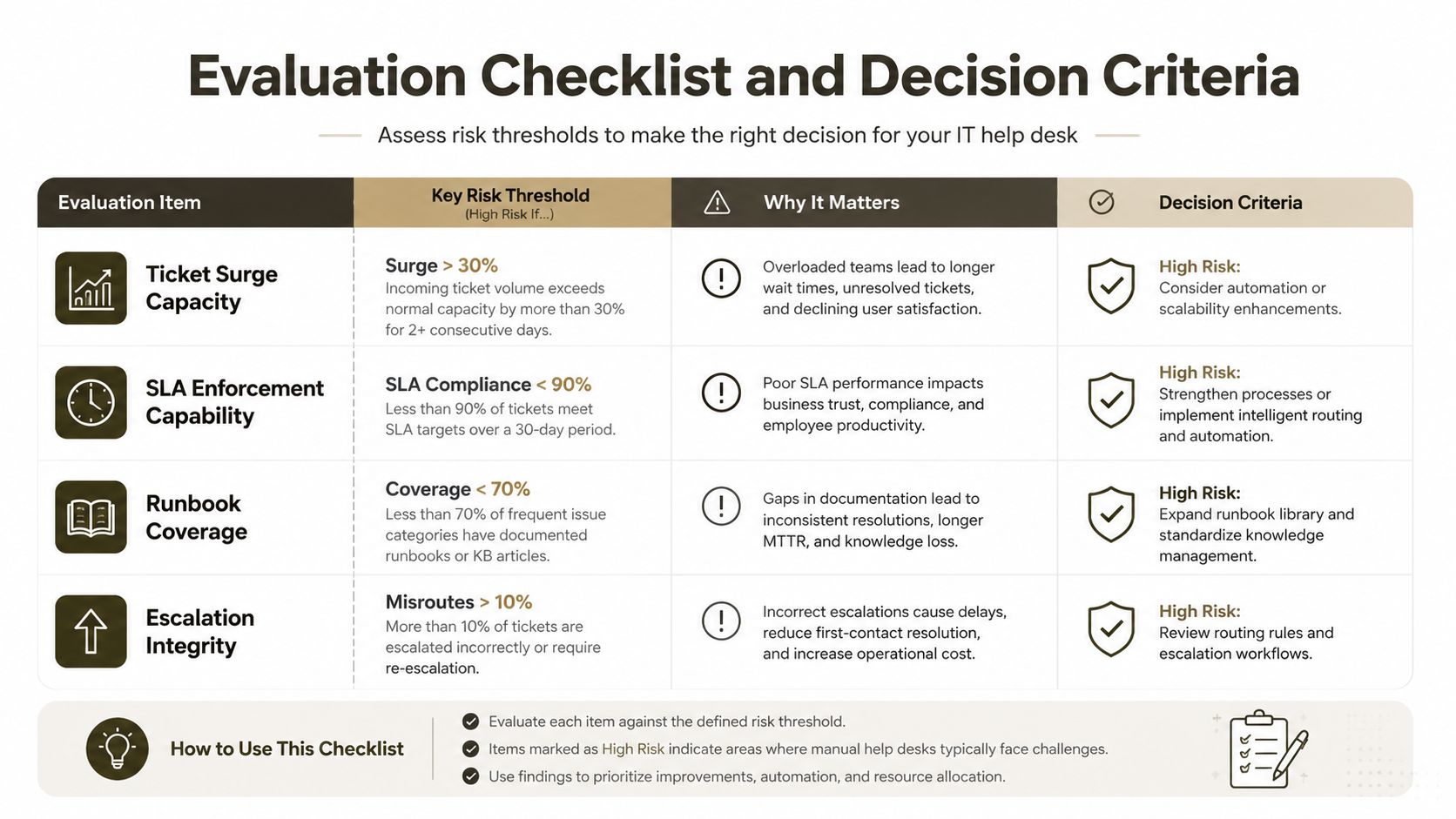
The four checks that decide whether DIY survives
- Ticket surge capacity. Can your desk keep first response times tight when migration defects arrive together, or does the queue stall?
- SLA enforcement capability. Can the team route and escalate within policy, or do tickets sit in limbo until someone notices?
- Runbook coverage. Does the desk have documented responses for identity, permission, and content failures, or does every case start from scratch?
- Escalation integrity. Can the team move a case to Microsoft or a vendor with license details, incident context, and a clean narrative, or does the case get bounced back for missing data?
Fixify's 2026 benchmark report found tickets with AI automation were resolved in a median of 4.4 hours, while human-only agents took 71 hours, a 66.6-hour gap that strains compliance SLAs. That gap isn't theoretical, it's the difference between a controlled backlog and a desk that collapses under pressure. See the benchmark in Fixify's 2026 IT help desk report.
A useful internal benchmark appears in the same report. First response times clustered at 4 to 6 minutes across ticket categories, which gives mature desks a realistic operational reference point. If your current process can't move that quickly during change, it won't hold up when migration incidents spike.
For verification and pre-cutover discipline, it helps to treat support readiness like a test plan. The same seriousness you'd apply to validation in types of testing for delivery control should apply to your support desk, because a weak desk turns every missed check into user friction.
Decision rule: if the desk can't prove response discipline before the migration starts, don't let it learn under live fire.
When you run this checklist thoroughly, the answer usually becomes obvious. DIY looks cheap until the defect queue starts eating your change window, your audit trail, and your management time.
Conclusion The Ollo Verdict and Risk Reduction Strategy
Your team cannot absorb migration defect volume by instinct alone. The support model has to be designed for governed escalation, migration-specific runbooks, and the ugly reality that Microsoft 365 incidents don't politely arrive one at a time. If your desk isn't ready for throttling, list thresholds, path limits, and identity fallout, then it isn't ready for a regulated migration.
The Ollo verdict is simple. Use SPMT only for trivial, sub-50 GB moves. For anything beyond that, you need specialist scripting, controlled escalation, and support architecture that treats the help desk as a compliance function, not a call centre. Miss that step and you don't just delay the migration, you invite audit breaches, legal exposure, and extended downtime.
Your data deserves a support model that can survive the move, not one that hopes the queue behaves itself. If you want the work done without rescue mode, bring in the team that already knows where Microsoft 365 migrations break and how to stop the desk from becoming the failure point.
A CTA for Ollo.

















