



Most companies treat a website redesign like a branding exercise. That's the first mistake.
I've spent years cleaning up redesigns that looked fine in Figma and failed the moment real content, permissions, integrations, and compliance controls had to move. The ugly truth is simple. If you want to redesign a company website in a Microsoft 365 environment, you're not running a creative project. You're running a migration with legal, operational, and security consequences.
That distinction matters because the budget conversation usually starts in the wrong place. In Ireland, the average cost for a business website redesign falls between €6,000 and €18,000 according to Weblogic's Ireland website redesign pricing guide. That sounds manageable until your team hits broken inheritance, throttled APIs, fragile integrations, and content structures nobody documented properly. Then the design budget becomes irrelevant. The recovery bill takes over.
Why Your Next Website Redesign Is a Migration Project in Disguise
Call it a redesign if you want. Your outage log will still read it as a migration failure.
I've been pulled into enough broken launches to know the pattern. Marketing signs off on page layouts. The agency promises a clean rebuild. Then go-live exposes the part nobody treated seriously enough. Content has to be moved, identities have to map correctly, old URLs have to resolve, integrations have to survive, and regulated records have to stay governed throughout the change. That is infrastructure work with audit exposure, not a cosmetic refresh.
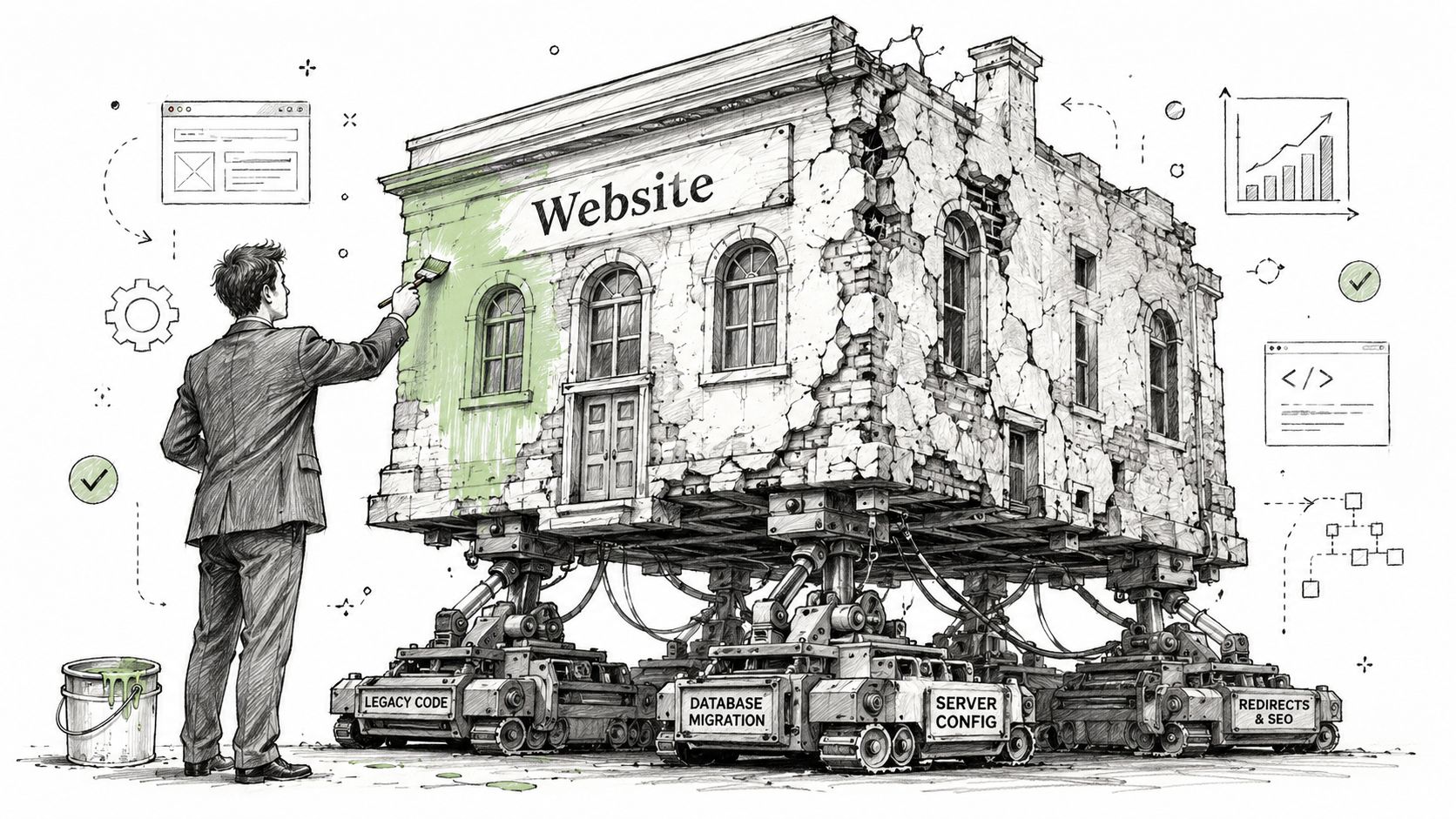
The dangerous part is how often this gets priced and managed like a design job. The visible website is only one layer. Under it sit SharePoint libraries, forms, metadata, retention rules, search indexes, Entra ID groups, CDN behaviour, DNS cutover, SSL certificates, API limits, and vendor access paths. In regulated sectors, a redesign can trigger the same control failures I see in badly planned tenant moves. Files surface to the wrong audience. Retention labels stop applying. Search exposes stale copies. A migration script hits throttling, retries badly, and leaves content half-moved with no clean rollback.
That is why the label matters. “Redesign” encourages shallow planning. “Migration” forces the right questions early.
- What is moving? Pages are the easy part. The full scope includes documents, media, metadata, redirects, forms, workflow history, search configuration, and embedded third-party services.
- What security model survives the move? If your team cannot explain permission inheritance, external sharing rules, privileged access, and approval rights, you are already carrying risk into the project.
- What breaks unannounced? URL changes, identity mismatches, and bad metadata mapping do not always cause obvious failures. They corrupt audit trails, damage findability, and create compliance gaps that sit unnoticed until an investigation.
Treat the project with the same discipline you would apply to a tenant move or platform consolidation. A broader guide to cloud migration for businesses is often more relevant than a creative brief, because the planning logic is the same. The same is true for infrastructure work such as on-premise to cloud migration, where the interface gets attention and the underlying dependencies are the root cause of failures.
The tangible cost of failure
Website redesigns rarely collapse because the homepage looks wrong. They collapse because operational controls were never designed for the cutover.
I've seen editors lose publishing access on day one because group mappings were rebuilt manually. I've seen legal teams discover that archived policy documents no longer carried the right retention settings after a content move. I've seen public forms continue to post into deprecated workflows while the new site looked polished enough to satisfy the launch meeting. None of that is a branding problem.
If your redesign changes content structure, hosting, authentication, integrations, or governance, run it as a controlled migration in a live production estate. Anything less is how companies end up with throttled APIs, broken search, exposed records, and incident reports dressed up as digital transformation.
Phase 1 The Discovery and Threat Modelling You Cannot Skip
The discovery phase is where serious teams separate themselves from hopeful ones.
If your marketing agency starts with mood boards before your IT team has mapped systems, identities, and data exposure, the project has already drifted off course. In Ireland, 68% of enterprise website failures stem from post-launch governance breakdowns due to unmanaged shadow administrators, as cited in Webstacks' enterprise redesign strategy discussion. That number should bother you if your environment includes ad hoc owners, inherited admin rights, or undocumented publishing workflows.

Start with forensic inventory, not design concepts
I've seen clients waste weeks debating user journeys while nobody could answer basic technical questions about source systems. That's amateur behaviour.
Your team needs a forensic inventory that covers:
- Current platforms and services. List every CMS, SharePoint site, document library, API dependency, authentication method, and storage location.
- Data categories. Identify content with regulatory impact, personal data, contractual records, policy documents, and anything tied to retention obligations.
- Approval and publishing logic. Document who approves what, where workflows run, and which exceptions exist outside official process.
- Identity and access paths. Find shadow administrators, service accounts, group sprawl, and any role assignment that bypasses normal governance.
If that inventory feels excessive, good. Production estates are excessive. Pretending otherwise is how teams create incidents.
Threat model the target state before you build it
A redesign changes trust boundaries. New CDNs, new forms, new admin interfaces, new integrations, and new editorial roles all create fresh attack paths.
Ask these questions early:
| Risk area | What your team must verify |
|---|---|
| Identity | Will Entra ID roles align with least privilege, or will the new platform create parallel admin paths? |
| Content exposure | Could migrated files or pages inherit broader visibility than intended? |
| Integration risk | Which APIs handle sensitive data, and what fails if authentication tokens, endpoints, or scopes change? |
| Auditability | Can you prove who changed content, approved publication, or accessed regulated material? |
Governance failures usually don't start with malicious actors. They start with someone being given “temporary” admin rights that never get removed.
That's why I insist on zero-trust thinking before architecture gets locked. If your team needs a sharper grounding in those control principles, review this explanation of Zero Trust in Microsoft environments. It's directly relevant to redesigns that touch identity, publishing, and data access.
The discovery outputs that matter
Skip vanity deliverables. Produce artefacts your security and operations teams can use.
- A current-state architecture diagram showing systems, dependencies, trust boundaries, and data flows.
- A permissions map showing inheritance, exceptions, privileged roles, and ownership gaps.
- A migration risk register with known failure points, rollback assumptions, and compliance dependencies.
- A threat model tied to the proposed target architecture, not just the existing one.
We often see clients fail when they treat discovery as a workshop series instead of an evidence-gathering exercise. The documentation says governance can be tidied up later. In reality, post-launch is where unowned permissions and shadow admins turn into security incidents.
Choosing Your Architecture and Hosting The Real Trade-Offs
Architecture decisions get dressed up as innovation choices. They're really risk decisions.
I hear the same buzzwords in every redesign programme. Headless. MACH. Composable. Cloud-native. Those terms aren't wrong, but they often hide the only question that matters. Can your team operate the target architecture safely and audit it properly?
Monolith versus decoupled stack
A monolithic platform can still be defensible if your requirements are modest, your integration surface is small, and your governance model is mature. A decoupled stack makes sense when you need stronger channel separation, API-led delivery, and cleaner control over presentation layers. The trade-off is operational complexity.
Here's the blunt comparison:
| Option | Strength | Breaking point |
|---|---|---|
| Monolithic CMS | Fewer moving parts, simpler editorial model | Becomes awkward when identity, integrations, and frontend performance requirements start diverging |
| Headless or API-first | Better separation of concerns, stronger flexibility for multiple channels | Multiplies dependency management, token security, API governance, and failure modes |
| Azure App Service style managed hosting | Reduces patching burden and standardises deployment controls | Still fails if your team mismanages identity, secrets, network boundaries, or release discipline |
| VM-heavy hosting model | Gives deep customisation and legacy compatibility | Pushes patching, hardening, and operational burden back onto your team |
Hosting decisions should come from control requirements
Don't choose hosting because a vendor says it scales. Everything “scales” in a slide deck.
Choose based on what your auditors, security team, and operations staff need to prove and maintain:
- Identity control. Can you enforce least privilege cleanly through Entra ID and separate admin duties properly?
- Patch accountability. Who owns patching, middleware maintenance, and runtime hardening?
- Data residency and access logging. Can you document where content sits and who accessed it?
- API governance. Who monitors token use, throttling patterns, and gateway exposure?
- Rollback discipline. Can you reverse bad releases without corrupting content or access policies?
A lot of redesign failures start with an architecture that looked elegant and nobody could run properly after launch.
What I'd recommend to an IT Director
If your organisation operates in finance, healthcare, or energy, don't let aesthetics drive the stack. Let governance do it. Start with identity, data classification, audit requirements, and integration criticality. Then pick the least complex architecture that still satisfies those constraints.
If the redesign only changes presentation and content structure, avoid overengineering. If it changes trust boundaries, editorial permissions, APIs, or regulated data paths, don't accept simplistic platform advice. Bring your cloud and security teams into the decision early, or the implementation team will make policy choices by accident.
The cloud migration services overview is relevant here because hosting and architecture are inseparable from migration planning. They shouldn't sit in different workstreams with different owners.
Use novelty sparingly. Every extra service, token path, runtime, and integration point becomes another place your team can lose control.
The Ollo Verdict
Use a monolith when your estate is relatively contained and your governance is already organised. Use a decoupled, API-first architecture when compliance, identity segregation, and multi-channel delivery demand it. If your team can't clearly explain how it will secure and operate the target stack, the architecture is wrong, no matter how modern it sounds.
The SharePoint Content Migration Minefield
Website redesigns in regulated organisations fail here. Not in Figma. Not in stakeholder workshops. They fail when somebody treats SharePoint content as a pile of files instead of a controlled record set with permissions, retention rules, version history, and legal exposure attached to it.
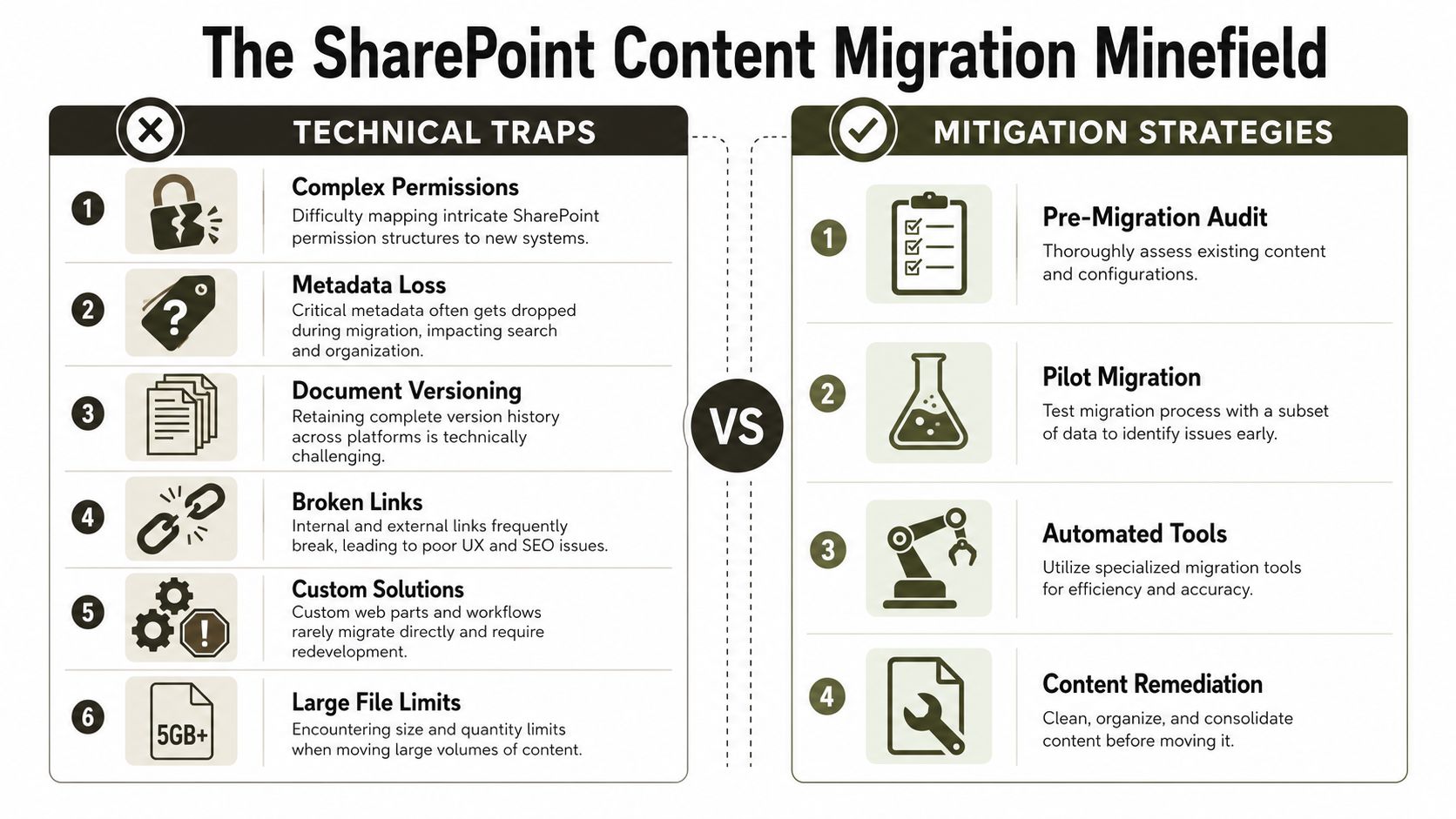
I've been pulled into enough redesign rescues to say this plainly. The design team is rarely the actual problem. The failure starts when an organisation approves a migration plan built on sampling, optimism, and a free tool that nobody has pressure-tested against the ugliest parts of the estate.
Microsoft documents one of the first operational traps in its guidance on SharePoint Online and OneDrive migration speed. Migrations can trigger HTTP 503 responses from throttling, especially with poor authentication choices and badly controlled job volume. For an IT Director, that is not a minor performance issue. It means missed cutover windows, partial copies, repeated reruns, and audit headaches when nobody can prove which content moved.
SharePoint's 5,000 item list view threshold creates another predictable failure. Libraries can look fine in a pilot, then break navigation, search, or admin handling once the actual volume lands. The same pattern shows up with long file paths, malformed metadata, and years of broken permission inheritance. GetSharePoint's review of common migration mistakes covers these failure points well enough. What it does not capture strongly enough is the compliance angle. If your migration drops inherited restrictions or misapplies access at scale, you have not just created mess. You may have exposed regulated information to the wrong users.
That is why I treat content migration as a security and records exercise first, and a publishing exercise second.
A pilot on a tidy department site proves very little. The actual environment contains abandoned subsites, stale group mappings, duplicate content types, orphaned users, and document libraries that have been abused for a decade. Those are the conditions that trigger throttling, surface hidden permission faults, and create silent exceptions your project team only notices after launch.
If you want the practical checklist before selecting tooling, review these SharePoint migration best practices for complex estates.
Here's a useful explainer on the broader problem space:
SPMT versus ShareGate with scripting
SPMT is acceptable for small, clean, low-risk migrations. It is not a serious answer for a redesign programme with regulatory exposure, cross-tenant identity mapping, or messy legacy permissions.
Use this standard instead:
| Scenario | What basic tooling misses |
|---|---|
| Complex permissions | Broken inheritance and inconsistent access surface late, often after users start testing |
| Large libraries | Threshold limits, path issues, and metadata defects stall jobs and force rework |
| Cross-tenant moves | Identity mapping errors create invalid access and weak validation trails |
| Regulated estates | Audit evidence, exception handling, and pre-migration controls are usually too weak |
Serious teams use ShareGate with PowerShell and PnP scripting because they need control. They need pre-validation reports, batch handling, repeatable remediation, clear logging, and a way to rerun specific problem sets without touching clean content. They also need evidence for internal audit and security review. Free tooling does not solve that. It only gets you to the point where the hard problems become visible.
One more point gets ignored too often. Transport security during migration traffic and admin access still matters, especially if third parties are involved in cutover support or remote validation. Your team should understand the basics of SSL TLS VPN and apply them to the migration operating model, not just the final public website.
The migration tool is not your control framework. Validation, scripting, access review, and evidence capture are the control framework.
The Ollo Verdict
Use SPMT for contained moves where failure has limited blast radius. Use ShareGate plus custom scripting when the estate is large, permissions are dirty, or compliance teams will ask who accessed what, when, and why. Ignore that distinction and your redesign becomes a data handling incident with a nicer homepage.
Executing the Technical Cutover DNS CDN and SSL
Launch day is the point of maximum exposure. Treat it like an operations event, not a celebration.
I don't trust “big bang” cutovers for enterprise website redesigns. They create too many simultaneous variables. DNS changes, CDN cache behaviour, certificate deployment, redirected content paths, authentication edge cases, and stale browser sessions all collide at once. If your rollback plan lives in someone's head, you don't have a rollback plan.
The cutover sequence that avoids chaos
Your team needs a disciplined order of operations.
- Freeze non-essential changes. Stop content churn, configuration edits, and ad hoc permissions changes before cutover.
- Validate certificate readiness. Confirm the certificate chain, renewal ownership, and coverage for all production hostnames.
- Prepare CDN behaviour. Know what will stay cached, what must be purged, and what headers or rules may expose stale content.
- Stage DNS changes carefully. Reduce propagation risk through planning, not optimism.
- Run production validation immediately. Test page delivery, auth flows, forms, redirects, search, and role-based access from multiple vantage points.
- Keep rollback criteria explicit. Define the failures that trigger reversal before cutover starts.
If your security team wants a useful refresher on transport protection basics around certificates and encrypted access, this primer on SSL TLS VPN gives practical context without the usual fluff.
Why migration queue planning matters during cutover
A critical juncture occurs where content migration planning and launch operations collide. Microsoft documents a hard limit of 4,000 pending migrations in the queue for cross-tenant SharePoint site migrations in its cross-tenant SharePoint migration guidance. Ignore that and you don't just get delay. You create identity mapping failures that can break compliance and leave content inaccessible.
That matters during a redesign because teams often assume cutover is only about traffic and frontend delivery. It isn't. If content batches, identity mappings, or trust configurations haven't settled properly, your “new site” may go live while critical material remains misaligned or unreachable.
A blunt pre-flight checklist
- Access validation. Test editor, approver, admin, and standard user roles separately.
- Search validation. Confirm new and migrated content appears correctly and honours permissions.
- Redirect validation. Check high-value legacy paths, not just homepage behaviour.
- Certificate checks. Make sure users won't see warnings on alternate paths or subdomains.
- Rollback triggers. Write them down. Don't negotiate them during an incident.
Cutover discipline protects your reputation because it gives your team permission to stop the launch when the evidence says stop.
A phased release with controlled validation beats a dramatic launch every time. Drama belongs in agency presentations, not in production.
Post-Launch Governance and Your Vendor Risk Checklist
A redesign doesn't end at go-live. That's when governance starts proving whether the project was built responsibly or just launched quickly.
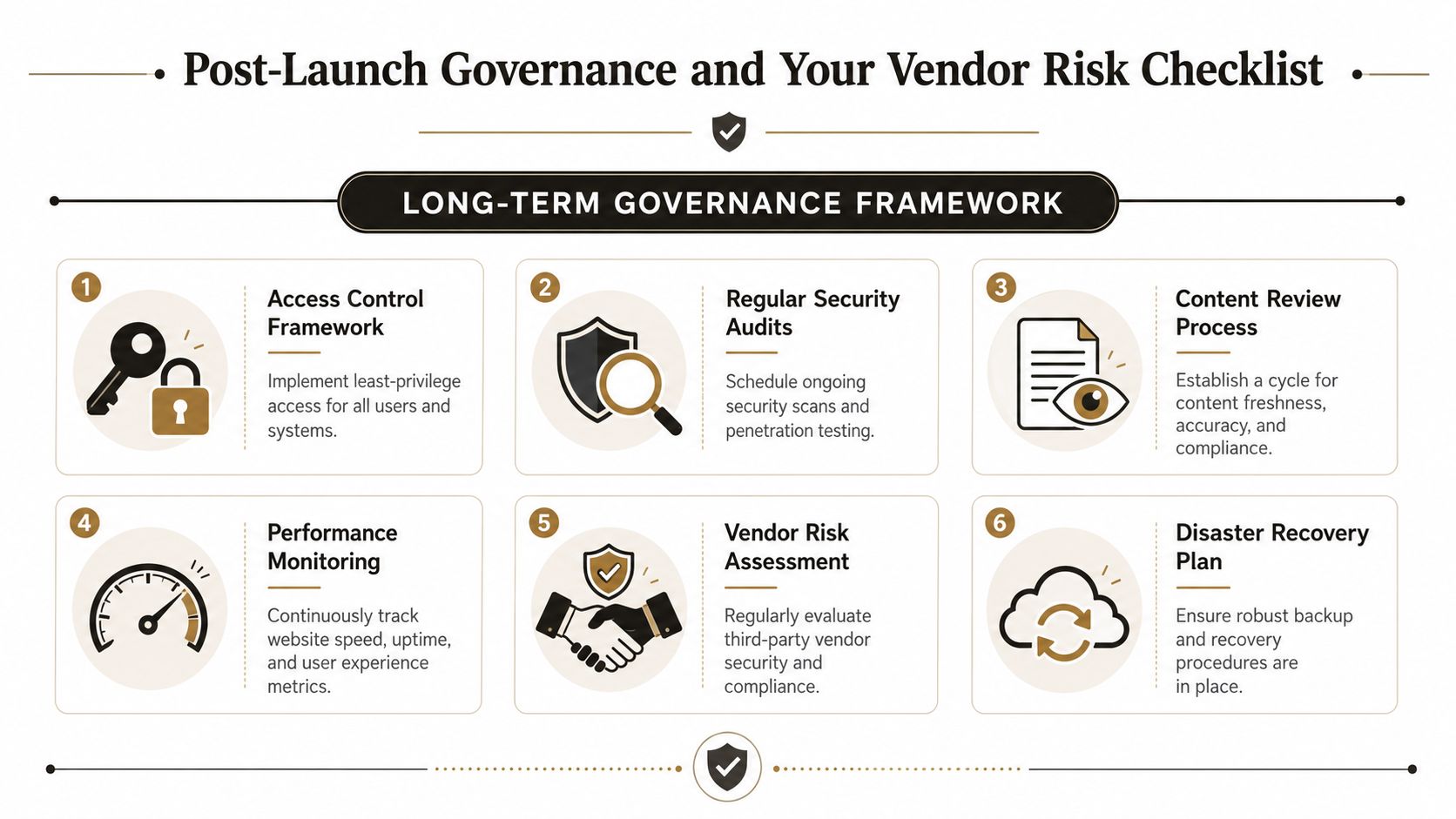
The first month after launch usually exposes the truth. Editors request exceptions. Old permission habits come back. Vendors ask for standing admin access “just for support”. Monitoring gets deferred because everyone's tired. That's exactly how a controlled redesign degrades into an unmanaged platform.
What your governance model must include
You need firm operating rules, not good intentions.
- Least-privilege access. Editors edit. Approvers approve. Administrators administer. Don't blur those boundaries.
- Patch and dependency ownership. Assign named owners for runtime updates, plugin reviews, certificate renewals, and integration maintenance.
- Monitoring and alerting. Watch availability, access anomalies, failed jobs, and content publication events.
- Content review discipline. Regulated content needs review cycles, ownership, and retirement rules.
- Backup and recovery validation. Don't trust backup status messages. Test actual restoration paths.
If your Microsoft 365 governance is already messy, fix that before it contaminates the redesigned estate. This Microsoft 365 governance audit checklist for CTOs is a strong place to start.
The vendor questions most teams avoid asking
Generalist agencies hate these questions because they expose the gap between design competence and operational competence.
Ask your vendor:
| Question | Why it matters |
|---|---|
| How do you handle broken permission inheritance during migration? | Because “we'll sort permissions later” is not a control model |
| What is your rollback method for failed cutover? | A vendor without a reversal plan is gambling with your production estate |
| How do you validate identity mapping in cross-tenant scenarios? | Bad identity handling breaks access and audit trails |
| What experience do you have with regulated data and zero-trust access models? | Compliance cannot be improvised after launch |
| Which tool limitations do you actively design around? | Mature teams know where tooling breaks |
A weak vendor will answer with reassurance. A strong vendor will answer with constraints, test methods, and failure criteria.
Your vendor should make you slightly uncomfortable in discovery. If they don't, they probably haven't seen enough failure to protect you from it.
If you're planning to redesign a company website that touches Microsoft 365, SharePoint, or regulated content, stop treating the project like a cosmetic upgrade. Treat it like controlled infrastructure change with governance at the centre. That's the difference between a launch and a rescue job.
If your team wants a second opinion before committing to a risky redesign, talk to Ollo. We specialise in the messy Microsoft 365 and SharePoint migration work that generalist web agencies usually underestimate, especially where compliance, zero-trust access, and cross-tenant complexity can't be left to chance.

















