


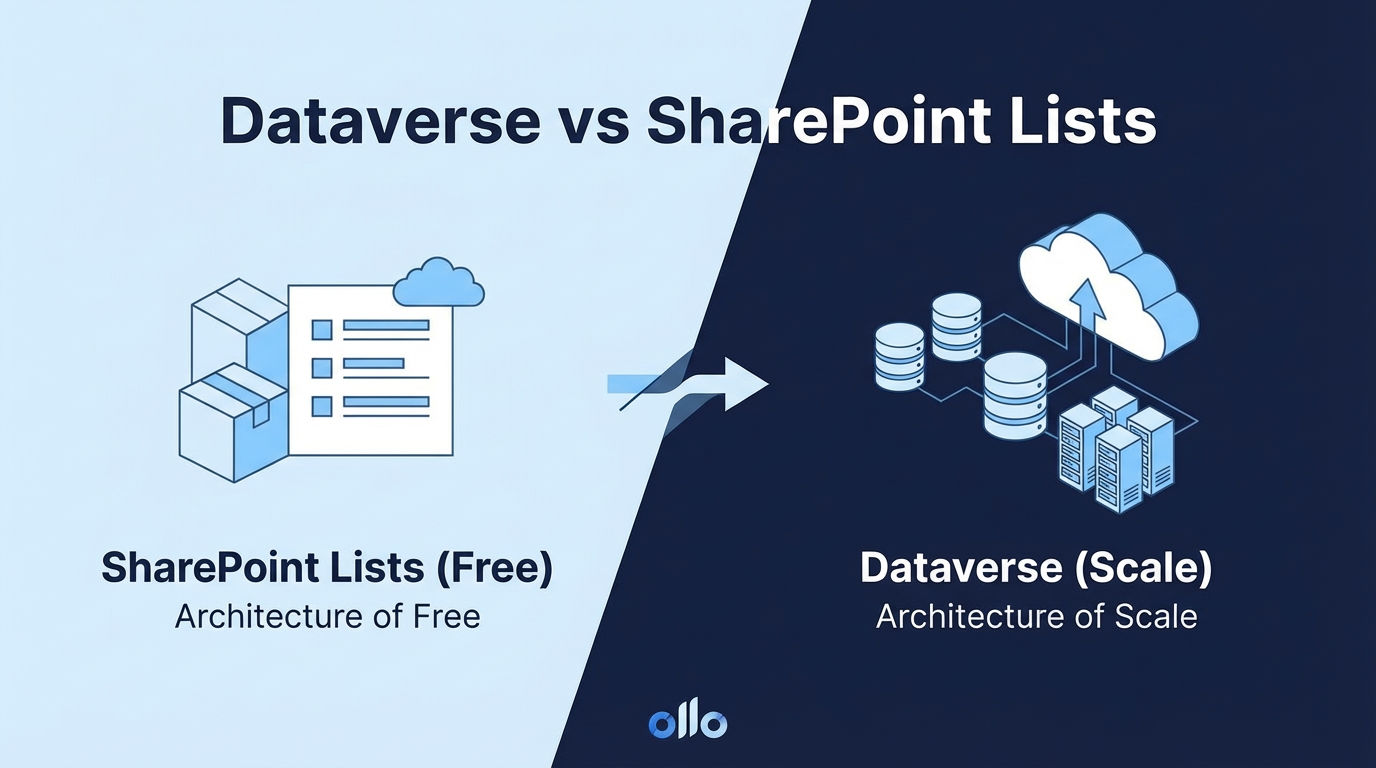

Dataverse vs. SharePoint Lists: The Architecture of "Free" vs. The Architecture of Scale
A SharePoint List is a simple, collaborative data table included within Microsoft 365, perfect for team-level tracking and ad-hoc tasks. Dataverse, in contrast, is a robust, scalable database platform for building enterprise-grade business applications with complex data, granular security, and relational logic. Choosing the right one is a critical architectural decision that pits immediate cost against long-term resilience.
In our experience architecting solutions for the Power Platform, we see a recurring pattern. A business need arises—a new intake form, an inventory tracker, a project status list. The path of least resistance leads directly to a SharePoint List. It’s fast, it’s easy, and most importantly, it feels "free." For a while, it works beautifully. But as the process grows in importance and complexity, the architectural cracks begin to show, and the "free" solution starts to incur a heavy technical tax.
The trap most architects fall into is treating SharePoint Lists and Dataverse as interchangeable. They are not. One is a spreadsheet with an API; the other is a true enterprise database. Understanding the ceiling of a SharePoint List is the first step to building solutions that last.
The Allure of "Free": Why We All Start with SharePoint Lists
Let's be clear: SharePoint Lists are a fantastic tool for the right job. They are the go-to solution for team-level collaboration and are deeply integrated into the Microsoft 365 fabric. Their primary benefit is the low barrier to entry. Within minutes, a department head can create a list to track vacation requests or manage a simple event registration, all without needing IT intervention or a new budget approval.
This is the "Grey Zone" in action—the human-scale, often messy world of team collaboration where a quick, simple solution is more valuable than a perfect, complex one. For tracking a project's top 10 risks or managing a list of 50 marketing assets, a SharePoint List is often the pragmatic and correct choice.
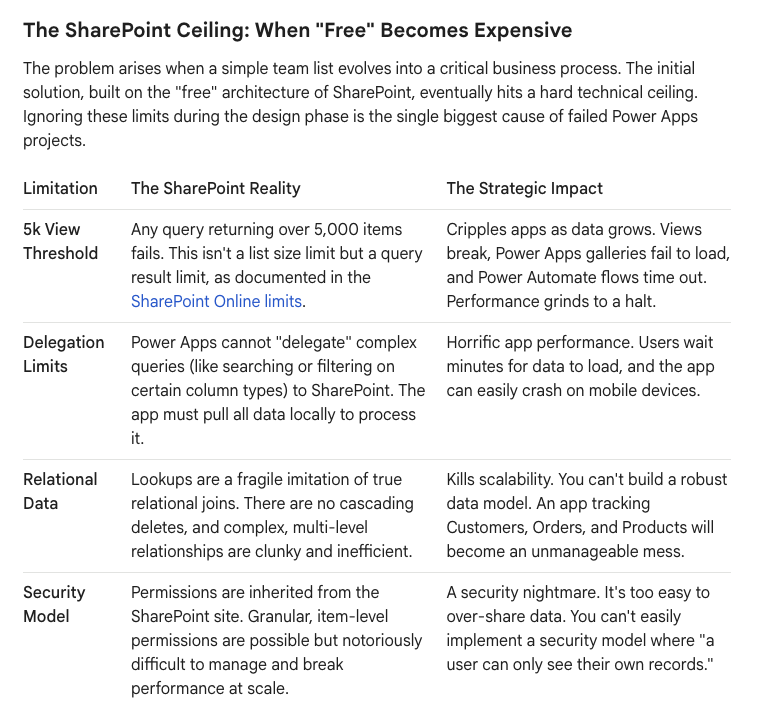
The SharePoint Ceiling: When "Free" Becomes Expensive
The problem arises when a simple team list evolves into a critical business process. The initial solution, built on the "free" architecture of SharePoint, eventually hits a hard technical ceiling. Ignoring these limits during the design phase is the single biggest cause of failed Power Apps projects.
Dataverse: The Architecture of Scale
When you hit the SharePoint ceiling, you need to graduate to an architecture built for scale, security, and complexity. That architecture is Dataverse. It is not just "another database"; it is the enterprise-grade data platform that underpins Dynamics 365 and the Power Platform.
Choosing Dataverse means you are moving from a world of lists to a world of true relational data.
- A True Database: Dataverse provides a fully relational model with tables, relationships, and advanced data types. You can build complex, logical data structures that mirror your business processes without workarounds.
- Built-in Scalability: The 5,000-item limit does not exist. Dataverse is designed to handle millions of records with high performance, backed by the power of Azure SQL.
- Granular, Role-Based Security: Dataverse offers a sophisticated, multi-layered security model. You can control access through business units, security roles, and even field-level security. This allows you to build applications where users, partners, and customers see only the specific data they are permitted to see.
- Rich Auditing & API: Auditing is built-in, tracking every change to your data for compliance and governance. The powerful API provides a secure and standardized way to integrate your business data with other enterprise systems.
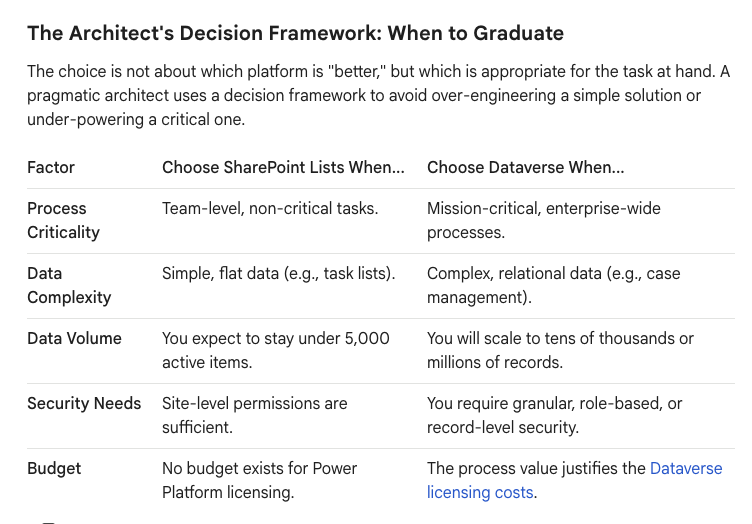
The Architect's Decision Framework: When to Graduate
The choice is not about which platform is "better," but which is appropriate for the task at hand. A pragmatic architect uses a decision framework to avoid over-engineering a simple solution or under-powering a critical one.
What to Use: The "Right Tool" Rule
Use SharePoint Lists When:
- The data is "throwaway" or short-term (e.g., a Potluck Sign-up, a temporary survey).
- The app is for a single team (< 50 users).
- You will never exceed 5,000 records.
- The data is flat (no complex Parent-Child relationships).
Use Dataverse When:
- The data is "Mission Critical" (Financials, HR, Client Data).
- You need granular security (Field-level).
- You need to integrate with Dynamics 365.
- The app will survive for more than 12 months.
The Bottom Line: SharePoint is free, but technical debt pays compound interest. If you are building a business-critical system, pay the premium for Dataverse. You aren't paying for storage; you are paying for stability.
Your Data as the Constant: A Pragmatic Hybrid Approach
A modern architecture is rarely a binary choice. The most resilient solutions often use both platforms for their respective strengths. A common and highly effective pattern we implement is to use SharePoint for what it does best—unstructured content and collaboration—while using Dataverse as the structured data backend.
For example, a "Project Management" solution might feature:
- A SharePoint Site for each project, holding documents, meeting notes, and collaborative conversations in Teams.
- A Power App embedded in that site, which writes all structured data—like budget items, risks, and status reports—to Dataverse tables.
In this model, the team collaborates freely in SharePoint, but the critical project data is securely stored, related, and scaled in Dataverse, ready for enterprise-wide reporting in Power BI.
SharePoint Lists are your on-ramp to business process automation. They are an invaluable starting point. But a successful long-term strategy requires knowing when to merge onto the highway. By evaluating your solution against the principles of scale, security, and complexity, you can make the right architectural choice and build a data foundation that is ready for whatever comes next.

















