



Confluence to SharePoint Migration: The Real Cost for Enterprises
A Confluence to SharePoint migration is a strategic decision to consolidate collaboration platforms, often driven by a broader move to the Microsoft 365 ecosystem. Instead of a simple "lift-and-shift," it requires a deep translation of Confluence's wiki-style knowledge base into SharePoint's structured, document-centric architecture. The real cost is not in the migration tools, but in the expert-led effort to preserve knowledge, remap user experiences, and ensure the new platform delivers on its promise of unified collaboration.
In our experience, enterprises often underestimate the architectural shift required. Confluence is built for organic, free-form knowledge creation. SharePoint is an enterprise content management platform built for structure, governance, and deep integration with the Microsoft security fabric. Treating this as a file-copy exercise is the #1 reason these projects fail, leading to a chaotic SharePoint environment that users reject and a loss of the very knowledge you sought to preserve.
The migration from Atlassian to Microsoft 365 is more than a technical project; it's a fundamental change in how your organization manages its intellectual property.
The Architectural Mismatch: Why You Can't "Copy-Paste" a Wiki
The core challenge lies in the philosophical differences between the two platforms. A direct "lift-and-shift" approach using basic tools will lead to a broken, unusable SharePoint environment.
- Spaces vs. Sites: In Confluence, a "Space" is a self-contained wiki. In SharePoint, the modern unit of collaboration is a Site (either a Team Site or a Communication Site). You cannot simply map a Space to a Document Library; you must strategically decide if each Space becomes its own SharePoint Site to preserve its context and permissions.
- Pages vs. Documents: The fundamental unit of Confluence is the "Page"—a dynamic, web-based document that can contain text, tables, images, and macros. SharePoint's strength lies in managing discrete documents (
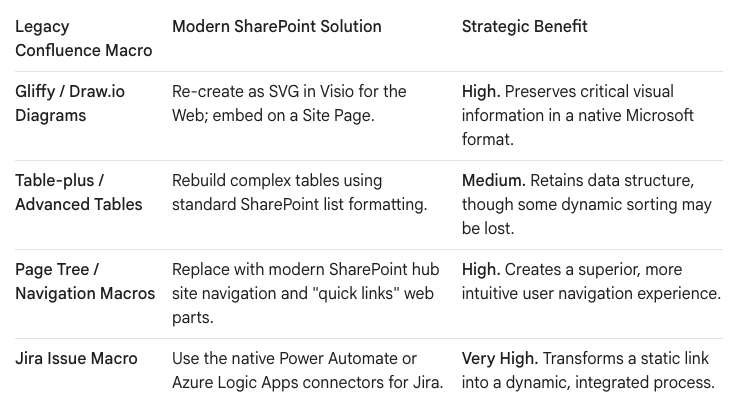
.docx,.pptx,.xlsx). A Confluence Page with attachments is a single entity; in SharePoint, this becomes a Site Page and a collection of separate files in a library, breaking the original context. - Macros & Add-ons: This is the most critical failure point. Confluence environments are often heavily customized with macros and add-ons from the Atlassian Marketplace (e.g., Gliffy for diagrams, advanced table tools). These will not migrate. Every macro represents a piece of functionality that will be lost, rendering pages unreadable or useless.
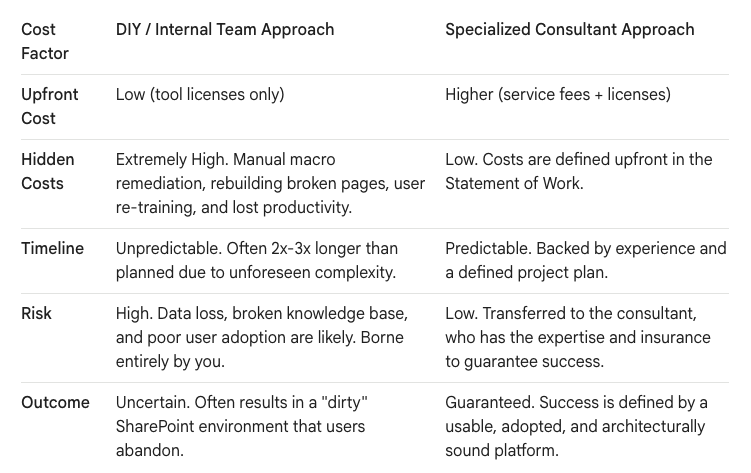
The True Cost of Migration: Beyond the License Fees
A realistic budget for an enterprise-scale Confluence migration must account for the specialized labor required to de-risk the project and re-architect the content for its new home.
The Blueprint for a Successful Migration
A successful migration is not a single event but a multi-phased program that prioritizes architecture and business continuity over raw speed. We treat this as a modernization project, not just a data move.
Phase 1: The Macro & App Audit (The "What Will Break?" Analysis)
Before anything is moved, we conduct a deep audit of your Confluence environment to identify every macro and third-party add-on in use.
- Inventory: We generate a complete list of all active macros and the pages that depend on them.
- Triage: We work with your business users to categorize each macro's function: Is it critical for displaying content (e.g., a diagramming tool)? Is it for navigation? Is it a retired function?
- Modernization Plan: For each critical macro, we define a modern SharePoint equivalent.
Phase 2: Architecting the Destination
This is where the real value of an expert-led migration is realized. We don't just dump files; we build a resilient, AI-ready information architecture.
- Space-to-Site Mapping: We analyze each Confluence Space and determine its ideal SharePoint destination. A small project Space might become one SharePoint Team Site. A large, multi-purpose departmental Space might be broken into several Sites (e.g., a Communication Site for official documentation and a Team Site for active collaboration).
- Page Transformation: We use advanced migration tools and custom scripts to transform Confluence Pages. The content is migrated to a modern SharePoint Site Page, and all attachments on that page are moved into the Site's default Document Library, with links automatically updated on the new page to preserve context.
- Governance by Design: A migration is a golden opportunity to apply proper governance. We help you define a new governance plan for the cloud, including site lifecycle policies, external sharing rules, and data classification using Microsoft Purview sensitivity labels. We ensure your new environment starts clean and stays clean.
Phase 3: The Phased, "Dark Mode" Launch
For an enterprise, a "big bang" cutover is too risky. We deploy in a "Dark Mode" model.
- Initial Sync to Staging: We perform the initial, full migration of content to a "staging" area in SharePoint that is not yet visible to end-users. This allows us to perform validation and remediation without impacting the business.
- User Acceptance Testing (UAT): A select group of power users from the business is given access to the staged content. They validate that their critical knowledge is intact and usable. This step is crucial for building trust and ensuring Day 1 readiness.
- Final Cutover & Go-Live: After UAT sign-off, we schedule the final cutover during a planned weekend window. We perform a final "delta" sync to capture any last-minute changes from Confluence, then switch the DNS and navigation to point all users to their new SharePoint sites on Monday morning.
The Strategic Payoff: An AI-Ready Knowledge Base
The goal of a Confluence to SharePoint migration is not just to consolidate licenses. It is to transform your scattered corporate knowledge into a structured, searchable, and AI-ready asset. By migrating correctly, you place your most valuable content directly in the path of Microsoft Copilot.
When a user asks Copilot, "What was our strategy for Project Phoenix in 2023?", the AI can now draw on the content from the migrated Confluence page, reference the attached financial model from the document library, and synthesize a complete, context-rich answer. This is impossible if your migration results in a messy, disorganized collection of broken pages and orphaned files.
A Confluence to SharePoint migration is a significant undertaking, but the risks are manageable with the right architectural approach. By investing in expert planning and a structured methodology, you can ensure the project delivers a true return on investment, transforming a legacy wiki into a powerful, modern, and intelligent knowledge management platform for your enterprise.
Would you like to explore a detailed breakdown of the technical tools used in this process?

















