



Death to the Spreadsheet: Using AI Agents to Fix the "User Review" Bottleneck
If you have ever managed a cloud migration, you know the "Spreadsheet of Doom."
It’s that moment when IT exports a CSV of 20,000 files from a legacy server, sends it to a Department Head, and says: "Please review this list and tell us what to keep."
We know what happens next. The user opens the Excel file, sees Row 1 of 20,000, gets overwhelmed, and closes it. The migration stalls, or worse, everything is migrated "just in case," turning your expensive new cloud environment into a digital swamp on Day 1.
At Ollo, we believe the "Excel Review" method is dead. We are using SharePoint Agents to replace the spreadsheet with an Intelligent, Pre-Configured Catalog.
Step 1: Staging the "Grey Zone"
We start by moving complex, messy data—folders that aren't clearly old enough to delete but aren't organized enough to migrate blindly—into a secure Staging Library. This is a safe "quarantine zone" where we can work without affecting your daily operations.
Step 2: The "Priming" Phase (Ollo's Secret Sauce)
This is the step most people miss. You can’t just turn on an AI and hope for the best. Before a user touches the data, we "Prime" the Agent.
We define your Cataloguing Tags based on your specific business language:
- Do you need to sort by Client Name?
- Do you need to identify "Confidential" vs "Public"?
- Do you need to group by Fiscal Year?
We teach the Agent your taxonomy so that when it "reads" a file, it categorizes it exactly the way a senior partner would. We turn the AI into a customized analyst that understands your business.
Step 3: The AI "Menu"
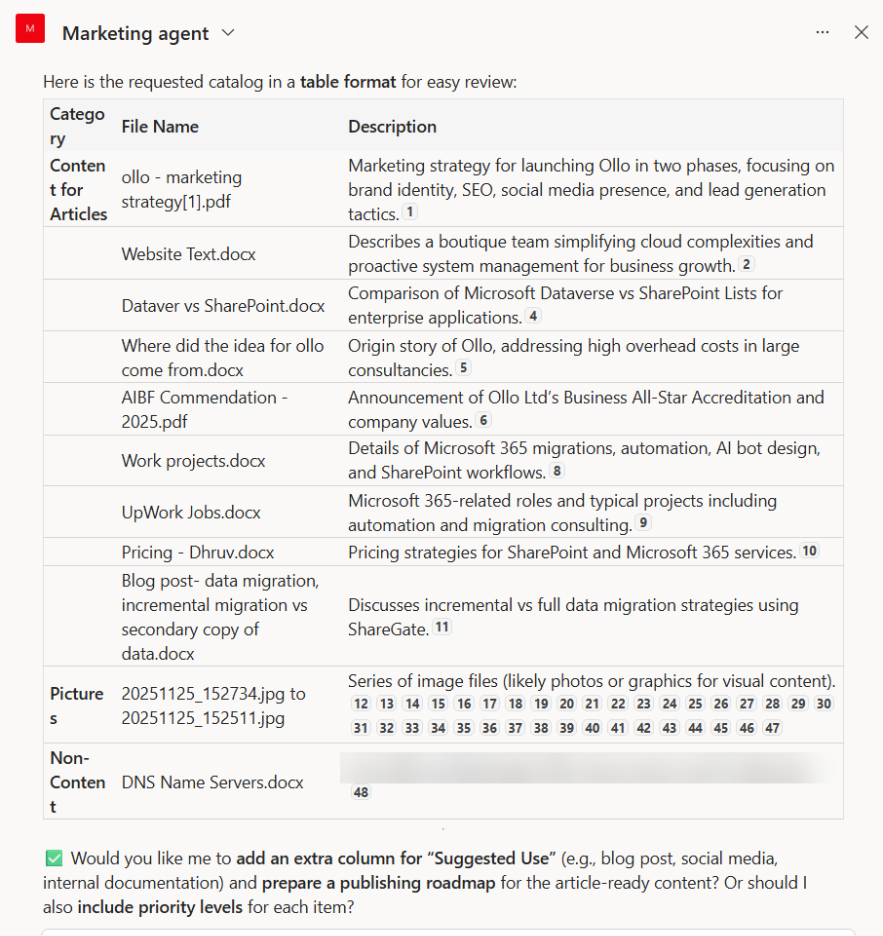
Because we have "Primed" the bot, your users don't need to be prompt engineers. They don't have to guess how to talk to the AI. They simply ask for a report, and the Agent delivers a table using the exact tags defined in Step 2.
See the Difference:
- The Old Way (Excel): Strategy_v2.docx | 12/04/2022 | 4MB
- The Ollo Way (Agent Catalog): Strategy_v2.docx | Category: Strategic Planning | Client: Acme Corp | Status: Draft
Suddenly, the user is making decisions based on Context, not just filenames.
Step 4: Final Execution
Once the user reviews the Agent's catalog—a process that now takes minutes rather than days—Ollo executes the final move:
- "Keep" files are promoted to the live Production environment with metadata tags already applied.
- "Archive" files are moved to low-cost storage to avoid the Forever Tax.
- "Delete" files are purged.
The Strategic View: The Ollo Benefit
This approach shifts the burden off your team. We stop treating migrations as a "data move" and start treating them as a modernization of your information architecture.
- We do the setup: We define the logic, the tags, and the "Priming."
- The AI does the reading: It scans thousands of pages in seconds.
- The User makes the decision: They get a clear menu, not a confusing spreadsheet.
We provide the architecture; your users provide the decisions—painlessly.

















