


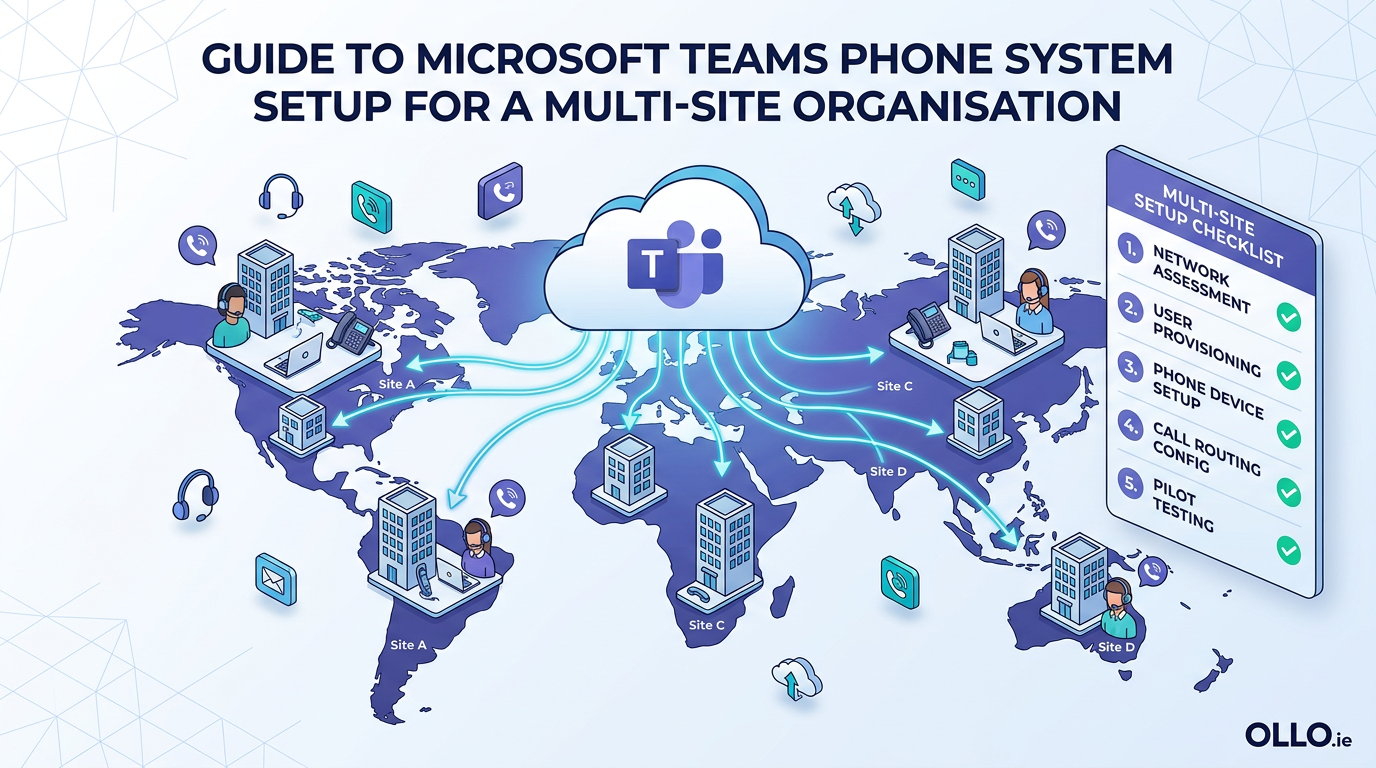

Guide to Microsoft Teams Phone System Setup for a Multi-Site Organisation
A successful Microsoft Teams Phone System setup for a multi-site organisation involves deploying a centralized, cloud-native PBX while ensuring each physical location maintains local call presence and compliant emergency services. This is not just a voice system replacement; it is an architectural shift that unifies communication into a single, governable platform.
In our experience, the most common failure point in a teams phone system enterprise deployment is underestimating the complexity of a multi-site environment. Leaders often focus on the user-facing dial pad and overlook the critical backend architecture required to manage call routing, number porting, and emergency response across different geographic locations. A successful teams voice setup treats each site as a unique node within a unified whole.
This guide provides the architectural blueprint for a resilient, scalable, and compliant multi-site Teams Phone deployment, moving beyond basic setup to address the real-world challenges of the enterprise.
The Strategic Shift: From On-Prem PBX to Cloud-Native Voice
Retiring a legacy on-premises PBX is more than a hardware refresh. It is a strategic decision to transform voice from a siloed utility into an integrated component of your digital workplace. The "box in the closet" model is rigid, expensive to maintain, and disconnected from modern collaboration tools.
By moving to Teams Phone, you are not just getting a dial tone in the cloud. You are unlocking:
- Unified Communication: Voice calls, video meetings, and chat exist in a single client, eliminating context switching.
- Centralized Governance: All communication modalities are managed under the Microsoft 365 security and compliance umbrella, simplifying eDiscovery and data retention.
- Operational Agility: Spinning up a new office no longer requires a new PBX and costly PRI lines. You can provision new users and numbers directly from the Teams Admin Center.
Architectural Blueprint: The Three Ways to Connect to the PSTN
Your first and most critical architectural decision is how your Teams Phone system will connect to the Public Switched Telephone Network (PSTN). There are three distinct models, each with specific implications for cost, control, and complexity in a multi-site organisation.
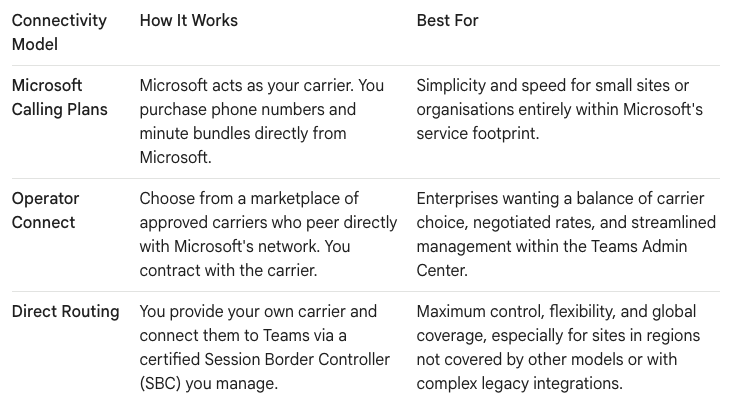
For a typical multi-site enterprise, the reality we found is that a hybrid approach is often the most effective. You might use Microsoft Teams Calling Plans for your headquarters in a supported country, while leveraging Direct Routing to connect a manufacturing plant in a region where you have an existing carrier relationship.
Core Components of a Multi-Site Teams Voice Setup
Regardless of your PSTN connectivity choice, a robust microsoft teams phone system setup relies on a set of core building blocks.
- Licensing: This is the foundation. Every user who needs a dial tone requires a Teams Phone Standard license. This is in addition to their base Microsoft 365 license (e.g., E3/E5). Think of the Phone license as the key that unlocks the PBX features.
- Resource Accounts: These are free, unlicensed accounts used to assign phone numbers to services rather than people. You will use them extensively for:
- Auto Attendants: Your virtual receptionist ("Press 1 for Sales, Press 2 for Support").
- Call Queues: Holds and distributes calls to a group of agents (e.g., your IT helpdesk).
- Call Routing Policies: These are the traffic cops of your voice system. You will create specific policies to manage how calls are routed for different sites, how calls are forwarded, and who is allowed to make international calls.
The Multi-Site Challenge: Emergency Calling and Local Presence
This is the single most critical aspect of a teams phone system enterprise deployment. In a legacy PBX world, 911 services were tied to the physical address of the office. In the flexible, work-from-anywhere world of Teams, this becomes far more complex.
- The Law: You are legally required to provide accurate location information for emergency calls. Simply sending the headquarters' address for a call made from a branch office is not acceptable and dangerously non-compliant.
- The Solution: Dynamic Emergency Calling: Teams uses network information (like Wi-Fi access points and IP subnets) to pinpoint a user's location dynamically. Your setup must involve meticulously mapping your network topology for each site to a specific physical address within the Teams Admin Center. You can learn more about the configuration at the official Microsoft documentation for emergency calling.
- Local Presence: Users in a specific branch office expect to make and receive calls from a local number. Your strategy must include porting your existing phone numbers from your old carrier for each site. This process can take weeks and must be carefully orchestrated to avoid service interruption.
Deployment Protocol: A Phased, Site-by-Site Rollout
A "big bang" cutover for a multi-site voice migration is a recipe for failure. We enforce a phased, "Dark Mode" deployment that prioritizes business continuity.
- Phase 1: Backend Build (Dark Mode): Before a single user is migrated, we build the entire backend architecture. This includes setting up all resource accounts, configuring emergency addresses for every site, building call queues, and defining routing policies. The system is fully functional but not yet "live" for users.
- Phase 2: Pilot Site Migration: Select a single, tech-forward site for the pilot.
- Port Numbers: Work with your carrier to port the block of numbers for that specific site.
- Assign Licenses & Numbers: Once ported, assign the Phone licenses and newly acquired numbers to the pilot users.
- Test and Validate: For a period of 1-2 weeks, this pilot group stress-tests the system. They make and receive calls, test emergency calling, and validate call queue functionality. This is your chance to find and fix issues on a small scale.
- Phase 3: Wave-Based Rollout: Using the refined process from the pilot, you now migrate the remaining sites in logical waves. This allows your IT team to focus their support efforts on one site at a time and ensures a smooth transition for each group of users.
Governing the Solution: Policies and Reporting
Once live, your teams voice setup is not a "set and forget" system. It is a living service that requires ongoing governance.
- Calling Policies: Use granular policies to control who can make international calls, who can forward calls to their mobile, and how voicemail is handled. For a multi-site organisation, you may apply different policies based on a user's location and role.
- Call Quality Dashboard (CQD): This is your primary tool for monitoring the health of your voice services. You must proactively review the CQD to identify and troubleshoot issues like jitter, packet loss, and latency that can degrade the user experience at a specific site.
The reality we have found is that without proactive monitoring of the CQD, voice quality issues will fester until they become major user complaints. It is your early warning system for network problems that could impact an entire office.
By following this structured, architecturally-sound approach, you can successfully deploy a Microsoft Teams Phone system that is not only cost-effective and scalable but also compliant and resilient enough to meet the demands of a modern, multi-site enterprise.
Would you like to explore the specifics of network readiness for Teams Voice, or perhaps delve deeper into device strategies for a multi-site rollout? Contact us on www.ollo.ie

















