


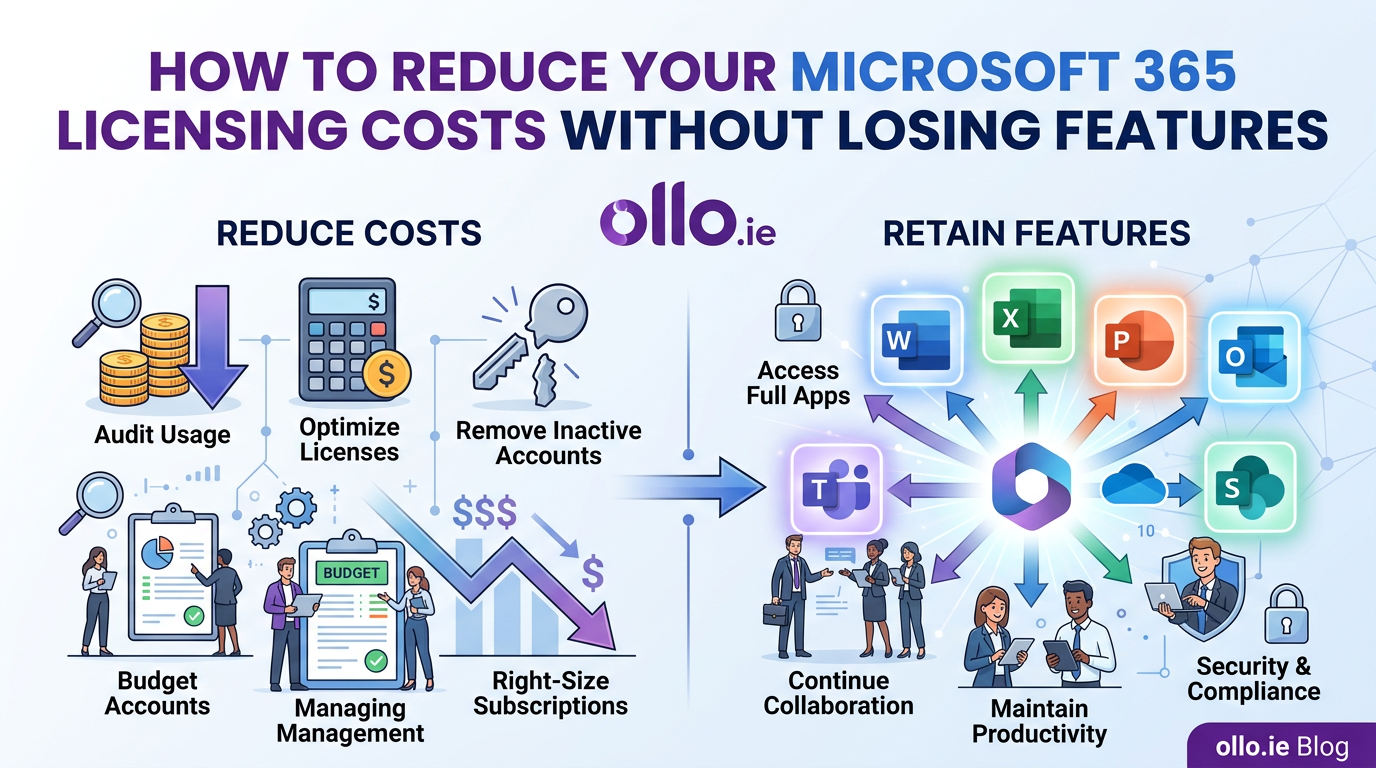

How to Reduce Your Microsoft 365 Licensing Costs Without Losing Features
Reducing Microsoft 365 licensing costs requires a strategic audit of assigned versus utilized services to eliminate waste. This is not about arbitrarily downgrading users and stripping away features. It’s an architectural process of right-sizing licenses to specific user roles and implementing a governance protocol to reclaim what you don’t use, ensuring you only pay for what your organization actively consumes.
In our experience, most organizations are overspending on their Microsoft 365 licensing by 15-25%. This isn't due to a single mistake, but a slow, creeping "license sprawl." An employee requests an E5 license for one feature, a user leaves the company but their account remains active, a Power BI Pro license is assigned for a one-off project and never revoked. Each instance is small, but they accumulate into a significant, unnecessary operational expense.
The trap most CFOs and IT Directors fall into is treating this as a simple accounting problem. They see the bill, export a CSV from the admin center, and create the "Spreadsheet of Doom." This manual approach is destined to fail because it lacks context. True optimization requires a shift from counting licenses to governing their entire lifecycle.
The First Step: Stop Guessing and Start Auditing
You cannot optimize what you cannot measure. A comprehensive license audit is the foundation of any cost-saving initiative. This isn't just about comparing Assigned vs. Active licenses. You need to go deeper and understand actual service usage. The goal is to move from assumptions to evidence-based decisions.
Your audit should answer three core questions for every user:
- Is the license active? Has the user logged in within the last 30, 60, or 90 days?
- Are the premium services being used? If a user has an E5 license, are they actually using Power BI, Phone System, or Advanced eDiscovery?
- Does the license match the user's role? Is a frontline worker in a warehouse assigned the same E3 license as a knowledge worker in your finance department?
The Microsoft 365 Admin Center provides baseline reports on service usage. For a true architectural view, however, you need to use PowerShell to query the Microsoft Graph API. This allows you to extract detailed data on last login dates and last activity dates for specific services like Exchange, Teams, and SharePoint.
Right-Sizing: The Persona-Based Licensing Model
One-size-fits-all licensing is a recipe for overspending. The key to architectural cost optimization is creating user personas and mapping the most cost-effective license to each one. You don't need a hundred personas; most organizations can achieve significant savings with just three or four.
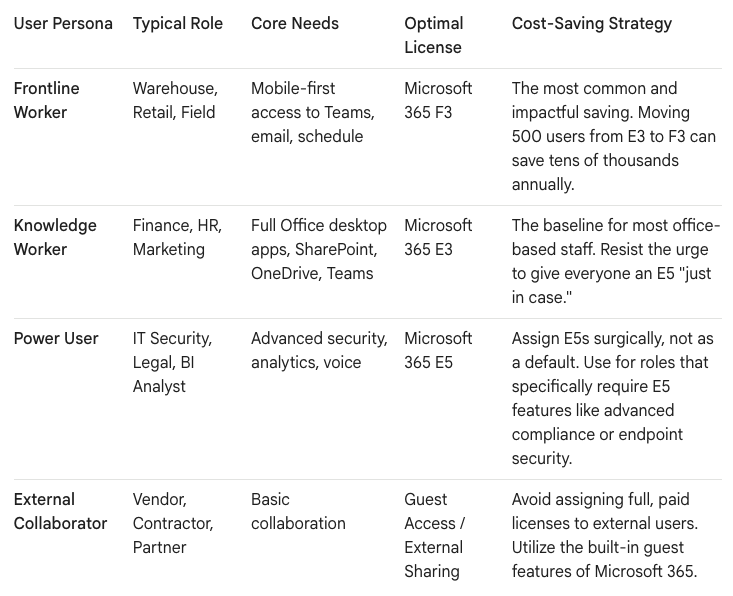
The reality we found is that many companies have hundreds of users who only need email and Teams access on a shared or mobile device. Moving these users from a costly E3 license to an F3 license provides the functionality they need at a fraction of the cost, with zero loss of productivity for that role.
Automating Governance: The Reclamation Protocol
An audit is a snapshot in time. To achieve sustainable savings, you must create an automated protocol for reclaiming unused licenses. This is not about being punitive; it's about responsible resource management.
- The Inactive User Policy: Create a policy that automatically flags users who have not logged in for 90 days. This is your primary indicator of an inactive or orphaned account.
- The Quarantine and Reclaim Process: Don't just remove the license immediately.
- Step 1 (Automate): A PowerShell script or third-party tool automatically removes the license from a 90-day inactive user and places them in a "quarantine" group. Their data is preserved.
- Step 2 (Notify): The script notifies the user's manager that the license has been reclaimed due to inactivity and can be restored upon request.
- Step 3 (Re-harvest): The reclaimed license is returned to your available pool in the admin center, ready to be assigned to a new employee.
- The Add-On License Review: Add-on licenses like Power BI Pro, Visio, and Project are notorious sources of waste. These are often requested for a single project and never revoked. Implement a quarterly review process for these high-cost add-ons. If a user hasn't accessed the service in 90 days, reclaim the license.
Unbundling: When Add-Ons Are Cheaper Than Upgrades
There is a common misconception that if a user needs one feature from a higher-tier plan, you must upgrade the entire license. This is often not the most cost-effective approach. You must analyze the cost of the "unbundled" feature versus the full suite upgrade.
For example, a user may need the risk-based conditional access policies found in Azure AD Premium P2.
- The Upgrade Path: Move the user from an E3 to an E5 license. Cost increase: ~$21 per user/month.
- The Unbundled Path: Keep the user on an E3 license and assign them a standalone Azure AD Premium P2 license. Cost increase: ~$9 per user/month.
This à la carte approach allows you to provide specific, necessary features without paying for the entire E5 suite of services the user will never touch. This requires a more granular approach to license management but delivers significant ROI at scale.
Your Data as the Constant, Your Licenses as the Variable
Ultimately, effective license management is an exercise in good governance. By moving away from reactive, manual spreadsheets and toward a proactive, automated, and persona-based protocol, you transform licensing from a source of cost overruns into a strategic asset. You ensure your users have the tools they need to be productive while simultaneously eliminating the digital waste that bloats your operational budget.
The goal is to architect a system where your data and user roles are the constant, and the licenses you apply are the variable, precisely matched to the current needs of the business.

















