



Is Your Microsoft 365 Environment Actually Ready for Copilot? Here's How to Check
A Microsoft 365 Copilot readiness assessment is a security and governance audit that verifies your tenant is architecturally prepared for AI. It moves beyond basic license checks to evaluate the core pillars Copilot relies on: permissions, data governance, and search configuration. Without this, activating Copilot is like giving a super-fast engine to a car with no brakes—powerful, but dangerously uncontrolled.
In our experience architecting complex cloud environments, the biggest risk to a successful AI deployment isn't the technology itself; it's the chaotic state of the data it’s pointed at. Microsoft Copilot is only as good as the information it can find, and it is only as safe as the permissions that guard that information. As Microsoft’s own documentation on preparing for Copilot makes clear, the underlying data architecture is paramount.
The trap most leaders fall into is treating Copilot as just another software license to be assigned. This is a critical error. The reality we have found is that Copilot acts as a "truth serum" for your tenant, revealing every permission flaw and data governance shortcut you've accumulated over the last decade.
The Copilot Blind Spot: Why "Good Enough" Permissions Are a Data Breach Waiting to Happen
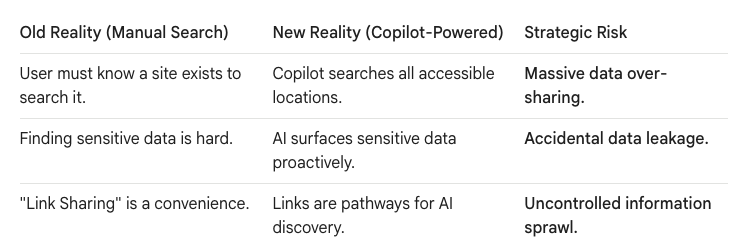
For years, organizations have operated on a "good enough" permissions model. A user might have access to a dozen SharePoint sites they no longer use, or a sensitive folder might be shared with "Everyone except external users." In a world where users had to manually hunt for files, this was manageable. The sheer effort required to find things acted as a natural, if inefficient, security layer.
Copilot obliterates that layer.
An AI-powered search can instantly find and synthesize data from every corner of the tenant a user has access to. That forgotten access to the "M&A Due Diligence 2018" site is no longer dormant; it's an active ingredient in every answer Copilot generates for that user.
The Blueprint for a Pragmatic Copilot Readiness Check
A true readiness check isn't just about technical prerequisites. It’s an architectural audit focused on preventing the most common failure points. We focus on three critical pillars.
Pillar 1: The "Least Privilege" Permission Audit
The core principle is simple: users should only have access to what they absolutely need to perform their jobs. Copilot makes enforcing this non-negotiable.
- Audit for Over-Provisioned Access: The most immediate threat is broad access grants. We run targeted audits to find and remediate sites and Teams using permissive groups like "Everyone except external users." The goal is to move from broad access to a model based on specific Microsoft 365 Groups.
- Hunt Down "Link Sprawl": Over-used "Anyone with the link" sharing is a primary vector for data leakage. Before enabling Copilot, you must get a handle on this. We recommend running a tenant-wide report on anonymous sharing links and establishing stricter default sharing policies, as detailed by experts like Gregory Zelfond at SharePoint Maven.
- Implement "Dark Mode" Deployment: Just as we build migrations in a staging area, access to sensitive data should be locked down before it becomes discoverable. We leverage Microsoft Purview sensitivity labels to enforce encryption and access controls, ensuring that even if a user can find a file, they can't open it without explicit permission.
Pillar 2: The "AI-Ready" Information Architecture
Copilot can't organize chaos. If your SharePoint environment is a digital landfill of deep folders and ambiguous filenames, the AI's output will be equally messy.
- Flatten the Architecture: Deeply nested folder structures are poison to effective AI search. They run into technical barriers like the SharePoint path length limit and make it difficult for the AI to determine which content is most relevant. We advocate for a "Pragmatic Hybrid" approach: shallow folders (2-3 levels max) enriched with metadata.
- Establish Foundational Metadata: You don't need to tag everything, but you must govern your most critical data. Using the SharePoint Term Store to define a central dictionary for terms like
Project Names,Department Codes, orDocument Statusprovides the context Copilot needs to deliver accurate, high-value answers. It can now understand that "Project Phoenix" is the same entity across Sales and Legal sites. - Clean the "Grey Zone": Every tenant has a "Grey Zone"—content with ambiguous ownership and relevance. Migrating this ROT (Redundant, Obsolete, Trivial) data "just in case" is a mistake. It pollutes search results and confuses the AI. A pre-Copilot cleanup is your best opportunity to archive or delete this content, ensuring the AI is working with a clean, relevant dataset.
Pillar 3: Optimizing the Search Index
Copilot doesn't search your files in real-time; it searches the Microsoft Search index. If a site isn't indexed correctly, its content is invisible to Copilot.
- Verify Site Indexing: Ensure that all critical SharePoint sites are set to be indexed by search. It's a simple setting that is often overlooked, especially on older sites.
- Prioritize Authoritative Sources: Use Microsoft Search's "Bookmarks" and "Q&A" features to designate official answers for common questions (e.g., "What is the employee holiday policy?"). This guides Copilot to provide users with curated, accurate information instead of trying to find the answer in a sea of outdated documents.
- Check for Broken Inheritance: Permissions inheritance in SharePoint is powerful but fragile. If inheritance is broken on a folder deep within a site, the search crawler may not have access to index its contents properly. An audit for broken permission inheritance is a critical step in troubleshooting search gaps.
Your Data as the Constant, Copilot as the Variable
By creating a clean, secure, and well-structured data foundation, you are not just preparing for Copilot; you are future-proofing your organization's information architecture. The AI agents will change and evolve, but your data architecture must be the constant.
A pragmatic readiness assessment is your single best opportunity to tame the digital sprawl of the past. It transforms the rollout of Copilot from a high-risk gamble into a strategic deployment, ensuring your organization can harness the power of AI intelligently and, most importantly, safely.
Would you like to explore how to perform a specific audit, such as identifying all anonymously shared links in your tenant? Contact us at www.ollo.ie

















