



Microsoft 365 E3 vs E5: Which Licence Is Right for Your Organisation?
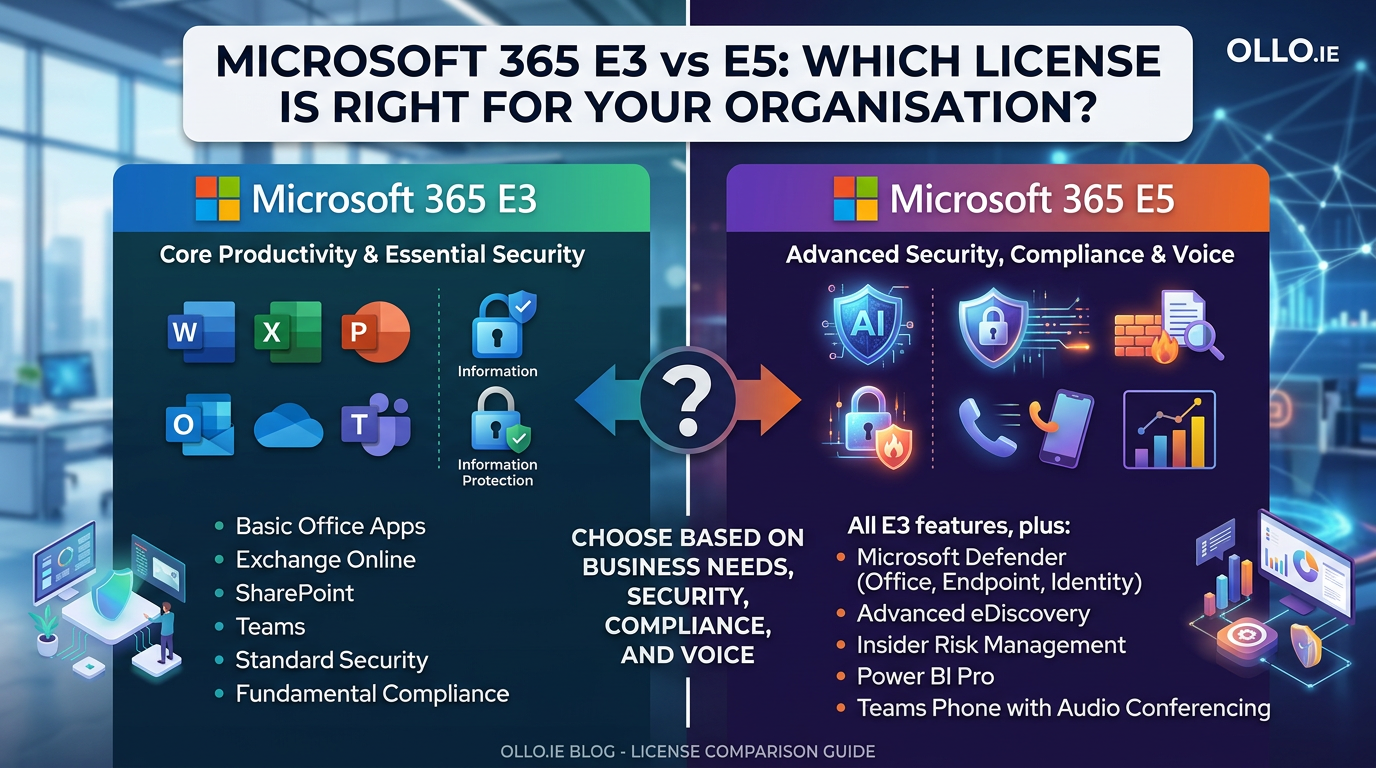
Choosing between Microsoft 365 E3 and E5 is a critical financial and architectural decision. E3 provides the foundational tools for productivity and collaboration, while E5 adds a sophisticated layer of advanced security, voice communication, and analytics. The right choice depends not on which is "better," but on your organisation's specific risk profile, regulatory requirements, and strategic goals for communication and data intelligence.
For many organisations, the decision feels like a significant price jump for features they don't fully understand. However, in our experience architecting secure enterprise environments, viewing E5 as a "cost" is a strategic mistake. E5 is an investment in risk mitigation and capability consolidation. The core difference is simple: E3 gives your team the tools to do their work. E5 gives your organisation the tools to protect, govern, and analyse that work at an enterprise scale.
The greatest risk isn't choosing the wrong license; it's paying for E5 and implementing it with an E3 mindset, leaving its most powerful security features unconfigured and your organisation exposed.
The Architectural Difference: Platform vs. Fortress
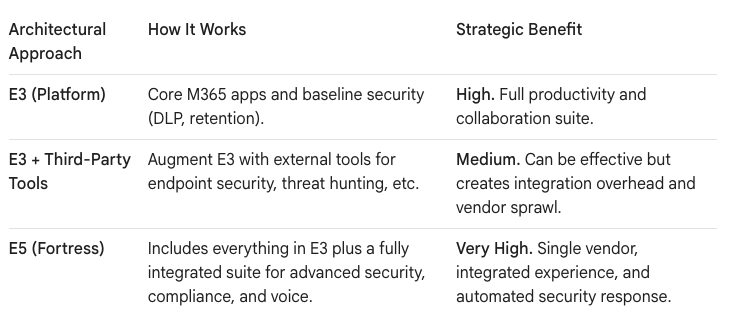
To make a strategic decision, you must stop comparing feature lists and start comparing architectural philosophies. Microsoft 365 E3 is a robust productivity platform. Microsoft 365 E5 is a security fortress with an advanced analytics engine built inside.
The trap most leaders fall into is underestimating the "hidden" costs of running E3. To achieve a similar level of security as a native E5 environment, an organisation on E3 must purchase, integrate, and manage a patchwork of third-party security tools. This creates architectural complexity and potential gaps in coverage.
The choice becomes clearer when framed as a strategic question: Do you prefer to build and manage your own multi-vendor security stack on top of E3, or do you want a fully integrated, single-vendor fortress with E5?
The Three Pillars of E5: Security, Compliance, and Voice
The value of upgrading from E3 to E5 is concentrated in three mission-critical areas. If your organisation has significant needs in any of these categories, the business case for E5 becomes compelling.
1. Advanced Security & Threat Protection
This is the most significant differentiator. While E3 provides a solid baseline, E5 delivers an intelligent, automated security operations (SecOps) platform.
- Endpoint Detection & Response (EDR): The flagship feature here is Microsoft Defender for Endpoint (Plan 2). While E3 includes basic antivirus, E5 provides a full EDR solution that detects and automatically investigates and responds to advanced threats on devices. In an E3 world, you would need to purchase a competing EDR product like CrowdStrike or SentinelOne.
- Identity & Email Protection: E5 upgrades you to Microsoft Defender for Office 365 Plan 2, which adds critical features like automated attack simulation training and threat investigation capabilities. More importantly, it includes Microsoft Defender for Identity, which monitors on-premises Active Directory signals to detect compromised identities—a crucial defense against modern cyberattacks.
- Cloud Application Security: E5 includes Microsoft Defender for Cloud Apps, a Cloud Access Security Broker (CASB) that gives you visibility and control over data traveling between your M365 environment and other cloud services.
2. Advanced Compliance & Data Governance
For organisations in regulated industries like finance, healthcare, or government, the compliance features in E5 are often a necessity, not a luxury.
- Intelligent Data Governance: E5 enables automated data classification. While E3 allows you to manually apply sensitivity labels, E5's automatic labeling can scan documents and emails and apply a "Confidential" label based on the content it finds, dramatically improving the accuracy of your data governance.
- Insider Risk Management: This E5-specific tool helps you identify and take action on potential data theft or leaks from internal users. It can detect patterns like a user downloading an unusual number of files before their resignation date.
- Advanced eDiscovery: E5's eDiscovery tools provide a more powerful and efficient way to handle legal discovery requests, allowing for deep analysis of large datasets without having to export them to a third-party platform.
3. Voice & Analytics
- Microsoft Teams Phone System: E5 includes the licensing for Teams Phone, turning Microsoft Teams into a full-featured cloud-based PBX system. With E3, this is an expensive add-on. If you are planning to replace a legacy phone system, the cost of the Teams Phone add-on for all your E3 users can often cover a significant portion of the upgrade to E5.
- Power BI Pro: Every E5 license includes a Power BI Pro license. For organisations committed to building a data-driven culture, this can represent a significant cost saving compared to licensing Power BI Pro separately for all E3 users.
The Pragmatic Decision: Who Truly Needs E5?
Let's be clear: not every organisation needs E5. A small business with a low-risk profile and no specific regulatory burdens can thrive securely on E3 with good hygiene. However, based on our experience, the tipping point toward E5 occurs when an organisation meets one or more of these criteria:
- You Have a Dedicated Security Team: If you employ security analysts, an E5 license gives them the integrated toolset (Defender suite) to proactively hunt for threats and manage vulnerabilities. Giving a SecOps team an E3 license is like asking them to be a bodyguard with one hand tied behind their back.
- You Are in a Regulated Industry: If you handle sensitive data subject to GDPR, HIPAA, or other compliance frameworks, the automated governance and advanced eDiscovery tools in E5 are essential for demonstrating compliance and reducing risk.
- You Are Planning to Consolidate Vendors: If you are already paying for separate EDR, threat intelligence, and eDiscovery solutions, a Total Cost of Ownership (TCO) analysis often reveals that consolidating those costs into a single E5 license is cheaper and architecturally simpler.
- You Are Adopting a Cloud-Native Phone System: If a move to a cloud PBX is on your roadmap, the inclusion of Teams Phone in E5 makes the financial math of upgrading highly attractive.
Your Data as the Constant, The License as the Enabler
A modern migration or license upgrade is an act of pragmatic architecture. It's an opportunity to build a more resilient, secure, and intelligent foundation for your organisation. E3 provides a solid base for collaboration, but E5 provides the integrated security and compliance that a modern enterprise requires.
The decision shouldn't be based on a spreadsheet feature comparison alone. It should be based on an honest assessment of your organisation's risk, your operational capabilities, and your strategic ambition. Choose E3 when you need a powerful productivity platform. Choose E5 when you need to protect that platform like a fortress.
Is your organisation currently evaluating its security posture or planning a move to a cloud phone system? These factors could significantly influence your licensing decision.

















