



Microsoft Teams Data Restructure: Architecting Permissions for the UI Layer
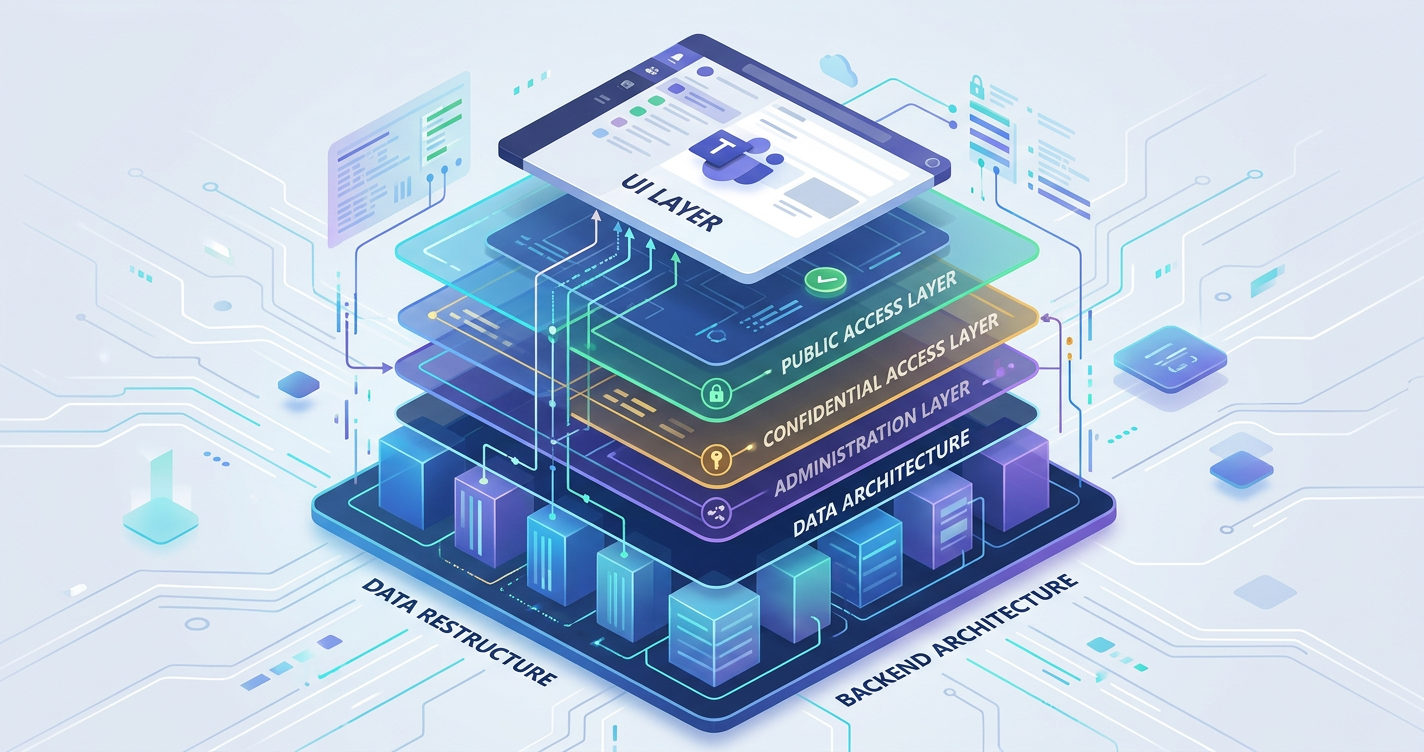
A Microsoft Teams data restructure involves mapping legacy file hierarchies into a flat, group-based architecture where Teams acts as the UI and SharePoint acts as the database. Migrating directly into Teams fundamentally alters permissions, requiring strict governance over Standard, Private, and Shared channels to prevent sprawl.
The trap most Architects fall into is treating a Teams migration like a file share upgrade. It is not. You are deploying a massive collaboration engine. If you lift and shift legacy folders directly into the Teams interface, you will destroy your digital employee experience.
The Illusion of the "Files" Tab
The reality we found is that users fundamentally misunderstand Teams. They view the "Files" tab within a channel as a traditional network drive. The technical truth is that Teams is merely a canvas. Every Team is backed by a Microsoft 365 Group and a SharePoint Site Collection.
When you drag a deeply nested legacy folder structure into a Teams channel, you are burying data deep within a default SharePoint document library. This immediately triggers path length limitations and severely degrades the Microsoft Search index.
If the search index cannot parse the deeply buried data, Copilot will fail to synthesize it. You are effectively blinding your own AI agents.
Navigating the Channel Architecture
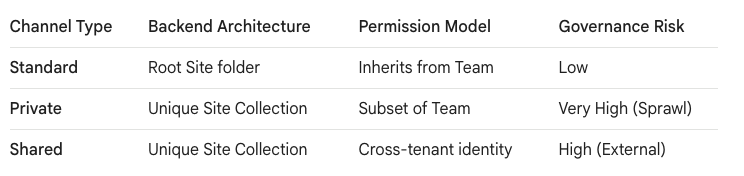
To restructure data for Teams, you must understand how channels dictate your backend SharePoint architecture. This is where IT loses control to the "Grey Zone" of user management. If you do not govern channel creation, users will architect a chaotic, unmanageable environment.
Microsoft provides three distinct channel types, each with massive architectural implications for your data lifecycle.
The "Grey Zone" of Decentralized Permissions
Moving users and data directly into Teams fundamentally changes your permission lifecycle. On a legacy file server, IT controls access. In Microsoft Teams, the Team Owners control access. This decentralized model is the definition of the Grey Zone.
You must train Owners, not just IT administrators. If a Team Owner creates a Private Channel, Microsoft provisions an entirely new, hidden SharePoint site collection stripped of the parent Team's permissions.
According to the SharePoint technical limits, a single tenant can handle millions of sites. However, your governance and compliance teams cannot manage millions of hidden sites created on a whim by users.
Governing the Structural Transition
We do not automate the creation of Teams without strict provisioning logic. Before migrating a single byte of data, you must map the legacy structure to a flat Teams topology. Large legacy departmental folders should become distinct Teams. Primary sub-folders should become Standard channels.
Never use Private channels to solve a complex permission requirement during a migration. As noted by structural experts at SharePoint Maven, if a subset of users requires heavily restricted access distinct from the broader Team, they require a completely separate Team, not a Private channel.
"Dark Mode" Deployment: Silencing the Noise
You cannot execute a data restructure into a live, populated Microsoft Team. If you migrate terabytes of data and restructure channels while users are actively working in the Team, you will trigger catastrophic "Notification Fatigue."
Users will be bombarded with alerts for every file uploaded and every channel created. Furthermore, staging data in a live environment creates massive "Search Bar Leaks." Users might stumble upon confidential restructure mapping files before the permissions are finalized.
The "Ollo Methodology" requires Dark Mode. We provision the Teams, create the channel architecture, and migrate the data using dedicated Service Accounts. The Team has absolutely zero human members during this phase.
The Final Cutover and User Injection
Once the data is staged in Dark Mode, we run automated permission audits against the underlying SharePoint sites. We verify that the M365 Group memberships align perfectly with the target architectural design and that no Private channels have broken the intended security boundaries.
Only when the security perimeter is fully verified do we execute the transition. We inject the users into the Microsoft 365 Groups overnight.
When users log in the next morning, the Teams appear seamlessly in their desktop client, fully populated, structurally sound, and AI-ready. This is how you engineer a migration that respects the technical limits of the platform while preserving the digital employee experience.

















