


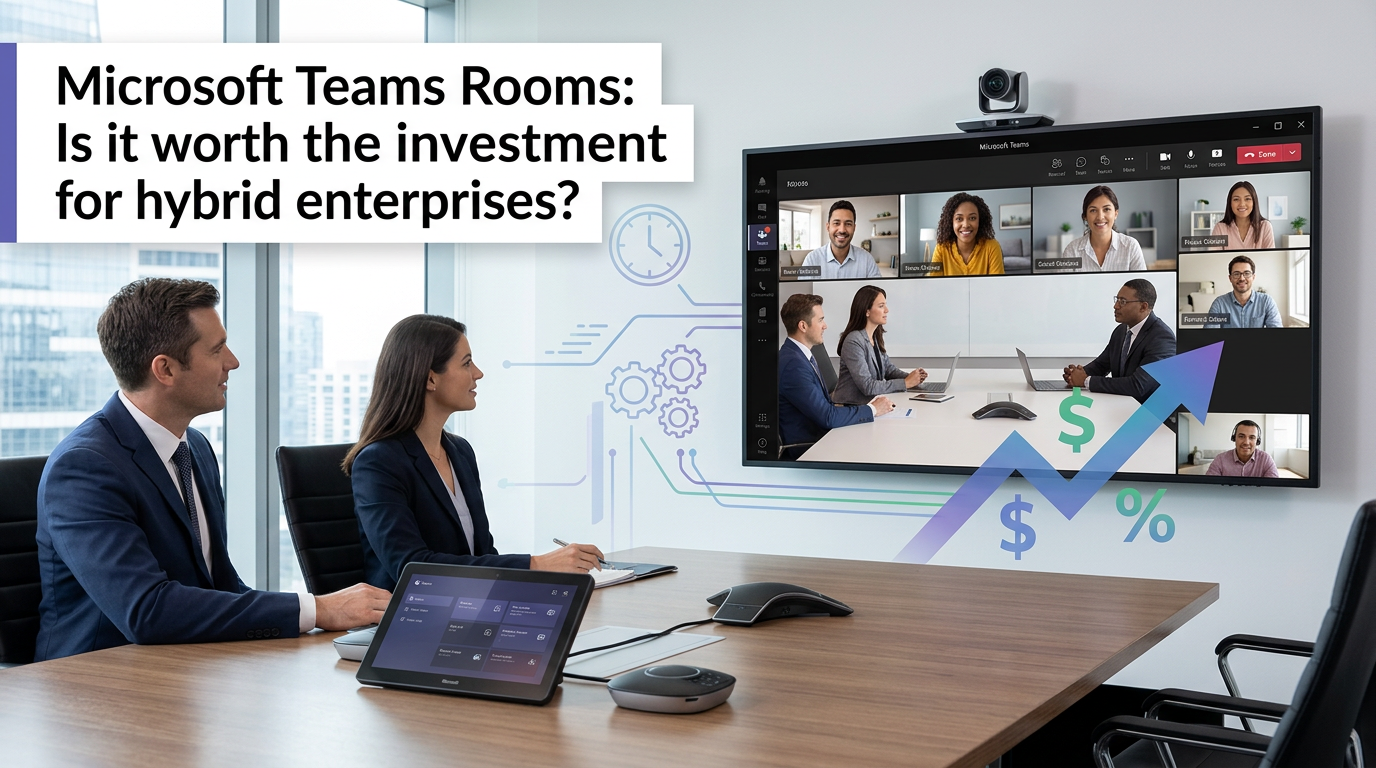

Microsoft Teams Rooms: Is It Worth the Investment for Hybrid Enterprises?
A Microsoft Teams Room is an integrated hardware and software solution designed to transform standard meeting rooms into native Microsoft Teams experiences. It combines certified audio and video peripherals with a dedicated compute unit running Teams software, ensuring a consistent, one-touch join experience and bridging the gap between in-person and remote participants in a hybrid work model.
In our experience architecting modern workplaces, the return to the office has created a new digital divide. The greatest challenge isn't getting people back into the building; it's ensuring that the collaboration experience is equitable for everyone, regardless of their physical location. A poorly equipped meeting room demotes remote attendees to second-class citizens, creating frustration and killing productivity.
For enterprises committed to a hybrid strategy, simply putting a webcam and a speakerphone on the table is no longer a viable solution. This is where Microsoft Teams Rooms shift from being a "nice-to-have" gadget to a strategic investment in business continuity and talent retention.
The Hybrid Meeting Dilemma: Why Your Old Setup Fails
The trap most IT leaders fall into is underestimating the friction of a bad meeting experience. When remote participants can't hear the side conversations or see who's speaking, they disengage. The meeting's value plummets. This creates three core problems that a dedicated Teams Rooms system is engineered to solve.
- Experience Inequity: Standard conference room setups often feature a single camera and microphone, creating a "bowling alley" view where remote attendees can't distinguish faces or read body language. In-room participants have a rich, collaborative session while remote workers are left feeling like passive observers.
- Cognitive Overload: Joining a meeting shouldn't be a puzzle. Fiddling with cables, selecting the right audio/video sources, and screen sharing issues all add cognitive load and waste the first ten minutes of every call. This "meeting setup tax" accumulates into significant lost productivity across the organization.
- Management & Security Sprawl: A fleet of unmanaged, consumer-grade devices in meeting rooms creates a security blind spot and a management nightmare. There's no centralized way to monitor device health, push updates, or ensure security compliance, leaving IT in a constant state of reactive support.
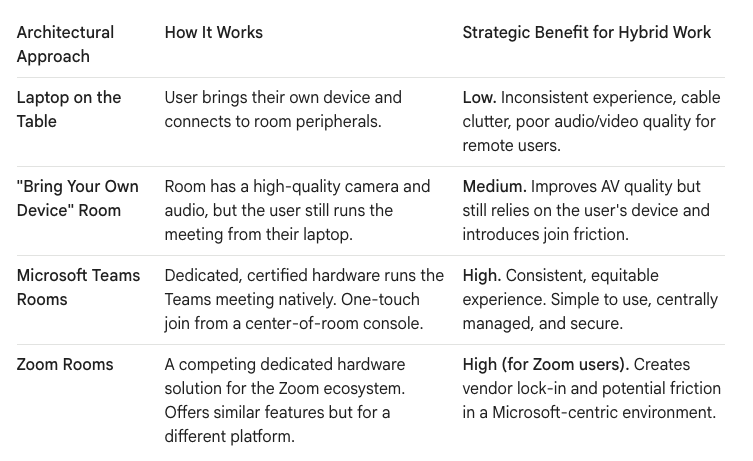
Architecting the Solution: Teams Rooms vs. The Alternatives
Choosing the right meeting room technology isn't just about the hardware; it's about the end-to-end user experience and the long-term management strategy. A simple webcam is fast to deploy but offers little value, while a full Teams Rooms deployment requires more upfront investment for a far superior and more secure outcome.
The Real-World Comparison: Teams Rooms vs. Zoom Rooms
For enterprises invested in the Microsoft 365 ecosystem, the primary competitor is Zoom Rooms. While both offer excellent in-room experiences, the decision often comes down to ecosystem integration and existing workflows. The "platform war" is a real consideration for architects.
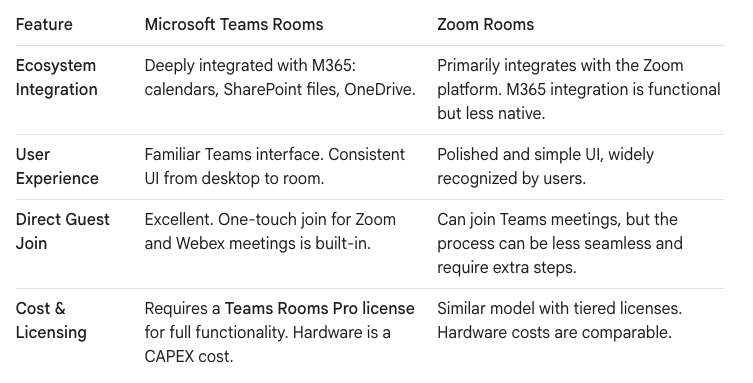
For a company where Teams is the hub for all internal collaboration, file sharing, and project management, forcing users to pivot to a Zoom Room for meetings creates a disjointed experience. In our view, aligning your meeting room strategy with your primary collaboration platform is critical.
The Deployment Blueprint: Cost, Setup, and Governance
A successful Teams Rooms rollout is a structured project, not an ad-hoc purchase. It follows the Ollo "Dark Mode" deployment philosophy: pilot, validate, and then scale.
1. Understanding the Cost
The investment breaks down into two main categories: software licensing and hardware.
- Licensing (The OPEX): The Microsoft Teams Rooms Pro license is the enterprise standard, costing approximately $40 per room per month. It includes critical features like the Pro Management Portal, intelligent camera/audio features, and multi-platform join. The free "Basic" license is limited to 25 rooms and lacks the management tools needed at scale.
- Hardware (The CAPEX): The cost varies by room size. A small huddle room kit from partners like Logitech, Poly, or Yealink might start around $2,000, while a large, integrated boardroom with multiple cameras and advanced microphones could exceed $15,000.
2. The Phased Setup
Never deploy to your entire organization at once.
- Phase 1: Pilot Program: Select 3-5 rooms of varying sizes. Deploy the hardware and Pro licenses. This is your "Dark Mode" environment to test the technology and gather real-world feedback from a pilot group of users.
- Phase 2: Develop Standards: Based on the pilot, create standardized hardware kits for your common room types (huddle, medium, large). This simplifies purchasing, deployment, and support.
- Phase 3: Scaled Rollout: Execute the deployment in waves, department by department. Each wave should be accompanied by clear communication and user training focused on the "one-touch join" simplicity.
3. Centralized Management and Governance
The true value for IT is realized through the Teams Rooms Pro Management Portal. This single pane of glass allows you to:
- Monitor Room Health: Proactively see if a camera, microphone, or console is offline before a user reports it.
- Automate Updates: Schedule and deploy software and firmware updates across your entire fleet from a central location, ensuring security and stability.
- Analyze Usage: Gain insights into room utilization to make data-driven decisions about future real estate and hardware investments.
Is It Worth It? Your Data Is the Constant, The Meeting Is the Variable.
For a modern hybrid enterprise, the meeting room is no longer just a physical space; it is a critical node in your communication network. An investment in Microsoft Teams Rooms is an investment in reducing friction, improving equity, and ensuring that every meeting, whether joined from the boardroom or a home office, is productive.
By standardizing on a managed platform, you turn a chaotic collection of devices into a reliable, secure, and strategic asset. The initial CAPEX is real, but the ROI—measured in reduced IT support tickets, increased meeting productivity, and a more connected workforce—makes it one of the most valuable investments an enterprise can make in the hybrid era.
Is there any specific aspect of the Teams Rooms setup or cost that you would like to explore further? Contact us on www.ollo.ie

















