



MS 365 after Merger: An IT Leader’s Survival Guide to Microsoft 365 Tenant Consolidation
A Microsoft 365 tenant consolidation is the strategic and technical process of merging two separate and distinct Microsoft 365 environments into a single, unified tenant. Following a merger or acquisition (M&A), this is not just an IT project; it is the digital execution of the business integration strategy, combining identities, data, and collaboration tools into one cohesive whole.
The ink on the M&A agreement is barely dry, and the directive from the executive board is clear: "Integrate the two companies. Make us one." For the CTO or IT Director, this translates into one of the most complex, high-stakes projects in enterprise technology. The executive team sees a synergistic new entity; you see conflicting domain names (@acquirer.com vs. @acquired.com), duplicate user accounts, and a labyrinth of permissions built over years.
In our experience as architects of these digital mergers, we’ve found that success is measured not just in terabytes moved, but in Day 1 productivity and seamless collaboration. A standard migration is a journey from Point A to Point B. An office 365 merger migration is like merging two speeding trains, loaded with live data and active users, onto a single track. Failure is not an option. This is your survival guide.
Why a Tenant-to-Tenant Migration Is More Complex Than Any Other
The architectural challenges of a tenant consolidation are an order of magnitude greater than a standard on-premises to cloud migration. You are dealing with two live, production environments, which introduces several unique and critical complexities:
- Identity Collision: This is the #1 source of failure. You aren't just creating users; you're merging identities. User Principal Names (UPNs), email addresses (SMTP), and security identifiers must be reconciled. The user
jane.doe@acquired.commay be the same person asj.doe@acquirer.com. Merging them without losing mailbox data, OneDrive files, or permissions is a monumental task. - Live Data Streams: In both tenants, email is flowing, Teams messages are being sent, and SharePoint sites are being updated simultaneously. You cannot simply "pause" the business for months while you move the data.
- Domain Name Conflict: You cannot have the same verified email domain (e.g.,
yourcompany.com) active in two tenants at once. The process of detaching it from the source and re-attaching it to the target is a high-stakes, precision maneuver that can stop mail flow if done incorrectly. - Business Process Entanglement: Workflows, custom apps, and third-party integrations are deeply tied to their source tenant's identity fabric. They will not "just work" after being moved; they must be re-engineered.
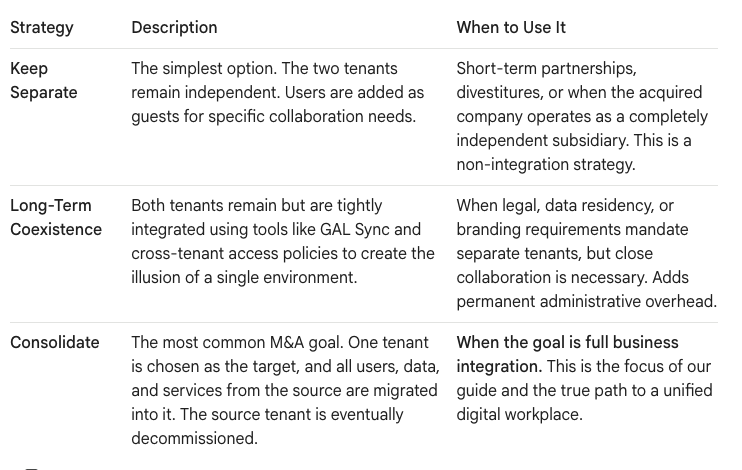
The First Critical Decision: The Three Consolidation Strategies
Before a single file is moved, you must work with business leadership to choose a foundational strategy. This decision dictates the entire scope and timeline of the project.
The Step-by-Step Guide to a Zero-Disruption Tenant Consolidation
A successful ms365 tenant merge is not a "big bang" event. It's a meticulously planned and phased program built on the principle of "coexistence first." We use the following five-phase architectural approach.
Phase 1: Strategy & Discovery (The Blueprint | Days 1-30)
This is the foundational planning phase. Do not rush it.
- Align with M&A Goals: Understand the business objectives. Is the acquired brand being retired? Which company's processes will take precedence? This will inform your technical decisions.
- Perform a Deep Tenant Analysis: Use third-party tools to audit both tenants. You need to know the total volume of data, the number of users, SharePoint sites, Teams, and the extent of customizations.
- Develop the Identity Mapping Strategy: This is the most critical step. Create a master list that maps every source user, group, and resource to its corresponding identity in the target tenant. Define rules for resolving UPN and SMTP address conflicts.
- Select Your Tooling: Native Microsoft tools are insufficient for a complex T2T migration. You will need enterprise-grade, third-party migration software (like ShareGate, AvePoint, or Quest) that can handle identity mapping and the complexities of moving Teams conversations and SharePoint permissions.
Phase 2: Building Coexistence (The Digital Handshake | Days 31-60)
During the multi-month migration, users from both companies must be able to collaborate seamlessly. This is not optional.
- Enable Cross-Tenant Access: Configure Azure AD B2B policies to control how users from the source tenant can access apps and data in the target tenant as guests.
- Synchronize Address Lists (GAL Sync): Implement Global Address List synchronization so that users in both tenants can see each other in their Outlook address book. Without this, finding someone to email is a nightmare.
- Share Calendar Availability: Configure Free/Busy sharing so users can see calendar availability across tenants, which is essential for scheduling meetings.
Phase 3: The Pilot Migration (The Blast Shield | Days 61-90)
Never attempt a mass migration without a successful pilot.
- Select a Pilot Group: Choose a tech-savvy group of 50-100 users from various departments. This group must be representative of the wider organization.
- Execute an End-to-End Migration: Migrate everything for this pilot group: their Exchange mailboxes, OneDrive accounts, personal SharePoint sites, and their access to a few shared Teams and SharePoint sites.
- Document and Refine: This is your "stress test." Document every single error and unexpected issue. Refine your scripts, your process, and your communication plan based on the pilot results. You will find problems here—and that is the entire point.
Phase 4: Wave-Based Migration (The Execution | Days 91-180)
With a validated process, you can now execute the mass migration in logical, manageable waves.
- Group users by department, region, or business unit. This allows your project team to provide focused "hypercare" support to each group as they are migrated.
- Communicate relentlessly. Users need to know when their migration is happening, what to expect, and how their login experience might change.
- Migrate workload by workload: The migration itself is a complex orchestration:
- OneDrive & Exchange: These are often migrated first in a user-by-user batch.
- SharePoint Consolidation After Acquisition: This is more complex. Decide whether to merge the acquired company's intranet into the parent structure or migrate their sites into a new, distinct Hub Site. The latter is often faster and less disruptive.
- Microsoft Teams: This is the hardest part. Third-party tools are essential to migrate not just the files, but the channel structure and, crucially, the conversation history to preserve context.
Phase 5: Domain Cutover & Decommissioning (The Final Switch | Days 181-200)
This is the final, high-stakes technical event.
- Schedule the Cutover Window: This must be done over a weekend. Communicate the planned downtime window to all users.
- Execute the Domain Switch: In a precise sequence, you will:
- Set a low TTL (Time To Live) on your DNS records in advance.
- Run final delta syncs of all data.
- Remove the domain from the source tenant.
- Immediately add and verify the domain in the target tenant and update user email addresses.
- Have a Rollback Plan: If the domain verification fails, you must have a documented plan to revert the changes and keep mail flowing in the source tenant.
- Decommission Gracefully: Do not delete the source tenant immediately. Keep it in a dormant state for at least 90 days in case any data was missed and needs to be retrieved.
The Real Cost of Failure
A botched microsoft 365 tenant consolidation merger has tangible business consequences. It erodes the value of the M&A by crippling productivity in the critical post-merger period. Users who can't find their files or collaborate with new colleagues become frustrated and disengaged.
A tenant consolidation is the ultimate test of an IT leader's strategic and technical capabilities. It requires meticulous planning, deep architectural expertise, and flawless execution under immense pressure. By approaching it with a structured, phased methodology, you can navigate the complexities and deliver a unified, productive environment that realizes the true value of the merger.
Ready to build your consolidation blueprint? Let’s architect your Day 1 success.

















