



Real World AI: 5 Business Processes to Automate with Microsoft Power Automate
Power Automate is Microsoft's low-code engine for automating repetitive, manual tasks across the Microsoft 365 ecosystem and beyond. It is not just a workflow tool; it is a platform for creating intelligent business process automation that connects disparate applications, synchronizes data, and makes decisions. By connecting to hundreds of services, it allows organizations to build resilient, automated processes that save time, reduce errors, and free up employees for higher-value work.
In our experience as architects, the most significant barrier to automation isn't technology; it's imagination. Business leaders often know they have process pain, but they struggle to see how a tool like Power Automate can be applied to their specific, real-world problems. The trap most fall into is thinking too small—automating a single alert instead of orchestrating an entire business process.
This article moves beyond theory. We will provide five concrete examples of business processes you can and should automate this quarter, complete with the architectural blueprint for how it's done. These are not "hello world" examples; they are robust solutions we have deployed to solve real business challenges.
1. The Modern Document Approval Workflow
The most common workflow in any business is the review and approval of a document. Yet, most organizations still manage this with a chaotic mess of emails, file versions like Contract_v7_FINAL_approved_2.docx, and verbal sign-offs. This is a classic "Grey Zone"—an ambiguous process ripe for architectural improvement.
We replace this chaos with a structured, auditable workflow built in Power Automate. This isn't just about modernizing old SharePoint Designer workflows; it's about creating a single, reliable system of record for approvals.
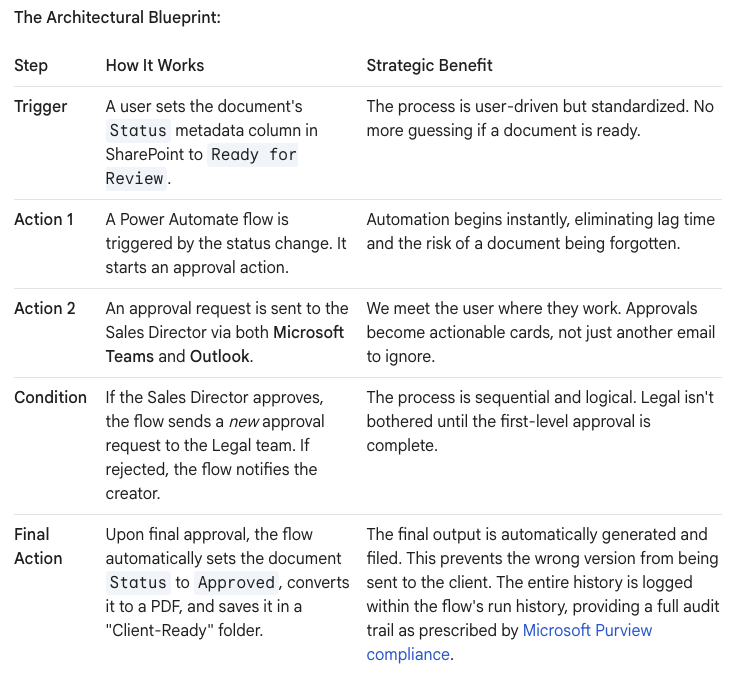
The Real-World Scenario: A sales proposal created in a SharePoint document library needs to be approved by both the Sales Director and the Legal department before it can be sent to a client.
The Architectural Blueprint:
2. Intelligent Invoice Processing with AI Builder
Accounts Payable is often a bottleneck, buried under a mountain of PDF invoices that must be manually keyed into a financial system. This is not just inefficient; it's prone to costly human error. By integrating Power Automate with AI Builder, we can teach a bot to read and understand your invoices.
The Real-World Scenario: Your company receives hundreds of PDF invoices from various suppliers via email each month.
The Architectural Blueprint:
- The Trigger: A flow is triggered when a new email with an attachment arrives in the
invoices@yourcompany.comshared mailbox. - The AI Model: The flow sends the PDF attachment to a pre-trained AI Builder Form Processing model. You train this model by showing it 5-10 examples of your typical invoices. You teach it to recognize key fields like
Invoice Number,Due Date,Total Amount, andSupplier Name. - Data Extraction: AI Builder "reads" the PDF and returns the data as structured variables. In our experience, the accuracy for standard invoices is remarkably high after only minimal training.
- Data Entry & Approval: The flow then takes this extracted data and:
- Creates a new item in a SharePoint list for tracking.
- Posts a message in a private "AP Approvals" Teams channel with the invoice details and a link to the file.
- Starts an approval process for invoices over a certain amount (e.g., $10,000).
- The Outcome: The manual data entry is eliminated. The AP team shifts from being data entry clerks to becoming reviewers and approvers, focusing only on exceptions. The process is faster, more accurate, and fully auditable.
3. The Automated Employee Onboarding Process
Onboarding a new employee is a complex dance between HR, IT, and the hiring manager. Done manually, it results in a poor first impression, with new hires waiting days for laptop access or the correct system permissions. Power Automate is the perfect conductor to orchestrate this cross-departmental process.
The Real-World Scenario: A candidate accepts an offer, and HR marks them as "Hired" in their HR system (e.g., Workday, or even just a SharePoint list).
The Architectural Blueprint:

This orchestrated flow ensures that all onboarding tasks are initiated, assigned, and tracked automatically. It provides a consistent, professional experience and removes the risk of critical steps being missed.
4. Proactive IT Support Ticket Triage
An unmanaged IT support inbox is a black hole. Users send vague emails, and skilled IT professionals waste time on basic triage instead of solving complex problems. We can insert Power Automate and its AI capabilities as an intelligent front door.
The Real-World Scenario: Users send emails to a central ITSupport@yourcompany.com address for all their technical issues.
The Architectural Blueprint:
- The Trigger: A flow triggers for every new email arriving in the IT Support mailbox.
- AI-Powered Analysis: The flow uses the built-in AI sentiment and text recognition actions.
- Sentiment Analysis: It first checks the sentiment of the email. If the user is flagged as "Negative" (e.g., using words like "urgent," "furious," "system down"), the flow can immediately escalate the priority.
- Key Phrase Extraction: The flow then extracts key phrases from the email subject and body, like "password reset," "VPN issue," or "monitor not working."
- Intelligent Routing: Based on the extracted key phrases, a
Switchaction in the flow routes the request:- If "password" is detected, it sends the user an automated reply with a link to the self-service password reset tool.
- If "VPN" is detected, it creates a ticket and assigns it directly to the Networking team.
- If "monitor" is detected, it assigns the ticket to the Hardware support team.
- The Outcome: The IT team is no longer the first line of defense for every single request. The "noise" is filtered out automatically, and tickets arrive at the correct destination pre-categorized. This reduces resolution time and allows specialists to focus on their work.
5. Automated Social Media Sentiment Analysis
In the digital age, your brand's reputation is being discussed publicly in real-time. Manually tracking every mention is impossible. This is a perfect use case for a Power Automate flow that acts as a 24/7 brand monitor.
The Real-World Scenario: The marketing team needs to be aware of what people are saying about the company on Twitter.
The Architectural Blueprint:
- The Trigger: A flow is configured with the Twitter connector to trigger whenever a new tweet is posted that contains a specific keyword (e.g., your company name
@Olloor product name#AwesomeProduct). The limits for this connector are clearly defined in the Power Automate documentation. - Sentiment Detection: The text of the tweet is passed to the AI Builder Sentiment Analysis action. It returns a score:
Positive,Negative, orNeutral. - Conditional Notification: The flow uses a condition to decide what to do next:
- If Negative, it immediately posts an urgent alert to the "PR Crisis" channel in Microsoft Teams, tagging the Head of Communications.
- If Positive, it posts the tweet to the "Marketing Wins" Teams channel for the team to see. It could even add the user to a list for future engagement.
- If Neutral, it might log the tweet in a SharePoint list or Excel file for historical analysis, without creating any "notification fatigue."
- The Outcome: This automation transforms a reactive marketing process into a proactive one. The team can amplify positive feedback and address negative customer experiences in near real-time, directly from within Microsoft Teams.
Your Data as the Constant, Automation as the Variable
These five examples are not just about saving time; they are about building a more resilient and intelligent organization. By architecting your business processes with Power Automate, you create a stable, reliable foundation. Your data and processes become a constant, allowing you to adapt and deploy new tools—including more advanced AI agents—with confidence, knowing the operational bedrock is solid.
Contact us on www.ollo.ie

















