



A SharePoint migration is the process of moving an organization's content, data, and applications from a legacy platform—such as an on-premise SharePoint Server farm, file shares, or other cloud storage—to SharePoint Online within Microsoft 365.
This is not a simple lift-and-shift operation. It’s a complex technical project requiring a strategic overhaul of security architecture, governance models, and collaboration workflows to fully leverage the Microsoft 365 cloud ecosystem.
Your Enterprise SharePoint Migration Playbook
For IT architects and infrastructure managers, particularly in regulated sectors like finance and healthcare, a SharePoint migration is far more than a simple infrastructure update. It’s a strategic transition to a cloud-native collaboration platform.
This guide provides a technical roadmap for migrating from legacy systems, such as SharePoint 2013 or disparate file servers, while re-architecting security and compliance for the Microsoft 365 ecosystem.
The primary technical objective is to consolidate siloed, on-premise platforms into a unified SharePoint Online environment. The core challenge—and opportunity—lies in redesigning governance and permission models from the ground up, not just migrating legacy misconfigurations into a new cloud tenant.
A Blueprint for Modernisation
This guide serves as a blueprint for transforming a complex migration project into a catalyst for business process modernization. We will focus on the critical technical components that determine the success or failure of a migration to Microsoft 365.
- Initial Discovery: A deep technical audit of source environments, including data volumes, API dependencies, and legacy customizations.
- Tenant Consolidation: Architecting a unified M365 environment, particularly critical when managing multiple tenants resulting from M&A activities.
- Governance Redesign: Re-architecting permissions and access controls based on Zero Trust principles, leveraging Entra ID and Conditional Access policies.
- Tooling Strategy: Implementing migration tools like ShareGate to ensure a high-fidelity transition with minimal downtime.
A successful SharePoint migration is fundamentally an exercise in risk management and modernisation. The goal isn't just to move data but to build a more secure, efficient, and compliant collaboration platform for the future.
Ultimately, this process is about maximizing the value of your Microsoft 365 investment. It establishes the technical foundation for integrating services like the Power Platform and Microsoft Copilot, transforming migrated content from a static archive into a dynamic, intelligent asset.
To begin, a thorough environmental analysis is critical. A free audit of your Microsoft 365 setup can help map your current topology and identify potential technical blockers. This foundational planning ensures your project delivers tangible, measurable outcomes from the outset.
Phase 1: Laying the Foundation for a Flawless Migration
A successful SharePoint migration is determined long before the first data packet is transferred. The foundational phase is about creating a detailed technical blueprint of your source environment, whether that’s an aging on-premise SharePoint farm, a complex network of file shares, or a third-party cloud storage solution.
Think of it as an architectural survey before a major renovation. You wouldn’t start removing servers without understanding application dependencies and data flows. Similarly, you must map your entire data landscape with precision. This initial inventory goes beyond simple data volume metrics; it's a deep analysis to uncover legacy customizations, convoluted permissions, and business-critical workflows that will fail in a cloud environment.
Conducting a Deep Environmental Inventory
First, you need a precise inventory of your source systems. For on-premise SharePoint farms, this involves using discovery scripts and tools to catalogue everything—from site collections and content database sizes to legacy web parts and full-trust code solutions. If migrating from file shares or another cloud platform, the focus shifts to analyzing folder structures, identifying file types, and mapping existing Access Control Lists (ACLs).
This audit provides the raw data needed to define the project scope and, more importantly, to identify hidden technical debt that could derail the execution phase.
- Customisation Analysis: The first priority is to identify all legacy code, such as full-trust solutions, InfoPath forms, and SharePoint Designer workflows, which are incompatible with SharePoint Online. Each discovered artifact requires a technical decision: retire, replace, or re-architect using modern frameworks like the Power Platform.
- Permission Mapping: Document the existing access control model. You will almost certainly uncover a complex web of nested security groups and broken permission inheritance that is unmanageable. This map serves as the baseline for designing a simplified and secure model based on Microsoft 365 Groups.
- Workflow Discovery: Identify all automated processes, with a specific focus on those built with the deprecated SharePoint Designer engine. These represent critical business functions that will cease to operate unless they are re-engineered in Power Automate.
Before proceeding, a comprehensive checklist is crucial for forcing the right technical conversations and understanding the true complexity of the environment.
Pre-Migration Assessment Checklist
Assessment AreaKey Questions to AskTools & MethodsData Volume & StructureWhat is the total size of the data? How many files and folders? What's the average file size and depth of folder structures?Storage analysis reports, PowerShell scripts, tree-size tools.ROT Data AnalysisWhat percentage is Redundant, Obsolete, or Trivial? When was the data last accessed? Who are the owners?Data classification tools, stakeholder interviews, file age reports.Permissions & SecurityHow complex are the current permissions? Is there broken inheritance? Who has access to what, and is it appropriate?Permission reporting tools (e.g., ShareGate), security group analysis.Customisations & WorkflowsAre there custom web parts, InfoPath forms, or SharePoint Designer workflows? What business processes do they support?On-premise farm reports, code analysis, stakeholder workshops.Business ImpactWhich sites and data are most critical? What are the peak usage times? Are there any hard deadlines (e.g., server end-of-life)?User surveys, interviews with department heads, IT infrastructure audit.User & Stakeholder NeedsWhat are the biggest pain points with the current system? What functionality do users need most in the new environment?Focus groups, workshops, user feedback sessions.
This checklist ensures a 360-degree view of the environment, moving beyond technical statistics to understand the business context of the data being migrated.
Tackling Redundant and Obsolete Data
A migration provides a non-negotiable opportunity to remediate years of unmanaged data growth. Failing to address Redundant, Obsolete, and Trivial (ROT) data means migrating legacy problems into a more expensive cloud environment.
A "lift and shift" migration without a proper clean-up is a massive missed opportunity. Every terabyte of ROT data you move increases your cloud costs, complicates governance, and pollutes search results, degrading the user experience from day one.
This requires a data classification exercise with business stakeholders to determine what must be archived for regulatory compliance and what can be securely deleted. This single step can significantly reduce migration scope, timeline, and overall cost. You can learn more about the hidden costs of poor data governance in our deep-dive article.
Defining What Success Actually Looks Like
Finally, define the technical success criteria for the migration. Vague goals like "improve collaboration" are insufficient. You need clear, measurable metrics defined in collaboration with IT, business, and compliance stakeholders.
These metrics transform a technical project into a strategic initiative with demonstrable business value. In the UK, where 187,000 businesses use Microsoft 365, migrating to SharePoint Online is a key strategic move. This high adoption rate underscores the platform's central role in modern IT architecture, as detailed in the state of SharePoint adoption on SharePoint Advisor.
Your success criteria should be specific and quantifiable:
- Security Enhancement: Achieve a 90% reduction in folders with broken permission inheritance.
- Operational Efficiency: Decommission three legacy on-premise servers, saving specific maintenance and licensing costs.
- User Collaboration: See a 40% increase in document co-authoring within the first three months post-migration.
With a deep inventory, a lean data set, and clear technical goals, you have the solid foundation required to build a migration plan that delivers measurable value upon go-live.
Phase 2: Architecting a Modern Governance and Security Framework
A SharePoint migration is a prime opportunity to dismantle outdated, perimeter-based security models. A common critical error is "lifting and shifting" legacy permissions, which directly transposes existing security risks into the new cloud environment. This phase is about architecting a modern, cloud-native framework based on Zero Trust principles to ensure the new SharePoint ecosystem is secure by design.
We must shift from the legacy "castle-and-moat" security posture, where internal network traffic was implicitly trusted. The modern paradigm assumes every access request is a potential threat until explicitly verified. This is non-negotiable for protecting sensitive data in a hybrid work environment against sophisticated cyber threats.
Modernising Identity with Entra ID
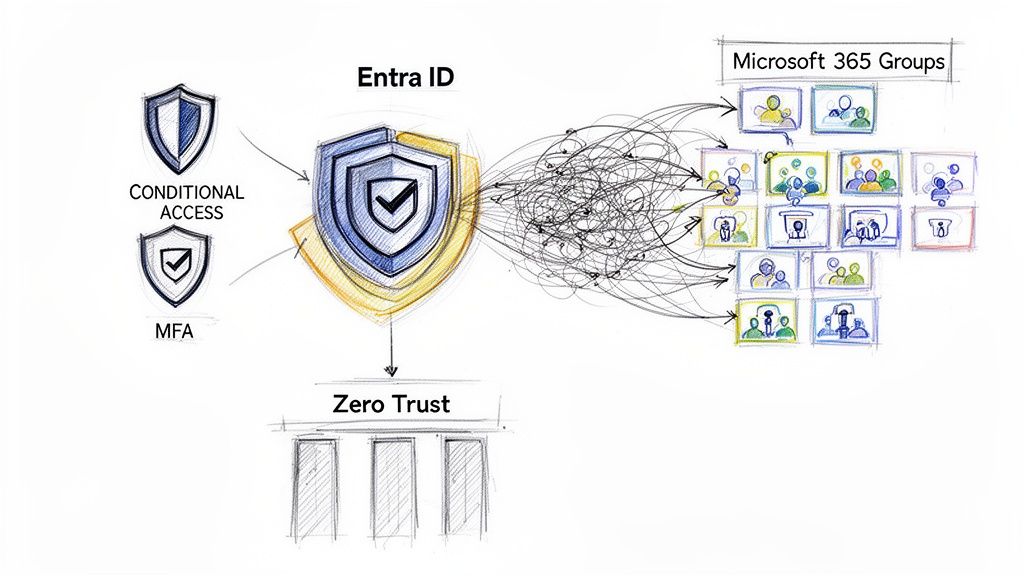
Modern security architecture begins and ends with identity. For any organization migrating to Microsoft 365, this requires establishing Microsoft Entra ID (formerly Azure Active Directory) as the single authoritative source for all user, group, and device identities. Entra ID serves as the central control plane for managing access policies across the entire Microsoft 365 tenant.
This centralization is the first critical step toward simplifying identity management and strengthening security. Instead of managing disparate identity systems, all identities are unified, providing a comprehensive and auditable view of the access landscape.
The core principle of Zero Trust is simple: never trust, always verify. During a SharePoint migration, this means treating every access request—whether from inside or outside your corporate network—as a potential threat until proven otherwise. This is achieved by verifying identity, device health, and location for every single session.
By consolidating identity into a single platform, you establish the foundation for implementing advanced, granular security controls that were unavailable in legacy on-premise environments.
Enforcing Granular Control with Conditional Access
With Entra ID as the identity foundation, the next step is to implement Conditional Access policies. Conditional Access functions as an intelligent, real-time policy engine for your data. It evaluates multiple signals for each access request before granting or denying entry to SharePoint resources.
These policies are not binary on/off switches; they are highly contextual, enabling a balance between robust security and user productivity.
- User Location: Require multi-factor authentication (MFA) for access attempts originating from outside the corporate network, while allowing seamless, passwordless access from trusted corporate locations.
- Device Health: Restrict access to company-managed, compliant devices, preventing sensitive data from being downloaded to personal or unmanaged endpoints.
- Application Context: Configure policies that allow users to view documents from any device but restrict download or print actions unless they are on a trusted machine.
- Real-time Risk: Entra ID can detect anomalous sign-in behavior, such as "impossible travel" scenarios, and automatically trigger an MFA prompt, a password reset, or an access block.
This risk-based approach ensures that security measures are proportional to the threat level, avoiding unnecessary friction for low-risk activities while applying stringent controls where they are most needed.
Redesigning SharePoint Permissions with Microsoft 365 Groups
One of the most significant challenges in legacy SharePoint environments is permission complexity. Over time, sites accumulate a convoluted mess of unique permissions and nested security groups, making it nearly impossible to audit access effectively. The migration is the opportunity to remediate this by adopting a modern permissions model.
The modern approach is to replace complex permission inheritance with a simplified model built on Microsoft 365 Groups. Instead of managing permissions at the item or folder level, access is managed at the group level. A user is either a member of the group with access or is not.
This model provides several key advantages:
- Simplicity and Scalability: Permissions become straightforward to manage and audit. Adding or removing a user from a group automatically propagates access changes across all connected resources, including the SharePoint site, Microsoft Team, and shared mailbox.
- User Empowerment: Business users can manage group memberships without IT intervention, reducing administrative overhead.
- Consistency: Access controls are standardized across the entire Microsoft 365 suite, creating a secure and predictable user experience.
By aligning your governance strategy with these modern tools, you create an environment that is secure, compliant, and genuinely easy to manage. This foundation is crucial for building a scalable cloud architecture. You can explore expert strategies for Microsoft 365 and Azure services to learn more about architecting a secure cloud foundation from the ground up.
Phase 3: Executing the Migration with Technical Precision
With planning complete and the governance framework designed, the project moves into the execution phase. This is where meticulous planning is translated into the physical process of data movement. Success is now measured by data throughput, integrity, and a seamless final cutover for end-users.
Executing a large-scale migration is not a monolithic task but a series of carefully orchestrated technical steps. It requires selecting the right tools, optimizing performance to mitigate throttling and other bottlenecks, and conducting disciplined pilot tests to validate all assumptions. This phase transforms strategy into tangible progress, moving data securely and efficiently to its new home in Microsoft 365.
Choosing Your Migration Toolset
The first major technical decision in this phase is the choice of migration tooling, which will directly impact the project's velocity, reliability, and reporting capabilities. For enterprise SharePoint migrations, there are two primary options.
- Third-Party Migration Tools (e.g., ShareGate): These solutions are purpose-built for the complexities of real-world migrations. They provide intuitive UIs, detailed pre-migration analysis, and robust reporting capabilities that automate countless hours of manual effort. Tools like ShareGate excel at handling complex permission mappings, preserving metadata, and providing clear dashboards to track progress and remediate errors. For most enterprises, the investment in a dedicated tool yields a significant ROI through risk reduction and accelerated timelines.
- Scripted Approaches (PnP PowerShell): For teams with deep technical expertise and highly specific requirements, a scripted approach using the Patterns and Practices (PnP) PowerShell module offers maximum flexibility. This method provides granular control over every aspect of the migration, enabling custom logic and complex integrations. However, it comes with a substantial overhead in development, testing, and maintenance, as you are effectively building a custom migration engine.
A hybrid approach is often optimal, using a commercial tool for the bulk of the data movement while leveraging PnP PowerShell for specific edge cases or custom transformations.
Navigating Performance Bottlenecks
Once data movement begins, performance optimization becomes a primary concern. A common pitfall in any SharePoint migration is underestimating throttling, both at the source system and at the Microsoft 365 destination. This is an expected behavior that must be factored into the project plan.
The biggest risk during execution isn’t a catastrophic failure. It’s a ‘death by a thousand cuts’ from persistent performance issues. Proactive performance tuning and realistic scheduling are the only ways to maintain momentum and hit your deadlines.
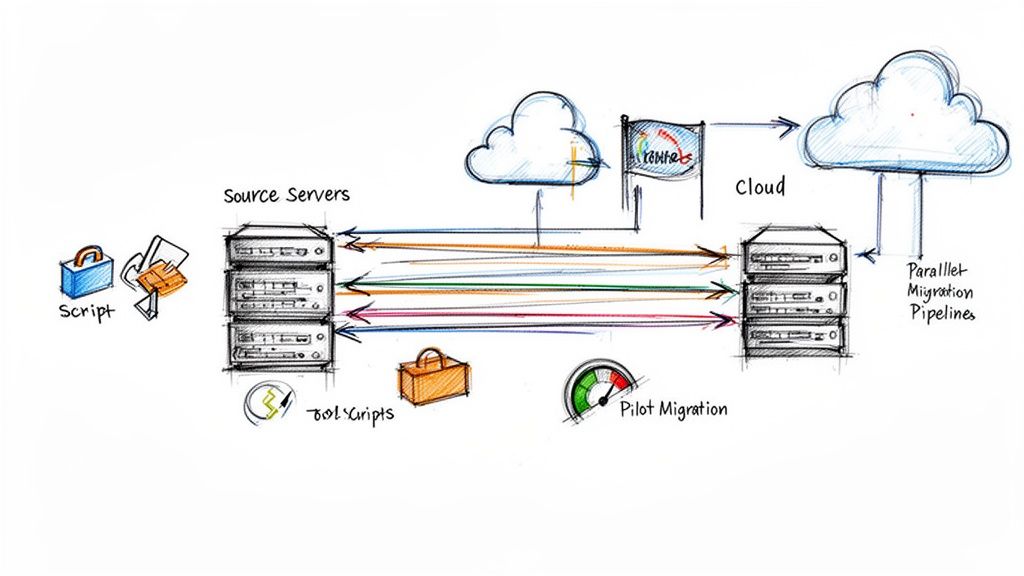
Migration throughput can vary significantly, from 1 TB/day for medium-sized Office files to as low as 250 GB/day for large numbers of small, metadata-heavy items. Experienced partners mitigate this by running pre-migration cleanup scripts, executing tasks in parallel across multiple site collections (up to a recommended 5,000 jobs), and scheduling large data transfers during off-peak hours. This transforms the migration into a predictable, manageable process. You can find more detail on migration speed and performance on the Microsoft Learn portal.
Key strategies to maximize throughput include:
- Running Parallel Jobs: Instead of migrating a single large site collection in one job, partition the content into multiple smaller jobs that can run concurrently.
- Leveraging Azure Infrastructure: Staging the migration from an Azure Virtual Machine within the same region as your Microsoft 365 tenant can significantly reduce network latency.
- Optimising Package Size: Both Microsoft's native tooling and third-party solutions package data for transfer. Optimizing the package size is crucial for maximizing throughput.
The Critical Role of Pilot Migrations
Before migrating production workloads, conducting pilot migrations is mandatory. A pilot serves as a full-scale dress rehearsal using a small, controlled, yet representative subset of data. This is not an optional step; it is where the migration plan is validated against real-world conditions.
A well-executed pilot validates the chosen tooling and methodology, allowing for process refinement and the creation of a repeatable runbook. It helps uncover unexpected issues—such as undocumented customizations or problematic file types—before they can impact a business-critical workload.
Finally, pilots provide invaluable data for forecasting. By measuring the duration and analyzing the error logs of the pilot, you can build a more accurate timeline for the full-scale migration. This data-driven approach builds stakeholder confidence and ensures the final cutover can be executed with precision and zero data loss. For organizations seeking to guarantee a flawless execution, professional SharePoint migration services can provide the necessary expertise to navigate these technical complexities.
Phase 4: Seeing it Through – Validation and Cloud Integration
Migrating the final file does not conclude the project. The true value of a SharePoint migration is realized post-cutover. The cutover marks the beginning of the operational phase, where we validate data integrity, finalize security configurations, and integrate the new SharePoint environment with the broader Microsoft 365 ecosystem.
This final phase begins with the cutover itself—the point at which DNS records are updated and users are redirected to SharePoint Online. This involves a final delta synchronization to capture any last-minute changes, followed by the systematic decommissioning of legacy systems.
The Post-Cutover Sanity Check
Immediately following the cutover, the primary objective is to validate that all data has been migrated with full fidelity. This is a comprehensive audit to confirm data integrity, functionality, and security. A structured validation checklist is non-negotiable.
Your validation process must cover several key areas:
- Data Integrity Check: Use migration tool reports to compare item counts between the source and destination. Perform spot-checks on critical documents and list items to ensure version histories and metadata (e.g., 'Created By', 'Modified By') have been preserved.
- Permissions and Access Control: This is critical. Verify that the new Microsoft 365 Group-based permissions have been applied correctly. Test access using multiple user accounts with different roles (e.g., site owner, member, visitor) to confirm that the principle of least privilege is enforced.
- Functionality Testing: Validate core functionalities. Test the in-browser rendering of common file types. Verify that search indexes have been updated and that new content is discoverable. For any workflows re-engineered in Power Automate, execute them to confirm they function as expected.
- Links and Navigation: Perform a link validation audit on hub sites and homepages to ensure all navigation elements point to new SharePoint Online locations and not to decommissioned on-premise URLs.
Successful validation provides the confidence and audit trail necessary to formally sign off on the migration.
Your Failsafe: The Rollback Plan
Even with meticulous planning and successful pilots, a documented rollback plan is an essential component of risk management. This plan outlines the precise technical steps required to revert users to the legacy system if a critical, unresolvable issue is discovered post-cutover.
A rollback plan is your ultimate safety net. You hope you never have to use it, but the process of creating one forces you to think through every potential point of failure. It makes your cutover stronger just by existing.
The plan must define specific rollback triggers, identify the decision-making authority, and detail the communication protocol. Crucially, it must also specify the "point of no return"—the moment at which the decommissioning of the legacy environment makes a rollback technically infeasible.
Plugging into the Microsoft 365 Ecosystem
Validation is just the beginning. The transformative potential of the migration is realized by integrating SharePoint with the rest of the Microsoft 365 suite, converting static file repositories into dynamic collaboration hubs.
- Microsoft Teams Integration: Connect SharePoint sites directly to Microsoft Teams channels. This creates a unified interface where conversations, files, and applications coexist, reducing context switching for users.
- Power Platform Automation: Replace legacy on-premise workflows with cloud-native solutions. Utilize the Power Platform to build sophisticated approval processes, automated notifications, and data synchronization tasks that are fully integrated with SharePoint.
- Microsoft Copilot Readiness: A well-structured SharePoint environment with robust, modern permissions is a prerequisite for leveraging AI effectively. A clean and secure information architecture ensures your organization can take full advantage of Microsoft Copilot for intelligent search, content summarization, and automated content generation.
By focusing on these deep integrations, you ensure the migration delivers not just a new platform, but a fundamentally more powerful and integrated way of working.
Driving User Adoption and Measuring Business Impact
A technically flawless SharePoint migration can still fail if users do not adopt the new platform. Technology is only half the equation; the human element is what ultimately determines the project's return on investment.
Driving adoption requires a strategic approach focused on communication, targeted training, and demonstrating how the new system solves specific user pain points and improves their workflows.
This means replacing generic user guides with role-based training. End-users need to understand practical applications, such as co-authoring documents within Teams, while site owners require deeper training on managing permissions through Microsoft 365 Groups without relying on IT support.
A clear day-one support model is also crucial. Establishing a network of "SharePoint Champions"—power users embedded within business departments—provides a first line of support, reducing the burden on the IT helpdesk and fostering a culture of self-service.
Creating Targeted Training and Communication
One-size-fits-all training is ineffective. Training must be tailored to the specific workflows and technical requirements of different teams, demonstrating how the new platform addresses their daily challenges.
- For Sales Teams: Develop concise video tutorials showing how to access the latest proposal templates from the SharePoint mobile app while in the field.
- For Project Managers: Conduct workshops on integrating a SharePoint document library as a tab within a project's Microsoft Teams channel, centralizing all project documentation.
- For Site Owners: Provide a detailed runbook on managing group membership and configuring basic site settings to empower them to manage their own resources.
This approach transforms training from a mandatory task into a valuable resource that accelerates user adoption. To see what a successful outcome looks like, check out some of our SharePoint migration case studies. They show how we've helped organisations like yours achieve high user engagement after the technical work is done.
Measuring the True Return on Investment
Finally, it is essential to circle back to the success criteria defined during the planning phase. This connects the technical project to tangible business outcomes, proving the strategic value of the migration. We must move beyond simple metrics like "data volume moved" and focus on Key Performance Indicators (KPIs) that resonate with business leadership.
The ultimate measure of a successful SharePoint migration isn't how many terabytes you moved; it's how you've improved the way your organisation works. Quantifiable improvements in productivity, security posture, and operational costs are what demonstrate true business impact.
When planning ROI calculations, a realistic timeline is key. For most enterprise projects in the IE region, SharePoint migrations typically span 3-6 months, accounting for complexities like custom integrations and large data volumes. Migration speeds can be deceptive; you might hit 10 TB/day for simple, light content but see that drop to just 250 GB/day for heavy loads with custom columns and complex permissions. You can explore more data on SharePoint migration timelines and performance to benchmark your project plans.
Instead of reporting solely on data volume, track metrics such as a reduction in IT support tickets related to file access, an increase in document co-authoring sessions, or faster document retrieval times. These data points provide the hard evidence needed to demonstrate a clear and compelling ROI to stakeholders.
SharePoint Migration: Your Questions Answered
When planning a SharePoint migration, numerous technical questions arise. Obtaining clear, practical answers upfront is critical to avoiding predictable and costly project roadblocks. Here are the most common questions from IT leaders and our approach to addressing them.
What Are the Biggest Risks and How Do We Dodge Them?
The three primary technical risks are data loss during transit, extended business downtime, and misconfigured permissions leading to security vulnerabilities in the new environment. All are manageable with proper planning and execution.
A thorough pre-migration assessment is the first line of defense. This is where you identify and plan for legacy customizations and complex permission structures. Next, utilize a professional-grade migration tool. Solutions like ShareGate are designed with built-in checks and balances to ensure data fidelity.
Your rollback plan is the ultimate safety net, but pilot migrations are your best line of defence. By testing the entire process on a small but representative chunk of data, you can work out all the kinks, validate your timelines, and build confidence in a controlled, low-impact setting.
Finally, a meticulous post-migration permissions audit is non-negotiable. This step verifies that the new governance model has been correctly implemented, preventing accidental data exposure and closing potential security gaps from day one.
How Should We Handle Old Customisations and Integrations?
Legacy customizations, particularly full-trust code solutions from SharePoint 2013 and earlier, are incompatible with SharePoint Online. They represent a significant project risk, but the migration provides the ideal opportunity to remediate this technical debt.
Begin with a complete inventory of every customization and integration. For each, conduct a business value assessment. Many can often be retired, as their functionality is now available through modern, out-of-the-box SharePoint features.
For critical functions that must be retained, the Power Platform provides a robust, fully supported framework for re-architecting them as cloud-native solutions. For third-party integrations, verify their compatibility with SharePoint Online and plan to either reconfigure them or identify a modern equivalent in the Microsoft AppSource marketplace.
Should We Do a Phased Migration or a "Big Bang" Cutover?
For any enterprise-scale SharePoint migration, a phased approach is the only responsible technical strategy. A "big bang" cutover, which attempts to move all data and users in a single event, is extremely high-risk and is only suitable for the smallest, simplest environments.
A phased migration allows you to partition the project into manageable workstreams, typically organized by department, region, or data type. This methodology offers several significant advantages:
- Risk Reduction: Any issues that arise are contained within a single phase, preventing a global impact on the organization.
- Minimal Disruption: The majority of the business continues to operate without interruption while individual teams are migrated in planned waves.
- Continuous Improvement: The technical team can learn from and refine the migration process with each phase, creating a highly efficient and repeatable model by the final stages.
This iterative strategy is the proven path to a successful and low-risk migration, particularly in regulated industries where data integrity and service uptime are paramount.
A well-planned SharePoint migration does more than just modernise your infrastructure; it fundamentally improves how your business operates and secures its data. Ollo specialises in guiding enterprises through this complex journey, ensuring a seamless transition with zero data loss. Book a consultation with us today to start building your migration roadmap.
Article created using Outrank

















