



The 400-Character Wall: Surviving File Path and OneDrive Sync Failures
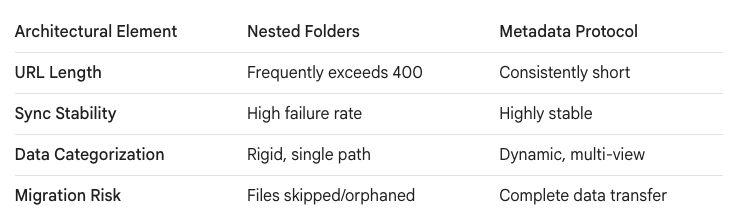
SharePoint file path limits restrict the total URL length of a document to 400 characters. Deeply nested legacy folders consistently breach this threshold during migrations, resulting in orphaned data, broken links, and catastrophic OneDrive sync failures across Windows applications.
In our experience, users love folders. They create folders inside folders to simulate categorization. On a local file server, Windows might tolerate this. But the cloud has strict structural rules, and the 400-character URL limit is absolute.
The trap most Architects fall into is ignoring the translation from local drives to cloud URLs. A file named Q3_Report.docx might be fine on a server, but in SharePoint, its path includes the tenant name, site name, library name, and every nested folder.
The Reality of the Path Limit
When migrating terabytes of data, path length violations are guaranteed. Native migration tools simply skip these files. The reality we found is that IT teams are often left with thousands of unmigrated, highly critical files scattered across legacy servers.
This limit is heavily documented in OneDrive and SharePoint restrictions. You cannot engineer a workaround to increase this limit. You must engineer your data to fit within it.
The pain is most acutely felt when users attempt to sync libraries using the OneDrive client. If a library contains files near or over the limit, the sync engine will crash, causing a cascade of errors across Windows applications that rely on that local cache.
The OneDrive Sync Cascade Failure
When the sync client fails due to path limits, the user experience degrades instantly. We frequently see users saving documents locally because their OneDrive is stuck in a perpetual "syncing" loop.
This creates massive version control issues. Furthermore, legacy applications that require local file paths (like older ERP macros or complex Excel models) break completely when the path exceeds limits or fails to sync. For deep dives on sync troubleshooting, we often reference SharePains for community-validated workarounds.
Metadata: The Structural Cure
The architectural solution is to replace deep folder trees with metadata. This is the "Ollo Methodology" for data resilience. By utilizing the SharePoint Term Store, you eliminate the need for folders entirely.
Instead of nesting a file in /Finance/2024/Q3/Reports/, you place it in a single /Reports/ library and tag it with Year:2024 and Quarter:Q3. This drastically reduces the URL length while vastly improving searchability for both humans and Copilot.
Deployment: Scripting the Truncation
During the migration, you cannot manually rename thousands of files. We use custom PowerShell protocols to identify files that will breach the limit before the migration begins.
We script intelligent truncation rules. Often, we programmatically convert the names of the top three folder tiers into metadata tags, flattening the data as it moves into the staging environment.
This is deployed in "Dark Mode" to ensure no critical filename data is lost during the truncation process. Only when the sync client validates the staging library do we proceed to production.

















