



The most popular advice about Microsoft Viva is also the most dangerous. People talk about it like it's an app you switch on in Teams, then watch culture, communication, and insight improve. That advice gets projects into trouble.
Microsoft launched Microsoft Viva as a formal employee experience brand in 2021, and positioned it as a suite built into Microsoft 365 and Teams rather than a standalone app, as shown in Microsoft Viva Insights product documentation. That sounds tidy. In reality, Viva acts like a diagnostic light for your tenant. If your Microsoft 365 estate is well governed, Viva can expose useful signals. If your tenant is full of broken inheritance, stale groups, unmanaged SharePoint sprawl, and weak retention design, Viva will surface your mess at scale.
I'm writing this for the IT Director who has already inherited one failed rollout too many. If that's you, treat Microsoft Viva as an architectural outcome, not a product install. Your Teams interface is only the front end. The essential work lies beneath it, in identity, permissions, information architecture, compliance controls, and licensing.
Most failed Viva projects don't fail because Microsoft built a bad platform. They fail because the tenant underneath it was never fit for the job.
Microsoft Viva Is Not the Product You Think It Is
If you approach Microsoft Viva like a product rollout, you are already on the path to a rescue project.
I have seen this failure pattern too many times. An organisation buys licences, enables the apps in Teams, runs a polished launch, and then spends the next quarter explaining to HR, compliance, and business leaders why the experience feels inconsistent. Viva did not fail. The tenant did.
Microsoft positions Viva as part of the employee experience layer across Microsoft 365 and Teams, but that description hides the part that decides whether the rollout survives. Viva depends on the condition of the tenant beneath it. Identity has to be clean. Permissions have to be deliberate. SharePoint structure has to make sense. Exchange, Teams, and Entra ID all have to support the same governance model. Microsoft's product page for Microsoft Viva makes the suite look unified. Underneath, it is only as coherent as your Microsoft 365 architecture.
It exposes your operating standard
Viva does not repair weak architecture. It broadcasts it.
That is why so many first attempts go wrong. Leadership expects a better employee experience. IT enables Viva on top of years of group sprawl, inconsistent naming, weak lifecycle controls, and unmanaged SharePoint permissions. Then users see the consequences in a very public way. Wrong content reaches the wrong audience. Organisational signals lose credibility. Search and recommendations feel random. Privacy questions arrive after release, which is amateur hour.
The dependency between Teams and SharePoint is a good example. If your collaboration model is already muddled, Viva will inherit that confusion. This breakdown of how SharePoint and Microsoft Teams work together under the hood is the kind of foundation work teams skip when they are in a hurry.
Trust is the first design constraint
In the failed projects I get called into, the technical issue is rarely activation. It is trust.
Users stop believing the experience when identity attributes are wrong, audiences are poorly defined, or content controls vary by site owner. Compliance teams lose patience when nobody can explain where the signals came from, what content is in scope, or how retention applies once Viva starts surfacing information across workloads. Microsoft documents Viva privacy, security, and compliance expectations in its Microsoft Viva privacy and security guidance, and that is where serious planning should start, not after the launch deck is approved.
Here is the pattern I keep seeing:
- Messy identity data breaks organisational context and weakens confidence in recommendations and insights.
- Loose permissions design surfaces content in places where it should never appear.
- Poor retention and records planning creates compliance exposure the moment Viva increases content visibility.
- DIY rollout logic leaves nobody accountable for the control plane, because every team assumes another team owns it.
Practical rule: If your Microsoft 365 governance is not credible before Viva, Viva will expose that weakness to users, managers, legal, and HR.
Treat Viva as the by-product of a well-governed tenant. Anything else is branding layered over technical debt.
Deconstructing the Viva Suite What It Actually Is
Most organisations make the same planning mistake. They budget for “Viva” as if it were one product with one owner, one rollout plan, and one risk profile. That's lazy architecture.
Microsoft Viva is a suite, not a monolith. Microsoft and Microsoft 365 advisers describe six major pillars: Connections, Insights, Topics, Learning, Goals, and Engage, with Engage inheriting the former Yammer community layer, as explained in this Viva suite overview.
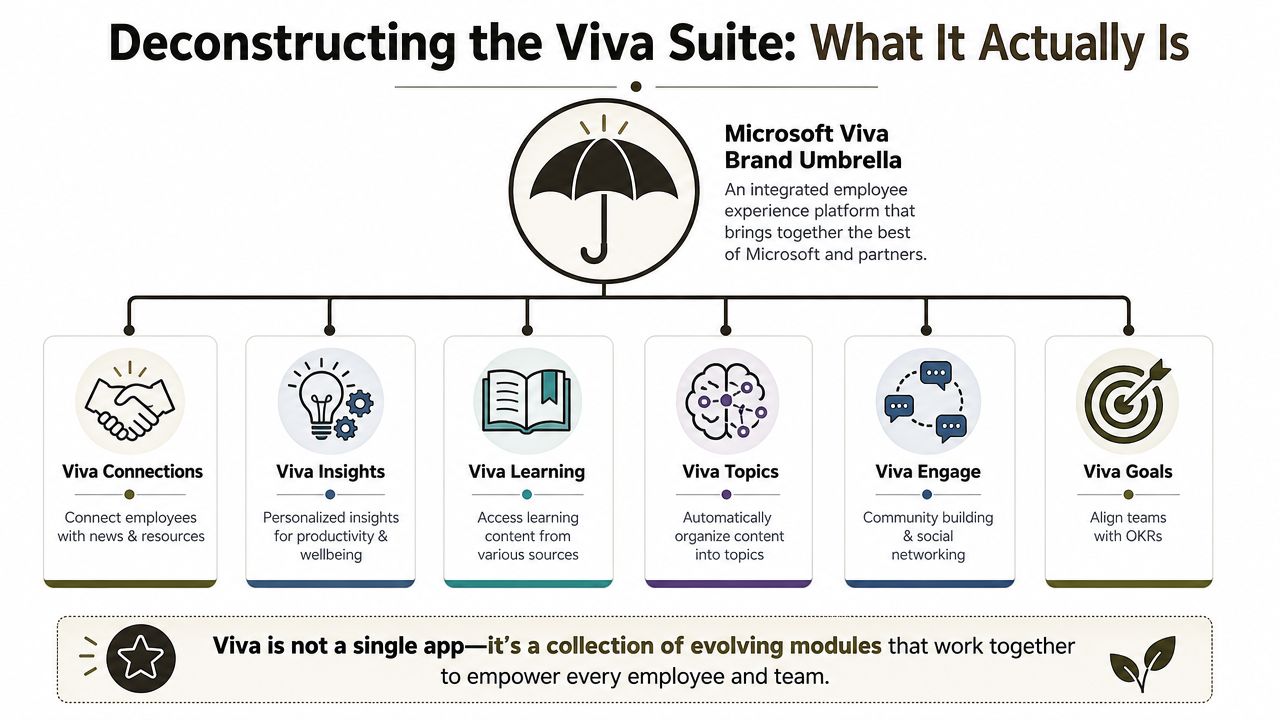
One brand. Multiple workloads.
That module spread matters because each part of the suite leans on a different part of your tenant.
| Module | What it really depends on | Where projects go wrong |
|---|---|---|
| Connections | SharePoint home site, navigation, audience targeting | Weak intranet structure, wrong content surfacing |
| Insights | Microsoft 365 signals, org data, permissions posture | Untrusted analytics, privacy concerns |
| Topics | SharePoint content quality, knowledge structure | Data sprawl, poor metadata, irrelevant topic surfacing |
| Learning | Content sources, access control, user entitlement | Fragmented learning access, confusing UX |
| Goals | Organisational structure and ownership clarity | No clear operating model |
| Engage | Community governance and legacy Yammer cleanup | Unmanaged communities and duplicated channels |
The Yammer lesson still matters
The move from Yammer to Viva Engage wasn't cosmetic. It signalled Microsoft's shift from isolated community tooling to a broader employee experience layer. We often see clients fail when they ignore that history and carry old governance mistakes into the new brand.
Common rescue patterns look like this:
- Legacy communities stayed unmanaged and no one decided what to archive, retain, or relaunch.
- Ownership never got formalised, so community sprawl moved under a different label.
- Information architecture got ignored, because teams treated the suite as front-end branding instead of operational consolidation.
Viva isn't a single purchase decision. It's a portfolio decision with different governance, security, adoption, and ownership requirements.
Buy modules. Don't buy the story.
A sceptical IT Director should ask six separate questions, not one:
- Which Viva modules do we need?
- Which tenant services do they depend on?
- Who owns each one operationally?
- What compliance controls apply to each?
- Which legacy workloads need cleanup first?
- Which modules create more change overhead than value?
That's the essential planning exercise. Anything softer turns into scope creep and arguments between IT, HR, Comms, and Security.
The Unforgiving Enterprise Architecture
Viva projects fail long before anyone opens the admin centre. They fail when IT treats Viva as an app rollout instead of a test of whether the Microsoft 365 tenant is governed well enough to expose content, identity, and behavioural signals safely.
I have had to rescue this more than once. The pattern is boring. HR buys the story. Comms wants a better employee experience. Security gets pulled in late. Then everyone discovers Viva is sitting on top of the same SharePoint mess, Teams sprawl, weak group ownership, and identity drift they already failed to clean up.
Viva exposes the quality of your tenant
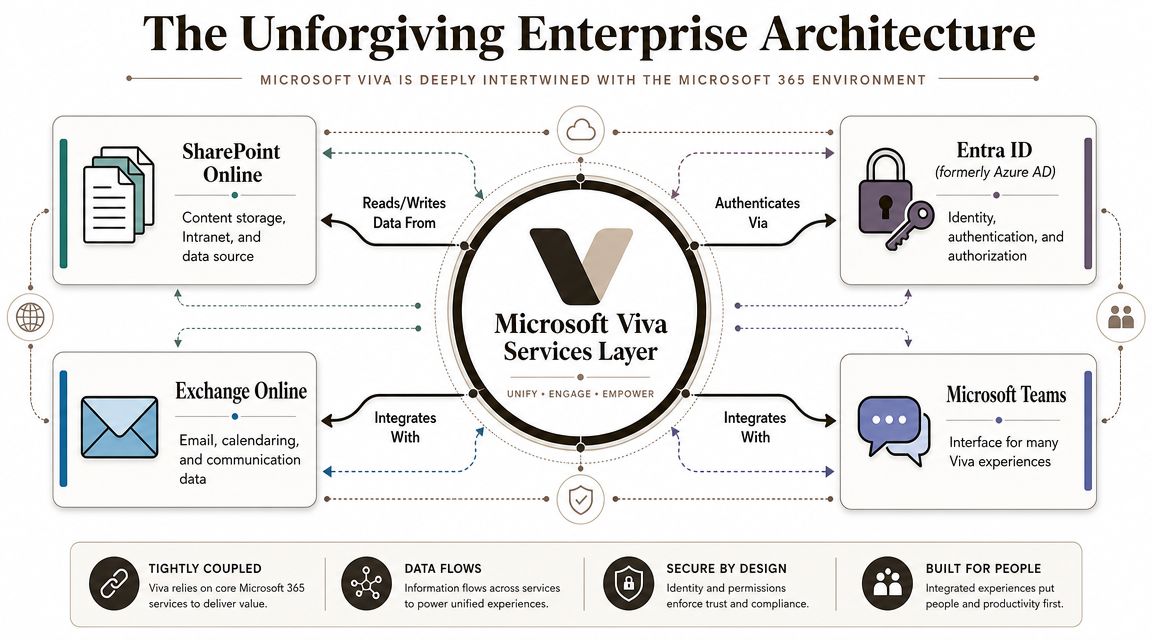
Viva depends on services you already run, and probably already struggle to control:
- SharePoint Online for content, permissions, intranet structure, and knowledge surfaces
- Entra ID for identity, audience logic, lifecycle, and access control
- Exchange Online for collaboration and organisational signal data
- Microsoft Teams for the shell many Viva experiences appear in
That dependency chain is the whole point. Viva is an outcome of tenant quality.
If your identity layer is weak, your rollout is weak. Entra ID governance and design decisions belong in the Viva plan from day one, not in a separate workstream someone promises to revisit later.
The failures are architectural, not cosmetic
The first serious break usually appears in SharePoint. Connections and Topics only help if the underlying information architecture is disciplined. In rescue engagements, we find site collections created with no publishing model, no authority rules, and permissions that stopped making sense years ago. Surface that content through Viva and you do not improve findability. You spread confusion faster.
Identity comes next. Audience targeting, organisational views, and access assumptions all rely on directory data being current and owned. If departments are inconsistent, reporting lines are stale, and Microsoft 365 groups have orphaned owners, Viva will faithfully reflect that mess back to users. DIY teams always assume the product will smooth this over. It will not.
Then compliance catches up. Regulated organisations often act as if Viva being part of Microsoft 365 solves the control problem by default. It does not. Retention, eDiscovery scope, access review cadence, insider risk boundaries, and records handling still have to match the way the business uses the data. Teams working through sector-specific obligations such as HIPAA compliance for legal practices already know the actual work is proving configuration, ownership, and review, not buying another licence.
The real architecture question is simple. Can your tenant survive having its content, relationships, and signals surfaced at enterprise scale?
What usually breaks during rescue work
Microsoft does not create these problems. Your existing estate does.
- Broken SharePoint inheritance that nobody wants to untangle
- Unmanaged Microsoft 365 groups with no clear lifecycle or accountable owner
- Poorly structured large libraries that make remediation and reclassification painful
- API throttling during cleanup, reporting, and migration activity
- Content restructuring problems caused by years of uncontrolled site growth
- Failed consolidation work because source environments were never standardised
None of this is theoretical. These are the jobs that turn a six-week pilot into a six-month recovery programme.
My advice to sceptical IT Directors
Do not approve a Viva rollout until you can name the architecture owner, the identity owner, the SharePoint governance owner, and the compliance owner. Do not accept “shared responsibility” as an answer. That phrase usually means nobody is in charge.
Run a readiness review first. Test whether directory attributes are trusted, whether group ownership is enforced, whether SharePoint authority sites are defined, and whether retention and access reviews are mapped to actual business use. If those controls are weak, fix them before rollout.
That is the lesson failed projects teach every time. Viva does not repair a weak tenant. It exposes one.
Governance and Compliance Controls for Regulated Sectors
Most DIY Microsoft Viva projects succumb. Not in configuration. In governance.
Microsoft's own materials state that Viva Insights uses de-identification, aggregation, and differential privacy safeguards, and that manager insights require at least 10 people before access is granted, as discussed in Microsoft's Viva Insights privacy explanation. Those controls matter. They reduce the risk of obvious managerial overreach.
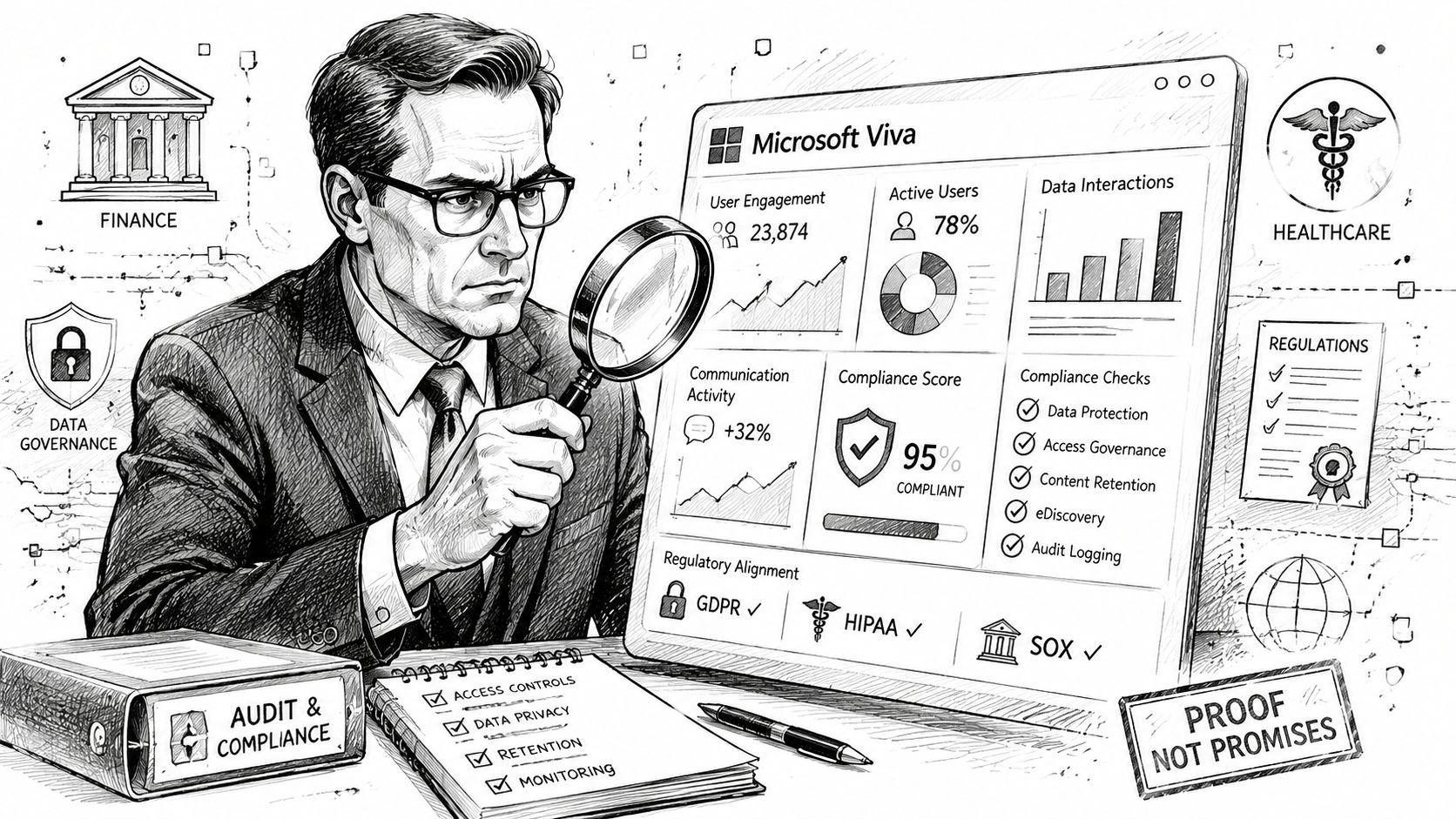
The feature isn't the problem. Proving control is.
The hard question from an auditor won't be “Does Microsoft provide privacy safeguards?” The hard question will be “Show me how your organisation configured, monitored, reviewed, and documented them.”
That's a different standard entirely.
In finance, healthcare, and energy, user trust collapses quickly when HR and Legal think the platform looks like surveillance. The technical safeguard may be valid, but if your governance model is vague, the rollout still fails. That's why privacy architecture and operating model design have to be settled before user communications begin.
What your governance pack must cover
A regulated Viva deployment needs more than a project plan. It needs evidence.
- Access control evidence that shows who can see what, and why
- Retention alignment between Viva-related content and the wider Microsoft 365 records model
- eDiscovery readiness so investigations don't become an improvised scramble
- Policy ownership across IT, Security, HR, and Legal
- Access review cadence for the roles that administer analytics or community surfaces
If you're working across professional services or health-adjacent environments, practical compliance thinking from adjacent sectors can help frame the right questions. This checklist on HIPAA compliance for legal practices is useful because it forces attention onto policy evidence, access control, and documentation discipline rather than vendor promises.
Trust is the weak point in Viva adoption. If staff think leadership can identify them through “insights”, the rollout is already damaged.
Governance has to precede excitement
This is also why AI governance conversations now intersect with Viva more directly. If your organisation is already debating oversight, data minimisation, and analytics boundaries, Viva won't sit outside that debate. It will intensify it. That's why a serious review of Microsoft 365 AI governance controls and operating policy belongs in the same room as your Viva planning.
The documentation covers product behaviour. It doesn't create your governance model for you. Your team has to do that work. If they don't, the cost of failure isn't just low adoption. It's formal compliance exposure and a trust problem that spreads beyond this one platform.
Common Implementation Disasters and How They Happen
The pattern is boring now because it repeats so often. Different tenant. Same mistakes.
A team gets approval for Microsoft Viva. Someone assumes the existing Microsoft 365 licence estate will cover most of it. Someone else treats the product roadmap as stable. Nobody wants to pause for cleanup because the business wants visible progress. Then the rollout slows, confidence drops, and the project becomes political.
Disaster one. The licensing trap
Microsoft's published Viva packaging shows that adoption is constrained by service-specific licensing thresholds and add-ons, not just broad Microsoft 365 entitlement. A concrete example sits in Microsoft's own feature comparison document. Viva Glint requires a minimum of 50 licensed users to initiate the service, as shown in the Microsoft Viva feature comparison PDF.
That one detail can stall a project immediately.
It usually unfolds like this:
- The team plans around assumed entitlement
- Procurement discovers module-specific requirements late
- Finance asks for reapproval
- The implementation loses momentum and credibility
That's not a procurement nuisance. It's a planning failure.
Disaster two. Module confusion
Microsoft Viva has expanded well beyond the original four modules. Microsoft's own launch messaging framed Viva as an evolving platform, not a fixed product, in the original Microsoft 365 blog announcement. Yet many internal project plans still treat it like a static bundle.
That creates avoidable problems:
| Assumption | What happens next |
|---|---|
| “We're buying Viva” | Nobody defines module-specific ownership |
| “The roadmap is settled” | Strategy gets built on outdated understanding |
| “It all rolls out together” | Change fatigue and security gaps multiply |
Disaster three. Technical debt gets surfaced, not solved
This is the part teams try to skip. They want shiny front-end wins before foundation work. Then SharePoint complexity catches up with them.
We often see clients fail when they attempt to surface knowledge, communications, or insights from an unmanaged estate with known Microsoft 365 limits already in play. Microsoft Learn documentation confirms platform realities such as list view threshold constraints, API throttling behaviours, and other operational limits. In practical terms, if your content architecture is bloated and badly structured, your implementation team spends its time fighting the platform instead of delivering value.
For a broader look at that pattern, this piece on why enterprise Microsoft 365 projects really fail gets to the point.
DIY Viva projects rarely collapse because one feature broke. They collapse because architecture, licensing, and ownership were all left half-defined.
An Adoption Strategy That Actually Reduces Risk
Every Viva rescue starts the same way. Someone bought the licences, announced the programme, and only then discovered the tenant could not support the promises made to HR, Internal Comms, or Security.
That is the wrong order.
Viva succeeds only in tenants that are already governed as a platform. If your Microsoft 365 estate has weak ownership, inconsistent permissions, unresolved retention conflicts, and poor identity hygiene, Viva does not create value. It exposes disorder faster and to a wider audience.
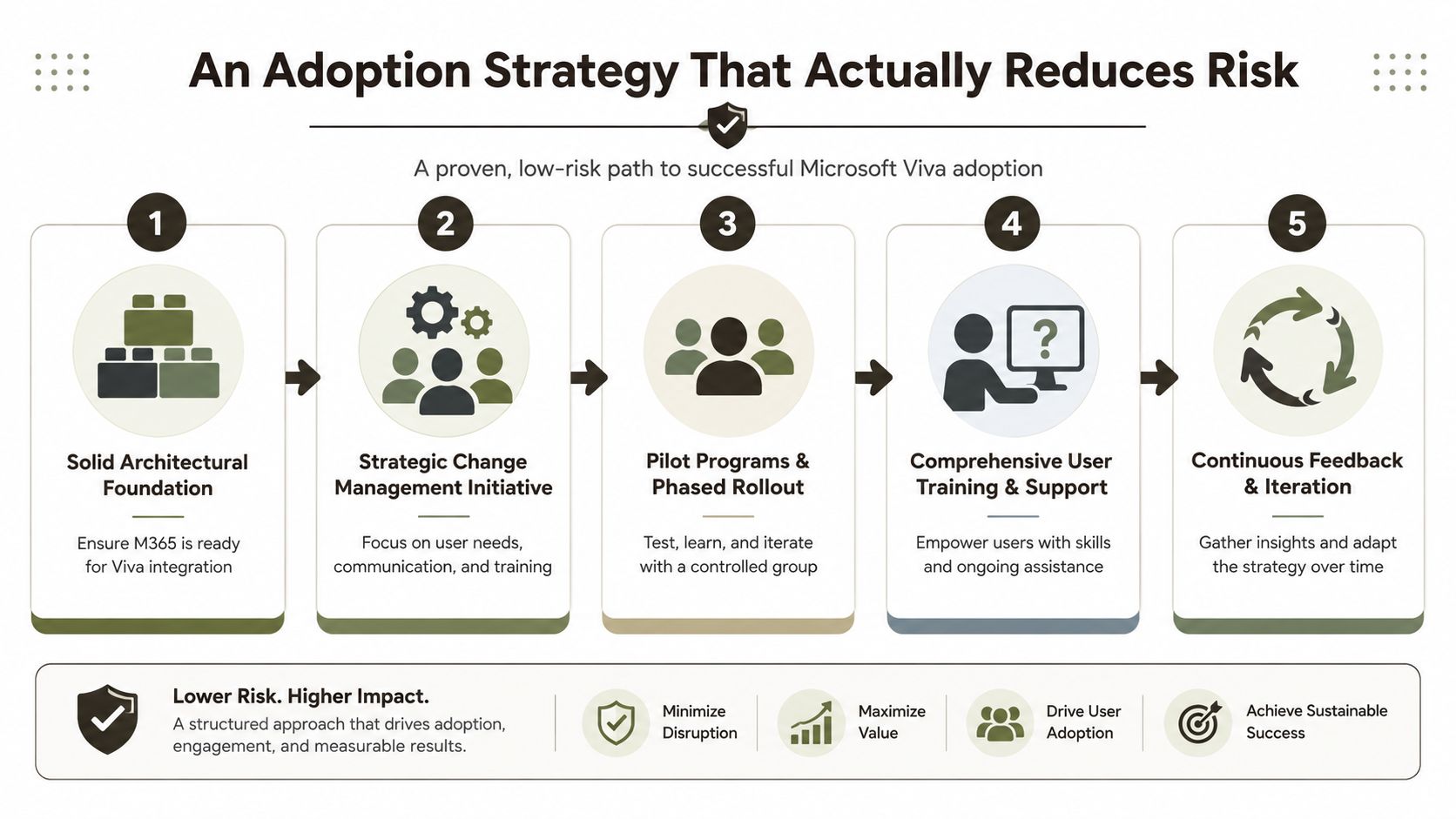
The only rollout model worth using
Use a four-phase approach. Anything broader turns into an expensive audit of your own governance failures.
Assess the tenant before scoping Viva
Start with Entra ID hygiene, SharePoint information architecture, permissions inheritance, retention configuration, sensitivity labels, search quality, and licensing alignment. Do not let a project team define rollout ambition before IT has defined operational reality.Fix the conditions that will destroy trust
Clean metadata. Remove dead sites. repair broken inheritance. assign real owners to content and communities. resolve retention conflicts. If employees see irrelevant content, inaccurate signals, or access mistakes in the first release, trust drops fast and recovery is slow.Pilot one governed scenario
Pick a narrow use case with clear executive ownership and a contained audience. For example, deploy Connections for a single business unit with a controlled dashboard, or test Insights with a privacy review already signed off. Do not run a vanity pilot designed to show everything at once.Scale module by module, with controls attached
Expand only when support ownership, data stewardship, adoption measures, and compliance decisions are documented for that module. Treat each Viva workload as a separate service with its own risk profile, not as one marketing bundle.
Change management follows architecture
I have had to clean up too many projects where the team led with comms packs, champions, and launch events while the underlying estate was still chaotic. That approach pleases sponsors for a few weeks, then IT gets the blame when the experience is poor or the privacy questions start.
Adoption work matters after the platform can support it. Before that, it is theatre.
The visual below captures the sequence better than most project plans do.
What a low-risk pilot looks like
A sensible pilot has hard boundaries. If it does not, it is not a pilot. It is an uncontrolled rollout with softer language.
Use these checks:
- One or two modules only, never the full suite
- Named data owners before any configuration begins
- Completed privacy review before user onboarding
- Documented rollback path if quality, trust, or access issues appear
- Defined feedback loop across IT, Security, HR, and Comms
- Support model in place for incidents, access requests, and content disputes
If your team needs a wider operating model around that discipline, a Microsoft 365 adoption strategy built around governance and service ownership should sit beside the technical plan from day one.
Field advice: Do not pilot Viva to validate Microsoft's story. Pilot it to prove your tenant can carry the governance, privacy, and support load without embarrassing your department.
The Ollo verdict. Your final go or no-go check
Here is the decision I give IT Directors after the recovery work is done. Proceed only if your Microsoft 365 tenant is already managed like a business platform with documented controls and accountable owners.
You are ready if your environment has a clear authority model for SharePoint, disciplined identity lifecycle management, controlled permissions, defensible retention rules, and privacy decisions that Legal and HR will stand behind. You are not ready if the tenant still runs on legacy site sprawl, vague ownership, inconsistent M365 groups, and policy drift nobody wants to admit exists.
Use this go or no-go check:
- Can your team explain the SharePoint authority model without hand-waving?
- Can you show who owns access, retention, review, and exception handling for each Viva workload in scope?
- Can Legal and HR approve the privacy position without reopening the surveillance argument?
- Can Procurement confirm module licensing before mobilisation starts?
- Can IT support module-level ownership instead of treating Viva as one blob?
If those answers are slow, political, or unclear, stop the programme and fix the tenant first.
That is not failure. It is competent governance.
My recommendation is simple.
Go if the estate is clean enough to trust, the controls are documented, and the owners are aligned.
No-go if the business expects Viva to impose order on a tenant that has been neglected for years.
That second route is where DIY programmes fail. First you get delays and rework. Then you lose credibility with sponsors. Then the harder problem arrives. Employees realise leadership has deployed insight and communications tooling on top of weak governance, and trust becomes harder to repair than the configuration itself.
A sceptical IT Director should treat specialist help as risk reduction. The hard part of Viva is not the interface. The hard part is the years of unresolved architectural debt sitting underneath it.

















