



Your tenant probably looks “good enough” on paper. Labels exist. DLP exists. SharePoint permissions mostly make sense. A few old Teams are messy, a few sites have broken inheritance, and nobody has a clean answer for who owns half the stale workspaces. That was survivable before AI.
It isn't survivable now.
Microsoft 365 AI governance fails when leaders treat Copilot, agents, and automation like a feature rollout instead of an exposure event. AI doesn't create your governance mess. It accelerates it, indexes it, and makes it useful to the wrong person at the wrong time. We often see clients fail when they assume old access reviews, loose SharePoint hygiene, and “we'll tidy it up later” will hold under AI pressure. They won't.
In regulated environments across Ireland, the cost of getting this wrong isn't just technical debt. It's failed audit evidence, uncontrolled data exposure, and a board-level problem that started as an admin shortcut.
Why Your Current M365 Governance Will Fail with AI
Your current Microsoft 365 governance model was probably built for storage, sharing, and collaboration. AI changes the operating model. It turns passive content into actively surfaced content.
That matters because Copilot and other AI agents inherit the permissions and structure you already have. If your SharePoint and Teams estate already contains broad membership, stale sites, broken inheritance, or sloppy ownership, AI doesn't politely ignore those flaws. It exposes them faster.
Microsoft's own internal guidance makes the root problem uncomfortably clear in its post on how Microsoft is tackling Microsoft 365 Copilot governance internally. The guidance points to oversharing and weak container segmentation as core failure points, recommends limiting protection taxonomies to a maximum of five parent labels and five sub-labels, and pushes container labels on groups and sites so file protections derive from the parent container.
Latent risk becomes immediate exposure
Before AI, weak permissions often sat dormant. A document might be overshared for months and nobody noticed because nobody went looking for it.
With AI, your users don't need to know where data lives. They ask a question. The system finds, summarises, and presents content based on the access model already in place. That turns a hidden governance defect into a live business event.
Your permissions model is no longer a back-office admin concern. It becomes the answer engine for every user with AI access.
We often see clients fail when they confuse file protection with information architecture. A few sensitivity labels won't save a tenant built on years of ad hoc Team creation, site sprawl, guest drift, and broad Microsoft 365 Group membership. The documentation says labels, DLP, auditing, conditional access, MFA, and Graph Data Connect all play a role. In reality, those controls only work when the underlying container design is sane.
The SharePoint and Teams layer is the real battleground
Most Microsoft 365 AI governance failures start lower in the stack than executives expect. They don't start with prompt abuse. They start with:
- Broad site membership that nobody re-attested
- Teams linked to SharePoint sites with unclear ownership
- Broken inheritance on libraries and folders
- Guest access sprawl across collaboration spaces
- Container labels that were never applied consistently
If your tenant has “mostly correct” permissions, that is not good enough. AI punishes “mostly correct”.
A practical review starts with the questions most internal teams avoid:
| Governance question | Why it breaks under AI |
|---|---|
| Who owns each Team, Group, and site? | No owner means no accountability when exposure appears |
| Are labels applied at container level? | File-level fixes alone don't solve broad workspace access |
| Are permissions inherited cleanly? | Broken inheritance creates invisible exceptions |
| Can you detect oversharing after rollout? | If not, you'll discover it from a complaint or audit |
Microsoft's guidance is stricter than most deployments
Microsoft advises keeping the label taxonomy limited, applying labels to containers, deriving file labels from those containers, and using Purview and auditing controls to catch oversharing after the fact. That's not a light-touch admin task. That's a design discipline.
If your team hasn't already pressure-tested the estate for Copilot readiness, start with this Microsoft 365 Copilot readiness check. It forces the uncomfortable conversation early, while you still have the option to fix structure before AI starts surfacing the mess.
Practical rule: If your SharePoint and Teams permissions need a cleanup project, your AI rollout needs a stop sign.
The hard truth is simple. Your existing governance probably wasn't built to survive AI. It was built to keep collaboration moving. Those are not the same thing.
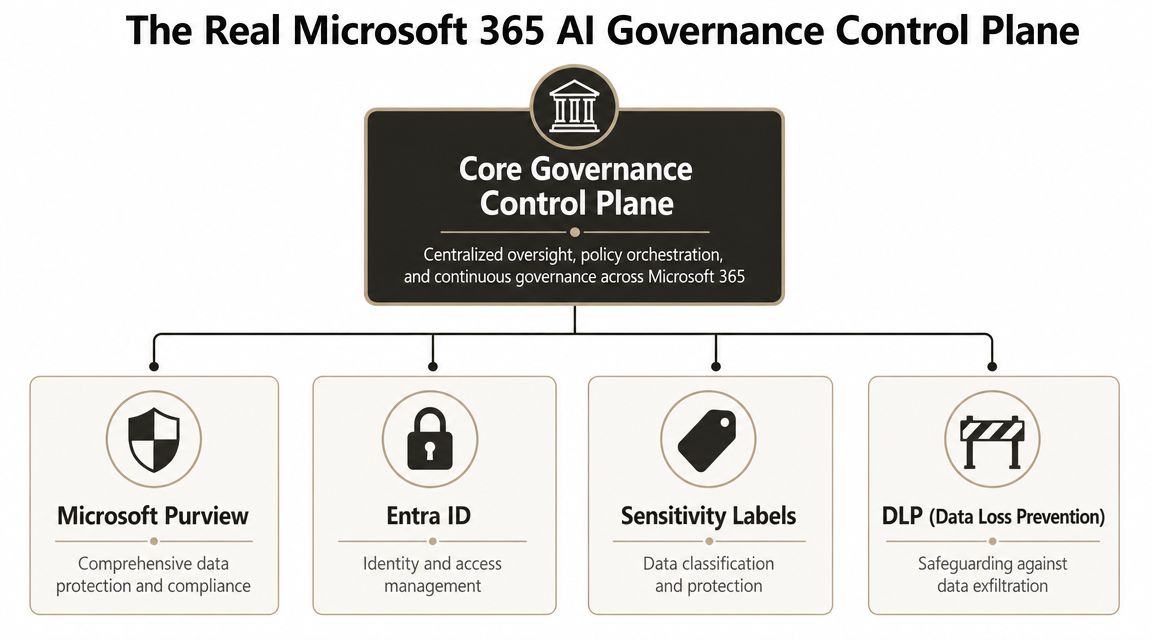
The Real Microsoft 365 AI Governance Control Plane
Most Microsoft 365 AI governance discussions collapse into feature lists. That's useless. Governance isn't a shopping basket of toggles. It's a control plane. If the parts don't work together, the whole model fails.
Microsoft signalled that shift on April 8, 2024, when it announced the preview of Microsoft Purview's reimagined data governance experience in its introduction to modern data governance for the era of AI. Microsoft positioned it as a unified governance layer across a multi-cloud data estate, combining curation, management, health controls, discovery, understanding, and compliant self-serve access. That matters because AI governance is no longer just about files. It's about data exposure, discoverability, and policy-driven access.
Purview is the policy engine, not a magic wand
Microsoft Purview should be the centre of your Microsoft 365 AI governance posture. It gives you the policy layer for classification, protection, data loss prevention, and audit visibility.
The documentation says governance should be unified and policy-driven. In reality, Purview becomes theatre if your content estate is chaotic. We see this constantly. Clients turn on labels and DLP, then realise the underlying SharePoint structure is full of exceptions, inconsistent naming, and unmanaged sites. Purview can enforce. It can't clean decades of admin shortcuts by itself.
Use Purview to do three jobs properly:
- Classification and protection for sensitive information
- Policy enforcement for data handling and sharing
- Evidence generation for audit, investigation, and remediation
If your data owners can't explain why a site is labelled a certain way, the policy isn't governance. It's decoration.
Entra ID decides who and what can act
Microsoft Entra ID is where governance becomes enforceable. AI systems don't exist outside identity. Every access path runs through principals, memberships, roles, and authentication controls.
That means your AI posture depends heavily on group hygiene, role design, Conditional Access, MFA, and app governance. If you haven't already rationalised identity architecture, read our guide to Microsoft Entra ID. Most AI governance failures we see aren't caused by the model. They're caused by weak identity boundaries around the model.
A few recurring failure patterns show up fast:
- Overloaded groups used for convenience rather than least privilege
- Service principals and apps with broad, poorly reviewed permissions
- Legacy access exceptions nobody wants to remove
- Inconsistent MFA and Conditional Access enforcement across privileged users
Sensitivity labels fail when taxonomy becomes a hobby
Sensitivity labels are powerful. They're also one of the fastest ways to create a governance mess if your taxonomy is too clever.
Microsoft's internal guidance recommends restraint. That's the right call. We often see teams invent label hierarchies that look good in workshops and collapse in real operations. Users don't apply them properly. Site owners override defaults. Files drift. AI then respects the mess you created.
A good taxonomy has to be:
| Control | Intended role | Where teams fail |
|---|---|---|
| Purview | Unified governance and enforcement | Treated as a reporting tool after rollout |
| Entra ID | Identity, access, and policy boundary | Left with legacy groups and broad app rights |
| Sensitivity Labels | Classification and default protection | Over-engineered taxonomy nobody follows |
| DLP | Detection and exfiltration control | Deployed without clean ownership and escalation |
DLP is a backstop, not your first line
Data Loss Prevention matters, but don't build your strategy backwards. DLP should catch mistakes and enforce handling rules. It should not act as the primary substitute for bad architecture.
That's where many internal teams go wrong. They assume they can tolerate broad collaboration because DLP will save them later. It won't always. DLP can detect patterns and trigger action. It cannot reverse the architectural damage caused by badly segmented Teams, inherited oversharing, and confused ownership.
The control plane only works when identity, classification, and access design move together. If one layer is weak, AI will find the gap.
The Ollo verdict
If you want a defensible Microsoft 365 AI governance posture, build the stack in this order. Identity first. Container design second. Classification third. DLP and audit fourth. Often, the inverse approach is taken, driven by a perception of ease, which subsequently leads to remediating exposure following deployment.
Documented Technical Landmines You Cannot Ignore
At this point, polite governance conversations usually fall apart.
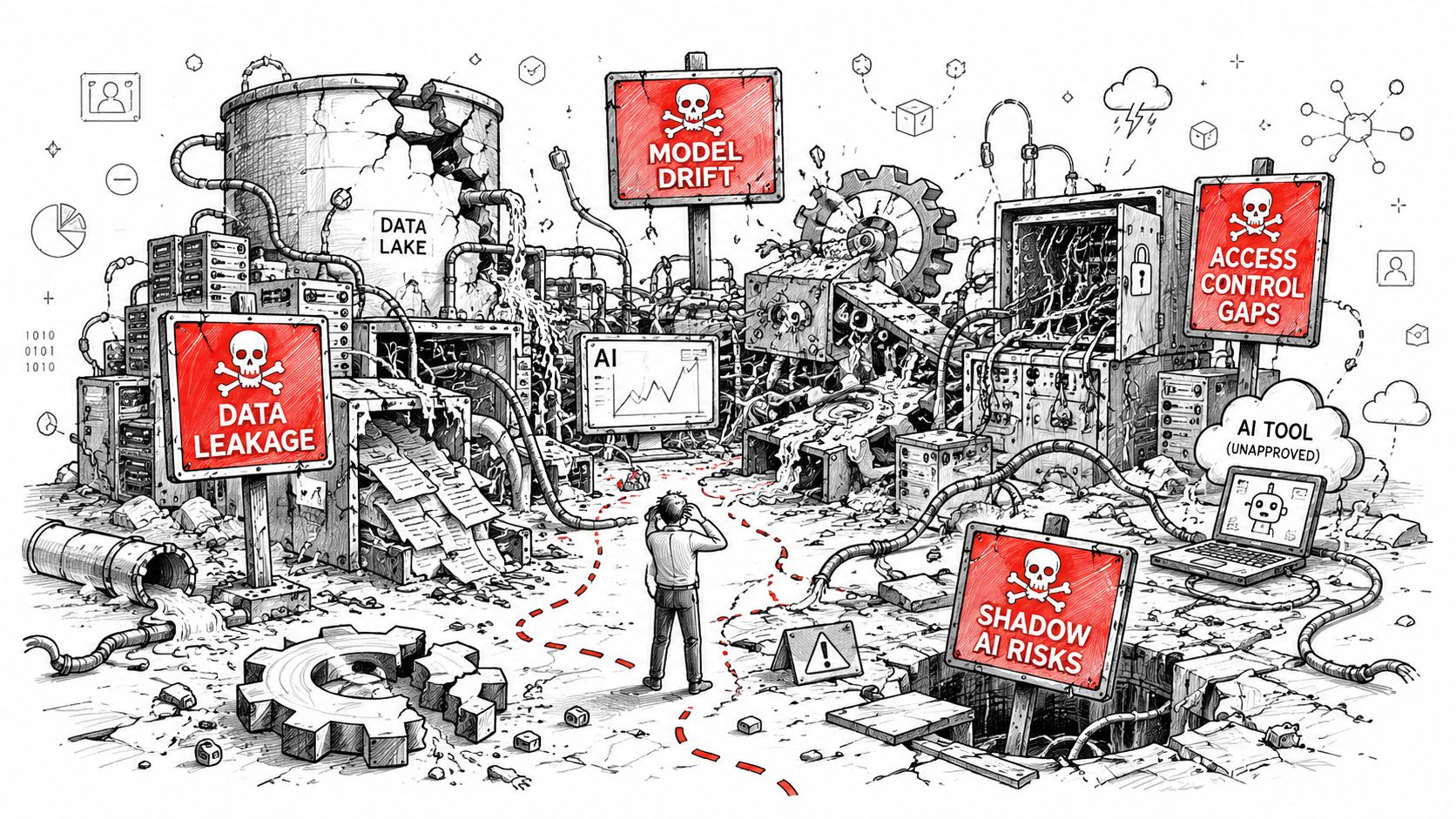
Your AI governance design might look acceptable in a steering meeting. It still fails when it hits platform limits, migration leftovers, and SharePoint realities your team didn't inventory. Microsoft 365 has documented architectural constraints. They aren't bugs. They're conditions you have to engineer around.
The hidden mess AI inherits
We often see clients focus on labels and ignore the estate mechanics underneath. Then the ugly details show up:
- API throttling slows discovery, reporting, and remediation work
- The SharePoint 5,000-item list view threshold breaks assumptions about visibility and management at scale
- Long path issues cause sync and handling problems in real estates
- Broken inheritance creates permissions exceptions nobody can explain
- GUID conflicts and migration artefacts muddy ownership and lineage
The uncomfortable part is that none of this is exotic. It's normal enterprise debris.
The documentation says “supported”. Reality says “fragile at scale”
Out-of-the-box tools have a place. SPMT can move straightforward content. ShareGate is useful. PowerShell and PnP scripting are necessary in serious estates. But every tool has a breaking point.
SPMT is fine for small, clean moves. It is not a governance strategy. ShareGate can accelerate structured migration work, but it won't think for you when inheritance is broken across years of SharePoint sprawl or when metadata design no longer matches security intent. We often see internal teams over-trust tooling and under-invest in pre-remediation.
That's how AI governance gets poisoned before rollout. If migrated content arrives with bad permissions, stale ownership, ugly path structures, or library design that nobody cleaned up, the AI layer inherits all of it.
Four landmines that keep causing damage
| Landmine | What your team assumes | What actually happens |
|---|---|---|
| API throttling | Reporting jobs will just take longer | Discovery windows slip and remediation stalls |
| 5,000-item threshold | Large libraries are manageable with enough patience | Admin tasks, views, and governance operations become brittle |
| Broken inheritance | Exceptions are isolated | Nobody can explain effective access at scale |
| GUID and migration artefacts | Old issues stay historical | AI surfaces current content with historical permission baggage |
Field lesson: Governance breaks on implementation details, not policy statements.
The 5,000-item threshold is especially toxic because teams treat it as a usability issue. It's a governance issue. Large, badly designed libraries become hard to review, hard to segment, and hard to validate. If your AI readiness work depends on site owners manually understanding access in those libraries, your process is already broken.
A second problem is throttling. Discovery, reporting, attestation support, and remediation scripts all depend on API behaviour. In enterprise tenants, those workloads can become inconsistent unless you engineer around them. Generalist teams rarely do.
Later in the lifecycle, DLP becomes part of the safety net. If you need a practical starting point, our guide to data loss prevention in Microsoft 365 covers where DLP helps and where it absolutely does not.
This walkthrough is worth your time before anyone tells you the estate is “ready”:
The Ollo verdict
Use native tools for small, clean, low-risk content sets. Use ShareGate for structured migration where you already understand the target architecture. For tenant-scale AI governance preparation, you need pre-remediation, exception handling, and custom scripting discipline. Anything less is gambling with legal exposure disguised as a tooling choice.
Mapping Controls to Compliance Mandates in Regulated Sectors
In regulated sectors, Microsoft 365 AI governance is not an IT hygiene exercise. It is evidence production. Auditors, compliance officers, and boards don't care that your admin team meant well. They care whether you can prove control.
That's where most organisations in Ireland hit the wall. They can talk about labels, DLP, and approved tools. They can't produce a repeatable line of evidence showing who controlled AI-enabled access, which agents existed, what connectors were in play, and how policy was enforced across the estate.
Independent guidance on AI governance for Microsoft 365 and EU AI Act readiness from Rencore captures that gap well. The discussion is shifting toward service governance, connector control, and delegated compliance oversight, and it points to the same hard truth: if you don't have visibility over AI-powered assets, you can't enforce policy in a way that stands up under European regulatory pressure.
Compliance teams need proof, not platform enthusiasm
A regulated business needs to answer questions like these without improvising:
- Which AI-enabled services can access regulated data?
- Who owns each agent, connector, and workspace involved?
- What policy controls govern access and output handling?
- How do you show that enforcement is consistent over time?
If you can't answer those questions, your problem isn't feature maturity. It's governance immaturity.
Approval of a tool is not the same as governance of the service.
That distinction matters. A board may approve Microsoft 365 Copilot. An auditor will still ask how you controlled the data paths Copilot and connected agents could reach.
AI governance control mapping for regulated industries
| Compliance Requirement | M365 Governance Control | Regulated Sector Example |
|---|---|---|
| Controlled access to sensitive data | Entra ID access controls, container segmentation, sensitivity labels | A healthcare provider restricts access to patient collaboration spaces |
| Evidence of policy enforcement | Purview audit, DLP incident workflows, ownership records | A financial services firm shows who handled confidential deal content |
| Accountability for AI-enabled assets | Agent registry, named owners, connector oversight | An energy company tracks who approved and maintains operational AI agents |
| Data handling under regional obligations | Residency mapping, encrypted logs, controlled output stores | An Irish enterprise documents where AI inputs and outputs reside |
The audit story has to be boring
Good compliance evidence is boring. It is documented, repeatable, and easy to follow. That means your Microsoft 365 AI governance model needs:
- Named ownership for sites, groups, agents, and data domains
- Consistent enforcement records through Purview and identity controls
- Inventory visibility over connectors, apps, and AI-powered assets
- A defensible review cycle that doesn't depend on one smart admin remembering where things are
This also changes how you should compare tools. The debate is no longer just Copilot versus a third-party AI service. It's whether either option gives you enough control and evidence for your risk posture. Our comparison of Microsoft 365 Copilot vs ChatGPT Enterprise is useful here because the key decision isn't “which AI is better.” It's “which control model can your organisation govern”.
Where regulated tenants usually collapse
We often see three repeated mistakes:
- They govern prompts, not services. Prompt rules matter, but service access matters more.
- They label content, but don't inventory assets. That leaves auditors with gaps around connectors and agents.
- They rely on delegated admins without delegated evidence. Responsibility spreads out, but nobody owns proof.
A misconfigured label is not just a technical mistake in these environments. It can become evidence that the organisation failed to apply its own controls consistently.
That's why mature Microsoft 365 AI governance isn't a feature deployment programme. It is a control evidence programme wrapped around a feature deployment.
AI Governance and the Zero Trust Imperative
If your Zero Trust model doesn't explicitly include AI agents, it's old already.
Many organizations continue to view Microsoft 365 AI governance as a content problem. It isn't. It's an identity and residency problem first. Data matters, but data only becomes exposed when an identity, agent, connector, or application gets permission to act on it.
Microsoft states this directly in its guidance on governance and security across an organisation for AI agents. The guidance says every agent needs a single identity, a central registry, and consistent policy enforcement across platforms. It also states that organisations must map the location of each data source, agent runtime, and output store to satisfy residency and sovereignty requirements, while keeping logging minimal and encrypted at rest.
Treat agents like workforce identities
That guidance should end the lazy thinking immediately. An AI agent is not a harmless helper. It is a managed organisational resource.
If your team allows agents to proliferate in Power Platform, Copilot extensions, automation flows, and connected apps without a registry, you are creating shadow users with unclear privileges. That isn't innovation. It's governance debt.
Your Zero Trust approach needs four concrete controls:
- Single identity per agent, not shared shortcuts
- Central registry with ownership and purpose recorded
- Consistent access policy enforcement across platforms
- Residency mapping for source data, runtime, and output storage
Residency is no longer a storage-only conversation
This catches Irish organisations out more often than it should. Teams check where SharePoint data sits and assume the residency question is done.
It isn't done.
AI processing introduces more locations to govern. You now need to know where source data lives, where the agent runs, where outputs land, and what logs are retained. If any of those are undocumented, your sovereignty story is weak.
Operational stance: No registry, no identity, no deployment.
That principle aligns with Zero Trust. Verify every actor. Scope every permission. Log what matters. Keep the access path narrow. If you need a good primer on the broader mindset, CloudOrbis has a useful piece on how to strengthen your small business security through a Zero Trust model. The same discipline scales upward. The names change. The enforcement problem doesn't.
Conditional Access has to include AI-era service paths
A mature identity boundary also means revisiting your Conditional Access design. Human users are only part of the picture now. Workload identities, privileged admin paths, and service integrations need equal scrutiny.
We often see clients fail when Conditional Access was designed around staff devices and interactive sign-ins, but not around application behaviour, service accounts, or AI-connected workloads. That gap becomes dangerous fast once agents start querying sensitive content or producing outputs into collaboration spaces.
If your current design is still user-centric rather than identity-centric, start with our guide to Conditional Access policies in Microsoft 365. Then review where agents and apps fit into the same policy posture.
The Ollo verdict
Zero Trust without agent governance is incomplete. In Microsoft 365 AI governance, the winning move is simple. Inventory every agent, bind it to identity, constrain it with policy, and map its residency. Teams that skip that work don't have an AI strategy. They have a blind spot.
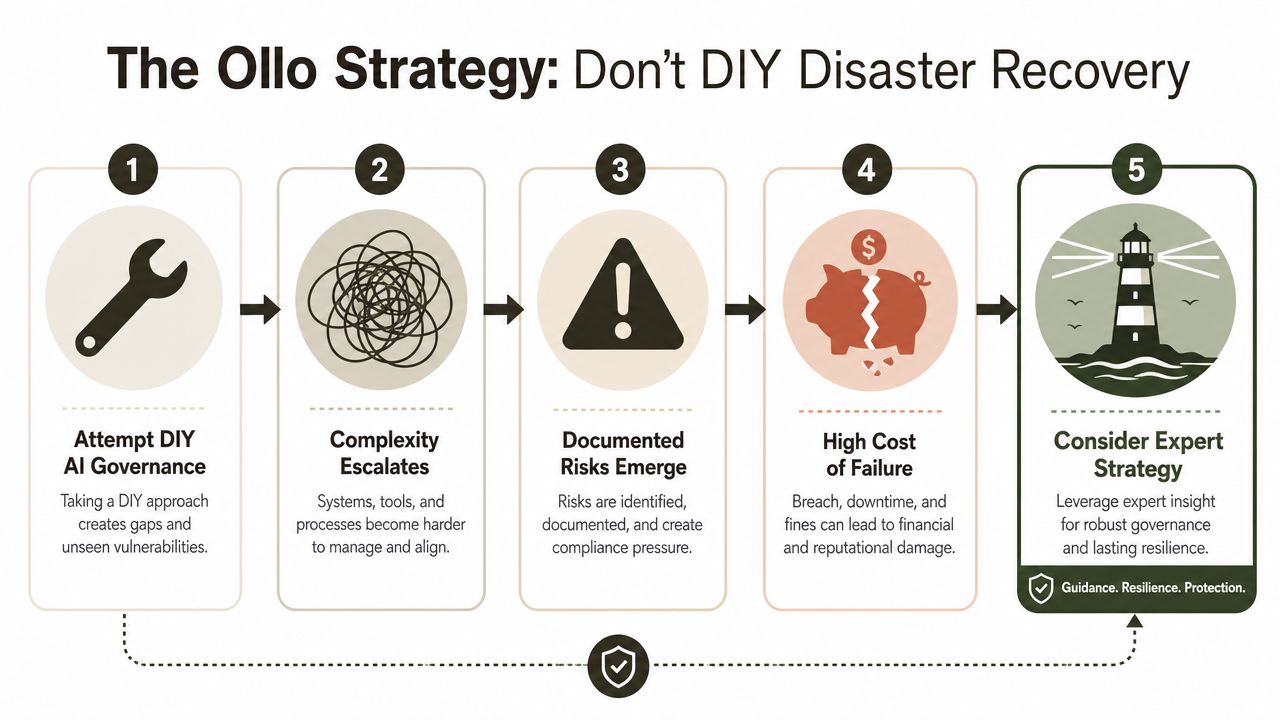
The Ollo Strategy Don't DIY Disaster Recovery
By this point, the key question isn't whether your team can enable AI features. They can. The question is whether they can do it without creating an incident trail that lands on your desk later.
Microsoft's AI strategy guidance makes the direction plain in its Cloud Adoption Framework guidance for AI strategy. Microsoft says organisations should set up data governance for AI projects, classify data by sensitivity, apply access controls and policies, and assign clear ownership for AI governance decisions. It frames AI strategy around use cases, Microsoft AI technologies, scalable data governance, and responsible AI. Governance is a prerequisite, not a tidy-up exercise after deployment.
That's the part DIY teams keep trying to ignore.
Why DIY breaks so often
Internal teams are usually strong in one or two areas. Maybe they know Entra ID. Maybe they know SharePoint administration. Maybe they know Purview licensing. AI governance in Microsoft 365 demands all of it at once, plus migration discipline, policy design, remediation sequencing, and scripting.
That combination is rare. It's also why rescue work exists.
We often see clients fail when they split responsibility like this:
- Security owns labels
- Infrastructure owns identity
- Collaboration owns SharePoint and Teams
- Compliance owns policy wording
- Nobody owns the operational join between them
That operating model doesn't just slow progress. It creates contradictory controls and leaves dangerous gaps in ownership.
The phased approach that reduces blast radius
The only sane way to approach Microsoft 365 AI governance is in phases:
Assess
Inventory the estate. Identify stale workspaces, ownership gaps, broad access, broken inheritance, and identity risk.Remediate
Fix structure before enabling broad AI access. Clean permissions, rationalise containers, tighten group logic, and simplify labels.Govern
Apply enforceable Purview, identity, and access controls with named ownership and operational review paths.Monitor
Detect oversharing, review exceptions, track drift, and maintain evidence for compliance and internal assurance.
Specialist support changes risk, not because a consultancy magically removes complexity, but because it compresses failure learning you don't want to pay for yourself. In practice, teams often use a mix of tools and services. Ollo handles Microsoft 365 and SharePoint governance-heavy transformation work, especially where tenant consolidation, Entra redesign, remediation, and custom scripting all intersect.
Disaster recovery starts before the incident
Most organisations think about disaster recovery after a breach, deletion event, or ransomware scenario. In the AI era, recovery planning has to start before rollout because agents and automation can amplify mistakes quickly.
For smaller organisations that need a practical baseline on continuity planning, this 2026 small business disaster recovery guide is a useful external reference point. The lesson scales upward. If you haven't designed for recovery, you haven't designed for deployment.
You don't reduce risk by hoping your generalist team can improvise across SharePoint, Purview, Entra ID, DLP, and AI controls under pressure.
The Ollo verdict
Use DIY for experimentation in isolated, low-risk environments. Don't use DIY for enterprise Microsoft 365 AI governance in regulated sectors. Missing this work doesn't just create admin pain. It undermines control evidence, weakens your legal position, and turns AI adoption into an avoidable governance failure.
If your Microsoft 365 estate has stale permissions, weak ownership, or no clear AI control model, don't wait for Copilot or agents to expose it for you. Talk to Ollo before your rollout becomes a remediation programme.

















