



Most advice on Microsoft 365 Copilot vs ChatGPT Enterprise starts in the wrong place. It starts with features, prompt quality, or whether one tool writes nicer summaries than the other.
That's how teams walk into avoidable failure.
If you run a regulated Microsoft 365 estate in Ireland, the primary question isn't which assistant feels smarter in a demo. That question is simpler and harsher. Which AI deployment adds the least unmanaged risk to your tenant, your access model, and your compliance boundary?
I've seen too many enterprise teams buy the licence first and ask governance questions later. They assume the hard part is picking the product. It isn't. The hard part is proving that your SharePoint permissions, Entra ID groups, guest access, retention settings, data boundaries, and connector choices won't create a fresh audit problem the moment users start prompting against live business data.
Marketing teams love “AI transformation”. Auditors don't. Neither does your legal team when prompts pull sensitive material from a site nobody remembered was over-permissioned.
That's why this isn't a feature bake-off. It's a risk analysis for IT Directors and Enterprise Architects who already know that glossy launch decks hide operational mess.
Stop Asking Which AI Is Better
The phrase “which AI is better” sounds sensible. It isn't. It reduces an enterprise architecture decision to a software comparison, and that's exactly the wrong level of thinking for regulated organisations.
Your problem isn't that one assistant drafts better prose. Your problem is that your tenant probably carries years of governance debt. Old SharePoint sites. Broken inheritance. Stale guest accounts. Entra ID groups that nobody wants to touch because they've become business critical by accident. AI doesn't remove any of that. It exposes it.
The wrong question creates the wrong project
When leadership frames this as Microsoft 365 Copilot versus ChatGPT Enterprise, the procurement team starts comparing licences and feature lists. Meanwhile, the actual project gets ignored:
- Identity hygiene: Who has access to what.
- Content exposure: Which files and mailboxes contain sensitive material.
- Control inheritance: Whether your current Microsoft 365 rules are fit to be amplified by AI.
- Auditability: Whether your security team can explain data movement and access in plain English.
We often see clients fail when they treat AI as a product rollout instead of a governance event. They assign it to productivity teams, run a pilot, and only later realise they've created a new route to surface old data in ways users never had before.
Practical rule: If your tenant isn't governable without AI, it won't become governable with AI.
Why regulated teams in Ireland should be more sceptical
If you're in finance, healthcare, energy, or any environment with sensitive operational or personal data, your standard should be higher than “the demo looked safe”. You need to know where prompts go, where outputs sit, what identity controls apply, and how your team will monitor misuse without building a parallel compliance process from scratch.
That's the part most comparison posts skip. They discuss capability. They avoid operational consequences.
The harsh reality is this. In a regulated tenant, architecture beats features. A weaker tool inside a tighter control boundary often creates less risk than a stronger tool that forces you to design and police a separate governance layer.
My recommendation before you compare anything
Before you debate assistants, answer these:
- Can you map your current permissions model confidently?
- Have you cleaned up stale access across SharePoint, Exchange, and Teams?
- Do your sensitivity labels, DLP rules, and identity controls reflect reality, not aspiration?
- Can your team explain where enterprise AI data will be processed and governed?
If the answer to any of those is shaky, you don't have an AI selection problem. You have a tenant-readiness problem.
The Feature and Cost Comparison Distraction
Procurement teams love a comparison table because it creates the illusion of control. In regulated environments, that habit leads people straight past the actual risk.
Copilot vs. ChatGPT Enterprise At a Glance
| Criterion | Microsoft 365 Copilot | ChatGPT Enterprise |
|---|---|---|
| General availability | Available to Microsoft 365 customers as an enterprise add-on | Available as a separate enterprise AI offering |
| Pricing model | Public list price of $30 per user per month in this Microsoft 365 Copilot pricing analysis | Custom enterprise pricing based on seats, terms, and procurement negotiation |
| Deployment model | Add-on within Microsoft 365 | Separate enterprise AI workspace |
| Native Microsoft 365 fit | Tightly coupled to Microsoft 365 workflows | More general-purpose |
| Governance model | Uses existing Microsoft 365 control layers | Needs a separate governance approach |
The table is useful for basic filtering. It is a poor basis for an enterprise decision.
A feature race is easy to present to a steering committee. It is also how organisations miss the expensive part. The hard question is not which assistant writes a better summary or answers a prompt faster. The hard question is which product creates the least new governance work inside your actual operating model.
That difference matters in Ireland. Financial services firms, healthcare providers, public sector bodies, and regulated suppliers do not get judged on how impressive the demo looked. They get judged on access control, data handling, auditability, retention, and whether they can explain the setup under scrutiny.
Why buyers get this wrong
Licence cost gets disproportionate attention because it fits neatly into a spreadsheet. Security clean-up, access reviews, data classification gaps, and failed rollout recovery do not.
That is backwards.
A tenant with messy SharePoint permissions, overshared Teams sites, weak sensitivity labels, and inconsistent retention settings will turn any AI assistant into a force multiplier for old governance failures. If you are serious about risk reduction, read a proper guide to AI governance before you compare prompt quality.
What the comparison table hides
The actual bill usually shows up after purchase:
- Access exposure when users discover content they were always technically allowed to see, but never surfaced this easily.
- Audit pressure when compliance teams ask where prompts, outputs, and logs sit, and nobody gives a consistent answer.
- Deployment delays when legal, security, and architecture teams realise the tool needs controls that were never designed up front.
- User distrust when answers are wrong, incomplete, or based on stale content from badly governed repositories.
Those costs are rarely listed in a vendor comparison. They are the costs that matter.
Ollo Verdict
Use the table to rule out obvious mismatches. Then stop pretending the table decides anything.
If your organisation already runs on Microsoft 365 and your control model is mature, Copilot is usually the lower-risk choice because it stays closer to the systems your team already governs. If your business needs a broader standalone AI workspace, ChatGPT Enterprise can fit. It still adds another control boundary, another review path, and another place for governance debt to hide.
In other words, the product choice is secondary. Your tenant condition is the decision.
Understanding Your Data Sovereignty and Compliance Boundary
Stop treating data sovereignty as a legal footnote. In Ireland, it decides whether your AI rollout gets approved, delayed, or shut down.
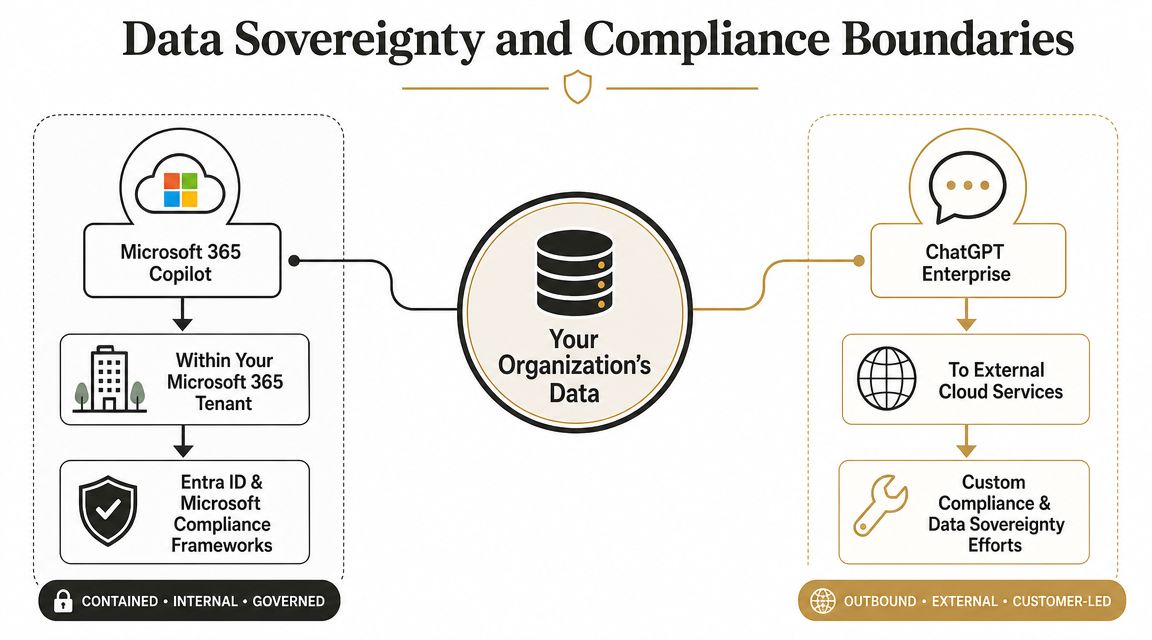
Microsoft 365 Copilot and ChatGPT Enterprise sit in different control boundaries. That is the point that matters. Copilot operates inside your Microsoft 365 estate and follows the identity, access, retention, labelling, and audit structures you already own. ChatGPT Enterprise introduces a separate AI workspace with its own data handling path, policy surface, and review burden.
What that means in practice
For a regulated tenant, the first question is simple. Which existing controls apply by default, and which ones need to be rebuilt somewhere else?
With Copilot, prompts and outputs stay closer to the Microsoft 365 control plane your security team already monitors. That usually means fewer policy gaps, fewer exceptions, and fewer arguments with compliance reviewers. It does not mean lower risk by magic. It means the risk sits in a place your team already knows how to inspect.
ChatGPT Enterprise changes the review model. Your team now has to govern another workspace, another set of user behaviours, another connector strategy, and another place where sensitive material can end up outside the habits and guardrails built around Microsoft 365.
That extra boundary is where projects get into trouble.
We have seen security reviews stall because project sponsors assumed "enterprise AI" meant the same thing across products. Auditors did not care about the branding. They asked where data is processed, how access scope is enforced, what evidence exists for cross-border handling, and which logs are available when an incident lands on the CISO's desk. Those questions decide the outcome.
Irish organisations dealing with regulated records, residency obligations, or sector-specific scrutiny should read this SharePoint migration and data residency guide alongside a broader guide to AI governance. The sequence matters. Define the control boundary first. Pick the AI tool second.
"Enterprise" is not a control model. Your auditors will want evidence, ownership, and a clear processing boundary.
Ollo Verdict
If your organisation already depends on Microsoft 365 for regulated collaboration, Copilot is usually the lower-risk option because it stays inside a boundary your team already governs. ChatGPT Enterprise can still be the right fit, but only if you are prepared to govern a second environment properly. If your tenant is messy, neither product saves you. It just changes where the risk shows up.
The Reality of Entra ID Integration and Governance Debt
Deep integration is what makes Copilot attractive. It's also what makes it dangerous when your tenant is a mess.
According to this technical comparison for regulated Microsoft 365 estates, the most material difference for Ireland is data boundary and governance scope. Microsoft 365 Copilot operates inside the Microsoft 365 service boundary and inherits the tenant's existing compliance posture, permissions, and Microsoft Graph grounding. ChatGPT Enterprise, by contrast, is a separate workspace that depends on user-provided data, files, or connectors rather than native Microsoft 365 grounding. In practice, Copilot can respect SharePoint and Exchange permissions natively, while ChatGPT Enterprise can create data-exfiltration or mis-scoping risk if connectors are configured carelessly.
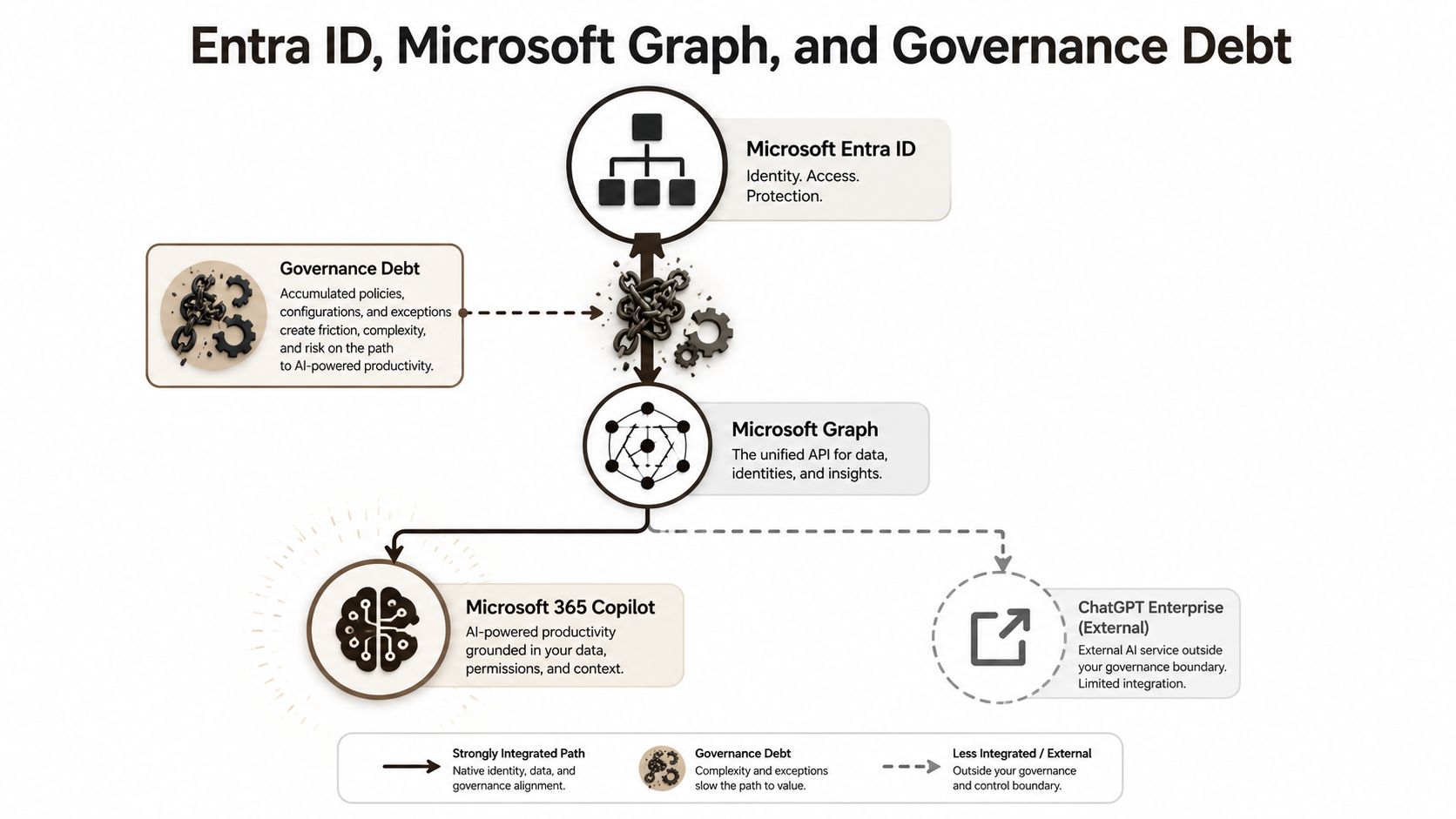
Copilot doesn't fix permissions. It obeys them.
That sounds obvious, but too many teams ignore the consequence. If your SharePoint estate has broken inheritance and over-permissioned sites, Copilot won't detect bad governance and save you from it. It will work exactly as designed. It will surface what users can access.
That's why I call Copilot a governance amplifier.
If a marketing user still has access to an old finance library because nobody cleaned up a legacy group, the problem isn't that Copilot is reckless. The problem is that your tenant has been reckless for years, and Copilot makes the exposure easier to discover at speed.
The ugly sources of governance debt
At this stage, enterprise teams underestimate the clean-up.
- Broken inheritance: SharePoint sites and libraries often carry unique permissions nobody documented.
- Messy Entra ID groups: Nested groups, stale owners, and role sprawl create access paths that are hard to reason about.
- Guest access drift: Old guests remain in Teams, SharePoint, and shared content long after the business purpose disappeared.
- Tenant-to-tenant leftovers: Mergers, acquisitions, and consolidations leave duplicate structures and inconsistent access logic.
If you're already dealing with those issues, read this background on Microsoft Entra ID architecture and governance. You can't judge Copilot safety without understanding the identity model it inherits.
Copilot is safer by design only if your design is actually safe.
ChatGPT Enterprise has the opposite problem
ChatGPT Enterprise avoids some of that native inheritance because it doesn't sit inside the Microsoft Graph in the same way. Some teams find that comforting. It shouldn't make you complacent.
A separate AI workspace forces users and admins to move or connect data deliberately. That gives you more isolation, but it also creates a different risk pattern. Badly configured connectors, careless file uploads, and loose workspace practices can push sensitive data into places your Microsoft-native controls don't govern as directly.
So you're choosing between two very different failure modes:
| Failure mode | What goes wrong |
|---|---|
| Copilot on a dirty tenant | Existing permission flaws become more visible and more damaging |
| ChatGPT Enterprise with weak connector discipline | Data gets scoped or exposed through a parallel platform with separate controls |
What a serious team should do before rollout
A proper pre-flight check should include:
- Permission audit across SharePoint, Teams, and Exchange
- Entra ID group review with owner validation
- Guest access remediation
- Sensitivity label and DLP alignment
- Connector approval model with named accountability
- High-risk content mapping before any pilot starts
Internal teams often say they'll “tidy this up as they go”. That approach is reckless. AI rollouts aren't forgiving. Once users trust the assistant, exposure becomes operational, not theoretical.
Ollo Verdict
For regulated Microsoft 365 estates, Copilot is the safer default because it fits the tenant-bound control model many Irish organisations already depend on. But launching it without a permissions and identity remediation programme is negligent. If you're not prepared to audit Entra ID and SharePoint properly, delay the rollout.
API Throttling and Other Real-World Integration Pitfalls
Most AI strategy conversations ignore the boring technical limits that derail enterprise projects. That's a mistake. Real tenants carry history, and history means ugly edge cases that aren't edge cases at all.
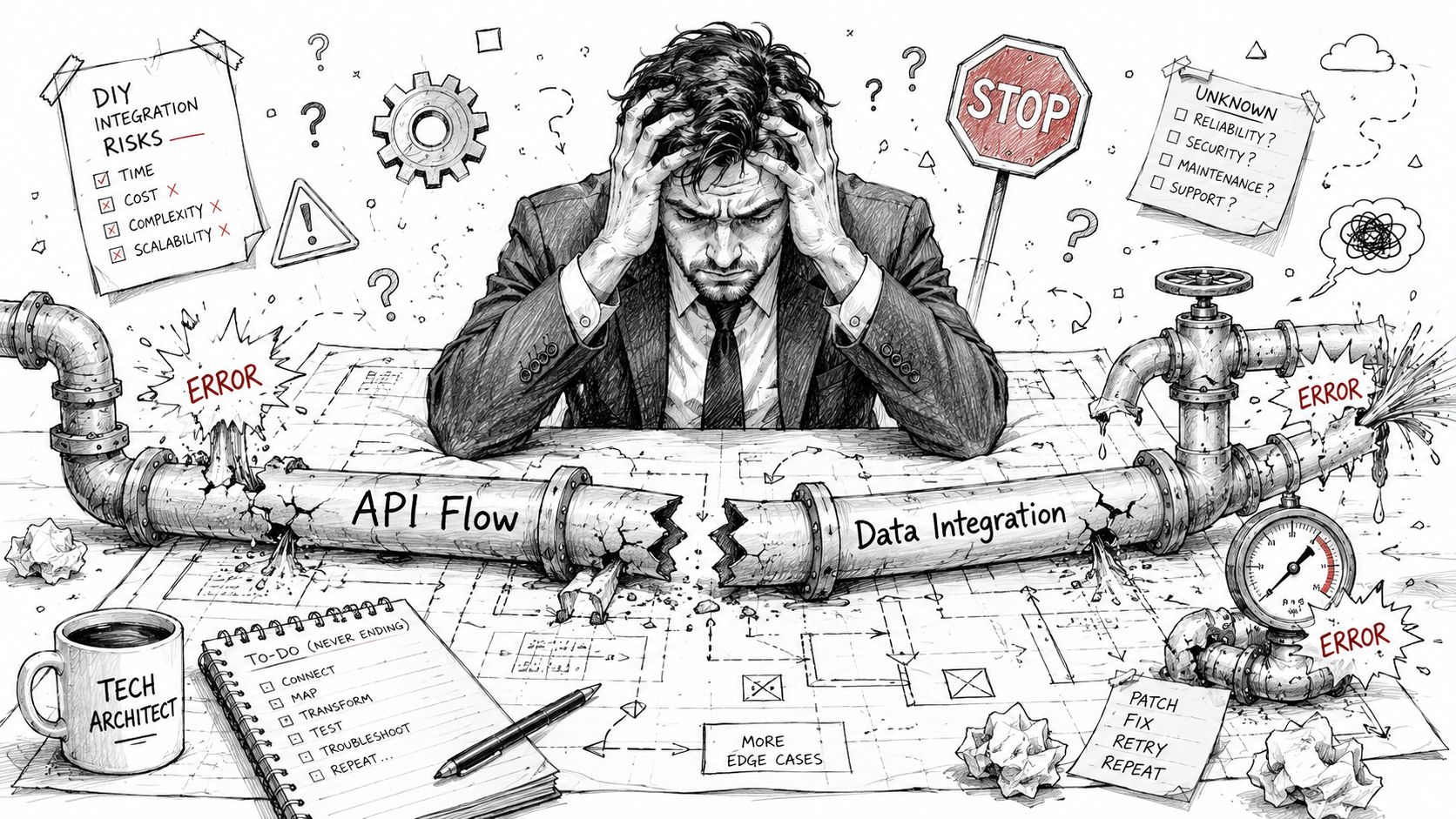
Microsoft Learn documents the limits. Teams still ignore them.
Official Microsoft Learn documentation confirms several constraints that architects run into constantly during migration, remediation, and large-scale processing work:
- API throttling: The documentation says services protect themselves by limiting excessive request patterns. In reality, that means bulk discovery, permission analysis, or connector-heavy processing can slow, fail, or produce inconsistent operational outcomes if your scripts and tooling aren't built to back off properly.
- SharePoint list view threshold: Microsoft documents the 5,000 item threshold. In reality, old document libraries and lists hit it all the time, and suddenly your lovely governance clean-up job turns into a performance and query design problem.
- Long path limits: The documentation is clear that path and filename constraints still matter in many migration and sync scenarios. In reality, one inherited folder jungle can derail remediation work before AI even enters the picture.
If your team is wrestling with that kind of SharePoint history already, this note on SharePoint migration performance issues will feel painfully familiar.
The documentation says one thing. Real tenants do another.
This is the pattern I keep seeing:
Microsoft documents the limit. The client assumes their environment is normal. Then the tenant proves it isn't.
A clean demo tenant won't show you API retry storms, giant legacy libraries, malformed metadata, old file structures, or permission repair jobs that collide with production usage. Your tenant will.
And if you think these are just migration annoyances, think again. AI depends on discoverable, correctly permissioned, consistently accessible content. If your underlying estate is difficult to crawl, classify, repair, or govern, your AI rollout inherits that instability.
The failure pattern is predictable
The sequence usually looks like this:
- Leadership approves AI licensing
- IT starts a pilot
- Security asks for permission validation
- Engineers hit throttling, threshold, and path issues during remediation
- The pilot slips while everyone argues over whether the tool or the tenant is the problem
It's usually the tenant.
Ollo Verdict
Treat Microsoft Learn limits as project design inputs, not footnotes. If your Microsoft 365 estate has age, sprawl, or migration baggage, don't assume standard admin effort will be enough. The failure won't look dramatic at first. It will look like delays, partial clean-up, inconsistent access, and outputs nobody trusts.
The Ollo Verdict A Risk-Reduction Recommendation
Here is the verdict.
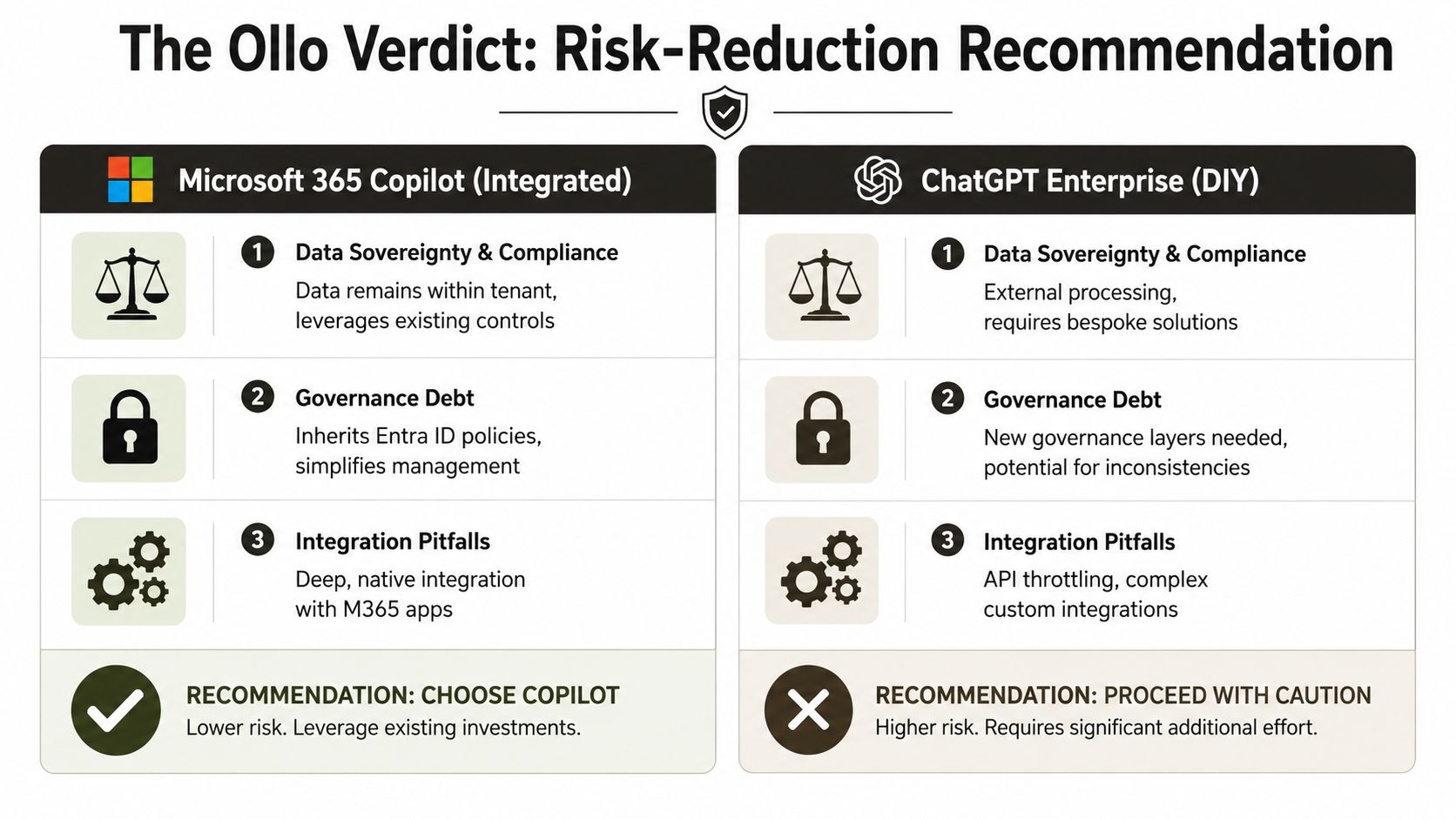
For regulated organisations in Ireland, this decision should be framed as a risk decision first, not a product preference exercise. If your Microsoft 365 tenant is already the centre of identity, retention, access control, audit, and data handling, Microsoft 365 Copilot is usually the lower-risk starting point. It fits inside controls your team already owns.
That does not make it safe.
Copilot will surface whatever your tenant allows it to surface. If permissions are wrong, if guest access has drifted, if SharePoint ownership is vague, or if sensitivity labels exist only on paper, Copilot turns those weaknesses into user-facing output at speed. The AI does not create the governance problem. It exposes it and amplifies the consequences.
My direct recommendation
Choose Microsoft 365 Copilot first if all three of these are true:
- Microsoft 365 already holds your core working data
- Your compliance model depends on tenant-based controls
- Your team can prove that permissions, identity, and retention are being actively governed
If you cannot prove those conditions, do not rush into a broad Copilot rollout because Microsoft branding feels safer. In a weak tenant, “native” AI just means the blast radius sits closer to regulated data.
ChatGPT Enterprise has a place. It can suit cross-platform work, development use cases, and organisations that need a cleaner separation from the mess inside their M365 estate. But that separation comes at a price. You now own another policy surface, another approval path, another monitoring problem, and another place where users will test the limits of your rules. In regulated environments, that overhead is often underestimated and rarely staffed properly.
The correct order of work
Do the work in this order:
- Assess the tenant
- Fix permissions, identity exposure, and content sprawl
- Decide which AI service fits the cleaned environment
- Pilot with named owners, hard scope limits, and audit checkpoints
Anything else is backwards.
Many AI programmes go off the rails under these circumstances. Procurement buys licences. Leadership announces innovation. Security asks uncomfortable questions late. Engineering finds old messes buried in SharePoint, Teams, and Entra ID. Then the argument starts over whether the chosen AI tool failed. Usually, governance failed first.
What this means for your next move
Use Copilot if Microsoft 365 is your control boundary and you are prepared to clean the tenant before exposing AI to end users.
Use ChatGPT Enterprise only if you have a specific use case that justifies a separate governance model and a team disciplined enough to enforce it.
Use neither at scale if your current estate still contains unresolved access chaos, stale collaboration patterns, or undocumented exceptions that nobody wants to own.
The sensible next step is not another vendor demo. It is an independent tenant review that tells you what AI will inherit on day one. If you need that view, request a free Microsoft 365 risk audit before you put any AI tool in front of staff.
Frequently Asked Questions for the Skeptical IT Director
Can't my internal team just do a permissions audit before we deploy
Only if you are comfortable letting the same people who lived with the exceptions judge whether those exceptions are safe for AI.
Internal IT teams know the obvious trouble spots. They also know which shared mailbox nobody wants to touch, which SharePoint site has broken inheritance, and which Entra group was left broad because a business unit complained three years ago. In a regulated Irish environment, that history matters. AI tools do not respect informal understandings. They use whatever access your tenant allows.
An internal review is useful. It is rarely independent enough to expose the politically inconvenient parts.
Isn't this what Microsoft FastTrack is for
FastTrack is an onboarding programme. It is not a cleanup crew, and it is not liable for a bad rollout.
If your tenant has stale guests, weak ownership, uncontrolled Teams creation, legacy connectors, or messy retention settings, baseline guidance will not fix it. You need hard decisions, named owners, and remediation work that someone is accountable for finishing. FastTrack can support a project. It does not replace one.
What if we need the power of GPT-4 but the security posture of Copilot. Can we use both
Yes. Do it only if you can define the boundary in writing and enforce it technically.
That means one platform for Microsoft 365-grounded work, another for approved external or specialist use cases, clear rules on what data can enter each system, and logging that survives an audit. Without that discipline, staff will choose based on convenience. Convenience is how regulated organisations end up with customer data in the wrong place and no clean explanation for the DPO.
Running both products is not a maturity signal. In many tenants, it is a sign the governance model is still undecided.
Is Copilot automatically compliant because it sits in Microsoft 365
No.
Copilot inherits your permissions, labels, sharing model, retention setup, and identity controls. If those are poorly maintained, Copilot exposes that weakness at speed. The product does not turn a messy tenant into a controlled one. It makes the consequences of weak control easier to trigger.
That is the part vendors downplay.
Should we delay AI completely until the tenant is perfect
Perfection is not the standard. Control is.
You need to know who can access sensitive content, how external sharing is governed, which identities have excessive privileges, and what happens when a user surfaces the wrong file through a prompt. If you cannot answer those questions cleanly, delay broad deployment. Run a narrow pilot instead, with a small user group, strict scope, and audit review built in from day one.
What question should I ask my team before I approve any rollout
Ask this. What will this tool be allowed to see on day one, and who has signed off on that exposure?
If the answer is vague, you are not choosing between Copilot and ChatGPT Enterprise yet. You are choosing whether to expose governance debt to an AI interface.
If your team is weighing Microsoft 365 Copilot against ChatGPT Enterprise, start with the blast radius, not the licence. Ollo helps regulated organisations audit messy Microsoft 365 estates, fix governance debt, and avoid AI rollouts that create new compliance problems before the first prompt is even typed.

















