



Most advice on supply chain analytics gets the problem backwards. It tells you to start with dashboards, forecasts, and prettier reporting. That's fine for board slides. It's useless when your actual failure point sits lower in the stack, inside Microsoft 365, where permissions, metadata, APIs, and list architecture decide whether your analytics are trustworthy or contaminated.
If you run IT in a regulated Irish enterprise, your supply chain isn't just pallets, depots, and carriers. Your supply chain is also the movement of records through SharePoint Online, Teams, OneDrive, Power Platform, and connected data services. When that digital chain breaks, your reporting doesn't just go stale. Your audit trail fractures, your access model drifts, and your compliance posture weakens.
We often see clients fail when they treat data migration as plumbing and analytics as a separate workstream. It isn't separate. If your source estate is dirty, throttled, mis-permissioned, or structurally wrong, every downstream model inherits that damage. If your team is still relying on workarounds and spreadsheets, the warning signs usually appeared long before the migration started, which is why articles on outgrowing spreadsheets in business operations often matter more than another generic BI tutorial.
Your Understanding of Supply Chain Analytics Is Wrong
Supply chain analytics is not a dashboard category. It's a risk discipline.
The common definition focuses on inventory, transport, demand, and supplier performance. That definition works for operations teams. It fails IT Directors. Your real exposure sits in the digital supply chain, meaning the way information moves, transforms, inherits permissions, and remains usable across Microsoft 365.
Dashboards don't protect data integrity
A Power BI report can look immaculate while the underlying SharePoint lists are already failing under threshold constraints, malformed structures, or permission sprawl. The documentation says your analytics layer gives you visibility. In reality, visibility built on unstable source systems gives you false confidence.
That matters because the global supply chain analytics market was valued at USD 11.0 billion in 2025 and is forecast to grow at a 15.85% CAGR through 2034, with descriptive, diagnostic, predictive, and prescriptive analytics identified as the core layers organisations use to avoid costly failures, according to IMARC's supply chain analytics market analysis. The market is growing. That does not mean your implementation is sound.
The first failure in supply chain analytics usually isn't the model. It's the assumption that the source data is structurally safe.
Your real supply chain runs through Microsoft 365
In practice, your enterprise data estate behaves like a logistics network:
- Metadata acts as routing logic. Break it, and downstream processing loses context.
- Permissions inheritance acts as customs control. Break that, and users gain or lose access in ways your compliance team won't accept.
- GUID relationships act as tracking references. Corrupt them during consolidation, and connected objects stop lining up cleanly.
- API limits act as traffic control. Ignore them, and Microsoft slows your migration until timelines collapse.
For Irish firms in finance, energy, and healthcare, this isn't academic. A weak digital supply chain breaks reporting, retention, discovery, and access control at the same time. You don't need more analytics enthusiasm. You need stricter engineering discipline.
Defining the Digital Supply Chain in Your Enterprise
Most enterprises define the supply chain too narrowly. They map suppliers, stock, transport, and reporting lines, then ignore the Microsoft 365 estate carrying the documents, approvals, identifiers, and audit records that make those operations legally and operationally credible.
That is a mistake.
Your digital supply chain is the full path information takes from capture to decision to retention. In a regulated Irish enterprise, that path usually cuts across ERP exports, SharePoint libraries, Teams workspaces, Power Platform flows, Dataverse tables, retention controls, and the reporting layer executives trust. If that chain is not explicitly defined, your analytics programme rests on undocumented dependencies and silent failure points.
The four layers that actually matter
The standard analytics labels still apply. What matters is how they fail inside Microsoft 365, and how quickly those failures spread when nobody owns the chain end to end.
- Descriptive analytics exposes what already broke. In Microsoft 365, that usually means failed Power Automate runs, duplicate records, inconsistent document classification, stalled approvals, and libraries that users can access but analysts cannot query properly.
- Diagnostic analytics identifies the cause. The cause is often structural. Broken permissions inheritance, poor column design, mismapped content types, malformed lookups, or migration decisions that stripped context from the source.
- Predictive analytics shows where the next failure will occur. That includes storage sprawl, throttling pressure, badly partitioned lists, unmanaged workspace growth, and integration points that depend on brittle field mappings.
- Prescriptive analytics tells you what to change before bad data reaches a regulator, board pack, or operational team. That means redesigning schemas, isolating corrupted datasets, correcting security boundaries, and forcing remediation before downstream reporting consumes the damage.
If your organisation uses Microsoft 365 to support logistics, dispatch, or field operations, material on vehicle tracking and fleet management systems can help frame the operational use case. It does not solve the harder problem. The harder problem is preserving record integrity, access control, and traceability across every handoff.
A specialist will map that chain as a controlled information system, not as a loose collection of apps.
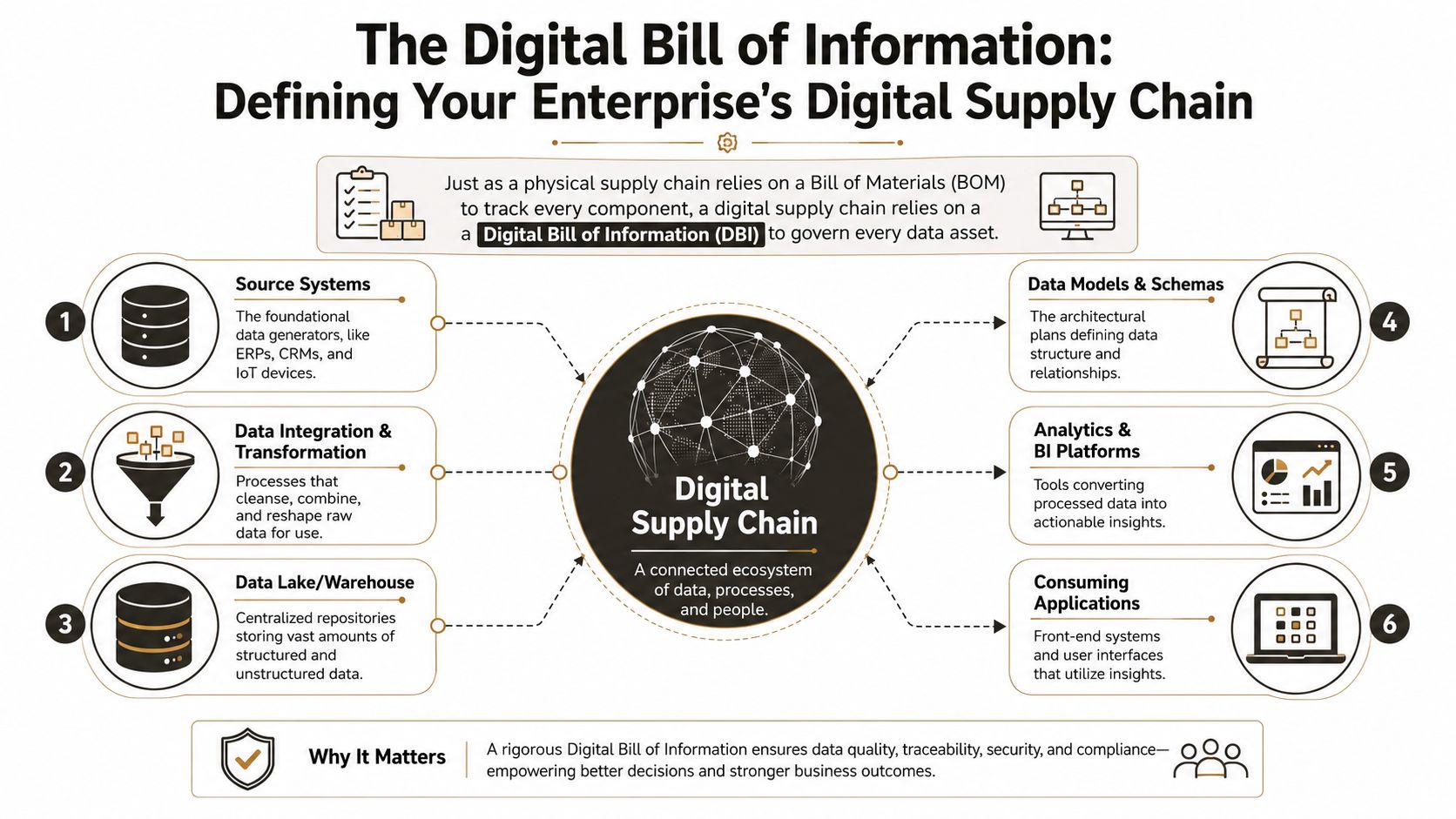
Your digital bill of information needs named owners and failure controls
A digital bill of information is stricter than a dashboard inventory because every layer carries a different class of risk:
- Source systems such as ERP, CRM, file shares, SharePoint Server, and line-of-business platforms that generate the original record.
- Transformation layers where data is classified, normalised, enriched, joined, or stripped of context by careless automation.
- Storage platforms such as SharePoint Online, Dataverse, and connected Azure repositories where poor structure becomes persistent technical debt.
- Consumption layers including Power BI, Power Apps, Teams, and external portals where bad assumptions become trusted outputs.
Architect's rule: If you cannot show how identities, metadata, permissions, retention states, and record relationships survive movement across all four layers, you do not have supply chain analytics. You have an exposure.
DIY programmes usually fail because internal teams document systems, but they do not document evidence paths. They can show where a file lives. They cannot prove how its metadata changed, who inherited access, which automation touched it, whether retention remained intact, or which report consumed the final record. In Irish healthcare, financial services, energy, and public sector environments, that gap is not an inconvenience. It is a regulatory and operational risk.
The same applies to transport and fleet operations. Tools that streamline fleet compliance are useful at the edge, but they still depend on a controlled Microsoft 365 information chain behind the scenes. If that chain is poorly defined, the dashboard looks healthy while the evidential record underneath is already compromised.
The Unstable Bedrock of Your Analytics Architecture
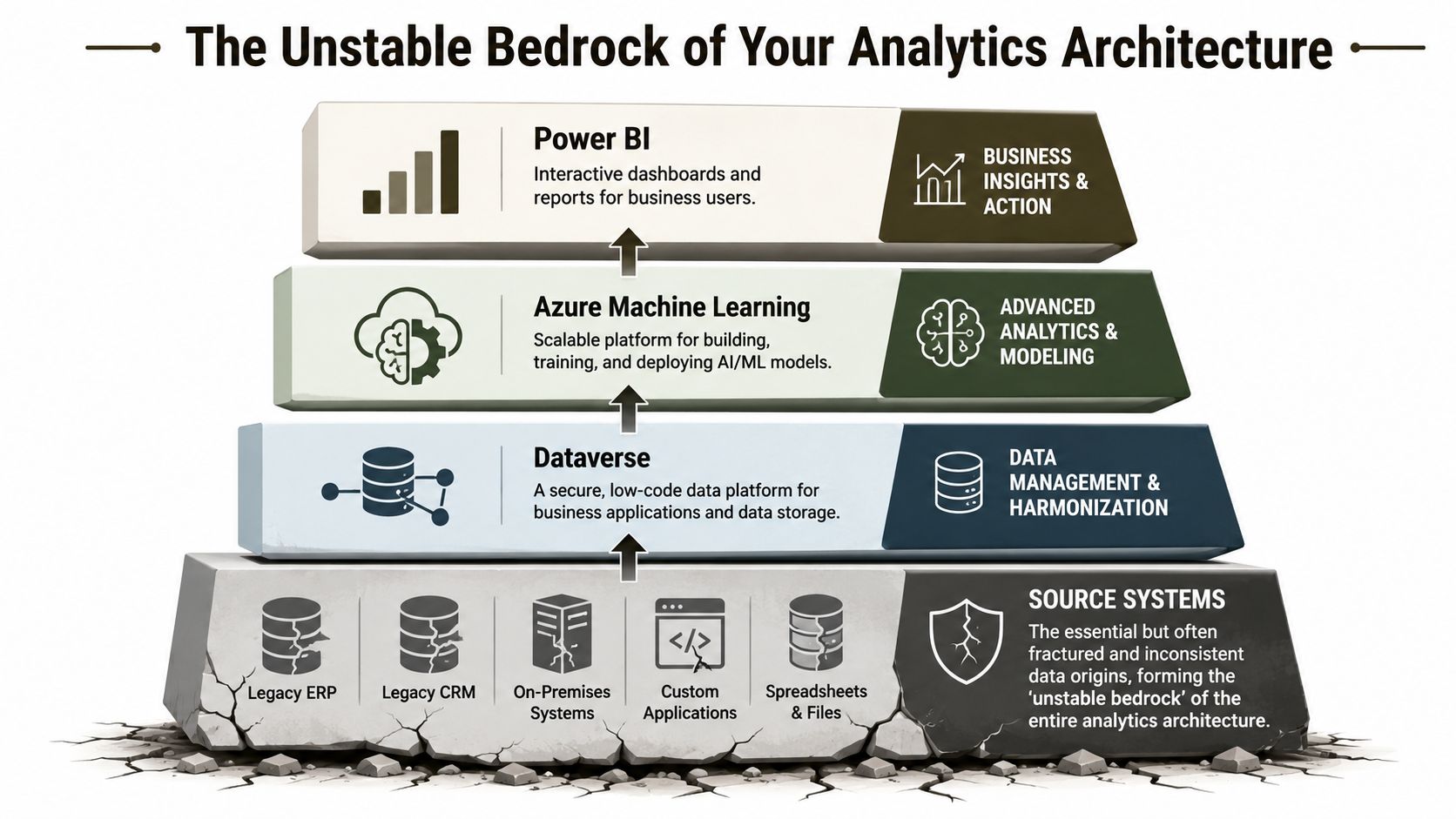
Most analytics architecture diagrams are dishonest. They show a clean rise from source systems to data platforms to dashboards. They rarely show the actual problem, which is that the foundation is usually cracked.
You can build Azure Machine Learning models, shape data in Dataverse, and publish elegant Power BI reports. If the source layer is SharePoint Online with poor list design, old customisations, or inherited mess from an on-prem estate, your stack is unstable from the first day.
The source layer breaks first
Here's the trap. Architects often spend design energy on the top of the stack because that's where executives look. Business users see reports. Security teams see policies. Nobody stares at the list architecture until the failures begin.
That's where the platform gets blunt. In SharePoint Online, the List View Threshold is a hard platform-level limit of 5,000 items per view that cannot be raised, bypassed, or temporarily lifted via any admin setting, and when you exceed it, query operations fail regardless of indexing efforts, as detailed in ShareGate's breakdown of SharePoint list thresholds.
That isn't a tuning issue. It's a design boundary.
What this means for analytics teams
If your analytics depends on SharePoint lists as a source of truth, this threshold changes everything:
- Your queries can fail even when users think the list is healthy
- Your views can break after migration because indexing was handled too late
- Your reporting can return incomplete results
- Your automation can behave unpredictably because the source object is structurally overloaded
For organisations trying to streamline fleet compliance, the lesson is the same. Operational reporting only works when the underlying compliance records remain queryable, secure, and structurally sound. The reporting layer never rescues a broken source layer.
The documentation says manageable. Reality is brittle.
The official narrative around cloud platforms often implies that scale problems can be solved with indexing, filtering, or cleaner views. Sometimes they can. Often they can't, because the issue isn't user interface design. It's object structure, volume distribution, and inherited assumptions from a previous platform.
We often see clients fail when they treat SharePoint as a passive repository instead of an active dependency in the analytics chain. Once list design, permissions, and content model drift out of control, every downstream BI or AI initiative turns into a rescue job.
Your analytics platform is only as reliable as the most fragile object feeding it. In Microsoft 365, that object is often a SharePoint list somebody stopped questioning years ago.
War Stories Common Data Migration Failure Modes
Most migration failures aren't dramatic at first. They start with delays, odd permissions behaviour, partial deltas, and logs that don't tell your team enough. Then the compounding starts.
API throttling slows everything until the project misses its window
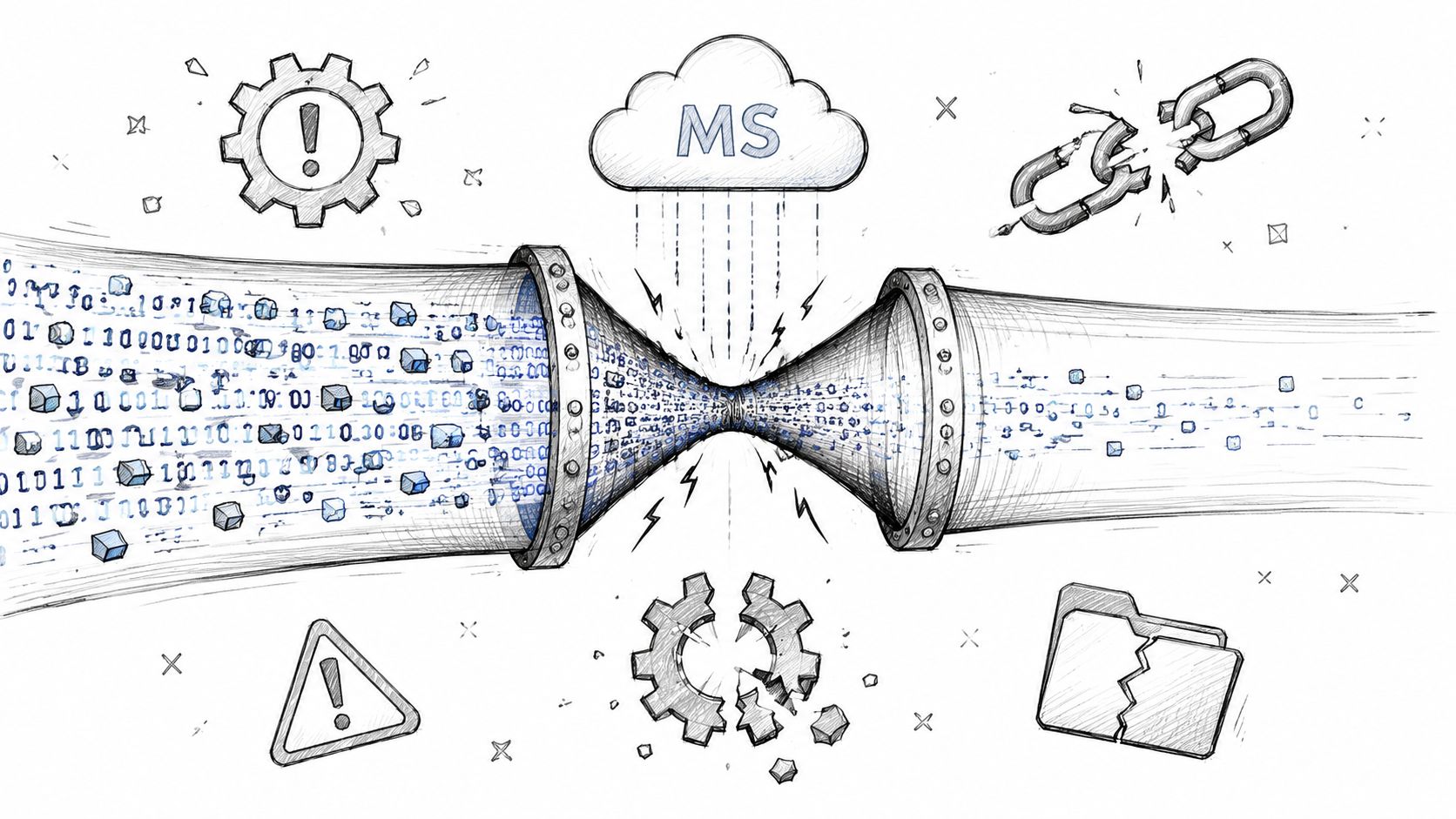
Microsoft doesn't owe your migration speed. If your tooling makes too many calls, the platform pushes back. Your team experiences that as jobs slowing down, retries stacking up, and migration windows slipping beyond change freeze dates.
For Irish firms in finance and energy, the risk is sharper. Without expert use of ShareGate and custom PowerShell PnP scripts, firms face a 30 to 45 percent higher risk of migration throttling errors that degrade forecast accuracy, according to the claim documented in Roots Analysis coverage of the market. The point isn't the exact number. The point is that throttling is not incidental. It's a predictable consequence of treating enterprise migration like a bulk file copy job.
Broken inheritance creates invisible compliance damage
A file can arrive in the target tenant and still be wrong.
That's what broken inheritance does. The content exists, but the security context no longer aligns with the original operational rules. In regulated environments, that's lethal because your legal, finance, or operational users may see too much, too little, or the wrong thing entirely.
We often see clients fail when they validate migration with file counts alone. File counts are comfort food. They don't tell you whether access control survived.
- A legal hold can lose practical value if the wrong people inherit access.
- A finance workspace can trigger exposure if permissions flatten during consolidation.
- An operational team can lose continuity if item-level logic disappears.
For a closer look at the patterns behind these failures, the breakdown of what goes wrong in enterprise SharePoint migrations lines up with what architects see in rescue engagements again and again.
GUID conflicts corrupt relationships, not just files
Tenant-to-tenant consolidation gets ugly when object identities and dependent references stop lining up. A GUID conflict doesn't always announce itself with a dramatic error. Sometimes it shows up later as mislinked records, workflow failures, missing references, or data attached to the wrong object chain.
Count the relationships, not just the documents. A migrated file with broken context is not a successful migration.
This short overview gives non-specialists a useful visual on migration pressure points before they become production incidents:
The Ollo Verdict
Use SPMT for small, low-complexity moves with limited dependencies.
For enterprise consolidations, regulated workloads, complex permissions, or analytics-critical datasets, you need ShareGate plus custom PowerShell PnP scripting. Anything less leaves your team reacting to throttling, inheritance damage, and GUID issues after the cutover, when the cheapest fix is already gone.
Compliance and Regulatory Implications in Ireland
Compliance failure in Irish supply chain analytics rarely starts with a policy mistake. It starts with a technical shortcut inside Microsoft 365 that somebody wrongly assumed was low risk.
That is the trap. Internal teams treat analytics migrations as a reporting project, a Power BI project, or a content move with some dashboards attached. In regulated Irish enterprises, it is a control preservation exercise. Get the architecture wrong and you do not just lose visibility. You lose evidence, access boundaries, retention behaviour, and the ability to prove that regulated information stayed under control throughout the move.
Irish regulatory pressure is heading in one direction
Irish organisations should stop pretending this is a niche IT concern. Academic and industry attention is already shifting toward supply chain analytics as a formal capability area, including the ATU programme noted earlier. The message is obvious. Analytics capability now sits close to operational resilience, governance, and regulated data handling.
For finance, healthcare, life sciences, and critical infrastructure, DIY analytics built on top of a loosely governed Microsoft 365 estate creates a predictable failure pattern. Data lands in the wrong workspace. Access inheritance drifts. Audit context disappears. Then compliance, legal, and internal audit arrive after the fact and ask for evidence your team never preserved.
Technical defects become Irish compliance problems fast
The failure modes are boring until they turn expensive.
A permissions break in a finance workload can create unauthorised access to commercially sensitive or regulated records. Missing version history or incomplete metadata can weaken retention and eDiscovery responses. An analytics dataset built from partially migrated SharePoint or Teams content can produce reporting that looks credible but no longer has a defensible chain of custody.
Healthcare is less forgiving. If migration errors affect record integrity, confidentiality, or access controls, the issue moves beyond platform hygiene and into governance exposure. Energy and utilities face the same problem with operational reporting and audit evidence. Once records, classifications, or timestamps are damaged, reconstruction is slow, political, and often incomplete.
If your architects are not aligning platform design with legal and policy controls from the start, review guidance on GDPR compliance for data platforms before you approve the target design. Governance controls added after cutover are usually cosmetic.
Residency errors create audit pain long after go-live
Data residency is where DIY programmes typically fail. Teams focus on copying content, rebuilding reports, and restoring user access. They do not examine how tenant moves, guest access, storage locations, and analytics pipelines affect jurisdiction, processor relationships, or downstream data handling.
That is reckless in an Irish regulated estate.
Tenant consolidation, merger activity, or carve-outs can shift where supply chain data is stored and who can touch it. If your analytics layer pulls from SharePoint, Teams, Dataverse, Power Platform, and third-party operational systems, residency assumptions can break in several places at once. Read the detail in this guide to SharePoint migration and data residency before design sign-off, not during remediation.
A migration control missed at design stage becomes a compliance incident after cutover.
Specialists treat this as risk management, not administration. They map regulated datasets, validate access models, test audit continuity, and confirm residency impacts before production data moves. That is the only sane approach for Irish enterprises that cannot afford to explain to regulators why a DIY analytics project broke control of the supply chain data they depend on.
DIY Tools vs Specialist Services A Risk Comparison
Let's be blunt. DIY migration is usually defended as cost control. In regulated Microsoft 365 estates, it's risk transfer. Your team accepts hidden failure modes in exchange for lower upfront spend, then pays for the damage during remediation, delay, and governance fallout.
The gap in most supply chain analytics content is obvious. It talks about better forecasting and cleaner insights, but it rarely addresses the DIY versus rescue migration problem for Irish regulated sectors. That blind spot is explicitly called out in this discussion of supply chain analytics content gaps, especially around unquantified risks like GUID conflicts and broken inheritance in tenant consolidations.
Risk Profile DIY Tools vs. Specialist Migration
| Risk Factor | DIY Approach (e.g., SPMT) | Specialist Approach (Ollo w/ ShareGate + Scripts) |
|---|---|---|
| Throttling management | Basic retry behaviour. Limited control when Microsoft slows call volume. | Planned pacing, scripted batching, and controlled execution patterns designed around platform limits. |
| Permissions remapping | Acceptable for simple structures. Struggles when inheritance is heavily customised. | Detailed mapping and validation for complex role models, exceptions, and regulated access boundaries. |
| GUID conflict handling | Limited visibility into relationship-level issues during consolidation. | Pre-migration analysis and custom remediation logic for dependency-heavy estates. |
| Delta migration integrity | Often treated as a rerun problem. That breaks down when content changes rapidly. | Controlled delta strategy with validation against source and target states. |
| Logging and diagnostics | Enough for basic troubleshooting. Weak when auditors or architects need forensic clarity. | Deeper operational logging, scripted validation, and exception tracking fit for enterprise review. |
| Large list behaviour | Usually discovers structural issues too late. | Designs around threshold and schema constraints before the move. |
| Regulated workload suitability | High-risk once retention, sensitivity, access segmentation, or evidence trails matter. | Built for environments where technical defects have legal and operational consequences. |
Constructive cynicism on the toolset
SPMT isn't useless. It's useful in the way a hand trolley is useful. You can move boxes with it. You should not use it to relocate a production line.
ShareGate is stronger. It gives architects a better operational base, better handling, and better visibility. Even then, the tool alone doesn't save you. Enterprise migrations fail in the edges. That's where custom PowerShell PnP scripting, validation logic, and pre-emptive remediation perform the essential work.
The Ollo Verdict
Use SPMT for small workloads with low complexity and limited dependency chains.
For anything involving regulated data, tenant consolidation, complex permissions, large lists, or analytics-critical content, you need a specialist-led approach built on ShareGate plus custom scripting. DIY is not a lean option. It's an uncontrolled risk position.
Adopting a Risk-First Modernisation Playbook
Modernisation efforts often start with the wrong objective. Teams talk about simplification, productivity, and better reporting. Those are outputs. The actual objective is risk reduction.
If your Microsoft 365 estate feeds business decisions, then your supply chain analytics capability depends on whether your data moved cleanly, retained context, preserved access rules, and remained structurally queryable after migration. That is the playbook. Not platform enthusiasm. Not another dashboard roadmap.
What a risk-first playbook looks like
A serious modernisation programme should include:
- Architecture-first assessment. Identify threshold risks, list design issues, dependency chains, and permission complexity before migration starts.
- Governance-aware mapping. Treat metadata, retention, inheritance, and access segmentation as first-class migration objects.
- Controlled execution. Plan for throttling, deltas, validation, and exception handling instead of assuming the tool will cope.
- Post-migration proof. Validate not only that content arrived, but that it arrived with the right relationships, rules, and reporting integrity.
If your leadership team is formalising this thinking at programme level, guidance on building a robust risk management framework provides a useful governance lens. The technical migration plan and the enterprise risk framework should agree with each other.
The practical decision for your team
You have two options.
Your team can run a DIY migration, trust basic tooling, and hope the edge cases don't matter. That approach usually works right up until thresholds, throttling, inheritance, or identity conflicts hit production data.
Or your team can treat migration as a controlled risk programme and design around the documented realities of Microsoft 365 from the start. If you're planning a broader Microsoft 365 migration strategy, that's the lens to use. Not “How do we move it?” but “How do we avoid damage we can't cheaply reverse?”
The documentation says migration is possible. Reality says enterprise migration is survivable only when you engineer for failure before it happens.
That's the only advice that holds up after dozens of rescue projects.
If your team is staring down a high-stakes Microsoft 365 migration and you want a specialist view before small technical mistakes turn into audit, security, or operational problems, talk to Ollo. We handle complex tenant-to-tenant consolidations, rescue migrations, and regulated SharePoint estates where failure isn't acceptable.

















