



A SharePoint hybrid migration isn’t just another IT project; it's a high-stakes technical operation where generic playbooks guarantee failure. The goal is to connect your on-premises SharePoint Server farm with SharePoint Online. In reality, the path is littered with landmines that the official documentation conveniently glosses over.
Success isn't about following a checklist. It’s about anticipating where the platform will break under the strain of your real-world data and customisations.
The Unspoken Truths of SharePoint Hybrid Migration
Let’s be direct. Your team has been sold a vision of a "seamless transition." The marketing materials promise a smooth journey, but they omit the brutal realities of API throttling, broken permissions, and corrupted data that we clean up for clients every week.
We often see clients fail when they trust the official line from Microsoft or third-party tool vendors. Competent internal teams grind to a halt because they believed a GUI-based tool could handle a decade of accumulated technical debt. This isn't about fearmongering; it's about building a strategy that expects failure and engineers around it.
Beyond the Marketing Hype
The documentation says migration tools handle permissions. What we actually see are clients wrestling with broken inheritance chains post-migration, opening up massive security holes. A single misconfigured site can expose sensitive HR or financial data, turning a technical hiccup into a legal disaster. Missing this step doesn't just fail the migration; it breaks legal compliance.
The real challenge isn't moving files; it's rebuilding your information architecture for a completely new paradigm. To lay a solid foundation, understanding the ultimate document management workflow guide is a critical first step.
Confronting Inevitable Technical Debt
Your on-premises environment is carrying years of technical debt—sprawling permissions, custom solutions, and content structures that will detonate during your migration.
- API Throttling: Microsoft's throttling isn't a suggestion; it's a hard wall. Pushing too much data will bring your migration to a dead stop for hours, wrecking your project timeline.
- List View Thresholds: That critical on-prem list with 50,000 items? It will break in SharePoint Online, which has a hard 5,000-item limit for most operations. This doesn't just fail the migration; it breaks the business process that depends on it.
- GUID Conflicts: When you merge sites, you risk creating GUID conflicts that corrupt data integrity. It's a subtle but catastrophic failure that basic tools simply won't detect.
The Ollo Verdict: A SharePoint hybrid migration is less about technology and more about risk management. Success depends on identifying these breaking points before they find you. Our approach, built on years of navigating these exact failure points, is the only way to de-risk a project of this complexity.
Your Hybrid Architecture: The First Point of Failure
Choosing your SharePoint hybrid architecture isn't a technical preference; it’s a strategic commitment with irreversible consequences for your security and operational costs. The documentation presents options like hybrid search as simple toggles.
That’s dangerously misleading. From what I’ve seen in the field, that initial architectural decision is the single most common point of failure for the entire migration project.
Get this wrong, and you're not just looking at rework. You've compromised the initiative from day one. Your architecture dictates everything, from data sovereignty compliance to the performance your users will tolerate before they revolt.
The Hybrid Search Deception
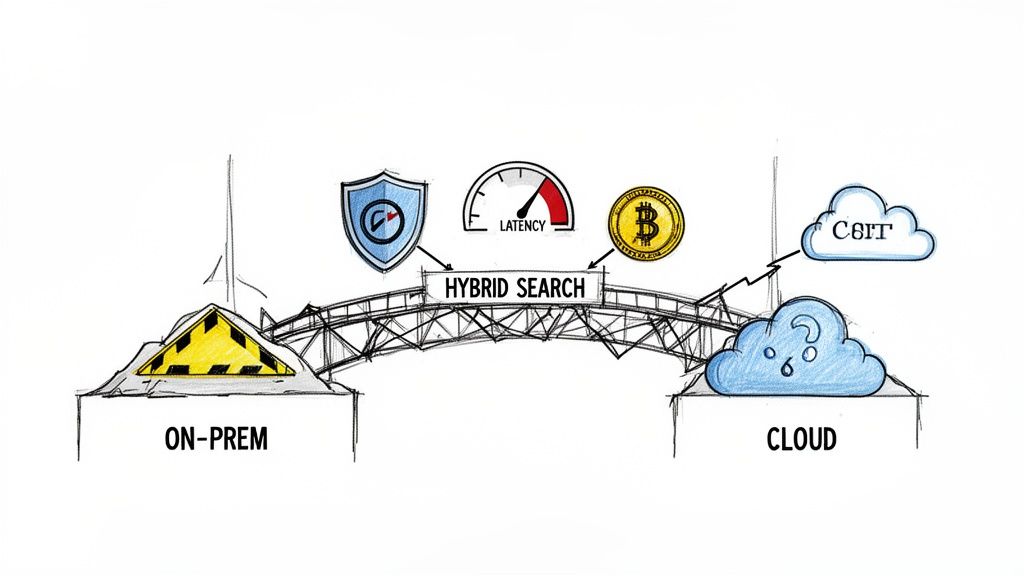
Hybrid search is positioned as the easy win: index your on-premises content into the M365 search index for unified results. The documentation claims this provides a seamless experience. In reality, it's a security and performance minefield.
I've seen clients get this disastrously wrong. A misconfigured Cloud Search Service Application (SSA) doesn't just fail to return results; it can crawl and index sensitive on-prem content never meant for cloud visibility. This isn't a theoretical risk. It’s a direct path to a data breach, putting you in violation of GDPR. The risk of exposing on-premises data to the cloud index must be weighed carefully against the reward of a unified search bar.
The Ollo Verdict: Deploying hybrid search safely requires a granular understanding of crawl rules, content sources, and the intricate security trimming between your on-premises Active Directory and Entra ID. Get it wrong, and you've created a compliance disaster waiting to happen.
On top of the security nightmare, performance is never what the datasheets promise. The latency introduced by querying an index that spans your data centre and Microsoft's introduces a noticeable lag. Users accustomed to sub-second on-prem search responses will not tolerate a three-second delay, leading them to abandon the official system.
The Myth of Simple Coexistence
Another approach is a prolonged coexistence, running both environments in parallel while slowly migrating content. This sounds low-risk on paper, but it creates a fractured user experience that kills productivity. Your users are forced to navigate two separate environments, never sure where the latest version of a document lives.
This approach also creates significant technical challenges:
- Fragmented Navigation: How do you provide a single navigation structure that spans both on-prem and cloud sites? The honest answer is you can't—not without complex custom development that introduces more points of failure.
- Profile Redirection: Configuring hybrid user profiles to redirect to Delve while content remains on-prem is notoriously brittle. We've seen this break after minor patching cycles, leaving users in a disorienting loop.
- Business Connectivity Services (BCS): If you rely on BCS to surface line-of-business data, making this work in a hybrid model is an architectural nightmare of complex authentication and firewall configurations.
A poorly planned coexistence doesn't reduce risk; it prolongs the pain. Choosing the right architecture requires a deep analysis of your data, security requirements, and risk tolerance. It’s a foundational process where expert guidance isn't a luxury—it’s a necessity.
The strategies involved in architecting these complex M365 & Azure services are what separate a successful migration from a costly failure. Your entire SharePoint hybrid migration hinges on this decision.
Migration Tools: SPMT vs ShareGate vs The Real World
Choosing your migration tool feels tactical but is deeply strategic. Relying on standard-issue tools for a complex, enterprise-level SharePoint migration is a recipe for disaster. The marketing brochures paint a picture of a simple, push-button process.
In the real world, these tools are the first thing to break when they hit the messy reality of your ten-year-old on-premises environment.
We often get called in after a project has gone off the rails. The client hands us a migration report littered with cryptic errors, convinced their team did something wrong. The problem wasn't the team; it was the false confidence they got from a tool that was never built for their scale or complexity. Understanding where each tool will fail is the first step to avoiding that failure.
The SharePoint Migration Tool (SPMT): The Free Option
Microsoft's own SharePoint Migration Tool (SPMT) is functional. It will move files from a network share to SharePoint Online. For a small team with less than 50GB of clean data, it can get the job done. It's free, and you get exactly what you pay for.
The documentation says it handles permissions, but in reality, SPMT often fails silently and catastrophically when it encounters the technical debt baked into mature environments. We've seen it choke on:
- Custom Permissions: The tool struggles with broken inheritance and deeply nested, unique permissions. It doesn't rebuild them; it often flattens them, creating massive, unintended security gaps.
- Long File Paths: It will give up on file paths that exceed the 256-character limit, leaving entire folder structures behind with no clear warning.
- List View Thresholds: It will try to migrate lists that blow past the 5,000-item view threshold. The migration report might look successful, but your team will later discover that the apps relying on those lists are completely broken.
The Ollo Verdict: Use SPMT for simple, non-critical file share moves under 50GB. For anything else, relying solely on SPMT is negligent. If you're still considering it, read our deeper analysis of the SharePoint Migration Tool's real-world limitations first.
ShareGate: The Power User's Tool
ShareGate is a serious step up. It gives you far more granular control, better reporting, and capably handles many basic issues that bring SPMT to its knees. Its pre-migration analysis is genuinely useful for flagging potential problems.
But ShareGate is not a silver bullet. I’ve seen projects stall because the team assumed its powerful automation would handle everything. It’s a fantastic tool, but it needs an expert operator who understands its specific breaking points in large-scale enterprise scenarios.
ShareGate’s biggest weakness is how it deals with API throttling. While better than SPMT, it still uses a brute-force approach. When Microsoft’s servers inevitably throttle your tenant, ShareGate doesn’t adapt gracefully. This leads to long slowdowns and requires you to manually babysit migration speeds, turning your "automated" project into a 24/7 monitoring job. It also struggles with complex legacy SharePoint Designer workflows and offers limited help for migrating third-party web parts.
The Real World: Custom PowerShell
The documentation implies you can migrate your entire enterprise with GUI-based tools. Here’s the reality: 90% of the successful, large-scale SharePoint hybrid migration projects we've delivered required a custom scripting approach, almost always using PowerShell and the PnP framework.
Why? Because your environment is unique. No off-the-shelf tool can account for your specific customisations, tangled permissions, or critical metadata mappings. A scripted approach lets us build a migration engine tailored to your exact needs.
This lets us do things the GUI tools can't:
- Intelligently Handle Throttling: We build logic that actively monitors API response headers and dynamically adjusts the data transfer rate to maximise throughput without getting your tenant throttled into oblivion.
- Remediate On-the-Fly: Scripts can fix known issues as data is being moved. We can shorten file paths, strip illegal characters, and restructure content to meet new governance rules during the migration itself.
- Validate with Precision: We don’t just rely on a summary report. Custom scripts let us perform granular, item-level validation, comparing source and destination checksums and permissions, providing a defensible audit trail. Missing this step doesn't just risk data loss; it puts you in breach of legal and compliance obligations.
Tooling Reality Check: SPMT vs ShareGate vs Custom Scripts
To put it all in context, here’s how these tools stack up against the real-world problems you’re guaranteed to face. The choice isn't just about features; it's about matching the tool to the complexity and risk of your project.
Ultimately, choosing a tool isn't about the marketing list of features. It's about risk management. For any truly complex SharePoint hybrid migration, the only safe pair of hands is one that can write the code needed to navigate the failures that are guaranteed to happen.
Executing the Migration: Cutover, Coexistence, and Rollback
A migration plan without a pressure-tested cutover and rollback runbook is just a wish list. This is where months of planning meet operational reality, and it's precisely where most SharePoint hybrid migration projects unravel.
Your team cannot afford to treat this as a simple go-live event. It's a meticulously choreographed technical operation.
We’re not just talking about scheduling downtime. We're talking about the non-negotiable steps for managing a coexistence period that doesn't cripple your users, ensuring delta syncs capture every last-minute change without creating versioning conflicts, and locking down source data into a read-only state at the exact right moment.
Get the sequence wrong, and you'll be restoring from backups while your CEO asks for a project post-mortem. This part of the migration is about operational discipline.
Below is a high-level view of the tooling flow we've discussed, moving from basic to enterprise-grade solutions.
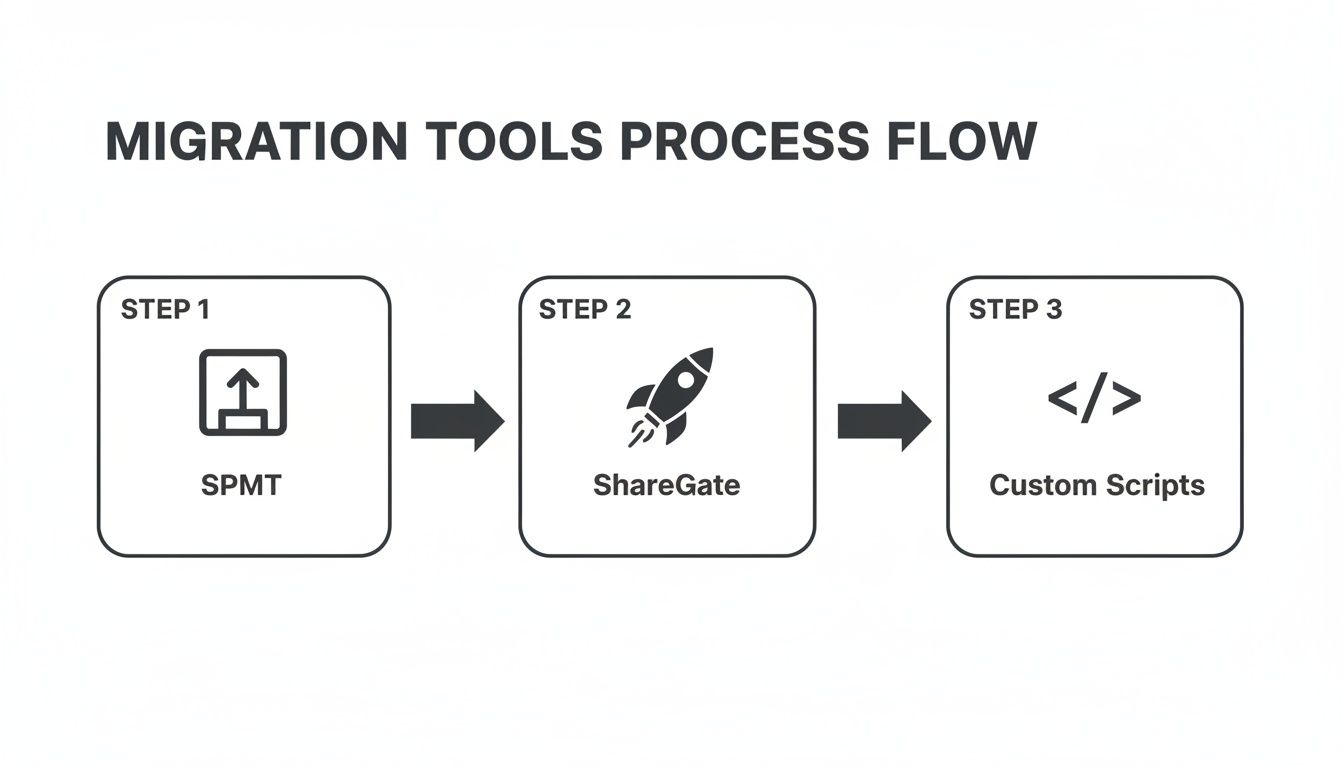
This flow illustrates a crucial reality: as project complexity increases, so does the need for more sophisticated tooling. A basic tool like SPMT simply won't cut it for a true enterprise migration.
The Anatomy of a Controlled Cutover
The documentation often implies a single, clean switch. In the real world, a successful cutover is a phased event executed with military precision. We consistently see clients fail when they underestimate the dependencies between data, identity, and network configurations.
Your cutover runbook must be a living document, tested repeatedly and refined with each dry run. It needs to detail every command, responsible person, and validation checkpoint.
- Pre-Flight Checklist: This is your final no-go decision point. Have you run a final delta sync? Confirmed all UAT sign-offs? Is the source environment configured to read-only to prevent last-second data changes that will be lost forever?
- DNS and Network Redirection: Flipping the switch is more than changing a DNS record. You must account for TTL propagation times and ensure all dependent applications are correctly pointing to the new SharePoint Online endpoints.
- Service Account Lockout: A common failure is forgetting to disable migration service accounts. Leaving these active post-cutover is a security risk and can lead to accidental data modifications on the now-archived on-premises farm.
The Ollo Verdict: A phased migration, where you move business units in controlled waves, is the only responsible approach for an enterprise. It contains the blast radius of any unforeseen issues. This is a core part of our methodology for complex cross-tenant migrations, which have their own unique cutover challenges. To dig deeper, check out our guide on cross-tenant SharePoint migrations.
Coexistence: The Necessary Evil
No enterprise migration happens overnight. You will be forced into a period of coexistence, and the goal is to make it as short and painless as possible. A poorly managed coexistence creates a two-headed information hydra, confusing users and leading to data fragmentation.
Your strategy must clearly define where users create new content. For example, all new project sites must be created in SharePoint Online, while legacy sites remain read-only on-prem until their migration wave. This isn't a suggestion; it must be enforced through technical controls and relentless communication.
In Ireland and the EU, this becomes more critical due to stringent GDPR compliance demands. Hybrid migrations have surged, with Microsoft rolling out EU Data Boundary (EUDB) support for data residency. A hybrid approach reduces risk by 55% in regulated sectors, but this relies on meticulous execution. Microsoft’s own guidance recommends keeping migration jobs under 5,000 items to avoid throttling—a limit that standard tools routinely ignore. This is precisely how Ollo operates, redesigning governance for standards like ISO 27001 to ensure our clients can consolidate their environments securely.
Your Rollback Plan Is Not a "Nice-to-Have"
If your rollback plan is simply "restore from backup," you don't have a plan.
A true rollback runbook is the reverse of your cutover plan, just as detailed and tested. You must have a defined trigger for initiating a rollback—for example, if more than 10% of critical business applications are non-functional two hours post-cutover.
The decision must be swift and decisive. Hesitation costs money and erodes business confidence. Your rollback procedure should allow you to revert to the on-premises environment in under an hour, not days. This involves reverting DNS changes, re-enabling write access to the on-prem farm, and communicating clearly to users.
Remember that A Pragmatic Plan for Recovery is your ultimate insurance policy. Without it, you’re gambling with your organisation's data and operational continuity. This isn't just about technology; it's about having the operational discipline to execute flawlessly when the pressure is at its highest.
Post-Migration: When The Real Work Begins
Getting the data across isn’t the finish line; it’s the starting pistol. I’ve seen it dozens of times: a client breathes a sigh of relief once the last delta sync completes, thinking the hard part is over. This is a catastrophic miscalculation.
Your old on-premises permissions model is fundamentally broken for the cloud. Simply lifting and shifting your Active Directory groups and legacy SharePoint permissions creates a porous, unmanageable security posture. It negates the very benefits you moved to Microsoft 365 to get.
Frankly, it's not just bad practice—it's a compliance failure waiting to happen. The successful end of a SharePoint hybrid migration marks the beginning of governance, optimisation, and actually getting value from your investment.
Redesigning Governance for a Zero-Trust World
Your first job post-migration is to dismantle that legacy security model and rebuild it from scratch, aligned with zero-trust principles. For any organisation subject to GDPR or aiming for ISO 27001 certification, this isn't a "nice-to-have"; it's a non-negotiable requirement.
The foundation for this new model is Microsoft Entra ID. We immediately rationalise access with dynamic groups and roll out Conditional Access policies.
This lets us enforce answers to questions your old environment couldn't contemplate:
- Who is accessing the data? We enforce strong authentication with MFA. No exceptions.
- What device are they on? We can grant access to sensitive financial data from a corporate-managed laptop but block it on a personal mobile device.
- Where are they? Sign-in attempts from unexpected geographic locations can be blocked automatically.
Failing to implement this modern security framework doesn't just leave you vulnerable; it makes your compliance claims indefensible during an audit. You can't claim to protect data when you're still using a security model from 2010. For a deeper dive, check out our guide on SharePoint Online migration strategies.
The Ollo Verdict: Post-migration governance is where the true ROI of your project is either realised or lost. A successful migration reduces long-term operational overhead and security risk. A poorly governed one multiplies it.
Unlocking True Value Through Integration and Automation
Once your new environment is secure, it's time to use the capabilities you've just paid for. A SharePoint site on its own is just a glorified file server. But a SharePoint site integrated with the Power Platform and Microsoft Teams? That becomes the central nervous system for your business operations.
We see many organisations stop after the data move, leaving immense value on the table. In the IE region, phased SharePoint hybrid migration strategies are common, with around 70% of Irish enterprises preferring incremental pilots before a full cutover.
For instance, a typical Ollo engagement involved selectively moving 500 sites for a tech firm. This cut the migrated data volume by 35% by archiving low-use content on-premises until its official end-of-life. You can explore more governance insights from this SharePoint Europe report.
This is where you transform static document libraries into active, living business assets.
Preparing for the Future with Copilot
The final piece of the puzzle is preparing your newly organised data for Microsoft Copilot. Copilot's effectiveness is directly proportional to the quality and structure of your underlying data. It's that simple.
If your permissions are a mess and your content is disorganised, Copilot will surface incorrect, outdated, or sensitive information to the wrong people. It won't just fail to deliver value; it will actively create risk.
By redesigning your information architecture and enforcing strict governance after the migration, you are building the essential foundation for a future where AI can safely augment your workforce. This is how a well-executed SharePoint hybrid migration stops being an IT project and becomes a strategic business enabler.
Critical Migration Questions Answered
Every enterprise migration has its unique wrinkles, but the questions that derail a SharePoint hybrid project are surprisingly common. These aren't just theoretical problems; they're the high-stakes issues that explode mid-project, forcing delays and blowing budgets. Let's get straight to the answers your team needs.
How Do We Handle Legacy Farm Solutions?
The blunt answer is: you don't. Legacy farm solutions and full-trust code simply do not migrate to SharePoint Online. Period.
Your first job has to be a brutal audit to figure out which customisations are genuinely business-critical versus historical baggage. The official documentation gently suggests you should modernise, but it fails to convey the urgency. For any functionality that must be kept, your migration plan needs a parallel application modernisation project.
This means redeveloping the solution from the ground up using the SharePoint Framework (SPFx) or shifting the logic to the Power Platform. Trying to "lift and shift" the data while ignoring the code that makes it useful will only lead to a completely broken user experience. This isn't a simple migration task; it's a full-blown software development project that must be scoped and resourced accordingly.
What Is the Most Common Cause of Migration Throttling?
The single biggest reason for throttling isn't raw data volume; it’s the sheer number of API calls your migration tool makes. Every file, every permission change, and every metadata update is another call against your tenant's quota. The documentation talks about throttling limits, but in reality, it’s an opaque system that can bring your project to a dead stop without warning.
Most tools, from Microsoft's own SPMT to third-party options like ShareGate, take a brute-force approach. They just push data as fast as they can until Microsoft’s servers push back and shut them down.
Throttling isn't something you can just power through with a tool. You need intelligent, adaptive scripting that actively monitors API response headers for "retry-after" signals and dynamically backs off. This isn't a feature in a GUI; it requires expert-level scripting and real-time monitoring to maximise throughput without crippling your tenant.
Can We Run a Hybrid Migration Without Identity Sync?
Technically, you can try. But from an architectural and security standpoint, it's a fundamentally flawed approach we would never recommend. It's the kind of shortcut that leads directly to failure.
Without a unified identity in Entra ID, you end up with a fragmented and dangerous security model. It becomes impossible to implement a true zero-trust architecture. Your team is left managing two disparate sets of permissions, doubling the administrative burden and creating security gaps a mile wide.
- No Conditional Access: You completely lose the ability to control access based on device, location, or risk.
- No Seamless SSO: Users are forced to deal with separate logins and a disjointed experience—a guaranteed productivity killer.
- Compliance Nightmare: You can't prove who has access to what, making any GDPR or ISO audit an instant failure.
A properly configured identity sync using Microsoft Entra ID Connect isn't a "best practice"; it is a non-negotiable prerequisite for any SharePoint hybrid migration that aims for security, compliance, and usability. Skipping this step doesn't just add technical debt—it invalidates the entire security premise of moving to the cloud.
A successful Ollo SharePoint hybrid migration is built on answering these tough questions before the project kicks off, not reacting when they become full-blown crises. If your current plan doesn't have concrete answers for these challenges, it’s time for a conversation. Contact us to architect a migration strategy that anticipates failure and engineers for success.

















