



Let’s be direct. Those standard SharePoint migration quotes you’re seeing—the ones based on simple per-user or per-gigabyte numbers—are dangerously misleading. They’re built for a perfect-world scenario that doesn’t exist inside your complex, regulated enterprise. The real costs are buried deep below the surface, hidden in years of technical debt and operational risk that will detonate your budget.
The Unspoken Truth About SharePoint Migration Costs
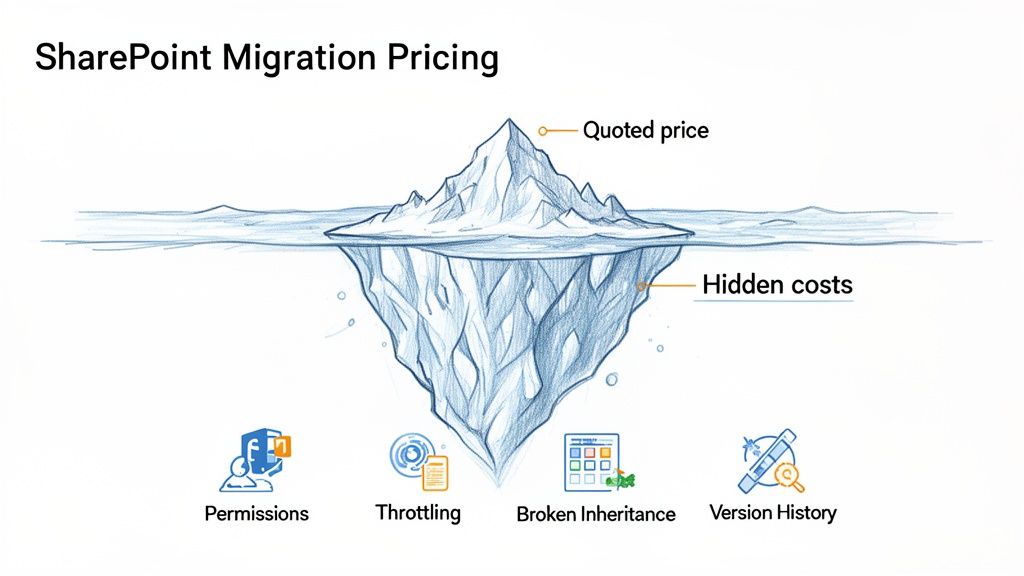
As an IT Director or Enterprise Architect, you've seen projects go off the rails before. You know a SharePoint migration isn’t just a feature upgrade; it’s a high-stakes effort to mitigate risk. The vendors promising a cheap and "seamless transition" are precisely the ones your experience has taught you to distrust.
They’re the ones who conveniently ignore the gremlins in the machine—the very factors that turn a predictable budget into an uncontrolled fire. This is your guide for the technical and financial battle ahead. We’re not just talking about moving files; we’re talking about untangling years of accumulated complexity that will shatter any simplistic pricing model.
Where Simple Pricing Models Fall Apart
Standard quotes disintegrate the moment they collide with enterprise reality. Your data isn’t a pristine, organised library. It’s a battlefield of legacy permissions, custom-coded solutions, and forgotten user data.
Here are just a few of the technical nightmares that most quotes pretend don’t exist:
- Broken Inheritance and Complex Permissions: Decades of ad-hoc access control have created a permissions minefield. We often see clients fail when their vendor migrates this mess "as is," creating massive security and compliance vulnerabilities in the new environment.
- API Throttling Limits: Microsoft actively slows down large data transfers to protect its service. The documentation says to be mindful of this, but in reality, any tool that doesn’t intelligently manage these limits will turn a weekend project into a month-long slog, burning through your budget and timeline.
- Long Path Limits and GUID Conflicts: Legacy file systems are riddled with file paths that SharePoint Online flat-out rejects. Without pre-migration remediation, that data is either lost or requires expensive, manual intervention after the fact.
The core problem is that vendors sell you a tool, but what you actually need is a strategy for navigating technical failure. They price the best-case scenario, knowing you'll pay for the inevitable emergency clean-up.
This table shows how quickly a "simple" budget explodes when you account for real-world enterprise complexity.
Initial Quote vs Reality: A Cost Explosion Scenario
What starts as a seemingly straightforward project based on volume metrics alone can easily double or triple in cost and time when these hidden complexities surface.
In the IE region, we see enterprise SharePoint migrations for mid-size companies in regulated sectors like energy, finance, and healthcare typically costing between €25,000-€75,000. For full-scale tenant-to-tenant consolidations, that figure often escalates to €75,000-€300,000 or more.
Too often, we see IT directors in Dublin and Cork underestimate these figures by 70% or more. They dive in with basic tools like SPMT, only to watch their budgets balloon from these exact overlooked technical issues.
The price you are quoted is rarely the price you will pay. Understanding the specific SharePoint migration best practices that mitigate these risks is the only way to protect your budget and your career.
Decoding the Shell Game of Migration Pricing Models
Vendors love a simple pricing model. It looks clean on a proposal and makes the number seem predictable. But these models are less about giving you a clear budget and more about getting a signature on a dangerously narrow scope.
You’ve seen these quotes before. They look appealingly straightforward. Let's pull back the curtain on the common "per GB," "per user," and "fixed-fee" numbers to show you exactly where they break in the real world.
The Per-Gigabyte (GB) Illusion
At first glance, per-GB pricing seems logical. You have X amount of data, and you pay Y to move it. Simple, right? Wrong. This model is a trap that completely ignores the nature of the data itself.
We see clients get burned here all the time. The vendor’s quote ignores a few critical realities:
- File Complexity and Version History: A single 10 MB file with 500 versions is not the same as 500 separate 10 MB files. The migration tool has to process each version individually, dramatically increasing API calls and the potential for errors. Your 1 TB of data might actually represent 5 TB of transactional work for the migration engine.
- API Throttling Overheads: When you start pushing massive volumes of data, Microsoft 365 will throttle your connection. A cheap per-GB price never accounts for the sophisticated error handling and intelligent retry logic needed to manage this. The result is a stalled migration where the clock—and the cost—just keeps ticking.
A price per gigabyte is meaningless if it doesn't account for the complexity of that gigabyte. It's an invitation for your vendor to bill you for every unforeseen hiccup—hiccups a specialist would have anticipated from day one.
The Per-User Model: A Failure to Account for Reality
The "per-user" model is even more flawed for any serious enterprise migration. It makes the wild assumption that your cost is tied to licensed accounts, which has almost nothing to do with where the real complexity lies.
Here’s where it collapses:
- Shared Data Volumes: A huge portion of your most critical data lives in SharePoint sites, Microsoft Teams, and shared mailboxes—not in individual user drives. A 1,000-user organisation might easily have the data footprint and complexity of a 5,000-user one, but a per-user model willfully ignores this.
- Intricate Permissions: The real cost driver isn’t the user; it’s the tangled web of permissions attached to them. Migrating a user with simple access to three team sites is a walk in the park. Migrating another user with unique, item-level permissions scattered across 300 different sites is a high-risk, time-intensive nightmare.
- Service Accounts and System Data: The model also conveniently forgets about all the non-human accounts essential for running workflows, applications, and system integrations, which often own or have access to huge, critical data sets.
The Fixed-Fee Trap
This is the most dangerous model of all. A "fixed fee" feels safe. It sounds like a guarantee. In reality, it's often just a bet the vendor is making that your project is far simpler than it actually is.
The fee might be fixed, but the scope of work is microscopic.
The moment an inevitable, real-world issue like a GUID conflict or broken permission inheritance surfaces, you’ll be hit with an expensive change order. The fine print will show that their "fixed fee" was never designed to cover the cost of remediating your actual environment; it was designed to win the business.
The Ollo Verdict: These common pricing models are fundamentally flawed for complex enterprise environments. Per-GB and per-user quotes are starting points for a conversation, not a reliable budget. A fixed-fee proposal that wasn't preceded by a comprehensive, paid discovery phase is a massive red flag. The only way to get a number you can trust is to invest in a deep-dive assessment that uncovers the risks before they blow up your project.
Why Your Migration Tools Are Set to Fail
Microsoft’s documentation might lead you to believe their free SharePoint Migration Tool (SPMT) is a decent option. From my position in the trenches, rescuing projects that started with that exact assumption, I can tell you it's a catastrophic misconception. Relying on free tools is often the most expensive decision you can make.
I’ve seen this story play out time and time again. Your team downloads SPMT, runs a few small test batches, and everything looks fine. Then, the moment they point it at your real, messy, production data, the project grinds to a halt. This isn't a possibility; it's an inevitability.
The SPMT Breaking Point
We’re usually called in after a DIY migration has been stalled for weeks. The first thing we look for are the predictable failure points that free tools are guaranteed to hit. The documentation says SPMT is for enterprise loads, but in reality, it means constant retries, silent data corruption, and outright failure in any remotely complex setup.
The issues are almost always the same:
- Crippling API Throttling: Microsoft throttles heavy data uploads. SPMT has only the most basic handling for this. That means your multi-terabyte migration will constantly start, stop, and fail, stretching a weekend project into a month-long nightmare.
- The 5,000-Item List View Threshold: This is a hard architectural limit in SharePoint. If your business relies on large lists, SPMT will either fail to migrate them or, far worse, migrate them in a way that shatters the business processes that depend on them.
- Total Inability to Handle Complex Permissions: Every SharePoint environment has a tangled mess of broken inheritance and unique, item-level permissions. SPMT has no sophisticated way to untangle this. It will either fail outright or apply simplistic permissions that create massive security and compliance gaps.
These failures are a direct consequence of using the wrong tool for the job. You can dig deeper into how these issues derail projects and inflate your SharePoint migration software choices.
What About Professional Tools Like ShareGate?
So, you invest in a professional tool like ShareGate. This is a significant step up, and it's a core part of our own toolkit. It’s powerful, it handles throttling with more intelligence, and its pre-migration reporting is excellent.
But even a best-in-class tool is not a "fire and forget" solution. We often see clients buy the licence but still fail because they lack the deep expertise to wield it effectively.
This is where common pricing models are dangerously misleading.
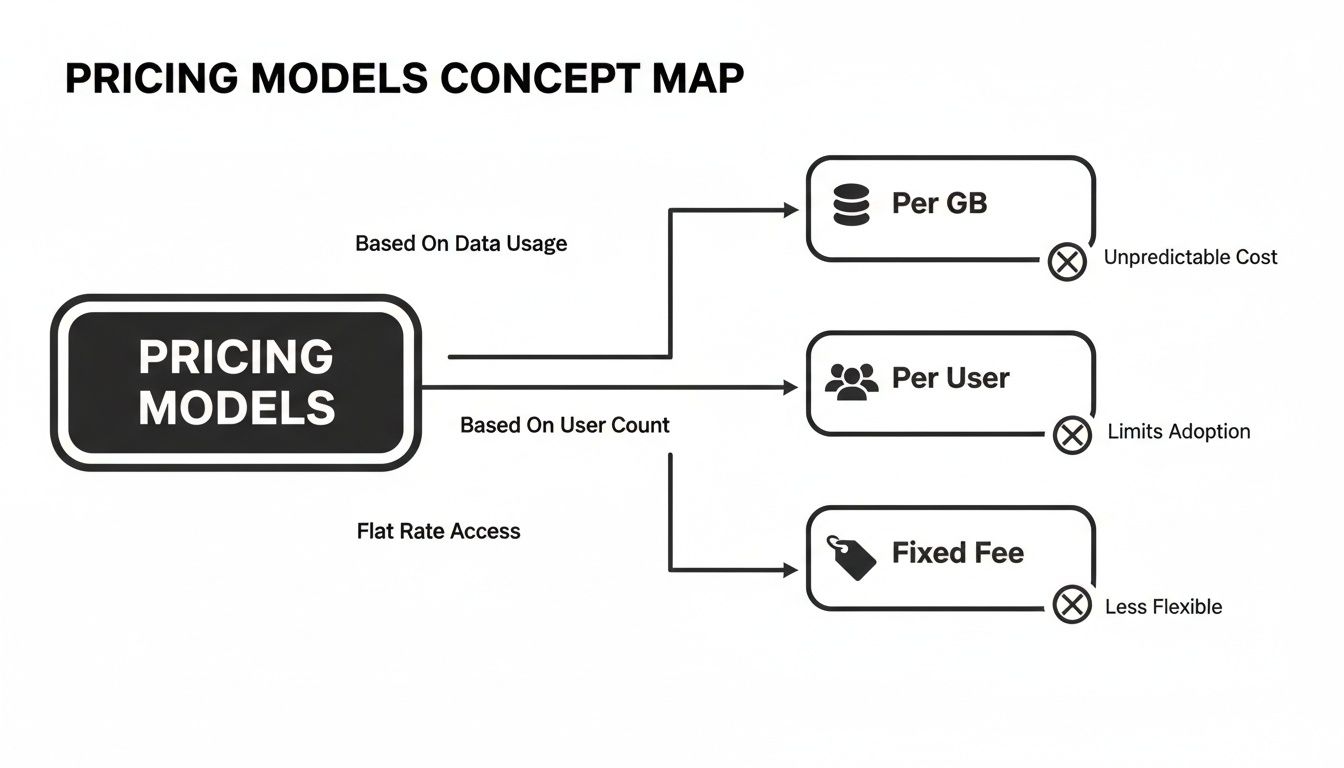
Each of these models simplifies the project down to a single metric. They dangerously ignore the technical complexity where tools, even good ones, inevitably fail without an expert writing custom scripts to bridge the gaps.
Even with a powerhouse like ShareGate, your team will hit a wall when dealing with a mature enterprise environment, especially for tenant-to-tenant migrations, which introduce a whole new layer of complexity that no off-the-shelf tool can fully solve.
The Ollo Verdict: Use SPMT for <50GB of non-critical, simply structured data. For anything else, you need custom scripting. ShareGate is an excellent engine, but it's not the entire car. Without expert PowerShell scripting to handle complex permissions, remap users, and automate post-migration fixes, it's just a faster way to hit the same roadblocks. The tool doesn't reduce the risk; the expert wielding it does.
The Hidden Costs That Wreck Budgets and Careers
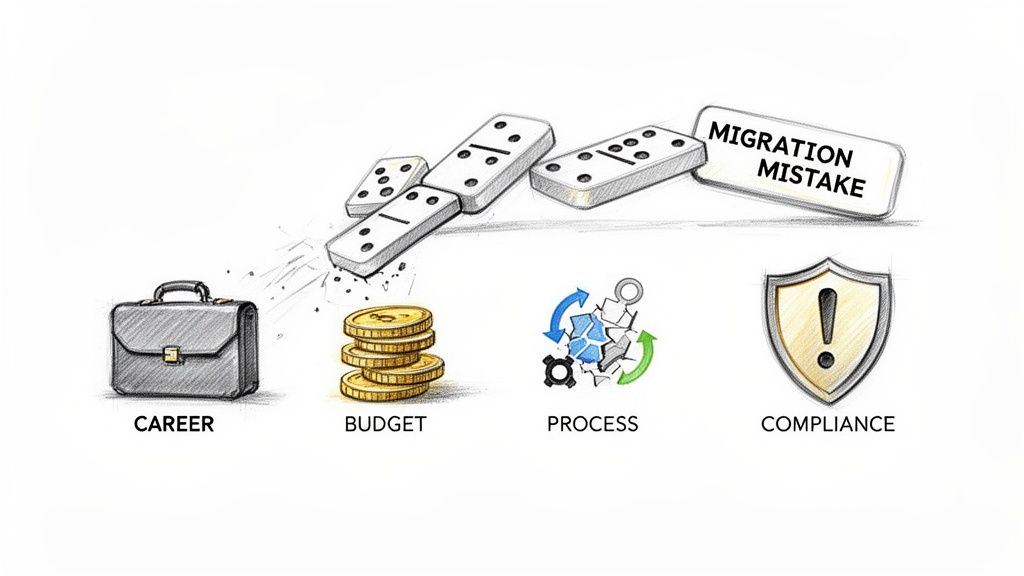
A migration isn't judged by the data you move. It’s judged by what doesn't break afterwards. The initial quote you approve is just the tip of the iceberg; the real costs—the ones that wreck budgets and careers—are lurking just below the surface.
I’ve been brought in to rescue projects where an IT Director's vendor delivered on the narrow scope of moving files, declared victory, and cashed the cheque. Now, the business is paralysed by broken processes, and the helpdesk is on fire.
This is the entirely predictable outcome of focusing on the upfront price. These are the budget-killers your vendor conveniently forgets to mention.
Post-Migration Remediation and Firefighting
This is the number one hidden cost. It's the emergency fund you never budgeted for, spent frantically fixing critical business systems that shattered during the move. Your SharePoint migration pricing has to account for this, or it's pure fiction.
A technical failure is a direct hit to your bottom line.
- Broken Workflows: That Power Automate flow that handles supplier invoicing isn't an "inconvenience" when it breaks. It’s a complete halt to your accounts payable process, demanding days of specialist developer time to rebuild.
- Permissions Failures: A misconfigured permission set isn't just a helpdesk ticket. It’s a potential data breach. We’ve seen migrations create security gaps that expose sensitive HR or financial data, demanding immediate, costly intervention from legal and compliance teams.
These aren't edge cases. They are the standard consequences of a poorly planned migration. You can learn more about getting ahead of these issues by understanding the hidden costs of poor data governance before you even start.
Lost Productivity and User Retraining
Your team's productivity is a direct casualty of a botched migration. When users can't find their files, when links in critical documents are broken, and when familiar processes no longer work, they simply stop working.
Consider a 500-person company where a migration failure causes just one hour of lost productivity per employee per week. At an average loaded cost of €50/hour, you're burning €25,000 per week—or €100,000 per month—in pure waste.
The documentation might say the migration will be smooth, but in reality, your team will bear the cost of every shortcut taken. The project's success is defined by user adoption, not by a progress bar hitting 100%.
Data Validation and Compliance Audits
How do you prove the data arrived intact and secure? A cheap migration quote never includes the budget for rigorous data validation. This leaves your organisation dangerously exposed.
In regulated industries like finance or healthcare, you can't just assume the data is correct. You must verify it. This requires scripting, sampling, and reporting to satisfy auditors. If a migration partner can’t show you their validation methodology, they are putting your compliance status at risk.
Missing this step doesn't just fail the migration; it breaks legal compliance. The cost of a cheap migration is always paid for in the chaos that follows.
How to Demand an Accurate Migration Quote
It’s time to stop accepting vague proposals. You have to take control of the procurement process and turn the tables on any potential migration partner.
This isn't about sending out a standard RFP. This is a technical interrogation, designed to expose weaknesses and instantly disqualify unprepared vendors. A partner who stumbles over these questions is a partner who will stumble during your project. They must answer with complete technical confidence, or you must show them the door.
The Non-Negotiable Technical Checklist
Add these questions to your vetting process immediately. We’ve seen too many projects go off the rails because the client focused on the "what" (the price) instead of the "how" (the specific methodology for dealing with inevitable failures).
Here's what you need to ask your potential partner:
- Throttling and Performance Management: "What is your specific, technical strategy for managing Microsoft API throttling? Show me the scripts or tool configurations you use to dynamically adjust data transfer rates to avoid project-killing delays." A vague answer about "monitoring" is a massive red flag.
- Permissions Remediation: "Describe your exact methodology for identifying and remediating broken permission inheritance before the migration begins. What reports will you provide to prove our security posture will be improved, not just lifted-and-shifted?"
- Data Validation and Integrity: "Walk me through your data validation plan. How will you prove, with auditable logs, that 100% of the data was migrated without corruption? What sampling percentage do you use for post-migration checks?" If they don’t have a bulletproof answer, they are gambling with your data.
- Identity and Security in Tenant-to-Tenant Scenarios: "In a tenant consolidation, how do you handle the Entra ID redesign? What is your process for remapping user identities and ensuring our zero-trust security policies are enforced from day one?"
To demand an accurate quote, you first need a crystal-clear understanding of your project's scope and requirements. Understanding key project management disciplines, including Strategic Portfolio Management and Project Portfolio Management, is vital for clearly defining your migration needs. A true partner must demonstrate not just technical skill but also iron-clad project discipline.
The Ollo Verdict: A partner who cannot answer these questions isn’t just unprepared; they are a direct risk to your project, your budget, and your compliance status. Their inability to detail their failure-mitigation strategy is the single biggest indicator that you will be paying for that failure later.
This interrogation is the first step of a proper migration assessment. Before you even begin to discuss a final price, you have to force potential partners to prove they understand the risks hiding in your system. You can see a detailed breakdown of our approach in our guide to conducting a SharePoint migration assessment.
The Ollo Approach: Why Our Price Reflects Risk Reduction
By now, it should be brutally clear that a low upfront price isn't a bargain; it's a predictor of future pain. We've spent this entire guide dissecting the landmines that cause migrations to fail. Now, let’s pivot from the problem to the only solution that works: a methodology built around project certainty, not wishful thinking.
We don't sell 'migrations'. We sell successful outcomes in high-stakes environments where failure is not an option. Our pricing is a direct reflection of that promise.
We Price for Reality, Not for the Proposal
Our entire engagement model is designed to prevent the budget spirals and career-limiting disasters that define most enterprise migrations. It starts with our mandatory, paid discovery phase. This isn't a quick chat and a vague proposal; it's a technical deep-dive where we pressure-test your environment to uncover every single landmine—broken inheritance, throttling bottlenecks, GUID conflicts, and compliance gaps—before a single file is moved.
This paid assessment isn't a cost centre; it's the most effective risk-reduction strategy you can deploy. It allows us to build a fixed-fee quote based on the real-world complexity of your data, not on a simplistic per-user or per-GB guess. The price we quote is the price you pay because we've already done the hard work of de-risking the project.
Our Hybrid Methodology: A Specialist's Toolkit
A DIY attempt or hiring a generalist is a gamble with your business-critical data. They rely on out-of-the-box tools that, as we've established, are guaranteed to hit a wall when they meet enterprise complexity. Our approach is fundamentally different.
We use ShareGate for its powerful core engine and robust reporting capabilities. But we recognise its limitations. That's why we deploy our extensive library of custom PowerShell scripts to handle the complex exceptions that cause other projects to implode.
This is the Ollo difference:
- Pre-Migration Remediation: Our scripts automatically find and fix issues like long file paths and broken permissions before the migration starts.
- Intelligent Throttling Management: We don't just "handle" throttling; we script around it, dynamically adjusting workloads to maximise throughput without hitting Microsoft’s hard limits.
- Post-Migration Validation: After the move, our automated scripts validate data integrity and re-apply complex permissions, ensuring your security posture is intact and auditable.
Hiring Ollo isn't just an option; it's the only strategy that slashes these risks. We use a combination of ShareGate and custom PowerShell PnP scripts, a method we've proven in complex tenant-to-tenant rescues where we preserve intricate permissions and execute zero-trust Entra ID redesigns without the throttling nightmares. You can learn more about how we handle these high-stakes migration services.
The Ollo Verdict: We don't compete on price; we compete on certainty. Our SharePoint migration pricing is higher because it includes the expert-led discovery, custom scripting, and deep technical oversight required to guarantee success. Investing in Ollo isn't buying a service; it's buying project insurance.
Frequently Asked Questions
As architects who spend our time in the trenches of complex migrations, we hear the same pointed questions over and over again. These usually come from IT Directors and Enterprise Architects who’ve been burned by a migration project before. Here are the direct, technically-minded answers you need.
How Much Does a Typical Enterprise SharePoint Migration Cost?
For an Irish enterprise in a regulated sector like finance or healthcare, a realistic starting budget is between €25,000 and €75,000. If you're looking at a complex tenant-to-tenant consolidation, that number frequently climbs into the €75,000 to €300,000+ range.
Be wary of anyone who quotes you a simple per-user or per-GB price. That approach wilfully ignores the factors that drive the real cost: the complexity of your data, the messiness of your permissions, and the rigour of post-migration validation.
Can We Just Use Microsoft’s Free SharePoint Migration Tool (SPMT)?
Only for tiny, non-critical datasets (under 50GB) with the most basic permissions. In any genuine enterprise scenario, it will inevitably break. It can’t handle API throttling intelligently, it shatters when it hits the 5,000-item list view threshold, and it has no capability to remediate broken permission inheritance. Relying on it is a direct path to project failure.
What Is the Single Biggest Hidden Cost in SharePoint Migration Pricing?
Without a doubt, it’s post-migration remediation. This is the emergency fund you’re forced to create to fix all the broken Power Automate flows, re-establish correct data permissions, and address data integrity issues that only surface after the cutover. A thorough, paid, pre-migration assessment is your only defence against these crippling and predictable surprise costs.
Why Is a Fixed-Fee Quote for a Migration Often a Red Flag?
A fixed-fee quote offered without a comprehensive, paid discovery phase is a massive red flag. It’s a sign your vendor hasn't grasped the complexity of your environment, and they're essentially gambling with your project. That fixed fee is tied to a dangerously narrow scope. The moment an inevitable issue like a GUID conflict or throttling arises, you’ll be hit with a wave of expensive change orders that obliterate the initial quote.
Your data's integrity is too critical to leave to chance. A failed migration doesn't just disrupt operations; it puts your compliance, and frankly, your career at risk. Ollo provides the battle-hardened expertise and proven methodology to de-risk your project from day one.

















