




The worst advice in the Angular vs React debate is also the most common. People tell you to compare components, syntax, learning curves, and developer happiness, then pick the one your team likes. That advice belongs in a side project, not inside a Microsoft 365 estate carrying regulated data, retention obligations, and executive scrutiny.
Your problem isn't choosing a prettier front end. Your problem is avoiding a framework decision that gradually turns an SPFx solution into a support burden, a governance gap, or a rewrite nobody budgeted for. In Microsoft 365, front-end choices don't stay in the browser. They reach into Graph calls, SharePoint list behaviour, packaging, tenant controls, supportability, and audit exposure.
I've seen too many enterprise teams treat Angular vs React like a developer preference vote. Six months later, they aren't arguing about JSX or dependency injection. They're arguing about missed milestones, API throttling, SharePoint list view thresholds, broken inheritance, long path limits, and why the original architects have already left. Microsoft Learn confirms some of the platform pain that drives these failures, including unsupported native cross-tenant migration of Microsoft Teams chat history in certain scenarios and the support limits of the SharePoint Migration Tool for older server versions only, which should tell you something important: the documentation always sounds cleaner than production reality (Microsoft Learn on Teams chat migration limits, Microsoft Learn on SPMT support limits).
Stop Comparing Features You Will Regret Your Choice
The feature-by-feature comparison is a trap. It reduces a governance decision to a developer shopping list.
In M365 and SPFx work, the primary question is simpler. Which choice gives your team the lowest chance of producing an application that becomes fragile under tenant constraints, expensive to staff, and impossible to defend during compliance review?
Your actual risk register starts after the demo
A front end can look polished and still be a disaster. We often see clients fail when they prove a concept against a clean dataset, then hit live SharePoint structures with broken inheritance, ugly content types, list view threshold behaviour, and Graph API throttling. The framework didn't fail them on day one. Their architectural assumptions failed them when the platform pushed back.
That matters because failure here isn't cosmetic. If your custom SPFx solution becomes unstable around permissions rendering, retention-aware content views, or large list interactions, your team doesn't just ship late. They create manual workarounds. Manual workarounds create audit risk. Audit risk creates legal exposure.
Practical rule: If your framework choice increases architectural variance, it increases operational variance. In regulated environments, operational variance becomes compliance risk.
This isn't a beauty contest
React and Angular both work. That's not the useful answer. Plenty of things "work" right up to the point where your project team has to support them under pressure.
If you're also weighing low-code against bespoke builds, the same pattern shows up there too. The front-end decision only makes sense when it sits inside a broader governance model, not a developer preference exercise. That trade-off shows up clearly in this Power Apps vs custom development guide for cloud architects.
| Decision lens | React | Angular | Business consequence |
|---|---|---|---|
| SPFx alignment | Stronger fit | Possible, but heavier | Wrong fit raises delivery friction |
| Team autonomy | High | Controlled | Too much freedom can create inconsistency |
| Hiring market | Easier | Harder | Delays increase project cost |
| Governance pressure | Needs discipline | Enforces structure | Weak governance creates long-term debt |
| M365 ecosystem friction | Lower | Higher | Friction turns upgrades into mini-projects |
The Core Conflict Framework vs Library
The Angular vs React argument starts with philosophy, but it ends in governance.
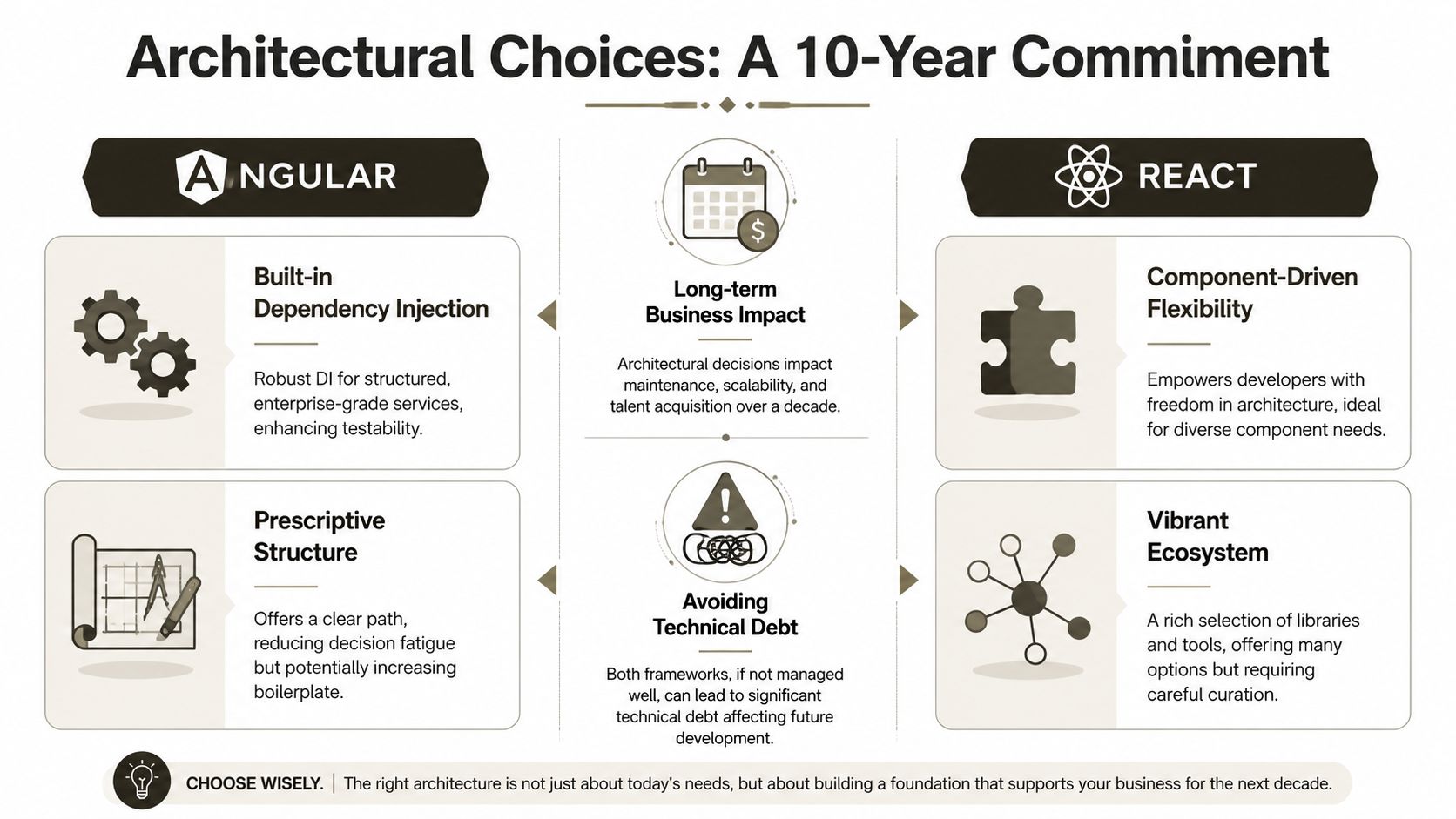
Angular is a framework. It wants order. It gives you a prescribed structure, deep TypeScript integration, and built-in patterns that reduce the number of architectural arguments your team can have. React is a library. It gives you the UI layer and expects your team to make good decisions about the rest. That's attractive until your developers build three different application patterns in the same codebase and call it flexibility.
React gives freedom. Freedom isn't always your friend
React dominates the market. According to DevsData's Angular vs React analysis, React runs on approximately 11,908,579 live websites, while Angular powers 327,765. That matters less as a popularity contest and more as a staffing signal. If your team needs to hire, replace, or scale, React gives you a wider pool and more community-built solutions. Angular asks you to find people who are comfortable with its structure and TypeScript-heavy discipline.
A useful outside perspective appears in Cleffex's React Angular article. It helps because it treats the choice as architectural rather than cosmetic, which is the only way enterprise buyers should look at it.
Angular gives order. Order isn't always enough
The usual enterprise argument for Angular sounds sensible. Strong structure reduces chaos. That's true. It also hides a cost. If your team doesn't already think in Angular's patterns, they will spend months fighting the framework instead of delivering business value.
That problem gets sharper in M365 programmes. Your team already deals with tenant boundaries, Graph permissions, legacy content models, SPFx packaging, and SharePoint quirks. If the front-end framework adds ideological rigidity on top, your delivery risk goes up, not down.
The documentation says structure reduces errors. In reality, structure only helps when the team understands the structure and can staff it for the life of the platform.
The governance question most teams avoid
Use this test before you choose:
- If your architects enforce standards well, React can work without becoming a patchwork of conflicting libraries.
- If your delivery model depends on strict guardrails, Angular can reduce random decisions.
- If your support team changes often, React's larger hiring pool lowers continuity risk.
- If your platform strategy centres on SPFx, React usually aligns with the ecosystem more naturally.
That's the core conflict. Angular reduces decision-making by making more decisions for you. React increases options and therefore increases the chance your team creates its own problems.
Architectural Landmines and Their Business Impact
Architecture isn't where teams show off taste. It's where they commit future support budgets.
In Angular vs React discussions, people love abstract words like maintainability and scalability. Those words become useful only when you tie them to what goes wrong in enterprise M365 estates. A front-end decision becomes expensive when it collides with SharePoint data structures, permission inheritance, client-side rendering constraints, and the simple fact that teams often fail to document their patterns sufficiently to survive staff turnover.
Dependency injection and the illusion of enterprise safety
Angular's dependency injection is one of its strongest enterprise arguments. It promotes separation of concerns and makes services easier to test. That's valuable when you're building long-lived applications that touch Graph, SharePoint data services, and internal APIs.
But we often see clients fail when they import Angular because it "feels enterprise", then force mismatched patterns into it. They build wrappers around wrappers, add abstractions nobody needed, and make the application harder to debug than the business process it replaced. The framework didn't create discipline. It gave a false sense of discipline to a team that lacked it.
React has the opposite failure mode. Teams build service layers, state patterns, and data-fetching strategies from assorted packages and blog posts. Six months later, one part of the app uses one pattern, another part uses another, and the handover document reads like archaeology.
TypeScript isn't optional in serious M365 work
If your front-end touches permissions, records views, approvals, or data surfaced from multiple M365 services, you need type safety. That's not academic. That's operational hygiene.
Angular pushes TypeScript from the start. React lets teams drift unless your standards are strict. In the abstract, that sounds like preference. In production, it changes how many runtime surprises your team catches before a release. And when a release exposes the wrong data shape from a Graph response or a malformed SharePoint payload, the impact isn't "a bug". It can become incorrect rendering of governed content, faulty user actions, or silent data handling mistakes.
State management is where React projects often rot
React can be excellent in disciplined hands. It can also become a bespoke framework assembled from competing opinions. The documentation says choice is a strength. In reality, junior or fragmented teams turn that choice into technical debt quickly.
Specialist React engineering matters. A team with deep pattern discipline can avoid that drift. If you want to see the level of practice serious delivery teams bring to the ecosystem, Refact's React expertise is a useful benchmark for the kind of focused capability React estates demand.
If your team can't explain its state model in one page, your support costs will rise long before your usage does.
What failure looks like in a live SharePoint estate
The war stories are depressingly repetitive:
- Large list rendering fails first at the UX layer: A team fetches too much, re-renders too broadly, and blames SharePoint. The actual issue is poor component architecture.
- Permission-aware UI becomes unreliable: Broken inheritance and inconsistent service design produce edge cases nobody tested.
- Reusable components stop being reusable: One squad builds for one site collection. Another builds for another. The codebase fragments.
- Support teams avoid touching it: Nobody wants to break a front end tied to brittle Graph calls and undocumented state behaviour.
If your estate includes intranet components, employee portals, or governance-heavy SharePoint experiences, architectural discipline matters more than framework branding. That pressure shows up in every serious SharePoint Online intranet programme, especially after the original implementation team has moved on.
Ollo verdict
Choose Angular only if you already have senior engineers who understand Angular's patterns and can hold the line on consistency. Choose React if you want lower staffing risk and you have the governance discipline to stop library sprawl. If you have neither, the framework isn't your problem. Your delivery model is.
Real-World Performance Under Enterprise Load
Enterprise performance failures do not start with a slow component. They start when a front end hits a real M365 tenant full of oversized lists, inconsistent permissions, throttled Graph calls, and users who keep ten tabs open all day. That is the point where framework marketing stops mattering and operational risk starts billing by the hour.
A visual summary helps, but don't mistake neat graphics for production certainty.
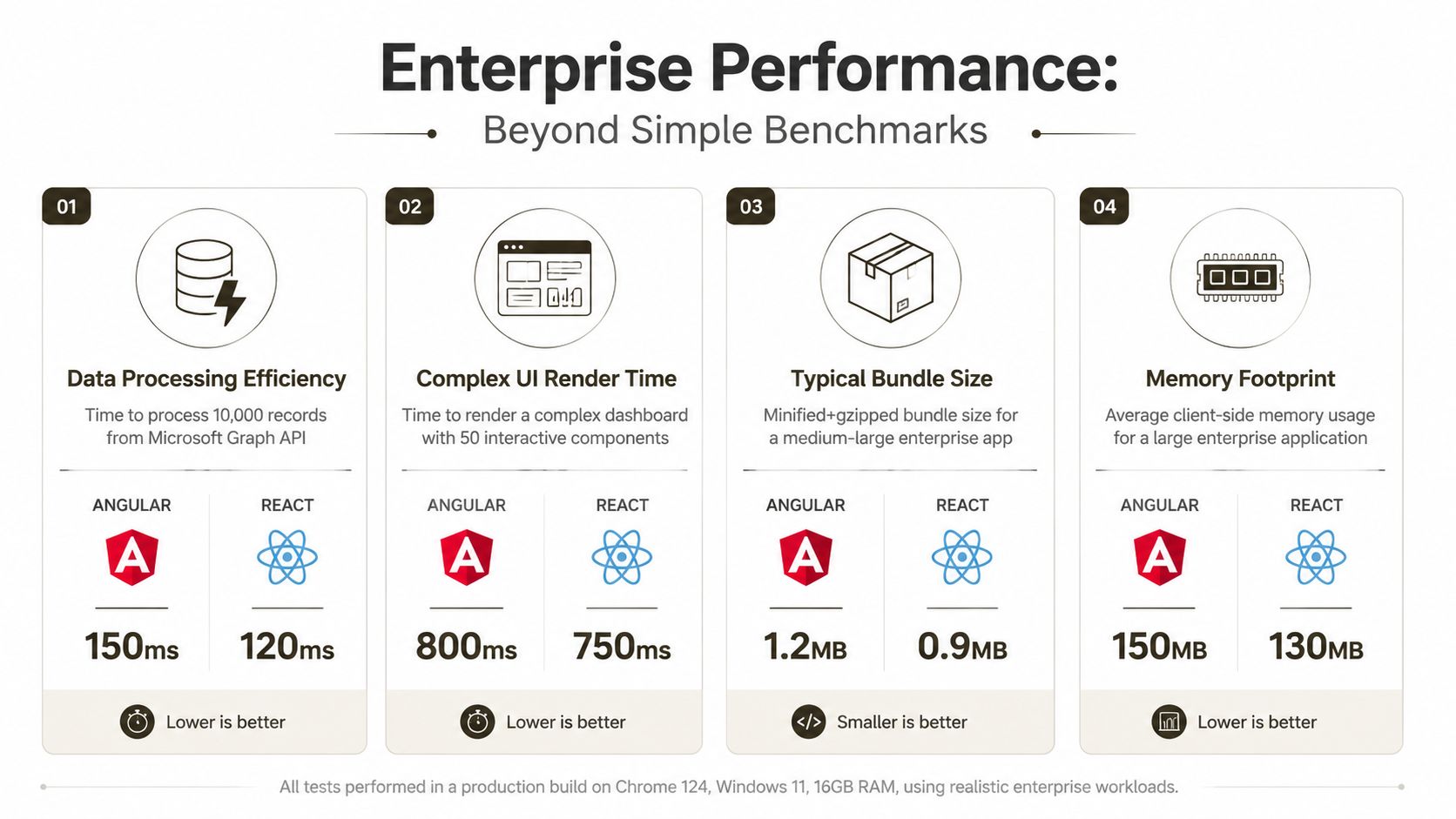
Controlled tests versus ugly reality
Benchmarks reward controlled conditions. Your SharePoint estate will give you the opposite. It will hand your team list view thresholds, uneven content models, permission trimming, stale caches, and data returned in shapes nobody designed on purpose.
That is why performance in M365 is a governance problem before it becomes a rendering problem. A page that stalls under tenant load drives duplicate submissions, support tickets, and workarounds in Excel. A permission-aware screen that updates unpredictably creates audit exposure because users stop trusting what they can see. Slow interfaces also push good engineers out the door. They get tired of debugging symptoms caused by framework decisions nobody stress-tested against enterprise data.
Angular has improved. React remains easier to keep fast in the kind of fragmented, high-churn screens that show up in approval consoles, intranet dashboards, and composite SPFx web parts. That matters because enterprise teams rarely build one clean page. They build pages with several independent widgets, mixed data sources, and partial refreshes. If your rendering model makes isolation hard, one noisy component can degrade the whole screen and turn a local defect into a tenant-wide support problem.
Speed matters less than predictable failure under Graph throttling, list pressure, and partial data loss.
The expensive mistakes usually sit below the benchmark layer. Teams fetch too much. They trigger duplicate requests. They bind broad state to narrow interactions. They assume SharePoint data is clean. Then production traffic arrives, retries multiply, and the front end starts lying to users with stale or half-rendered views. You can see the same pattern in large-scale SharePoint migration performance issues that surface under real tenant constraints. The platform punishes optimistic assumptions fast.
What actually breaks under enterprise load
Under sustained M365 load, React usually fails in ways teams can isolate and repair. Angular usually fails after more architectural coupling has already accumulated, which makes the clean-up cost higher. That is a key distinction.
Use these tests before you approve either stack:
- Render isolation: Can one busy widget trigger broad page updates and raise CPU use across unrelated components?
- Request discipline: Can the team stop duplicate Graph and SharePoint calls before throttling turns into outages and support noise?
- Degraded-state handling: Does the UI stay accurate after partial failures, slow APIs, or token refresh issues?
- Large-list behaviour: Does the screen degrade safely when SharePoint-backed queries become expensive or hit threshold-related constraints?
- Permission accuracy: Can the interface resolve denied, hidden, and inherited-access states without showing the wrong action or stale data?
- Tab multiplication: What happens when the same user opens several sessions and each one polls, caches, and re-renders independently?
These are not technical niceties. They map directly to project risk. Broad re-renders mean higher infrastructure and testing cost. Weak degraded-state handling means incident churn. Incorrect permission rendering means compliance trouble. Poor recovery patterns mean your service desk becomes the integration layer.
This walkthrough is worth watching if you're assessing the trade-offs with a practical lens rather than a fan-club mentality.
Ollo verdict
In M365, performance is a survival issue, not a beauty contest. Choose React if you want the safer path for data-dense SPFx interfaces and lower risk under messy tenant conditions. Choose Angular only when you already have senior Angular engineers who can keep state, change detection, and component boundaries under strict control. If you choose the wrong model, the bill arrives later as support cost, compliance exposure, missed deadlines, and staff burnout.
Integrating with the SharePoint Framework SPFx
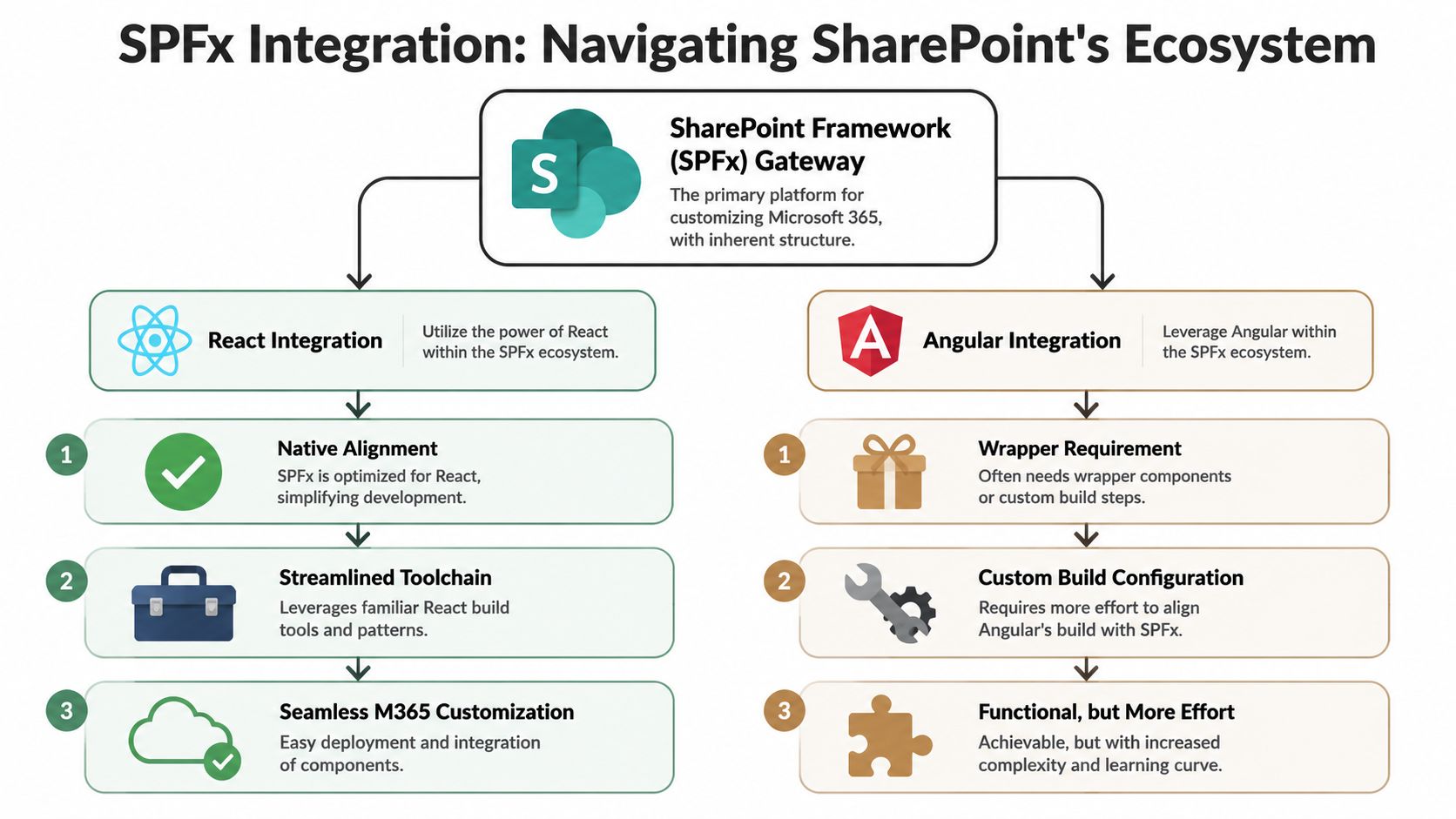
Abstract framework arguments clash with Microsoft's actual ecosystem. SPFx says it supports more than one path. In practice, it leans heavily toward React. If you ignore that bias, your team pays for it in build friction, dependency headaches, and support pain.
That doesn't mean Angular is impossible in SPFx. It means Angular in SPFx is a choice you should make with your eyes open and your risk register updated.
React fits the grain of SPFx
React feels native in SPFx because the tooling, examples, community patterns, and UI habits tend to point that way. That matters more than many architects admit. It affects onboarding, troubleshooting, package compatibility, and how quickly your team can find an answer when something breaks during a tenant-wide deployment.
When clients build SPFx with React, their problems usually come from their architecture. When they build SPFx with Angular, their problems often start before the architecture. The fight begins in setup, dependencies, wrappers, and custom build arrangements.
Angular works in SPFx. That's not the same as being a good idea
The documentation says both are workable. Reality is uglier.
We often see these Angular-on-SPFx failure points:
- Wrapper complexity: Teams add bridging layers just to make Angular sit properly inside SPFx web parts.
- Build fragility: Dependency versions drift and bundling becomes a maintenance exercise.
- UI inconsistency: React-first M365 component ecosystems leave Angular teams building or adapting more by hand.
- Handover risk: The next support partner inherits custom configuration that nobody wants to touch.
None of those problems are impossible. All of them are expensive.
In SPFx, choosing Angular means accepting more engineering overhead before you've solved a single business problem.
How to avoid the usual SPFx disaster
If you're deciding now, keep it brutally simple.
Use React in SPFx when:
- your solution leans on Microsoft 365 UI conventions
- your team needs broad hiring flexibility
- you want less tooling resistance
- supportability matters more than ideological purity
Use Angular in SPFx only when:
- your organisation already runs Angular successfully elsewhere
- your architects can standardise the build and package model
- your team accepts that ecosystem alignment will be weaker
- you have a clear reason stronger than "our developers prefer it"
There's a broader customisation lesson here. SharePoint rewards choices that work with its grain. It punishes choices that require constant exception handling. That pattern becomes obvious in any serious SharePoint customisation and migration programme.
The Microsoft 365 context changes the answer
If this were a greenfield app outside Microsoft 365, the Angular vs React answer might stay open longer. Inside SPFx, the platform narrows your options whether you like it or not.
And remember the larger Microsoft story. Native tools already have hard edges in adjacent areas. Microsoft Learn confirms that cross-tenant migration of Teams chat history isn't natively supported in the scenario cited earlier, which forces third-party tooling or manual export and raises data loss risk. That's a useful reminder that "supported by the platform" and "safe in production" are not the same thing. The same mindset applies here. SPFx may tolerate Angular. Your operational model may not.
Ollo verdict
For SPFx, use React unless you have a compelling existing Angular capability and a team senior enough to absorb the extra engineering overhead. If you're asking whether Angular can work, you're already asking the wrong question. Ask whether your support team wants to inherit it.
Total Cost of Ownership Staffing and Survival
The cheapest front end is often the one that ruins the programme later.
Initial build cost flatters bad decisions. The ultimate bill arrives after the launch party, when two senior developers leave, an audit asks who can approve a permissions change, and a minor SPFx update turns into a three-week incident because nobody wants to touch the code.
Inside Microsoft 365, framework choice is a staffing bet with compliance consequences. If your team cannot hire, replace, and supervise the people needed to keep the application alive, you have built an operational risk, not a product.
Hiring risk is architecture risk
React usually gives enterprises a larger hiring pool and a lower replacement cost. That matters because M365 work already needs unusual overlap: SPFx, Graph, tenant governance, retention rules, and the judgment to avoid breaking someone else's intranet. Add a narrower front-end specialism on top, and recruitment slows down, contractor dependence rises, and knowledge starts concentrating in too few hands.
That concentration creates business risk fast. One resignation can delay fixes. Delayed fixes become workarounds. Workarounds become unapproved data handling, broken permissions, or UI behaviour that no longer matches policy. Compliance failures rarely begin with a dramatic technical collapse. They begin with a support team that is understaffed and guessing.
Staff attrition hits Angular harder in SPFx shops
A React handover usually produces one ugly problem. Inconsistent patterns.
An Angular handover in an M365 environment often produces three. Limited candidate supply. Longer onboarding. Greater fear of changing anything tied to tenant-facing functionality.
That fear is expensive. Teams postpone upgrades. Security reviews drag on because fewer people can explain the design. Change requests stay open while the business assumes IT is just being slow. It is not slowness. It is a thin support bench carrying too much architectural weight.
If you are testing the market, even broad recruiting funnels such as Angular developers for startups show the underlying issue. You can find Angular talent. Building a durable support model for long-lived enterprise M365 solutions from that smaller pool is harder and more expensive.
Framework decisions fail in year two, not sprint two.
TCO includes the costs nobody puts in the business case
Procurement tends to budget for build. It misses survival.
The hidden costs are predictable:
- Longer re-onboarding: New engineers need more time to understand opinionated patterns, custom wrappers, and old design decisions nobody documented properly.
- Slower incident response: Fewer capable engineers means production bugs sit longer, which raises user frustration and support overhead.
- Upgrade avoidance: Teams defer package and platform updates because the stack feels fragile, which increases security and compatibility risk.
- Key-person dependency: One senior developer becomes the unofficial gatekeeper for releases, fixes, and architectural decisions.
- Attrition risk: Developers leave codebases they do not want to maintain, and replacing them takes time the business never planned for.
In a Microsoft 365 estate, those costs spill outside engineering. Delayed updates can leave unsupported dependencies in production. Thin ownership can slow responses to audit findings. Missed release windows can push wider migration or intranet programmes off schedule, which means more contractor spend, more governance exceptions, and more executive attention on a problem that should never have reached them.
This is why staffing and delivery model matter as much as framework preference. If your organisation depends on external support, choose a partner with proven overlap between M365 delivery and front-end support, not a generic team that happens to know JavaScript. The broader risk profile becomes obvious when you assess what a software development company for enterprise Microsoft 365 delivery has to support after go-live.
Ollo verdict
Choose the option your organisation can still support after the original team leaves. For most SPFx and M365 work, that is React. Angular can work with a disciplined team and stable ownership. In companies that lack both, it is not advanced. It is reckless.
The Ollo Verdict A Risk-Based Decision Framework
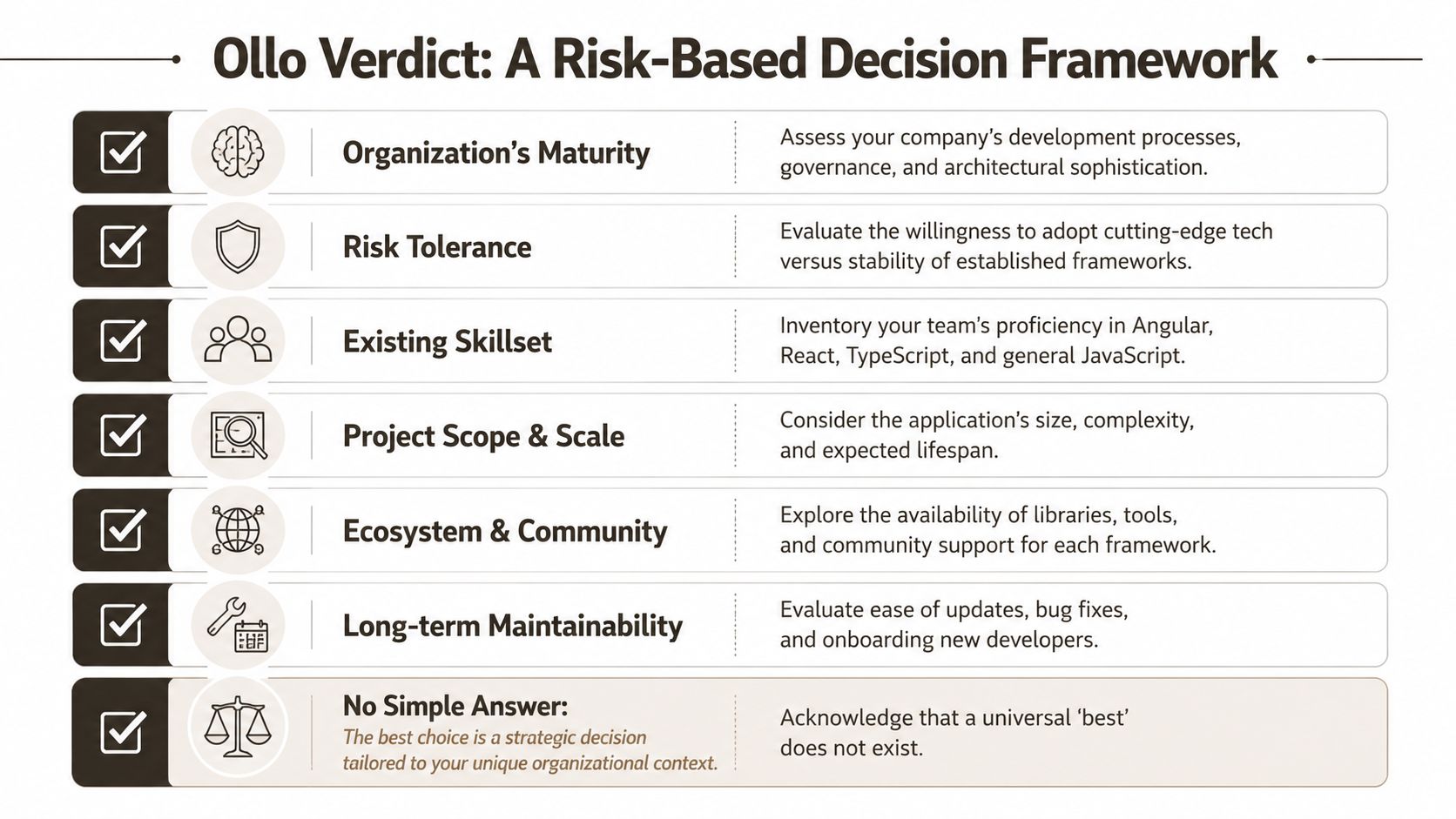
Framework selection in Microsoft 365 is not a style debate. It is a risk allocation decision with a long tail. Pick the wrong one and the penalty shows up later in audit delays, missed release windows, contractor dependence, and a codebase nobody wants to inherit.
The right question is simple. Which choice leaves your organisation with fewer single points of failure after the delivery team has gone?
Choose Angular when discipline already exists
Angular makes sense only if your organisation already has the operating model to carry it properly. That means senior TypeScript engineers who can keep architecture under control, governance that can block pointless abstraction, and a delivery model that will not collapse when two key people resign.
Use Angular if all of the following are true:
- You already have deep Angular capability in-house: not a single enthusiast, a real bench.
- Your architecture standards are enforced: teams follow them, and exceptions are rare.
- Ownership is stable for years: support, enhancement, and security remediation are funded and staffed.
- The application is large enough to justify the structure: long-lived, process-heavy, and expensive to rewrite.
If those conditions are missing, Angular does not create order. It turns weak governance into hidden cost. In an M365 programme, that cost spreads fast. Release friction slows fixes. Slow fixes leave unsupported packages in production. Unsupported packages become audit findings and emergency spend.
Choose React when survivability matters
For most SPFx and M365 work, React is the safer default because it fits the platform more naturally and leaves you more recovery options when requirements change, funding tightens, or staff leave.
That recommendation is not ideological. It is operational.
React reduces the chance that your front end becomes a specialist asset that only a narrow group can maintain. In enterprise environments, that matters more than framework purity. A system that survives turnover, tenant change, security review, and rushed business requests is worth more than a system that looked cleaner in an architecture deck.
React still fails when teams treat flexibility as an excuse for chaos. Poor state management, weak component boundaries, and careless package choices create their own support mess. But those failures are usually easier to contain. In Microsoft 365 estates with frequent UI changes, cross-team handoffs, and SPFx constraints, containment is the difference between a manageable backlog and a rescue project.
Performance belongs in this decision too. As noted earlier, teams often dismiss the architectural differences between Angular and React because they do not see dramatic benchmark numbers tied to their own environment. That is how bad assumptions survive procurement. In M365 interfaces with frequent independent updates, those assumptions can turn a busy dashboard into a support burden, then into user workarounds, then into data quality problems no one budgets for.
A blunt decision matrix
| If this sounds like you | Safer choice |
|---|---|
| You build heavily in SPFx and need easier long-term support | React |
| You already have a proven Angular team with low attrition | Angular |
| You expect staffing churn, supplier changes, or reorganisation | React |
| You can enforce strict architectural rules across teams | Angular |
| You want the least friction inside the M365 development model | React |
Your framework should cut failure modes. If it adds staffing risk, governance risk, and upgrade risk, it is a bad decision dressed up as technical ambition.
Final recommendation
For most organisations building inside Microsoft 365, React is the default safe choice. It usually lowers hiring risk, reduces friction with SPFx, and gives the business a better chance of surviving handovers, audits, and scope changes without another rewrite.
Use Angular only from a position of organisational strength. You need mature governance, established Angular capability, stable ownership, and the patience to carry that discipline through support as well as delivery. If you are choosing Angular because it feels more enterprise, you are confusing ceremony with control.
That confusion is expensive.
If your Microsoft 365 programme can't tolerate data loss, compliance gaps, or another front-end rewrite disguised as “modernisation”, get Ollo involved before your team locks in the wrong architecture. Ollo handles the ugly projects most firms avoid, including tenant-to-tenant consolidations, zero-trust redesigns, rescue migrations, and SharePoint estates where native tooling breaks down. When API throttling, 5k item limits, broken inheritance, and migration edge cases threaten delivery, you're not looking for generic implementation help. You're looking for risk reduction.

















