



Your project board says the right things. Discovery. Pilot. Cutover. Hypercare. Governance. Every failed SharePoint migration I get called into had the same neat labels.
Then the project starts. Permissions stop mapping properly. Metadata drifts. Users lose access to sites they still need. Security teams apply controls that break collaboration. Someone discovers the old tenant contains years of inherited mess nobody audited because the plan assumed tooling would “surface issues”.
That is where a cloud solutions architect SharePoint specialist earns their keep. Not by drawing a target-state diagram. By spotting the failure modes early enough to stop them turning into downtime, legal risk, and an executive post-mortem.
Beyond the Blueprint Why Your SharePoint Project Is Doomed
You do not have a migration problem first. You have a role definition problem.
Many IT Directors assume a certified architect is enough. In regulated environments, that assumption breaks projects. Industry commentary notes a critical blind spot: architects without embedded business acumen consistently fail at the adoption coordination phase. For energy and finance, that gap becomes catastrophic because the architect treats migration as a technical lift-and-shift instead of a business process redesign, as noted in Microsoft’s Cloud Solution Architect pathway guidance at https://leap.microsoft.com/pathways/cloud/cloud-solution-architect/.

The project plan is not the safety net you think it is
A standard project plan cannot compensate for the wrong architect. We see clients fail when the person leading the work can explain topology and licensing but cannot map business-critical permissions, regulated retention expectations, or stakeholder impact during cutover.
That failure shows up in familiar ways:
- Access breaks after migration: Teams lose access because nobody modelled broken inheritance before moving content.
- Compliance gets weakened: Data lands in the new tenant without the right controls wrapped around it.
- User adoption stalls: Business owners reject the new environment because the migration preserved files but destroyed working practices.
Your plan might still show “green” while all three are happening.
A SharePoint migration fails long before cutover. It fails when the architect treats content as payload instead of evidence, process, and access control.
SharePoint architecture is business architecture
In finance, a damaged permission model is not just an inconvenience. In energy, a broken document history can affect operational trust. In healthcare, a sloppy consolidation can turn governance gaps into audit findings.
That is why the broad job description of “Cloud Solutions Architect” is significantly incomplete for SharePoint. The work sits at the intersection of content, identity, governance, and business process. If the person in charge cannot challenge the business on ownership, lifecycle, and access assumptions, your project will inherit the same disorder you were trying to escape.
If you have lived through a Microsoft 365 programme that looked technically sound and went sideways, this is usually the reason. The technology was not the root issue. The blind spot was. We unpacked that problem in more detail in https://ollo.ie/blog-posts/real-reason-enterprise-microsoft-365-projects-fail-its-not-the-technology.
The warning sign sceptical IT Directors should not ignore
If your architect talks primarily about destination architecture and not enough about permission repair, governance decommissioning, and stakeholder adoption, you have a blueprint artist, not a migration risk owner.
That distinction matters. Your data will not care how good the Visio looked.
Redefining the SharePoint Cloud Solutions Architect Role
The brochure version of the role sounds tidy. Design the future state. Run workshops. Lead technical decisions. Produce recommendations.
That definition collapses under enterprise SharePoint pressure.
A cloud solutions architect SharePoint specialist does not just design a landing zone. They act as a risk manager, a governance enforcer, and a script-literate operator who knows where Microsoft 365 abstractions stop and ugly platform behaviour begins.
The brochure architect versus the trench architect
The brochure architect asks what your target tenant should look like.
The trench architect asks harder questions:
- Who owns the permissions that have drifted for years?
- Which sites carry legal or regulatory weight beyond their file contents?
- What breaks if identity changes before external sharing dependencies are mapped?
- Which workflows depend on metadata fidelity rather than just document presence?
Those are not side topics. They decide whether the migration works.
General cloud architecture content can be useful for context. If your team needs a broader view of service-layer thinking across Azure estates, Top 8 Azure Cloud Services in UAE is a decent example of how organisations frame cloud building blocks. It just does not solve SharePoint’s tenant consolidation traps.
SharePoint punishes generalists
A general Azure or AWS architect may be strong on infrastructure patterns and be underprepared for SharePoint. SharePoint carries decades of inherited organisational behaviour inside folders, libraries, list structures, and ad hoc permissions.
That means the architect needs to understand all of these at once:
- Content architecture: What should move, what should die, and what must be transformed.
- Identity design: How Entra ID decisions affect access, sharing, and service dependencies.
- Tool behaviour: Where SPMT, ShareGate, and PnP scripts succeed, and where they become dangerous.
- Regulatory posture: Which controls must survive the move intact.
This role is less diagram, more prediction
The documentation tells you what tools can do. It says far less about what happens when enterprise mess collides with those tools at scale.
We often rescue projects where nobody predicted one of these obvious-in-hindsight problems:
- Legacy governance was never decommissioned.
- Permission inheritance had fractured beyond what the business understood.
- Migration tooling preserved structure badly enough to create legal and operational confusion.
- Security redesign was bolted on after the content move, not designed into it.
If your architect cannot script around undocumented behaviour, challenge the business on ownership, and police governance boundaries, they are not leading a SharePoint migration. They are observing one.
The role you need
For serious Microsoft 365 work, the architect has to own uncomfortable conversations. They must tell your business when the source estate is unfit to move as-is. They must stop your team from treating tenant-to-tenant consolidation as a transport exercise. They must force decisions on identity, permissions, and lifecycle before the migration window.
That is why this role is a specialism, not a generic cloud title. SharePoint punishes shallow expertise quickly and publicly.
The Migration Playbook Where Most Teams Fail
Many teams fail in the same place. Not because they lack effort. Because they trust the default sequence too much.
They inventory content, schedule a pilot, pick a tool, and start moving data. That looks sensible until the platform starts enforcing its own rules. Then the project turns reactive.
Throttling is where amateur plans meet production reality
We often see clients in Ireland fail tenant-to-tenant migrations when DIY teams hit API throttling. Microsoft Learn guidance confirms SharePoint Online APIs enforce a sustained limit of 4,000 requests per minute, and the field reality in Irish data centres is worse because higher latency amplifies retry loops, leading to incomplete syncs. In one Dublin finance migration, a 10TB move attempted with basic tools caused 3-day downtime, while a blended approach cut that to 6 hours, as documented here: https://www.tealhq.com/job/cloud-solution-architect-sharepoint_7ea1a7e834b82bbfa203cd5383aa2b67c8a43.
This is not a niche edge case. It is what happens when teams push APIs like they are moving flat files.
The technical landmines usually arrive in this order
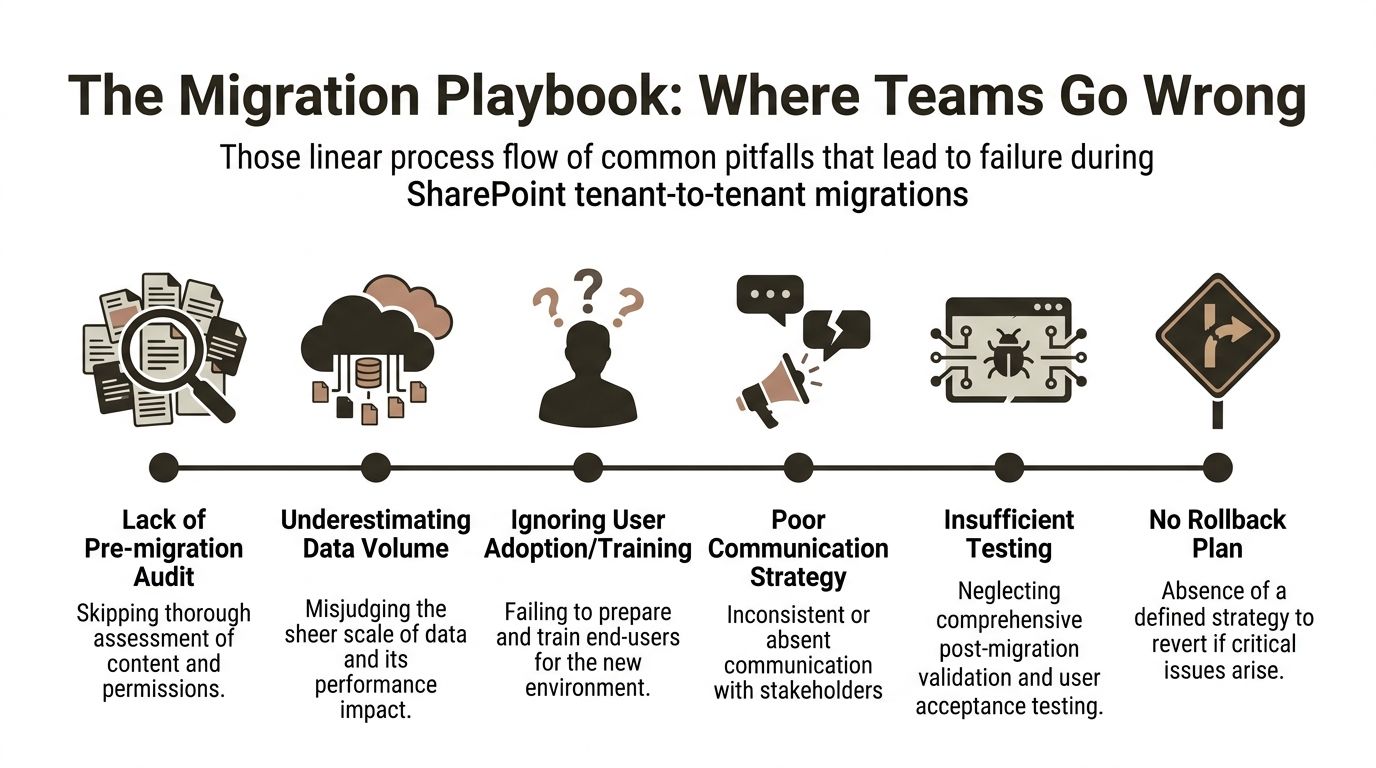
- Audit is skipped or too shallow: Teams count files and sites, but they do not inspect inheritance, metadata dependencies, and orphaned access.
- Volume is misread: Large estates behave differently under migration load. Queue design and throttling discipline suddenly matter.
- Testing is cosmetic: Teams validate file presence but not author stamps, version expectations, business workflows, or access paths.
- Rollback is fictional: The plan says rollback exists. In practice, no one can restore business continuity cleanly once identity and content changes overlap.
For a broader engineering view on release discipline, this explainer on how teams reduce deployment failures is worth reading. The principle applies here as well. Failure usually starts with weak validation and optimistic assumptions.
What teams miss before the first batch runs
The obvious errors are not the worst ones. The worst ones are silent.
GUID conflicts can leave content apparently present but logically detached from the assumptions your users and systems depend on. Broken inheritance can copy disorder into the target tenant while making access reviews harder, not easier. Metadata can degrade in ways business owners only notice when they need auditability.
Many internal teams do not catch that because their test criteria are too shallow. “Can we open the file?” is not validation.
The migration plan must start earlier than your team wants
The work should begin with governance and identity validation, not transport. If your team needs a better planning baseline than the generic project checklists they already have, start with a proper SharePoint migration planning lens at https://ollo.ie/blog-posts/share-point-migration-project-plan.
Missing pre-migration validation does not just slow the programme. It creates damage you only discover after users return and trust has already dropped.
The business impact is nastier than the technical error
A failed list migration is not just an IT incident if the list drove approvals. A bad permission carryover is not just a support issue if regulated content becomes visible to the wrong audience. A delayed cutover is not just project slippage if a business unit cannot operate on current records.
That is why I do not advise ambitious internal teams to “learn by doing” on tenant-to-tenant SharePoint consolidation. The platform has no sympathy for experimentation in production.
The Dangerous Limits of Your Migration Toolchain
Tools do matter. Not in the simplistic way most buyers think.
The wrong question is, “Which tool is best?” The right question is, “At what point does this tool stop protecting us from ourselves?”
SPMT is fine until the estate looks like an enterprise
Microsoft’s SharePoint Migration Tool has a place. It is accessible. It is useful for smaller, cleaner jobs. But in on-premises SharePoint setups common in Irish enterprises, migrations face path length limits of 400 characters, confirmed in Microsoft Learn documentation, and that contributes to 30-50% failure rates in basic tools like SPMT for enterprise jobs over 100GB according to the referenced labour market analysis at https://visa-bulletin.us/job-title/sharepoint-solution-architect/.
That is the polite version of the problem.
The practical version is this: SPMT is not the tool you bet your reputation on when the source estate is messy, deep, inherited, and business-critical. It does not give you enough control over the ugly parts.
ShareGate is strong, but it still needs adult supervision
ShareGate is the workhorse many serious teams reach for. Sensible choice. It handles a lot more than SPMT. It provides better operational efficiency. It belongs in the conversation.
It still breaks at enterprise edges if the architect driving it lacks discipline.
Typical failure points include:
- Complex permissions: The tool can move structure faster than your team can validate whether access still matches reality.
- Large lists and libraries: Performance and verification become harder under enterprise load.
- Cutover pressure: Good tooling does not eliminate the need for queue management, sequencing, and exception handling.
PnP PowerShell is a scalpel, not a safety blanket
Custom PowerShell and PnP scripting gives you the control that enterprise migrations often need. It also gives inexperienced teams more ways to create invisible damage.
Used well, scripts can work around GUID conflicts, handle edge cases, and enforce pre-checks. Used badly, they produce fast, repeatable mistakes.
That is why the toolchain should never be chosen in isolation from the operator.
Enterprise migration tool breaking points
| Tool | Best Use Case | Common Enterprise Failure Point |
|---|---|---|
| SPMT | Smaller, cleaner migrations with limited complexity | Path length issues, weak handling of messy enterprise edge cases |
| ShareGate | Mid-size to complex migrations where operational control matters | Permissions complexity, validation pressure, cutover timing |
| PnP PowerShell | Custom remediation, exception handling, and advanced migration control | Unsafe scripting, poor rollback discipline, silent logic errors |
The blended approach is the only serious answer
The estates that survive are rarely moved with one tool and one mindset. They are moved with a blended method. ShareGate where it provides safe acceleration. Custom scripting where the standard path breaks. Strong validation before and after each movement.
One practical example is the specialist approach used by Ollo’s SharePoint migration work, which combines ShareGate with custom PowerShell PnP scripting specifically for complex tenant moves and rescue scenarios.
Tool selection is not procurement. It is risk allocation. If your team chooses a tool for convenience instead of failure handling, they are choosing future downtime.
The Ollo Verdict
Use SPMT for very small, clean jobs. Use ShareGate when the estate is substantial but still governable. Bring in custom scripting the moment you face broken inheritance, tenant complexity, path problems, or identity redesign.
For anything beyond a modest site move, you need a blended strategy led by someone who has already seen where each tool snaps.
Implementing Entra ID Zero Trust Without Breaking SharePoint
Security teams approach Zero Trust like a policy rollout. SharePoint punishes that approach.
The problem is not the principle. The problem is that SharePoint, Teams-connected sites, service dependencies, and external sharing patterns all carry assumptions your security team may not see until users start logging tickets.
The mistake that causes the helpdesk spike
Many organisations apply blanket Conditional Access changes before they understand what SharePoint is really depending on. External collaboration, legacy service accounts, embedded apps, and migration-stage exceptions all get hit.
Then everyone acts surprised when:
- Business users lose access to partner-facing content
- Background processes stop behaving as expected
- Site owners find sharing patterns have changed overnight
- Security and collaboration teams start blaming each other
That is not Zero Trust. That is poor sequencing.
Standard Cloud Solution Architect guidance overlooks the complexities of rescuing broken tenant consolidations where legacy governance was never decommissioned. Organisations need an explicit framework to validate Entra ID zero-trust readiness and audit orphaned permissions before migration begins, which basic SPMT tooling cannot handle, as highlighted in this discussion: https://www.youtube.com/watch?v=wdUtiDrKFNQ.
What proper Zero Trust work looks like in SharePoint
You need an architectural review before enforcement. Not after.
The order matters:
- Map dependencies first. Know which sites, apps, flows, and sharing scenarios still rely on legacy assumptions.
- Audit permissions before policy hardening. Otherwise you will secure the wrong mess.
- Phase controls. Pilot policies where blast radius is contained.
- Build business exceptions deliberately. Not as panicked workarounds after rollout.
The reason this goes wrong so often is simple. Security teams think in policy objects. SharePoint estates behave like living collaboration systems.
Zero Trust should tighten control without breaking legitimate work. If it does both at once, the architecture was wrong.
Legacy governance comes back to bite
Most problematic tenant consolidations carry old baggage. Site sprawl. Orphaned groups. Historic permission breaks. Unowned sharing patterns. When teams ignore that and bolt Entra ID controls on top, they freeze the disorder into the new environment.
That is why Zero Trust in SharePoint is not a switch. It is a redesign.
If you are tackling this seriously, your team needs a security architecture approach grounded in collaboration reality, not just identity theory. This is the lens I recommend starting with: https://ollo.ie/blog-posts/share-point-zero-trust-architecture.
A useful walkthrough on the broader Microsoft security model sits below.
The outcome you should demand
Your users should end up with tighter access control, cleaner sharing, and fewer hidden permission liabilities. They should not end up with a broken collaboration estate wrapped in stronger policy language.
If your Zero Trust programme does not include SharePoint-specific dependency mapping, it is incomplete.
Building Governance and Compliance Controls That Stick
A migration without governance is just a cleaner route into the next mess.
That matters most in regulated sectors because the business tends to focus on move day while the primary risk sits in day two. If you migrate disorganised content into a modern tenant without enforceable controls, you have not reduced risk. You have redistributed it.
Governance has to be built into the architecture
Many teams treat governance as post-project tidy-up. That fails because users start recreating the same sprawl patterns that polluted the source estate.
The controls need to exist from the start:
- Site lifecycle rules: Not every workspace deserves permanent life.
- Permission discipline: Access should be auditable, attributable, and reviewable.
- Data handling controls: Regulated information needs consistent treatment, not owner preference.
SharePoint Embedded exposes a different kind of governance failure
For multi-tenant SaaS builds, SharePoint Embedded enforces strict container isolation. That is valuable. But clients still fail when they encounter certain storage transaction limits, and 40% of DIY implementations fail compliance audits in regulated Irish healthcare settings because they were not architected for those quotas, according to the referenced guidance here: https://techcommunity.microsoft.com/blog/marketplace-blog/sharepoint-embedded-guide-for-software-companies-success-factors-positioning--ke/4463615.
That is the pattern to remember. The platform can support the control model you want. It will punish you if you ignore operational quotas and governance design.
Controls that survive contact with users
The best controls are enforceable and boring. Users follow them because the environment leaves little room for ambiguity.
Good examples include:
- Provisioning with guardrails: New sites inherit approved structures instead of bespoke chaos.
- Access models people can explain: If nobody can describe why a group has access, the design is already decaying.
- Operational ownership: Somebody in the business must own each critical workspace.
Governance that depends on memory fails. Governance that depends on architecture lasts longer.
Compliance is not a report. It is an operating condition
IT Directors often discover too late that technical migration success does not equal audit success. Auditors do not care that the files moved if access logic became harder to explain. Compliance teams do not care that the target tenant is newer if ownership and control remained vague.
That is why governance belongs inside the migration architecture, not behind it. The migration should reduce ambiguity. If it merely relocates it, your team has done expensive transport work, not risk reduction.
The Decision Point When DIY Becomes a Liability
There is a point where keeping the work in-house stops being prudent and starts being reckless.
Many internal teams are capable. That is not the issue. The issue is concentration of risk. SharePoint migration becomes dangerous when several hard problems stack up at once and your team is trying to solve them in a live business environment for the first time.
Use this as your decision test
DIY has crossed into liability if your project includes more than one of these conditions:
- Tenant-to-tenant consolidation: Especially where identity, sharing, and permissions have drifted over time
- Regulated data: Finance, energy, or healthcare content that cannot tolerate ambiguous access outcomes
- Complex permission history: Broken inheritance, unclear ownership, or inherited sprawl
- Identity redesign: Entra ID changes happening alongside content migration
- Large or messy estates: The kind that expose tool limits, validation gaps, and rollback weakness
One factor might be manageable. Several together create compound risk.
The hidden cost is not effort. It is recovery
When internal teams underestimate the complexity, they do not just miss dates. They create rework, trust issues, and audit headaches that cost more than the original migration budget ever would have.
That is why I advise IT Directors to frame specialist support as a governance decision, not a staffing preference. If the migration affects legal exposure, business continuity, or regulated access, you are not buying extra hands. You are buying down risk.
The practical threshold
If your team is asking any of these questions, you are in specialist territory:
- Can we preserve business meaning, not just documents?
- How do we validate permissions before and after cutover?
- What breaks when Zero Trust lands on top of migration?
- Which tool handles the ugly cases, not just the common ones?
If you need firm support for that kind of programme, start with a specialist migration services view at https://ollo.ie/blog-posts/share-point-migration-services.
Your internal team should still be involved. They hold context no outside architect can invent. But they should not carry the whole risk envelope alone when the estate is high-stakes.
If your SharePoint project involves regulated data, tenant consolidation, identity redesign, or messy permissions, bring in Ollo before the first batch runs. We work on the failure modes that derail Microsoft 365 migrations, so your team does not have to discover them in production.

















