



You're probably in the same place as every cautious IT Director we meet. Someone in the business wants SharePoint “modernised”, someone else says “just move it to Microsoft 365”, and your team still remembers the last migration that dragged on, broke permissions, and filled the helpdesk queue for weeks.
That's why the usual SharePoint Online vs SharePoint Server comparison is useless. You don't need another features checklist. You need a risk briefing. The fundamental question isn't which product has the prettier story. It's which operating model your team can control without creating a governance mess, a security incident, or a compliance headache you'll still be defending at audit time.
Your Last Migration Failed, Here Is How to Ensure This One Succeeds
Last time, the project probably looked reasonable on paper. Inventory the content. Pick a tool. Schedule the cutover. Tell users the cloud will reduce admin overhead. Then reality arrived. Old folder structures blew past platform limits. Permissions no one had documented got flattened or mangled. Users lost trust because the new platform behaved differently from the old one.
That's the part weak migration plans hide. They treat SharePoint Online vs SharePoint Server as a technology choice. It's really a failure-mode choice. One model gives you direct control of the farm and infrastructure. The other removes that burden but replaces it with service limits, governance controls, identity dependencies, and compliance exposure that many internal teams underestimate.
If your last migration failed, don't start by buying another tool. Start by assuming the data is dirtier, the permissions are stranger, and the business processes are more fragile than anyone admitted in the steering meeting. That's the only useful mindset.
A practical baseline helps. This data migration best practices guide is worth reading because it frames migration as a discipline, not a copy exercise. The same principle applies here. If your team skips discovery, remediation, rollback logic, and validation, the project won't just slip. It'll break in ways that are expensive to unwind.
We often see clients fail when they assume prior pain came from “bad luck” rather than bad design. It usually comes from three things:
- False simplicity: Someone decides SharePoint Online is just SharePoint with fewer servers.
- No permission strategy: Inheritance is already broken in the source and nobody models the target properly.
- No pre-flight remediation: Legacy paths, naming, list structures, and content sprawl stay untouched until the migration tool starts throwing errors.
Your migration didn't fail because users resisted change. It failed because the technical design didn't respect the platform's limits and the organisation's risk profile.
If any of that sounds familiar, read why SharePoint migration projects fail before you approve another plan. Your next success starts when you stop treating migration as transport and start treating it as controlled risk reduction.
The Core Architectural Divide Beyond Cloud vs On-Premises
The biggest mistake in the SharePoint Online vs SharePoint Server debate is thinking this is about location. It isn't. It's about ownership when something breaks.
Microsoft's own documentation is clear that SharePoint Online and SharePoint Server are different operational models. SharePoint Online runs as part of Microsoft 365 in Microsoft's cloud, while SharePoint Server is the on-premises product family that you install and run yourself. In practical terms, Microsoft owns patching, service updates, and scaling in SharePoint Online, while your team owns the farm, upgrades, and maintenance in SharePoint Server, as outlined in this SharePoint Online vs on-premises comparison.
| Area | SharePoint Server | SharePoint Online |
|---|---|---|
| Infrastructure | Your team owns it | Microsoft owns it |
| Patching | Your team performs it | Microsoft performs it |
| Scaling | Your team plans and funds it | Microsoft handles service scaling |
| Update timing | You control it | You live with Microsoft's cadence |
| Governance burden | Lower platform abstraction, more infrastructure work | Less infrastructure work, more service governance complexity |
| Best fit | Organisations needing server-level control | Organisations moving into Microsoft 365 cloud operations |
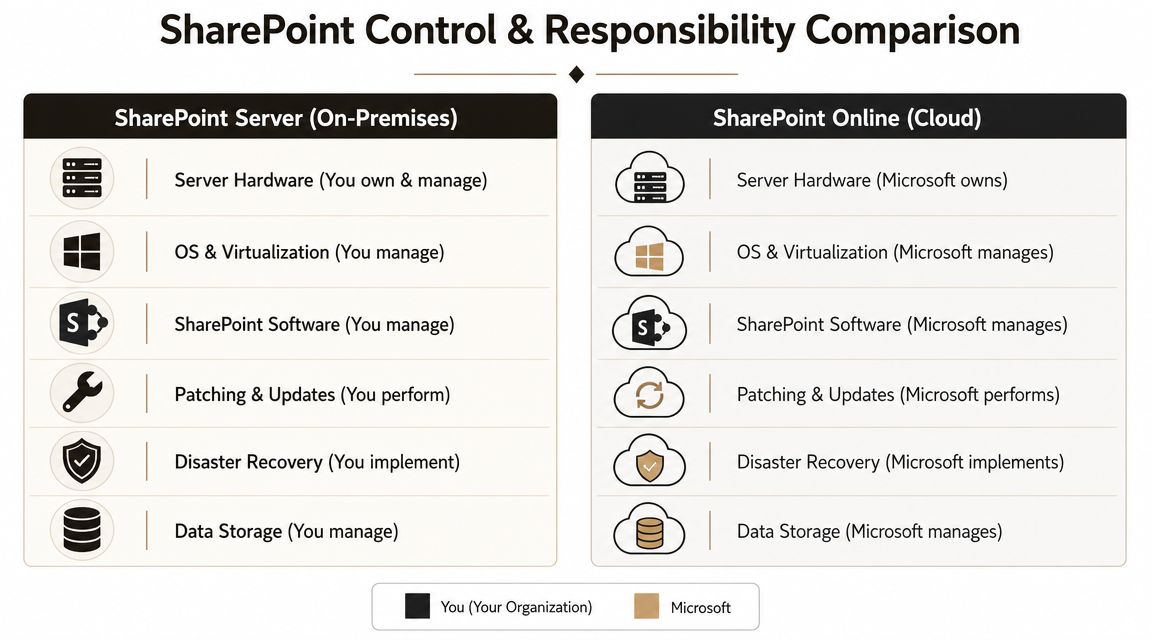
What moves off your plate and what replaces it
With SharePoint Server, the pain is obvious. Hardware, Windows Server, SQL, backups, disaster recovery, patch cycles, and farm health all sit with your team. Nobody confuses that with simplicity.
With SharePoint Online, the pain becomes less visible and more political. You stop owning servers. You start owning configuration risk. Identity, sharing, retention, governance, app permissions, lifecycle control, and migration design become the places where projects go wrong.
That shift catches people out. The documentation says cloud reduces infrastructure work. It does. But it doesn't reduce responsibility. It changes the type of responsibility.
Why regulated organisations get this wrong
In Irish and wider EU environments, the technical platform decision immediately becomes a control question. Residency, lawful transfer, guest access, retention, and auditability matter more than UI familiarity. The tenant design has to support those controls from day one. Bolting them on later is how projects become rescue engagements.
Practical rule: If your team still talks about SharePoint Online as “the same thing without the servers”, you're not ready to migrate.
We often see clients fail when they plan a lift-and-shift and ignore the architectural consequences of multi-tenant cloud. If your estate spans multiple business units or segregated control boundaries, multi-tenant SharePoint architecture decisions need to be settled before content starts moving. If you don't settle them early, every later decision becomes slower, more expensive, and harder to reverse.
Feature Parity Is a Myth That Breaks Business Processes
The most damaging phrase in this market is “it's just SharePoint in the cloud”. That line has caused more broken business processes than any migration tool ever did.
Yes, users will recognise document libraries, permissions, and team sites. That superficial familiarity is exactly why organisations get complacent. They see a familiar interface and assume their old customisations, workflows, and heavily customized site structures will behave the same way in SharePoint Online. They won't.
Microsoft confirms the core operational split plainly. SharePoint Online is a cloud service hosted in Microsoft data centres with updates and patching managed by Microsoft, while SharePoint Server 2019 is deployed and managed on-premises. That means Online reduces server lifecycle burden but removes local control over update timing and infrastructure tuning, while Server keeps that control and pushes patching, SQL, Windows Server, and farm maintenance back to the customer, as described in Microsoft's SharePoint Online vs SharePoint 2019 guidance.
Familiar interface, different consequences
That operational difference matters because business process behaviour often depends on what sits underneath the platform, not what users see in the browser. Legacy environments often rely on years of accumulated customisation. Some of it is documented. A lot of it isn't.
What usually breaks first is not collaboration. It's process logic. Approval chains, compliance reporting, departmental forms, hand-built integrations, old workflow assumptions, and permissions attached to nested structures all tend to surface after the migration has already started.
The hidden rebuild nobody budgets for
The documentation will tell you to modernise. In reality, “modernise” often means rebuild. That means redesigning old behaviours with current tooling, simplifying what should never have existed, and retiring what nobody should carry forward.
We often see clients fail when they migrate content before they catalogue dependencies. They move the files, then discover a critical function depended on brittle architecture no one had challenged for years. At that point the project stops being migration and becomes emergency redevelopment.
A hard rule from the field:
- Catalogue every customisation: If a process matters to legal, finance, operations, or regulated reporting, treat it as a design stream, not a migration afterthought.
- Assume parity is partial: If someone says “that should work the same”, make them prove it.
- Test the process, not just the data: A document arriving in the target doesn't mean the business can still operate.
If a workflow supports compliance or revenue, moving the library without redesigning the process is negligence disguised as progress.
This is why feature parity is the wrong frame. In SharePoint Online vs SharePoint Server, parity isn't the starting point. It's a negotiated outcome, and sometimes the right outcome is controlled change rather than imitation.
The Technical Limits Microsoft Hopes You Overlook
DIY migrations commonly fail. Not in strategy workshops. Not in licensing meetings. They die when a tool starts copying real content into SharePoint Online and the platform pushes back.
Microsoft's official SharePoint Online limits include a 5,000-item view threshold for lists and libraries, a 400-character URL limit, a 100 GB maximum file size in a document library, a 93-day recycle bin retention window, and a 300,000-item sync limit with the OneDrive sync client, as summarised in this SharePoint vs SharePoint Online limits review. These aren't obscure edge cases. They're common failure points in old departmental estates and legacy file shares.
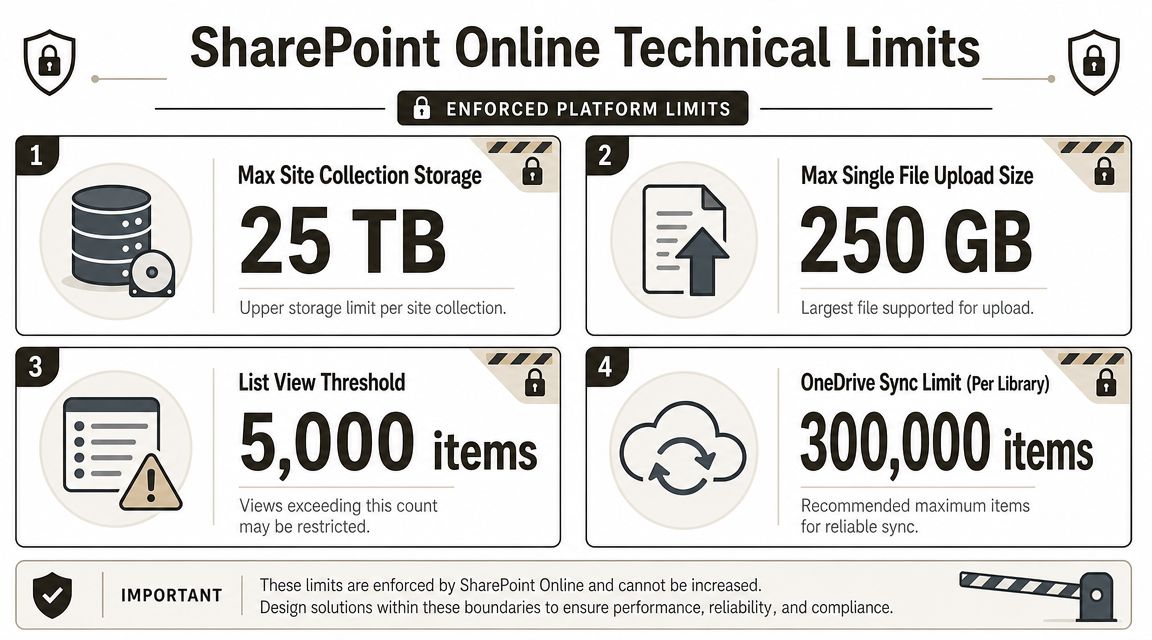
Why the limits matter before cutover
The 5,000-item threshold isn't a nice suggestion. If your content design depends on views that drag too much into a single query pattern, users hit broken views and support tickets start immediately.
The 400-character URL limit is where old file server habits come back to punish you. Deep folders, long project names, and duplicate naming conventions don't survive cleanly. You need path normalisation before migration, not after users complain that content has vanished.
The 300,000-item sync limit creates another trap. Teams often assume sync can paper over bad information architecture. It can't. Large libraries with messy structures become unstable from a user perspective long before anyone admits the design is the problem.
What experienced teams do differently
They don't drag and drop and hope. They remediate first.
- Restructure oversized libraries: Split content based on actual use, not departmental politics.
- Normalise paths and names: Shorten folder structures before the migration engine starts rejecting them.
- Script around edge cases: Basic copy jobs don't handle large estates with enough control.
- Model user access early: Permissions and navigation have to work with the new structure, not against it.
There's a reason large migration teams obsess over pre-flight analysis. If you ignore thresholds, the failure won't announce itself politely. It shows up as inaccessible content, sync confusion, strange permissions behaviour, and executives asking why “the cloud” made things worse.
For organisations already drowning in exceptions, this breakdown of the unique permissions wall in SharePoint is worth your time. It explains why dumping content into SharePoint without structural redesign isn't migration. It's technical debt relocation.
Migration Tooling The Good The Bad and The Disastrous
Tools matter. Tool worship is dangerous.
Most internal teams start with Microsoft's SharePoint Migration Tool because it's there, it's free, and the interface looks harmless. For simple jobs, that's fine. If you're moving a small, clean file share or a basic site with limited complexity, SPMT can do the job.
The problem starts when people confuse “can move content” with “can run an enterprise migration safely”.
Where SPMT is acceptable and where it becomes a liability
SPMT is acceptable when the source is simple, the permissions are clean, and the business impact of imperfection is low. It becomes a liability when the structure is old, the inheritance is broken, the volume is high, or the migration needs precise remediation during transit.
Microsoft Learn-backed behaviour around service limits, API throttling, large-library handling, and path constraints is exactly why this goes wrong in practice. The operational risk isn't theoretical. Without pre-flight analysis, broken inheritance cleanup, path normalisation, and throttling-aware tooling, migrations stall or permissions get corrupted at scale, as outlined in this analysis of SharePoint migration risk.
ShareGate is better, but it still isn't the strategy
ShareGate is a serious step up. Better visibility. Better control. Better logging. For many standard departmental migrations, it's the right commercial tool.
But don't romanticise it. We often see clients fail when they assume buying ShareGate means they've bought judgement. They haven't. Complex inheritance repair, deep remediation logic, tenant-to-tenant collision handling, and exception-heavy projects still need scripting and architecture decisions outside the tool.
Here's the practical split:
- Use SPMT for small, low-risk migrations where business impact is limited and you can tolerate manual cleanup.
- Use ShareGate for standard site and departmental moves where the source is reasonably organised.
- Use scripted remediation with commercial tooling when you face large estates, regulatory scrutiny, ugly permissions, or rescue conditions.
This short video gives useful context on migration tooling choices before you commit your team to the wrong path.
The Ollo verdict on tooling
Use SPMT for a small site or a basic file share. Use ShareGate when the estate is standard and the governance model is already settled. For enterprise, regulated, or rescue migrations, you need commercial tooling plus custom PowerShell PnP scripting and someone who knows how to handle the exceptions before users find them.
If your team is still comparing tools instead of designing controls, start with a technical review of SharePoint migration tools. That's the right order. The tool supports the plan. It doesn't replace it.
One option in that category is Ollo. The firm handles SharePoint and Microsoft 365 migration work using ShareGate and custom PowerShell PnP scripting rather than relying on basic tool-only execution.
Governance and Security The Real Cost of Getting It Wrong
A bad SharePoint migration doesn't end as an IT inconvenience. In regulated organisations, it turns into a security problem, a legal problem, and then a board-level problem.
That's especially true when teams move sensitive content into SharePoint Online and assume Microsoft's managed service model covers governance by default. It doesn't. Microsoft manages the service. Your organisation still controls permissions, guest access, retention posture, and identity design.
The Irish Data Protection Commission's 2023 annual report recorded 6,795 total breach notifications in Ireland, up 20% year-on-year, a useful reminder that control failures don't stay inside the infrastructure team, as noted in this SharePoint governance and compliance discussion.

The migration mistake that becomes a breach
Most serious incidents in this space don't start with a cinematic hack. They start with poor control mapping. A library inherits access it shouldn't. A guest permission survives where it should have been removed. A retention assumption gets lost during redesign. A business unit starts sharing from a site that was never governed properly.
That's why migration and governance can't be separate workstreams. If they are, one will undermine the other.
Missing this step doesn't just fail the migration. It breaks legal compliance.
What regulated teams need to enforce
A credible migration design for finance, healthcare, energy, or any audit-heavy environment needs hard decisions before content moves:
- Permission governance: Map access deliberately. Don't let legacy sprawl define the target state.
- Sharing controls: Decide where guest access is allowed, then enforce it.
- Retention posture: Align target sites and libraries to policy before user activity expands.
- Identity integration: If your Entra ID model is weak, SharePoint will expose that weakness fast.
If your current plan still treats governance as “phase two”, it isn't a plan. It's a delay mechanism for an avoidable incident. This SharePoint data governance guide is the sort of baseline your security and compliance teams should challenge before any cutover date gets approved.
The Ollo Verdict The Only Path to Reduce Your Risk
Here's the blunt answer. In the SharePoint Online vs SharePoint Server decision, there is no universally “better” platform. There is only the platform whose risk model your organisation can manage.
If you need direct server-level control, have valid reasons to stay on-premises, and can carry the operational burden, SharePoint Server can still make sense. Your team owns the farm, the upgrade path, and the consequences.
If you want Microsoft to own the infrastructure layer and your organisation is moving properly into Microsoft 365, SharePoint Online is usually the right destination. But only if you accept that the work shifts into governance, identity, architecture, remediation, and control validation. That's where most projects fail.
DIY isn't brave. In regulated environments, it's often reckless. Tool-only migration is fine when the data is low value, the structure is simple, and the consequences of mistakes are minor. Most mid-sized and enterprise estates don't fit that description.
So here's the recommendation.
- Choose SharePoint Server when local control is genuinely required and your team can support the full operational stack.
- Choose SharePoint Online when cloud operating discipline, governance maturity, and redesign effort are funded properly.
- Choose specialist-led migration delivery whenever the estate is complex, regulated, politically sensitive, or already scarred by a failed attempt.
The cost of failure isn't just technical cleanup. It's broken access, damaged user trust, audit exposure, and the kind of avoidable incident that nobody can explain convincingly after the fact.
If your team is staring at another high-stakes SharePoint decision and you want someone to challenge the assumptions before they become another rescue job, talk to Ollo. We'll tell you quickly whether your plan is viable, where it will break, and what has to change before your data moves.

















