



The worst advice in this space says a computer aided facilities management system is just another line-of-business app that needs a connector, a few SharePoint lists, and a Teams tab. That advice burns budgets because it misclassifies the problem.
A CAFM platform is an operational control layer. It holds the records your estates team, compliance team, and auditors will treat as evidence. If your Microsoft 365 integration corrupts asset identifiers, loses maintenance history, or exposes sensitive records through broken permissions, you haven't had an awkward IT project. You've created a governance failure with technical roots.
Sceptical CIOs are right to push back here. The marketing promise sounds tidy. Surface CAFM data in Microsoft 365. Reuse SharePoint. Let Power Platform fill the gaps. In reality, the hardest part isn't licensing or screens. It's preserving relationships between space, asset, maintenance, and access-control data while Microsoft 365 imposes its own constraints on scale, structure, and permissions.
Stop Thinking of CAFM as Software
The first mistake is conceptual. Your team treats CAFM like CRM, HR, or ticketing. They assume they can deploy it, integrate it, train users, and move on. That framing is wrong.
One market forecast projects the global CAFM market at USD 1.2 billion in 2025 and USD 2.4 billion by 2035, with a 6.9% CAGR over that period, which matters because enterprises are budgeting CAFM as a control system for space, assets, and maintenance, not as a niche admin tool (Future Market Insights on CAFM market growth). That shift changes the risk profile immediately.
The real system of record problem
A CAFM estate lives or dies on trust in the record. If the room code in SharePoint doesn't match the room code in the CAFM platform, your work orders drift. If an asset gets recreated instead of matched, preventive maintenance history fragments. If site drawings sit in one library while maintenance data sits elsewhere with weak linkage, your “single pane of glass” becomes a polished lie.
We often see clients fail when they let collaboration tooling become a shadow system of record. A SharePoint site starts as a harmless document hub. Then someone adds lists for assets. Then Power Apps layers forms on top. Then Teams becomes the front end. Suddenly nobody can say with confidence which platform owns the truth.
Practical rule: If your CAFM integration doesn't define one authoritative source for every core object, asset, location, work order, maintenance plan, and document, your project has already started to fail.
Microsoft 365 doesn't remove governance debt
Microsoft 365 can expose data well. It does not forgive bad structure. That's why the platform decision behind CAFM integration matters so much. If your architects still debate whether relational operational data belongs in SharePoint lists, they need to read a more grounded comparison of Dataverse vs SharePoint Lists.
The documentation for these products often implies you can compose a workable solution from standard services. You can, sometimes. But when the estate includes regulated assets, audit-sensitive maintenance records, and floor-linked operational data, “can” isn't the threshold. The threshold is whether the model remains trustworthy under change, integration, and audit pressure.
That's why this topic belongs in board-level risk conversations, not only in application delivery meetings.
CAFM Core Modules Are Data Governance Problems
A CAFM platform looks modular on paper. In production, each module becomes a governance trap if your Microsoft 365 integration team treats it like flat content.
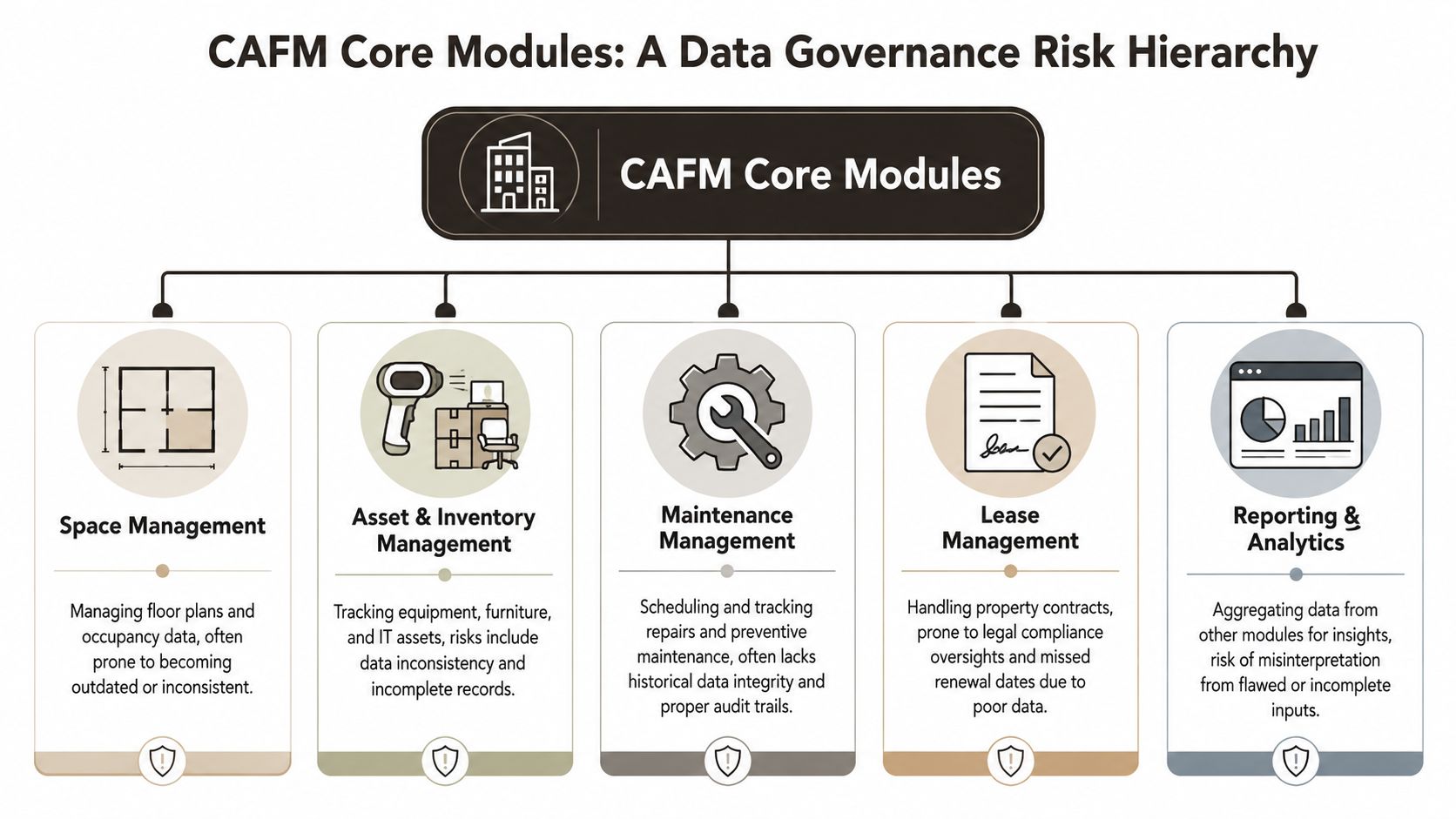
Planon describes effective CAFM as managing space, assets, planned preventative maintenance, and reactive work orders, and that aligns with what matters operationally. The same reference also matches what we see in the field. Dirty asset records and weak governance undermine the platform from day one (Planon glossary on CAFM).
Space management breaks when naming standards drift
Space management sounds visual. People think floor plans, room bookings, occupancy. The fundamental issue is identifier discipline.
If one building uses legacy room numbers, another uses refurbished codes, and SharePoint stores display labels instead of controlled location keys, every downstream integration suffers. Work orders route to the wrong location. Utilisation reports stop being defensible. CAD-linked views lose credibility because the visual map and the data model diverge.
Your architects need to enforce:
- Stable location codes: not user-friendly aliases as primary keys.
- Controlled updates: room renames must follow governed change, not ad hoc edits.
- Mapped hierarchies: campus, building, floor, room must stay consistent across systems.
Asset management fails on identity, not on forms
Asset management isn't “a list of things.” It's identity management for physical infrastructure. If your migration duplicates records or resets unique identifiers, history detaches from the object that matters.
That's why good operational teams spend serious effort on mastering IT asset management. The discipline matters even more when a CAFM estate has to line up with Microsoft 365 artefacts, scanned documents, supplier records, and maintenance workflows.
A short risk view helps:
| Module | What teams assume | What actually breaks |
|---|---|---|
| Space | “It's just floor data” | Inconsistent location keys |
| Assets | “It's just inventory” | Duplicate IDs and broken history |
| Maintenance | “It's just tickets” | Lost audit trails and invalid states |
| Lease | “It's just contracts” | Wrong access, poor retention control |
| Reporting | “It's just dashboards” | Garbage outputs from flawed inputs |
Maintenance and reporting expose every weak decision
Maintenance data becomes toxic quickly when workflow states aren't controlled. Open, assigned, deferred, completed, verified. Those states aren't cosmetic. They drive accountability and audit evidence.
Reporting then amplifies every upstream mistake. A dashboard can look impressive while feeding on duplicated assets, stale room codes, and malformed maintenance statuses. That's why governance has to sit above the module design, not behind it.
If your team wants a practical governance baseline before building any M365-connected CAFM model, start with a stricter view of SharePoint data governance. Most failed CAFM programmes don't collapse because the vendor lacked features. They collapse because nobody enforced the data contract.
The Microsoft 365 Integration Trap
The pitch is familiar. Put CAFM approvals in Teams. Store associated documents in SharePoint. Use Entra ID for access. Add Power Apps for mobile forms. Build reporting around Microsoft 365 usage patterns. It sounds efficient because it reuses what you already own.
That pitch also hides the central problem. Microsoft 365 is excellent at collaboration. It is far less forgiving when you try to force complex CAFM operational data into patterns that were never designed to be the authoritative backend.
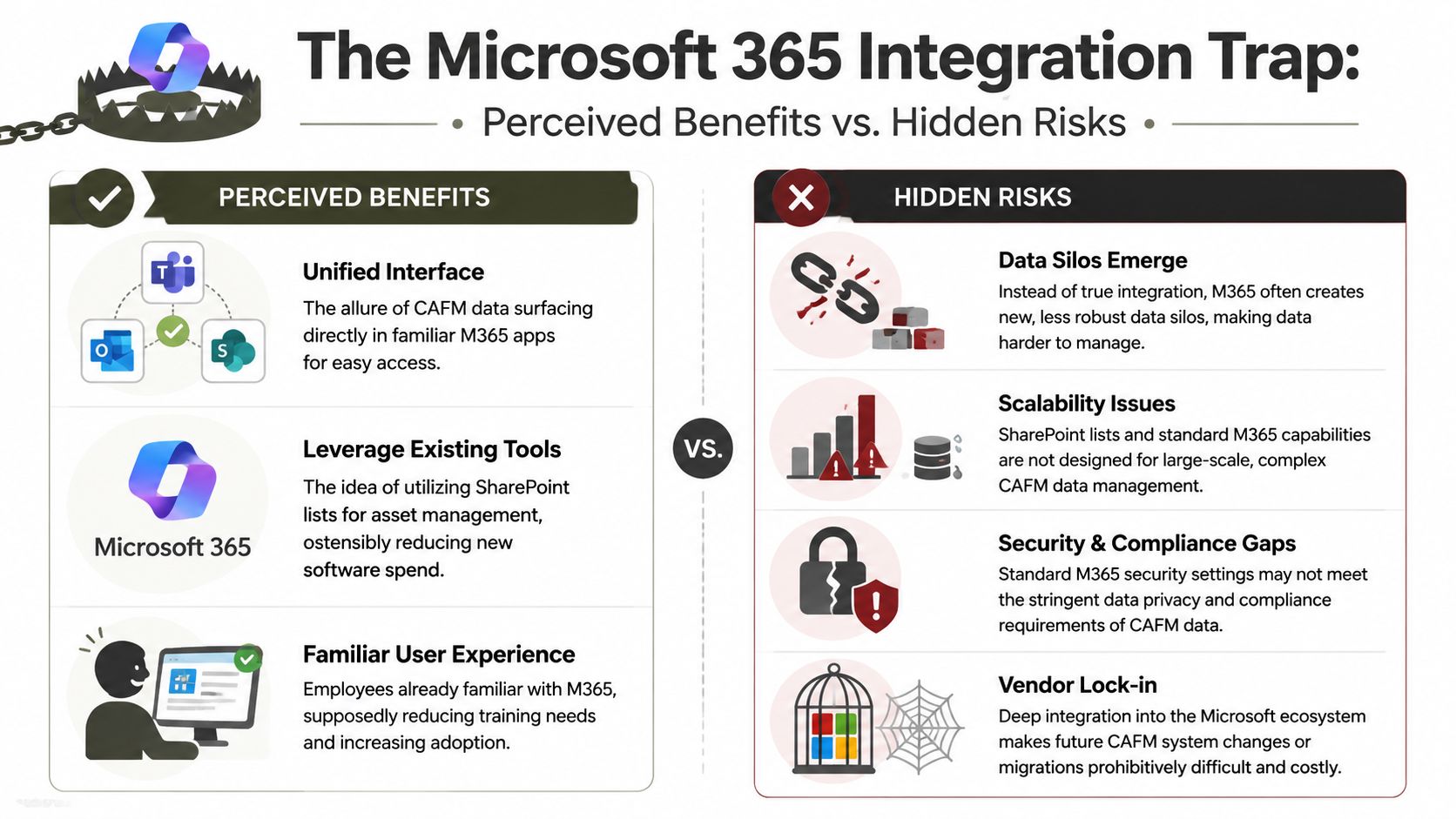
IBM notes that modern CAFM platforms use IoT and AI to collect real-time asset data, and that value only materialises if the data model is enforced end to end. We often see clients fail by underestimating clean master data and stable identifiers during integration (IBM on modern CAFM capabilities).
SharePoint is not your relational asset backend
Sceptical enterprise architects should offer a blunt assessment. SharePoint lists are useful. They are not a serious raw backend for high-complexity CAFM estates.
Microsoft Learn documentation confirms several failure points that matter here:
- API throttling: bulk sync and aggressive integration jobs will hit service protection behaviour. Your nightly sync design may look fine in test and degrade badly under real load.
- List view threshold: the well-known 5,000 item threshold changes how lists behave and how queries need to be designed. That doesn't make SharePoint unusable. It does make naive enterprise asset modelling reckless.
- Broken inheritance: item- and folder-level permissions create complexity quickly, and the compliance consequences are obvious when sensitive records leak wider than intended.
The documentation says you can work within these constraints. That's true. Reality is that most internal teams don't design for them early enough.
A CAFM integration fails long before go-live if nobody can answer three questions clearly: where the master record lives, how identifiers stay stable, and what happens when Microsoft 365 throttles the sync path.
Standard tools help, until they don't
SPMT has a role. It moves straightforward file content into Microsoft 365. It is not the right answer for structured, relational CAFM migrations where metadata integrity, permission fidelity, and linked records matter.
ShareGate is stronger for many SharePoint migrations. It still won't magically solve a bad target model, broken inheritance sprawl, or custom logic needed to preserve linked operational records across environments. Tooling can move payload. It can't repair architecture.
If your team is still treating Microsoft 365 as the default landing zone for every CAFM entity, read a more grounded take on Microsoft 365 online architecture decisions. The trap isn't that Microsoft 365 is weak. The trap is assuming familiarity makes it safe for every data shape.
The Ollo Verdict
Use SPMT for simple file-share content with light metadata and no serious relational dependency. For anything resembling real CAFM operational data, you need a governed target architecture, custom scripting, and integration validation that anticipates throttling, threshold behaviour, and permissions drift.
If your plan says “we'll store the core asset model in SharePoint lists and sort out the edge cases later,” you don't have a plan. You have a failure pattern.
Compliance in Energy Finance and Healthcare
A CAFM failure becomes expensive fastest in regulated estates. That's why this topic lands differently in healthcare, finance, and energy than it does in a generic office portfolio.
Vendor-neutral guidance describes CAFM as most defensible in legally sensitive and operationally dense environments such as healthcare estates and regulated finance sites. When space, maintenance, and asset records are synchronized, managers reduce costs. When they are not, the result is missed maintenance, duplicate records, and failed audits (NexGen Asset Management on CAFM risk and control).
Healthcare loses trust first
In healthcare, maintenance history isn't an admin convenience. It supports safe operation of critical spaces and equipment. If your integration splits documents from maintenance records, or exposes draft reports through weak permissions, your issue isn't poor UX. Your issue is that the organisation can't prove control.
Common weak points include:
- Asset traceability gaps: maintenance evidence no longer follows the correct asset.
- Location mismatch: ward, room, or site references drift across systems.
- Access-control mistakes: staff see records outside their operational role.
Missing this step doesn't just fail the project. It weakens your compliance posture.
Finance needs defensible records, not attractive dashboards
Regulated finance estates often care less about “smart building” rhetoric and more about controlled access, maintenance proof, and evidence that secure facilities are managed under policy. If the CAFM-M365 model allows ad hoc list edits, inconsistent permissions, or unreliable change history, internal audit will find the gap sooner or later.
Board-level implication: when CAFM data becomes evidence, integration defects turn into governance defects.
That's why a migration or integration strategy for finance sites needs the same seriousness as any other controlled records platform. If your team still thinks this is “just SharePoint plus a facilities app,” they're understating the risk.
Energy estates punish weak workflow control
Energy environments multiply the effect of bad maintenance state handling. Deferred work, closed work, exception records, and site-linked documentation all need to remain coherent. If they don't, your reporting stops being actionable and your audit trail stops being credible.
For teams operating in these sectors, the right benchmark isn't convenience. It's whether the implementation can withstand scrutiny. A more realistic view of that challenge sits in this guide to regulated industry SharePoint migration.
If the record isn't complete, the organisation can't prove control. That's the only sentence that matters.
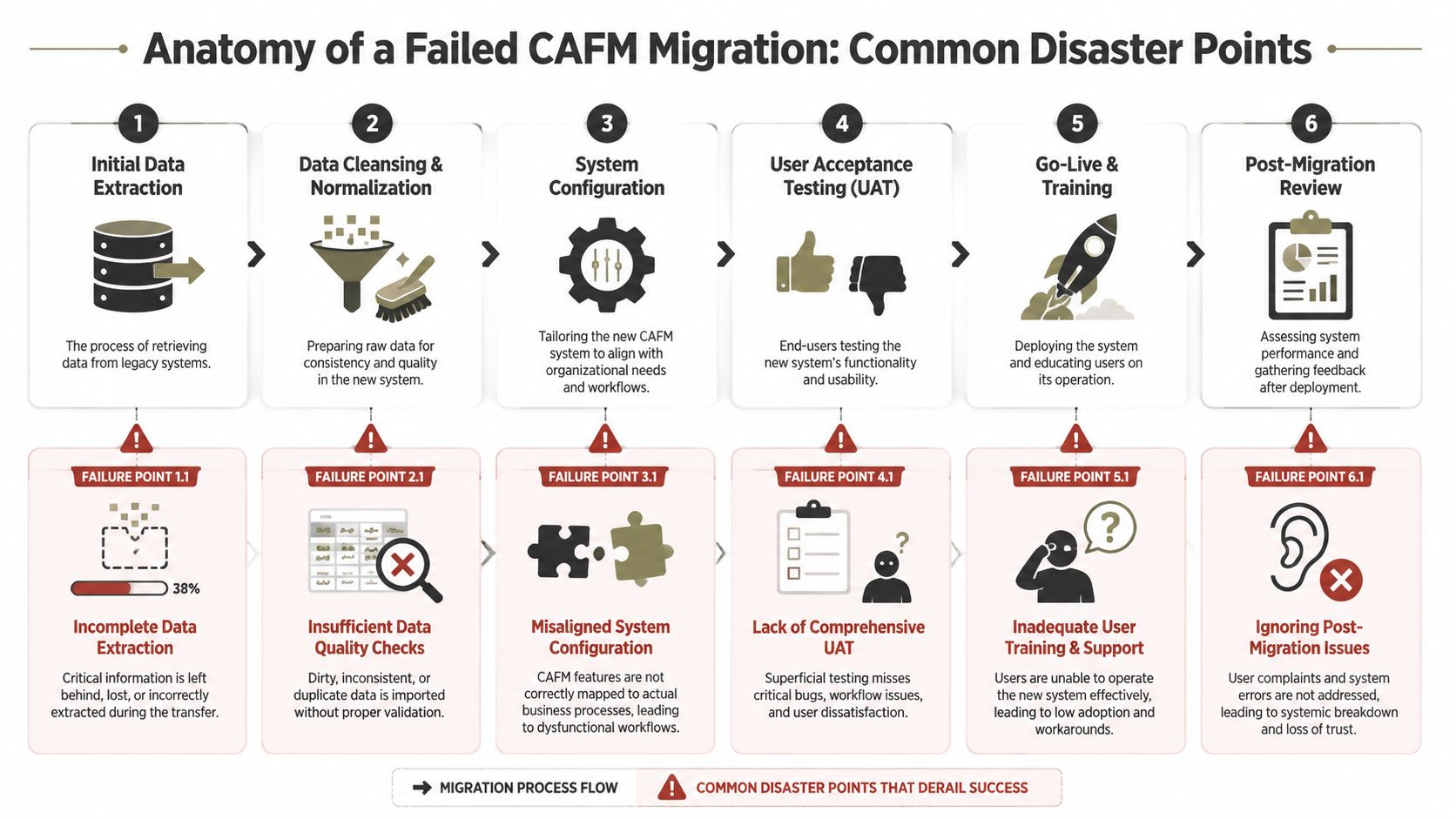
Anatomy of a Failed CAFM Migration
Most failed CAFM migrations don't fail in one dramatic moment. They fail in layers. A field maps incorrectly. A lookup breaks. A permission model gets simplified “temporarily.” Testing checks screens, not evidence chains. By the time users complain, the technical debt is already embedded.
Failure pattern one: GUID conflicts and duplicate identities
A classic rescue scenario starts with duplicate asset records after migration. The visible symptom is simple. Users search for one pump, one panel, one room asset, and find multiple records. The deeper problem is uglier. Linked work orders, documents, and maintenance history now point to different identities.
This often happens when teams rebuild records in a target Microsoft 365 environment instead of preserving authoritative IDs and relationship logic. Off-the-shelf migration tools don't understand your business semantics. They move objects. They don't guarantee identity continuity across custom data models.
Failure pattern two: broken inheritance becomes a compliance leak
SharePoint permission inheritance is powerful and dangerous. Teams break inheritance to solve a local access issue. Then they do it again. And again. During migration, that complexity often gets flattened, partially copied, or misapplied.
The symptom arrives as overexposure. Maintenance reports, site documents, lease-related files, or incident-linked material become visible to people who should never see them. Microsoft Learn documentation is clear that permissions design in SharePoint demands careful control. Yet many CAFM projects still treat it as post-migration housekeeping.
Failure pattern three: silent file and metadata loss
Some of the worst failures are quiet. Files with problematic paths or unsupported naming patterns don't always announce themselves in ways business stakeholders understand. A report says “completed with warnings.” The project team declares success. Months later, someone discovers missing site drawings, detached inspection reports, or malformed metadata.
We often see clients fail when they confuse tool completion with migration completeness.
“The migration finished” is not the same as “the record remained legally and operationally intact.”
Failure pattern four: shallow testing hides operational breakage
User acceptance testing often focuses on whether users can log in, search, and open records. That isn't enough for CAFM. You need to test relationship integrity, permission boundaries, workflow states, filtered reporting, and exception handling.
A proper test view looks like this:
| Test area | Superficial check | What you actually need |
|---|---|---|
| Data | Records exist | Relationships and history intact |
| Permissions | Users can access | Wrong users cannot access |
| Workflow | Form submits | State transitions remain valid |
| Reporting | Dashboard loads | Output matches controlled source data |
If your programme still treats testing as a sign-off ceremony, fix that before you move anything. This deeper guide to types of testing is a better starting point than the usual checkbox exercise.
The common root cause
The root cause usually isn't one bad tool. It's a design culture that assumes migration is transport. For a computer aided facilities management system, migration is controlled reconstruction. If the target architecture, identity strategy, permissions model, and validation regime aren't specified in advance, the project drifts toward a cosmetically successful failure.
The Only Mitigation Strategy That Works
By this point, the pattern should be obvious. DIY isn't bold here. It's negligent.
A generalist systems integrator can run a plan, hold workshops, and move artefacts. That still doesn't mean they understand SharePoint's breaking points, Microsoft 365 service behaviour, or the identity and workflow constraints that a CAFM estate imposes. The market likes to pretend these are implementation details. They are not. They are the project.
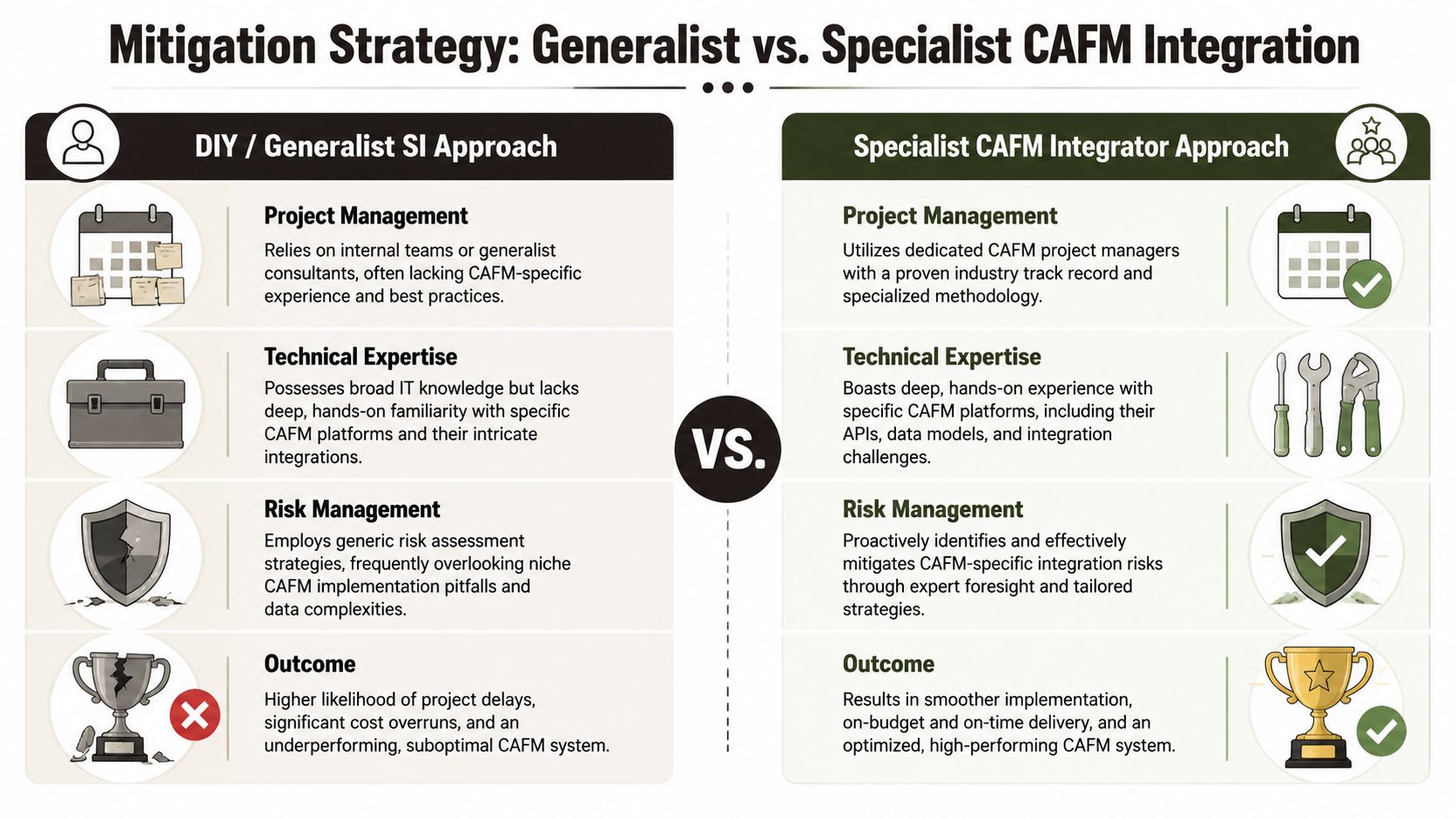
Generalist delivery creates predictable blind spots
The DIY path usually relies on familiar ingredients. Internal M365 admins. A business analyst. Maybe a vendor partner who knows Power Platform. A migration tool licence. Some workshops. A backlog.
That team will usually miss at least one of these:
- Identity strategy: how authoritative asset and location IDs persist across systems.
- Permission architecture: how inheritance, exceptions, and confidential records are controlled.
- Service constraints: how throttling and platform limits affect sync and load patterns.
- Validation depth: how to prove not only that data moved, but that governance survived.
Generalists aren't useless. They're just the wrong risk profile for this class of problem.
Specialist delivery starts with what can break
A specialist team works backwards from failure modes. Before any migration run, they'll isolate system-of-record ownership, model identifier preservation, design permission boundaries, and define validation criteria for evidence-bearing records. They'll use tools like ShareGate where appropriate. They'll abandon them the moment the data model, permission model, or workflow model demands custom handling.
That usually means custom PowerShell and PnP-driven logic, structured reconciliation, exception reporting, and test cases that target the exact ways CAFM estates go wrong inside Microsoft 365.
Decision rule: if your CAFM records influence audits, safety, regulated operations, or legal defensibility, you shouldn't let a generic migration pattern anywhere near the core dataset.
The Ollo Verdict
Use ShareGate when you're moving standard SharePoint content and need strong administrative control over a conventional migration. Don't pretend that makes it a CAFM migration strategy.
For a business-critical computer aided facilities management system integrated with Microsoft 365, the only rational path is specialist design, specialist migration logic, and specialist validation. Anything else outsources your operational risk to hope.
You don't need a partner because the project is complicated. You need one because failure will look deceptively successful until audit, operations, or compliance exposes the damage.
If your CAFM programme touches SharePoint, Teams, Entra ID, or the wider Microsoft 365 stack, treat it like a control-system migration, not an app rollout. Ollo handles the high-risk end of this work: regulated estates, broken legacy permissions, complex tenant moves, and rescue projects where “mostly migrated” already caused damage. If your team has been burned before, that caution is justified. Use it.

















