



The biggest risk in microsoft 365 online isn't the platform. It's believing the brochure.
Your board hears "cloud productivity suite" and assumes a tidy upgrade. Your project team hears "Microsoft 365" and thinks Word, Excel, Teams, and a migration wizard. That misunderstanding is where expensive failures start. Microsoft 365 online is not a simple app bundle. It's a distributed service estate with hard limits, opaque routing, identity dependencies, and compliance consequences that surface the moment you try to move real enterprise data through it.
I've seen the same pattern too many times. A firm buys licences, picks a free tool, underestimates the architecture, and only realises the risk when SharePoint permissions break, Teams content lands in the wrong place, or security policy rollout stalls halfway through a tenant consolidation. At that point, the migration is no longer an IT task. It's an operational incident.
Beyond the Brochure What Microsoft 365 Online Really Is
Microsoft 365 online gets sold as a familiar software bundle with cloud delivery. That framing causes bad decisions. The product you're buying is the operating model, and that model comes with service limits, dependency chains, and failure modes that marketing pages barely mention.
Adoption at Microsoft scale does not reduce your migration risk. It increases the odds that your leadership assumes the platform is straightforward because everyone else uses it. That assumption burns time and money. A widely adopted service can still punish poor planning, especially when your estate includes old SharePoint structures, long file paths, broken permission models, and identity sprawl from years of acquisitions or local admin shortcuts.
If your team still describes microsoft 365 online as "Office on the web", they are planning for the wrong system. This is a live service stack for identity, content, collaboration, device trust, and policy enforcement. It behaves well in demos. It behaves very differently when you push large volumes of content, preserve metadata, remap permissions, and keep regulated users working during cutover. If you want the mainstream version first, CloudOrbis published an ultimate guide to Office for Business 365. That view is fine for orientation. It is useless for risk control.
Your users see apps. You need to see constraints.
SharePoint Online is not just document storage. It is a rules engine wrapped around files, versions, libraries, lists, content types, and permission inheritance. Teams is not just chat. Its content and governance footprint spreads into SharePoint, Exchange, OneDrive, and Entra ID. Entra ID is not a background directory. It is the trust boundary that decides what can authenticate, what can sync, and what breaks unnoticed when you redesign a tenant under pressure.
Enterprise migrations do not fail on the happy path. They fail on the documented limits nobody bothered to model. Microsoft publishes service constraints for SharePoint and OneDrive, including file and path restrictions, sync limits, and list performance boundaries such as the well-known 5,000-item list view threshold. Throttling is also part of the service by design. The platform protects itself first. Your project comes second.
Practical rule: If your migration plan fits on one slide, it ignores the constraints that will stop it.
Bad programmes measure the wrong things. They track mailbox counts, file volumes, and target dates because those numbers look tidy in a steering meeting. They ignore path hygiene, list design, permission depth, API pressure, identity dependencies, and rollback design because those numbers are harder to explain. Then the cutover slips, the helpdesk fills up, and everyone acts surprised that "mostly done" still means business disruption.
Licensing choices make the problem worse when they lock the wrong operating assumptions into the tenant. If your team is still comparing plans as if this is a feature checklist, read this breakdown of Microsoft 365 Business vs Enterprise and what mid-market companies get wrong. The wrong licence is not a procurement error. It is an architecture decision with a delayed invoice attached.
The Core Architecture Your Team Misunderstands
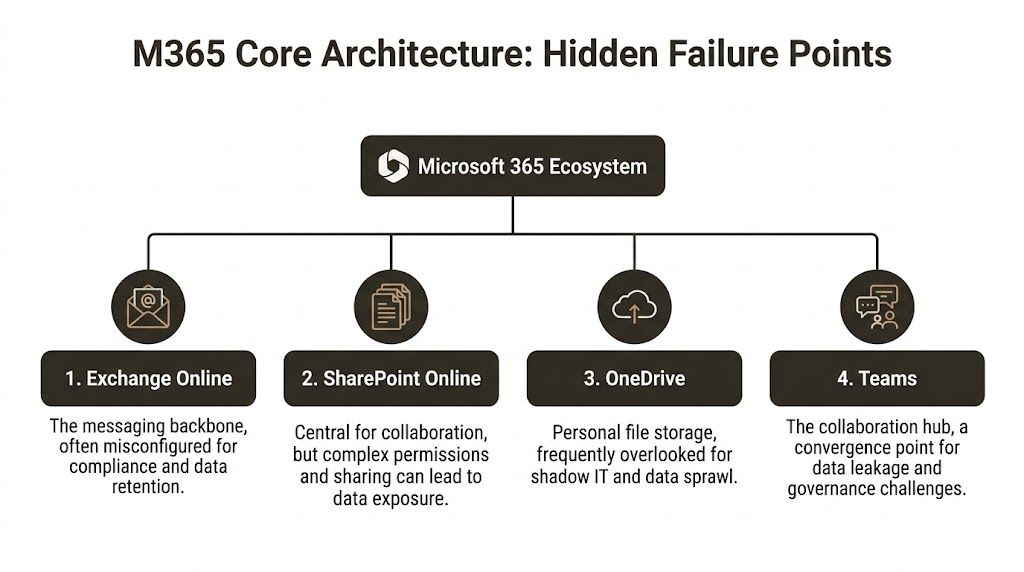
The failure mode in microsoft 365 online usually starts with architecture, not tooling. Teams don't fail because admins are lazy. They fail because people treat a distributed platform like a flat file move.
SharePoint Online is not a file share
SharePoint Online is the content backbone for modern collaboration, but migration pain comes from its structure. Lists, libraries, content types, versioning, permission inheritance, and site relationships all carry hidden fragility. Your team can move files and still fail the migration because the business doesn't just need documents. It needs metadata, access logic, and predictable behaviour after cutover.
The trap is simple. Engineers scan storage volume, not structural complexity. A site with messy item-level permissions, old folder design, and nested paths can be more dangerous than a much larger but cleaner estate. That's why multi-tenant planning matters more than raw transfer speed. If you're rationalising multiple estates, this guide to SharePoint multi-tenant architecture is worth reviewing before anyone touches production data.
Entra ID breaks quietly and expensively
Entra ID handles identity, authentication, and policy enforcement. During tenant consolidation, it becomes the source of some of the nastiest failures because identity objects don't behave like portable records you can drag between tenants.
Permissions tied to one tenant's identity model don't magically become safe in another. Group structures shift. App registrations complicate trust. Legacy assumptions around guest access, conditional access, and role assignment suddenly collide with a new security boundary. If your team migrates content before it resolves identity mapping properly, you'll get access drift. Users lose access, or worse, the wrong users gain it.
That's not a technical annoyance. It's an audit problem.
Teams is a wrapper around several moving parts
Teams is the collaboration front end. Underneath it, you inherit SharePoint sites, Exchange-backed components, OneDrive dependencies, and identity controls. A "simple Teams migration" is usually a misleading phrase used by someone who hasn't had to clean up orphaned artefacts afterwards.
When a team is created, it creates data dependencies across services. Move the chat context without handling the associated storage and permissions correctly, and you end up with disconnected content, ownership confusion, and governance blind spots. The UI looks intact. The governance model isn't.
Teams doesn't fail loudly. It fails by leaving content in the wrong service with the wrong permissions, and users only notice after the old tenant is gone.
Exchange Online and OneDrive create their own traps
Exchange Online is the messaging and calendar layer. Migration teams usually respect it because mailbox moves feel serious. The danger comes when they treat compliance settings, retention behaviours, and delegated access as second-order tasks. Those details are exactly what legal and security teams ask about after cutover.
OneDrive looks personal and therefore low risk. That's a mistake. OneDrive is where shadow IT, abandoned ownership, and inconsistent sharing habits become visible. During migration, abandoned accounts and poorly governed sharing links create a trail of edge cases that basic tooling doesn't resolve cleanly.
A lot of architects also underestimate observability. If your team can't inspect migration telemetry, service behaviour, and security events properly, you'll troubleshoot blind. For teams building that operational visibility, this overview of an Azure Log Analytics Workspace is useful context. You don't need more dashboards. You need the right signals before and during cutover.
| Component | What people think it is | What actually breaks |
|---|---|---|
| SharePoint Online | Document storage | Permissions, metadata, inheritance, path hygiene |
| Entra ID | User directory | Object mapping, policy continuity, access integrity |
| Teams | Chat workspace | Cross-service dependencies and orphaned data |
| Exchange Online | Mailboxes | Retention, delegation, compliance behaviour |
| OneDrive | Personal storage | Ownership gaps, sprawl, and unmanaged sharing |
The Technical Limits Microsoft Documents But You Ignore
Microsoft does not hide the failure points in microsoft 365 online. It documents them. The usual failure is simpler than that. Project teams read the limits, assume their tool will work around them, and commit the business to timelines that collapse on contact with the platform.

The pattern is predictable. SharePoint throttles requests. Large lists behave badly if they are structured badly. Long paths fail. Permissions drift. Then the programme gets reframed as a user adoption problem, because admitting it was a design problem is politically expensive.
API throttling is a service policy, not an exception
Microsoft 365 uses distributed service entry points and traffic controls to protect the platform, as described in the Microsoft 365 networking overview. That is normal for Microsoft. It is also a direct migration risk.
If your plan assumes steady throughput, your plan is fiction.
Throttling does not care about your cutover weekend, your change board approval, or the vendor slide that promised rapid execution. Under load, throughput drops, retries increase, and migration windows stretch. In a small tenant that is annoying. In an enterprise estate, it means dual-running lasts longer, support demand rises, and every delay increases the chance that source and target drift apart.
Experienced teams model for throttling before the first batch moves. Inexperienced teams discover it in production and call it bad luck.
The 5,000 item threshold exposes bad information architecture
The 5,000 item list view threshold gets dismissed because people misunderstand it. They hear "lists can hold more than 5,000 items" and stop reading. That is how projects get burned.
The issue is not raw capacity. The issue is how lists are queried, filtered, indexed, permissioned, and presented to users. Ignore that, and migration jobs slow down or fail, views time out, permissions become inconsistent, and users arrive on day one convinced the new platform is worse than the old one.
That is not a technical footnote. It is a business failure caused by lazy design.
Use the threshold as a triage signal. Any list near or beyond it deserves review before migration. Split it, index it, archive it, or redesign it. If your team needs help choosing tooling around those decisions, review the practical trade-offs in this guide to SharePoint migration software for complex estates.
The 400-character path limit punishes years of neglect
The 400-character path limit is one of the oldest, most ignored migration traps in SharePoint Online. Nobody wants to clean folder sprawl, inherited naming mistakes, and nested project structures before a move. So they postpone the cleanup and pay for it during execution.
Files with excessive path length do not migrate cleanly. Some fail outright. Some require renaming, remapping, or manual handling. In regulated environments, that turns into a records problem fast. If content arrives incomplete, renamed without control, or stranded outside the approved repository, you now have an audit problem, not just a migration problem.
Vendor optimism results in real damage. "Supported" is not the same as "ready."
GUID conflicts and broken inheritance create the expensive work
The ugly part starts after teams declare success based on file counts.
Object IDs change. References break. Item-level permissions and broken inheritance do not survive careless moves in a clean, predictable way. Content may appear in the target, but access control and object relationships often do not line up with what the business expects. That is when legal, security, and operations finally get involved, usually after the migration team has already claimed the hard part is done.
A common sequence looks like this:
- The team validates volumes and folder presence.
- Users report missing access or excessive access.
- Workflows, links, and dependent processes start failing.
- Admins apply manual fixes under pressure.
- Auditability gets weaker with every exception.
That repair cycle costs more than proper discovery ever would.
These limits are business risks, not admin trivia
Executives do not need a lecture on SharePoint internals. They need a direct translation of risk.
| Documented limit | Technical effect | Business result |
|---|---|---|
| API throttling | Throughput drops under migration load | Cutover dates slip and dual-running continues |
| 5,000 item threshold | Lists, views, and queries become unreliable | Users lose confidence in the target environment |
| 400-character path limit | Files fail or need manual remediation | Records arrive incomplete or outside control |
| GUID and inheritance issues | Permissions and references break | Access incidents and audit exposure follow |
Microsoft documented these limits. Your risk comes from pretending they will stay theoretical.
That is why enterprise migrations fail in boring, repeatable ways. Not because the platform is mysterious. Because teams ignore the parts Microsoft already warned them about, then act surprised when the bill arrives.
Why Your Migration Tools Will Fail You
Migration tools fail for a boring reason. They execute exactly what you tell them to execute, including bad structure, bad sequencing, and bad assumptions about how Microsoft 365 Online behaves under load.
That is the part vendors gloss over. Product demos show file copy, progress bars, and happy-path reporting. Real estates hit throttling, oversized lists, broken inheritance, long paths, stale identities, and ugly retries. The tool does not solve those problems. It exposes them at production scale, usually during the week your leadership team expects a clean cutover.
SPMT works for light work, not enterprise estates
Microsoft's free SharePoint Migration Tool is acceptable for small, tidy moves. A few libraries. Predictable permissions. Limited metadata complexity. No serious cleanup required.
Enterprise teams keep trying to stretch it far beyond that use case. That is where projects get into trouble. SPMT cannot redesign a chaotic source estate, and it cannot protect you from platform limits that are already documented. If your source contains deep folder structures, oversized lists, messy permissions, or years of unmanaged exceptions, the tool becomes a transport mechanism for technical debt.
Calling that a migration strategy is reckless.
Paid tools reduce manual pain. They do not remove risk.
ShareGate is a serious product. We use it because it gives better control, better visibility, and better recovery options than the free tools. That still does not make it autonomous. It will not decide how to split batches to reduce throttling. It will not resolve your broken security model. It will not know which sites need pre-remediation because list structure or path depth will cause predictable failures.
That judgment still sits with the migration architect.
Teams buying software without that expertise usually make the same mistake. They confuse a better interface with a safer outcome. In practice, they just get a faster way to copy defects into the target tenant. If procurement is still treating tool selection as the main decision, read this review of SharePoint migration software before you sign anything.
Field note: The dangerous phase is not the first pass. It is the exception cycle after the first pass, when teams start rerunning jobs, overriding permissions, and making undocumented fixes to hit a date.
What tools actually do well, and where they stop
| Capability | SPMT (DIY) | ShareGate (Out-of-Box) | Ollo (ShareGate + Custom Scripts) |
|---|---|---|---|
| Small, simple file moves | Acceptable | Strong | Strong |
| Complex SharePoint permissions | Weak | Partial | Managed with scripted remediation |
| Long path handling | Poor | Better visibility, still needs planning | Planned and remediated before cutover |
| Throttling response | Reactive | Better controls, still limited by operator skill | Batched and sequenced around service behaviour |
| GUID conflict handling | Weak | Partial | Addressed through migration design and scripting |
| Metadata preservation | Basic | Stronger | Strong, with validation and exception handling |
| Regulated sector governance | Fragile | Tool-dependent | Process-led with architectural controls |
| Rescue after failed DIY attempt | No | Limited | Designed for remediation and controlled rerun |
The pattern is obvious. The more complex the estate, the less the tool matters on its own.
Ollo's role here is factual, not magical. It combines ShareGate with custom scripting, pre-migration remediation, batch design, and exception handling. That is what enterprise migrations require. The software is only one layer.
One more risk gets ignored in planning. Endpoint compromise. A migration run executed from an admin workstation infected by credential theft malware can turn a messy project into a security incident. If your team still treats administrator endpoints as an afterthought, read the rising threat of infostealer malware.
My recommendation is simple. Use SPMT for small, low-risk moves. Use ShareGate only with people who understand Microsoft 365 Online limits, failure modes, and recovery design. For anything with compliance exposure, complex permissions, or a history of SharePoint sprawl, custom scripting and pre-cutover remediation are required. Without that, your tool will do exactly what you paid for. It will fail faster.
Compliance Zero Trust and the Cost of Getting It Wrong
A microsoft 365 online migration is where compliance teams discover how much blind trust was baked into the old estate.
Procurement treats the move like a data transfer. Microsoft markets the target state like a polished control plane. Both views are dangerous. During migration, you are rewriting identity relationships, administrative scope, retention behaviour, sharing controls, and audit evidence at the same time. Get that sequence wrong and you do not get a modern secure tenant. You get a cleaner-looking mess.
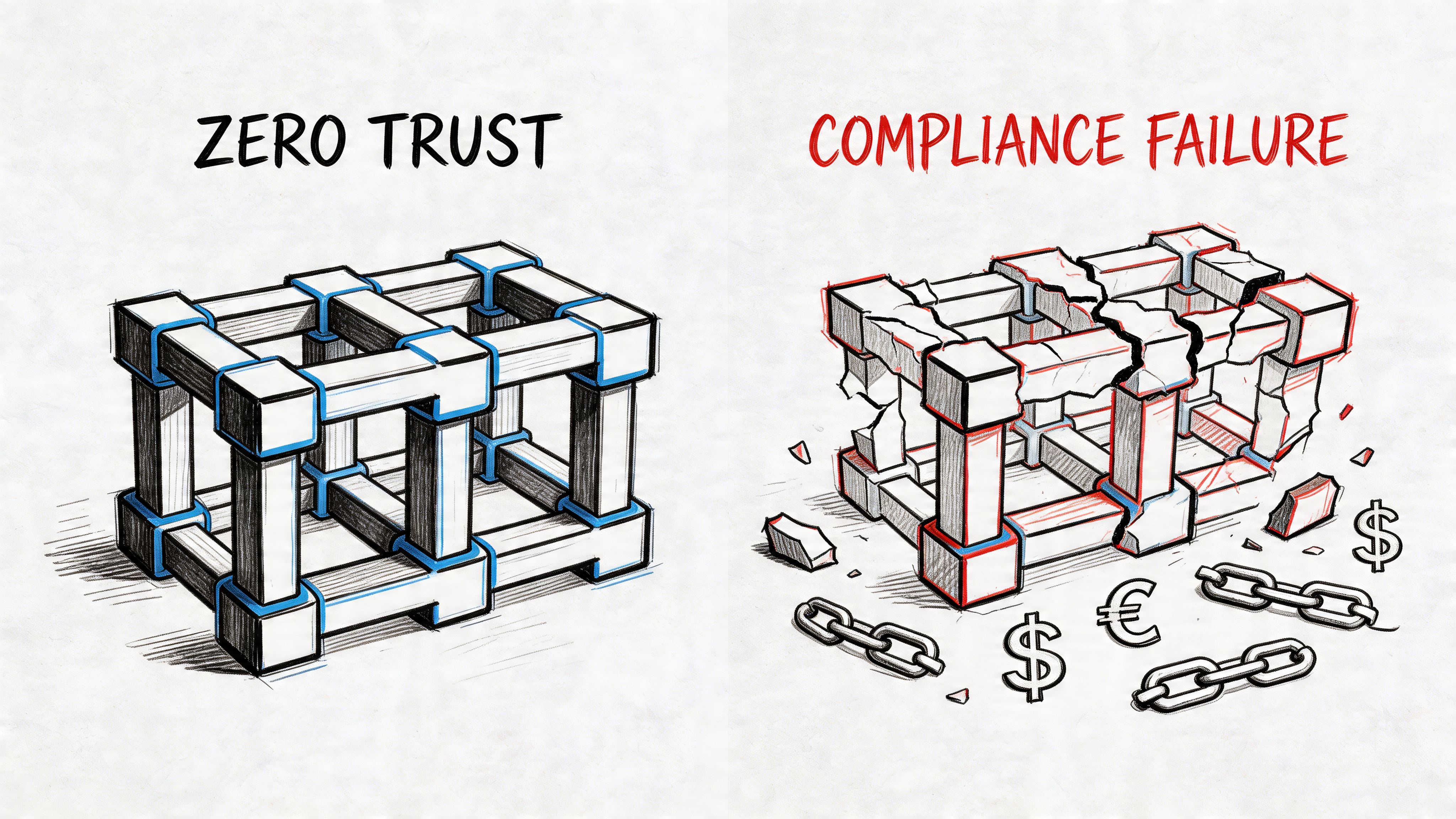
Zero Trust breaks during transition
Zero Trust fails in the middle state, not on the architecture diagram.
Microsoft documents that Microsoft Graph can throttle requests and return 429 responses when clients exceed service limits, with callers expected to back off and retry. During a large migration or tenant consolidation, that matters because any process that depends on Graph for group updates, provisioning steps, or control validation can stall while content keeps moving. That is how firms create a gap between where the data sits and which controls are enforced, as described in Microsoft Graph throttling guidance.
That gap is a business risk, not a technical footnote. Conditional Access changes may be queued. Group membership updates may lag. Sensitivity and lifecycle controls may not be validated on schedule. Audit teams do not care that the API asked you to slow down. They care that your access model was unproven during a high-risk change window.
Then add the limits teams keep pretending they can clean up later. SharePoint list view thresholds. Long paths. Broken inheritance. Unique permissions nobody can explain. These are documented constraints. They still wreck projects because internal teams read the brochure and skip the ugly parts.
Compliance failures usually start as permission mistakes
The security problem in migration is often accidental exposure, not clever intrusion.
A library inherits the wrong access after restructuring. A records area keeps old external sharing. A legal hold scope no longer matches the new information architecture. A retention label applies to the site but not the content that matters. None of that looks dramatic on cutover day. It becomes dramatic when legal, audit, or a regulator asks for evidence and your team cannot prove who had access to what, and when.
One broken permission chain can invalidate the control story for an entire workspace. In regulated environments, that is enough to trigger investigation, disclosure work, or a painful remediation programme that costs more than the migration ever should have.
The risk gets worse if administrator endpoints are weak. Constructive-IT's piece on the rising threat of infostealer malware is a useful reminder that credential theft does not pause because your project team is busy. A migration window creates confusion, increased privileges, and rushed approvals. Attackers do not need a perfect opening. They need one tired admin and one compromised session.
Zero Trust requires control sequencing
Post-migration hardening is a fantasy sold by people who will not be there for the audit.
If your programme includes Entra redesign, SharePoint restructuring, and Teams rationalisation, the control model has to be designed before the bulk move. Identity boundaries come first. Permission inheritance has to be tested before cutover. Retention and classification have to map to the target structure before users start working in it. Evidence collection has to be built into execution, not requested afterward because compliance finally joined the call.
For teams setting that target model properly, this guide to SharePoint Zero Trust architecture is a useful reference because it treats the tenant as a trust system with enforcement points, not just a place to store files.
Here is a useful baseline discussion before design reviews get diluted by product marketing:
Governance gaps become legal and financial problems
Teams love to label compliance work "phase two." That usually means the project is already undercontrolled.
Use a harsher lens:
| Migration error | Security interpretation | Business impact |
|---|---|---|
| Broken inheritance | Access scope cannot be trusted | Audit failure, disclosure risk, expensive remediation |
| Delayed control application or validation | Trust state was not verified during change | Temporary policy gap during a critical window |
| Misclassified or unlabeled content | Records and retention controls no longer map correctly | Legal exposure and weak defensibility |
| Incomplete validation evidence | No proof that target controls worked as intended | Poor response to regulator, customer, or legal challenge |
Your migration is complete only when you can prove the target controls, permissions, and evidence trail hold up under scrutiny.
The Only Risk Reduction Strategy That Works
By the time most organisations call for specialist help, they've already paid once for a cheap migration and once for the failure.
The pattern barely changes. Internal IT starts with confidence. Procurement asks why outside help is necessary. Someone says the built-in tools should cover it. The team underestimates path problems, permission complexity, identity redesign, and service limits. Then the project drifts into a half-migrated state that nobody can confidently sign off.
DIY is not a savings plan
In complex estates, in-house migration isn't the economical option. It's unmanaged risk.
Your team already has a day job. They run the tenant, support users, patch issues, handle audits, and absorb every urgent request the business throws at them. Expecting that same team to design and execute a high-stakes migration with custom remediation logic, integrity validation, rollback planning, and compliance evidence is how you create burnout and bad decisions.
I'll be blunt: If your environment includes regulated data, complex SharePoint estates, tenant-to-tenant movement, or Entra redesign, you shouldn't run this as a volunteer effort.
The right model is managed outcome
The safer decision is to treat migration as controlled risk reduction. That means:
- Interrogate the source before moving anything. Find permission anomalies, long paths, large lists, and structural debt early.
- Design the target tenant on purpose. Don't copy old mistakes into a new subscription.
- Script the ugly parts. Manual fixes create inconsistent results and weak audit trails.
- Validate integrity, not just volume. Counts are not proof.
- Control cutover as a business event. Security, operations, and compliance all need evidence.
A lot of failed programmes also skip rescue planning because they assume competence will prevent failure. That's fantasy. Serious migration planning includes controlled retry paths, exception handling, and rollback logic from the start.
What specialist execution actually looks like
A specialist team doesn't just "run ShareGate". It analyses what the tool will get wrong and builds around that. That's where Microsoft 365 migration services become relevant as an operating model, not a staffing shortcut.
One option in the market is Ollo, which handles tenant-to-tenant migration work using ShareGate plus custom PowerShell PnP scripting for complex Microsoft 365 and SharePoint estates. That matters because the actual work sits in batching, permission repair, target-state design, and validation, not in clicking "migrate".
The decision you actually need to make
You are not choosing between internal pride and external help. You are choosing between two risk profiles.
One path assumes your team can absorb hard platform limits, identity complexity, compliance exposure, and remediation work while still keeping the business stable. The other path treats those failure modes as predictable and designs around them from the start.
I've seen enough rescue projects to know which path costs less in the end. The remediation phase always takes longer than the people who caused it expected. It also lands at the worst possible moment, when confidence is gone and the business has stopped believing your cutover dates.
If your migration plan depends on everything going right, you don't have a plan. You have hope.
A responsible IT Director doesn't buy hope. You buy control.
If your microsoft 365 online project involves tenant consolidation, SharePoint complexity, Entra redesign, or regulated data, talk to Ollo before your team turns documented platform limits into a live incident.

















