



Migrating SharePoint in the energy sector isn't just another IT project. It's a high-stakes risk management exercise where a single misstep can lead to catastrophic data loss and serious compliance breaches. To succeed, you have to move beyond generic checklists and standard tools. We’re talking about the unique challenges of massive engineering files, rigid regulations like ISO 27001, and the brutal reality of API throttling on enterprise-scale data. Forget 'seamless'; think 'battle-tested'.
Why Your Migration Is Primed for Failure
Let’s be blunt: your upcoming SharePoint migration is likely on a path to disaster. This isn’t because your team lacks skill, but because standard playbooks and out-of-the-box tools are fundamentally broken for the high-stakes, regulated world of energy. We're not talking about minor hiccups; we're talking about the kind of data loss and compliance breaches that get regulators' attention.
This isn't just a scare tactic. It's what we see time and again on the "rescue" projects we’re called into after a DIY attempt, armed with a generic online checklist, has gone completely off the rails. The root cause is almost always the same: a deep misunderstanding of what SharePoint actually is in an organisation like yours. For a deeper look at strategic content management, it's worth reviewing a guide on Enterprise Content Management (ECM) solutions.
The Tooling and Playbook Deception
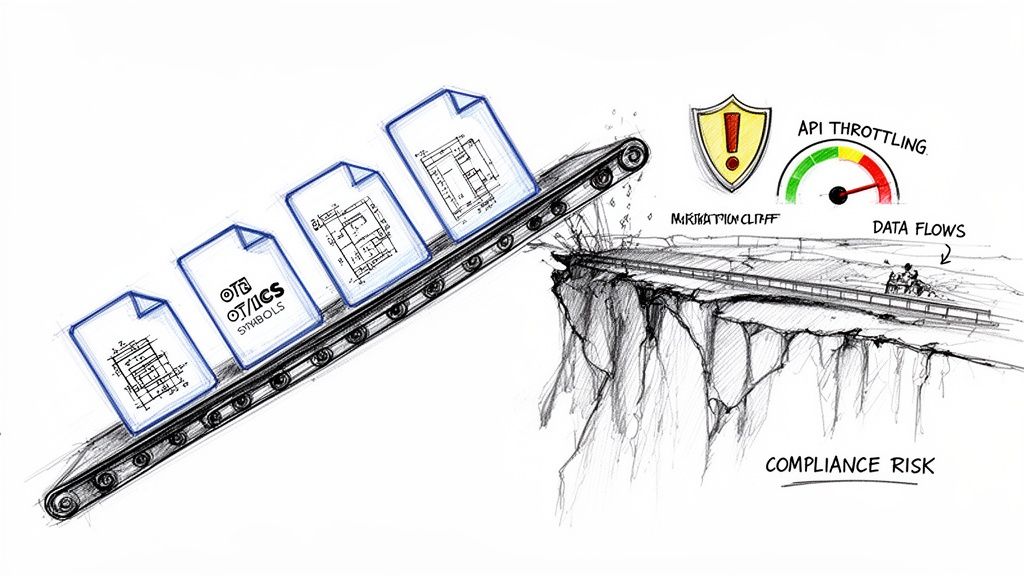
The advice you'll find online is dangerously simplistic. It operates on the fantasy that your data is neat, your permissions are clean, and your regulatory burden is light. In the energy sector, that's never the case. Your data landscape is a minefield.
- Massive Engineering Files: We’re talking about CAD drawings, seismic data, and geological surveys that will choke standard migration tools.
- Operational Technology (OT) & ICS Data: This is sensitive operational data with unique security protocols and strict retention requirements that cannot be ignored.
- Complex Permissions: Joint venture agreements and project-based access create a tangled web of broken inheritance that standard tools simply cannot replicate accurately.
- Stringent Regulations: Mandates like ISO 27001 demand a defensible chain of custody for every single file. Missing this step doesn't just fail the migration; it breaks legal compliance.
The Ollo Verdict: Standard migration checklists are written for marketing departments, not for organisations managing critical national infrastructure. Following a generic plan is the first, and most critical, mistake you can make.
Tools like Microsoft’s free SharePoint Migration Tool (SPMT) will buckle under this kind of pressure. We’ll show you exactly how it hits API throttling limits, fails on the long file paths common in engineering folders, and silently corrupts the very metadata that underpins your compliance. Forget 'easy-to-use'; this is a frank discussion about how to avoid a total project collapse.
The Brutal Reality of Scoping and Risk Mapping
Most SharePoint migrations are destined to fail before a single file ever gets moved. The failure is baked right in at the scoping stage.
We often see clients fail when they treat this critical phase as an IT project—a simple matter of counting files and drawing up a new folder structure. This is your first, and potentially most expensive, mistake. In the energy sector, this isn't an IT task; it’s a business-critical risk management exercise. That approach is a direct path to compliance breaches and operational chaos.
This isn’t about ticking boxes. It’s a forensic examination of your entire data landscape, mapping every single asset against its legal, contractual, and operational context.
Beyond a Simple Content Inventory
A standard inventory tells you what you have. A professional risk assessment tells you why it exists and how it's actually used. We often see clients fail when they inventory their files but completely ignore the business logic embedded within the data's structure and permissions.
Your team cannot afford to miss these fundamental questions:
- Regulatory Mapping: Where is the geological survey data that falls under specific national data sovereignty laws? Which joint venture operational documents are governed by strict, non-negotiable contractual access controls?
- Permission Archaeology: Why is that one specific folder locked down with a tangle of unique permissions? Is it for a legacy legal hold, a sensitive M&A deal that’s still under NDA, or just a mistake someone made five years ago? The documentation says move it, but in reality, moving it without understanding the 'why' will shatter its security context.
- Interdependency Analysis: Which critical business processes, maybe in Power Automate or even a legacy AS/400 system, rely on this data's exact location and structure? A simple move-and-rename can shatter those fragile dependencies.
We consistently find that over 30% of a client's legacy permissions model is a tangled mess of broken inheritance, circular group memberships, and orphaned user accounts. A "lift and shift" doesn't just replicate this problem in the cloud; it amplifies it, creating a security nightmare in your new, otherwise pristine, tenant.
Ignoring this deep analysis doesn't just risk a failed migration; it guarantees one. The goal is to design a target Microsoft 365 environment that enforces compliance from day one, not as a panicked afterthought. To get this right, you must perform a rigorous SharePoint migration assessment that goes far beyond surface-level scans.
From Data Audit to a Defensible Plan
Once you understand the why, you can start building a practical risk matrix. Let's be honest, not all data is created equal. Your sensitive seismic analysis data requires a completely different migration path and governance strategy than your departmental marketing materials.
We build a framework that classifies data by risk level and maps each class to specific technical controls in the target environment.
This means defining your strategy before you move anything:
- Sensitivity Labels: Applying mandatory retention and encryption labels based on data classification before the migration, ensuring that vital protection travels with the file, no matter where it ends up.
- Access Architecture: Redesigning access from the ground up around clean Entra ID Security Groups and modern Conditional Access policies, not the brittle, unmanageable SharePoint groups you’ve inherited.
- Site Provisioning Rules: Establishing clear templates for different data types. A project site for a joint venture will have fundamentally different security, sharing, and governance settings than a public-facing communications site.
The documentation from tool vendors implies you can just figure this out on the fly. That is dangerously wrong. In reality, failing to architect this security and governance model upfront means your new SharePoint environment will be just as chaotic and non-compliant as your old one within six months.
The hard truth is that a successful energy sector SharePoint migration is 90% planning and risk mapping and only 10% execution. Any team that tells you otherwise is dangerously unprepared for the complexity of your environment.
The Tooling Deception and Why SPMT Fails at Scale
Microsoft's own documentation might point you towards their free SharePoint Migration Tool (SPMT). Let’s be blunt: for any energy company with terabytes of data, legacy complexities, and strict regulatory obligations, relying on SPMT is a direct path to project failure.
The core problem is that SPMT is a black box. It gives you a simple interface but offers almost no real control over the critical mechanics of the migration. It was built for simple, non-critical workloads, not for the high-stakes data environments we see every day in the energy sector.
API Throttling: The Silent Project Killer
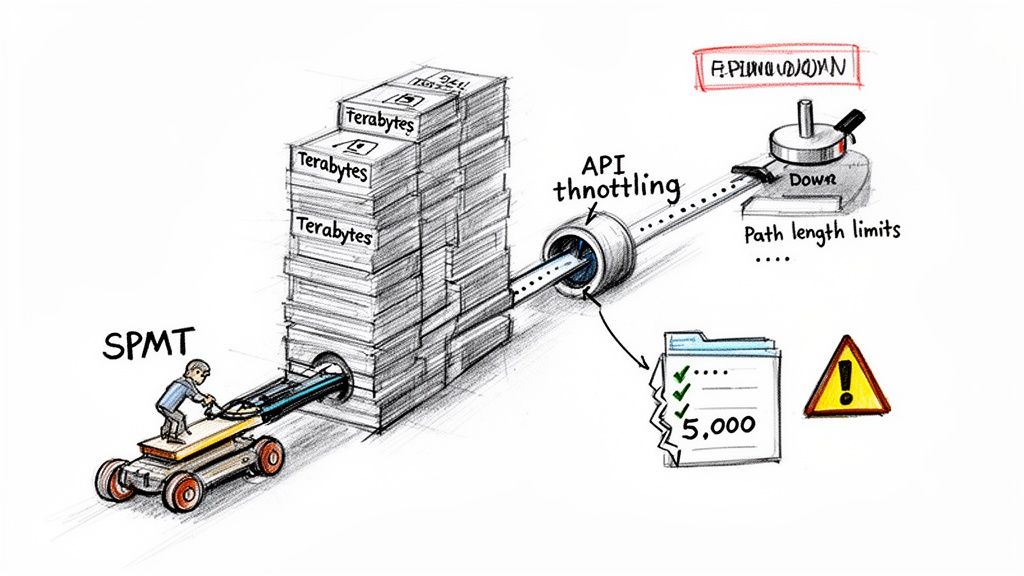
The biggest deception is performance. SPMT uses Microsoft's SharePoint Migration API, which is a shared resource. We’ve seen clients treat this API like their own private motorway, only to discover it’s heavily policed with strict traffic controls.
The documentation says you can run many jobs, but in reality, when an enterprise with terabytes of legacy engineering documents tries a tenant-to-tenant move, they inevitably face severe API throttling. Microsoft's own guidance warns against submitting more than 5,000 migration jobs at once, but even that is optimistic. Over-queuing just slams the database and throttles your throughput to a crawl.
Speeds can drop to under 1 GB/hour per task. This isn't just a theoretical risk; it's a daily reality we measure. A multi-terabyte migration that your team projected to take a weekend can quickly spiral into a multi-week nightmare of start-stop failures, with the tool giving you no clear reason for the slowdown. For a deeper dive, check out Microsoft's detailed breakdown of migration speed factors.
Where Out-of-the-Box Tools Fracture
Beyond throttling, the list of SPMT’s breaking points in enterprise scenarios is long and unforgiving. These aren't minor bugs; they are fundamental limitations that lead directly to data loss and compliance gaps. We've seen these failures cripple too many internal projects to count.
Here are the specific failure points your team will almost certainly hit:
- Long Path Lengths: Engineering and geological project folders are notoriously deep. SPMT will hit the 400-character path limit and simply fail on those files. It doesn’t intelligently shorten or reorganise; it just stops, often leaving entire project archives stranded.
- The 5,000-Item List View Threshold: This is a hard database limit, not just a user interface annoyance. Critical operational lists, asset registers, or compliance trackers that exceed this will not migrate cleanly. We’ve seen SPMT silently drop items or fail the entire list, breaking business processes that rely on that data.
- Metadata and Permissions Fidelity: SPMT makes a "best effort" to migrate metadata and permissions. In our experience, this is where it fails most spectacularly. It struggles with broken permission inheritance, complex metadata columns, and GUID conflicts, leaving you with a destination where your carefully built information architecture is shattered and data governance is non-existent.
The Ollo Verdict: SPMT is fine for a sub-50GB, single-site, non-critical migration with a simple file structure. For any real energy sector workload—with terabytes of data, complex permissions, and regulatory weight—using SPMT isn’t a cost-saving measure. It’s an acceptance of unacceptable risk.
A Hardened Approach: ShareGate and PowerShell
This is exactly why we build our migration services on a combination of professional tooling and custom scripting. We use ShareGate as the core engine, but never as a simple out-of-the-box solution. We often get calls from clients who bought ShareGate, ran it on default settings, and hit the very same throttling wall they saw with SPMT.
ShareGate's real power is its granularity. It allows us to control the number of parallel jobs, schedule migrations for off-peak hours to avoid throttling, and provides far more robust metadata mapping. But even ShareGate has its limits when faced with the chaotic reality of a legacy environment. For a more technical look, you can review our breakdown of the SharePoint Migration Tool's limitations for complex projects.
This is where custom PnP (Patterns and Practices) PowerShell scripting becomes non-negotiable. Our scripts are the intelligence layer that wraps around the migration engine.
Here’s how we use them:
- Pre-process the Source: Before a single file moves, our scripts run to identify and fix problems at the source. This includes flagging and shortening long file paths, identifying lists that will breach the 5k limit, and cleaning up broken permission inheritance.
- Parallelise Workloads Intelligently: We don’t just throw more jobs at the API. We use PowerShell to strategically segment the migration into logical waves, spreading workloads across different site collections and geographical databases to maximise throughput without triggering throttling.
- Validate with Precision: We never trust a tool's final report. Our post-migration scripts perform a forensic audit, comparing item counts, version histories, and metadata between the source and destination. This provides a defensible, verifiable record that the migration was successful and compliant.
This combination of a professional tool and custom scripting isn't a luxury; it is the minimum requirement for executing an energy sector SharePoint migration with a guarantee of zero data loss and an intact chain of custody. Relying on a free, basic tool for a complex, high-stakes project is a gamble no responsible IT Director should be willing to take.
Fortifying Access with a Zero-Trust Entra ID Redesign
Moving your data is only one piece of the puzzle. The real challenge—and where we see most projects get into trouble—is controlling who can access it. Let's be blunt: the single most dangerous assumption you can make is that your legacy Active Directory permissions can be "lifted and shifted" into SharePoint Online.
That’s not a migration strategy; it’s a security incident waiting to happen.
Your migration isn't just an IT project; it's a mandatory opportunity to dismantle years of accumulated, brittle permissions. It’s your chance to build a genuine Zero-Trust model from the ground up using what is now Microsoft Entra ID. Time and again, we see organisations try to replicate their old, chaotic structure of SharePoint groups and broken inheritance. This always ends in one of two ways: either critical data is inaccessible to those who need it, or far worse, it's exposed to those who shouldn't have access.
This is the fundamental shift you need to make—moving away from a legacy, perimeter-based mindset to a modern, secure identity architecture.
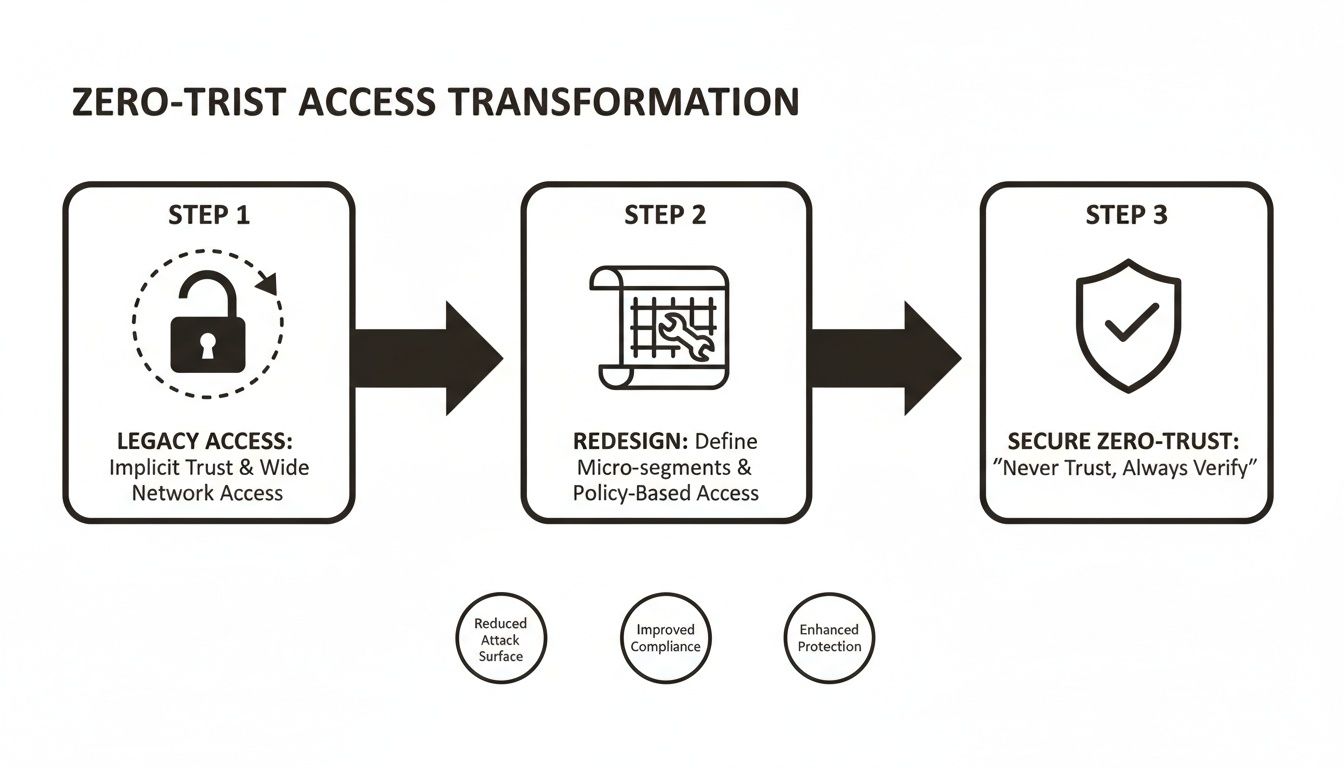
This isn't just a technical swap. It’s a fundamental change in your security posture, moving from "trust but verify" to the far safer principle of "never trust, always verify."
Decoupling Data from Identity
Here’s the key to avoiding a permissions disaster: treat the data migration and the identity redesign as two separate, parallel workstreams. The documentation might suggest you can fix permissions on the fly, but in the real world, this approach creates chaos. We've personally seen migrations grind to a halt for weeks while teams frantically try to untangle permission loops and GUID conflicts mid-flight.
A clean redesign demands a new way of thinking:
- Abandon Legacy SharePoint Groups: Honestly, these are a management nightmare. They offer none of the advanced capabilities of Entra ID. Your new model must be built exclusively on Entra ID Security Groups. Full stop.
- Analyse Actual Usage: Your old permissions reflect who was supposed to have access years ago, not who actually needs it today. A proper redesign means auditing access logs to build a new model based on real-world operational needs.
- Map Roles to Data: Instead of giving access to individuals (a recipe for chaos), you map business roles—like 'Drilling Engineer' or 'JV Legal Counsel'—to specific Entra ID groups. Those groups are then granted access to the corresponding datasets.
The Ollo Verdict: Decoupling these processes is non-negotiable. You first clean up the source permissions to stabilise the current environment. Then, you migrate the data into a clean, pre-built destination that has been architected from day one with a new Entra ID security model. Trying to merge these tasks is the number one cause of permission corruption we see.
Implementing Non-Negotiable Controls
Once your new identity foundation is built with Entra ID groups, you can finally apply the powerful, policy-driven controls that a true Zero-Trust model demands. This is where you move beyond simple permissions and start enforcing intelligent, context-aware access rules. Your IT Director must insist on these as baseline configurations.
- Conditional Access Policies: This is your primary enforcement engine. For instance, we architect policies that make MFA mandatory for any access to sites tagged with sensitive project data. For field engineers, we can implement location-based controls that grant access from known sites but block attempts from unrecognised networks.
- Sensitivity Labels That Travel: Your data's security can't be tied to its location in a SharePoint library. We help clients configure Microsoft Purview sensitivity labels that apply encryption and access rights directly to the documents themselves. A 'Confidential - Joint Venture' label ensures that even if a file is downloaded or emailed, it remains encrypted and inaccessible to unauthorised accounts.
- Privileged Identity Management (PIM): Your SharePoint administrators should not have standing, "always-on" superuser access. Implementing PIM for Entra ID ensures that administrative rights are granted on a time-bound, just-in-time basis, complete with an approval workflow and a full audit trail.
This meticulous redesign isn't about adding complexity; it's about systematically reducing risk. A successful energy sector SharePoint migration depends entirely on building a secure, auditable, and compliant access model from the ground up. As our expert SharePoint migration services show, getting identity right is the cornerstone of a defensible cloud environment.
Executing a Battle-Tested Cutover and Rollback Plan
This is the point where all the planning meets reality. Let's be blunt: any consultant who suggests a "big bang" cutover for your entire environment should be shown the door. That approach isn't bold; it's reckless, and it shows they don’t grasp the operational risks inherent in the energy sector.
A successful cutover isn’t a single event. It’s a series of controlled, verifiable phases designed to protect your data and ensure business continuity.
We often see clients fail when they attempt to migrate the crown jewels first. Instead, we begin with the lowest-risk, lowest-impact data—think departmental communication sites, not sensitive geological surveys or OT network diagrams. This first wave acts as a live-fire test of the entire process, from the tooling and scripts to your user comms plan and support readiness.
Verifiable Chain of Custody
Migration tool vendors love to show a simple, clean process. In reality, it's almost guaranteed that 35-40% of files will fail on the first pass due to locked files, transient API errors, or throttling from Microsoft's end. A generic tool's summary report is completely useless here.
True validation demands a verifiable chain of custody, and the only way to achieve that is with custom PowerShell scripting.
- Pre-Migration Manifest: Before a single file moves, we generate a detailed manifest of the source. This isn't just a file count; it captures item counts, version histories, and critical metadata for every file in the migration wave.
- Post-Migration Audit: Once the migration engine has run, a second script audits the destination, comparing it forensically against the original manifest to prove data fidelity. This isn't a spot-check; it's a complete accounting.
- Delta Synchronisation: Our scripts then run delta syncs to catch the initial failures and capture any changes made during the migration window. This ensures the final cutover is swift, complete, and accurate.
The Ollo Verdict: A migration tool's dashboard showing "100% complete" is a vanity metric. A successful migration is only confirmed when an independent, script-driven audit proves that the source and destination manifests are identical. Anything less is just an assumption.
The Non-Negotiable Rollback Plan
Here’s the question every IT Director must ask their migration partner: "What happens if our critical operational data is inaccessible five minutes after you declare the cutover complete?" If you get a hesitant answer, you have a serious problem.
A documented rollback plan isn't a "nice-to-have"; it's a non-negotiable part of any professional engagement. This isn't about a vague promise to restore from a backup. It needs to be a precise, time-bound plan that guarantees business continuity is never compromised. Our plan is built on clear triggers and immediate actions.
- Go/No-Go Decision Point: We establish a hard checkpoint right before the final cutover. If our validation scripts reveal discrepancies above a tiny, agreed-upon tolerance (typically <0.1%), the cutover is a "no-go." Period.
- Immediate Reversion Steps: If a critical failure is found after the cutover—say, a corrupted permissions model locking engineers out of vital schematics—the plan details the exact technical steps to immediately make the source data read-only and redirect users back.
- Communication Cascade: The plan includes a pre-written communication tree to instantly inform everyone from the service desk to executive leadership, ensuring chaos is contained and managed.
To further solidify this, understanding the difference between a runbook and playbook is crucial. We provide a detailed runbook that outlines every single technical step for both the cutover and any potential rollback scenario.
We've seen too many energy firms botch SharePoint migrations by trying to move massive amounts of data during peak business hours. The documentation says to run large jobs during off-peak hours, but in reality, DIY projects consistently ignore this. The result is aggressive API throttling, sometimes slowing transfers to under 500 MB/hour.
Worse still, we've seen path length violations at the 400-character limit completely shred folder structures, and GUID conflicts fracture meticulously planned zero-trust Entra redesigns. These aren’t opinions; they are hard limits you can read about in Microsoft's own migration tool reports.
A proper execution plan anticipates these failures and builds in the processes to handle them. For a deeper look at the complexities, explore our insights on executing a large-scale SharePoint migration. This isn't just about moving data; it's about guaranteeing its availability and integrity at every single stage.
The Tough Questions We Always Get Asked
After countless SharePoint migrations in the energy sector, we know the questions that really matter. They don't come from the marketing team; they come from the IT Directors and Enterprise Architects who are on the hook if a project goes sideways, blows the budget, or fails a compliance audit.
These are the direct, in-the-trenches concerns we hear in every planning session. Here are the straight answers.
"How on Earth Do You Handle Our Massive Files?"
This is where standard, out-of-the-box tools fall over, every single time. We see it constantly: a team tries to push huge seismic data sets, complex CAD drawings, or detailed geological models through a basic migration tool, only to watch it fail. Files over 15GB get stuck in endless upload loops, throwing cryptic errors that can burn days of troubleshooting.
Our solution isn't a single tool; it's an engineered process.
- Bypassing the Standard Route: For truly massive data, we don't even use the standard migration APIs. We package the data using PnP PowerShell scripts and push it through the much more robust Azure Blob Storage import method, which is built for this kind of bulk ingestion.
- Fixing Paths Before We Start: Engineering files are notorious for deeply nested folders that violate SharePoint's path length limits. Before any migration begins, our scripts scan for and automatically remediate these long paths, preventing failures that stump off-the-shelf tools.
- Rethinking the Architecture: Honestly, sometimes SharePoint simply isn't the right home for multi-terabyte archival data. In these cases, we'll design a hybrid solution, moving that data to more cost-effective near-line Azure Blob Storage while surfacing it in SharePoint via intelligent links. Users get access without bogging down the system.
It's about engineering the right data architecture, not just forcing a file-copying tool to do a job it was never designed for.
"What’s the Single Biggest Mistake You See Companies Make?"
Underestimating the clean-up and overestimating their tools. By far, the most common mistake is thinking an energy sector SharePoint migration is just a technical task of moving files from point A to point B.
Teams dive in, maybe with a free tool like SPMT, and immediately get throttled by Microsoft's APIs or hit a wall of cryptic permission errors. Only then do they realise their source environment is a decade-old mess of broken inheritance, redundant files, and enormous version bloat.
The Ollo Verdict: The failure to perform a rigorous, script-driven pre-migration audit is the number one reason we get called in for a 'rescue migration'. The battle is won or lost in the discovery and preparation phase, not during the actual file copy.
"Can We Really Achieve a Zero-Downtime Migration?"
Let’s be honest. "Zero-downtime" is a marketing term, not an engineering reality. Any provider who promises it isn't being upfront about how the technology actually works.
What we deliver is a "zero business impact" migration. There's a crucial difference.
We achieve this through meticulously planned migration waves, executed during off-peak hours like nights and weekends (as Microsoft recommends to avoid performance throttling). We use delta synchronisation to keep everything in sync. The final cutover for any given department or dataset involves a brief, well-communicated content freeze on the old system while the final tiny changes are synced and verified.
For your users, the "downtime" is a matter of minutes for a specific set of files, not a weekend-long outage for the whole company. It’s a controlled, predictable, and transparent process designed to ensure business continuity is never at risk.
Your data's integrity and your company's compliance record are too important to leave to chance. At Ollo, we don't just move data; we deliver a defensible, battle-tested process that guarantees its safety and auditability. We combine professional tooling with our hardened custom scripts to ensure your SharePoint migration is successful, secure, and compliant from day one. Contact us to de-risk your migration project.

















