



Let’s be honest. Most vendors frame a government SharePoint migration as a simple ‘lift-and-shift’ job. This isn't just wrong; it’s a dangerously misleading idea that sets projects up for catastrophic failure from day one. This isn’t a file transfer. It's a high-stakes data governance initiative where getting it wrong means crippling compliance breaches and massive operational disruption, not just a missed deadline.
Why Your Migration Is Already Destined to Fail
You’ve likely been handed the standard playbook. Your team is probably relying on the official documentation for tools like Microsoft's free SharePoint Migration Tool (SPMT). The documentation says it will be a smooth ride but conveniently skips over the brutal technical realities of highly regulated government environments.
At Ollo, we are brought in to rescue projects that go off the rails because this approach completely ignores the architectural landmines buried deep inside SharePoint Online. These aren't minor hiccups. We're talking about project-killing obstacles like API throttling, broken permission inheritance, and the infamous 5,000-item list view threshold—existential threats the official guides downplay.
The "Lift-and-Shift" Fallacy
The "lift-and-shift" mindset is the number one reason these projects collapse. It operates on the fantasy that your on-premises environment is clean, your permissions are sound, and your data structure is magically ready for the cloud.
That is never, ever the case. We constantly see organisations try to move decades of accumulated technical debt and messy permissions directly into a modern, zero-trust cloud architecture. It doesn't just fail; it detonates on impact.
The most expensive migration is the one you have to do twice. Shovelling files into the cloud without a complete architectural redesign isn't a strategy—it's a gamble with your data's integrity and your organisation's compliance posture. Missing this step doesn't just fail the migration; it breaks legal compliance.
The Unseen Technical Breaking Points
Your migration plan is only as good as its ability to navigate the hard limits of the cloud platform. The documentation might claim a tool "supports" a certain feature, but in the real world of government data volumes and complexity, this is exactly where things shatter.
Standard tools promise a lot, but the reality on the ground for complex government projects is very different. We see the same breaking points derail projects time and time again.
Standard Tools vs. Enterprise Reality in Government Migrations
These aren't just technical footnotes; they are the most common reasons a migration budget doubles and the timeline slips by months.
A successful government SharePoint migration demands a forensic-level approach right from the start. You can learn more about the non-negotiable planning phases that separate a successful project from a career-limiting disaster in our detailed SharePoint migration strategy guide.
Conducting a Forensic Pre-Migration Risk Assessment
Where do most government SharePoint migrations go wrong? Right at the very beginning, with a dangerously superficial discovery phase. Your standard IT audit won't even scratch the surface. A government SharePoint migration demands a forensic-level analysis of what you currently have, unearthing the kind of technical debt that will shatter your project on contact with the cloud.
We see this happen time and time again: clients treat discovery as a simple inventory check. This isn't about counting sites and users. It’s about mapping the tangled web of nested permissions that violate data protection principles, identifying ancient custom solutions incompatible with the modern framework, and flagging every single list that will breach the 5,000-item view threshold.
Microsoft's official documentation calls these 'limitations'. In the trenches, we call them project killers.
This flow chart highlights the exact traps we see derail projects. It shows the messy reality of moving from a legacy server environment, navigating hidden pitfalls that stop a successful cloud deployment dead in its tracks.
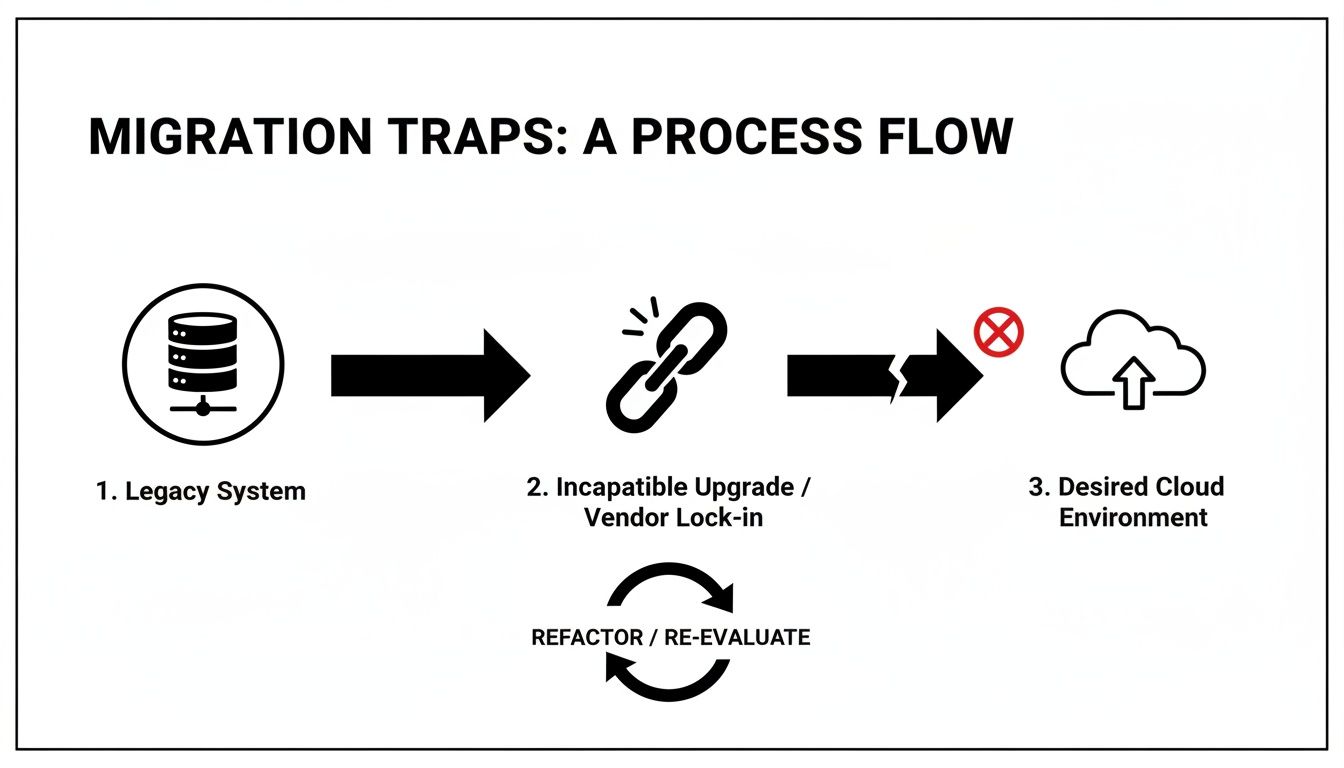
The key takeaway here is that the path to the cloud is never a straight line. It's littered with technical landmines like broken inheritance, GUID conflicts, and path length limits that absolutely must be defused before you even think about starting the migration.
Beyond the Automated Scan
Free scanning tools and basic scripts offer a false sense of security. They'll give you metrics on data volume but tell you nothing about data complexity or compliance risk. A genuine forensic assessment goes much deeper, quantifying the real-world remediation effort required for each issue it uncovers.
Here's what your team must investigate manually—no shortcuts:
- Permissions Anomaly Detection: Don't just count unique permissions. You need to identify and map every instance of broken inheritance, direct user access assignments, and obsolete Active Directory groups that create massive security gaps once you're in the cloud.
- Customisation Triage: Every legacy web part, custom workflow, and InfoPath form is a ticking time bomb. Each one has to be catalogued, its business owner identified, and a concrete decision made: retire it, replace it with a modern Power App, or rebuild it from scratch as an SPFx component.
- List and Library Threshold Analysis: It's not enough to check for lists with over 5,000 items. Your team needs to analyse the views, filters, and indexed columns to figure out which large lists are mission-critical. These will require immediate architectural redesign before they inevitably break business processes in SharePoint Online.
The goal of a risk assessment isn't just to find problems. It's to translate those technical problems into concrete budget and timeline impacts, building the business case to do this right the first time.
Quantifying Risk in Government Migrations
For the Irish public sector, the stakes are incredibly high. European government bodies, including those tied to EU mandates, are facing a daunting reality. Many mid-size public organisations planned their migrations for 2025 to avoid the 2026 deprecation of critical compliance features, but we've seen DIY attempts consistently fail.
We've watched support tickets spike from API throttling during Azure uploads, where the only viable window for maximum throughput is after 8 PM GMT. Microsoft's own documentation on migration performance confirms these limits, yet standard tools aren't built to navigate them effectively. Just last quarter, an Irish finance client wasted three weeks wrestling with GUID mismatches because their basic tools simply weren't enterprise-grade.
This isn't theoretical; it's a high-risk gamble that leads to cost overruns between €75k and €300k from failed pilot projects alone.
As part of this assessment, it's absolutely critical for government agencies to evaluate existing—and define new—Service Level Agreements to manage expectations and performance post-migration. This step ensures that operational stability and support expectations are contractually defined from day one, turning a technical checklist into a binding operational commitment.
A thorough, forensic-level assessment is the only way to build a realistic plan. We provide a much more detailed breakdown in our complete SharePoint migration assessment guide.
Building a Zero-Trust Identity and Permissions Model
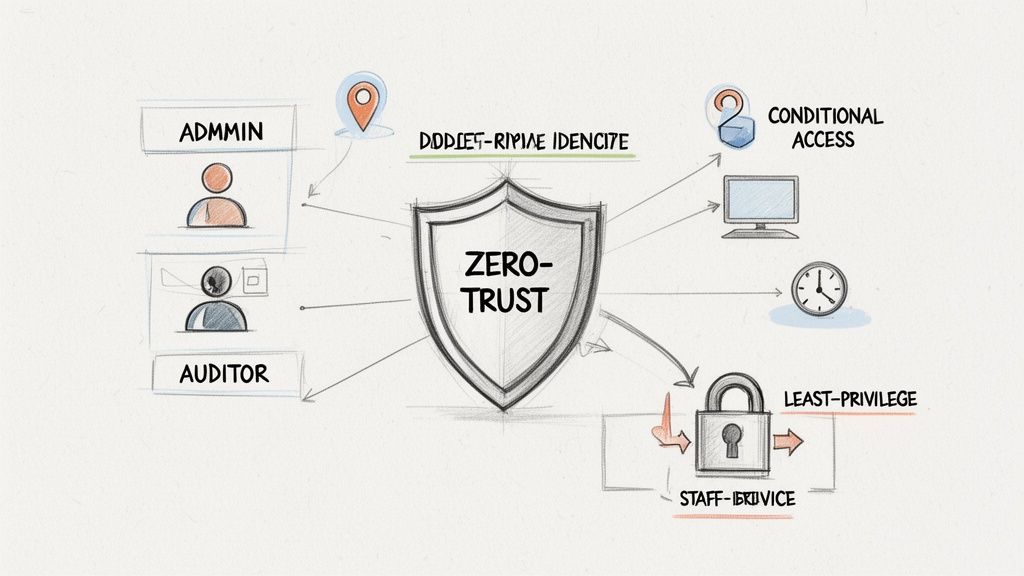
Let’s be blunt: migrating your legacy permissions is a direct path to a security incident. Your on-premises Active Directory is almost certainly a minefield of obsolete groups, circular nesting, and over-privileged access that has built up over years. A government SharePoint migration is your one chance to incinerate that technical debt and build a genuine Zero-Trust architecture in Microsoft Entra ID.
Attempting a "lift-and-shift" of your old permissions is a catastrophic mistake. I’ve seen projects grind to a halt because a team treated permissions as a simple data-mapping exercise. They discover far too late that the convoluted "Everyone except Contractors" group from their on-prem AD has no logical equivalent in the cloud, leading to massive data spillage.
This isn't just a best practice; it's a foundational, non-negotiable step. Getting this wrong doesn't just complicate your migration; it completely invalidates your security and compliance posture in the cloud.
From Legacy Mess to Modern Governance
Your old permissions model was built for a world with a hard network perimeter. The cloud has no perimeter. Your new model must assume breach and verify every single access request, every single time. This means dismantling your existing structure and rebuilding it from first principles.
Our entire methodology is built on this principle. We don't migrate permissions; we redesign them.
- Role-Based Access Control (RBAC) Mapping: We kick things off by interviewing business units to define user roles based on their actual function, not just their department. Access is then granted to the role, not the individual, which is the only way to properly enforce the principle of least privilege.
- Data Classification Alignment: Next, we map these newly defined roles to the data sensitivity levels you defined back in your risk assessment. For example, access to "Restricted" data will now require membership in a tightly controlled security group, multi-factor authentication, and a mandatory device compliance check.
- Incinerating Direct Access: This part is critical. All direct user permissions on individual files and folders must be systematically stripped out and replaced with group-based access. It’s the only way to create a manageable and auditable governance model that stands up to scrutiny under frameworks like ISO 27001.
To get this right, you need to understand how to implement zero trust security from the ground up. It's less about a technical configuration and more about a complete operational philosophy.
Conditional Access as Your New Perimeter
Once your identity foundation in Entra ID is solid, the real power comes from setting up Conditional Access policies. Think of these as intelligent rules that act as your new, dynamic perimeter, challenging access requests based on real-time risk signals. Simply having the right permissions is no longer enough.
We build policies that challenge access based on critical context:
- Location: Is a user trying to access sensitive financial data from an unrecognised IP address outside of Ireland? Block access and trigger an immediate alert.
- Device Health: Is the device trying to connect compliant with your security policies and free of malware? If not, access is denied until the device is remediated.
- Application Context: A user might be able to read a document from a managed corporate laptop but will be blocked from downloading it onto a personal mobile device.
This is where the theoretical concept of Zero-Trust becomes a practical reality. It’s not about trusting a network; it's about continuously verifying the user, their device, and the context of their request before granting even momentary access to your data.
Forget about trying to lift and shift your broken "Everyone" groups. That approach doesn't just fail the migration; it breaks legal compliance and exposes your organisation to unacceptable risk. Rebuilding your identity model isn't the easy path, but it's the only one that leads to a secure, compliant, and governable cloud environment.
Choosing Your Migration Tools and Custom Scripts
Let's be direct about the tools for a government SharePoint migration. This decision isn't about fancy features; it's about managing risk. Believing an off-the-shelf product alone can handle a mission-critical, terabyte-scale government project is, frankly, professional negligence.
The free SharePoint Migration Tool (SPMT) from Microsoft is fine for a small, non-critical departmental file share. But for a government agency with complex permissions and highly sensitive data, it's a liability. It will choke on API throttling, fail silently on complex metadata, and offer zero recourse when things inevitably break.
The Limits of Standard Tooling
ShareGate is a necessary and powerful step up. Its pre-migration analysis is excellent for catching issues like long file paths and broken permissions before they derail the entire project. We use it for the heavy lifting of bulk content transfer.
But even a best-in-class tool like ShareGate hits a wall. The documentation says it handles everything, but in reality, we’ve seen it struggle with complex tenant-to-tenant consolidations or migrations from heavily customised legacy farms. This is where relying solely on a GUI-based tool becomes a critical vulnerability.
The Ollo Verdict: Use SPMT for a pilot project under 50GB just to get a feel for the process. For any serious government migration, ShareGate is the baseline for moving the bulk data, but custom PowerShell scripting is non-negotiable for complex fixes, final syncs, and post-migration validation. Relying on a GUI tool alone is how projects fail.
When Custom Scripts Become Non-Negotiable
This isn't about choosing one tool over another. It's about a hybrid strategy—using the right tool for the right job. We often see clients fail when they rely on a single piece of software to handle every nuance of a complex government environment.
This is where custom PowerShell PnP (Patterns and Practices) scripting becomes essential. It’s the surgical instrument you need when the sledgehammer of a commercial tool is too blunt.
We deploy custom scripts for specific, high-risk scenarios that GUI tools just can't handle reliably:
- Fixing Broken Inheritance: When you have thousands of items with unique permissions, a GUI tool often times out or applies permissions incorrectly. A targeted PowerShell script can iterate through these libraries and surgically reset permissions back to the parent, ensuring your new governance model is actually enforced.
- Complex Metadata Transformation: Your old on-premises content types and metadata columns rarely map one-to-one with the modern structure in SharePoint Online. Custom scripts can read the source, transform the data on the fly, and apply it correctly to the destination—something off-the-shelf tools handle poorly at best.
- Automated Validation: How do you prove that 100% of your data was migrated correctly? We use scripts to run post-migration spot checks, comparing source and destination file counts, version histories, and metadata. This generates an auditable validation report that isn't just for peace of mind; it's often a legal compliance requirement.
In the Irish and broader European public sector, the pressure to modernise is immense. In fact, research shows 85% of enterprises plan to migrate to SharePoint Online by 2026, driven by remote work and the end-of-life for systems like SharePoint 2016.
Yet, we see DIY attempts fail spectacularly when teams underestimate the platform’s hard limits. Microsoft's own documentation on migration performance confirms the SharePoint Migration API caps you at 5,000 concurrent jobs to prevent database overload. The harsh reality is that source-side bottlenecks—disk I/O, antivirus scans, and network latency—can slash your real-world throughput by over 50%, turning a four-week project into a twelve-week nightmare. You can read more about the trends driving migrations by 2026 to understand the pressures your peers are facing.
Your team cannot afford to learn these lessons the hard way. Last year, an Irish energy firm lost 72 hours of productivity fighting broken inheritance on 150,000 items because they gambled on free tools. The documentation promises a smooth ride, but reality demands the expert-led, hybrid approach we deliver. For a deeper technical breakdown, check out our analysis of the SharePoint Migration Tool's breaking points in enterprise scenarios.
Executing the Cutover and Post-Migration Operations
The cutover weekend isn’t the finish line; it’s the starting gun for your organisation’s new operational reality. Far too many IT leaders treat the final migration as a simple switch-flip, and that’s precisely why users arrive on Monday morning to find broken workflows, missing files, and a support desk that’s completely overwhelmed.
A successful government SharePoint migration is defined by what happens after the final data sync. Your team's focus has to pivot from data velocity to operational stability. The cutover itself should be a meticulously scripted, non-eventful process, practiced and timed down to the minute. Improvisation is how you get fired.
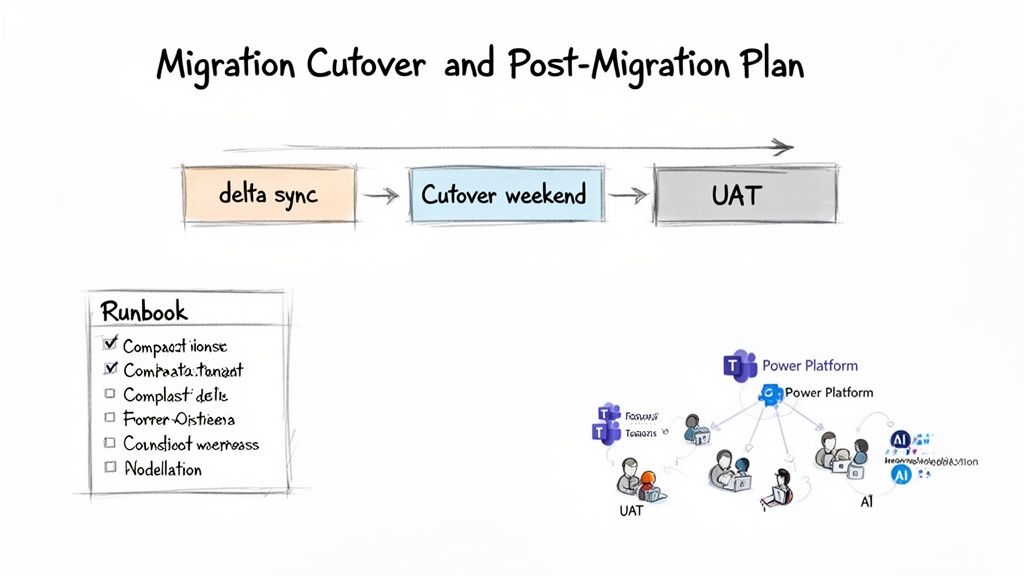
From Delta Sync to User Acceptance
The week before the final cutover is your last chance to de-risk the entire project. Attempting a "big bang" migration over a single weekend is a recipe for disaster. The sheer data volume makes it nearly impossible, and the risk of catastrophic failure approaches 100%.
Instead, we use a phased approach that systematically shrinks the amount of data left to move.
- Initial Bulk Sync: Weeks in advance, we migrate the vast majority of your data—often 95% or more—to a read-only state in the new environment. This gets the heavy lifting out of the way early.
- Iterative Delta Syncs: In the days leading up to the cutover, we run multiple delta migrations. These syncs only copy over files that have changed since the last run, dramatically reducing what needs to move during the final outage window.
- The Final Cutover Runbook: This is your team's minute-by-minute script for the cutover weekend. It needs exact PowerShell commands, rollback procedures, and a clear communication plan for every stakeholder. Guesswork is forbidden.
I’ve seen projects fail when clients treat User Acceptance Testing (UAT) as a quick checkbox exercise. UAT isn't about asking a few users if their homepage looks right. It’s about giving a curated group of power users specific, scripted business processes to validate end-to-end. If you skip this, your end-users become your real-time testers on Monday morning—a scenario that destroys project credibility.
Post-Migration Integration Is Not Optional
Getting your files into SharePoint Online is just the beginning. The real value—and the real work—starts now. Your new environment is incomplete until it’s deeply integrated with the rest of the Microsoft 365 ecosystem. This is where you turn a simple file repository into an intelligent content platform.
Your immediate priorities should be:
- Connecting to Microsoft Teams: Ensure newly created Teams have their file storage correctly provisioned in SharePoint, applying the governance and sensitivity labels you designed from the start.
- Automating with the Power Platform: Identify the high-value legacy workflows you retired and begin rebuilding them with Power Automate. This delivers immediate, tangible value to business units and proves the migration was more than just a server upgrade.
- Preparing for AI and Copilot: Your data architecture must be ready. This means finalising your content types, enforcing metadata tagging, and ensuring your permission model is solid. Without this foundation, Copilot will be useless at best and a data leakage risk at worst.
A successful migration is one that becomes invisible to users within a month. Their workflows are intact, performance is better, and new capabilities are unlocked. This outcome is only possible through meticulous post-cutover planning.
This stage is also about establishing long-term support protocols and delivering training that reflects how workflows have fundamentally changed. You can explore our insights on managing a large-scale SharePoint migration to understand the full lifecycle of these complex projects. Relying on an internal team, already stretched thin, to manage this new cloud reality without a clear operational plan is a direct path to failure.
Answering the Hard Questions About Your Migration
You’ve read the official Microsoft documentation, sat through the vendor demos, and heard all the promises. Now it’s time for the blunt, unfiltered questions your team should be asking before committing to a government SharePoint migration. No marketing spin, just direct answers based on years of pulling these exact projects back from the brink.
This is where theoretical plans meet the harsh realities of public sector IT. We've seen too many IT Directors wish they had asked these questions before signing off on a project plan built on a foundation of dangerous assumptions.
Can We Really Just Use the Free SharePoint Migration Tool?
You can, but you are consciously accepting a massive level of risk for any migration involving more than a terabyte of data or any level of customisation. In a government context, the SharePoint Migration Tool (SPMT) has several critical failure points.
Its handling of API throttling is primitive at best, its error logging is almost non-existent, and it completely falls apart when faced with complex, broken permissions inherited from old file servers. It often fails silently, leaving your team to discover gaping holes in your data during user acceptance testing—the worst possible time. It simply wasn't built for the scale and compliance demands of a government body.
The Ollo Verdict: Use SPMT to move a non-critical, standalone file share under 50GB. For anything involving regulated data, citizen information, or business-critical operations, using SPMT is a gamble your compliance officer would never knowingly approve.
How Do We Actually Handle Data Residency and GDPR?
This is completely non-negotiable and demands a multi-layered approach, not just a checkbox. First things first: your Microsoft 365 tenant must be provisioned and configured for the correct data residency region before a single file is moved. This is incredibly difficult and expensive to change later.
During the deep-dive discovery phase, you have to classify all your data to ensure anything subject to GDPR is identified and tagged. Your migration runbook then needs to detail the precise chain of custody for this sensitive data, including encryption protocols during transit. We often build entirely separate migration packages just for highly sensitive data sets, complete with enhanced, auditable logging.
Simply landing the data in the right place isn't enough. The moment it arrives, you must apply Microsoft Purview sensitivity labels and data loss prevention (DLP) policies to enforce governance. You have to be able to prove to auditors that its governance has tangibly improved, not just been lifted and shifted.
What Is the Single Biggest Mistake You See Teams Make?
Underestimating the 'people' part of the project. The technical challenges, while significant, are ultimately predictable problems. They can be solved with the right expertise and tooling.
The projects that truly spiral into disasters are the ones that lack a comprehensive communication and training plan. We often see clients fail when they assume users will adapt. When staff arrive on Monday to find their file paths have changed, familiar workflows are broken, and files seem to have vanished (even if they're just relocated), they will cripple adoption. The result is a tsunami of support tickets, the immediate creation of shadow IT workarounds, and a complete loss of faith in the project's success.
A successful migration requires a dedicated change management stream. It has to prepare users for exactly what's coming, show them the direct benefits, and equip them for success from day one.
What Happens to Our Old Custom Workflows and Web Parts?
They will break. Let's be absolutely clear on this. Nearly all legacy full-trust code, sandbox solutions, and JavaScript-heavy customisations built for on-premises SharePoint are incompatible with SharePoint Online. In fact, they represent a direct threat to the stability and security of your new environment.
The discovery phase must catalogue every single one of them. Each customisation then requires a firm decision:
- Retire: It's no longer needed and can be safely decommissioned.
- Replace: The functionality can be replicated using a modern, out-of-the-box feature or a solution built on the Power Platform.
- Rebuild: The capability is absolutely business-critical and has to be re-developed from scratch as a modern SharePoint Framework (SPFx) component.
Hoping they will "just work" isn't a strategy; it's a guarantee of post-migration failure. This remediation work must be scoped and budgeted as a separate development project that runs in parallel to, or even ahead of, the main migration effort.
Your government SharePoint migration is too critical to leave to chance. The risks of data loss, compliance breaches, and operational failure are very real. At Ollo, we don't just move data; we architect success by addressing these hard questions before they become project-ending disasters. If you're ready for a migration strategy built on expertise, not assumptions, visit us at https://www.ollo.ie to schedule a technical deep-dive.

















