



Your team has probably already bought the right HR platform.
That isn't the part that fails.
What fails is the collision between HR system software and the Microsoft 365 estate you already carry. HR wants onboarding, contracts, policy acknowledgements, leaver workflows, payroll hand-offs, document retention, and self-service. The vendor demo looked clean. Then the existing environment showed up. Old SharePoint libraries. File shares with messy folder trees. Permissions nobody fully understands. Legacy workflows that still matter because payroll or compliance depends on them.
I've seen this pattern too many times. The board signs off on a new HR platform. HR expects a single source of truth. Then IT gets the call because contracts in SharePoint have the wrong access, Teams provisioning for joiners is inconsistent, and offboarding leaves orphaned access behind. The software isn't broken. Your data estate is.
Your New HR System Is Not the Problem
A typical failure starts with a harmless request. HR asks for employee contracts to sync into SharePoint with restricted access by department and manager. Someone builds a quick integration. It works in test. Then production data lands. Historical folders don't match the new schema. Existing permissions don't inherit cleanly. The approval flow starts skipping edge cases. Nobody notices until a leaver process fails and a former employee still has access to documents they shouldn't see.
That's the actual shape of the problem. The platform works. The surrounding Microsoft 365 environment doesn't.
The pressure on IT teams is getting worse because adoption keeps accelerating. The global HR software market is projected to reach $22.9 billion in 2026, according to Grand View Research's HR software market outlook. More HR platform projects means more rushed integrations, more manual uploads, and more DIY migrations that run straight into throttling and compliance trouble.
What the vendor sells and what you actually inherit
Vendors sell order. You inherit history.
That history usually includes:
- Old file structures: Deep nested folders from file servers that don't map cleanly to SharePoint libraries.
- Permission sprawl: Direct user permissions, broken inheritance, and ad hoc exceptions nobody documented.
- Manual processes: Spreadsheet trackers and mailbox-driven approvals that people still trust more than the new system.
- Duplicate records: Multiple versions of contracts, policies, and employee files spread across Teams, OneDrive, and SharePoint.
If your organisation still relies on spreadsheet-heavy HR admin, these signs your business has outgrown spreadsheets will look painfully familiar.
Practical rule: If HR says “we just need the documents moved,” you're not looking at a file move. You're looking at a permissions, metadata, and workflow redesign.
Even smaller firms hit this wall. If you're assessing foundational essential human resource systems, the useful question isn't which feature list looks strongest. The useful question is whether your Microsoft 365 estate can absorb the records, security model, and workflow load without breaking.
The first bad decision usually happens early
We often see clients fail when they treat migration as an admin task instead of an architectural risk. Someone exports CSVs, bulk uploads documents, maps a few fields, and assumes they can clean up exceptions later. They can't. Later is when legal asks for a defensible audit trail and HR discovers that document access no longer reflects role changes.
Missing this doesn't just slow the project. It creates a mess your team will spend months unpicking.
The HR Platform You Buy vs The Data Ecosystem You Inherit
Buying HR system software is easy compared with fitting it into your tenant. That's where control often falters.
A good HR platform gives you onboarding, approvals, employee self-service, payroll hand-offs, and reporting. In isolation, those features are sensible. In Microsoft 365, each one creates data, files, identities, permissions, and retention obligations. Your problem isn't the feature list. Your problem is the blast radius.
Configurable workflows are a requirement, not a nice-to-have
Modern HR systems need configurable workflows with granular approval logic. HiBob's HRIS requirements checklist makes the point clearly in its discussion of workflow flexibility and custom models. Without that adaptability, organisations fall back into manual workarounds and shadow processes that destroy the value of the platform, as outlined in HiBob's HRIS requirements template.
That matters because rigid workflows don't fail loudly. They fail imperceptibly.
A joiner flow that can't handle contractor exceptions creates side channels. A leave approval path that can't follow delegated authority sends people back to email. A document generation process that can't map the right metadata pushes HR staff into manual uploads. Once that happens, your “single source of truth” becomes three sources of partial truth.
The ecosystem creates the real liability
Here's what the average HR implementation leaves out of the board slide:
| HR feature | M365 impact | Typical failure mode |
|---|---|---|
| Onboarding | SharePoint libraries, Teams access, Entra ID groups | Wrong permissions on starter packs and contracts |
| Employee records | Metadata, document libraries, retention labels | Duplicate records and poor searchability |
| Approval workflows | Power Automate, notifications, audit logging | Silent failure in edge cases |
| Reporting | Data sync across systems | Mismatched fields and stale records |
If your team is deciding where operational data belongs, the choice between Dataverse and SharePoint Lists becomes critical very quickly. Put high-churn HR process data in the wrong place and you create scale problems before go-live.
The documentation says “configurable.” In reality, your tenant decides whether that configuration survives contact with legacy permissions, naming standards, and document sprawl.
Turnkey is a fantasy
HR vendors sell a product. They don't own your Entra ID design, your SharePoint information architecture, or your historical files. Your team does.
That means you need to think about the ecosystem in harsher terms:
- Every approval path becomes a dependency chain.
- Every employee file becomes a records management problem.
- Every security group becomes a governance decision.
- Every integration becomes a potential point of failure.
The teams that get burned usually focused on the UI, not the underlying data model. Then the first mass update, org restructure, or audit request exposes the fragility.
The Compliance Minefield in Regulated Irish Sectors
If you work in finance, healthcare, or energy, this isn't a software project. It's a liability project.
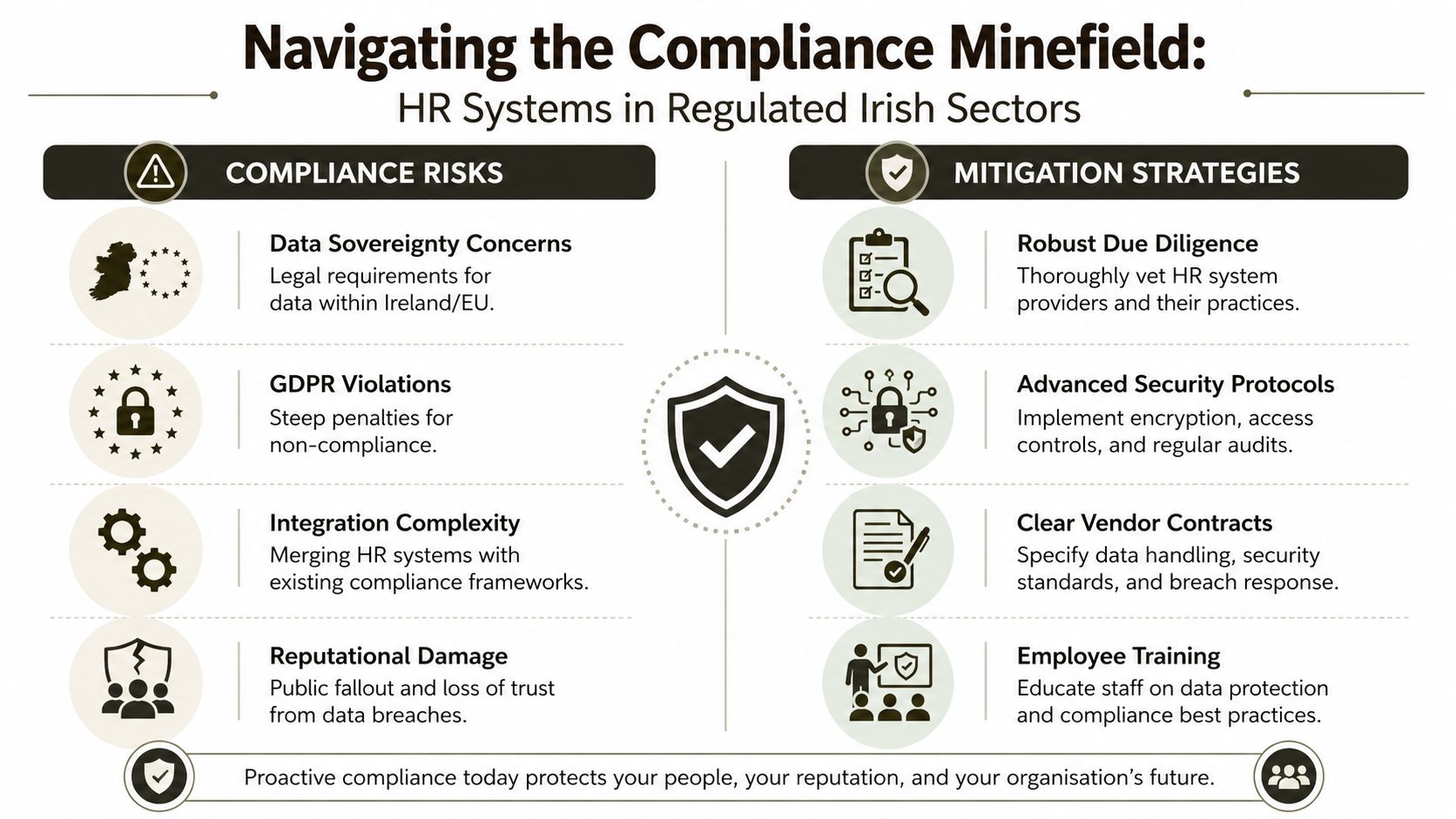
HR system software handles your most sensitive data set. Contracts, disciplinary records, payroll-linked information, sickness data, right-to-work documentation, and leaver records all end up touching Microsoft 365 somewhere. Once you connect that data to SharePoint, Teams, and identity workflows, every technical shortcut becomes a legal risk.
Compliance breaks in the gaps
In Ireland, HR system software must enforce GDPR and adhere to the Data Protection Act 2018, including data residency controls. The same implementation guidance also warns that DIY migration work which skips data accuracy and permission testing causes Broken Inheritance and GUID conflicts, leading to downtime and direct legal exposure, as described in Harmony HR's guide to HR systems.
That's the point many IT leaders underestimate. Broken inheritance isn't just untidy SharePoint. It can expose files to the wrong people. GUID conflicts aren't just annoying identifiers. They can break downstream references, records links, and workflow dependencies. Once that happens in a regulated environment, your incident isn't purely operational.
Regulated sectors don't get to guess
Your compliance officer won't care that the migration tool completed with warnings. Legal won't care that only some permission anomalies appeared. If an access review fails, if a subject access request returns incomplete records, or if a leaver retains access to a document set, your team owns the failure.
The most common danger areas look like this:
- Data residency gaps: Non-EU hosting assumptions and weak location controls create immediate concern for Irish operations.
- Audit trail weakness: HR actions that happen outside governed workflows become hard to prove later.
- Leaver process failures: Access removal across sites, groups, and document sets often breaks at the exceptions.
- Inherited permission drift: Historical SharePoint structures rarely align cleanly with new HR security rules.
If your security programme is already being shaped by NIS 2 planning in Microsoft 365, your HR data flows need to sit inside that control model, not outside it.
Missing this step doesn't just fail the migration. It breaks legal compliance.
Marketing compliance is not actual compliance
Vendors love the word “compliant.” They usually mean the product has security features. That's not enough. Your actual risk sits in implementation choices. Where data lands. How identities map. Which permissions survive migration. Which logs remain usable. Which records remain discoverable.
That's why generic deployment advice fails in Irish regulated sectors. Your tenant design, your retention model, and your historical permission structure matter more than the glossy compliance page in the vendor deck.
M365 Integration The Technical Breaking Points
Projects catch fire at the integration stage.
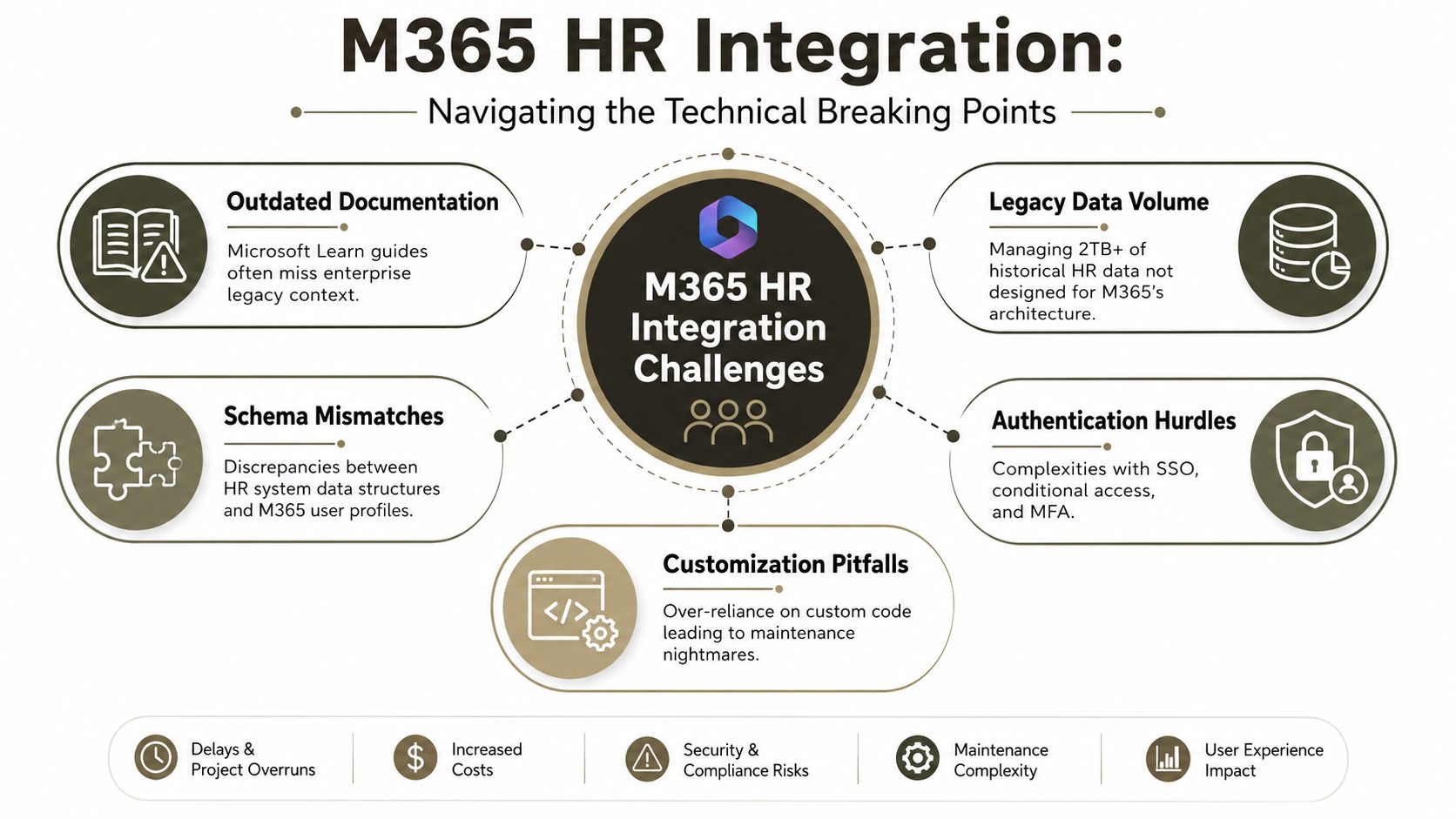
A team buys a solid HR platform, reads the Microsoft docs, runs a tidy pilot, and assumes the hard part is under control. Then production data arrives. Old folder paths break naming rules. Custom metadata does not map cleanly. Permissions were inherited from years of exceptions. Volume exposes throttling and indexing limits that never showed up in test.
That pattern is common because vendor documentation describes supported states, not the broken estates enterprises run. In regulated Irish organisations, that gap is dangerous. Your risk sits in the data structures, identity dependencies, and workflow remnants wrapped around the HR platform. Ollo deals with that risk before it turns into a failed cutover.
Microsoft tells you what is supported. It does not design around your blockers.
The clearest example is documented by Microsoft itself. If the source tenant has Service Encryption with Microsoft Purview Customer Key enabled, cross-tenant SharePoint site migration will fail, as stated in Microsoft Learn's cross-tenant SharePoint migration documentation.
Treat that as a programme risk, not a technical footnote.
Teams usually discover blockers like this too late. Governance sign-off is done. Communications are sent. Cutover weekends are booked. At that point, the issue is no longer a configuration problem. It is a scheduling failure, a stakeholder failure, and often a compliance failure because fallback handling starts happening outside the original control model.
The breaking points are predictable
Enterprise HR integrations fail in repeatable ways:
- API throttling: Bulk reads and writes trigger service protection controls, which stretches migration windows and breaks assumptions about throughput.
- List view thresholds: Audit-heavy lists and workflow history libraries become unstable to query and validate once SharePoint indexing and threshold behaviour start biting.
- Long path and naming violations: File share history rarely fits SharePoint Online constraints without remediation rules and exception reporting.
- GUID and link dependency issues: Recreated objects can break references used by downstream automations, shortcuts, and embedded document links.
- Authentication collisions: Conditional Access, MFA requirements, and poorly designed service principals can stop connectors mid-run or force unsafe workarounds.
These issues compound each other. One problem delays the plan. Three problems put the migration at risk.
Identity is usually the hidden dependency. If the HR platform expects clean joiner, mover, and leaver logic, group-based access, or conditional access enforcement, your Microsoft Entra ID architecture is inside the migration scope whether anyone acknowledged it or not.
Failed HR integrations usually collapse under tenant complexity, brittle permissions, and weak test data. Unsupported connectors are only one small part of the story.
Legacy workflows fail after go-live
Older SharePoint workflow components are a common trap. They do not always fail during copy. They fail later, when HR tries to run approvals, archive routines, or notification steps that existed in the old estate and were never rebuilt properly in Microsoft 365.
That is one of the most expensive failure modes because it looks like a successful migration until the business starts operating in the target environment. By then, ownership is blurred, troubleshooting is urgent, and manual process workarounds start spreading across HR teams. In regulated sectors, those workarounds create new audit and access-control problems immediately.
What Ollo checks before production
Before any production move, we test the technical breakers in a strict order:
- Encryption state in the source tenant, including conditions that block cross-tenant migration paths.
- Permission irregularities across HR libraries, case folders, and inherited access structures.
- Path and naming violations carried over from file servers and legacy SharePoint estates.
- Workflow dependencies tied to retired SharePoint components, custom forms, and email triggers.
- Identity assumptions embedded in groups, lifecycle rules, access reviews, and conditional access policies.
That is the difference between reading product documentation and running a controlled migration in a messy enterprise tenant. Standard guidance tells you what can work. Ollo finds what will break first.
Why Standard Migration Tools Fail at Enterprise Scale
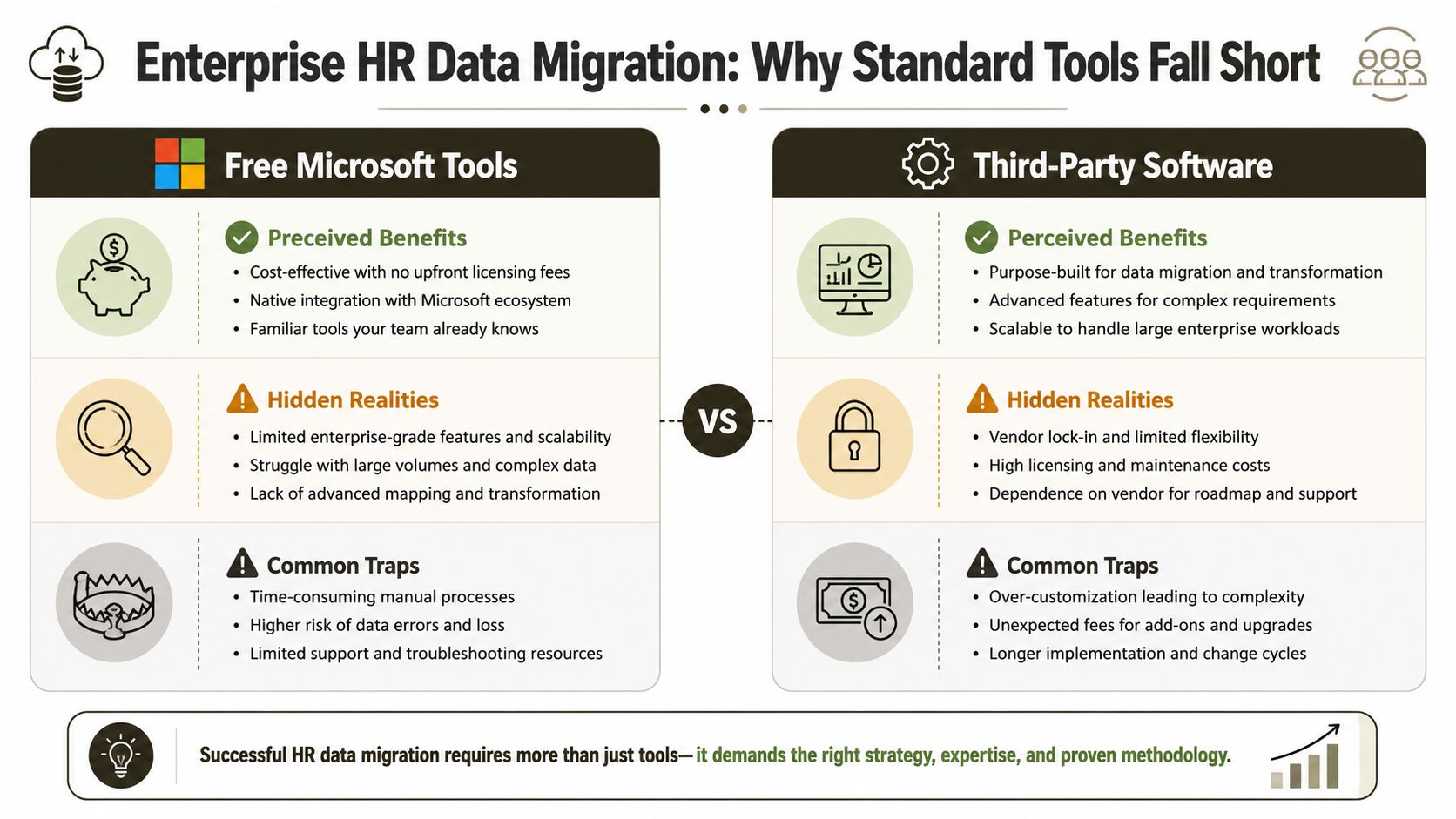
Friday evening. HR signs off the cutover. By Monday morning, employee records are in Microsoft 365, but case files have lost metadata, approval history is incomplete, and access reviews no longer match the old controls. The tool did exactly what it was built to do. Your migration still failed.
That is the enterprise mistake. Teams buy a migration tool and treat it as a migration strategy. In regulated Irish organisations, that decision creates audit gaps, retention errors, and rework that costs more than the original project.
SPMT handles transfer, not enterprise migration control
The SharePoint Migration Tool is fine for clean, low-complexity moves. It is a poor fit for HR estates with mixed permissions, inconsistent folder structures, records that depend on metadata fidelity, and years of exceptions nobody documented properly.
Pilots are where teams get trapped. A tidy test library migrates successfully, so the programme board assumes scale is just a scheduling problem. Production proves the opposite. Legacy naming collisions appear. Old archives contain malformed paths. Permissions differ site by site. HR content that looked uniform turns out to be a patchwork of manual workarounds.
SPMT does not solve those problems. It exposes them late.
Its reporting is another weak point. If legal, compliance, or internal audit asks what changed, what failed, what was skipped, and what needs remediation, basic migration logs do not give you a defensible operating record.
Ollo's recommendation: use SPMT only for small, isolated migrations where the source is already clean and the control requirements are modest.
ShareGate gives you more control. It does not give you judgment.
ShareGate is the better tool for serious work. It offers better handling, better visibility, and more room for controlled execution. It still cannot decide how your HR data should land in Microsoft 365, what exceptions need scripted treatment, or which source defects will create compliance risk after cutover.
| Tool | Strength | Breaking point | Ollo verdict |
|---|---|---|---|
| SPMT | Good native option for small, simple migrations | Limited enterprise control and weak compliance-grade reporting | Use it only for small clean jobs |
| ShareGate | Strong migration control and broad capability | Needs expert operators and custom handling for messy estates | Use it with scripting, discovery, and governance discipline |
This is the point internal teams underestimate. ShareGate will not repair broken inheritance logic. It will not redesign a target structure for HR case management. It will not interpret why two document sets with the same label need different retention treatment. It will not resolve every failed object through the UI when the underlying issue sits in API behaviour, identity translation, or source corruption.
That is why experienced delivery teams pair ShareGate with PowerShell, PnP, validation scripts, and a documented exception model. Ollo does this on Microsoft 365 migration projects for complex tenant and SharePoint moves because standard tooling alone does not survive messy enterprise estates.
Standard tools fail where enterprise risk actually lives
Enterprise HR migrations do not usually collapse on file copy speed. They collapse on edge cases at scale.
One department has unique permissions that nobody declared. A records team expects old audit context to survive the move. HR operations relies on metadata values that were never enforced consistently. Security expects group membership and conditional access outcomes to remain aligned after identity changes. The tool can move content. It cannot make these dependencies coherent.
This is why timelines slip. Not because the software is slow, but because the software exposes the gap between the source estate people describe and the one that exists.
Teams planning these programmes should read broader lessons on avoiding PEO data migration errors, then apply a stricter standard for Microsoft 365 in regulated environments. Vendor documentation covers product capability. It does not give you the forensic discovery, remediation logic, and cutover controls needed when HR data, compliance obligations, and enterprise identity all collide.
Ollo's recommendation: buy the licence if you need it. Do not confuse that purchase with migration readiness. The failure point is rarely the tool. It is the absence of architecture, exception handling, and compliance-led validation before production.
A Proven Framework for Migration Risk Reduction
You don't reduce migration risk with confidence. You reduce it with pre-mortem discipline.
Most failed HR system software projects showed their warning signs early. The team just treated those signs as admin details instead of kill risks. If you want to avoid disaster, force the project through a harsher checklist before build work starts.
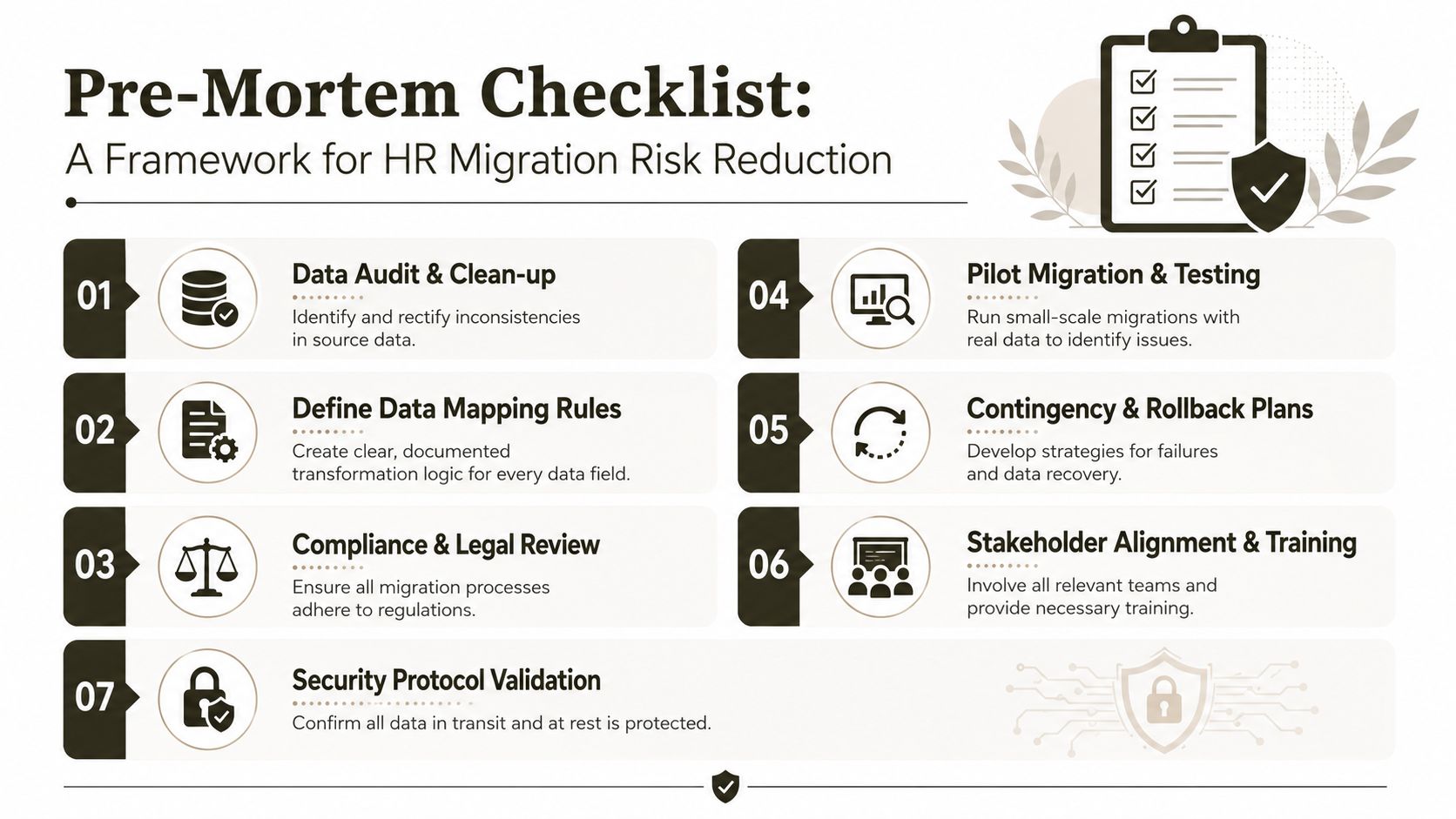
The pre-mortem that saves projects
Start with these checks:
- Data audit and scoping: Inventory source files, list structures, metadata, and permissions before anyone promises dates.
- Technical validation: Confirm blockers, validate identity dependencies, and test against ugly real-world samples rather than curated folders.
- Mapping discipline: Define exactly how records, documents, users, and approval paths land in the target environment.
- Compliance sign-off: Involve your Data Protection Officer before cutover design, not after.
- Rollback planning: Decide what happens if validation fails after migration, while rollback is still possible.
For teams looking at broader checklists on avoiding PEO data migration errors, the useful lesson is that process discipline matters most when the data is sensitive and operationally critical. HR data in Microsoft 365 is exactly that.
The sequence matters
Don't run this like a generic software deployment. Run it like a risk programme.
- Discover first. If you don't know where sensitive records live, every later control is weak.
- Test the ugly cases. Clean samples lie. The messy folders tell the truth.
- Lock governance before cutover. Security groups, retention, ownership, and logging must be agreed early.
- Train operators and business owners together. HR, IT, compliance, and security need one shared view of what “correct” looks like.
- Escalate specialist support before rescue mode. Recovery work costs more because the environment is already damaged.
If you're planning a broader Microsoft 365 migration strategy, the same rule applies here with higher stakes. HR data punishes ambiguity faster than most workloads.
A good migration plan doesn't ask, “How do we move the data?” It asks, “What will break, who will detect it, and how fast can we prove integrity?”
The hard recommendation
If your HR project touches regulated data, legacy SharePoint, cross-tenant movement, or custom workflow logic, don't run it as a DIY exercise. That route looks cheaper at the start because it hides the cost of failure. The failure arrives later as rework, downtime, legal exposure, and damaged trust between HR and IT.
Your safest option is specialist migration design, hard validation, scripted exception handling, and controlled cutover. Anything less is optimism dressed up as delivery.
If your team is about to connect HR data to Microsoft 365 and you already suspect the estate is messier than the vendor assumed, talk to Ollo. We help IT leaders in regulated environments assess migration blockers, validate risk before cutover, and prevent the kind of SharePoint, identity, and compliance failures that usually surface after go-live.

















