



The most dangerous advice in legacy system decommissioning is also the most common: migrate the data, switch off the old platform, and clean up afterwards. That sequence fails because the old system rarely acts as a simple storage container. It still feeds billing, compliance, identity, archive, reporting, and operational workflows long after users believe the migration has finished.
Treat decommissioning as a multi-year risk-reduction programme, not an end-of-project task. Your team must govern retention, dependency removal, validation, fallback support, and final shutdown together. Ireland's regulatory experience makes the point clearly. ComReg found that a small group of legacy exchanges carried a disproportionate share of the installed base, so the final shutdown phase demanded more control than the first migration wave (ComReg's legacy infrastructure framework).
Why Most Legacy System Decommissioning Projects Fail
Most decommissioning plans fail before the first file moves. IT Directors approve a migration scope, assign a tool, and leave system retirement to the final project phase. By then, the team has discovered that old permissions, reporting jobs, archive exports, service accounts, and compliance processes still depend on the source environment.
The documentation says decommissioning can follow a clean schedule. Reality is less forgiving. Late migrations, hidden service dependencies, incomplete reconciliation, and regulatory reporting compress the final timeline. ComReg's framework requires an operator to stop offering services over legacy infrastructure and place it into a permanently non-usable state within one month after a Phase 2 Complete Notice (ComReg switch-off documentation). A customer or record left behind at that point isn't an administrative nuisance. It becomes a business continuity and compliance problem.
The closing-task mistake
We often see clients fail when they treat decommissioning as a cleanup task. The legacy platform may still support:
- Compliance retrieval: Auditors need historical records with context, not a folder full of unlabelled exports.
- Billing and finance: Downstream processes may still query old identifiers or transaction history.
- Identity and access: Old groups, service accounts, and inherited permissions can survive the migration.
- Fallback operations: Users may depend on the source system during an extended overlap period.
Northern Ireland's 2025 Major IT Projects report shows why your overlap assumption deserves scrutiny. The report records an average project lifecycle of almost 6.5 years, while contract extensions used to keep legacy systems operating averaged almost 8 years (Northern Ireland Audit Office report). Those figures don't describe a quick handover. They show that replacement programmes routinely outlive their original plans.
Where DIY breaks
Basic migration tools can copy content. They can't decide whether a retained record remains legally necessary, reconstruct a broken permission model, or identify a workflow that calls an old endpoint at an inconvenient hour. DIY scripts also tend to run at full concurrency, hit API throttling, retry badly, and leave partial copies with no defensible reconciliation record.
If you need a practical framework for overcome legacy data migration risks, focus on dependency discovery, validation, and controlled retirement rather than file transfer alone. Our own analysis of why enterprise Microsoft 365 projects fail reaches the same conclusion: technology rarely causes the most expensive failure. Under-scoped governance does.
Architect's warning: If your shutdown plan starts with a cutover date instead of an inventory and retention decision, your plan is already under-scoped.
Building a Complete Inventory Before Any Data Moves
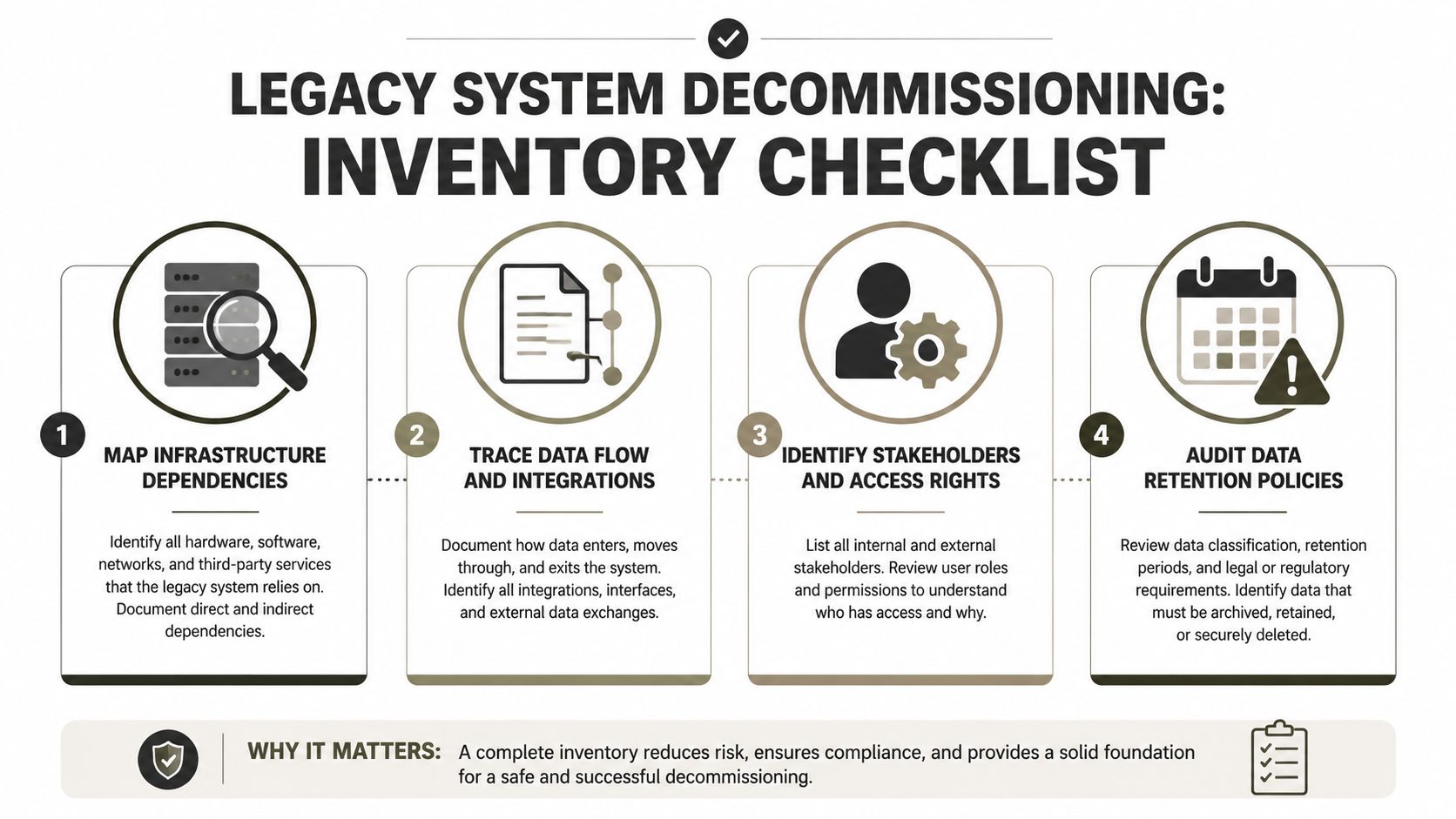
Decommissioning starts with an inventory, not a migration tool. Your first deliverable should identify every system, account, integration, report, archive, process, and person that depends on the platform you intend to retire.
Start with infrastructure. Record servers, databases, file stores, SharePoint sites, application interfaces, scheduled jobs, backup locations, and privileged accounts. Then trace the connections. A static diagram isn't enough. Inspect logs, scripts, service principals, Power Automate flows, Power Apps, scheduled exports, and identity groups. Ask business owners which reports they still run and which historical records they retrieve during audits or disputes.
Build an inventory that survives scrutiny
Your register needs more than a system name and an owner. Capture the evidence that determines whether retirement is safe:
- Infrastructure dependency: Identify the platform, storage, network paths, databases, backups, and operating accounts that require shutdown.
- Data flow: Trace where content enters, where it leaves, and which process still reads legacy identifiers or metadata.
- Stakeholder ownership: Name technical owners, business owners, compliance reviewers, legal contacts, and users with exceptional access.
- Retention status: Classify records by purpose, retention requirement, legal hold, personal-data content, and approved disposition.
Ireland's ComReg consultation frames legacy infrastructure work around identifying the infrastructure and proceeding promptly towards decommissioning (ComReg legacy infrastructure consultation). The operational lesson is straightforward. You need regulatory sign-off and a staged withdrawal plan before you schedule cutover.
Find the small systems carrying large risk
A small legacy exchange, library, or application can carry critical services that don't appear in volume reports. ComReg recorded that 38 legacy exchanges represented about 3% of all legacy exchanges while holding 28% of the EUL installed base as of 31 December 2021 (ComReg's installed-base analysis). That pattern appears in enterprise estates too. The largest repository isn't always the most important one.
Look for orphaned workflows, departmental archives, old project sites, and specialist databases. Check whether a compliance team uses the source during an investigation. Check whether a finance export still depends on an old GUID. Check whether a healthcare or energy process stores evidence outside the primary system.
A disciplined inventory also helps you reduce data migration failures because it turns assumptions into testable dependencies. Use the inventory control system approach to assign ownership, evidence, status, and a retirement decision to every identified component.
Don't approve a shutdown until each dependency has one of three outcomes: migrated, replaced, or formally retired with documented approval. Anything else remains a live risk.
Platform Limits That Break Enterprise Migrations
Microsoft 365 doesn't accept every legacy structure you throw at it. Official Microsoft Learn documentation confirms that SharePoint Online imposes hard limits around list views, paths, files, libraries, and request volume. These constraints become blockers when your source estate contains deep folders, flattened lists, inherited permissions, large libraries, or aggressive automation.
The 5,000-item List View Threshold deserves particular attention. Microsoft states that operations exceeding the threshold can be blocked, and users may see warnings once a list exceeds 3,000 items (Microsoft's List View Threshold guidance). An on-premises design that worked after changing threshold settings may fail in SharePoint Online, where Microsoft documents that the threshold remains 5,000 and doesn't offer the same adjustment option (Microsoft guidance on large lists and libraries).
SharePoint Online Hard Limits That Block Migrations
| Limit | Threshold | Migration impact |
|---|---|---|
| List View Threshold | 5,000 items | Large lists and flattened libraries can block queries and migration operations |
| Warning level | 3,000 items | Users may encounter warnings before the hard threshold affects operations |
| Decoded file path | 400 characters | Deep folder structures and long filenames require path normalisation |
| File upload | 250 GB | Oversized files need separate handling or exclusion decisions |
| List or library capacity | 30 million items | Large repositories need architectural partitioning |
| Requests per user | 3,000 requests per 5 minutes | High-concurrency scripts can trigger throttling |
| Resource units per app per tenant | 12,000 | Parallel workloads can exhaust application capacity |
| Resource units per container | 3,000 per minute | One busy site or container can stall processing |
Microsoft also documents HTTP 429 and 503 responses when SharePoint Online experiences pressure, with clients expected to honour Retry-After headers (Microsoft throttling guidance). These responses don't mean your script needs a faster retry loop. They mean your workload needs a different design.
Redesign before you copy
Normalise paths before migration. Split libraries before they approach operational limits. Remediate broken inheritance rather than carrying thousands of unique permission scopes into the target. Resolve duplicate names, preserve meaningful metadata, and establish a GUID strategy before incremental synchronisation begins.
The 400-character decoded path limit creates a predictable failure mode for file servers with deep departmental folders. A 250 GB upload cap matters when users treat SharePoint as a dump for large media or database exports. The 30 million item ceiling matters even when your current user interface appears healthy, because migration jobs and validation queries create different load patterns.
Practical rule: Don't migrate a bad structure into Microsoft 365 and call the problem solved. Redesign the target, then move content into a structure your administrators can govern.
Our guidance on the SharePoint 5,000-item limit reflects the operational reality. One missed threshold can stall the run, create partial metadata, and leave your old platform active because nobody can prove the target is complete.
Choosing the Right Migration Tools for Your Estate
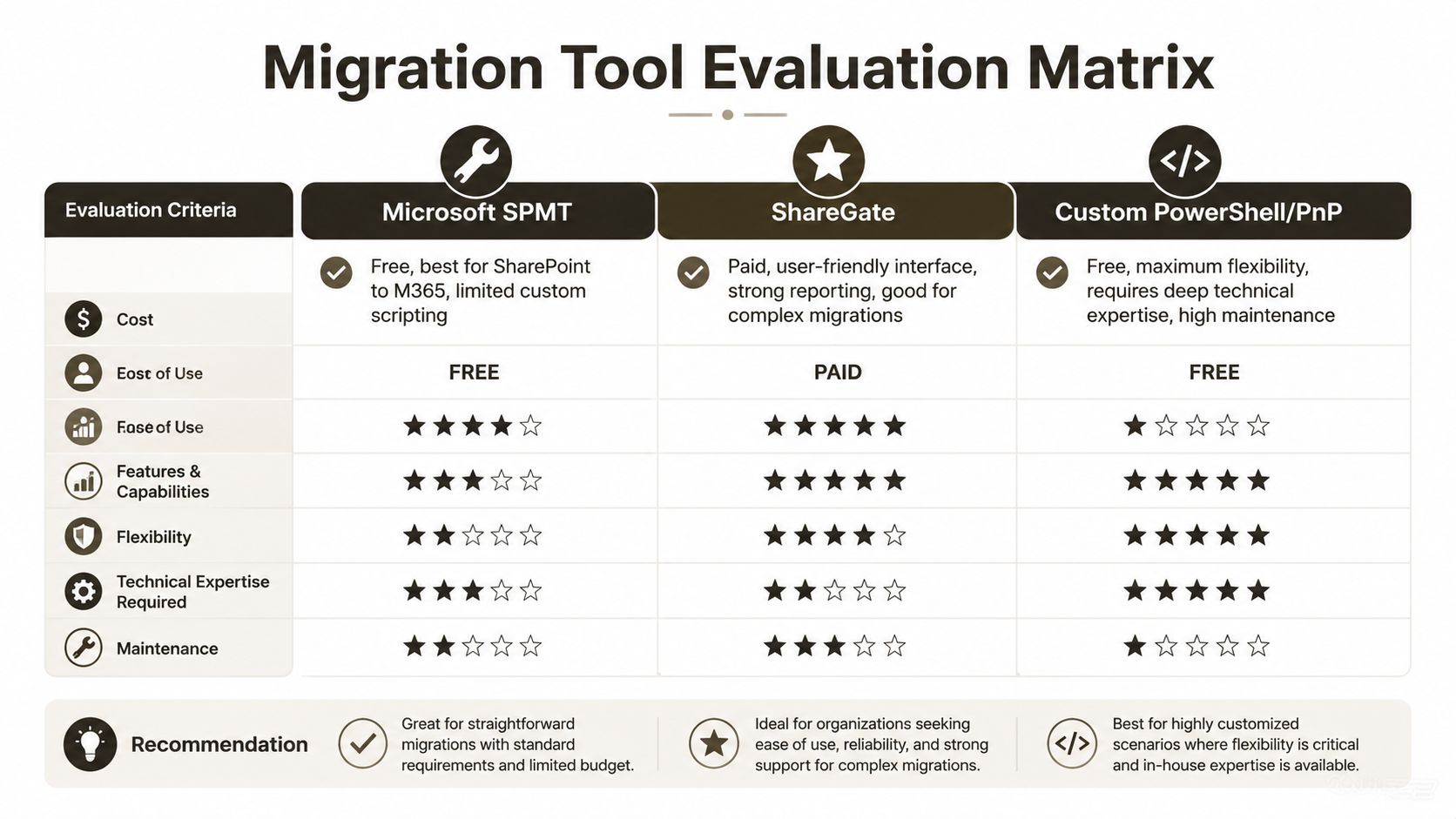
Tool selection should follow estate complexity, not procurement convenience. Microsoft's SharePoint Migration Tool, ShareGate, and custom PowerShell or PnP automation each have a place. None removes the need for architecture, reconciliation, permission remediation, or compliance approval.
Microsoft SPMT
SPMT works well for a small, clean SharePoint-to-Microsoft 365 move, particularly when the source has straightforward permissions and predictable paths. It gives a familiar route for basic content transfer without adding a third-party licence.
It becomes a poor fit when your source has broken inheritance, long paths, complex metadata, unusual permissions, or a requirement for custom remediation. Its simplicity can hide the work your team still needs to perform around exceptions and validation.
ShareGate
ShareGate offers stronger reporting and a more accessible interface for complex migrations. It can help your team analyse content, plan batches, and manage common SharePoint scenarios without writing every operation from scratch.
It doesn't make throttling disappear. Poorly configured concurrency can still produce throttling storms, partial copies, and long-running retries. ShareGate also won't make an undocumented business dependency visible unless your team discovers and tests it.
Custom PowerShell and PnP
Custom automation becomes necessary when you need deterministic handling of GUID conflicts, metadata preservation, broken inheritance, path normalisation, incremental synchronisation, and detailed evidence. A serious script must record every batch, retry, failure, validation result, and exception. It must also respect Microsoft Graph and SharePoint request guidance, including Retry-After and rate-limit signals (Microsoft's calling limits guidance).
That flexibility carries maintenance risk. Your engineers need deep SharePoint, Power Platform, identity, and compliance knowledge. A script that copies content isn't an enterprise migration framework.
The SharePoint migration tool comparison should sit alongside your dependency and risk assessment, not replace it. Ollo uses ShareGate and custom PowerShell or PnP handling for complex estates, while SPMT remains suitable for limited, clean scenarios.
Ollo Verdict: Use SPMT only for a small, clean dataset with simple permissions. Use ShareGate when reporting and repeatable migration operations fit the estate. For regulated, structurally damaged, or dependency-heavy environments, use custom automation under specialist control.
Sequencing Cutover and Mapping Compliance Retention
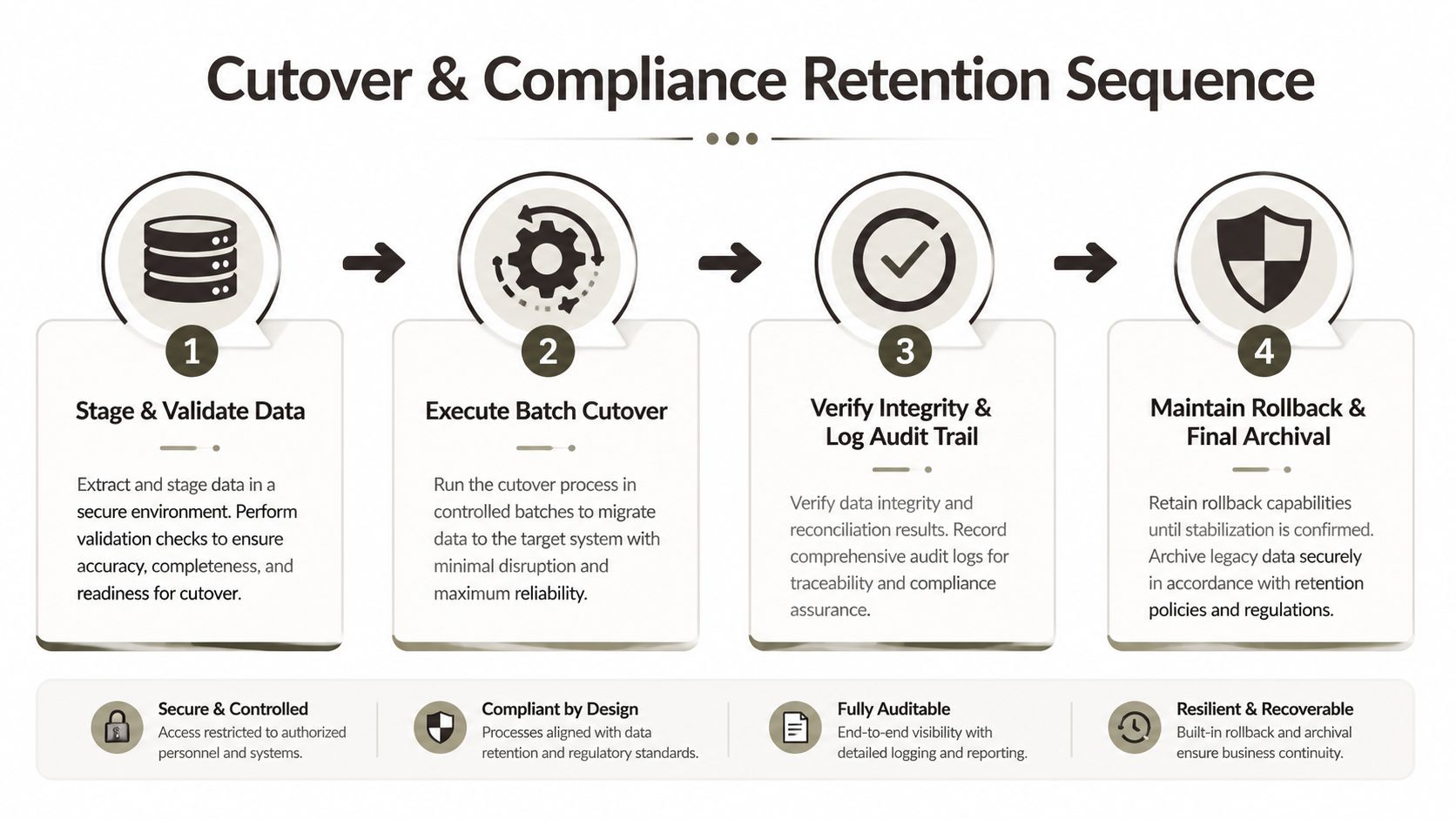
A safe cutover follows a sequence. Your team stages the data, validates it, freezes the source, runs controlled batches, verifies integrity, and keeps rollback support available until the target proves itself under production conditions.
Begin with a pilot that exercises the worst content, not the easiest content. Include long paths, inherited permissions, unique permissions, large libraries, sensitive records, and files with unusual metadata. If the pilot only contains clean documents, it tells you almost nothing about the actual retirement risk.
Stage, batch, and validate
Use bounded batches rather than maximum concurrency. Honour Retry-After responses, record throttling events, and slow the workload when Microsoft 365 signals pressure. Capture source and target counts, item identifiers, metadata checks, permission results, and failed-object reasons for every batch.
Before switching off the source, run business validation. Ask the people who use the records to locate documents, open them, confirm metadata, test access, and retrieve historical evidence. Technical success without user validation leaves you with a system that passes a script and fails an audit.
This legacy system to SharePoint migration guidance provides a useful reference point for source retirement planning. Your own runbook should define the freeze window, final delta copy, access change, validation gate, rollback decision, and approval authority.
Map retention to the processing purpose
Ireland's Data Protection Commission states that retention depends on the processing operation, while Irish data-protection guidance confirms that personal data must not remain longer than necessary and that the Data Protection Act doesn't set fixed retention periods (Irish Data Protection Act guidance). Your retention schedule therefore needs a business and legal rationale for each record class.
Map each category to:
- Purpose: Why does the organisation still process or retain the data?
- Authority: Which legal, contractual, regulatory, or operational requirement applies?
- Access: Who can retrieve it after shutdown, and under what approval?
- Disposition: When should the organisation delete or review it?
- Evidence: Which record proves the decision and the action?
Rollback isn't a sentence in a project plan. Test it with production-like data, real permissions, realistic throttling, and the people who must invoke it.
The embedded walkthrough below can support internal discussions about migration sequencing, but it can't replace a tested runbook or compliance sign-off.
Keep the legacy system available until the validation gate passes and the rollback owner signs off. A final backup alone doesn't prove that your target preserves relationships, metadata, permissions, and retrieval capability.
Engineering Audit Evidence for Regulated Sectors
A decommissioning project isn't complete when the server powers down. It ends when you can prove what you extracted, what you retained, what you deleted, who approved each decision, and why the old environment can no longer operate.
Regulated organisations need evidence designed into the migration process. Retrospective evidence assembled from scattered logs rarely proves completeness, especially after a failed script, a manual exception, or an undocumented re-run.
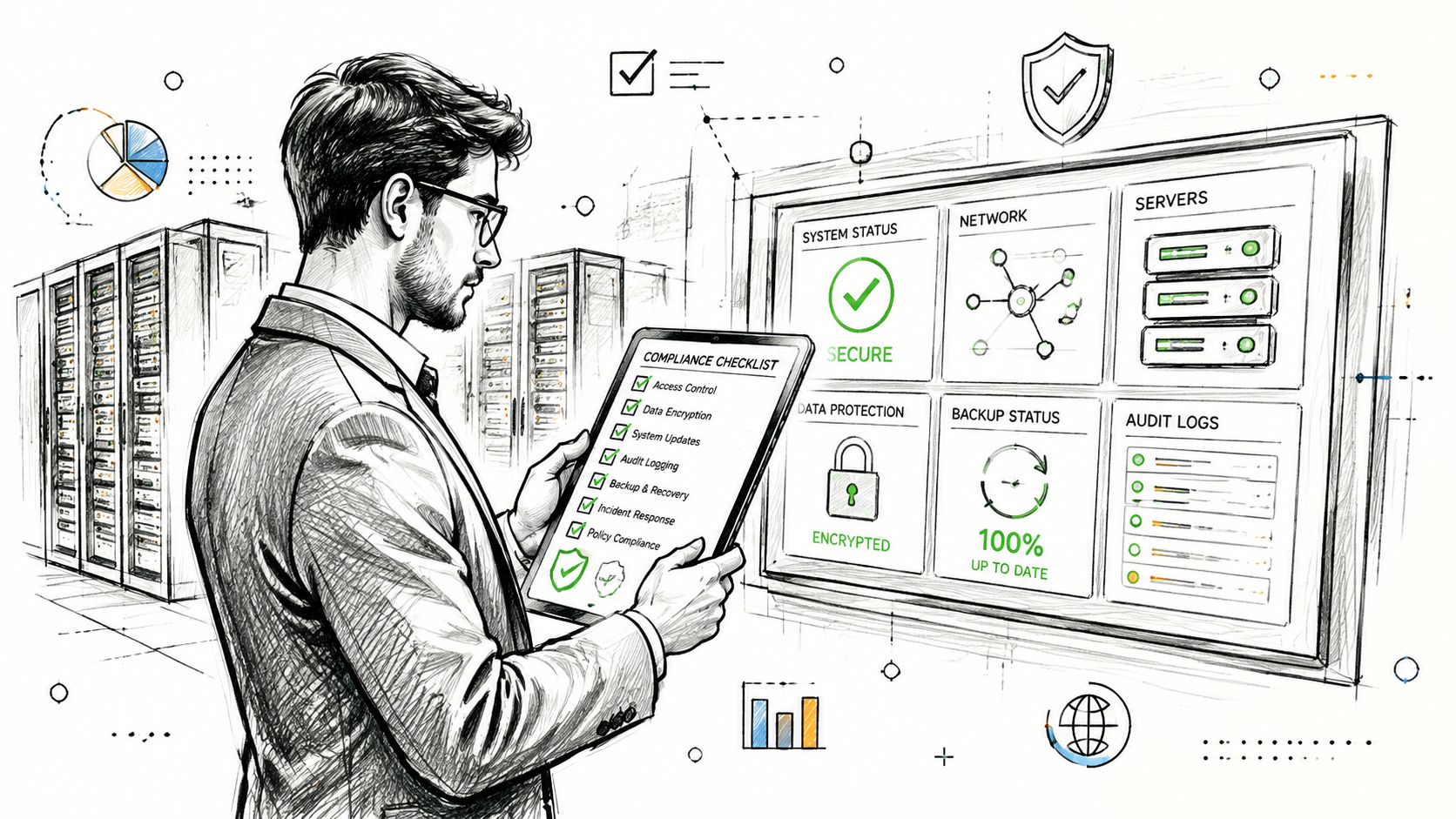
Capture evidence at batch level
Your automation should create a record for every meaningful action:
- Migration logs: Record source identifiers, target identifiers, status, timestamps, retries, and failure reasons.
- Reconciliation reports: Compare source and target inventories, metadata, permissions, and representative content.
- Retention decisions: Link each record class to its purpose, owner, approval, and review or deletion action.
- Chain of custody: Preserve who extracted, transformed, transferred, validated, and approved sensitive data.
- Shutdown proof: Record access removal, integration disconnection, backup treatment, infrastructure disposal, and the final non-usable state.
Don't settle for a green progress bar. A migration can report completion while missing unsupported paths, blocked files, failed permissions, or records excluded by a filter. Your evidence must expose exceptions and show how your team resolved them.
ComReg's decommissioning framework illustrates why permanent non-use matters. A retired environment can't remain available through an overlooked service account or an undocumented management route (ComReg framework for legacy infrastructure withdrawal). In regulated sectors, a half-decommissioned system creates both security exposure and an audit question.
Give compliance teams usable proof
Compliance officers need more than infrastructure diagrams. Give them a decision trail that connects the source inventory to the target archive, retention schedule, validation report, approval record, and shutdown certificate. Keep the evidence searchable and access-controlled, with a clear owner for future retrieval requests.
If your team can't demonstrate completeness and controlled disposal, it hasn't finished legacy system decommissioning. It has only stopped routine operations.
Reducing Risk in High-Stakes Environments
DIY decommissioning works only when content is clean, permissions are simple, dependencies are known, volume is manageable, and retention decisions are straightforward. Enterprise estates rarely meet those conditions. Expect broken inheritance, excessive path lengths, obsolete identifiers, undocumented integrations, and records requiring different treatment after the application is gone.
Treat decommissioning as a multi-year risk-reduction programme, not a cleanup task. Combine zero-trust redesign, custom PowerShell or PnP handling, staged synchronisation, item-level reconciliation, and a controlled teardown sequence. Basic migration tools and DIY scripts do not reliably resolve unsupported paths, permission failures, hidden dependencies, or records excluded by filters. Build evidence while the source remains available, then use it to govern the shutdown.
Plan for an overlap period, fallback support, and retention obligations from the start. The replacement platform may be operational before the legacy system can be safely retired because unresolved integrations, support requirements, or regulated records still depend on it. Keep the source read-only where possible, define an owner for exceptions, and set explicit exit criteria for access removal, backup treatment, and infrastructure disposal.
The hard truth: Decommissioning becomes irreversible only after your team proves that the target works, records remain governed, and every dependency has an approved outcome.
Ollo assesses the estate, redesigns the target, engineers migration and validation controls, and manages final source shutdown for Microsoft 365 and SharePoint programmes. If your environment contains regulated data, complex permissions, or a failed migration history, visit Ollo to discuss a controlled decommissioning plan before setting a cutover date.

















