



Your CIO has approved a “simple” Teams rollout. Slack has grown organically, business units want one collaboration platform, and somebody in procurement has already asked whether ShareGate or an export script can handle the move over a long weekend.
That's the moment projects go bad.
The Microsoft Teams vs Slack debate gets trivialised into chat features, reactions, and app tabs. That's the wrong lens. In a regulated estate, this decision changes your identity model, your records boundary, your eDiscovery surface, and your SharePoint architecture whether you planned for that or not.
I've seen too many IT teams discover this after launch. They switch Teams on, assume existing controls will somehow hold, then spend months cleaning up permissions, retention gaps, broken search, and angry compliance teams. Even basic operational confusion compounds the problem. If your users already struggle with how to locate Teams content, that usually signals a deeper structural issue underneath the interface, not a training problem.
The Real Microsoft Teams vs Slack Decision
A sceptical IT Director usually starts in the same place. Slack works. Teams is already in Microsoft 365. The board wants consolidation. So the internal story becomes simple: migrate chat, recreate channels, map files, train users, done.
That story is fiction.
The true Microsoft Teams vs Slack decision sits underneath the UI. Slack behaves like a relatively self-contained collaboration layer. Teams does not. Teams pulls your conversations, files, permissions, labels, and identity dependencies into the wider Microsoft 365 estate. If your tenant is already untidy, Teams won't hide that. It will expose it.
What usually gets missed
Most failed projects share the same bad assumptions:
| Decision area | Slack assumption | Teams reality | Business risk |
|---|---|---|---|
| Architecture | Chat platform can stay separate | Teams sits on Microsoft 365 services | You inherit existing structural mess |
| Permissions | Channel access is the main concern | Access touches Entra ID and SharePoint patterns | Broken inheritance and audit gaps |
| Compliance | Export later if needed | Retention and discovery need planning before rollout | Legal exposure |
| Migration | Tool can lift and shift content | Metadata, labels, and file structures need redesign | Rework and user distrust |
| Operations | Support desk can absorb change | Admin model changes across multiple workloads | Ongoing cost and governance debt |
Practical rule: If your project brief says “Slack to Teams migration” and doesn't also say “SharePoint, Entra ID, retention, and governance redesign”, your team is walking into a rescue project.
The cleanup always costs more than the assessment. Missing the architecture step doesn't just create inconvenience. It creates operational drag, failed searches, bad records management, and discovery blind spots that auditors won't excuse.
Beyond Chat The Architectural Divide You Cannot Ignore
Your developers may love Slack because it feels contained. That's exactly why many estates tolerate it for years. It doesn't force the organisation to confront deeper Microsoft 365 design problems.
Teams does.
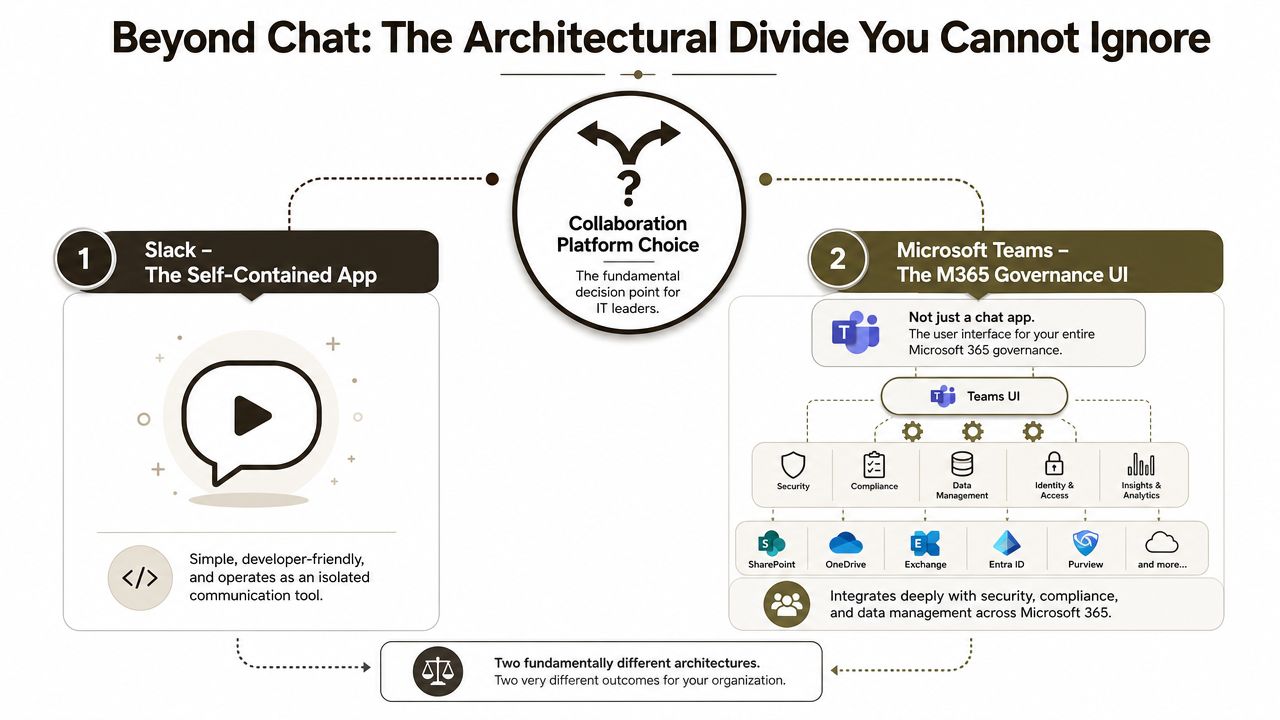
Teams is not a chat app
Microsoft Teams crossed 300 million monthly active users globally by early 2023 according to Computerworld's coverage of the platform comparison. That scale matters because enterprises keep pretending Teams is a parallel tool when it's a governance-bound extension of SharePoint Online.
Every Team creates dependencies. Files land in SharePoint. Identity ties back to Entra ID. Site collection behaviour affects what your users can do in Teams whether they realise it or not. If you want the mechanics laid out plainly, this explanation of how SharePoint and Microsoft Teams work together behind the scenes is the starting point.
The hidden architecture tax
Microsoft Learn confirms the ugly parts people skip in slide decks. Teams provisioned through the modern SharePoint Online environment inherits the site collection's governance model. That means your old permission sprawl, bad library design, and records misconfiguration don't stay in the past.
We often see clients fail when they treat Teams as a clean start. It isn't. It's an amplifier.
Here's what that looks like in practice:
- Per-site permission sprawl: Your old broken inheritance patterns don't disappear. They carry forward and become harder to reason about once users work through Teams instead of directly in SharePoint.
- Library growth issues: Microsoft documentation confirms that chat and channel file spill-over can push sites past 100,000 items or 25,000 security principals per site in the wrong conditions, which triggers throttling and search index failures that are painful to unwind after launch.
- Migration blind spots: Teams-only planning ignores Lists and Libraries migration, retention labels, and clean-up of inherited permissions before tenant consolidation.
Teams doesn't simplify a poor SharePoint estate. It exposes it to more users, more content, and more scrutiny.
Slack and Teams are solving different problems
Slack can sit beside the estate. Teams becomes part of the estate. That's the architectural divide most comparison articles miss.
If your environment includes legacy file servers, old SharePoint structures, or multiple Microsoft 365 tenants, the decision is not about user preference. It's about whether you can absorb the governance consequences of making Teams your collaboration front end.
The Ollo Verdict: If you already run Microsoft 365 and hold regulated data, standardise on Teams only after you've assessed the underlying SharePoint and permission model. Treating Teams as “just chat” is how projects become remediation exercises.
Security and Identity Zero Trust with Entra ID
Security teams often get dragged into this conversation too late. By then, collaboration decisions have already been made by operations, the PMO, or whoever shouted loudest about user adoption.
That sequence is backwards.
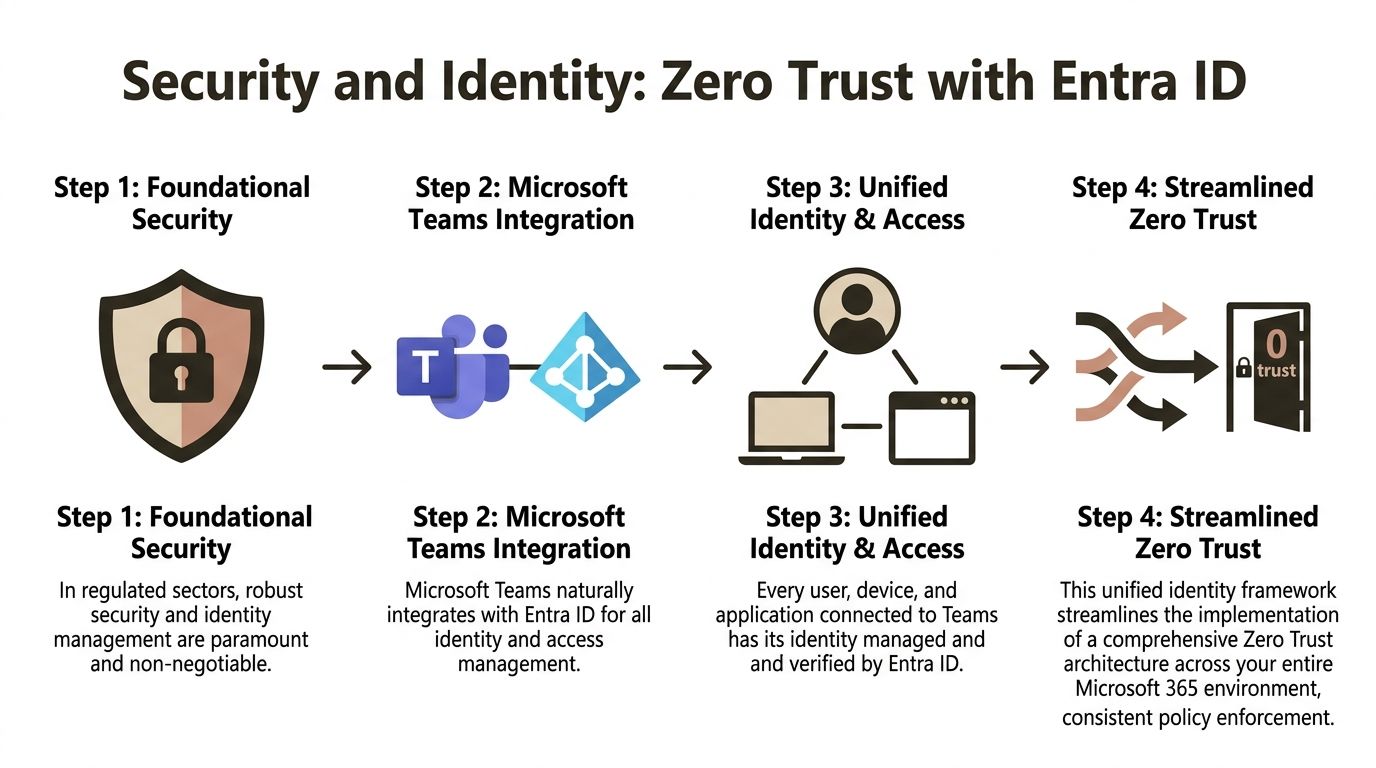
One identity fabric beats stitched-together controls
For regulated organisations in Ireland and across the EU, Teams has one structural advantage Slack can't match. It sits natively inside the Microsoft 365 identity and compliance boundary.
That matters because Microsoft documentation confirms that sensitivity labels and retention policies applied in Microsoft 365 automatically propagate to Teams chats, files, and sites, while Slack requires separate DLP agents and third-party connectors, as outlined in this comparison discussing Teams, Slack, and Microsoft 365 governance alignment. If you're standardising your security model, that native propagation is not a convenience feature. It's the difference between one policy surface and several fragile ones.
Your Entra design sits at the centre of this. Conditional access, device compliance, MFA posture, guest governance, and access reviews all behave more predictably when collaboration stays inside that same fabric. This overview of Microsoft Entra ID and its role in enterprise identity control is worth revisiting if your tenant has grown through acquisitions or decentralised admin.
Why Slack creates policy drift
Slack can absolutely be secured. That's not the point. The point is that securing it properly in a Microsoft-centric estate means extra moving parts.
Those extra parts become business risk:
- Dual identity logic: Your team ends up maintaining Slack access decisions and Microsoft access decisions, then pretending they are equivalent.
- Connector dependency: DLP, retention mirroring, and legal hold workflows depend on third-party tooling staying healthy under load.
- Audit inconsistency: Labels, records controls, and review cycles don't naturally stay aligned across separate systems.
We often see clients fail when they call this flexibility. It isn't flexibility. It's policy drift with a friendly interface.
Zero Trust needs fewer seams, not more
Zero Trust fails at the seams. Every custom sync, duplicated policy, and connector-based workaround gives attackers and auditors somewhere to look.
Security judgement: If your collaboration layer sits outside your core identity and records model, you haven't simplified risk. You've hidden it behind integrations.
The documentation may present feature parity at a distance. Reality is harsher. Once Teams becomes your collaboration backbone, you can apply one coherent identity-centric model across SharePoint, Exchange, and Teams. With Slack, you keep translating controls between systems and hoping nothing gets lost.
The Ollo Verdict: If your board is serious about Zero Trust, Teams is the only architecturally sound choice inside a Microsoft 365 estate. Slack can be tolerated at the edge. It shouldn't own your regulated core.
The Governance Minefield eDiscovery and Data Residency
At 06:30 on a Monday, your legal team asks for every message, file, and decision tied to a harassment complaint, a pricing dispute, or an employee exit. If your answer is "some of it is in Slack, some is in SharePoint, and we may need an export," you already have a governance failure. The platform decision stopped being a user preference issue the moment that data became evidence.
The key risk in Microsoft Teams vs Slack sits here. Governance is either built into the operating model or bolted on after the fact. Bolted-on governance fails under pressure.
eDiscovery breaks first
Slack often enters the business through engineering, product, or delivery teams, then spreads until it carries commercially sensitive conversations. By then, nobody has done the hard work of aligning channels, private messages, files, app data, retention, and legal hold procedures with the rest of Microsoft 365.
That creates expensive ambiguity. Legal asks for a complete record. IT produces partial exports, disconnected files, and arguments about where the authoritative version lives. Auditors do not care that the collaboration estate grew organically. Regulators care that you cannot produce, preserve, and explain the record.
Teams gives you a cleaner compliance boundary inside Microsoft 365. Chat, files, identities, retention, and case workflows sit closer together. That does not remove governance work, but it removes a large class of translation errors that Slack-to-Microsoft coexistence creates.
Data residency is a board-level risk
Too many IT leaders treat residency as a vendor checkbox. That is amateur hour.
Microsoft documents how data location, tenant geography, and service-specific processing work across Microsoft 365 in its Data residency in Microsoft 365 documentation. The point is not that every byte always stays neatly inside one country. The point is that you can govern Teams inside the same administrative, legal, and records framework that already controls Exchange, SharePoint, and Entra ID.
Slack pulls you away from that centre of gravity. Then the app ecosystem makes it worse. Messages, files, and workflow artifacts can sit across separate stores, separate admin models, and separate review processes. For an Irish or EU-regulated organisation, that is not an architectural quirk. It is controller risk with legal cost attached.
The business exposure is plain:
- Incomplete holds: A legal hold that misses Slack content, connected app data, or shared files is a failed hold.
- Fragmented review: Counsel and compliance teams spend time stitching together evidence instead of assessing risk.
- Residency confusion: Security teams cannot answer simple questions about where sensitive collaboration data is stored, processed, and copied.
- Audit failure: Inconsistent labels, retention outcomes, and ownership records turn a routine review into a credibility problem.
Teams can still become a compliance mess
Choosing Teams does not save you from bad design. It just gives you a governable destination if somebody competent is in charge.
Microsoft's own guidance on SharePoint limits and list behavior catches many migrations after the damage is done. Slack conversations and files do not land in a vacuum. They land in Teams-backed SharePoint structures with permissions, libraries, metadata, search, retention, and discovery consequences. Dump too much content into the wrong structure and you create a records problem inside the very platform meant to reduce one.
This is why DIY migration projects are so dangerous. General migration tools can move content. They do not design a defensible records model, channel architecture, ownership standard, or legal hold strategy. That gap becomes your problem after cutover, during litigation, subject access requests, or regulatory review.
If your team has not defined ownership, retention, private channel handling, guest access controls, and site structure before migration, users will create the mess for you. Start with a controlled operating model. Ollo's guidance on Microsoft Teams governance for controlled enterprise rollouts sets out the controls most organisations skip until the first serious incident.
The Ollo Verdict: Teams is the only sensible destination for a regulated Microsoft 365 estate. Slack coexistence multiplies discovery and residency risk. A careless migration multiplies it again. If governance matters, treat the move as a compliance programme, not a chat platform swap.
The Migration Disaster Playbook How DIY Projects Fail
Friday evening. The pilot looked acceptable. By Monday morning, search is broken, channel history is incomplete, users cannot find files, Legal is asking what happened to retention context, and the service desk is drowning. That is how Slack to Teams DIY migrations fail in real organisations. The tool finishes the copy job. The business inherits the damage.
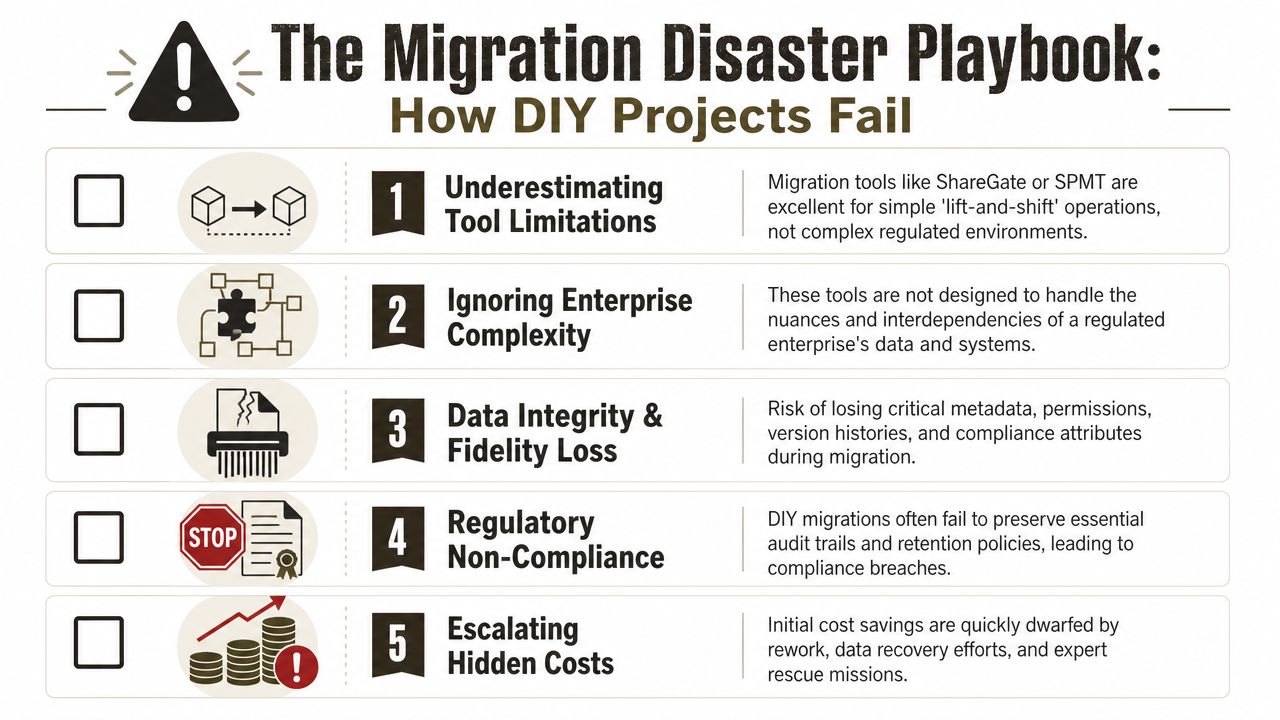
The failure pattern is boringly predictable
We keep seeing the same rescue brief. An internal team buys a migration tool, maps Slack users to Microsoft 365 accounts, creates Teams, pushes files and messages across, then declares success because the job completed. Weeks later, actual problems appear. Owners are wrong. Permissions are inconsistent. Private conversations are handled badly. File locations make no operational sense. Search results are unreliable. Nobody can prove the migrated data still supports compliance obligations.
ShareGate is useful for structured Microsoft 365 moves. SPMT is useful for lighter ingestion work. Neither product decides what a defensible target architecture should look like, how Slack channel sprawl maps to Teams and SharePoint without creating a mess, or which exceptions need scripted handling before cutover. That work sits with the migration lead. If the migration lead is treating this like a file move, the project is already off course.
DIY teams also underestimate how much Slack data is operationally ambiguous. Messages, files, app content, membership history, shared channels, and ad hoc permission habits rarely translate cleanly into a governed Teams model. A tool can copy payloads. It cannot resolve intent.
Tools fail at the point where enterprise risk starts
Microsoft documents platform limits and expected behaviours. It does not stop your project when your design is poor, your source estate is dirty, or your target model is unworkable.
The common breakpoints are the same in almost every failed migration:
- Overloaded document libraries: Slack file dumps land in SharePoint-backed storage that was never designed properly. Users get clutter, poor structure, and slower retrieval.
- Permission sprawl: Broken inheritance, one-off access decisions, and badly handled private spaces create confusion that turns into access incidents.
- API throttling and timing slips: The tool retries. Your cutover window extends. The business loses trust because communications and timings stop matching reality.
- Context loss: Message meaning, ownership, classification, and retention intent degrade when teams rely on simplistic exports and default mappings.
- Search breakdown after go-live: Users judge the migration by whether they can find what they need. If search confidence collapses, adoption collapses with it.
DIY migration does not fail only when data is missing. It fails when the copied data no longer behaves like a trustworthy business record.
The real cost shows up after the migration weekend
“Mostly migrated” is one of the most expensive states an IT director can create. Support tickets spike first. Then business leaders start bypassing the new environment because they do not trust it. After that, security and compliance teams start finding exceptions that should have been resolved before any production cutover.
That is why proper Microsoft 365 migration planning for regulated organisations starts with assessment, remediation, exception handling, and target-state design. Tooling comes later. If your team starts with the tool, you have already put the project in the wrong hands.
Cost discipline matters here too. Teams migrations often trigger related telephony and licensing decisions, and finance teams routinely underestimate that side of the programme. A separate guide on understanding Microsoft Teams Phone costs is useful, but do not confuse licence planning with migration control. They are different problems, and only one of them can put you in front of auditors.
Ollo handles these programmes with ShareGate where it fits, and with custom PowerShell PnP scripting where the estate is too messy or too regulated for template-driven work. That is not embellishment. It is the difference between a controlled migration and an expensive clean-up exercise.
Tool choice needs a hard rule
Use SPMT for light, low-risk moves. Use ShareGate where the Microsoft 365 structure is already defined and clean. For Slack-to-Teams migrations with compliance exposure, permission sprawl, private channel complexity, or tenant consolidation, use specialist-led design and custom execution. Anything less creates a business records problem, not just a delayed IT project.
Calculating the True Total Cost of Ownership
Licence comparisons waste too much oxygen. Your finance team wants a clean number. Your risk team lives in the mess left out of that number.
That's why most Microsoft Teams vs Slack TCO discussions miss the point.
The expensive part isn't the subscription
Slack supports more than 2,000 third-party integrations, while Teams gains its strength from native integration with OneDrive, SharePoint, Exchange, and Entra ID, as summarised in this Slack and Teams comparison focused on integration models. If your organisation already runs on Microsoft 365, those integration differences translate directly into cost and control.
Slack's app ecosystem is useful. It's also a management burden. Every additional integration creates another policy edge, another review obligation, another possible data path, and another place where records or access logic can drift away from standard control.
That cost rarely appears in a licence spreadsheet.
Risk creates the real bill
The TCO questions that matter are uglier:
| Cost area | Slack-heavy model | Teams-centric model |
|---|---|---|
| Identity administration | Parallel controls and sync logic | More unified inside Microsoft 365 |
| Compliance operations | Separate retention and discovery effort | Better alignment with existing M365 controls |
| Integration oversight | Larger app review surface | Smaller if you standardise on native services |
| Migration remediation | High if you consolidate late | High upfront if you skip design, lower later if done properly |
Your telephony stack is a good example of hidden complexity. Plenty of teams underestimate voice costs and governance knock-on effects when they fold calling into Teams. If you're reviewing that side of the estate, this guide to understanding Microsoft Teams Phone costs is useful context for the licensing and architecture conversation.
Don't confuse “already licensed” with “ready to deploy”
I see this all the time. Somebody says Teams is cheaper because it's included. Then the organisation spends months untangling guests, site sprawl, inconsistent labels, and duplicated workflows.
The smarter approach is to reduce spend by reducing complexity. Tenant clean-up, role-based governance, and sensible workload consolidation usually do more for long-term cost control than haggling over one more app subscription. If your estate is bloated, ways to reduce Microsoft 365 licensing costs without increasing operational risk should be part of the review.
The Ollo Verdict: The true TCO isn't your per-user fee. It's the long-tail cost of fragmented governance, duplicated controls, and rescue work after a bad migration. In a Microsoft 365 estate, Teams usually wins because it reduces moving parts. But only if you implement it with discipline.
The Ollo Verdict A Path Forward for IT Leaders
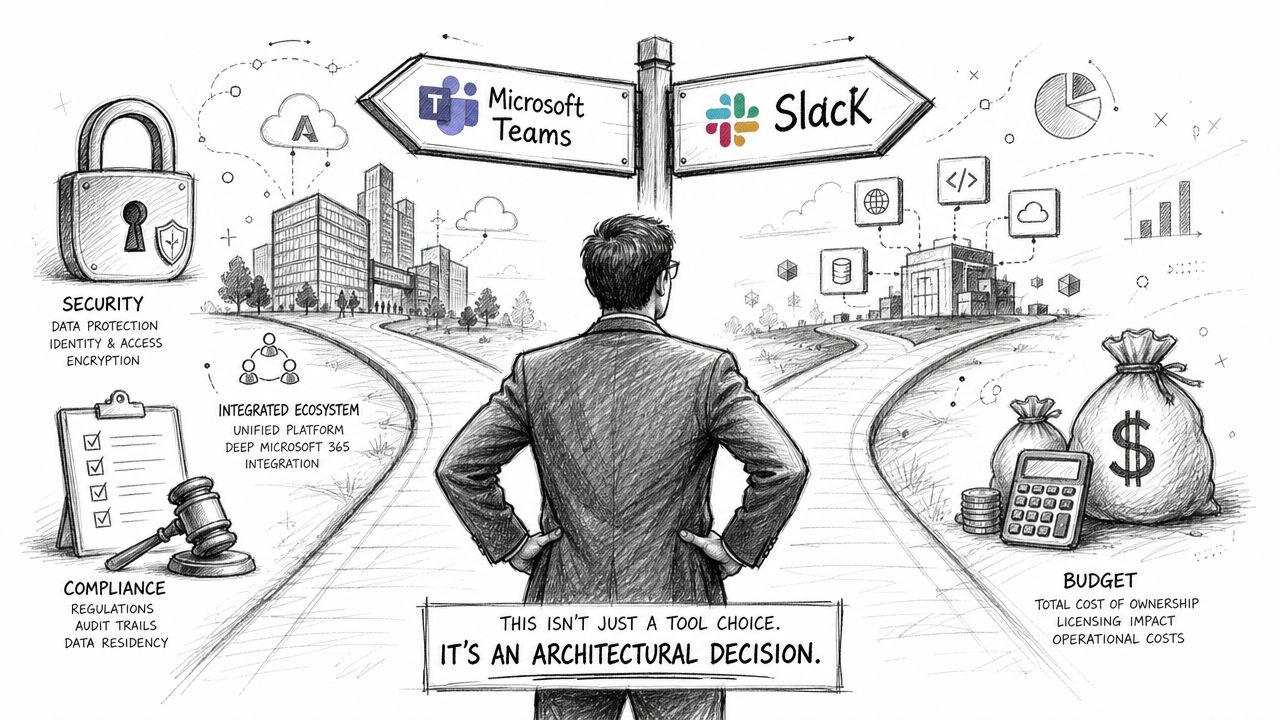
Here's the blunt answer. For most regulated organisations, Microsoft Teams vs Slack is not a lifestyle choice for end users. It's an architectural decision with consequences for identity, governance, discovery, and operational control.
Microsoft Teams has become the dominant collaboration platform in the Microsoft 365 ecosystem, with over 320 million monthly active users as of 2024 compared to Slack's estimated 65 million, according to this usage comparison on Teams and Slack adoption. That scale brings its own risk. More Teams usage means more sprawl, more orphaned channels, more guest access drift, and more governance complexity if your tenant grows without control.
My recommendation, without fluff
If you're a small team with light governance needs and a mixed-tool culture, Slack is perfectly defensible.
If you run energy, finance, healthcare, or any environment where records, identity, and auditability matter, standardise on Teams. Don't do it because Microsoft says so. Do it because one control plane beats two, one identity fabric beats stitched connectors, and one compliance boundary beats fragmented evidence stores.
What your team should do next
Don't start with migration tooling. Start with the estate.
Your first decisions should cover:
- Content architecture: Which Teams map to which business functions, records classes, and SharePoint structures.
- Identity design: How Entra ID, guest access, conditional access, and admin boundaries will behave.
- Governance rules: Naming, lifecycle, retention, ownership, and decommissioning.
- Migration exceptions: Which Slack data should move, which should archive, and which should never be recreated one-for-one in Teams.
The worst possible move is buying a migration tool before your organisation knows what the target state should look like.
Final call
If your internal team has already been burned by a failed project, trust that instinct. The danger isn't just technical. It's political, legal, and operational. Once users lose trust in the platform, every later phase gets harder.
My view is simple. Standardise on Teams if you're already committed to Microsoft 365. Treat Slack as an edge-case platform, not the strategic core. And if the migration touches regulated data, multiple tenants, or a messy SharePoint history, don't run it as a DIY programme.
If your organisation needs a sober assessment before committing to a Slack-to-Teams move, talk to Ollo. We work on Microsoft 365 migrations, tenant-to-tenant consolidations, Entra ID redesigns, and rescue scenarios where governance failure would cost more than doing the job properly the first time.

















