



The migration script finished over the weekend. On Monday morning, your team discovers that thousands of files failed without a useful alert, permissions no longer match the source, and the CEO's shared mailbox has lost years of delegation rules. Search returns inconsistent results, workflows point at old locations, and nobody can explain which exclusions were deliberate.
That isn't a tool failure. It's a governance failure. A Microsoft 365 migration succeeds only when your team defines what may move, who may access it, how the destination will enforce policy, and what happens when the platform rejects part of the workload. The same principle appears in Ireland's migration governance model, where legal permissions, administrative ownership, reporting obligations, and operational capacity must exist before movement takes place. Your tenant needs the same discipline.
Why Most Microsoft 365 Migrations Fail Before They Start
Most failed projects begin with a deceptively simple instruction: copy everything from the old environment into the new one. That approach ignores the structure your destination tenant needs to remain usable. It also turns every inherited permission, stale folder, unsupported workflow, and undocumented exception into a migration decision made by a script.
We often see clients fail when they treat discovery as an inventory exercise rather than a control point. A file count tells you almost nothing about ownership, sensitivity, retention, broken inheritance, external sharing, or the business process attached to a document library. When your team skips those decisions, the migration engine has no safe basis for deciding what to preserve and what to reject.
The technical debt appears later:
- Permission drift: Users receive broader access than they held in the source, or lose access to operational content.
- GUID conflicts: SharePoint lookups, embedded references, and workflow connections can point to the wrong object after tenant consolidation.
- Orphaned site collections: Nobody owns the migrated site, so nobody maintains its access reviews, retention settings, or lifecycle decisions.
- Silent exclusions: The target looks populated until a legal request, audit, or operational incident exposes missing content.
Microsoft's own SharePoint migration best-practice guidance provides useful planning context, but enterprise programmes need more than a checklist. Your team needs enforceable gates, exception ownership, reconciliation reports, and a rollback decision that someone can trigger without debating the evidence during a crisis. Our experience aligns with the failure patterns described in why enterprise Microsoft 365 projects fail: the technology usually exposes a decision that the programme never made.
Practical rule: Don't move the first byte until you can explain the destination permission model, data boundary, failure alerting, and rollback condition.
Ireland's national model shows why this matters. The Irish government says it processed 270,000 applications for entry or immigration services in 2023, including 167,000 visa applications, 33,000 temporary protection applications, 23,000 citizenship applications, and 13,000 international protection applications. Those volumes sit behind a defined administrative structure, not an improvised process. The Irish government's migration facts illustrate the central lesson for your migration programme: governance must precede movement.
What a Migration Governance Framework Actually Covers
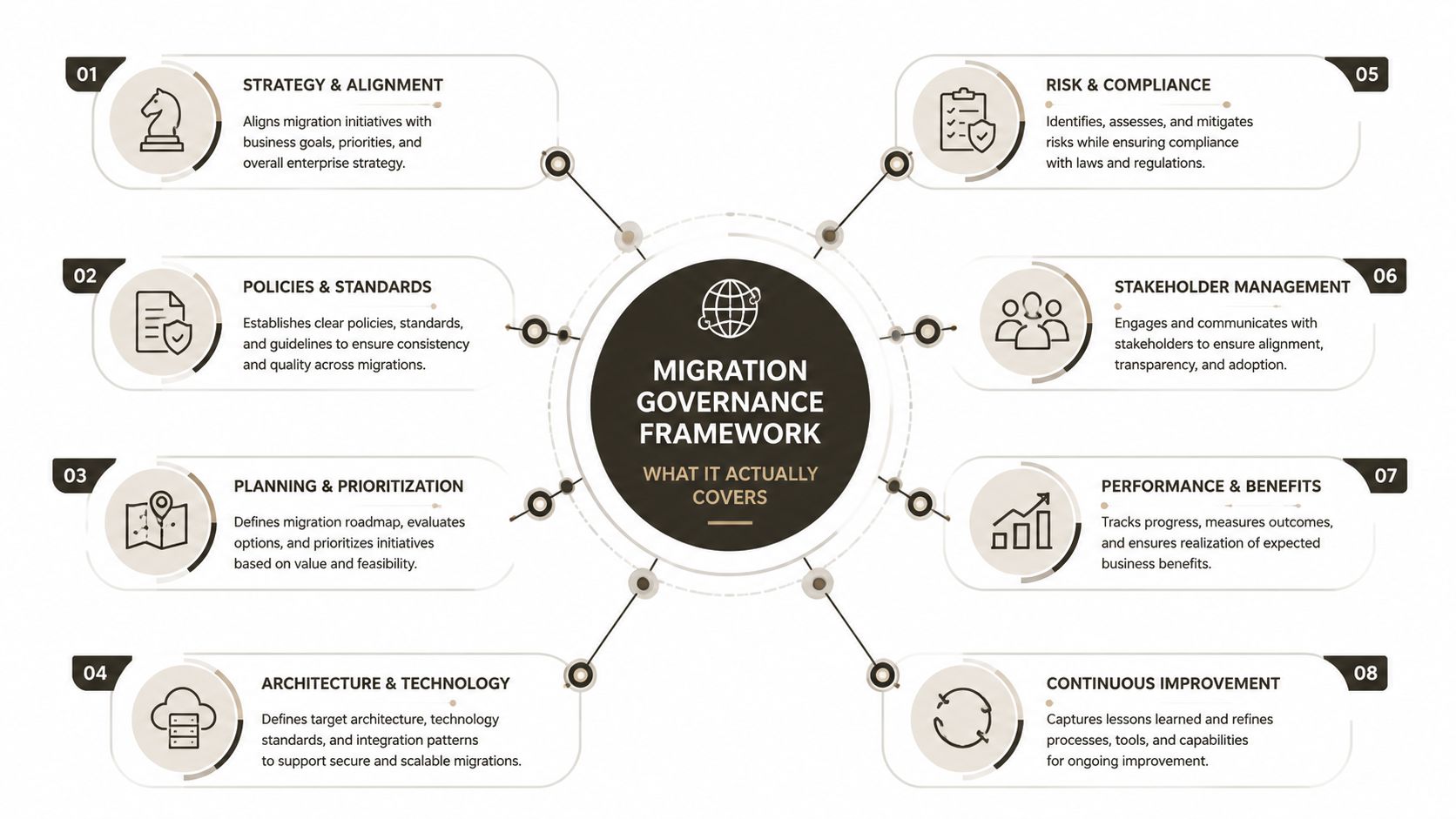
A migration governance framework is an operating system for decisions. It shouldn't sit in a project folder as a policy document that nobody consults after the first migration wave. It must control discovery, transformation, transfer, validation, exception handling, and retirement.
Ireland offers a useful structural analogy. Its migration governance framework places core administrative responsibility with the Department of Justice, Home Affairs and Migration and its Immigration Service Delivery unit, while the wider system connects to EU reporting channels through Eurostat and the EU Open Data Portal. The European Commission's Ireland migrant integration profile also describes changes in institutional responsibility over time. Distributed ownership creates risk unless each hand-off has a defined control.
Map that logic to Microsoft 365:
- Scope boundaries define the source systems, sites, mailboxes, identities, workloads, exclusions, and business owners. Your discovery output should identify what enters the migration factory and what stays outside it.
- Classification rules separate active, redundant, sensitive, regulated, temporary, and unowned content. A classification decision must produce an action, such as migrate, archive, retain in place, or delete after approval.
- Permission translation logic maps source groups, users, SharePoint groups, and item-level access to target identities. A written intention isn't enough. The process needs a machine-readable mapping table and an exception queue.
- API budget management controls batch size, concurrency, retry behaviour, and maintenance windows. Microsoft 365 can throttle aggressive workloads, so your runbook must treat API responses as operational signals rather than unexpected tool errors.
- Audit chain requirements record who approved the scope, what the migration moved, which objects failed, which exceptions received approval, and when validation completed.
- Rollback triggers define the conditions that stop a wave or reverse cutover. Examples include unacceptable permission variance, missing legal content, failed identity checks, or broken business-critical workflows.
The framework also needs improvement loops. Irish governance reporting shows why a system must handle scale and changing responsibilities. It can't depend on one administrator remembering every exception across every wave.
Your outputs should remain executable:
- A scope register drives migration batches.
- A classification register drives transformation and retention actions.
- An identity map drives permission translation.
- A throttling policy drives scheduling and retry logic.
- A validation pack drives go or no-go decisions.
- An exception log preserves accountability.
For broader planning context, the AI modernisation migration playbook for ecommerce CX is useful because it treats migration as a business and operating-model decision, not merely a transfer task. For regulated organisations, the same principle appears in Ollo's governance structure guidance, where ownership, guardrails, override logging, and cross-functional decisions matter as much as the migration tooling.
Scope Definition and Data Classification That Prevents Throttling
Your first control should be scope. Your second should be classification. Teams often reverse that order, starting with a migration tool before they know whether the source contains duplicated libraries, abandoned sites, unsupported paths, or content nobody can legally move.
SharePoint Online enforces a 5,000-item List View Threshold, and Microsoft warns that large lists may trigger a warning once they exceed 3,000 items. Microsoft confirms those limits in its official List View Threshold documentation. If your team dumps a legacy library into a poorly indexed target structure, views, searches, workflows, and migration operations can fail or become unreliable.
Scope definition should answer practical questions:
- Which sites still support a live business process?
- Which libraries contain regulated or legally significant records?
- Which owners have approved the move?
- Which content has no recent business use?
- Which workflows, Power Apps, Power Automate flows, and integrations depend on source locations?
- Which data belongs in a different retention or access model?
Path length creates another hard boundary. Microsoft documents a 400-character maximum for the entire decoded file path, including the filename, in OneDrive for work or school and SharePoint in Microsoft 365. The Microsoft 365 service limits documentation confirms the restriction. Deep file-server trees can therefore produce failed transfers, truncated paths, broken links, and document references that no migration report can repair automatically.
Classify each object against sensitivity level, retention requirement, active usage, and owner validation status. Don't let “unknown” become an invisible fifth category. Treat it as an exception requiring a named decision.
| Classification Dimension | Migration Impact When Skipped | Microsoft 365 Limit at Risk |
|---|---|---|
| Sensitivity level | Sensitive content may inherit broad access in the target tenant | Access controls and auditability |
| Retention requirement | Records may move into a location with the wrong lifecycle policy | Retention and deletion controls |
| Active usage | Stale or redundant content increases transfer volume and review effort | List View Threshold and API capacity |
| Owner validation status | Nobody can approve exclusions, permissions, or post-migration defects | Accountability and rollback decisions |
Proper classification reduces unnecessary API calls because your team excludes stale, duplicate, and unowned content before transfer. It also prevents the migration factory from spending scarce capacity on data that should have entered an archive or disposal process instead. Ollo's data classification guidance provides a practical reference for turning classification into a migration control rather than a labelling exercise.
Where Migration Tools Break in Enterprise Environments
SPMT, ShareGate, and Quest each have legitimate uses. None of them creates governance automatically, and none removes the need to understand Microsoft 365's technical limits.
The SharePoint Migration Tool can support controlled workloads, but enterprise teams shouldn't assume it will preserve every permission relationship or application dependency. ShareGate provides strong operational visibility for many migration patterns, yet incremental synchronisation still needs validation around large libraries, unique permissions, metadata, and throttling. Quest can help with complex identity and content scenarios, but overlapping identifiers and target object structures still require deliberate reconciliation.
The documentation says the platform enforces limits. Reality is harsher when your runbook treats those limits as warnings instead of stop conditions. Microsoft documents API throttling behaviour and the use of HTTP 429 responses in its official throttling guidance. If a tool retries too aggressively, fails to apply exponential backoff, or hides rejected operations inside a summary report, one throttled batch can cascade into incomplete incremental synchronisation.
Typical enterprise defects include:
- Version history stripped: The file arrives, but the evidence needed to understand earlier changes doesn't.
- Choice metadata altered: Columns lose valid values, so views and downstream automation no longer behave as designed.
- Workflow associations broken: A flow or process still references a source URL, list, library, or identifier.
- Unique permissions flattened: The target looks tidy, but sensitive content now follows a broader parent permission.
- GUID conflicts: References resolve to the wrong site, list, or document location after consolidation.
- Long paths rejected: Nested folders fail against Microsoft's documented path limit, as covered earlier.
| Tool | Failure Mode | Impact | Governance Gap |
|---|---|---|---|
| SPMT | Complex permissions and application dependencies require separate control | Users lose access or business processes fail | No complete entitlement and dependency model |
| ShareGate | Incremental operations encounter large-list and throttling conditions | A wave completes with missing or delayed objects | Weak exception ownership without external controls |
| Quest | Overlapping tenant identifiers create reconciliation work | References and target mappings require correction | No automatic decision on conflicting identities |
| Any migration tool | Poor retry handling around 429 responses | API throttling produces incomplete workloads | Scheduling and API budget remain undefined |
A demo environment rarely contains the permission density, legacy metadata, path depth, and integration dependencies of your production tenant. Your team needs a migration factory around the tool, including pre-flight tests, controlled batches, error classification, reconciliation, and business validation. Ollo's SharePoint Migration Tool guidance is relevant here because tool selection only solves part of the engineering problem.
Ollo verdict: Use SPMT for tightly bounded, low-complexity workloads. For enterprise tenant consolidation, choose the tool only after discovery, then add custom PowerShell, PnP validation, identity reconciliation, and specialist governance. The tool can copy content. It cannot own your risk.
Entitlement Mapping and Cutover Validation Under Zero Trust
Entitlement mapping causes the most damaging DIY failures because source permissions rarely form a clean hierarchy. Active Directory group nesting, SharePoint group membership, direct user grants, sharing links, and item-level permissions interact across the same content estate. Manual spreadsheets cannot reliably resolve that combinatorial problem.
Your target tenant needs an explicit identity decision for every source principal. That means mapping users, groups, service accounts, service principals, and privileged administrators before the migration wave begins. Where no valid target identity exists, your framework must route the object to an exception queue instead of broadening access without scrutiny.
The regulatory consequence matters. In March 2024, the European Data Protection Supervisor found that the European Commission's use of Microsoft 365 violated several provisions of EU data protection law and ordered suspension of certain data flows to Microsoft and related parties outside the EU/EEA unless compliance could be demonstrated by 9 December 2024. The EDPS Microsoft 365 ruling analysis shows why a permission defect isn't merely an inconvenience. A migration that exposes sensitive data to unauthorised users can become a data protection problem.
Validate before users discover the defect
Zero Trust cutover validation should compare source and target states before you redirect users to the new environment. Your scripts should verify:
- Conditional Access: Policies apply to the intended users, applications, locations, and risk conditions.
- MFA enrolment: Users and administrators meet the target authentication requirements.
- Service principals: Each workload retains only the permissions it needs.
- Privileged roles: Administrative access follows the approved target model.
- SharePoint access: Site, library, folder, and item-level permissions match the approved translation.
- External sharing: Guests and sharing links receive deliberate treatment.
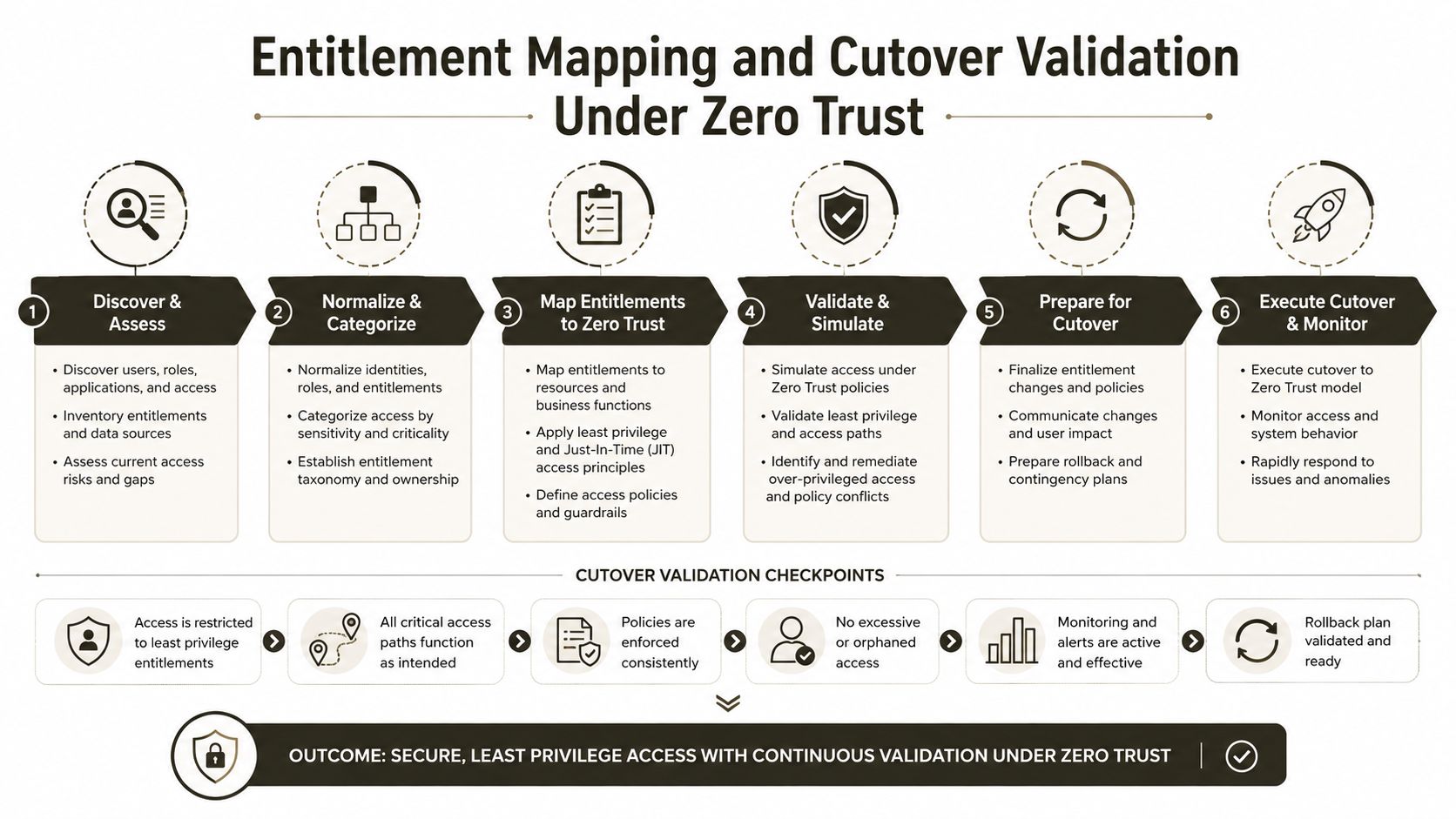
Run the comparison as a release gate. If the source and target permission matrices differ beyond an approved exception, stop the wave. Don't wait for users to report that they can't open a project site, or worse, that they can open one they shouldn't.
The following video provides a visual introduction to the control sequence, but your programme still needs tenant-specific scripts and evidence:
Post-migration access reviews often take far longer than pre-cutover reconciliation because the evidence becomes fragmented across support tickets, administrator changes, and emergency fixes. A specialist team can automate the comparison while your internal owners make the decisions.
Audit Trails and Rollback Plans That Satisfy Regulators
A migration audit trail and rollback plan should work as one safety system. Logs prove what happened. Validation proves whether the result meets the acceptance criteria. Rollback gives your organisation a controlled response when the result fails.
Your logs should capture the source object, target object, migration time, operator or process identity, outcome, retry history, exclusion reason, and validation status. For regulated data, preserve evidence that the transfer didn't alter content unexpectedly and that deleted or excluded items received an intentional decision. A green dashboard without object-level evidence won't help during an audit.
Build rollback around an actual failure
A useful rollback plan identifies the actions and dependencies that restore service. It should include:
- Point-in-time recovery evidence: Maintain the snapshots or source copies required to restore content and configuration.
- Parallel validation: Keep the source and target environments available during the agreed validation period, rather than dismantling the source immediately.
- Identity recovery: Document how your team restores the approved identity and access state if the target fails validation.
- Business sign-off: Name the people who can declare the cutover unacceptable and trigger reversal.
- Evidence retention: Store migration reports, approvals, exceptions, and test results where administrators can't rewrite them after the event.
The rollback procedure in Ollo's SharePoint migration rollback guidance should sit beside your cutover runbook, not in a separate project archive. Your team must rehearse the decision path, because a rollback that exists only on paper won't protect users during a failed release.
Measure the controls, not just the transfer
Useful KPIs connect technical activity to operational safety:
- Migration velocity: Measure GB per hour after throttling and retry effects, not the optimistic rate from a test run.
- Permission accuracy: Track the percentage of items whose approved access control lists match the target state.
- User impact: Track support tickets per 1,000 migrated users, with the denominator and ticket definition agreed before cutover.
- Exception ageing: Measure how long unresolved objects remain outside the approved migration boundary.
- Validation completion: Track business owner sign-off by workload, not only by overall programme status.
Retention decisions need equal precision. A practical GDPR retention schedule guide can help your compliance team connect retention periods to actual handling rules. The governance framework then turns those rules into migration actions, labels, holds, exclusions, and audit evidence.
DIY Migration Versus Hiring a Specialist Consultancy
DIY works when the environment is simple, the permission model is flat, the data boundary is clear, and your team can absorb the operational work without neglecting business operations. A small tenant-to-tenant move under 500 users may fit that profile when the programme doesn't involve hybrid identities, multi-geo deployment, or regulated data.
Enterprise migrations rarely stay inside those conditions. Your internal team must learn the platform's throttling behaviour, reconcile identity conflicts, validate permissions, test workflows, review exclusions, and remediate defects after cutover. Those hours come from business-as-usual work, and the hidden cost appears when orphaned sites, broken inheritance, or audit gaps surface weeks later.
| Factor | DIY Migration | Specialist Consultancy (Ollo) |
|---|---|---|
| Discovery | Internal staff build inventories alongside normal duties | A dedicated team establishes scope, dependencies, and ownership |
| Permissions | Manual mapping often misses nested and item-level access | Automated comparison supports controlled entitlement translation |
| Throttling | Your team learns retry and scheduling behaviour during delivery | The migration factory plans API budgets and exception handling |
| Data quality | Exclusions and path remediation happen reactively | Classification and normalisation occur before transfer |
| Cutover | Administrators respond to user-reported defects | Validation gates compare technical and business acceptance criteria |
| Compliance | Evidence can remain scattered across tools and email | Audit records, approvals, and exceptions form a controlled chain |
| Recovery | Rollback depends on improvised administrator actions | The runbook defines recovery ownership, evidence, and triggers |
We often see rescue engagements begin with orphaned site collections, broken permission inheritance, missing metadata, and compliance findings that nobody recorded during the original migration. Hiring Ollo means front-loading governance design, using ShareGate with custom PowerShell and PnP scripts where appropriate, adding automated validation gates, and transferring operational knowledge to your internal team. It doesn't remove difficult decisions. It makes those decisions visible before they become incidents.
Ollo verdict: DIY suits a bounded, low-complexity move with flat permissions. Specialist support becomes risk insurance when your migration touches more than three of the seven governance domains covered here, especially hybrid identities, multi-geo services, complex permissions, regulated data, legacy integrations, high-volume content, or business-critical cutover.
Ollo can assess your source estate, design the migration governance framework, map entitlements, control throttling, and validate the target before users depend on it. Visit Ollo to discuss a high-stakes Microsoft 365 migration before your team turns a recoverable planning problem into a compliance and service incident.

















